rea
Reverse engineer anything with agents, from app behavior down to native binaries.
- 476k
- TypeScript
- MIT
- 10 min ago
Agent skills for Codex and Claude Code that preserve project context, decisions and next steps across AI sessions in plain Markdown.
Repo jaredchu/context-docs, read from GitHub 9 h ago. jaredchu has not joined Take My Repo.
jaredchu/context-docs is a public repo on GitHub by jaredchu. Agent skills for Codex and Claude Code that preserve project context, decisions and next steps across AI sessions in plain Markdown. It declares the MIT license on GitHub. It is written mainly in Python, has 168 stars and last changed on 2026-11-22. Nobody has reviewed it on Take My Repo yet, which says nothing about its quality. Read from GitHub on 2026-11-23.
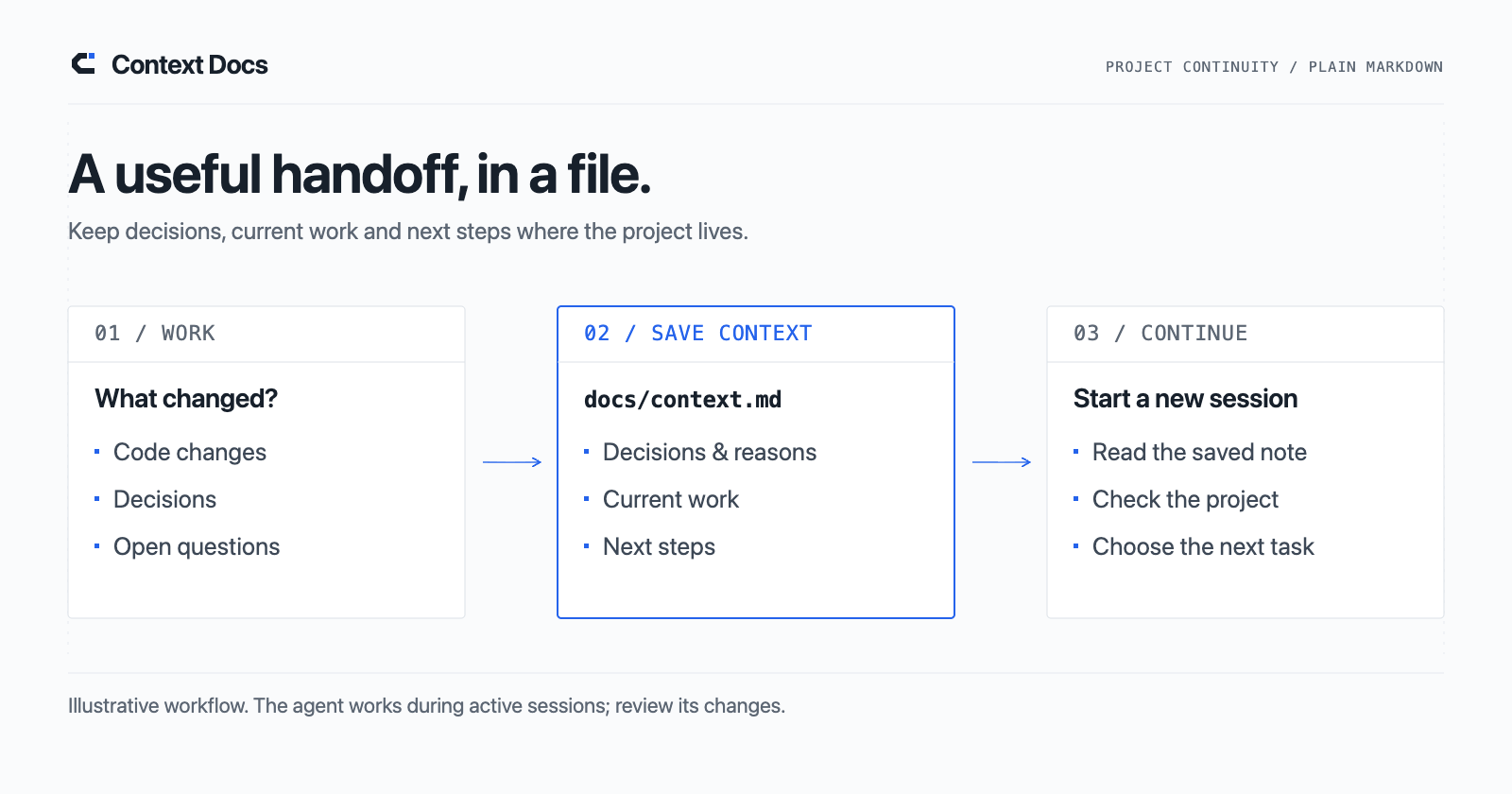
Keep decisions, current work and next steps across AI sessions.
Context Docs provides reusable agent skills for context management in Codex and Claude Code, with experimental Cursor and Antigravity support, validated through their CLIs. The Cursor editor and Antigravity App and IDE were not separately tested. Preserve project knowledge in readable Markdown so a new AI session can pick up where you left off: what was decided and why, what is done or blocked, and what to do next.
Designed for people without an established context-management workflow, it uses your project's existing documents with as little setup and manual organization as possible.
Vibe coding with AI prompts? Start with one useful note or keep your existing PRD, design and task files. Review the context updates as you build, then ask your next session to read them.
Website · Get started · See an example · User guide · Evidence · Contribute
Status: experimental, core skill v0.2.8 and adoption skill v0.1.16. The v0.2.8 experimental prerelease covers shared writer handoff and private journal input. Everyday installation selects this bundle. The v0.2.7 release notes cover a narrow instruction simplification and qualified checks. The Codex candidate report's automatic-loading confirmation remains unverified; Claude instruction events support loading in its checked sessions only. The v0.2.6 release notes cover metadata filtering, portable references and qualified synthetic checks. The earlier candidate’s unlinked-note coverage gap remains; the separate installed check names the note explicitly. See results and qualifications. Publication and installation are separate actions. See release history for earlier versions, feature boundaries and retained evidence. For Codex and Claude Code · Experimental Cursor support · Experimental Antigravity support · Plain Markdown · MIT licensed
You should not have to invent a documentation system before you can preserve your work. Context Docs gives your agent instructions to:
For example, after working on an export feature, your project context might contain:
## Current work
CSV export is implemented; empty-input behavior still needs testing.

## Decision (maintainer-approved)
Keep the existing export API to preserve compatibility.

## Next step
Test empty input before calling the feature complete.
Illustrative content, not a required template. The agent should derive entries from your actual work and evidence. You review the changes; the next session reads the saved context. See a fuller before-and-after example.
Explore the worked examples: the Reading Queue walkthrough teaches the full workflow; separate Codex → Claude Code and Claude Code → Codex cases show how to hand off the same project through saved Markdown.
Install both skills, then adopt them in the project you want to maintain. Already installed? Skip to Use it. The instructions below select published bundle v0.2.8: core 0.2.8 and adoption 0.1.16. See the guide for development-source installations.
Ask Codex:
Use $skill-installer to install both skills from jaredchu/context-docs
at the published tag v0.2.8:
- skills/context-docs
- skills/adopt-context-docs
Install them together in ~/.agents/skills/.
Preserve existing installations and local customizations; report version
mismatches before upgrading. Report the installed VERSION values:
context-docs 0.2.8 and adopt-context-docs 0.1.16.
Manual installation and project-only setup →
For a first installation, run these commands in a terminal:
git clone --branch v0.2.8 https://github.com/jaredchu/context-docs.git
cd context-docs
mkdir -p ~/.claude/skills
cp -r skills/context-docs skills/adopt-context-docs ~/.claude/skills/
cat ~/.claude/skills/context-docs/VERSION ~/.claude/skills/adopt-context-docs/VERSION
If either skill is already installed, review the upgrade guidance
before copying files. Project-only setup and instruction loading →
The version output should be 0.2.8 followed by 0.1.16.
Experimental Cursor support, validated through the CLI; editor not separately tested.
One bounded Cursor CLI trial used the unchanged
v0.2.7 skills from an existing ~/.claude/skills installation, in print mode on
Free. Interactive sessions, the desktop editor and fresh installation are untested.
If you already installed both skills for Claude Code or Codex, Cursor
documents reading those directories;
reuse them instead of copying another set. Otherwise, for a first installation
in Cursor's own user directory (fresh placement not tested):
(
  git clone --branch v0.2.8 https://github.com/jaredchu/context-docs.git &&
  cd context-docs &&
  mkdir -p ~/.cursor/skills &&
  test ! -e ~/.cursor/skills/context-docs &&
  test ! -e ~/.cursor/skills/adopt-context-docs &&
  cp -r skills/context-docs skills/adopt-context-docs ~/.cursor/skills/ &&
  cat ~/.cursor/skills/context-docs/VERSION ~/.cursor/skills/adopt-context-docs/VERSION
)
The sequence stops at the first failure: a failed clone copies nothing, and the
guard copies nothing if either folder already exists. Expect 0.2.8 then
0.1.16; no version output means installation did not complete. Cursor setup, evidence and limits →
Experimental Antigravity support, validated through CLI; App and IDE not separately tested.
Bounded CLI results retain completion, loading and final-answer limitations.
The unchanged v0.2.7 bundle was checked
in project .agents/skills/. A denied-shell control and a later scoped attempt
completed adoption. The longer-timeout follow-up
retains task and loading limits alongside the earlier scoped outcomes
and preserved original trial.
From the root of your target project, for a first installation:
(
  test ! -e .agents/skills/context-docs &&
  test ! -L .agents/skills/context-docs &&
  test ! -e .agents/skills/adopt-context-docs &&
  test ! -L .agents/skills/adopt-context-docs &&
  git clone --branch v0.2.8 https://github.com/jaredchu/context-docs.git context-docs-skills &&
  mkdir -p .agents/skills &&
  cp -r context-docs-skills/skills/context-docs context-docs-skills/skills/adopt-context-docs .agents/skills/ &&
  cat .agents/skills/context-docs/VERSION .agents/skills/adopt-context-docs/VERSION
)
The guards preserve existing folders and symlinks; a failed clone copies nothing.
The source checkout is context-docs-skills/ in your project. Expect 0.2.8 then
0.1.16. Reuse existing project copies; review the upgrade guidance before
replacing them. Antigravity setup, evidence and limits →
Open your project in your coding agent and invoke:
| Codex | Claude Code | Cursor (experimental) | Antigravity (experimental) |
|---|---|---|---|
$adopt-context-docs |
/adopt-context-docs |
/adopt-context-docs |
/adopt-context-docs |
The adoption skill applies the context workflow and adds or reuses a maintenance rule in the project instructions your agent loads. It preserves equivalent existing rules and the project’s documentation layout, and reports when it cannot confirm instruction loading.
Adoption directs the agent to start a simple inline progress path by default when the documented goal and work support one, including during explicit re-adoption. The guidance reuses existing views and keeps them current during everyday context updates, without a second task list or repeated requests. Installation and upgrade alone do not rewrite existing project setups.
If setup or saved context seems wrong, use the read-only troubleshooting prompt.
Once adopted, the project's loaded maintenance rule guides the agent to update context after meaningful changes during normal work. You do not need to name Context Docs in every prompt. Check that the rule is loaded and review the updates. If an update is missed, or you want one explicitly, ask:
Update this project's context from the work we just completed.
Preserve decisions and their reasons, current work, blockers and next steps.
Review the resulting diff. You do not need to keep a session diary or log every interaction. For shared Git context, include relevant context changes alongside code in your already-authorized commit/transfer workflow, and confirm the other checkout has those files before resuming. For ignored local-only context, use your existing private transfer/backup procedure; it does not travel with a clone.
If work accumulated outside the current session, use the same skill to refresh context against current evidence:
Use context-docs to refresh this project's context against current project evidence.
This uses existing maintenance guidance; no new skill or re-adoption is needed. See the refresh guidance and focused check. To inspect documentation without changing it, ask:
Use context-docs to audit this project's context documents without editing files.
Start a new session with:
Read this project's context entry point and its relevant linked documents.
Use the recorded decisions, current work and next steps to continue with the next task.
Find the entry point in your README, documentation index, or the adoption marker’s
Entry point: field. Explicitly
ask the agent to read it: a saved file alone does not ensure that a new session
loads it. To check what a new session takes from the saved note, use the optional
read-only verification prompt
jaredchu/context-docs is a public repo on GitHub by jaredchu. Agent skills for Codex and Claude Code that preserve project context, decisions and next steps across AI sessions in plain Markdown.
It declares the MIT license on GitHub.
Its maker has not tagged a system, so it is unknown here. Its README says what it needs.
Open "Take it" on its page: Take My Repo writes an install plan for your machine and hands it to your AI agent (Claude Code, Codex or Cursor), which asks you before each step. Take My Repo has not tested it on any machine.
Persistent Context Across Sessions for Every Agent – Captures everything your agent does during sessions, compresses it with AI, and injects relevant context back into future sessions. Works with Claude Code, OpenClaw, Codex, Gemini, Hermes, Copilot, OpenCode + More
The agent harness performance optimization system. Skills, instincts, memory, security, and research-first development for Claude Code, Codex, Opencode, Cursor and beyond.
3,000+ reusable AI agent skills for Claude Code, Codex, Cursor and Gemini CLI. AAS Core adds local catalog discovery, agent-owned selection and plan preview. CLI, MCP and plugins.
Its last change on GitHub was on 2026-11-22. GitHub counts 0 open issues and pull requests. Take My Repo does not judge from that whether it is maintained.
Nobody has reviewed it on Take My Repo yet, which says nothing about its quality.
Take My Repo cannot say: it does not audit code and has not run context-docs. What is known comes from GitHub. It declares the MIT license on GitHub. Its last change was on 2026-11-22. It has 168 stars, which measure popularity, not safety. Nobody has reviewed it on Take My Repo yet, which says nothing about its quality. Read the source before you run it. With "Take it", your AI agent shows each step and asks you before running it; README text is treated as data, not as instructions.