

AutoGPT
AutoGPT is the vision of accessible AI for everyone, to use and to build on. Our mission is to provide the tools, so that you can focus on what matters.
- 188k
- Python
- 1 h ago
The most advanced, fully offline client-side AI suite on Android today.
Repo jegly/Box, read from GitHub 2 h ago. jegly has not joined Take My Repo.
jegly/Box is a public repo on GitHub by jegly. The most advanced, fully offline client-side AI suite on Android today. It declares no license on GitHub. Public does not mean open source: without a license, nobody is granted the right to reuse it. It is written mainly in Kotlin, has 1,039 stars and last changed on 2026-11-24. Nobody has reviewed it on Take My Repo yet, which says nothing about its quality. Read from GitHub on 2026-11-24.
AutoGPT is the vision of accessible AI for everyone, to use and to build on. Our mission is to provide the tools, so that you can focus on what matters.
⭐️ If this project helped you, please star it — it helps others find it.
We've hit 50K downloads!!! Thank you to everyone for supporting Box, i never would have thought Box would have so many users :) !! All releases are now PQC ML-DSA-87 signed.
Note: If you're using a custom ROM (LineageOS, GrapheneOS, CalyxOS), download the
custom-rom-supportAPK from the latest release instead.
https://github.com/jegly/BoxRecommended for most users: Main version
| Version | For |
|---|---|
| Main | Stock Android (Pixel, Samsung, etc.) |
| Custom ROM | GrapheneOS, LineageOS, CalyxOS — no Google services |
The in-app updater is also available in Settings
Maincustom-rom-supportNote: As of v2.0.0, the in-app App version matches the Box release version (2.0.0) — the earlier mismatch with the upstream Google AI Edge Gallery build number (which showed 1.0.15) is fixed (#67). Box releases are tracked via GitHub tags. Use Settings → Check for updates to see if a newer Box release is available.
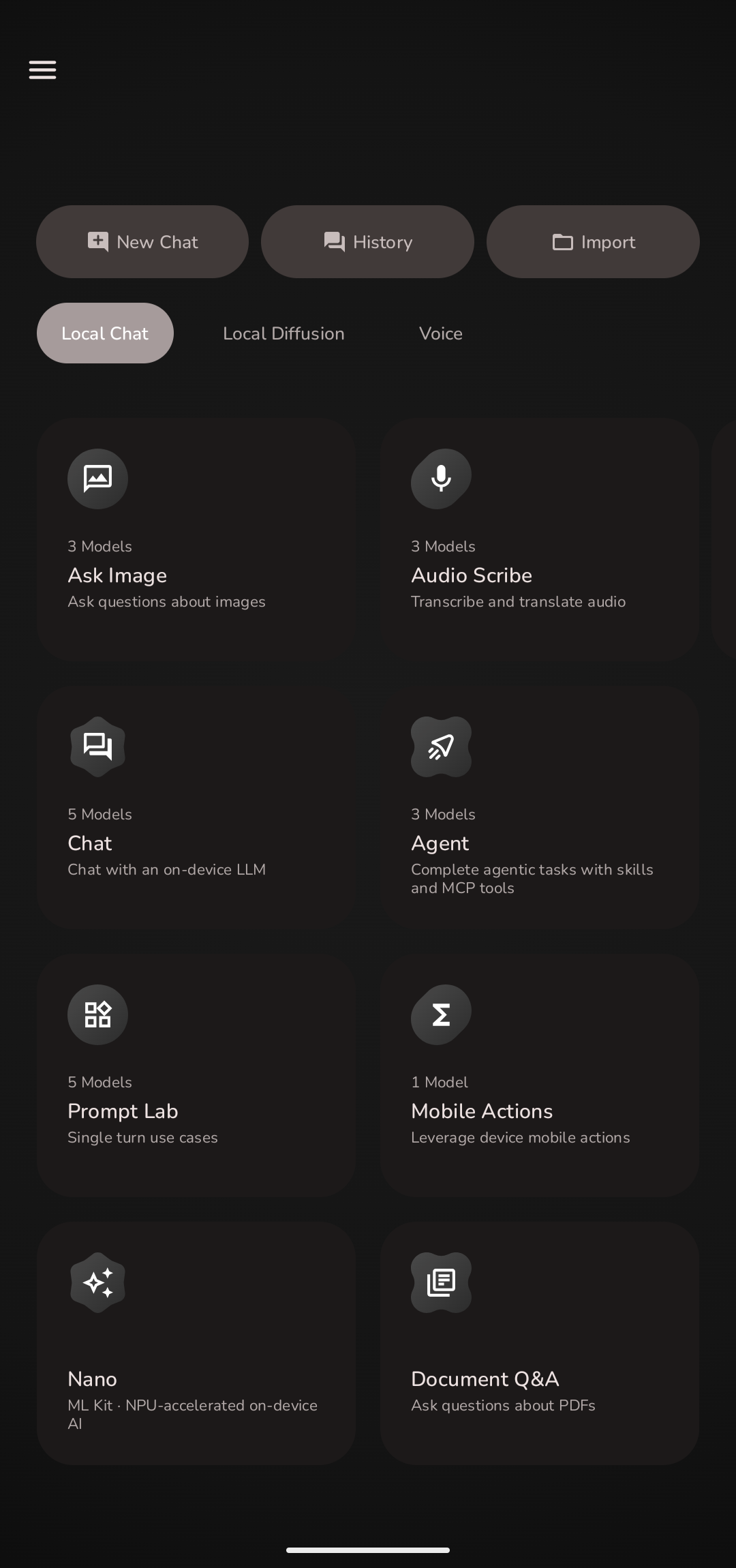
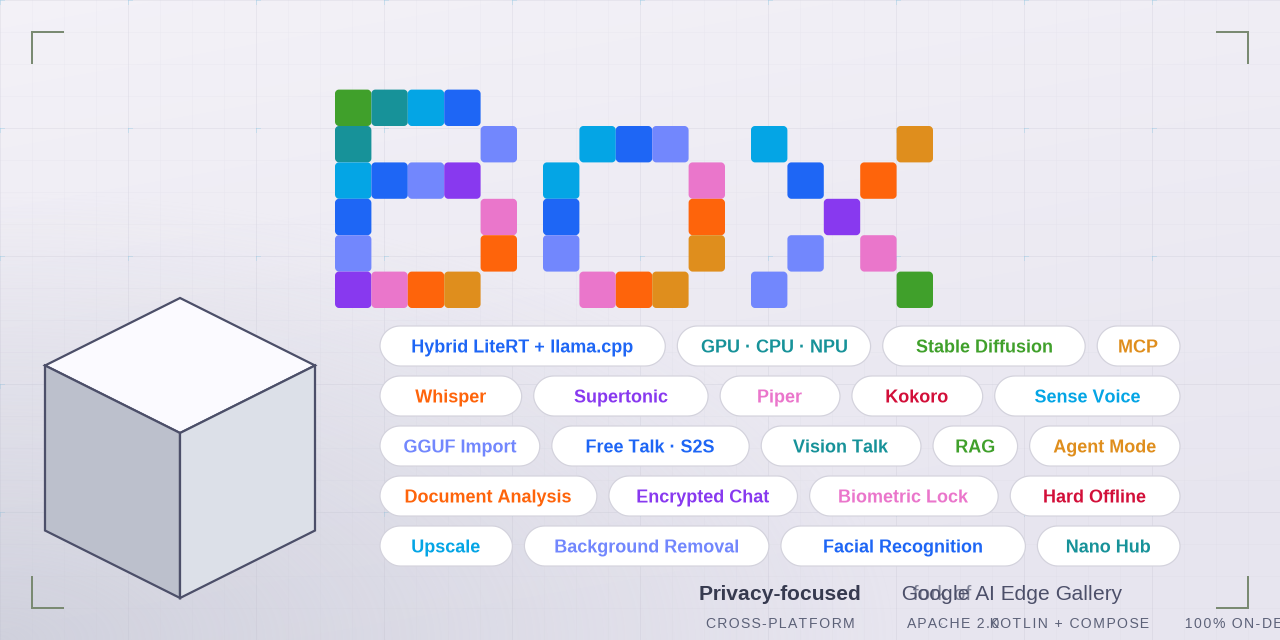
Box is a security-hardened, feature rich fork of Google AI Edge Gallery — with on-device image generation (Bonsai Image 4B, FLUX.2 klein, Z-Image Turbo & iris-3b Turbo diffusion), Box Assist (spoken camera assistance for blind and low-vision users), AI image upscaling, face recognition, photo erase/inpainting, music & sound generation, voice mode (speech-to-speech AI chat), voice input, multilingual text-to-speech, document analysis and Q&A, vision AI, full GPU and Snapdragon/Tensor/MediaTek NPU acceleration, a hardened security posture (biometric lock, encrypted chat history, tap-jacking protection), llama.cpp support, and GGUF model import — and more
[!IMPORTANT]
Disclaimer
Box began as a fork of Google AI Edge Gallery and is not affiliated with or endorsed by Google LLC. Google branding has been replaced throughout. Box has since diverged substantially from upstream — active merging with upstream stopped some time ago, and upstream has itself since adopted features that originated in Box. Box now carries roughly 50+ features not present in upstream Google AI Edge Gallery. Credit for the original underlying platform goes to Google and the original contributors.
| Version | Feature | Details |
|---|---|---|
| v3.5.7 | ✂️ Background Removal — built in, fully offline, no Google Play services (#153) | Background Removal used ML Kit's subject segmentation, where Google Play services downloads and runs the model — so it could never work on GrapheneOS and other de-Googled ROMs, and leaving the screen there showed a "requires Google Play services" message. It now runs U²-Net, an open-source (Apache-2.0) cut-out model built into the app, on the phone's GPU via LiteRT: no download, no internet, no Google Play services, on both Main and custom-rom-support. Edges are softer than before, so hair and fine outlines keep their shape. Cut-outs are saved at up to 2048 px on the longest side. Bundling the model makes the app about 88 MB larger. |
| v3.5.7 | 🌍 New model: Hy-MT2-1.8B — translation | Tencent's 1.8B translation model, for translating text between 33 languages. It's a translation model, not a chat model: start your message with an instruction such as "Translate the following text into French. Note that you should only output the translated result without any additional explanation:" and then your text. Works best with one translation per chat. Runs on the processor by default; needs 8 GB of RAM or more. 1.8 GB download, Apache-2.0. |
| v3.5.7 | Image generator layout fix (#203) | On the Stable Diffusion image screen, the Generate button could sit underneath the navigation bar on phones and tablets using three-button navigation. It now sits above it. The keyboard also covered the prompt fields — longer prompts couldn't be scrolled into view and the negative prompt was hidden while typing. The screen now shrinks above the keyboard so both stay visible. |
| v3.5.7 | Under the hood | AGP 9.5.1, Gradle 9.9.0, Material 3 1.5.0-rc01 and other library updates. Removed one unused library and the ML Kit subject segmentation library. LiteRT and LiteRT-LM are deliberately held at their current versions. Release builds remain R8-obfuscated and PQC ML-DSA-87 signed. |
| v3.5.6 | 🎨 iris-3b Turbo — 768×768 image generation | A fourth on-device image generator and the highest-resolution one in Box: Speridlabs' iris-3b Turbo makes 768×768 images in 4 steps, drawing pixels directly with no VAE. Every graph runs on the phone's GPU via LiteRT, nothing leaves the device. It is a big model — a 13.7 GB download, a few minutes per picture and around 5 GB of memory while it works — so it is meant for phones with 12 GB of RAM or more; close other apps first. If the phone runs low on memory mid-image, Box stops cleanly and tells you instead of crashing. |
| v3.5.6 | 📱 Android 13 support | Minimum Android version lowered from 14 to Android 13 — Box now installs on another generation of phones. One setting, Accessibility data sensitivity, needs Android 14 and shows as unavailable on 13. |
| v3.5.6 | System prompt fix | In the model settings, the System prompt tab's OK button could be pushed off the edge of the dialog — most noticeably in German — so a chosen prompt could never be applied, wasn't selected when you reopened the dialog, and the model ignored it. OK is now always visible. Also fixed: changing the system prompt together with another setting silently dropped the new prompt. |
| v3.5.6 | MediaTek NPU chat fix (#190) | On MediaTek NPU models (e.g. Dimensity 9300+), the second message in a chat came back empty. Box rebuilds the NPU conversation on every turn to work around a runtime issue, but the rebuild was failing every time because the old session was still open. It now closes the old session first. (MediaTek NPU only — Snapdragon, Tensor, GPU and CPU are unchanged.) |
| v3.5.6 | Licenses screen rebuilt, one Google library removed | Settings → View licenses now opens Box's own list of every library, engine and font it ships, with the full license text for each. It replaces Google's play-services-oss-licenses viewer, which pulled several Google Play services components into the app for that one screen — and the screen it opened was empty anyway. |
| v3.5.6 | Under the hood | AGP 9.5.0, Compose BOM 2026.09.00 and around 20 library updates. LiteRT and LiteRT-LM are deliberately held at their current versions. Release builds remain R8-obfuscated and PQC ML-DSA-87 signed. |
| v3.5.5-PQC | Post-quantum release signatures | Release APKs now carry post-quantum (PQC) signatures alongside the standard Android signature. |
| v3.5.5-PQC | Dependencies updated | Libraries bumped to current versions. Otherwise identical to v3.5.5. |
| v3.5.5 | Removed several crashing models | A batch of newer LiteRT models were failing to load or crashing outright, mostly reported on lower RAM devices like the Pixel 6a. They need a newer LiteRT runtime than Box currently ships. Removed: Granite-4.0-H-1B, InternVL3-2B, InternVL3_5-2B, Jan-nano, MiniCPM5-1B (int4), Nanbeige4.2-3B, OLMo-2-1B-Instruct, Phi-4-mini-instruct, Phi-4-mini-reasoning, SmolLM3-3B, SmolVLM2-2.2B, SmolVLM2-500M, and both Ministral-3-3B models. |
| v3.5.5 | Kokoro TTS download fixed | The Hugging Face repo Kokoro downloaded from was wiped upstream, so downloads landed on an error page instead of the model. Repointed to the model's new home; existing installs redownload cleanly. |
| v3.5.5 | Gemini Nano hub updated | The 256-token reply cap is lifted, up to 4096 tokens depending on device. Added Pixel 11 (Nano v4) support and a much longer list of supported phones. Updated the About text in the hub, which was out of date. |
| v3.4.5 | Google Firebase removed | Firebase Analytics and Firebase Cloud Messaging came in with the original Google AI Edge Gallery fork and were never used by Box. There was no configuration file for them, so they could not start up, collect anything or send anything — and analytics was switched off in the manifest on top of that. They are now gone from the app entirely rather than merely disabled, along with 20 dormant tracking calls and six Google entries in the app manifest. Nothing you can see or do in Box changes. |
| v3.4.5 | Google usage logging switched off | Removing Firebase surfaced a second piece of Google code: Clearcut, a usage-logging transport that arrives inside ML Kit (used for background removal, face detection and reading text from images), so it did not leave with Firebase. It sends over an ordinary HTTPS connection rather than through Google Play services — meaning a de-Googled phone does not stop it — and ML Kit provides no setting to turn it off. Box now disables it at the source: with nothing registered to receive them, events are discarded before they are even written down. The ML Kit features themselves are unaffected. |
| v3.3.5 | Pixel 11 / Tensor G6 acceleration | Two models rebuilt for the Tensor G6 in the Pixel 11 — Gemma-4-E2B-it (Tensor G6) (3.3 GB, 32K context, text/image/audio) and Gemma 3 1B-IT (Tensor G6) (2.0 GB, text only). Both run on the phone's dedicated AI hardware rather than the GPU, and are substantially faster there than the standard build. They appear automatically on a Pixel 11 and are hidden everywhere else. The Pixel 10 / Tensor G5 path is unchanged. |
| v3.3.5 | Themes for colour blindness | Three new Ptyxis+ palettes — Deuteranopia, Protanopia and Tritanopia, one per common type of colour blindness. Each palette's colours are drawn from the standard published colour-blind-safe sets (Okabe–Ito, Paul Tol, IBM) and were chosen by simulating that specific condition and maximising the separation between the palette's worst-matched pair, so no two colours collapse into one. An ordinary theme put through the same check usually has at least one indistinguishable pair — blue and cyan being the classic. Plus Seafoam Pastel, a new regular palette, bringing Ptyxis+ to 42. |
| v3.3.5 | New font — Alice | A warm, readable serif, selectable under Settings → Font. Egyptian Hieroglyphs has been removed; if you had it selected Box falls back to the default font on its own. |
| v3.3.4 | Restore — deblur and denoise your photos | A new tile under Image. Deblur sharpens shots ruined by camera shake or a moving subject; Denoise cleans the speckled grain phones produce in dim light without smearing detail away. Both run on the GPU via LiteRT and are bundled in the app, so there is nothing to download and it works with no connection. Large photos are processed in overlapping tiles and stitched, so the result comes back at the size you put in. |
| v3.3.4 | Flatten — straighten a photo of a page | Photograph a receipt, a book page or a form at an angle and Box will flatten the curl out so the text sits straight. Downloaded on first use (180 MB) rather than bundled, since it is a specialist tool. |
| v3.3.4 | Portrait Sketch | Turn a portrait photo into a pencil line drawing. Works best on a single, well-lit face looking at the camera. Downloaded on first use (168 MB). |
| v3.3.4 | App language — Deutsch & 简体中文 | German and Simplified Chinese join French, Portuguese and Português (Brasil) in Settings → Language. Both were translated properly rather than merged from upstream, so every screen that can follow your language setting now does. A good deal of Box's text is still written directly into the app rather than being translatable, though, so English still shows in places — in every language. |
| v3.3.4 | Five light terminal themes | The Ptyxis theme picker was dark-only. It now also offers Belafonte Day, Everforest Light, GitHub Light, Solarized Light and Xterm Light |
jegly/Box is a public repo on GitHub by jegly. The most advanced, fully offline client-side AI suite on Android today.
It declares no license on GitHub. Public does not mean open source: without a license, nobody is granted the right to reuse it.
Its maker tagged it for Linux. That is declared by the maker; Take My Repo has not tested it.
Open "Take it" on its page: Take My Repo writes an install plan for your machine and hands it to your AI agent (Claude Code, Codex or Cursor), which asks you before each step. Take My Repo has not tested it on any machine.
WinBox is a modern HTML5 window manager for the Web.
Hundreds of models & providers. One command to find what runs on your hardware.
A human-centric, resource-aware Android node for edge computing and federated learning. Orchestrates distributed intelligence with privacy-first localization and empathetic hardware management.
The agent harness performance optimization system. Skills, instincts, memory, security, and research-first development for Claude Code, Codex, Opencode, Cursor and beyond.
Its last change on GitHub was on 2026-11-24. GitHub counts 3 open issues and pull requests. Take My Repo does not judge from that whether it is maintained.
Nobody has reviewed it on Take My Repo yet, which says nothing about its quality.
Take My Repo cannot say: it does not audit code and has not run Box. What is known comes from GitHub. It declares no license on GitHub. Public does not mean open source: without a license, nobody is granted the right to reuse it. Its last change was on 2026-11-24. It has 1,039 stars, which measure popularity, not safety. Nobody has reviewed it on Take My Repo yet, which says nothing about its quality. Read the source before you run it. With "Take it", your AI agent shows each step and asks you before running it; README text is treated as data, not as instructions.