switchy
🔗 Rule every link — snappy Windows browser picker with smart URL routing
- 1
- MIT
- 6 mo ago
Repo jonaskahn/switchy, read from GitHub 2 d ago. jonaskahn has not joined Take My Repo.
In short
jonaskahn/switchy is a public repo on GitHub by jonaskahn. 🔗 Rule every link — snappy Windows browser picker with smart URL routing. It declares the MIT license on GitHub. It is written mainly in Vue, has 1 stars and last changed on 2026-05-18. Nobody has reviewed it on Take My Repo yet, which says nothing about its quality. Read from GitHub on 2026-11-20.

Switchy
Every link. Your choice. Zero friction.
The lightning-fast browser picker for Windows that routes URLs exactly where you want them — every single time.
Why Switchy?
You open Chrome for work, Firefox for personal browsing, Edge for that one internal app, and Brave for everything else. But Windows lets you pick only one default browser — and every link goes there, no matter what.
Switchy fixes that.
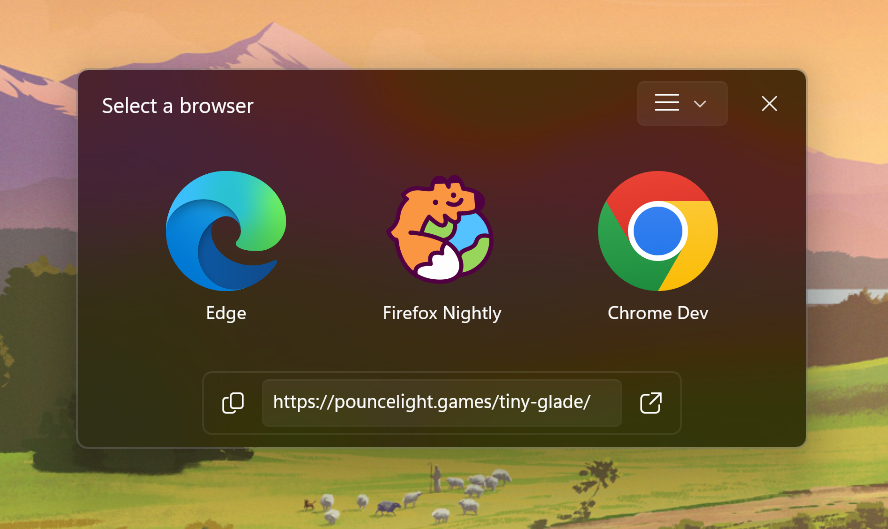
Click any link → Switchy intercepts it → a sleek, acrylic-glass picker floats up in under a second → you tap a key and it's open in exactly the right browser. You can even teach Switchy rules so work URLs go straight to Chrome, your team's Notion links open in Firefox, and everything else still asks you. Pure control, zero compromise.
Showcases
Features
- Instant browser picker — frameless, always-on-top acrylic window appears the moment a link is clicked; dismiss
with
Escor pick with1–9 - Two layout modes — vertical list or horizontal dock; switch in settings
- Timed auto-selection — optional countdown that opens your default browser automatically if no key is pressed; timer and duration are configurable
- Smart URL rules — domain (
d$), regex (r$), and substring (s$) patterns auto-open URLs without asking; force the picker with_Switchy - Alternate browser profiles — launch a browser's incognito or work-profile variant directly from the picker
- Single-instance IPC — a second click forwards its URL to the running picker over a named pipe; no double windows
- Native Windows feel — Acrylic backdrop on the picker, Mica on settings, frameless with custom drag region; looks right at home on Windows 11
- Auto-detect browsers — scans
StartMenuInternetregistry to find every installed browser in seconds - Icon extraction — rasterizes browser icons directly from executable resources at configurable sizes (16–256 px)
- Settings persist — all configuration saved to
%APPDATA%\Switchy\settings.json
Project Structure
switchy/
├── main.go               # Entry point & CLI modes (--register, --unregister, --settings)
├── app.go                # Wails-bound App struct — the frontend ↔ backend bridge
├── go.mod / go.sum
├── wails.json
├── .golangci.yml         # golangci-lint configuration
│
├── internal/             # Private Go packages
│   ├── browser/
│   │   ├── launch.go        # Launch browsers; DetectInstalled via registry; FilterLegacyIE
│   │   └── icon_windows.go  # Extract & rasterize HICON → base64 PNG (shell32/gdi32)
│   ├── config/
│   │   ├── service.go    # Load / Get / Save / Invalidate settings; schema migration
│   │   └── types.go      # UserSettings, Browser, AlternateLaunch, Ruleset, Rule, AppSettings
│   ├── ipc/
│   │   └── pipe.go       # Named-pipe single-instance IPC (go-winio, \\.\pipe\SwitchyPipe)
│   ├── registry/
│   │   └── registry.go   # Register / Unregister Switchy as Windows default browser
│   └── rules/
│       └── matcher.go    # URL-to-browser rule engine (domain / regex / substring)
│
├── frontend/             # Vue 3 + TypeScript + Tailwind CSS
│   ├── eslint.config.js  # ESLint 9 flat config (TS + Vue + Prettier-compat)
│   ├── .prettierrc.json  # Prettier config (no-semi, single-quote, Tailwind class sort)
│   ├── .prettierignore
│   └── src/
│       ├── App.vue           # Root router — renders SelectorView or SettingsView
│       ├── types.ts          # Frontend type definitions (mirrors Go structs)
│       ├── views/
│       │   ├── SelectorView.vue  # Browser picker (vertical list or horizontal dock)
│       │   └── SettingsView.vue  # Configuration hub (browsers, rulesets, app settings)
│       ├── components/
│       │   ├── BrowserList.vue       # Vertical stacked browser list
│       │   ├── BrowserButton.vue     # Single row item with icon, name, shortcut
│       │   ├── BrowserDock.vue       # Horizontal dock layout
│       │   ├── BrowserDockTile.vue   # Single dock tile with large icon and keycap badge
│       │   ├── UrlCard.vue           # URL display with protocol icon and copy button
│       │   ├── BrowserEditor.vue     # Browser config row in settings
│       │   └── RulesetEditor.vue     # Ruleset config row in settings
│       ├── composables/
│       │   └── useBrowserIcon.ts     # Async icon loader (calls GetBrowserIconAt backend)
│       └── utils/
│           ├── browser.ts    # Shortcut key helpers, animation delay calculations
│           └── config.ts     # Layout / overflow value normalizers
│
├── build/                # Wails build assets
│   ├── appicon.svg       # Source logo — regenerate appicon.png / icon.ico from this
│   ├── appicon.png       # 1024×1024 app icon (used by Wails build)
│   └── windows/
│       ├── icon.ico
│       ├── info.json         # Product metadata (version, company, copyright)
│       ├── wails.exe.manifest
│       └── installer/
│           ├── installer.iss   # Inno Setup 6 script → Switchy_Installer.exe
│           └── project.nsi     # NSIS script (wails build --nsis)
│
└── scripts/
    └── build.ps1         # Full release build: Wails → switchy.exe → Inno Setup installer
Prerequisites
| Tool | Version | Install |
|---|---|---|
| Go | 1.25+ | go.dev/dl |
| Wails CLI | v2 | go install github.com/wailsapp/wails/v2/cmd/wails@latest |
| Node.js | 18+ | nodejs.org |
| golangci-lint | latest | go install github.com/golangci/golangci-lint/cmd/golangci-lint@latest |
| Inno Setup | 6 | jrsoftware.org (installer only) |
Development
# From the switchy/ directory — hot-reload on both Go and Vue changes
wails dev
Go methods are also exposed as a dev server at http://localhost:34115 so you can call them from the browser DevTools.
Code Quality
Frontend
cd frontend

npm run lint          # report ESLint issues
npm run lint:fix      # auto-fix what's fixable
npm run format        # format all src files with Prettier
npm run format:check  # CI-safe Prettier check (no writes)
Go
# Format
gofmt -w .

# Vet
go vet ./...

# Full lint (requires golangci-lint)
golangci-lint run ./...
Building
Executable only
wails build -platform windows/amd64
# → build/bin/switchy.exe
Full release (exe + Inno Setup installer)
.\scripts\build.ps1
# → build/bin/Switchy_Installer.exe
Register as Default Browser
After building or installing, run once:
.\build\bin\switchy.exe --register
Windows will open Default apps settings — scroll to Web browser and select Switchy to complete the setup. ( Windows 10/11 requires this manual confirmation step; no app can bypass it.)
To remove Switchy from the registry:
.\build\bin\switchy.exe --unregister
URL Rule Patterns
Rules are evaluated in order across enabled rulesets. The first match wins.
| Prefix | Type | Example | Matches |
|---|---|---|---|
d$ |
Domain | d$example.com |
example.com and *.example.com |
r$ |
Regex | r$^https://work\. |
Full URL matched against regex |
s$ |
Substring | s$/confluence/ |
URL contains the string |
| (none) | Substring | github.com |
Same as s$ |
Set a rule's browser target to _Switchy to force the picker even when other rules would match.
CLI Flags
| Flag | Effect |
|---|---|
| (no flag, with URL argument) | Open the browser picker for the given URL |
--register |
Write Windows registry entries and open Default Apps settings |
--unregister |
Remove Switchy registry entries |
--settings |
Open the settings window |
Inspiration
Switchy is lovingly inspired by Hurl — a fantastic open-source browser picker for Windows that proved the concept beautifully. Switchy builds on that idea with a Wails-powered UI, native-pipe IPC, URL rule matching, and alternate browser profiles. Huge respect to the Hurl team for laying the foundation.
Agent Context
This repository uses agent-context to generate and maintain its
AI-agent context files (e.g., AGENTS.md). If you're working on Switchy with an AI assistant, those files provide the
grounding architecture, conventions, and module map needed to navigate the codebase effectively.
License
Questions
What is switchy?
jonaskahn/switchy is a public repo on GitHub by jonaskahn. 🔗 Rule every link — snappy Windows browser picker with smart URL routing.
Is switchy open source?
It declares the MIT license on GitHub.
Does switchy run on macOS, Windows or Linux?
Its maker has not tagged a system, so it is unknown here. Its README says what it needs.
How do I install switchy?
Open "Take it" on its page: Take My Repo writes an install plan for your machine and hands it to your AI agent (Claude Code, Codex or Cursor), which asks you before each step. Take My Repo has not tested it on any machine.
Is switchy still maintained?
Its last change on GitHub was on 2026-05-18. Take My Repo does not judge from that whether it is maintained.
What do people who ran switchy say?
Nobody has reviewed it on Take My Repo yet, which says nothing about its quality.