react-native-beacon-kit
iBeacon, AltBeacon, and Eddystone-UID for React Native with a hooks-first API, New Architecture support, and real Android background scanning.
Platform support: Android and iOS
- ✅ Hooks-first API (
useBeaconRanging, useBeaconMonitoring, useMonitorThenRange)
- ✅ New Architecture (Fabric) ready
- ✅ Expo plugin included
- ✅ Real Android background scanning via foreground service
- ✅ Android 14+ and 16 KB page size (Android 15+) support
- ✅ iBeacon, AltBeacon, and Eddystone-UID
- ✅ Kalman filter for stable distance readings
- ✅ Environment diagnostics built in
Why this library
Most beacon libraries for React Native are unmaintained or broken on modern Android and iOS. This library was built to fill that gap.
| Feature |
react-native-beacon-kit |
react-native-beacons-manager |
| Actively maintained |
✅ |
❌ Last updated 3+ years ago |
| New Architecture (Fabric) |
✅ |
❌ |
| Expo plugin |
✅ |
❌ |
| Hooks-first API |
✅ |
❌ Event listeners only |
| Android 14+ support |
✅ |
❌ |
| Android 16 KB page size (Android 15+) |
✅ |
❌ |
| Real Android background scanning |
✅ Foreground service |
⚠️ Unreliable |
| Eddystone-UID |
✅ Android |
❌ |
| Environment diagnostics |
✅ |
❌ |
| Kalman filter for distance |
✅ |
❌ |
When to use each API
| API |
Use it when |
useBeaconRanging() |
You want nearby iBeacon/AltBeacon readings, RSSI, and distance |
useBeaconMonitoring() |
You only need inside / outside region state |
useMonitorThenRange() |
You want monitoring to wake the flow, then range only while inside |
useEddystoneRanging() |
You want nearby Eddystone-UID readings on Android |
Beacon.* |
You need custom orchestration or a non-React flow |
If you are building a screen in React, start with the hooks API.
Installation
React Native (bare)
npm install react-native-beacon-kit
Then for iOS:
cd ios && pod install
Expo bare workflow
npx expo install react-native-beacon-kit
Add the plugin to your app.json or app.config.js:
{
  "expo": {
    "plugins": ["react-native-beacon-kit"]
  }
}
Optional iOS background location capability:
{
  "expo": {
    "plugins": [
      [
        "react-native-beacon-kit",
        {
          "iosBackgroundLocation": true
        }
      ]
    ]
  }
}
Then run prebuild to apply the native changes and install iOS pods:
npx expo prebuild
The plugin automatically adds the required Android permissions, iOS Info.plist usage strings, and — if iosBackgroundLocation is enabled — the background location mode. It does not request runtime permissions for you.
Quick start (High-level API)
Requesting permissions
Call this before starting the scanner. Uses react-native-permissions:
npm install react-native-permissions
import { Platform } from 'react-native';
import { request, PERMISSIONS } from 'react-native-permissions';

async function requestPermissions() {
  if (Platform.OS === 'android') {
    await request(PERMISSIONS.ANDROID.ACCESS_FINE_LOCATION);
    if (Platform.Version >= 31) {
      await request(PERMISSIONS.ANDROID.BLUETOOTH_SCAN);
      await request(PERMISSIONS.ANDROID.BLUETOOTH_CONNECT);
    }
  } else {
    await request(PERMISSIONS.IOS.LOCATION_WHEN_IN_USE);
  }
}
For background scanning or notification permissions, see Platform setup.
[!NOTE]
This helper doesn't check the result of request() — it resolves the same way whether the user grants or denies. Before calling Beacon.configure() / start() in production, check Beacon.checkPermissions() (or the result of request()) and handle the denied case explicitly.
Minimal ranging example
This is the shortest useful flow for most apps:
- Mount the hook
- Request permissions
- Call
Beacon.configure()
- Call
start()
import { Platform } from 'react-native';
import { request, PERMISSIONS } from 'react-native-permissions';
import { useCallback } from 'react';
import { Button, Text, View } from 'react-native';
import Beacon, { useBeaconRanging } from 'react-native-beacon-kit';

async function requestPermissions() {
  if (Platform.OS === 'android') {
    await request(PERMISSIONS.ANDROID.ACCESS_FINE_LOCATION);
    if (Platform.Version >= 31) {
      await request(PERMISSIONS.ANDROID.BLUETOOTH_SCAN);
      await request(PERMISSIONS.ANDROID.BLUETOOTH_CONNECT);
    }
  } else {
    await request(PERMISSIONS.IOS.LOCATION_WHEN_IN_USE);
  }
}

const region = {
  identifier: 'store',
  uuid: 'FDA50693-A4E2-4FB1-AFCF-C6EB07647825',
};

export const BeaconScreen = () => {
  const { beacons, error, isActive, start, stop } = useBeaconRanging({
    region,
  });

  const handleStart = useCallback(async () => {
    try {
      await requestPermissions();

      // Configure the native scanner before starting it.
      Beacon.configure({
        scanPeriod: 1100,
        backgroundScanPeriod: 10000,
        betweenScanPeriod: 0,
      });

      await start();
    } catch (error) {
      console.warn('[beacon] start failed', error);
    }
  }, [start]);

  return (
    <View>
      <Text>Detected beacons: {beacons.length}</Text>
      {error ? <Text>{error.message}</Text> : null}
      <Button
        title={isActive ? 'Stop' : 'Start'}
        onPress={isActive ? stop : handleStart}
      />
    </View>
  );
};
This shows the smallest useful flow. In a real app, you will usually centralize
permissions and Beacon.configure() at the app level, then use hooks inside
screens.
[!IMPORTANT]
On Android SDK 34+, call Beacon.configure({ foregroundService: true }) only after permissions are granted. Calling it too early can throw a SecurityException on a fresh install.
Recommended app-level setup
For apps with multiple screens or shared beacon behavior, do permissions and
initial configuration once at the app level, then let screens use the hooks.
import { useEffect } from 'react';
import Beacon from 'react-native-beacon-kit';

export const App = () => {
  useEffect(() => {
    const setup = async () => {
      await requestPermissions();

      Beacon.configure({
        scanPeriod: 1100,
        backgroundScanPeriod: 10000,
        betweenScanPeriod: 0,
        foregroundService: true,
        foregroundServiceNotification: {
          title: 'My App',
          text: 'Scanning for beacons...',
        },
      });
    };

    setup().catch((error) => {
      console.warn('[beacon] app setup failed', error);
    });
  }, []);

  return <Screens />;
};
For fuller working examples, see the apps in this repository:
Low-level API equivalent
Use this style if you need manual orchestration outside the hooks.
import { useCallback, useEffect, useState } from 'react';
import { Button, Text, View } from 'react-native';
import Beacon from 'react-native-beacon-kit';

const region = {
  identifier: 'store',
  uuid: 'FDA50693-A4E2-4FB1-AFCF-C6EB07647825',
};

export const BeaconScreen = () => {
  const [beacons, setBeacons] = useState([]);
  const [error, setError] = useState<string | null>(null);
  const [isActive, setIsActive] = useState(false);

  useEffect(() => {
    const rangingSub = Beacon.onBeaconsRanged((event) => {
      if (event.region.identifier !== region.identifier) return;
      setError(null);
      setBeacons(event.beacons);
    });

    const failureSub = Beacon.onRangingFailed((event) => {
      if (event.region?.identifier !== region.identifier) return;
      setError(event.message);
    });

    return () => {
      rangingSub.remove();
      failureSub.remove();
    };
  }, []);

  const handleStart = useCallback(async () => {
    try {
      await requestPermissions();
      Beacon.configure({
        scanPeriod: 1100,
        backgroundScanPeriod: 10000,
        betweenScanPeriod: 0,
      });
      await Beacon.startRanging(region);
      setIsActive(true);
    } catch (error) {
      console.warn('[beacon] start failed', error);
    }
  }, []);

  const handleStop = useCallback(async () => {
    await Beacon.stopRanging(region);
    setBeacons([]);
    setIsActive(false);
  }, []);

  return (
    <View>
      <Text>Detected beacons: {beacons.length}</Text>
      {error ? <Text>{error}</Text> : null}
      <Button
        title={isActive ? 'Stop' : 'Start'}
        onPress={isActive ? handleStop : handleStart}
      />
    </View>
  );
};
Platform setup
The library declares native permissions, but runtime permission requests are your responsibility.
Android
Use react-native-permissions or your own runtime flow.
| Permission |
When required |
ACCESS_FINE_LOCATION |
Always |
ACCESS_BACKGROUND_LOCATION |
Android 10+ background scanning |
BLUETOOTH_SCAN |
Android 12+ |
BLUETOOTH_CONNECT |
Android 12+ |
FOREGROUND_SERVICE |
Android background scanning |
FOREGROUND_SERVICE_LOCATION |
Android 14+ location foreground service |
POST_NOTIFICATIONS |
Android 13+ foreground service notification |
Important notes:
ACCESS_BACKGROUND_LOCATION must be requested separately at runtime- on Android 13+,
POST_NOTIFICATIONS should be requested at runtime too
- background scanning requires
foregroundService: true
iOS
If you are using the Expo plugin, these keys are added automatically by npx expo prebuild. No manual changes to Info.plist are needed.
If you are configuring iOS manually, add these keys to Info.plist:
<key>NSLocationAlwaysAndWhenInUseUsageDescription</key>
<string>This app uses your location to detect nearby beacons.</string>
<key>NSLocationWhenInUseUsageDescription</key>
<string>This app uses your location to detect nearby beacons.</string>
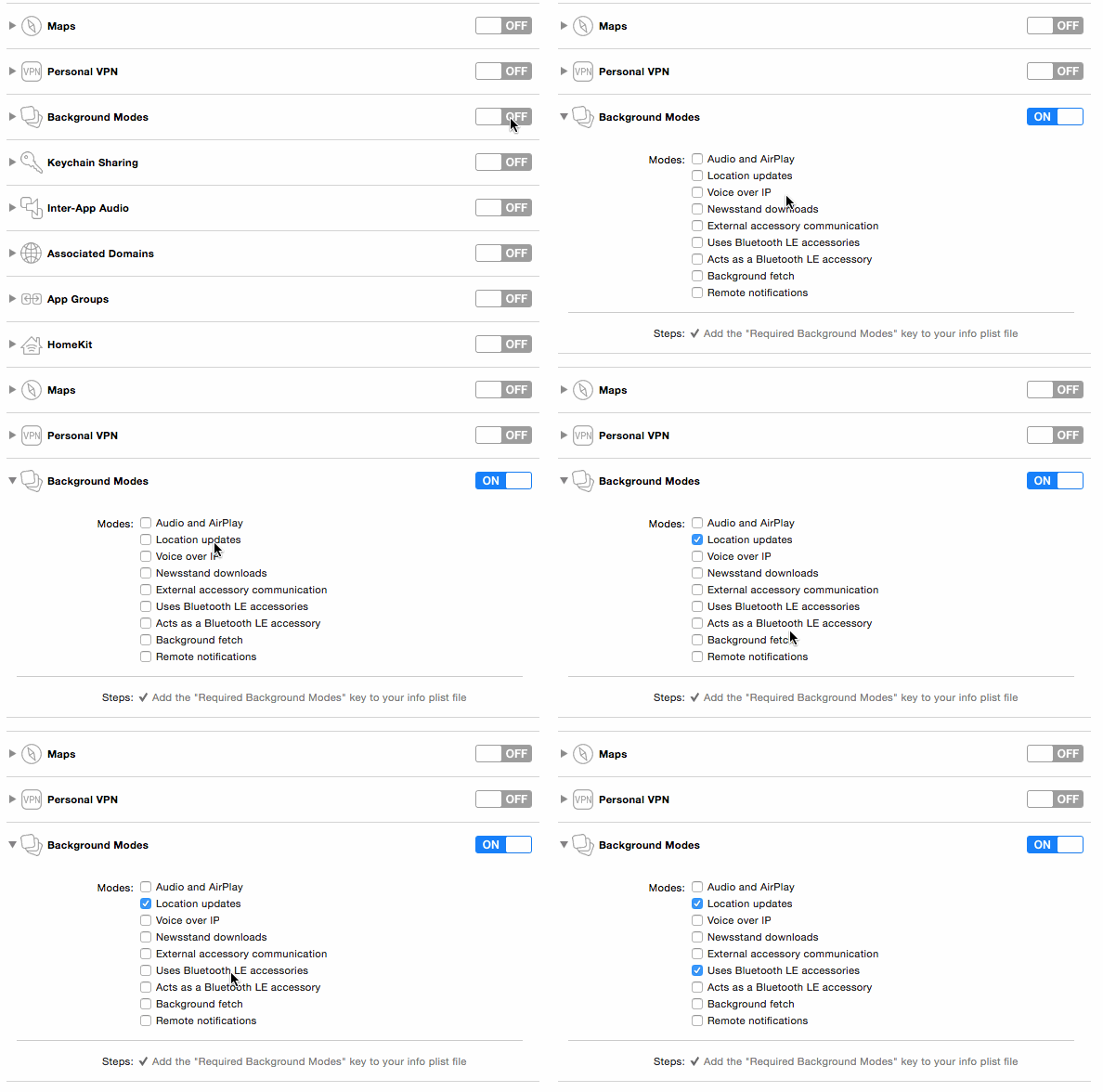
For background region monitoring, enable Location updates in your target's Background Modes capability. If you are using the Expo plugin, set iosBackgroundLocation: true instead and let prebuild handle it.
Platform behavior and limits
Android
- Real background scanning requires
foregroundService: true
- OEM power management can still affect reliability with the screen off
- If you need the strongest background behavior on restrictive devices, see Advanced Android
Behavior by API level:
| API level |
What changes |
| Android 10 (API 29) |
ACCESS_BACKGROUND_LOCATION must be requested separately at runtime |
| Android 12 (API 31) |
BLUETOOTH_SCAN and BLUETOOTH_CONNECT are required in addition to location |
| Android 13 (API 33) |
POST_NOTIFICATIONS required to show the foreground service notification |
| Android 14 (API 34) |
FOREGROUND_SERVICE_LOCATION required for location-type foreground services; calling configure({ foregroundService: true }) before permissions are granted throws a SecurityException |
iOS
- Continuous background ranging is not supported
- Use monitoring to wake the app, then start ranging during the available execution window
- Android-only options such as
foregroundService, aggressiveBackground, scanPeriod, backgroundScanPeriod, and betweenScanPeriod are ignored on iOS
- Region limit: CoreLocation allows a maximum of 20 simultaneously monitored regions per app. If you register more than 20, iOS silently drops the extras. Prefer fewer, broader regions where possible.
- Simulator: the iOS Simulator does not have Bluetooth hardware. You need a physical device to scan for beacons.
Typical iOS background pattern:
Beacon.startMonitoring({ identifier: 'my-region', uuid: '...' });

const sub = Beacon.onRegionStateChanged(({ state }) => {
  if (state === 'inside') {
    Beacon.startRanging({ identifier: 'my-region', uuid: '...' });
  }
});
Beacon identification: UUID vs MAC address
Always use the iBeacon/AltBeacon triplet (uuid:major:minor, or
namespace:instance for Eddystone) as your primary identifier — it works
across both platforms and beacon types.
macAddress reliability depends on what's advertising:
| Source |
MAC address |
| Hardware beacons (dedicated BLE devices) |
✅ Stable — fixed at manufacture |
| Android 10+ phone acting as a beacon |
⚠️ Randomized — rotates periodically |
| iOS (any source) |
❌ Unavailable — OS privacy restriction |
MAC randomization is a property of the advertiser, not the scanner — your
phone just reports whatever MAC the beacon is broadcasting. Dedicated beacon
hardware almost never rotates its MAC, since the whole point of a beacon is
to be reliably identifiable. Use macAddress only as secondary metadata
(debugging, RTLS) when you control the hardware.
API summary
Hooks