GarageStack
Monitor your MG car just like the iSmart app can but better
- 27
- MIT
- 4 h ago
Repo joszz/GarageStack, read from GitHub 4 h ago. joszz has not joined Take My Repo.
In short
joszz/GarageStack is a public repo on GitHub by joszz. Monitor your MG car just like the iSmart app can but better. It declares the MIT license on GitHub. It is written mainly in C#, has 27 stars and last changed on 2026-11-23. Nobody has reviewed it on Take My Repo yet, which says nothing about its quality. Read from GitHub on 2026-11-23.
Similar repos

GarageStack
A self-hosted dashboard, trip log, charge history and map for your MG.
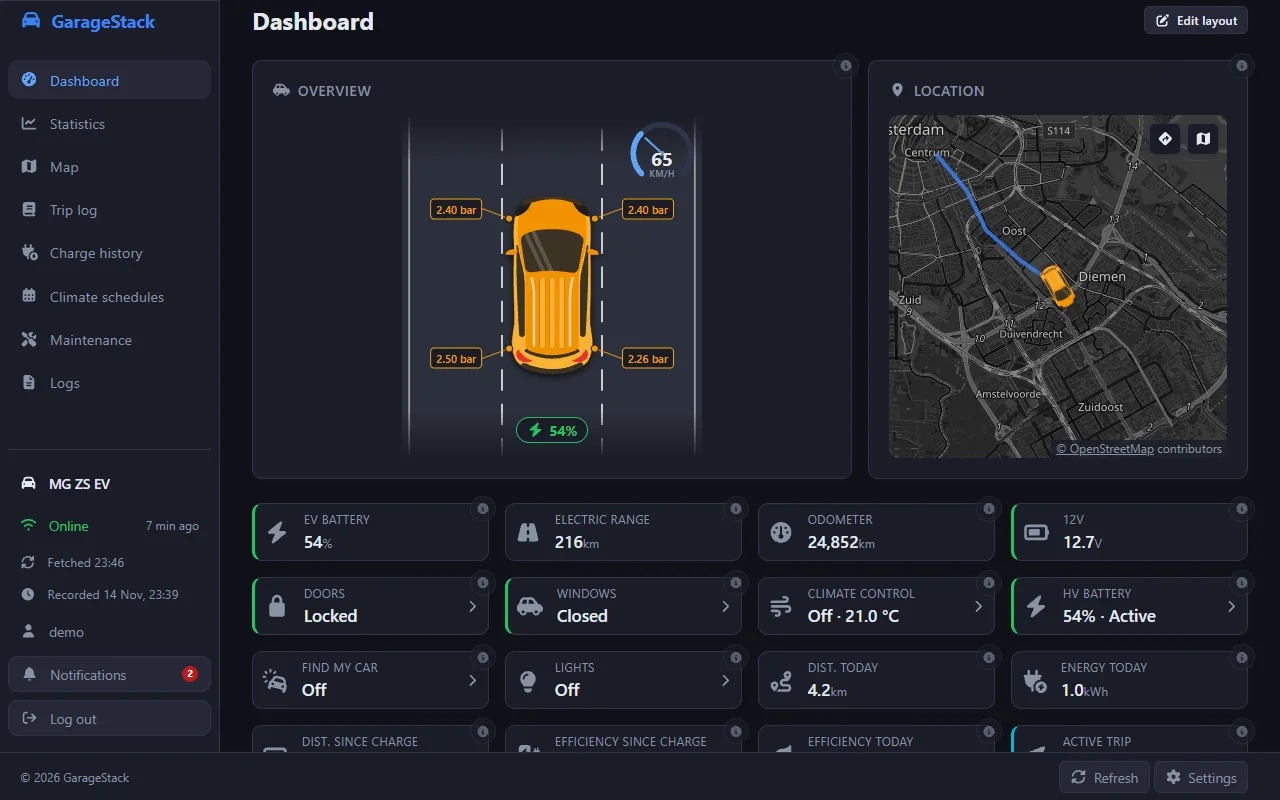
GarageStack is a free, open-source web app for modern MG cars, the ones built by SAIC Motor such as the MG4, MG5, ZS EV and HS PHEV. It signs in to the SAIC iSmart API, the same backend the official MG iSmart app uses, and turns what your car reports into something worth opening:
- See the car at a glance. Fuel, battery, tyre pressures, doors, windows and climate on one live dashboard, with cards that adapt to your hybrid, plug-in hybrid or full electric car.
- Relive every drive. Trips are saved automatically, named by where they went and drawn on the map along the roads you took, with heatmaps and the speed limits along the way.
- Keep a trip log for the taxman. Mark trips as business, commute or private, add notes, and export a month or a year as a spreadsheet.
- Review charge history. See completed and ongoing sessions, duration, charging type and state-of-charge readings when the car reports them.
- Control it from anywhere. Pre-condition the cabin, lock the car or flash its lights to find it, and see whether the car actually carried the command out.
- Have it warm when you leave. Schedule climate for weekday mornings or a one-off trip, with seat heating, the defrosters, and a skip for mild days.
- Hear about it when something is off. Push notifications for low tyre pressure, a car left unlocked, a window left open, charging complete and more.
- Fit it into your homelab. Home Assistant through MQTT discovery, a gethomepage.dev widget, and single sign-on through Authentik, Authelia, Keycloak or any other OpenID Connect provider.
- Keep it yours. Everything runs in Docker on your own hardware, as one all-in-one container or a Compose stack. No subscription, and no account needed beyond your MG login.
Note: GarageStack only works with the current MG brand owned by SAIC Motor. It is not compatible with classic British-built MG cars (MGB, Midget, MGF, etc.) produced before SAIC's acquisition of the brand. If your car does not use the MG iSmart app, GarageStack will not work with it.
Screenshots
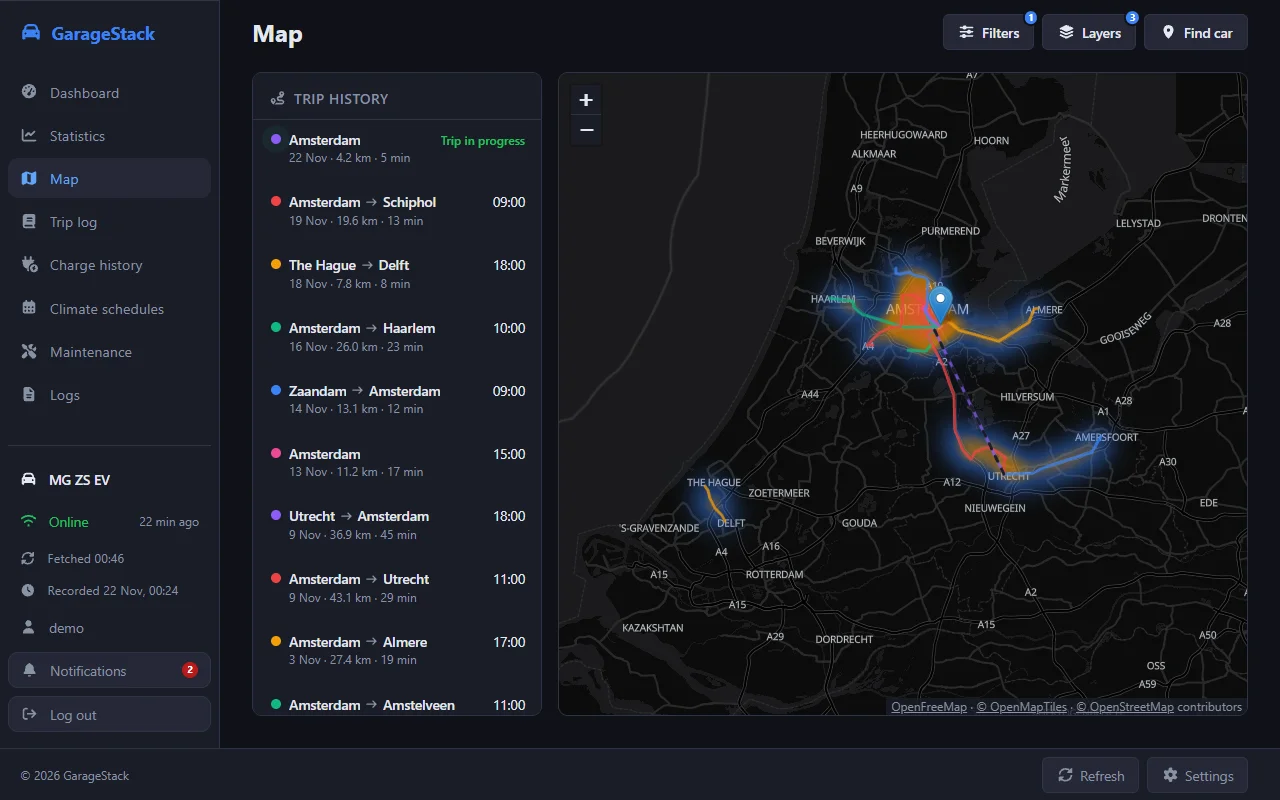
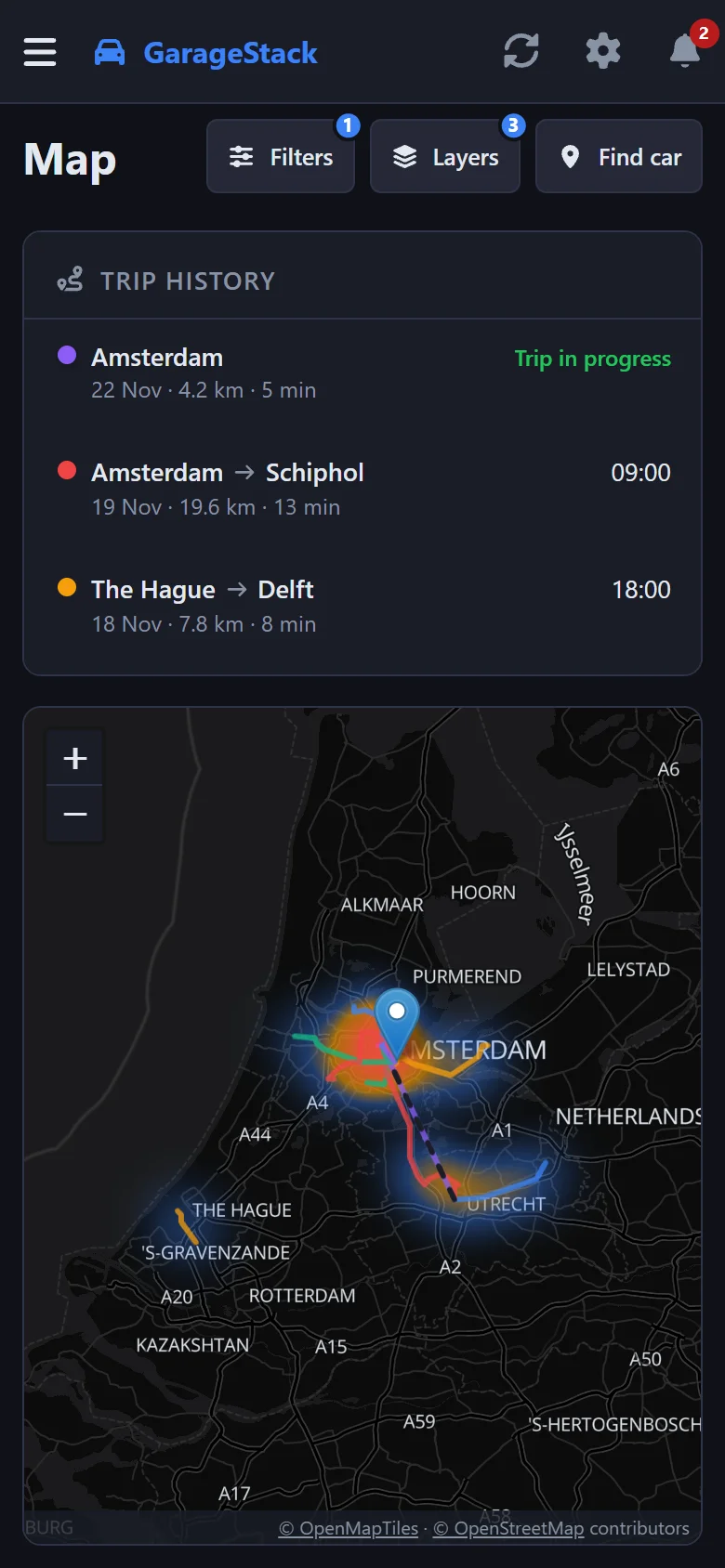
Every trip on one map, listed by where it went and drawn along the roads you took, over a heatmap of the roads you drive most:
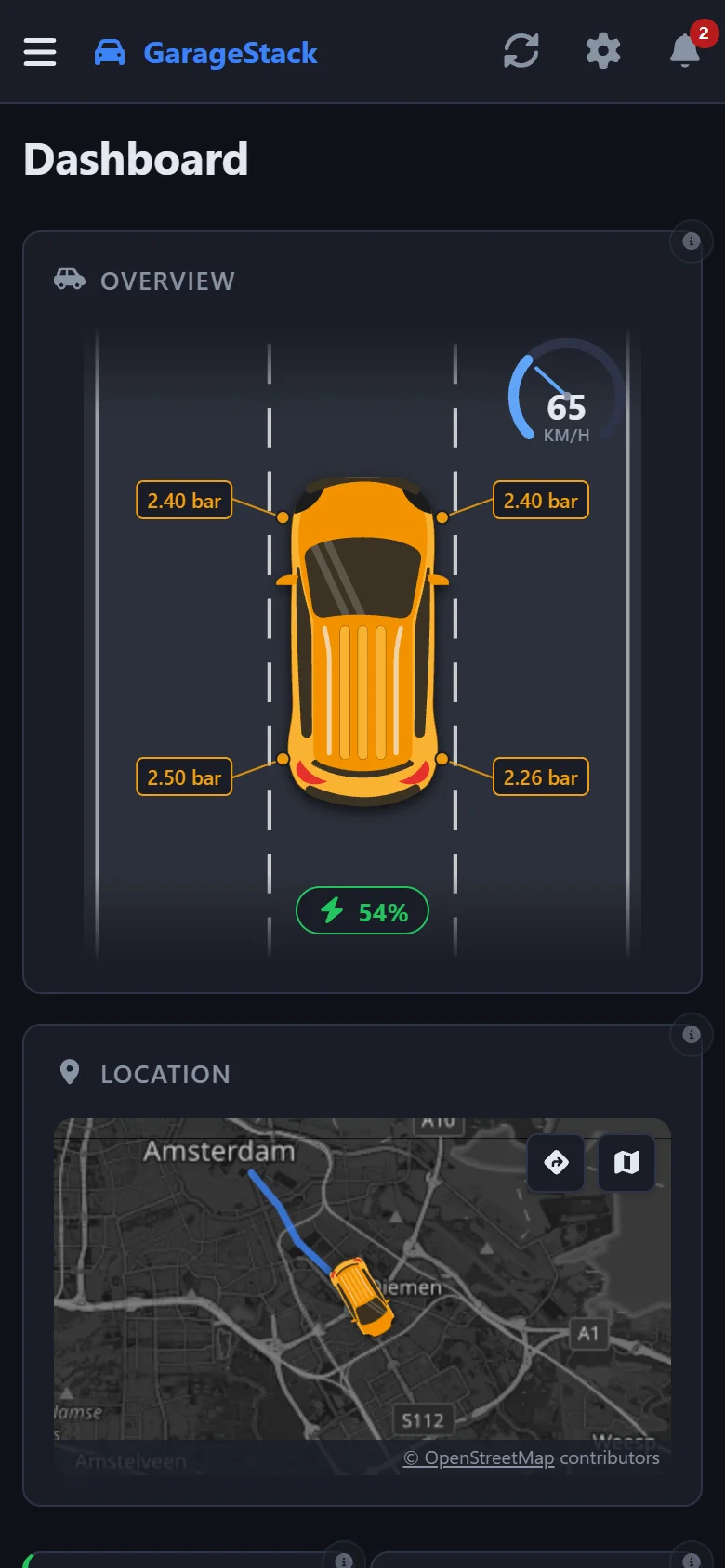
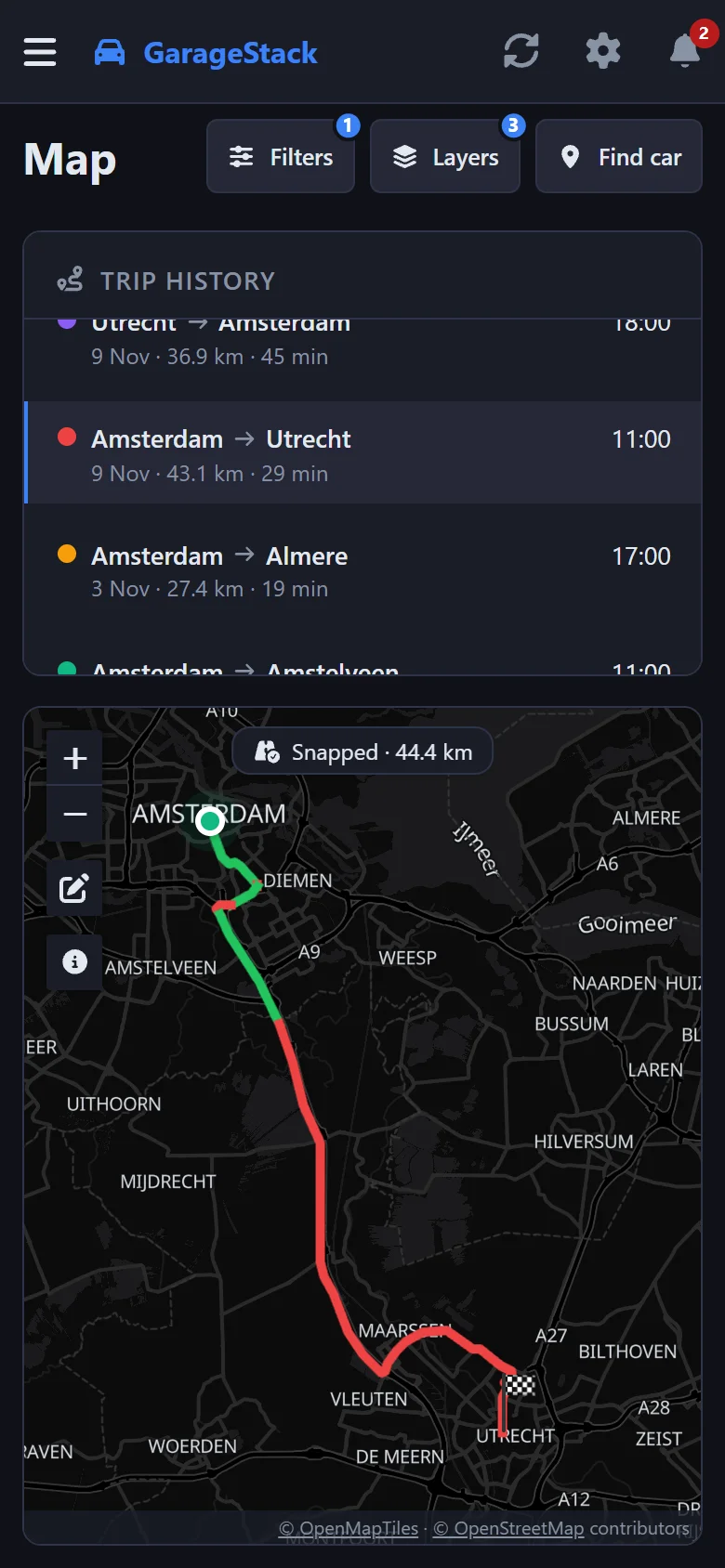
And on a phone, with a single trip snapped to the roads and coloured against the speed limits:
| Dashboard | Map | A single trip |
|---|---|---|
 |
 |
 |
The map behind the dashboard, the layout editor, the offline view, the HV battery, the statistics with energy and efficiency, the trip log, route editor, charge history, maintenance list, climate schedules, settings for each car, logs, sign-in page and light theme are in the screenshot gallery.
Want to try it? Read MG iSmart account and session limits first, because GarageStack and the MG app cannot be signed in to the same account at once, then pick an installation option. A single docker run is enough to get going.
Contents
- Features
- MG iSmart account and session limits
- Prerequisites and Installation
- Updating, Monitoring and Backup and restore
- Push notifications
- Trip log, Charge history, Climate schedules and Maintenance
- Dutch registration (RDW)
- Homepage dashboard widget, Read-only API tokens and Calendar feed
- Directions to the car and Map overlays
- Security defaults, HTTPS and What leaves your network
- Documentation
Features
- Live dashboard -- Real-time vehicle telemetry displayed as configurable cards. Cards are automatically shown or hidden based on your vehicle type (HEV, PHEV, BEV) and can be reordered or toggled individually in the dashboard's edit mode. The car drawn on the dashboard and the map takes your car's colour, a preset or two colours of your own (Settings > Vehicle > Car colour), and the vehicle type can be set by hand under Settings > Vehicle > Vehicle type when detection gets it wrong.
- Directions to the car -- Open walking directions to the car's last known location from the dashboard or the car's map marker, on OpenStreetMap or, if you prefer, Google Maps, Apple Maps or a map app on your phone. See Directions to the car.
- Tyre history -- Tap a tyre's pressure on the dashboard's car to see a month of daily pressures for all four tyres, and how each one moved against the other three over the last two weeks: a tyre falling behind the others while they hold is a slow puncture, which also sends a notification.
- Trip history -- Browse past journeys on an interactive map, each drawn on the roads it took and coloured by speed or by the speed limit, with a heatmap of the roads you drive most. Each trip is saved to the database a few minutes after the car parks. After upgrading from a version that did not save trips, the existing history is saved in the background on the Worker's first start.
- Phone GPS -- Fill gaps in recorded car trips with the phone's own GPS: from the installed app, kept on screen in a holder during the drive, or from your own Dawarich instance. Identify trackers by their app/device ID and last-seen time; you can link multiple phones, and GarageStack uses the best match for each trip. See Phone GPS setup.
- Trip log -- Mark each trip as business, commute or private (commutes between your home and work are marked automatically), add notes, hide a GPS glitch, join two trips a fuel stop split, fix a route the car recorded badly on the map, and export a month or a year as a spreadsheet with the addresses and odometer readings a tax trip log (such as the Dutch rittenregistratie) asks for. See Trip log.
- Charge history -- Review completed and ongoing charging sessions with their duration, state of charge, odometer, battery-energy gain and peak power. Expand a session to see charging power plotted over time, plus distance, battery energy used and consumption since the previous charge when readings are available. Sessions are reconstructed from recorded charging-state telemetry, so their history depends on what the vehicle has reported and retained.
- Maintenance -- Keep the car's service items (oil, tyres, the yearly inspection, ...) with a distance interval, a time interval or both. GarageStack works out from the odometer and your service log when each one is due, shows the most urgent on the dashboard, and sends a notification when an item reaches 90 % of its interval. Log each service with its date, odometer reading and notes.
- Dutch registration (RDW) -- For a car with a Dutch licence plate, a dashboard card with the date the APK runs out and the days left, open recalls with what can go wrong and what the dealer does about it, and whether the car is insured, from the RDW's open data. Notifications come for a new recall, the APK a month and a week ahead, and a car with no insurance on record. Off until
RDW_ENABLED=true; the plate, entered under Settings, is the only thing sent. See Dutch registration (RDW). - Energy statistics -- Track daily energy consumption, efficiency (in your chosen unit on a plug-in car, L/100 km on a hybrid), fuel use, electric share, average driving speed, and more, for any period from a week to several years.
- Remote commands -- Trigger climate pre-conditioning (normal climate, fan only or front defrost), lock or unlock the car, open the boot, and activate the horn and lights remotely from the dashboard. On a plug-in car also start or stop charging, lock or unlock the charging cable, switch battery heating on or off, set the charging and battery heating schedules, and set the charge current limit and, where the car takes one, the charge target. Opening the boot and unlocking the cable ask for a second tap. Each command reports whether the car carried it out, and if it refused, the reason the MG servers gave.
- Climate schedules -- Switch climate on at a set time on chosen weekdays, or once. A schedule sets the temperature or mode, seat heating and the rear defroster, and can skip mild days by the car's outside temperature. Schedules run on the server, so no browser needs to be open, and each run sends a push notification saying whether the car started climate.
- Push notifications -- Browser and in-app alerts for key events: engine started, low or high tyre pressure, a slow puncture, low EV battery, low fuel, a weak 12V battery, car left unlocked, doors or windows left open, the car moving while parked, arriving at or leaving home or work, a charge that finished or stopped early, maintenance coming due, the APK running out or a recall on a Dutch plate, a climate schedule that ran, the messages the official MG app receives, and data that stopped arriving because the MG sign-in failed or the car went quiet. Each device chooses which ones it gets.
- Homepage widget -- A read-only API endpoint for the gethomepage.dev Custom API widget, exposing key vehicle stats at a glance, along with the APK days left, open recalls, the maintenance due next and the last trip.
- Log viewer -- The Logs page shows the entries of the API's and the Worker's log files, newest first and older ones loading as you scroll, filtered by service, level and text, with exceptions folded open on request and a live mode that adds what was written every ten seconds. The files themselves stay on the server, one per day (
LOG_RETAINED_FILES). - Full data export -- Settings > Data & API > Your data downloads everything GarageStack keeps as one zip: per car its trips, maintenance, schedules, places and every telemetry reading (as CSV), and your notifications and settings.
- Diagnostics for a bug report -- Settings > Data & API > Diagnostics downloads a small anonymized zip to attach to an issue: the version, which parts are on and healthy, the car's type and configuration codes, the last week of readings without positions, and the last week of warnings from the logs. VINs become car-1, car-2, and plates, email and IP addresses, URLs, host names, sign-in names and coordinates are taken out.
- Calendar feed -- Subscribe to the APK expiry date, maintenance due dates and the coming climate schedules in Google Calendar, Apple Calendar, Outlook or any other calendar app. See Calendar feed.
- Read-only API tokens -- Make a token under Settings > Data & API > API tokens and let a script, a dashboard or a watch read what the app shows, without signing in. A token can only read: it cannot send commands or change anything, and the full data export, the logs and the diagnostics stay with a signed-in session.
- Home Assistant -- Your car appears in Home Assistant automatically through MQTT discovery, sharing GarageStack's broker and MG session instead of needing a second integration. GarageStack adds sensors of its own to the car: the APK and its days left, open recalls, the maintenance due next and the last trip. See
HOME_ASSISTANT.md. - Progressive Web App (PWA) -- Installable on mobile or desktop for a native app-like experience, complete with a home screen icon and push notification support. Where the browser allows it, GarageStack offers to install itself, and the offer can be turned down for good. It also opens without a connection, in an underground car park or away from home without your VPN: every page then shows what that device last loaded (the dashboard, statistics, the map with its routes, the trip log, charge history, maintenance and climate schedules) and says so and from when, the buttons that need the server (commands, editing, the log viewer) are hidden until it can be reached again, and the directions dialog still offers the coordinates and a
geo:
Questions
What is GarageStack?
joszz/GarageStack is a public repo on GitHub by joszz. Monitor your MG car just like the iSmart app can but better.
Is GarageStack open source?
It declares the MIT license on GitHub.
Does GarageStack run on macOS, Windows or Linux?
Its maker tagged it for macOS, Windows and Linux, or as Docker or cross-platform. That is declared by the maker; Take My Repo has not tested it.
How do I install GarageStack?
Open "Take it" on its page: Take My Repo writes an install plan for your machine and hands it to your AI agent (Claude Code, Codex or Cursor), which asks you before each step. Take My Repo has not tested it on any machine.