【NeurIPS'2023 🔥】 Act As You Wish: Fine-grained Control of Motion Diffusion Model with Hierarchical Semantic Graphs
We propose hierarchical semantic graphs for fine-grained control over motion generation.
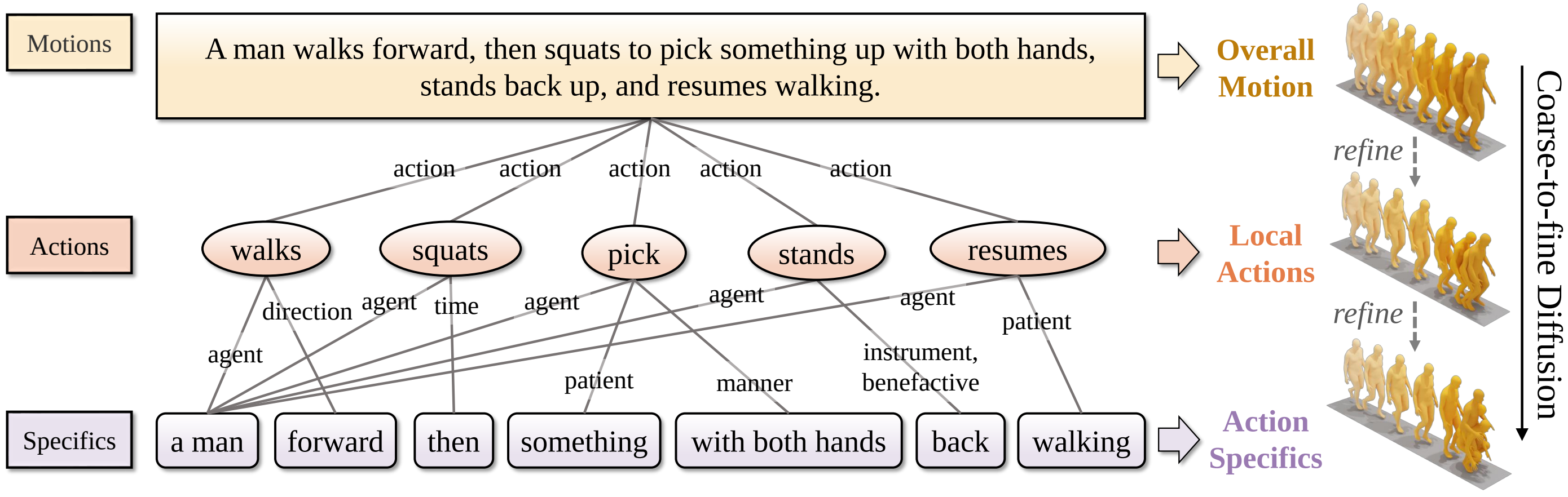
Specifically, we disentangle motion descriptions into hierarchical semantic graphs including three levels of motions, actions, and specifics.
Such global-to-local structures facilitate a comprehensive understanding of motion description and fine-grained control of motion generation.
Correspondingly, to leverage the coarse-to-fine topology of hierarchical semantic graphs, we decompose the text-to-motion diffusion process into three semantic levels, which correspond to capturing the overall motion, local actions, and action specifics.
📣 Updates
- [2023/11/16]: I fixed a data load bug that caused performance degradation.
- [2023/10/07]: We release the code. However, this code may not be the final version. We may still update it later.
📕 Architecture
We factorize motion descriptions into hierarchical semantic graphs including three levels of motions,
actions, and specifics. Correspondingly, we decompose the text-to-motion diffusion process into three
semantic levels, which correspond to capturing the overall motion, local actions, and action specifics.
😍 Visualization
Qualitative comparison
Video.mp4
Refining motion results
To fine-tune the generated results for more fine-grained control, our method can continuously refine the generated motion by modifying the edge weights and nodes of the hierarchical semantic graph.
🚩 Results
Comparisons on the HumanML3D
Comparisons on the KIT
🚀 Quick Start
Datasets
Model Zoo
| Checkpoint |
Google Cloud |
Baidu Yun |
Peking University Yun |
| HumanML3D |
Download |
TODO |
TODO |
1. Conda environment
conda create python=3.9 --name GraphMotion
conda activate GraphMotion
Install the packages in requirements.txt and install PyTorch 1.12.1
pip install -r requirements.txt
We test our code on Python 3.9.12 and PyTorch 1.12.1.
2. Dependencies
Run the script to download dependencies materials:
bash prepare/download_smpl_model.sh
bash prepare/prepare_clip.sh
For Text to Motion Evaluation
bash prepare/download_t2m_evaluators.sh
3. Pre-train model
Run the script to download the pre-train model
bash prepare/download_pretrained_models.sh
4. Evaluate the model
Please first put the trained model checkpoint path to TEST.CHECKPOINT in configs/config_humanml3d.yaml.
Then, run the following command:
python -m test --cfg configs/config_humanml3d.yaml --cfg_assets configs/assets.yaml
💻 Train your own models
1.1 Prepare the datasets
For convenience, you can download the datasets we processed directly. For more details, please refer to HumanML3D for text-to-motion dataset setup.
1.2 Prepare the Semantic Role Parsing (Optional)
Please refer to "prepare/role_graph.py".
We have provided semantic role-parsing results (See "datasets/humanml3d/new_test_data.json").
Semantic Role Parsing Example
        {
            "caption": "a person slowly walked forward",
            "tokens": [
                "a/DET",
                "person/NOUN",
                "slowly/ADV",
                "walk/VERB",
                "forward/ADV"
            ],
            "V": {
                "0": {
                    "role": "V",
                    "spans": [
                        3
                    ],
                    "words": [
                        "walked"
                    ]
                }
            },
            "entities": {
                "0": {
                    "role": "ARG0",
                    "spans": [
                        0,
                        1
                    ],
                    "words": [
                        "a",
                        "person"
                    ]
                },
                "1": {
                    "role": "ARGM-MNR",
                    "spans": [
                        2
                    ],
                    "words": [
                        "slowly"
                    ]
                },
                "2": {
                    "role": "ARGM-DIR",
                    "spans": [
                        4
                    ],
                    "words": [
                        "forward"
                    ]
                }
            },
            "relations": [
                [
                    0,
                    0,
                    "ARG0"
                ],
                [
                    0,
                    1,
                    "ARGM-MNR"
                ],
                [
                    0,
                    2,
                    "ARGM-DIR"
                ]
            ]
        }
2.1. Ready to train VAE model
Please first check the parameters in configs/config_vae_humanml3d_motion.yaml, e.g. NAME,DEBUG.
Then, run the following command:
python -m train --cfg configs/config_vae_humanml3d_motion.yaml --cfg_assets configs/assets.yaml --batch_size 64 --nodebug
python -m train --cfg configs/config_vae_humanml3d_action.yaml --cfg_assets configs/assets.yaml --batch_size 64 --nodebug
python -m train --cfg configs/config_vae_humanml3d_specific.yaml --cfg_assets configs/assets.yaml --batch_size 64 --nodebug
2.2. Ready to train GraphMotion model
Please update the parameters in configs/config_humanml3d.yaml, e.g. NAME,DEBUG,PRETRAINED_VAE (change to your latest ckpt model path in previous step)
Then, run the following command:
python -m train --cfg configs/config_humanml3d.yaml --cfg_assets configs/assets.yaml --batch_size 128 --nodebug
3. Evaluate the model
Please first put the trained model checkpoint path to TEST.CHECKPOINT in configs/config_humanml3d.yaml.
Then, run the following command:
python -m test --cfg configs/config_humanml3d.yaml --cfg_assets configs/assets.yaml
▶️ Demo
TODO
📌 Citation
If you find this paper useful, please consider staring 🌟 this repo and citing 📑 our paper:
@inproceedings{
jin2023act,
title={Act As You Wish: Fine-Grained Control of Motion Diffusion Model with Hierarchical Semantic Graphs},
author={Peng Jin and Yang Wu and Yanbo Fan and Zhongqian Sun and Yang Wei and Li Yuan},
booktitle={NeurIPS},
year={2023}
}
🎗️ Acknowledgments
Our code is based on MLD, TEMOS, ACTOR, HumanML3D and joints2smpl. We sincerely appreciate for their contributions.