
plugin-ultracode
Ultracode Codex plugin
- 48
- 5 mo ago
Repo just-every/plugin-ultracode, read from GitHub 11 h ago. just-every has not joined Take My Repo.
In short
just-every/plugin-ultracode is a public repo on GitHub by just-every. Ultracode Codex plugin. It declares no license on GitHub. Public does not mean open source: without a license, nobody is granted the right to reuse it. It is written mainly in JavaScript, has 48 stars and last changed on 2026-07-09. Nobody has reviewed it on Take My Repo yet, which says nothing about its quality. Read from GitHub on 2026-11-25.
Ultracode Plugin for Codex
Part of the Just Every Codex plugin marketplace.
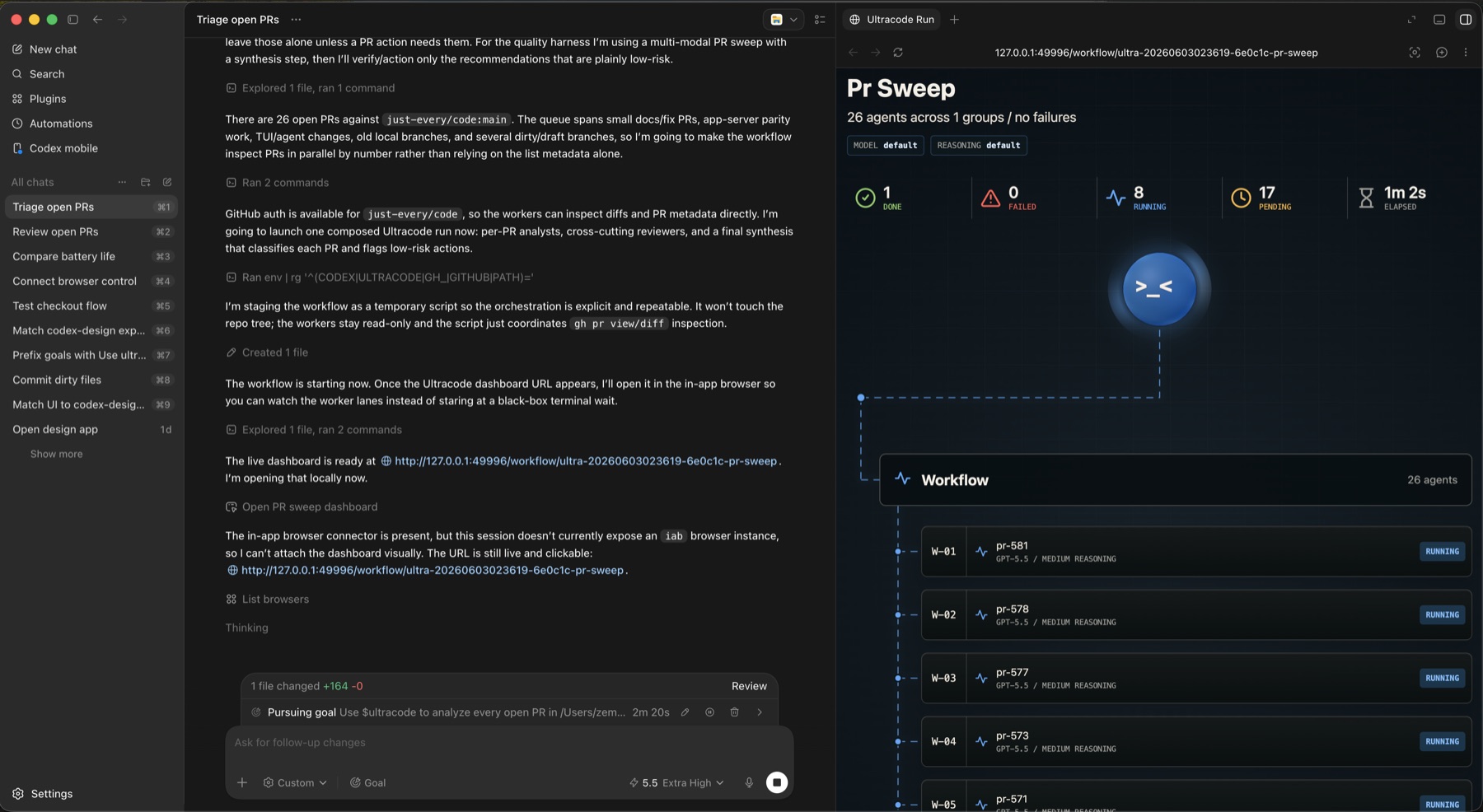
Ultracode helps Codex take on work that is too broad, risky, or multi-step for one thread to handle alone. It lets Codex break a task into focused parallel lanes, compare the evidence, verify claims, and bring back a clearer answer or implementation plan.
Use it when you want Codex to act less like one reviewer skimming a problem and more like a coordinated team working through it from several angles.
What It Is
Ultracode is a Codex plugin for orchestrating many focused Codex workers on one larger goal.
Those workers can inspect different parts of a codebase, review the same change from different perspectives, verify each other's findings, explore multiple solutions, or produce competing plans that Codex can synthesize into one clear next step.
The result is not just "more output." The point is better coverage, better verification, and less hidden single-thread tunnel vision.
When To Use It
Reach for Ultracode when the task benefits from breadth, independent checks, or parallel exploration:
- Reviewing a large or risky change.
- Auditing a subsystem for bugs, security issues, or missing tests.
- Finding every place a pattern, API, or behavior appears.
- Comparing multiple implementation strategies before committing to one.
- Investigating a confusing failure with several plausible causes.
- Asking for a final sign-off where false confidence would be expensive.
- Running a research pass that needs planning, gathering, verification, and synthesis.
For tiny, obvious edits, normal Codex is enough. Ultracode earns its keep when you want coverage and confidence, not just a quick answer.
What It Is Good At
Parallel investigation. Different workers can scan different files, features, call sites, risks, or hypotheses at the same time.
Independent review. Workers can approach the same change through separate lenses such as correctness, security, performance, tests, product behavior, or maintainability.
Adversarial verification. Findings can be checked by skeptical reviewers before they are treated as real.
Complex workflows. Larger tasks can be shaped as stages: plan, gather, verify, synthesize, implement, then review.
Visible progress. Ultracode has a dashboard so you can see the work unfold: which lanes are running, what they found, what failed, and what survived review.
How To Ask For It
You do not need to know the internals. Ask Codex for the outcome and mention Ultracode when the task deserves a wider pass:
Use Ultracode to review this refactor for correctness, security, and missing tests.
Good prompts name the goal, the scope, and the kind of confidence you want. Codex can choose the worker layout and verification pattern from there.
Pair With Codex Goals
When Ultracode is invoked, Codex should always create a Codex goal whose
objective begins with Use $ultracode to .... That goal is the continuity
mechanism: every continuation re-triggers the Ultracode skill, so the parent
thread keeps integrating worker results, applying or recommending changes, and
running final verification instead of stopping after the first summary.
Keep the goal active until the top-level outcome is genuinely settled: synthesis is complete, any requested edits are integrated, failures or refuted findings have been handled, and the final checks have run or been explicitly reported as blocked. Only then should Codex clear the goal.
What To Expect
Ultracode work usually has three visible parts:
- Codex shapes the workflow: what to split up, what to verify, and how results should come back.
- Workers run in parallel and return evidence-backed findings or plans.
- Codex synthesizes the useful results, applies or recommends changes, and runs the final verification.
The dashboard is there for transparency, not because you need to manage it by hand. Failed or refuted lanes remain visible so Codex can treat them as real signals instead of quietly smoothing them over.
Install
Install Ultracode from the Just Every plugin marketplace:
codex plugin marketplace add just-every/plugins
codex plugin add ultracode@just-every
After installation, start a new Codex thread and ask Codex to use Ultracode on a task that deserves parallel investigation.
More Detail
Most users can stop here. The deeper docs are for maintainers, advanced workflow authors, and plugin development:
- docs/technical-reference.md for operational details, local commands, updates, and development notes.
- skills/ultracode/SKILL.md for the Codex-facing orchestration guidance.
- skills/ultracode/references/quality-patterns.md for verification patterns.
- skills/ultracode/references/cookbook.md for workflow recipes.
- skills/ultracode/references/cli.md for the complete technical reference.
Questions
What is plugin-ultracode?
just-every/plugin-ultracode is a public repo on GitHub by just-every. Ultracode Codex plugin.
Is plugin-ultracode open source?
It declares no license on GitHub. Public does not mean open source: without a license, nobody is granted the right to reuse it.
Does plugin-ultracode run on macOS, Windows or Linux?
Its maker has not tagged a system, so it is unknown here. Its README says what it needs.