
gitcontext
Build Perfect Context of Your Codebase for Your AI Chatbot
- 2
- MIT
- 5 wk ago
Repo kccarlos/gitcontext, read from GitHub 19 h ago. kccarlos has not joined Take My Repo.
In short
kccarlos/gitcontext is a public repo on GitHub by kccarlos. Build Perfect Context of Your Codebase for Your AI Chatbot. It declares the MIT license on GitHub. It is written mainly in TypeScript, has 2 stars and last changed on 2026-10-16. Nobody has reviewed it on Take My Repo yet, which says nothing about its quality. Read from GitHub on 2026-11-21.
 GitContext

100% private codebase context engineering tool
Fully local app to package your codebase files and diffs into LLM-friendly format
Install the desktop app · Try it in your browser · How it works

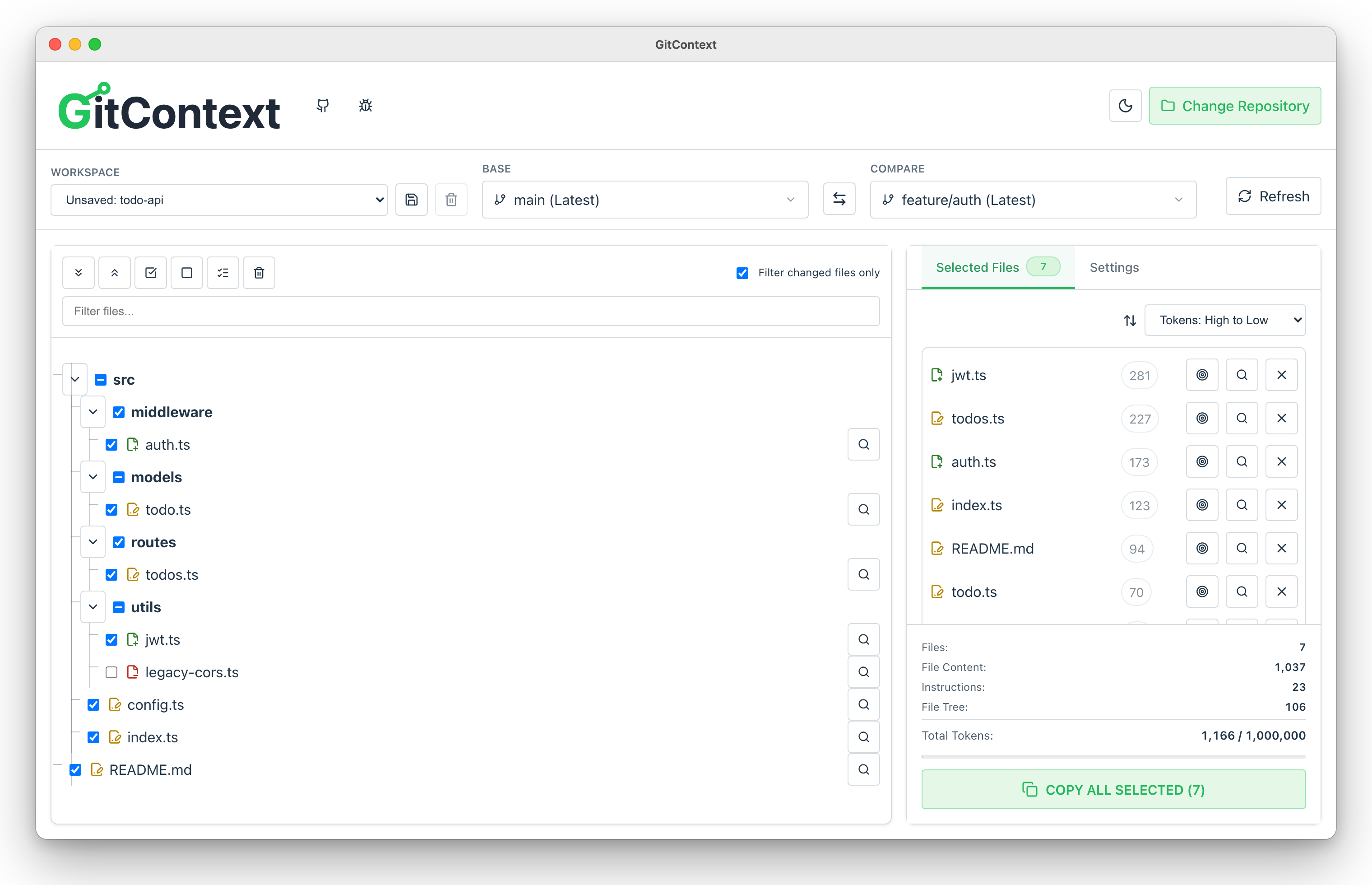
GitContext turns the part of a repository you care about into one clean prompt for ChatGPT, Claude or any other LLM. Pick two branches, tick the files, and copy a single block with the file tree, the diffs and your instructions, with a live token count against the model's context window.
Everything runs on your machine. There is no server and no upload: the desktop app reads Git through native Rust (libgit2). A web version runs Git in your browser with isomorphic-git if you want to try it before installing.
It is similar to Repomix or GitIngest, with a few differences:
- Branch-to-branch diffs, not just whole files, so a review or bug fix prompt carries only what changed
- Visual selection: a file tree with add/modify/remove markers instead of CLI glob filters
- Token budget up front: per-file and total counts (tiktoken) against the selected model's context window
- Prompt templates for common jobs: summarize a branch diff, review changes, suggest tests, draft release notes
- Private by construction: local files only, no network calls for your code
Install
The desktop app is the recommended way to use GitContext: native Git through libgit2, direct access to your folders, saved workspaces, and no browser limits on large repositories.
macOS (Homebrew)
brew install --cask kccarlos/tap/gitcontext
The cask installs the same signed and notarized universal DMG (Apple silicon and Intel) that is attached to each GitHub release. Update with brew upgrade --cask gitcontext.
Direct download
| Platform | Package |
|---|---|
| macOS 10.15+ | GitContext_<version>_universal.dmg (Developer ID signed, notarized) |
| Windows | .msi or -setup.exe |
| Linux | .AppImage, .deb or .rpm |
All from the latest release.
Try it in the browser
The web version at kccarlos.github.io/gitcontext is a quick way to try GitContext without installing anything. Your code still never leaves the browser. It needs Chrome or Edge (File System Access API), and it is slower and less robust on large repositories than the desktop app, which is the one to use day to day.
Screenshots
 Diff preview: unified or side-by-side, with word-level highlights, before you include a file. |
 Dark mode, following the system or set by hand. |
 Settings: target model and its context window, prompt templates, file tree and binary options, then one click to copy the whole prompt. |
How it works
flowchart LR
  UI["React UI<br/>(shared @gitcontext/ui)"] --> Engine{{GitEngine interface}}
  Engine -->|desktop| Rust["Tauri commands<br/>Rust + libgit2"]
  Engine -->|web| Worker["Web Worker<br/>isomorphic-git + LightningFS"]
  Rust --> Repo[(Local repository)]
  Worker -->|File System Access API| Repo
  UI --> Tok["tiktoken (WASM)<br/>token counts"]
  UI --> Out["Prompt: file tree + diffs + instructions"]
- One UI, two engines. The React app talks to a
GitEngineinterface. In the desktop build it is backed by Tauri commands overlibgit2; in the browser, by a Web Worker runningisomorphic-giton an in-memory file system seeded from the.gitfolder you pick. - Responsive with large repositories. Diffs and file reads run off the main thread, token counting is debounced and cancellable with bounded concurrency, and stale results are dropped by request IDs.
- Exact token counts. Counts are taken on the same text that is copied, so the budget shown matches what the model receives.
- Shipping. Conventional Commits drive semantic-release. Each release builds Windows, Linux and a universal macOS app in CI. The macOS app is signed with a Developer ID, notarized, and published to a Homebrew tap. The web app deploys to GitHub Pages after a smoke test of the production build.
Why I Built It
As a developer who frequently works with ChatGPT, Claude, and other LLMs, I found existing tools lacking:
- Needed a visual way to pick files and diffs instead of crafting CLI filters
- Wanted branch-to-branch diffs for scenarios like code reviews and bug fixes
- Preferred an interactive workflow over command-line arguments
- Required privacy — no uploading code to third-party servers
Passing only relevant context to an LLM significantly improves accuracy — especially in large codebases with overlapping names and structures. See Context Rot for why trimming irrelevant context matters.
Tech Stack
Desktop App (Tauri)
- Frontend: React 18 + TypeScript + Vite
- Backend: Rust + Tauri 2.0
- Git Operations:
git2crate (native Rust) - Token Counting:
tiktoken(WASM)
Web App
- Frontend: React 18 + TypeScript + Vite
- Git Operations:
isomorphic-git+ LightningFS - Token Counting:
tiktoken(WASM) - Storage: IndexedDB for caching
Shared Packages (Monorepo)
@gitcontext/ui- Shared React components@gitcontext/core- Shared types and utilities
Getting Started
This project uses a monorepo structure with NPM workspaces.
Prerequisites
npm install
Web App
Run the web app in development mode:
npm run web:dev
Build the web app for production:
npm run web:build
npm run web:preview
The web app will be available at http://localhost:5173
Desktop App
Prerequisites:
- Rust must be installed
- Platform-specific dependencies:
- macOS: Xcode Command Line Tools
- Linux:
libwebkit2gtk-4.1-dev,libappindicator3-dev,librsvg2-dev,patchelf - Windows: Microsoft Visual C++ Build Tools
Run the desktop app in development mode:
npm run desktop:dev
Build the desktop app for production:
npm run desktop:build
Installers will be created in apps/desktop/src-tauri/target/release/bundle/. Release builds are signed and notarized in CI (.github/workflows/release.yml).
Testing
Run end-to-end tests:
npm --workspace apps/web run test:e2e
Run unit tests:
npm --workspace apps/web run test:unit
npm --workspace apps/desktop run test
cd apps/desktop/src-tauri && cargo test
Smoke test the production web build as GitHub Pages serves it (under /gitcontext/):
npm --workspace apps/web run build
npm --workspace apps/web run test:pages
Project Structure
gitcontext/
├── apps/
│   ├── web/              # Web application (React + isomorphic-git)
│   │   ├── src/
│   │   │   ├── components/
│   │   │   ├── hooks/
│   │   │   ├── workers/
│   │   │   └── utils/
│   │   └── vite.config.ts
│   └── desktop/          # Desktop application (Tauri + Rust)
│       ├── src/          # React frontend
│       └── src-tauri/    # Rust backend
│           ├── src/
│           │   ├── git.rs    # Git operations (git2)
│           │   └── lib.rs    # Tauri commands
│           └── Cargo.toml
├── packages/
│   ├── ui/               # Shared React components
│   └── core/             # Shared types and utilities
└── package.json          # Root workspace config
Development Scripts
| Command | Description |
|---|---|
npm run web:dev |
Start web app dev server |
npm run web:build |
Build web app for production |
npm run desktop:dev |
Start desktop app in dev mode |
npm run desktop:build |
Build desktop app installers |
npm run lint |
Lint all workspaces |
npm run build |
Build all workspaces |
Contributing
Contributions are welcome! Please feel free to submit a Pull Request.
License
This project is licensed under the MIT License - see the LICENSE file for details.
Acknowledgments
- isomorphic-git for browser-based Git operations
- git2-rs for native Rust Git operations
- Tauri for the native desktop framework
- tiktoken for token counting
Made with ❤️ by kccarlos
Questions
What is gitcontext?
kccarlos/gitcontext is a public repo on GitHub by kccarlos. Build Perfect Context of Your Codebase for Your AI Chatbot.
Is gitcontext open source?
It declares the MIT license on GitHub.
Does gitcontext run on macOS, Windows or Linux?
Its maker tagged it for macOS, Windows and Linux, or as Docker or cross-platform. That is declared by the maker; Take My Repo has not tested it.
How do I install gitcontext?
Open "Take it" on its page: Take My Repo writes an install plan for your machine and hands it to your AI agent (Claude Code, Codex or Cursor), which asks you before each step. Take My Repo has not tested it on any machine.
Is gitcontext still maintained?
Its last change on GitHub was on 2026-10-16. GitHub counts 0 open issues and pull requests. Take My Repo does not judge from that whether it is maintained.
What do people who ran gitcontext say?
Nobody has reviewed it on Take My Repo yet, which says nothing about its quality.