
dbptk-developer
DBPTK Developer - library and command-line tool for execution of database preservation actions
- 56
- LGPL-3.0
- 3 wk ago
Repo keeps/dbptk-developer, read from GitHub 5 h ago. keeps has not joined Take My Repo.
In short
keeps/dbptk-developer is a public repo on GitHub by keeps. DBPTK Developer - library and command-line tool for execution of database preservation actions. It declares the LGPL-3.0 license on GitHub. It is written mainly in Java, has 56 stars and last changed on 2026-11-05. Nobody has reviewed it on Take My Repo yet, which says nothing about its quality. Read from GitHub on 2026-11-23.
Similar repos


Database Preservation
Relational databases are one of the most important technologies supporting today’s information management activities. They are designed to store, organize and explore digital records that not only support but also document day-to-day business operations. Very often, these records are irreplaceable or prohibitively expensive to reacquire by other means rendering the preservation of databases a serious concern.
This page focus on workflows, tools and standards to allow information managers to extract, archive and preserve records of information currently managed by relational databases.
The most relevant initiatives in this context are the Database Preservation Toolkit, the Database Visualization Toolkit and the SIARD 2.0 preservation format.
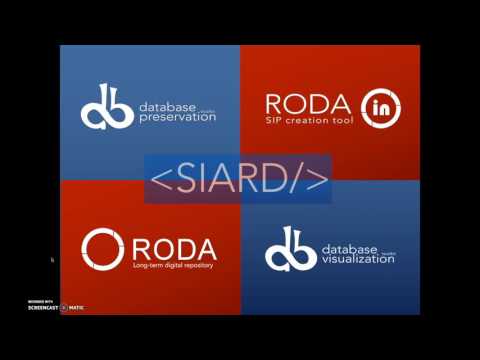
The following screencast aims to illustrate how all these tools fit together in a full-cycle archiving and preservation workflow for relational databases.
More detailed information about these tools and standards can be found on the following sections.
RODA – A digital repository made for preservation
RODA is a complete digital repository solution that delivers functionality for all the main functional units of the OAIS reference model. RODA is capable of ingesting, managing and providing access to the various types of digital content produced by large corporations or public bodies. RODA is based on open-source technologies and is supported by existing standards such as the Open Archival Information System (OAIS), Metadata Encoding and Transmission Standard (METS), Encoded Archival Description (EAD), Dublin Core (DC) and PREMIS (Preservation Metadata).
For more information please visit https://github.com/keeps/roda
RODA-in – The ultimate SIP creation tool
RODA-in is a tool specially designed for producers and archivists to create Submission Information Packages (SIP) ready to be submitted to an Open Archival Information System (OAIS). The tool creates SIPs from files and folders available on the local file system.
In version 2 we revolutionized the way SIPs are created to satisfy the need for mass processing of data. In this version you can create thousands of valid SIPs with just a few clicks, complete with data and metadata.
The tool includes features such as:
- Create, load and edit classification schemas
- Automatic association of files/folders to SIP
- Automatic association of metadata to SIP
- Definition of metadata templates
- Support for various metadata formats (EAD, DC, etc.)
- Creation of SIP of unlimited size
- Creation of SIP in various formats: BagIt and E-ARK
For more information please visit https://github.com/keeps/roda-in
Database Preservation Toolkit
The Database Preservation Toolkit allows conversion between Database formats, including connection to live systems, for purposes of digitally preserving databases. The toolkit allows conversion of live or backed-up databases into preservation formats such as SIARD, a XML-based format created for the purpose of database preservation. The toolkit also allows conversion of the preservation formats back into live systems to allow the full functionality of databases.
This toolkit was part of the RODA project and now has been released as a project by its own due to the increasing interest on this particular feature. It is now being further developed in the EARK project together with a new version of the SIARD preservation format.
The toolkit is created as a platform that uses input and output modules. Each module supports read and/or write to a particular database format or live system. New modules can easily be added by implementation of a new interface and adding of new drivers.
EARK and SIARD 2.0
A new version of the this tool, together with a new version of the SIARD preservation format, is currently being designed and developed on the EARK project. Meanwhile, if you'd like to know more and even send us use cases and requirements, contact us.
Database Visualization Toolkit
The Database Visualization Toolkit is a lightweight web viewer for relational databases, specially if preserved in SIARD 2, that uses SOLR as a backend, and allows browsing, search, and export. It uses the Database Preservation Toolkit to process new relational databases that are in the SIARD2 format or on the original live DBMS.
For more information please visit http://visualization.database-preservation.com
Requirements
To use the program, Java 21 or higher needs to be installed. Instructions on how to do this are available at https://docs.oracle.com/en/java/javase/21/install/overview-jdk-installation.html.
How to use
To use the program, open a command-line and try out the following command (replace x.y.z accordingly to the version of the binary in use):
java --add-opens java.xml/com.sun.org.apache.xerces.internal.jaxp=ALL-UNNAMED -jar "-Dfile.encoding=UTF-8" dbptk-app-X.Y.Z.jar
NOTE: Getting WARN could not get type for name javax.xml.bind.annotation.adapters.XmlAdapter from any class loader issue? See workaround.
Using this command you will be presented with the application usage, describing all supported modules and their parameters. This information is also available in the application usage page.
To use the application an input and an output module must be selected and some configuration parameters must be provided.
Supported Database Management Systems and Preservation formats
The Database Preservation Toolkit supports the following Database Management Systems:
- MySQL/MariaDB
- PostgreSQL
- Oracle
- Microsoft SQL Server
- Microsoft Access
- Progress OpenEdge
- Sybase ASA
- And other databases (using JDBC)
Database Preservation Toolkit can convert any of the above DBMS to the following preservation formats:
- SIARD 1
- SIARD 2
- SIARD DK
The Database Preservation Toolkit is also capable of loading preserved databases into any of the above DBMS.
Examples
If you want to connect to a live MySQL database and export its content to SIARD 2.0 format, you can use the following command.
java -jar "-Dfile.encoding=UTF-8" dbptk-app-x.y.z.jar migrate --import mysql --import-hostname=localhost --import-database="example_db" --import-username=username --import-password="p4ssw0rd" --export siard-2 --export-file=example.siard
Or using the equivalent short version of the parameters:
java -jar "-Dfile.encoding=UTF-8" dbptk-app-x.y.z.jar migrate -i mysql -ih localhost -idb "example_db" -iu username -ip "p4ssw0rd" -e siard-2 -ef example.siard
More examples containing only required parameters:
Oracle to SIARD 2
java -jar "-Dfile.encoding=UTF-8" dbptk-app-x.y.z.jar migrate --import oracle --import-server-name=127.0.0.1 --import-instance="instance" --import-username=username --import-password="p4ssw0rd" --import-port-number=1521 --import-accept-license --export siard-2 --export-file=example.siard
MySQL to SIARD 2
java -jar "-Dfile.encoding=UTF-8" dbptk-app-x.y.z.jar migrate --import mysql --import-hostname=localhost --import-database="example_db" --import-username=username --import-password="p4ssw0rd" --export siard-2 --export-file=example.siard
PostgreSQL to SIARD 2
java -jar "-Dfile.encoding=UTF-8" dbptk-app-x.y.z.jar migrate --import postgresql --import-hostname=localhost --import-database="example_db" --import-username=username --import-password="p4ssw0rd" --export siard-2 --export-file=example.siard
Microsoft SQL Server to SIARD 2
java -jar "-Dfile.encoding=UTF-8" dbptk-app-x.y.z.jar migrate --import microsoft-sql-server --import-server-name=localhost --import-database="example_db" --import-username=username --import-password="p4ssw0rd" --export siard-2 --export-file=example.siard
The conversion in the opposite direction is also possible, check the complete application usage to know more about the supported modules and respective configurations.
How to use JDBC import and export modules
To use Database Preservation Toolkit with an unsupported database, one can connect by providing the name of the JDBC driver class (and adding the JDBC driver to the classpath) and the JDBC connection string. The steps to run Database Preservation Toolkit this way are as follows:
- Obtain the JDBC driver for the database you want to use (this is typically a file with
jarextension). For Oracle12C this file can be downloaded from http://www.oracle.com/technetwork/database/features/jdbc/index-091264.html; - Identify the driver class. For Oracle 12C this would be something like
oracle.jdbc.driver.OracleDriver; - Prepare the connection string. For Oracle 12C this could be something like
jdbc:oracle:thin:username/password@serverName:port/database; - Run Database Preservation Toolkit by providing files to add to the classpath and the main entry point.
Please be aware that using this method the conversion quality cannot be assured, as it depends on the used driver. Furthermore, non-tested drivers are more prone to possible errors during the conversion. A specialized module for the database, if available, would always be preferable to this generic JDBC module.
Example to convert from Oracle to SIARD2:
Using the method described above, the Windows command to extract a database from an Oracle database to SIARD 2 is as the following:
java -cp "C:\path\to\dbptk-app-x.y.z.jar;C:\path\to\jdbc_driver.jar" com.databasepreservation.Main migrate --import=jdbc --import-driver=oracle.jdbc.driver.OracleDriver --import-connection="jdbc:oracle:thin:username/password@serverName:port/database" -e siard-2 -ef C:\path\to\output.siard
And on Linux the equivalent command would be (note that the jarfile separator is : instead of ;):
java -cp "/path/to/dbptk-app-x.y.z.jar:/path/to/jdbc_driver.jar" com.databasepreservation.Main migrate --import=jdbc --import-driver=oracle.jdbc.driver.OracleDriver --import-connection="jdbc:oracle:thin:username/password@serverName:port/database" -e siard-2 -ef /path/to/output.siard
Related publications & presentations
- Presentation "Database migration: CLI" by José Ramalho at "A Pratical Approach to Database Archiving", Danish National Archives, Copenhagen, Denmark, 2012-02-07.
- Presentation "RODA: a service-oriented digital repository: database archiving" by José Ramalho at "A Pratical Approach to Database Archiving", Danish National Archives, Copenhagen, Denmark, 2012-02-07.
- Presentation "RODA - Repository of Authentic Digital Objects" by Luis Faria at the International Workshop on Database Preservation, Edinburgh, 2007.
- José Carlos Ramalho, Relational database preservation through XML modelling, in proceedings of the International Workshop on Markup of Overlapping Structures (Extreme Markup 2007), Montréal, Canada, 2007.
- Marta Jacinto, Bidirectional conversion between XML documents and relational data bases, in proceedings of the International Conference on CSCW in Design, Rio de Janeiro, 2002.
- Ricardo Freitas, Significant properties in the preservation of relational databases, Springer, 2010.
Other related publications:
- Neal Fitzgerald, "Using data archiving tools to preserve archival records in business systems – a case study", in proceedings of iPRES 2013, Lisbon, 2013.
Troubleshooting
Troubleshooting information can be found in a separate Troubleshooting page.
Information & Commercial support
Database Preservation Toolkit logos can be downloaded here.
For more information or commercial support, contact KEEP SOLUTIONS.
Developers
To develop new components for DBPTK check the Developer notes which has information on:
- How to build from the source code
- How to make a new release
- How to set up the development environment
- Code structure
Questions
What is dbptk-developer?
keeps/dbptk-developer is a public repo on GitHub by keeps. DBPTK Developer - library and command-line tool for execution of database preservation actions.
Is dbptk-developer open source?
It declares the LGPL-3.0 license on GitHub.
Does dbptk-developer run on macOS, Windows or Linux?
Its maker has not tagged a system, so it is unknown here. Its README says what it needs.
How do I install dbptk-developer?
Open "Take it" on its page: Take My Repo writes an install plan for your machine and hands it to your AI agent (Claude Code, Codex or Cursor), which asks you before each step. Take My Repo has not tested it on any machine.


