

system-design-101
Explain complex systems using visuals and simple terms. Help you prepare for system design interviews.
- 91k
- 20 mo ago
Python utility for caching in Lambda Functions
Repo keithrozario/lambda-cache, read from GitHub 1 min ago. keithrozario has not joined Take My Repo.
keithrozario/lambda-cache is a public repo on GitHub by keithrozario. Python utility for caching in Lambda Functions. It declares the MIT license on GitHub. It is written mainly in Python, has 37 stars and last changed on 2020-06-24. Nobody has reviewed it on Take My Repo yet, which says nothing about its quality. Read from GitHub on 2026-11-24.
Explain complex systems using visuals and simple terms. Help you prepare for system design interviews.

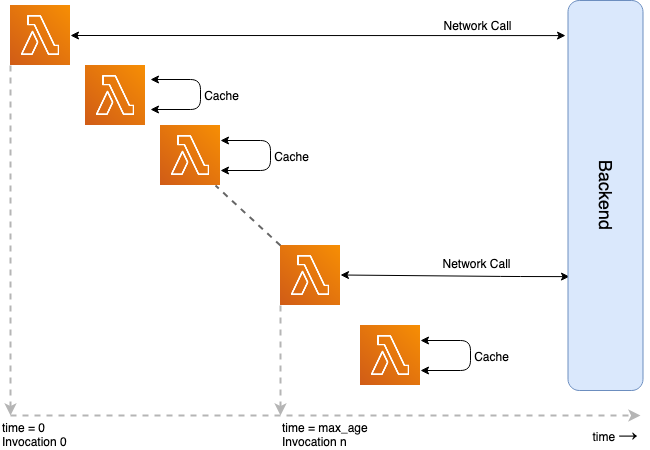
lambda-cache helps you cache data in your Lambda function from one invocation to another. It utilizes the internal memory of the lambda function's execution context to store data across multiple invocations, which:
lambda-cache is purpose-built for AWS Lambda functions, and prioritizes simplicity as our design gaol. It currently supports SSM Parameters, Secrets from Secrets Manager and S3 Objects.
Include the package in your function zip-file artifact using:
$ pip install lambda-cache -t /path/of/function
Refer to installation guide for other options.
The official user guide has more info.
To cache a parameter from ssm, decorate your handler function like so:
from lambda_cache import ssm

@ssm.cache(parameter='/production/app/var')
def handler(event, context):
    var = getattr(context,'var')
    response = do_something(var)
    return response
All invocations of this function over in the next minute will reference the parameter from the function's internal cache, rather than making a network call to ssm. After one minute has lapsed, the the next invocation will invoke get_parameter to refresh the cache. The parameter value will be injected into the context object of your lambda handler for retrieval.
The default max_age_in_seconds settings is 60 seconds (1 minute), it defines the maximum age of a parameter that is acceptable to the handler function. Cache entries older than this, will be refreshed. To set a longer cache duration (e.g 5 minutes), change the setting:
from lambda_cache import ssm

@ssm.cache(parameter='/production/app/var', max_age_in_seconds=300)
def handler(event, context):
    var = getattr(context,'var')
    response = do_something(var)
    return response
Note: The caching logic runs only at invocation, regardless of how long the function runs. A 15 minute lambda function will not refresh the parameter, unless explicitly refreshed using get_entry method (described later). The library is primary interested in caching 'across' invocations rather than 'within' an invocation
The default name of the parameter is the string after the last slash('/') character of its name. This means /production/app/var and test/app/var both resolve to just var. To over-ride this default, use the entry_name setting like so:
from lambda_cache import ssm

@ssm.cache(parameter='/production/app/var', entry_name='new_var')
def handler(event, context):
    var = getattr(context,'new_var')
    response = do_something(var)
    return response
To cache multiple entries at once, pass a list of parameters to the parameter argument. This method groups all the parameter values in one python dictionary, stored in the Lambda Context under the entry_name.
Note: When using this method, entry_name is a required parameter, if not present a NoEntryNameError exception is thrown.
from lambda_cache import ssm

@ssm.cache(parameter=['/app/var1', '/app/var2'], entry_name='parameters')
def handler(event, context):
    var1 = getattr(context,'parameters').get('var1')
    var2 = getattr(context,'parameters').get('var2')
    response = do_something(var)
    return response
Under the hood, we use the get_parameters API call for boto3, which translate to a single network call for multiple parameters. You can group all parameters types in a single call, including String, StringList and SecureString. StringList will return as a list, while all other types will return as plain-text strings. The library does not support returning SecureString parameters in encrypted form, and will only return plain-text strings regardless of String type.
Note: for this method to work, ensure you have both ssm:GetParameter and ssm:GetParameters (with the 's' at the end) in your function's permission policy
If you wish to cache multiple parameters with different expiry times, stack the decorators. In this example, var1 will be refreshed every 30 seconds, var2 will be refreshed after 60.
@ssm.cache(parameter='/production/app/var1', max_age_in_seconds=30)
@ssm.cache(parameter='/production/app/var2', max_age_in_seconds=60)
def handler(event, context):
    var1 = getattr(context,'var1')
    var2 = getattr(context,'var2')
    response = do_something(var)
    return response
Note: Decorator stacking performs one API call per decorator, which might result is slower performance
If you require a fresh value at some point of the code, you can force a refresh using the ssm.get_entry function, and setting the max_age_in_seconds argument to 0.
from lambda_cache import ssm

@ssm.cache(parameter='/prod/var')
def handler(event, context):

    if event.get('refresh'):
        # refresh parameter
        var = ssm.get_entry(parameter='/prod/var', max_age_in_seconds=0)
    else:
        var = getattr(context,'var')

    response = do_something(var)
    return response
You may also use ssm.get_entry to get a parameter entry from anywhere in your functions code.
To only get parameter once in the lifetime of the function, set max_age_in_seconds to some arbitary large number ~36000 (10 hours).
Caching supports String, SecureString and StringList parameters with no change required (ensure you have kms:Decrypt permission for SecureString). For simplicity, StringList parameters are automatically converted into list (delimited by comma), while String and SecureString both return the single string value of the parameter.
Secret support is similar, but uses the secret.cache decorator.
from lambda_cache import secrets_manager

@secrets_manager.cache(name='/prod/db/conn_string')
def handler(event, context):
    conn_string = getattr(context,'conn_string')
    return context
The default max_age_in_seconds settings is 60 seconds (1 minute), it defines how long a parameter should be kept in cache before it is refreshed from ssm. To configure longer or shorter times, modify this argument like so:
from lambda_cache import secrets_manager

@secrets_manager.cache(name='/prod/db/conn_string', max_age_in_seconds=300)
def handler(event, context):
    var = getattr(context,'conn_string')
    response = do_something(var)
    return response
Note: The caching logic runs only at invocation, regardless of how long the function runs. A 15 minute lambda function will not refresh the parameter, unless explicitly refreshed using get_cache_ssm. The library is primary interested in caching 'across' invocation rather than 'within' an invocation
The name of the secret is simply shortened to the string after the last slash('/') character of the secret's name. This means /prod/db/conn_string and /test/db/conn_string resolve to just conn_string. To over-ride this default, use entry_name:
from lambda_cache import secrets_manager

@secrets_manager.cache(name='/prod/db/conn_string', entry_name='new_var')
def handler(event, context):
    var = getattr(context,'new_var')
    response = do_something(var)
    return response
If you wish to cache multiple secrets, you can use decorator stacking.
@secrets_manager.cache(name='/prod/db/conn_string', max_age_in_seconds=30)
@secrets_manager.cache(name='/prod/app/elk_username_password', max_age_in_seconds=60)
def handler(event, context):
    var1 = getattr(context,'conn_string')
    var2 = getattr(context,'elk_username_password')
    response = do_something(var)
    return response
Note: Decorator stacking performs one API call per decorator, which might result is slower performance.
To invalidate a secret, use the get_entry, setting the max_age_in_seconds=0.
keithrozario/lambda-cache is a public repo on GitHub by keithrozario. Python utility for caching in Lambda Functions.
It declares the MIT license on GitHub.
Its maker has not tagged a system, so it is unknown here. Its README says what it needs.
Open "Take it" on its page: Take My Repo writes an install plan for your machine and hands it to your AI agent (Claude Code, Codex or Cursor), which asks you before each step. Take My Repo has not tested it on any machine.
⚡ Serverless Framework – Effortlessly build apps that auto-scale, incur zero costs when idle, and require minimal maintenance using AWS Lambda and other managed cloud services.
Linux, Jenkins, AWS, SRE, Prometheus, Docker, Python, Ansible, Git, Kubernetes, Terraform, OpenStack, SQL, NoSQL, Azure, GCP, DNS, Elastic, Network, Virtualization. DevOps Interview Questions
Enhanced ChatGPT Clone: Features Agents, MCP, Skills, DeepSeek, Anthropic, AWS, OpenAI, Responses API, Azure, Groq, o1, GPT-5, Mistral, OpenRouter, Vertex AI, Gemini, Artifacts, AI model switching, message search, Code Interpreter, langchain, DALL-E-3, OpenAPI Actions, Functions, Secure Multi-User Auth, Presets, open-source for self-hosting. Active
Its last change on GitHub was on 2020-06-24. GitHub counts 2 open issues and pull requests. Take My Repo does not judge from that whether it is maintained.
Nobody has reviewed it on Take My Repo yet, which says nothing about its quality.
Take My Repo cannot say: it does not audit code and has not run lambda-cache. What is known comes from GitHub. It declares the MIT license on GitHub. Its last change was on 2020-06-24. It has 37 stars, which measure popularity, not safety. Nobody has reviewed it on Take My Repo yet, which says nothing about its quality. Read the source before you run it. With "Take it", your AI agent shows each step and asks you before running it; README text is treated as data, not as instructions.


