holderbot
A powerful Telegram bot for managing multiple VPN panels with advanced features and ease of use.
- 338
- Python
- 18 mo ago
Telegram bot to monitor uptime, power-control (start/stop/reboot), and track balances & costs of your Vultr, Hetzner & AWS cloud servers — 24/7, multi-account, EN/RU/UK/ES.
Repo kirillDevPro/cloud-control-bot, read from GitHub 3 min ago. kirillDevPro has not joined Take My Repo.
kirillDevPro/cloud-control-bot is a public repo on GitHub by kirillDevPro. Telegram bot to monitor uptime, power-control (start/stop/reboot), and track balances & costs of your Vultr, Hetzner & AWS cloud servers — 24/7, multi-account, EN/RU/UK/ES. It declares no license on GitHub. Public does not mean open source: without a license, nobody is granted the right to reuse it. It is written mainly in Python, has 36 stars and last changed on 2026-11-23. Nobody has reviewed it on Take My Repo yet, which says nothing about its quality. Read from GitHub on 2026-11-23.
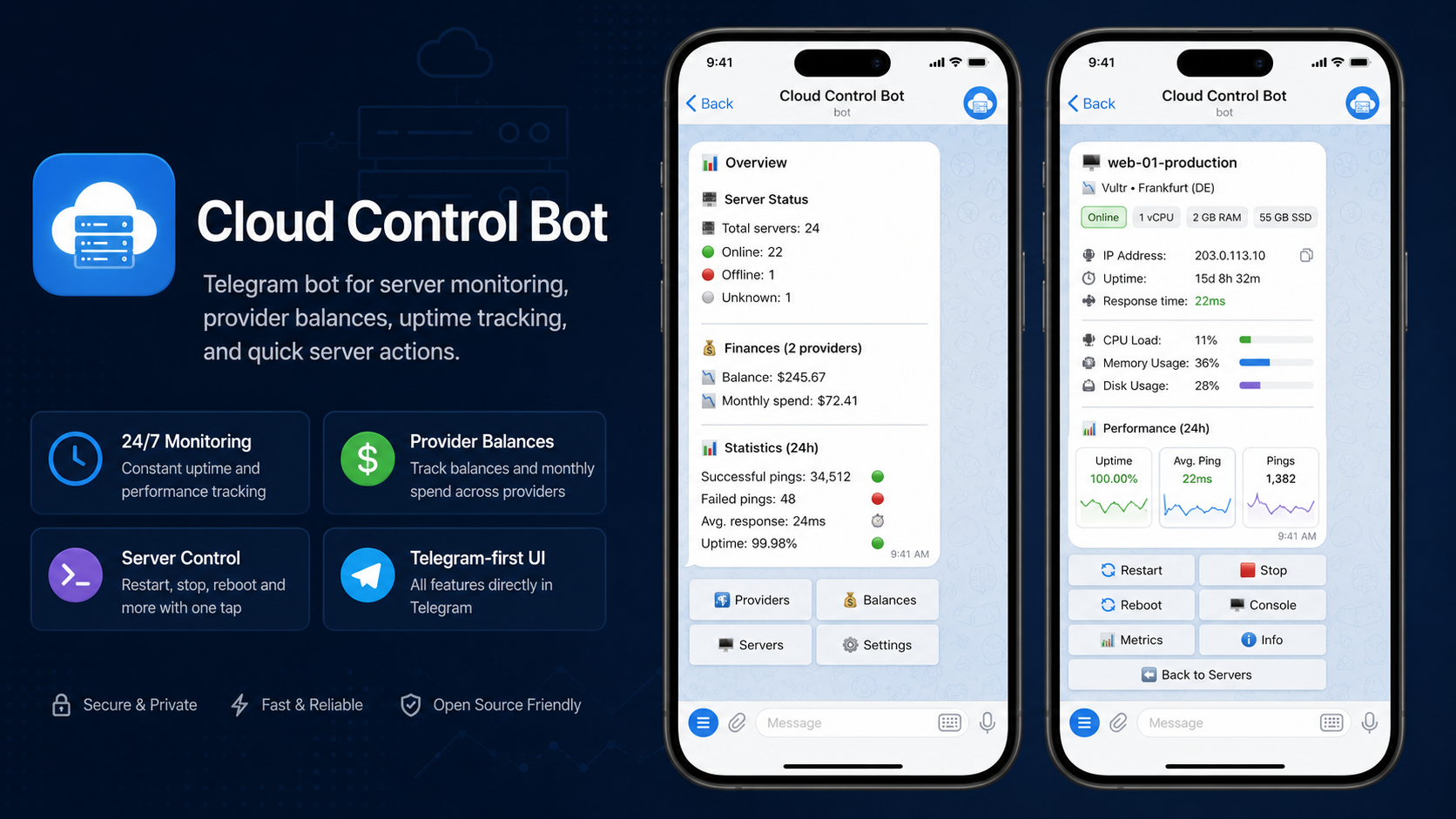
Monitor uptime, power-control, and track costs of your cloud servers — all from Telegram. Vultr · Hetzner · AWS
Features · Providers · Installation · Configuration · Running · Windows · Deployment · Adding a provider · Development · Troubleshooting
A Telegram bot to monitor, power-manage, and track the cost of your cloud servers across Vultr, Hetzner, and AWS. It watches your instances around the clock via ICMP ping (plus optional per-server TCP, HTTP, and SSL-certificate checks), alerts you the moment one goes down (or comes back), lets you start / stop / reboot servers straight from chat, and keeps an eye on provider balances and costs.
Built on aiogram 3.x, with one isolated worker process per server, supervised background tasks, and heartbeat-based stall detection for unattended 24/7 operation.
The bot's user-facing text is available in English, Russian, Ukrainian, and Spanish — default English, with each user picking their language in Settings (or
/language). The code, docstrings, and this documentation are in English.
Maintained and in daily production use. A working check runs every week against a live deployment; rare commits mean the bot is stable, not abandoned.
Verified working: 2026-11-20
| Provider | Instances | Balance / cost | Graceful shutdown |
|---|---|---|---|
| Vultr | Cloud Compute | Prepaid balance | No |
| Hetzner | Cloud | Postpaid (no balance API) | Yes |
| AWS | EC2 + Lightsail | Postpaid (AWS Cost Explorer) | EC2 only |
main.py (main process)
|
+-- ApplicationContainer (DI: settings -> repos -> providers -> PingManager -> bot)
|
+-- PingManager
|   +-- one worker process per enabled server
|   +-- ping_results_queue   (IPC Queue: results -> main process)
|   +-- shared_state         (DictProxy: current status sync)
|
+-- up to 6 supervised background tasks
|   +-- ping_results_processor  reads the queue, writes SQLite, sends notifications
|   +-- balance_checker         polls balances, alerts below threshold (only if a provider exposes balance)
|   +-- servers_sync_task       syncs the server list with provider APIs
|   +-- workers_health_task     monitors + reconciles worker processes
|   +-- log_cleanup_task        removes rotated logs
|   +-- service_checks_task     runs per-server TCP/HTTP/SSL checks (main process), writes SQLite, alerts
|
+-- supervisor + heartbeat registry
|   crash -> CRITICAL log + alert + recreate; stale heartbeat -> alert
|
+-- Telegram bot (aiogram polling)
Servers are identified by a composite key f"{provider_alias}:{server_id}"
(e.g. hetzner_prod:12345, aws_main:us-east-1:i-0123456789abcdef), which keeps
instances from different accounts and regions cleanly separated.
src/
+-- config/          settings (Pydantic), config.yaml, provider auto-discovery
+-- providers/       BaseProvider + Vultr / Hetzner / AWS, factory, manager, mixins
+-- monitoring/      PingManager and the per-server ping worker
+-- checks/          TCP / HTTP / SSL service-check runners + address-validation chokepoint
+-- background_tasks/ ping processor, balance checker, sync, health, service checks, supervisor, heartbeat
+-- bot/             routers, formatters, keyboards, middlewares, notifications, utils
+-- storage/         JSON + SQLite repositories (servers, balance, statistics)
+-- models/          Server, Provider, PingResult, billing models
+-- utils/           logging, log cleanup
+-- container.py     application container / wiring
+-- exceptions.py    typed exception hierarchy
main.py              entry point
CAP_NET_RAW capability:sudo setcap cap_net_raw+ep $(readlink -f $(which python3)). Note a setcap grant
is invalidated whenever the interpreter is replaced (a pip/apt upgrade or venv
rebuild) and applies to every script that interpreter runs — for a real deployment
prefer the scoped capability of the Docker (cap_add: NET_RAW) or
systemd (AmbientCapabilities=CAP_NET_RAW) setups below.git clone https://github.com/kirillDevPro/cloud-control-bot.git
cd cloud-control-bot
python -m venv venv
# Linux/macOS:
source venv/bin/activate
# Windows (PowerShell):
.\venv\Scripts\Activate.ps1
# Windows (Git Bash):
source venv/Scripts/activate
pip install -r requirements.txt
Configuration comes from two sources, with the following priority:
environment variables (.env) > src/config/config.yaml > built-in defaults
.envCopy the template and fill it in:
cp .env.example .env
TELEGRAM_BOT_TOKEN=123456:your-bot-token   # from @BotFather
ADMIN_IDS=123456789                         # Telegram user IDs, comma-separated

# Providers are auto-discovered from variable names:
HETZNER_PROD_API_KEY=...        # -> alias "hetzner_prod"
VULTR_MAIN_API_KEY=...           # -> alias "vultr_main"
AWS_MAIN_ACCESS_KEY_ID=...       # -> alias "aws_main" (both AWS keys required)
AWS_MAIN_SECRET_ACCESS_KEY=...
The bot detects providers from the shape of your environment variables — there is no provider list to maintain by hand:
| Pattern | Resulting alias |
|---|---|
HETZNER_{SUFFIX}_API_KEY |
hetzner_{suffix} |
VULTR_{SUFFIX}_API_KEY |
vultr_{suffix} |
AWS_{SUFFIX}_ACCESS_KEY_ID + AWS_{SUFFIX}_SECRET_ACCESS_KEY |
aws_{suffix} |
{SUFFIX} matches [A-Z0-9_]+ (the full pattern is e.g. ^HETZNER_([A-Z0-9_]+)_API_KEY$).
The display name is generated automatically: Hetzner (prod), Vultr, AWS (prod), etc.
The suffix main is hidden, so VULTR_MAIN_API_KEY simply shows as Vultr. Add a second
account by adding another suffix, e.g. HETZNER_STAGING_API_KEY.
src/config/config.yamlPing intervals, balance threshold, sync interval, and log level:
monitoring:
  ping_interval: 60     # seconds between pings (10-3600)
  ping_timeout: 5       # ping timeout in seconds (1-30)
  ping_attempts: 3      # attempts before marking offline (1-10)
balance:
  threshold: 2000.0     # low-balance alert threshold (USD)
  check_interval: 10800 # balance poll interval (seconds)
sync:
  servers_interval: 600  # server-list sync interval (seconds)
  max_removal_ratio: 0.3 # share of a provider's fleet whose simultaneous disappearance
                         # must be confirmed by a second sync cycle before removal (0-1)
stats:
  retention_days: 30     # rolling statistics window in days (1-365)
  deleted_grace_days: 7  # keep a removed server's statistics this long, so a server
                         # that reappears keeps its history (1-90)
checks:                 # per-server TCP/HTTP/SSL service checks
  interval: 60          # default TCP/HTTP check interval in seconds (10-3600)
  tcp_timeout: 5        # TCP connect-check timeout in seconds (1-60)
  http_timeout: 10      # HTTP endpoint-check timeout in seconds (1-60)
  ssl_interval: 21600   # SSL expiry-check interval in seconds (3600-86400)
  ssl_warn_days: 14     # default days-before-expiry to start warning (1-365)
logging:
  level: INFO           # DEBUG, INFO, WARNING, ERROR, CRITICAL
python main.py

# with debug logging:
LOG_LEVEL=DEBUG python main.py
In Telegram, open the bot and use /start. The main menu exposes Monitoring,
Management, and Balance. Only the user IDs listed in ADMIN_IDS are allowed in.
Per-server TCP/HTTP/SSL service checks are configured from a server's control screen
(Servers → pick a server → Checks), and apply on the next cycle with no restart.
Runtime data lives in data/ (server cache, balance history, SQLite statistics, callback
cache) and logs in logs/ — both are gitignored and safe to delete to reset state.
The bot runs on Windows Server 2016 and newer (2019 / 2022 / 2025) and Windows 10 / 11 —
anything Python 3.12+ installs on. There is no separate Windows build; python main.py is identical
on every platform, and multiprocessing uses the native spawn start method.
One Windows-specific requirement: run it as Administrator. ICMP ping uses raw sockets, which on Windows are only available to elevated processes. Without admin rights every ping fails and all servers are reported offline. Start an elevated terminal ("Run as administrator"), then:
.\venv\Scripts\Activate.ps1
python main.py
For unattended 24/7 operation, register it as a Windows service that restarts on crash and runs elevated — Task Scheduler (built in: Run with highest privileges + Run whether user is logged on or not) or a service wrapper such as NSSM both work.
For unattended operation, run the bot under a process manager that restarts it on
crash — the in-app supervisor only restarts background tasks, not the main.py
process itself.
cp .env.example .env   # fill in your tokens/keys
docker compose up -d --build
docker compose logs -f
The provided docker-compose.yml reads secrets from .env, runs the process
unprivileged with only CAP_NET_RAW (for ICMP), persists data/ and logs/ in named
volumes, and restarts automatically (restart: unless-stopped).
A sample unit lives at deploy/cloud-control-bot.service.
It restarts the process on failure and grants CAP_NET_RAW via AmbientCapabilities
(no setcap needed). Adjust the paths/user, then:
sudo cp deploy/cloud-control-bot.service /etc/systemd/system/
sudo systemctl daemon-reload
sudo systemctl enable --now cloud-control-bot
journalctl -u cloud-control-bot -f
BaseProvider, RetryMixin, HttpClientMixin in src/providers/.get_servers(), start_server(), stop_server(), reboot_server(),
shutdown_server(), and optionally get_balance().ProviderType enum (src/models/provider.py) and register it in
ProviderFactory (src/providers/factory.py).src/config/provider_discovery.py.Install the pinned dev tools (ruff, mypy):
pip install -r requirements-dev.txt
Then run the same checks CI runs (ruff/mypy configured in pyproject.toml):
ruff check src main.py scripts/check_i18n_locales.py
mypy src main.py scripts/check_i18n_locales.py
python scripts/check_i18n_locales.py   # EN/RU/UK/ES locale parity
All three run automatically in CI on every push and pull request, across Linux and Windows on Python 3.12 and 3.13.
PermissionError / "Operation not permitted" on ping, or every server shows
offline. The process lacks raw-socket privileges — see
Requirements (Linux setcap / CAP_NET_RAW, Windows Administrator).ADMIN_IDS.
Get your ID from @userinfobot and add it (comma-separated)
in .env, then restart.*_API_KEY,
AWS needs both *_ACCESS_KEY_ID and *_SECRET_ACCESS_KEY for the same suffix
(see Provider auto-discovery).Issues and pull requests are welcome. Please run ruff and mypy before opening a PR and
keep the existing conventions: code, docstrings, and comments in English; user-facing
strings go through the i18n catalog (src/bot/i18n/locales/) — English (en.py) is the
source of truth, Russian, Ukrainian, and Spanish are translations of it, never hard-code a UI string.
Adding a new message means adding it to every locale (the python scripts/check_i18n_locales.py
parity check, which CI runs, fails otherwise).
The bot holds cloud-provider API keys and can power-manage live servers. See SECURITY.md for the disclosure process and operator hardening notes.
Source-available under the PolyForm Noncommercial License 1.0.0 — not an OSI open-source license. You may install, run, and modify this bot for noncommercial purposes only: personal, educational, research, or other non-profit use. Commercial use is not permitted.
kirillDevPro/cloud-control-bot is a public repo on GitHub by kirillDevPro. Telegram bot to monitor uptime, power-control (start/stop/reboot), and track balances & costs of your Vultr, Hetzner & AWS cloud servers — 24/7, multi-account, EN/RU/UK/ES.
It declares no license on GitHub. Public does not mean open source: without a license, nobody is granted the right to reuse it.
Its maker has not tagged a system, so it is unknown here. Its README says what it needs.
Open "Take it" on its page: Take My Repo writes an install plan for your machine and hands it to your AI agent (Claude Code, Codex or Cursor), which asks you before each step. Take My Repo has not tested it on any machine.
Its last change on GitHub was on 2026-11-23. Take My Repo does not judge from that whether it is maintained.
A powerful Telegram bot for managing multiple VPN panels with advanced features and ease of use.
Nobody has reviewed it on Take My Repo yet, which says nothing about its quality.
Explain complex systems using visuals and simple terms. Help you prepare for system design interviews.
Terraform enables you to safely and predictably create, change, and improve infrastructure. It is a source-available tool that codifies APIs into declarative configuration files that can be shared amongst team members, treated as code, edited, reviewed, and versioned.
A collection of inspiring lists, manuals, cheatsheets, blogs, hacks, one-liners, cli/web tools and more.
π RuView turns commodity WiFi signals into real-time spatial intelligence, vital sign monitoring, and presence detection — all without a single pixel of video.
Source-available (personal use only, no redistribution) Chrome MV3 extension that auto-refreshes tabs on a schedule - per tab, in bulk, or by URL pattern.
Source-available (personal use only, no redistribution) Chrome MV3 extension that auto-skips SponsorBlock community segments on YouTube.