
KHGradientTextView
Static and animated gradients inside real UIKit text, with native wrapping and automatic display-link management.
- 1
- 9 d ago
Repo kylehowells/KHGradientTextView, read from GitHub 17 min ago. kylehowells has not joined Take My Repo.
In short
kylehowells/KHGradientTextView is a public repo on GitHub by kylehowells. Static and animated gradients inside real UIKit text, with native wrapping and automatic display-link management. It declares no license on GitHub. Public does not mean open source: without a license, nobody is granted the right to reuse it. It is written mainly in Swift, has 1 stars and last changed on 2026-11-15. Nobody has reviewed it on Take My Repo yet, which says nothing about its quality. Read from GitHub on 2026-11-24.
KHGradientTextView
Static and animated gradients inside real UIKit text. Apply one attributed-string attribute to a word or phrase; the text view handles drawing and animation automatically.
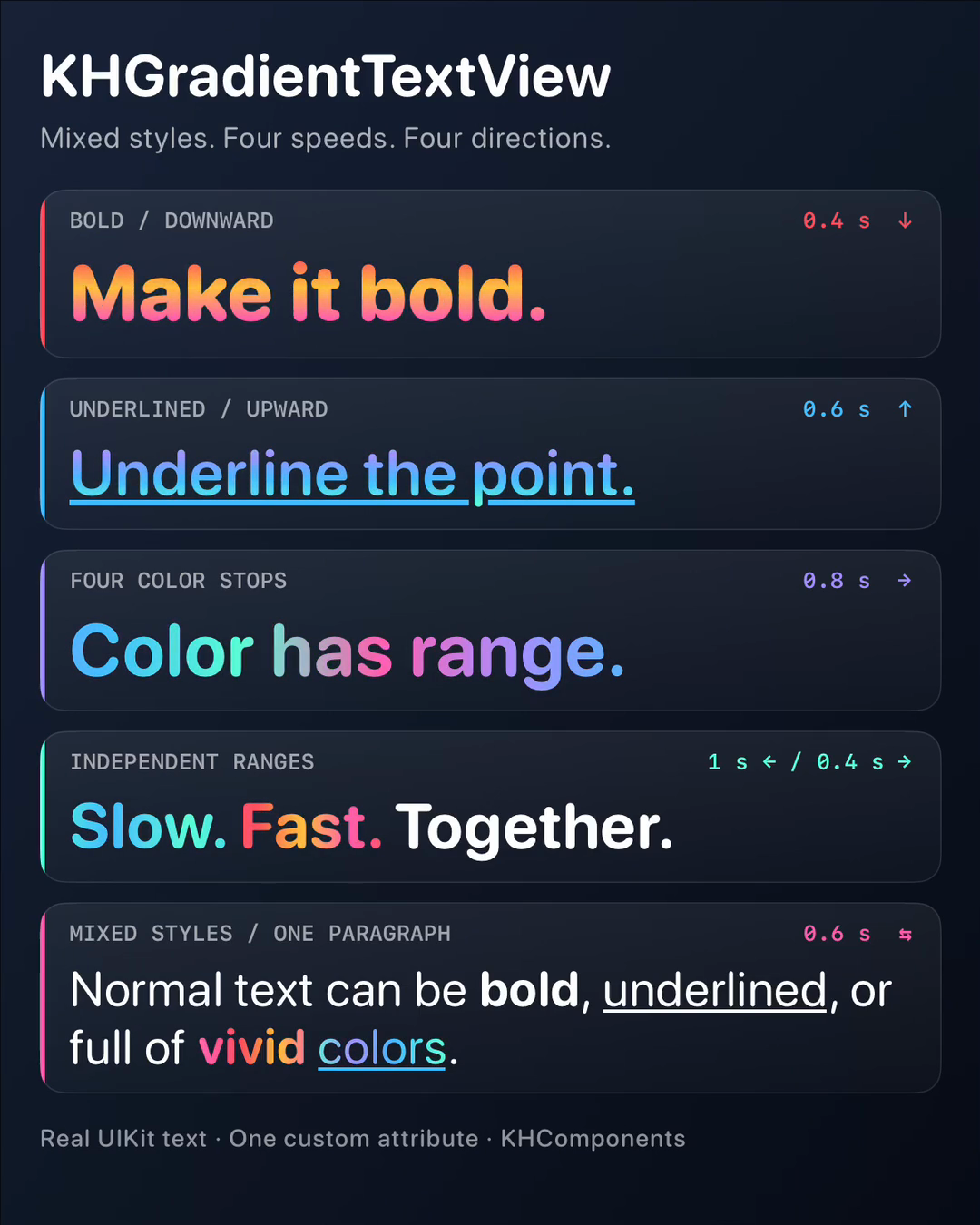
- Horizontal and vertical fills, with all four animation directions.
- Independent palettes, speeds and directions for different ranges.
- Native TextKit layout, wrapping, baselines, selection and accessibility.
- Dynamic colors, native color emoji, bold text and ordinary UIKit underlines.
- A display link only while animated content and the view's environment require it.
- No third-party dependencies or private UIKit extensions.
Requires iOS 16 or Mac Catalyst 16 and Swift 5.9 or later.
Install
In Xcode, choose File → Add Package Dependencies and enter:
https://github.com/kylehowells/KHGradientTextView
Select version 1.0.0 or later and add the KHGradientTextView product to your app target.
For a Swift package:
.package(url: "https://github.com/kylehowells/KHGradientTextView", from: "1.0.0")
Add "KHGradientTextView" to your target's dependencies. You can also copy the three files in Sources/KHGradientTextView directly into an app, retaining the licence notices.
Usage
import UIKit
import KHGradientTextView

let text: NSMutableAttributedString = .init(
	string: "Watch vivid flowing colors move.",
	attributes: [
		.font: UIFont.preferredFont(forTextStyle: .body),
		.foregroundColor: UIColor.label
	]
)
let gradient: KHTextGradient = .init(
	colors: [.systemPink, .systemIndigo, .systemTeal],
	duration: 0.8,
	animationDirection: .leftToRight
)
text.addAttribute(
	.khTextGradient,
	value: gradient,
	range: (text.string as NSString).range(of: "vivid flowing colors")
)

let textView: KHGradientTextView = .init()
textView.adjustsFontForContentSizeCategory = true
textView.attributedText = text
Use NSString ranges because attributed strings use UTF-16 offsets. Retain .font for layout and .foregroundColor as the fallback in renderers such as UILabel that do not understand the custom attribute.
Add the view to your view hierarchy and assign its frame in layoutSubviews() or your controller's viewDidLayoutSubviews(). Measure its height with sizeThatFits(CGSize(width: availableWidth, height: .greatestFiniteMagnitude)). It defaults to a clear background, zero text insets and line-fragment padding, disabled editing, and disabled scrolling. UIKit owns text measurement and scroll-view geometry.
Configuration
KHTextGradient is immutable and may be shared between ranges:
let staticVertical: KHTextGradient = .init(
	colors: [.systemOrange, .systemPink],
	isAnimated: false,
	animationDirection: .topToBottom
)
let upward: KHTextGradient = .init(
	colors: [.systemTeal, .systemIndigo],
	duration: 0.6,
	animationDirection: .bottomToTop
)
| Property | Behavior |
|---|---|
colors |
Evenly spaced stops. Empty uses the foreground color; one color gives a solid fill. |
isAnimated |
Defaults to true. Identical colors remain static. |
duration |
Seconds per complete loop; defaults to 2. Nonpositive/nonfinite values are static. |
animationDirection |
.leftToRight, .rightToLeft (default), .topToBottom, .bottomToTop. |
textView.isAnimationEnabled |
Pause/resume the view while preserving its phase. |
textView.hasAnimatedText |
Whether valid animated attributes cover non-whitespace content. |
textView.isAnimating |
Whether a display link is running. |
Static palette order is left-to-right or top-to-bottom. Reversing travel direction changes animation, not the static palette order. A gradient restarts on each wrapped line fragment. Mixed font runs share stable gradient geometry on that line.
The display link is released for static content, disabled animation, detachment from a window, a hidden/transparent view, an inactive app, or Reduce Motion. Screens with additional visibility policies (for example an off-screen page or cell) can set isAnimationEnabled themselves. Use UIKit and this component on the main thread.
Color emoji retain native rendering. Underlines use UIKit's normal drawing, rather than a gradient fill. Animated text invalidates the text view's display each frame; profile large documents or many simultaneous instances.
How it works
TextKit lays out the text normally. For a gradient-attributed glyph run, the renderer saves the graphics state, draws the glyphs into a temporary clipping region, paints the gradient through that stencil, and restores the state before continuing with ordinary text. The letters remain fixed as the gradient endpoints move. A closed, repeated palette makes each loop continuous.
Read the component article and the step-by-step technique.
The source includes a SwiftUI preview. Open the package in Xcode and select KHGradientTextView.swift to preview a wrapped vertical gradient.
Verification
This is a UIKit package; run tests on an iOS Simulator, not host-side swift test:
xcodebuild -scheme KHGradientTextView -destination 'generic/platform=iOS Simulator' build
xcodebuild test -scheme KHGradientTextView -destination 'platform=iOS Simulator,name=iPhone 17 Pro'
The tests cover wrapping and measurement against UIKit, mixed fonts, partial redraws, all animation directions, loop boundaries, independent speeds, emoji, dynamic colors and display-link lifetime.
Licence
Copyright © 2026 Kyle Howells. Available under your choice of the MIT licence or Apache License 2.0, matching KHMeshGradient.
Questions
What is KHGradientTextView?
kylehowells/KHGradientTextView is a public repo on GitHub by kylehowells. Static and animated gradients inside real UIKit text, with native wrapping and automatic display-link management.
Is KHGradientTextView open source?
It declares no license on GitHub. Public does not mean open source: without a license, nobody is granted the right to reuse it.
Does KHGradientTextView run on macOS, Windows or Linux?
Its maker has not tagged a system, so it is unknown here. Its README says what it needs.