
KHMeshGradient
A Metal-backed UIKit mesh gradient view with native animation support for iOS 15 and later.
- 3
- 7 wk ago
Repo kylehowells/KHMeshGradient, read from GitHub 27 min ago. kylehowells has not joined Take My Repo.
In short
kylehowells/KHMeshGradient is a public repo on GitHub by kylehowells. A Metal-backed UIKit mesh gradient view with native animation support for iOS 15 and later. It declares no license on GitHub. Public does not mean open source: without a license, nobody is granted the right to reuse it. It is written mainly in Swift, has 3 stars and last changed on 2026-10-08. Nobody has reviewed it on Take My Repo yet, which says nothing about its quality. Read from GitHub on 2026-11-24.
KHMeshGradient
A Metal-backed, UIKit-native mesh gradient view for iOS 15 and later.
KHMeshGradientView uses UIKit properties, Core Animation interpolation, and a
custom CAMetalLayer. It does not wrap SwiftUI or require iOS 18. There are no
external package dependencies.
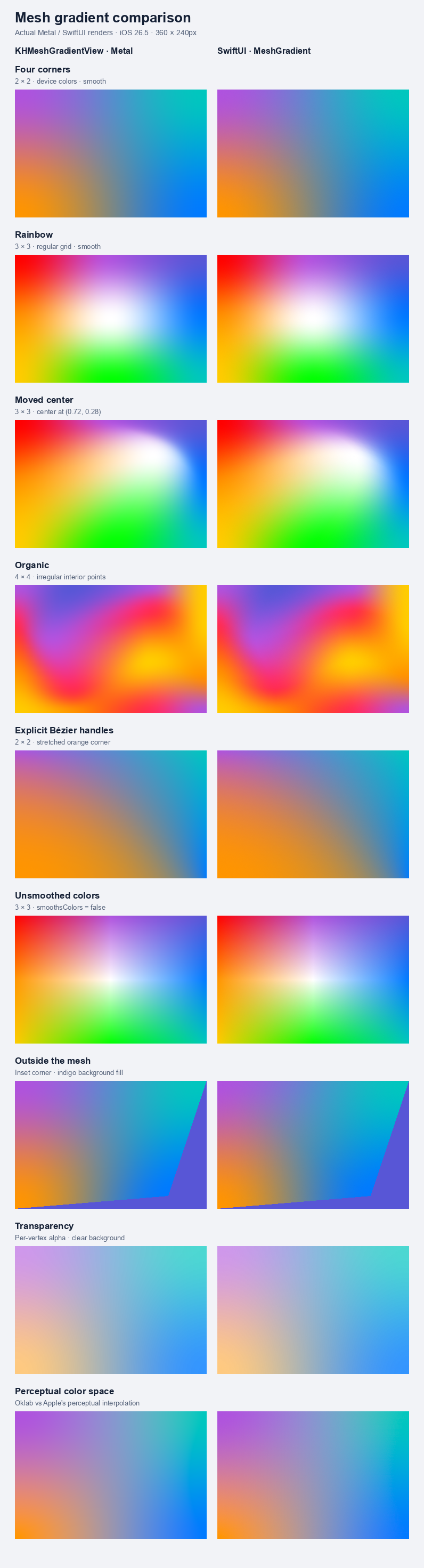
Requirements
- iOS 15+ / Mac Catalyst 15+
- Swift 5.9+ and an Apple SDK with UIKit and Metal
- A Metal-capable device or Simulator
- The example's SwiftUI reference panels require iOS 18+. The UIKit panels work on older systems.
The package builds for a deployment target of iOS 15. All 31 tests pass on iOS 18.2 and 26.5 Simulator and a physical M1 iPad Pro running iPadOS 18.6. Release device and Mac Catalyst arm64/x86_64 builds pass. The gallery comparisons were captured on iOS 26.5 Simulator; the geometry comparison matrix and performance measurements use the physical iPad. Pre-iOS-18 runtime testing remains to be done. See verification details.
Installation
Swift Package Manager
Add https://github.com/kylehowells/KHMeshGradient.git through Xcode's
File → Add Package Dependencies, select the main branch, and add the
KHMeshGradient product. There is no versioned release yet.
For a Swift package, add the dependency and product to your Package.swift:
// In Package.dependencies:
.package(
	url: "https://github.com/kylehowells/KHMeshGradient.git",
	branch: "main"
),

// In your target's dependencies:
.product(name: "KHMeshGradient", package: "KHMeshGradient"),
For local development, add this folder as a local package in Xcode, or use
.package(path: "../KHMeshGradient") in your package dependencies. After a release
is tagged, prefer a version requirement over the moving main branch.
Import the module wherever you use the view:
import KHMeshGradient
Basic usage
import KHMeshGradient
import UIKit

// Inside your UIView subclass:
let gradientView: KHMeshGradientView = KHMeshGradientView()
gradientView.meshSize = KHMeshGradientView.MeshSize(width: 3, height: 3)
gradientView.points = [
	CGPoint(x: 0, y: 0), CGPoint(x: 0.5, y: 0), CGPoint(x: 1, y: 0),
	CGPoint(x: 0, y: 0.5), CGPoint(x: 0.5, y: 0.5), CGPoint(x: 1, y: 0.5),
	CGPoint(x: 0, y: 1), CGPoint(x: 0.5, y: 1), CGPoint(x: 1, y: 1),
]
gradientView.colors = [
	.red, .systemPurple, .systemIndigo,
	.systemOrange, .white, .systemBlue,
	.systemYellow, .systemGreen, .systemMint,
]
gradientView.smoothsColors = true
gradientView.colorSpace = .device
gradientView.layer.cornerRadius = 20
gradientView.clipsToBounds = true
self.addSubview(gradientView)

// Assign its frame in your view's layoutSubviews().
Positions and colors are row-major arrays with width × height elements.
Coordinates are normalized: (0, 0) is the top-left and (1, 1) is the
bottom-right. Coordinates outside that range are allowed. Keep rows and columns
ordered for an ordinary non-folded mesh. Folded patches are rendered, but their
overlap/compositing is not guaranteed to match SwiftUI.
Sequential configuration is supported. An incomplete or invalid configuration
clears the mesh and sets configurationError; it does not crash. Maximum grid
size is 4096 vertices. The default is a transparent 2 × 2 grid.
Explicit Bézier handles
Start with generated handles and edit them, or provide an entirely custom array:
var vertices: [KHMeshGradientView.BezierPoint] = gradientView.resolvedBezierPoints
vertices[4].trailingControlPoint = CGPoint(x: 0.9, y: 0.35)
gradientView.bezierPoints = vertices
Each BezierPoint contains position, leadingControlPoint, topControlPoint,
trailingControlPoint, and bottomControlPoint. Handles are absolute normalized
coordinates, not offsets. Handles pointing outside the grid are unused.
Setting points clears bezierPoints and returns to automatic geometry. Setting
bezierPoints = nil also returns to automatic geometry using the current points.
Color and background options
| Property | Behavior |
|---|---|
colors |
UIKit colors, including dynamic colors resolved against view traits |
resolvedColors |
Optional [CGColor]; selects already-resolved colors |
meshBackgroundColor |
Fills pixels outside the mesh only; defaults to clear |
backgroundColor |
Ordinary UIView background, visible through mesh transparency |
smoothsColors |
Cubic interpolation when true; bilinear colors when false |
colorSpace |
.device (encoded sRGB), .perceptual (Oklab), or .linear (linear-light sRGB) |
Setting colors clears resolvedColors. Setting resolvedColors = nil selects
UIKit colors again. Trait changes re-resolve dynamic colors without animation.
Color interpolation uses premultiplied alpha. Output is 8-bit sRGB; wide-gamut
inputs are converted to sRGB and out-of-gamut output is clipped. HDR output is not implemented.
Animation
UIView.animate(
	withDuration: 1.5,
	delay: 0,
	options: [.curveEaseInOut, .beginFromCurrentState],
	animations: {
		gradientView.points[4] = CGPoint(x: 0.7, y: 0.3)
		gradientView.colors[4] = .systemPink
	},
	completion: nil
)
Point positions, explicit handles, vertex colors, and meshBackgroundColor
animate with ordinary UIView.animate blocks, including UIKit springs. Arrays
must retain their topology. Grid dimensions, interpolation mode, and debug mode
change immediately. Interruption starts from presentation values.
UIViewPropertyAnimator also supports mesh properties, including pause, scrub,
resume, reversal, springs, and finishing at .start, .current, or .end:
let animator = UIViewPropertyAnimator(duration: 2, curve: .easeInOut, animations: {
	gradientView.points[4] = CGPoint(x: 0.7, y: 0.3)
	gradientView.colors[4] = .systemPink
})
animator.startAnimation()
animator.pauseAnimation()
animator.fractionComplete = 0.5 // For example, driven by a UISlider.
animator.continueAnimation(withTimingParameters: nil, durationFactor: 1)
The example gallery's Scrub UIKit slider and Resume button exercise this path. Paused animators skip GPU submissions until their presentation values change. Finishing at the start/current position also updates the view's model configuration.
The bridge uses public Core Animation hooks, without private selectors or runtime introspection. UIKit's internal action/registration behavior is undocumented; interactive support is verified on iOS 18.2/26.5 Simulator and a physical iPad running iPadOS 18.6, with regression tests in the example scheme. The package still targets iOS 15, but earlier runtimes have not been verified.
Rendering and debugging
No timer or permanent display link runs. Core Animation drives redisplay while mesh properties animate. Dirty views share a command buffer, and compatible drawable sizes share render passes with up to eight independent targets. Indexed triangles and reusable upload buffers avoid duplicated work. Geometry density adapts to curvature and framebuffer size; cubic color is evaluated per pixel. Unchanged snapshots skip GPU submission. A static mesh keeps its last submitted image and does no recurring rendering work.
gradientView.debugMode = .mesh          // Patch edges and vertex markers
gradientView.debugMode = .controlPoints // Also show Bézier handles
gradientView.debugMode = .tessellation  // Actual selected triangle grid
gradientView.debugMode = .none

gradientView.isRenderingSuspended = true
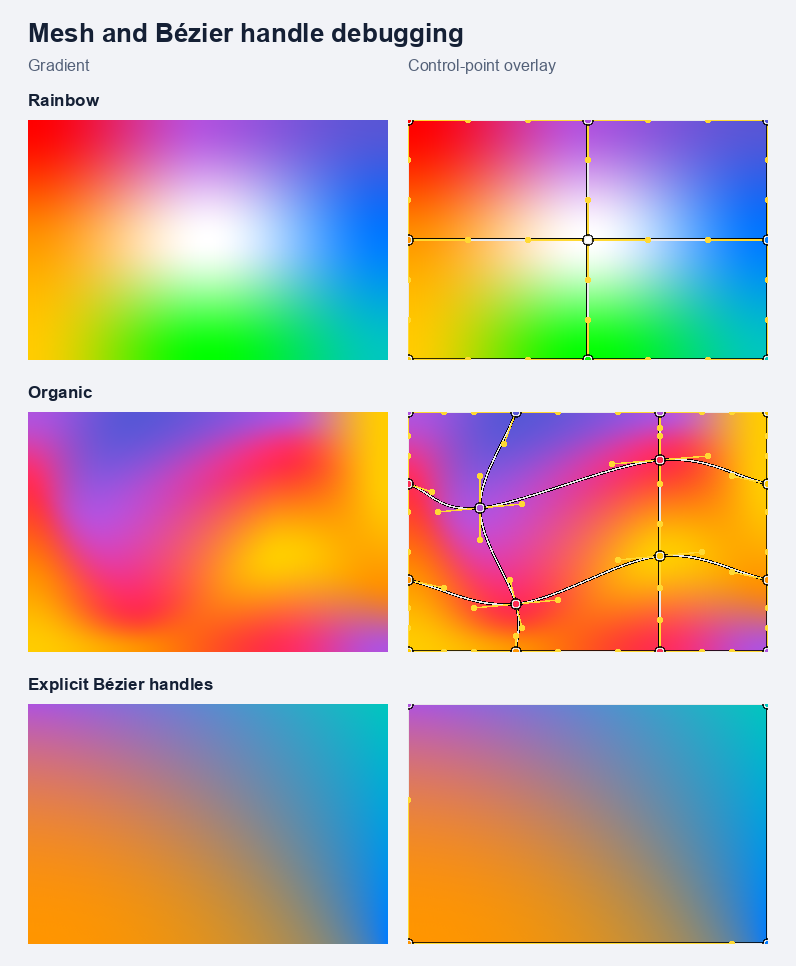
The tessellation debug mode shows every selected cell and its diagonal. Adaptive geometry is the default; fixed density remains available:
gradientView.subdivisions = 0           // Automatic (default)
gradientView.maximumGeometryError = 0.5 // Target deviation in framebuffer pixels
gradientView.subdivisions = 48          // Fixed geometry; still per-pixel colors
Positive subdivisions are clamped to 1...128. Automatic selection uses a uniform
power-of-two grid so shared patch boundaries agree. Its second-derivative bound
includes mixed curvature and targets 0.5 framebuffer pixels by default. The
128-segment and 65,536-cell limits can override that target for extreme inputs.
This is a geometry target, not a bound on color differences or SwiftUI parity.
maximumGeometryError is clamped to 0.05...8 and ignored in fixed mode.
Opaque device colors use packed half coefficients on supported CPU architectures; translucent, linear/perceptual, and values beyond half range retain float precision. Intel Catalyst uses the float specialization. All modes evaluate the full color surface per fragment. UIKit animation and on-demand rendering apply to both modes.
The view suspends onscreen submissions when detached, explicitly hidden, explicitly suspended, or when the app resigns active. Resume invalidates the frame. For custom containers, explicitly suspend fully covered/offscreen views; the library does not perform occlusion detection.
renderedFrameCount counts successful onscreen submissions. presentationPoints
exposes interpolated vertex positions. renderingError reports initialization or
synchronous rendering errors.
Optional diagnostics expose aggregate onscreen rendering measurements:
gradientView.collectsRenderingStatistics = true
gradientView.resetRenderingStatistics()
// Change or animate the mesh, then inspect after GPU work completes.
let statistics = gradientView.renderingStatistics
let allocatedGPUMillisecondsPerDraw = statistics.gpuFrameCount == 0 ? 0 :
	statistics.gpuFrameSeconds * 1000 / Double(statistics.gpuFrameCount)
// These are fractional contributions when other views share the batch:
let commandBufferContribution = statistics.commandBufferCount
let renderPassContribution = statistics.renderPassCount
gradientView.collectsRenderingStatistics = false
CPU statistics are wall times for snapshot creation, drawable acquisition,
encoding, and scheduling; they exclude public property setters. GPU times cover
equal shares of completed batch command-buffer envelopes and exclude display
composition. They are allocated costs, not isolated per-view GPU durations.
Sum the command-buffer/pass contributions and GPU shares across all participating
views with diagnostics enabled to measure the grid. Presentation counters
are available on device, not Simulator. Diagnostics default to off and retain
only counters. Reset isolates subsequent frames from earlier in-flight work.
See the physical-device benchmark report
for the preserved original sweep. The optimization measurements
compare the earlier batched renderer against the original library and SwiftUI on the same
60 unique gradients, with fresh Release trials and unchanged quality.
The geometry-resolution experiment
measures subdivision cost and pixel convergence, and records runtime evidence
of SwiftUI's curvature-based tessellation and fragment color evaluation.
The adaptive renderer measurements
cover the current implementation, image convergence, and physical-device results.
With diagnostics enabled, lastSubdivisionCount reports the selected geometry
density and triangleCount totals submitted gradient triangles (excluding overlays).
For export and tests:
let image: UIImage = try gradientView.renderedImage(
	size: CGSize(width: 600, height: 400),
	scale: 2
)
This renders through Metal and waits for completion. It includes mesh background and debug overlays, but not UIView background, clipping, transforms, or subviews. Use it for occasional exports, not inside a frame loop.
Example app and tests
Open Example/KHMeshGradientExample.xcodeproj, choose the
KHMeshGradientExample scheme, and run on an iPhone or iPad. The gallery has nine
comparison fixtures, Animate/Reset buttons, and a debug-mode selector. The
project is checked in; XcodeGen is only needed to regenerate it from Example/project.yml.
From the repository root:
xcodebuild -project Example/KHMeshGradientExample.xcodeproj \
	-scheme KHMeshGradientExample \
	-destination 'generic/platform=iOS Simulator' \
	-derivedDataPath DerivedData build
Run tests in Xcode with Product → Test, or use the same project/scheme with
xcodebuild test and a specific Simulator destination. Plain host-side
swift test is not appropriate for this UIKit package. Tests exercise GPU output,
patch continuity, invalid configurations, source switching, alpha/background
semantics, animation interpolation, springs, interruption, suspension, and idle
submission counts.
SwiftUI comparison and limits
Both sides use identical positions, handles where explicit, colors, smoothing,
background, color space, output dimensions, and a light appearance. UIKit images
are rendered into actual Metal textures; SwiftUI images use ImageRenderer.
The contact sheet composites both onto white. Raw images and measurements are
in Documentation/Comparisons.
This is an independent renderer, not a pixel-identical reimplementation of SwiftUI. Apple's automatic-handle inference, internal patch construction, perceptual color math, tessellation, and antialiasing are not fully documented. Irregular automatic geometry shows the largest differences in these fixtures. Supplying equivalent explicit handles substantially reduces the geometric differences.
To regenerate all captures on an already booted iOS 18+ Simulator after building:
python3 -m pip install -r Scripts/requirements.txt
Scripts/export_comparisons.sh SIMULATOR_UDID
Questions
What is KHMeshGradient?
kylehowells/KHMeshGradient is a public repo on GitHub by kylehowells. A Metal-backed UIKit mesh gradient view with native animation support for iOS 15 and later.
Is KHMeshGradient open source?
It declares no license on GitHub. Public does not mean open source: without a license, nobody is granted the right to reuse it.
Does KHMeshGradient run on macOS, Windows or Linux?
Its maker has not tagged a system, so it is unknown here. Its README says what it needs.