
rea
Reverse engineer anything with agents, from app behavior down to native binaries.
- 467k
- TypeScript
- MIT
- 3 h ago
onebox (ob) — plan-before-apply deploys. Zero downtime. One box.
Repo labstack/onebox, read from GitHub 1 min ago. labstack has not joined Take My Repo.
labstack/onebox is a public repo on GitHub by labstack. onebox (ob) — plan-before-apply deploys. Zero downtime. One box. It declares the Apache-2.0 license on GitHub. It is written mainly in Go, has 5 stars and last changed on 2026-11-09. Nobody has reviewed it on Take My Repo yet, which says nothing about its quality. Read from GitHub on 2026-11-18.

Plan-before-apply deploys. Zero downtime. One box.
Production operations for one application intentionally running on one Linux server.
Documentation · Install · First deploy · Capabilities · Releases
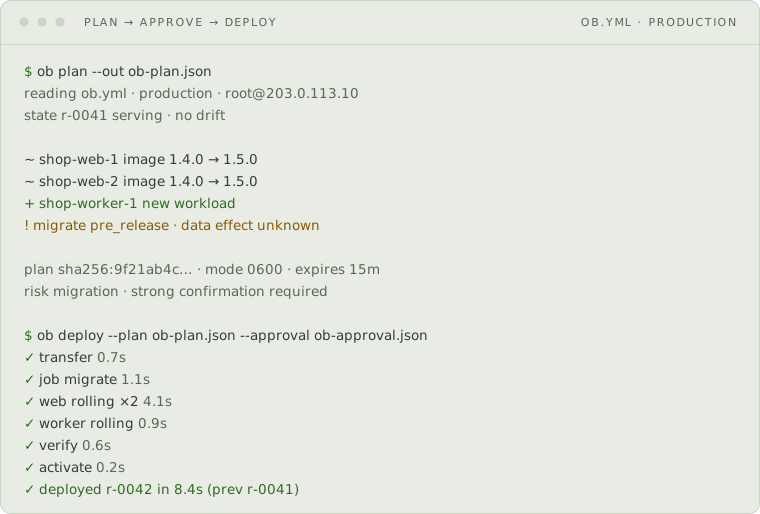
A rendering of an example session, not a recording of one.
Onebox keeps the economic and cognitive simplicity of a single server without
turning production into a pile of scripts. You declare the application in
ob.yml; Onebox derives the Compose runtime, stable names, routing, supporting
services, and release operations.
It connects over SSH with host-key verification. There is no deployment agent to install on the host, and nothing runs against production until you approve the exact plan you reviewed.
| Concern | Contract |
|---|---|
| Change review | A digest-bound plan shows the exact config, images, host state, rendered Compose, payloads, and operation graph before apply. |
| Deployment | Each full deploy reconciles workloads independently: an unchanged, healthy workload stays running; a changed or uncertain workload uses its configured health-gated rolling or recreate strategy. |
| Recovery | Every release records its predecessor; interrupted work can be resumed or aborted, and a failed deploy rolls back by default. |
| Host access | Agentless SSH, key authentication, and mandatory known_hosts verification. An optional one-hop jump host reaches private targets, with both hops verified and the agent never forwarded. |
| Runtime ownership | Generated Compose stays inspectable with ob preview and can be taken over permanently with ob eject. |
| Automation | Human output, JSON envelopes, and NDJSON event streams come from the same lifecycle service. |
Workload reconciliation is automatic; it needs no selection flag. Onebox fingerprints the effective runtime contract, including the rendered service, plain environment-file contents, encrypted secret inputs, managed-connection declarations, and bind-mount declarations. An unchanged healthy consumer is retained when another workload changes. A relative bind source remains tied to its release directory and is recreated safely; an unchanged absolute host bind can be retained.
You administer Linux, SSH access, and Docker with the Buildx plugin. Onebox owns the generated application runtime inside that boundary.
Homebrew, Scoop, release archives, and Debian/RPM packages are available. The installation guide includes checksum verification and source builds.
brew tap labstack/tap             # macOS or Linux
brew trust --tap labstack/tap
brew install labstack/tap/onebox
scoop install labstack/onebox      # Windows
ob version
Homebrew 7 requires explicit trust for non-official taps on both macOS and Linux.
Starting from an existing Compose project, ob init writes the first draft.
This is a complete single-workload project:
# yaml-language-server: $schema=https://onebox.run/schemas/application/v1alpha2/application.schema.json
apiVersion: onebox.run/v1alpha2
kind: Application
metadata:
  name: shop
spec:
  environments:
    production:
      server: root@203.0.113.10
  workloads:
    web:
      image: ghcr.io/acme/shop:1.4.0
      routes:
        - {hostname: shop.example.com, port: 3000}
It derives the application container, Traefik routing and TLS, release layout
under /var/lib/onebox/app, and retention policy. ob canonical prints every
derived value with its source: # default, # shorthand, or # override.
ob validate
ob canonical
ob bootstrap
ob plan --out ob-plan.json
ob approve --plan ob-plan.json --out ob-approval.json
ob deploy --plan ob-plan.json --approval ob-approval.json
ob validate and ob canonical are local. ob bootstrap is the first command
that changes the server; ob plan is read-only. Its artifact is mode 0600 and
expires after 15 minutes; drift or a changed local payload requires a new one.
Approval is a short-lived, digest-bound local confirmation. It is tamper-evident ceremony, not authenticated identity or an independently issued capability. See Your first deploy for the complete walkthrough and expected output.
Onebox refuses configurations it cannot operate safely, including:
There is no generic --force. Each exceptional path grants one named
capability, such as breaking a stale lock or accepting a destructive volume
change. What Onebox refuses
and the safety envelope give
the full rules.
backup is a request;
protection begins only after ob backup enable establishes continuous
archiving and takes the first base backup. Workload volumes and other service
drivers do not have that contract today.Shipped vs proposed is the complete account of what the binary executes today and what remains direction.
Onebox occupies a narrow spot: one application on one Linux server, with a review gate in front of every change. Neighbouring tools solve overlapping problems differently, and the difference is usually the boundary rather than the feature list.
| If you use | Where Onebox differs |
|---|---|
| Docker Compose and a few shell scripts | Compose stays the runtime — Onebox generates it, and ob eject hands it back permanently. What you gain is the release layer around it: health-gated rolling replacement, recorded predecessors, rollback, and backups. |
| Kamal | Both deploy containers over SSH with no agent on the host. Kamal spans multiple hosts and applies when you run it; Onebox is deliberately single-host and puts a digest-bound plan and an explicit approval between you and production. |
| Dokku, CapRover, Coolify | Those run a control plane on the server and lead with git-push or a dashboard. Onebox has no dashboard and nothing resident: a CLI over SSH, a file in your repository, and generated Compose you can read. |
| Ansible | Ansible configures hosts in general; you still model application releases yourself. Onebox models only the release — plan, approve, deploy, roll back — and expects you to administer the Linux host underneath it. |
| Kubernetes or k3s | A cluster reconciles desired state continuously and survives a lost node. Onebox does neither, and says so: no failover, no scheduler. It buys the operational habits — a diff before apply, health gates, recorded releases — without the cluster. |
| Terraform | The plan-then-apply ceremony is borrowed on purpose. The subject is different: an application release on one box, not an infrastructure graph across providers. |
The CLI is the interface for both. Every finite machine result uses one
onebox.run/cli/v1alpha1 envelope with a schema version, command, outcome, and
exactly one data or error value. NDJSON streams ordered operation events. Errors
are typed: branch on the code, never the sentence.
There is deliberately no MCP mutation surface. Point an agent at ob the way
you would point it at gh; every lifecycle decision still passes through the
same canonical service and safety checks. See the
structured-output policies.
Every page on onebox.run is also available as clean
Markdown at <path>.md; llms.txt maps the site
for agents.
The field, CLI, and error references are generated from the binary by
cmd/ob-docgen, so documentation cannot silently drift from the accepted
contract.
Preview the CLI's spinner, replica progress, and nested health/drain waits with
go run ./scripts/ui-demo; add -fail for a failed-healthcheck example. The
demo simulates a deployment locally and never connects to a server.
Interactive terminals show a live progress line. Pipes, CI, and TERM=dumb
receive static progress updates. Set ONEBOX_NO_ANIMATION=1 to use static
output in a terminal; NO_COLOR disables colors independently.
just check       # local pre-commit gate
just e2e         # opt-in Docker end-to-end suite
just site-build  # generated references and production site
See CONTRIBUTING.md for setup, verification, and releases. Contributions require accepting the Contributor License Agreement. Report security issues through SECURITY.md, never a public issue.
Apache License 2.0 · Copyright 2026 LabStack LLC
labstack/onebox is a public repo on GitHub by labstack. onebox (ob) — plan-before-apply deploys. Zero downtime. One box.
It declares the Apache-2.0 license on GitHub.
Its maker tagged it for macOS, Windows and Linux, or as Docker or cross-platform. That is declared by the maker; Take My Repo has not tested it.
Open "Take it" on its page: Take My Repo writes an install plan for your machine and hands it to your AI agent (Claude Code, Codex or Cursor), which asks you before each step. Take My Repo has not tested it on any machine.
Its last change on GitHub was on 2026-11-09. Take My Repo does not judge from that whether it is maintained.
Nobody has reviewed it on Take My Repo yet, which says nothing about its quality.
Reverse engineer anything with agents, from app behavior down to native binaries.
An open-source, self-hostable PaaS alternative to Vercel, Heroku & Netlify that lets you easily deploy static sites, databases, full-stack applications and 360+ one-click services on your own servers.
A list of Free Software network services and web applications which can be hosted on your own servers
Fair-code workflow automation platform with native AI capabilities. Combine visual building with custom code, self-host or cloud, 400+ integrations.
Ray is an AI compute engine. Ray consists of a core distributed runtime and a set of AI Libraries for accelerating ML workloads.


