
kanban-code
The maintainer has not written a description at the source.
- 343
- Apache-2.0
- 2 d ago
Repo langwatch/kanban-code, read from GitHub 1 min ago. langwatch has not joined Take My Repo.
In short
langwatch/kanban-code is a public repo on GitHub by langwatch. It declares the Apache-2.0 license on GitHub. It is written mainly in Swift, has 343 stars and last changed on 2026-11-24. Nobody has reviewed it on Take My Repo yet, which says nothing about its quality. Read from GitHub on 2026-11-26.

Kanban Code
A beautiful kanban board for managing Claude Code sessions.
Native on macOS (SwiftUI liquid glass) and Windows (Tauri). The IDE for 2026.
Installation · Features · Getting Started · Architecture · License
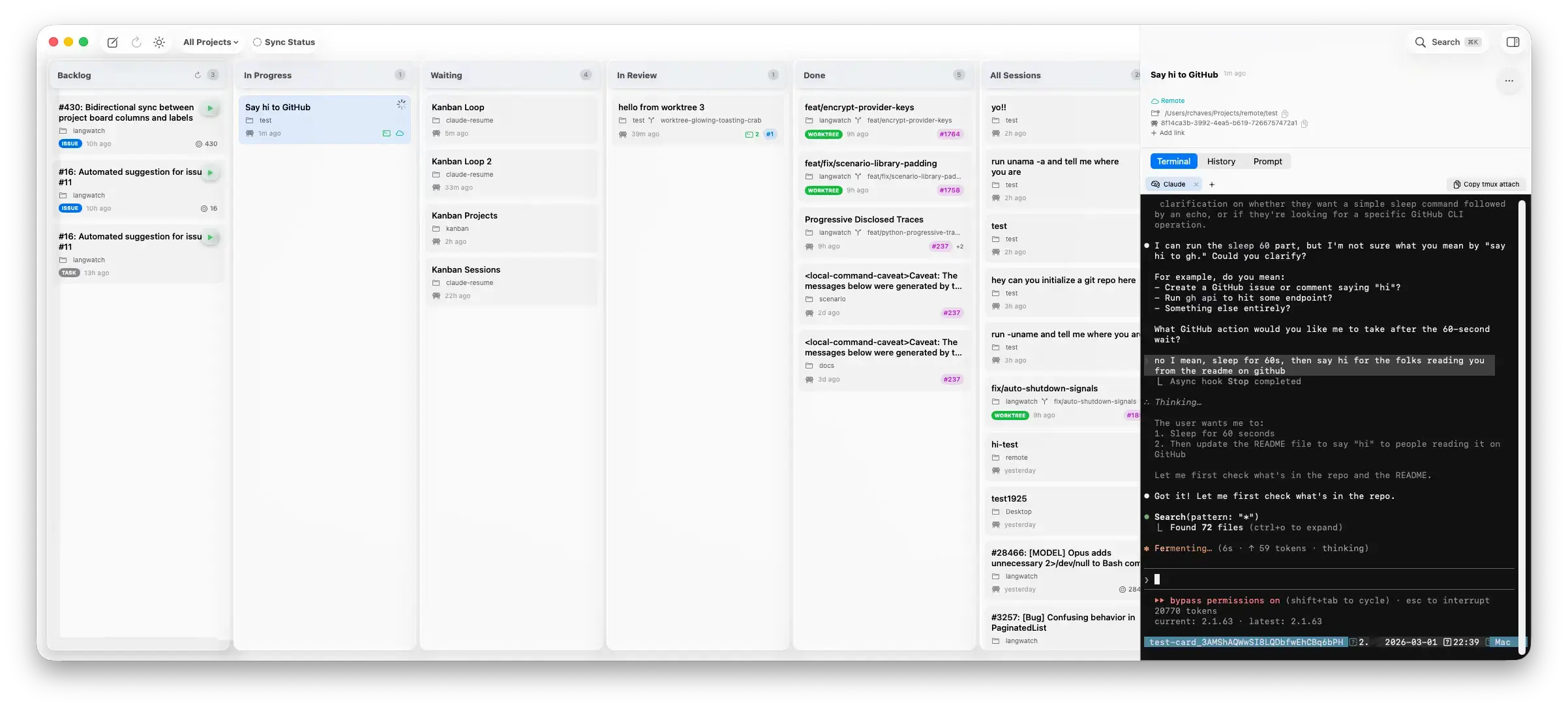
Kanban Mode:

Productive Mode:

What is Kanban Code?
A native macOS app for running multiple Claude Code agents in parallel. Each task is a card on a Kanban board that automatically links your Claude session, git worktree, tmux terminals, and GitHub PR together — cards flow from backlog to done as Claude works, opens PRs, and gets them merged. Push notifications on your phone when agents need attention, remote execution to offload work to a server, and sleep prevention to keep your Mac awake while agents run.
Kanban Code's goal is to ease as much as possible the context switching bottleneck for modern development by centralizing all context needed for each Claude session into their cards.
Kanban Code combines the lessons learned from claude-resume, claude-remote, git-orchard, claude-pushover, and cc-amphetamine into one unified experience.
Installation
macOS
Grab the latest .app from Releases, unzip, and drag to Applications.
Since the app is not notarized, macOS will block it on first launch. To open it:
- Right-click the app and select Open
- Click Open in the dialog that appears
- If blocked, go to System Settings → Privacy & Security, scroll down, and click Open Anyway
Requires macOS 26 (Tahoe) and Claude Code CLI installed.
Build from Source (macOS)
git clone https://github.com/langwatch/kanban-code.git
cd kanban-code
make run-app
Windows
Native Windows app. Requires Node.js (v18+), Rust, and the Claude Code CLI (npm install -g @anthropic-ai/claude-code). Optionally GitHub CLI for PR/issue features.
Embedded terminal: launches
cmd.exeby default and runsclaudenatively. To run Claude inside WSL or PowerShell instead, change Settings → General → Terminal shell towsl.exe,pwsh.exe -NoLogo, or any shell on your PATH.Logs: diagnostics are written to
%APPDATA%\kanban-code\logs\kanban-code.log. SetKANBAN_CODE_DEBUG_LOGS=1for verbose output.
git clone https://github.com/langwatch/kanban-code.git
cd kanban-code/windows
npm install
npm run tauri dev        # dev mode
npm run tauri build      # production .exe
An onboarding wizard checks your dependencies and walks you through setup on first launch.
CLI
The kanban CLI is automatically installed to ~/.local/bin/kanban when you launch the app (requires Node.js). You can also install it manually:
cd kanban-code
make install-cli
Commands:
kanban list                  # List cards grouped by column
kanban list -c in_progress   # Filter by column
kanban list --json           # Machine-readable JSON output
kanban status                # Overview: card counts, terminals, tokens, cost
kanban show <card>           # Detailed card info (session, tmux, PRs, transcript)
kanban sessions              # Tmux sessions with card associations
kanban capture <card>        # Capture terminal output (last 50 lines)
kanban send <card> <message> # Send a prompt to a card's tmux session
kanban interrupt <card>      # Send Escape to stop the assistant
kanban transcript <card>     # Recent conversation transcript
kanban export [card]         # Whole session as Markdown (default: this card)
kanban projects              # List configured projects
kanban open [path]           # Open a project in the app
Cards can be referenced by ID, ID prefix, name, tmux session name, or session ID. Every command supports --json for agent consumption.
Agent orchestration: The CLI is designed to be used by a master agent that manages multiple Claude Code sessions. With kanban list --json it can see all active cards, their status, tokens, and context usage. With kanban send and kanban capture it can interact with running sessions via tmux.
Features
Kanban Board with Smart Columns
Six columns that cards flow through automatically based on real activity signals:
| Column | What goes here |
|---|---|
| Backlog | GitHub issues, manual tasks, ideas waiting to start |
| In Progress | Claude is actively working (confirmed via hooks) |
| Waiting | Claude stopped, needs plan approval, or hit a permission prompt |
| In Review | PR is open, waiting for CI or code review |
| Done | PR merged, worktree ready to clean up |
| All Sessions | Archive of every past session, searchable |
Cards move between columns automatically. When Claude starts working, the card jumps to In Progress. When it stops and needs input, it moves to Waiting and sends you a push notification. When a PR opens, it shifts to In Review. You can always drag cards manually to override.
Tmux Sessions & Embedded Terminal
Every Claude task runs inside a tmux session. This means you can always take control — attach from your own terminal, send input, inspect output, or just watch Claude work. Kanban Code manages the tmux lifecycle for you: creating sessions on launch, reattaching on resume, killing on archive.
Each card can have multiple terminals associated with it — Claude's main session plus any extra shells you spin up. Start a dev server for one worktree, a test watcher for another, and they all live on the right card. When you have ten Claude agents running across five projects, you can see every terminal for every task at a glance, without losing track of which server belongs to which branch.
Inside the app, each card has a native terminal emulator (powered by SwiftTerm) that connects directly to the tmux session. True color, Unicode, mouse events, scrollback — the full terminal experience without switching windows. If Claude is waiting for input, hit Resume and you're typing to it immediately. Terminal state persists as you navigate between cards. Or copy the tmux attach command to connect from your own terminal instead.
Session Discovery, Search, Fork & Checkpoint
Kanban Code automatically discovers all your Claude Code sessions from ~/.claude/projects/. Past sessions, active sessions, sessions you started from the terminal — they all show up.
BM25 full-text search lets you find any session across your entire history. Search by prompt, conversation content, or project name. Results are ranked by relevance with a recency boost.
Fork any session to branch off a new conversation with the same history — perfect for spinning up parallel tasks that share context, or exploring a different approach without losing your place. Checkpoint lets you roll back to any point in a conversation and continue from there. Both are dramatically faster than Claude Code's built-in equivalents, operating directly on the session files instead of going through the CLI.
Git Worktree Integration
Start a task and Kanban Code can create a git worktree automatically, giving Claude its own isolated branch. The app tracks which worktree belongs to which card, discovers orphaned worktrees, and offers cleanup when you're done.
Cards created from GitHub issues get named worktrees (issue-123). Manual tasks get auto-generated names. You can also link existing worktrees to cards.
Remote Execution
Two remote modes are available in Settings > Remote.
Boxd integration. Each card gets its own boxd cloud machine, created from a snapshot you save from a machine you set up once. The tmux session, the coding assistant and the repository checkout live on the machine. Every transcript line, hook event and statusline file is streamed back to your Mac with the paths rewritten, so the conversation is always resumable locally, on the same machine, or on another one. Machines are paused the moment a session stops, after a configurable inactivity timeout, and when the app quits or the Mac sleeps. The kanban CLI inside the machine reaches back to your Mac, so DMs, channels and subagents work the same as local cards. See docs/remote-boxd.md for the protocol.
Mutagen + Claude Remote Exec. Offload Claude to a remote machine and run even more agents in parallel without melting your laptop. Kanban Code manages a shell wrapper that transparently intercepts commands and executes them over SSH, with Mutagen handling bidirectional file sync. Local paths are automatically translated to remote paths, so Claude does not know it is running remotely. The UI shows Mutagen sync status in real time. If the remote host goes offline, Kanban Code automatically falls back to local execution and notifies you.
Settings > Assistants also lets you wrap or extend the launch command of each assistant (${cli_command} stands for the command Kanban Code builds), with a separate command for cards that run remotely.
GitHub PR Tracking
Once Claude pushes a branch, Kanban Code discovers the PR via gh CLI and tracks it on the card:
- PR status (draft, open, merged, closed)
- CI check runs with individual pass/fail status
- Review decision (approved, changes requested)
- Unresolved review thread count
- Lazy-loaded PR description
Multiple PRs per card are supported. Click to open in browser, or copy the link.
GitHub Issue Backlog
Configure per-project GitHub issue filters (e.g. assignee:@me label:bug) and Kanban Code populates your backlog automatically. Issues become cards with the full issue body as context. Start working on one and Claude gets the issue description as its prompt.
Push Notifications
Get notified on your phone — and your Apple Watch — when Claude needs attention, via Pushover. Notifications include a full summary of what Claude did, rendered as Markdown so you can read the last assistant response right from the lock screen. Multi-line responses are rendered as images for readability.
Smart deduplication prevents notification spam — rapid Stop events are collapsed, and duplicate notifications within 62 seconds are suppressed. Each notification includes the session number so you know which agent is calling.
Falls back to macOS native notifications if Pushover isn't configured. Just add your Pushover user key and API token in settings.
Amphetamine Integration
When Claude agents are actively working, Kanban Code spawns a lightweight companion process that keeps Amphetamine triggered — preventing your Mac from sleeping mid-task. The companion quits automatically when all agents are idle. No more waking up to find Claude was interrupted by sleep mode.
Multi-Project Support
Configure multiple projects, each with its own GitHub filters, prompt templates, and repository settings. A global view combines everything — or focus on a single project. Exclude side projects from the global view to keep work and personal separate.
Keyboard-First
- ⌘K — Search sessions
- ⌘N — New task
- Drag and drop between columns
- Context menus on every card
Optional Dependencies
These unlock additional features. Kanban Code works without them — it's all progressive enhancement.
| Tool | What it enables |
|---|
Questions
What is kanban-code?
langwatch/kanban-code is a public repo on GitHub by langwatch. Its maker has not written a description.
Is kanban-code open source?
It declares the Apache-2.0 license on GitHub.
Does kanban-code run on macOS, Windows or Linux?
Its maker tagged it for macOS and Windows. That is declared by the maker; Take My Repo has not tested it.
How do I install kanban-code?
Open "Take it" on its page: Take My Repo writes an install plan for your machine and hands it to your AI agent (Claude Code, Codex or Cursor), which asks you before each step. Take My Repo has not tested it on any machine.