dify
Build Agentic workflows, RAG pipelines, with rich AI model and tool support on one collaborative workspace. Deploy on cloud, VPC, or self-hosted, so teams move from prototype to production without rebuilding the stack.
- 162k
- Python
- 5 min ago
How Microsoft Agent Framework can orchestrate multiple specialised agents locally using Foundry Local How a coding agent can generate and execute a standalone Python application as part of an agent workflow How you can use tool calling with model which support tooling How planner and reviewer agents can be composed
Repo leestott/agentframework--foundrylocal, read from GitHub 16 h ago. leestott has not joined Take My Repo.
leestott/agentframework--foundrylocal is a public repo on GitHub by leestott. How Microsoft Agent Framework can orchestrate multiple specialised agents locally using Foundry Local How a coding agent can generate and execute a standalone Python application as part of an agent workflow How you can use tool calling with model which support tooling How planner and reviewer agents can be composed. It declares the MIT license on GitHub. It is written mainly in Python, has 12 stars and last changed on 2026-02-12. Nobody has reviewed it on Take My Repo yet, which says nothing about its quality. Read from GitHub on 2026-11-23.
Build Agentic workflows, RAG pipelines, with rich AI model and tool support on one collaborative workspace. Deploy on cloud, VPC, or self-hosted, so teams move from prototype to production without rebuilding the stack.
Koog is a JVM (Java and Kotlin) framework for building predictable, fault-tolerant and enterprise-ready AI agents across all platforms – from backend services to Android and iOS, JVM, and even in-browser environments. Koog is based on our AI products expertise and provides proven solutions for complex LLM and AI problems
Multi-agent orchestration demo using Microsoft Agent Framework (MAF) and Foundry Local — everything runs on your machine, no cloud API keys needed.
# 1. Install Foundry Local → https://github.com/microsoft/Foundry-Local
# 2. Set up Python
python -m venv .venv && .venv\Scripts\activate
pip install -r requirements.txt
copy .env.example .env

# 3. Run the demo
python -m src.app "What are the key features of Foundry Local?" --docs ./data

# 4. Launch the web UI
python -m src.app.web
This demo teaches you how to:
foundry-local-sdkChatAgentOpenAIChatClient (OpenAI-compatible API)asyncio.gatherword_count, extract_keywords)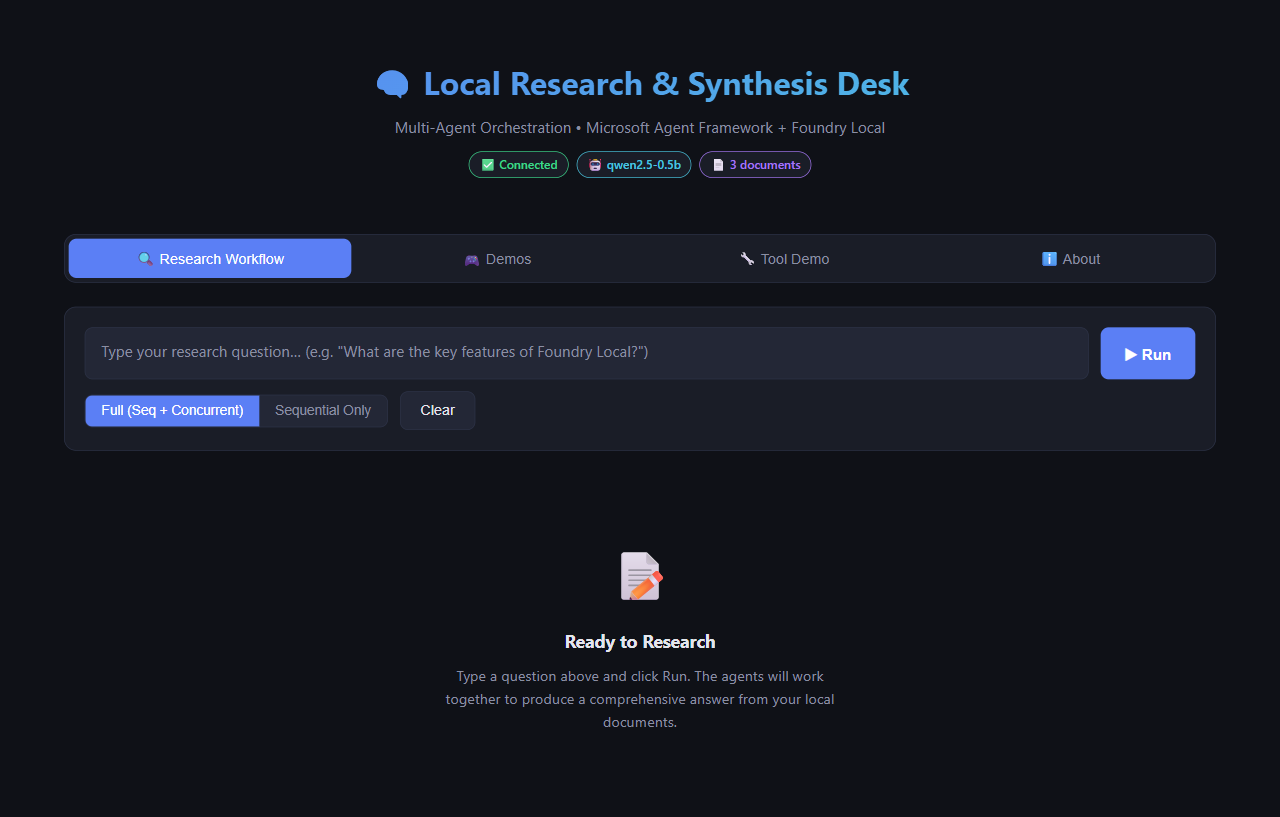
The main interface with the research workflow tab, showing the agent pipeline and input form.
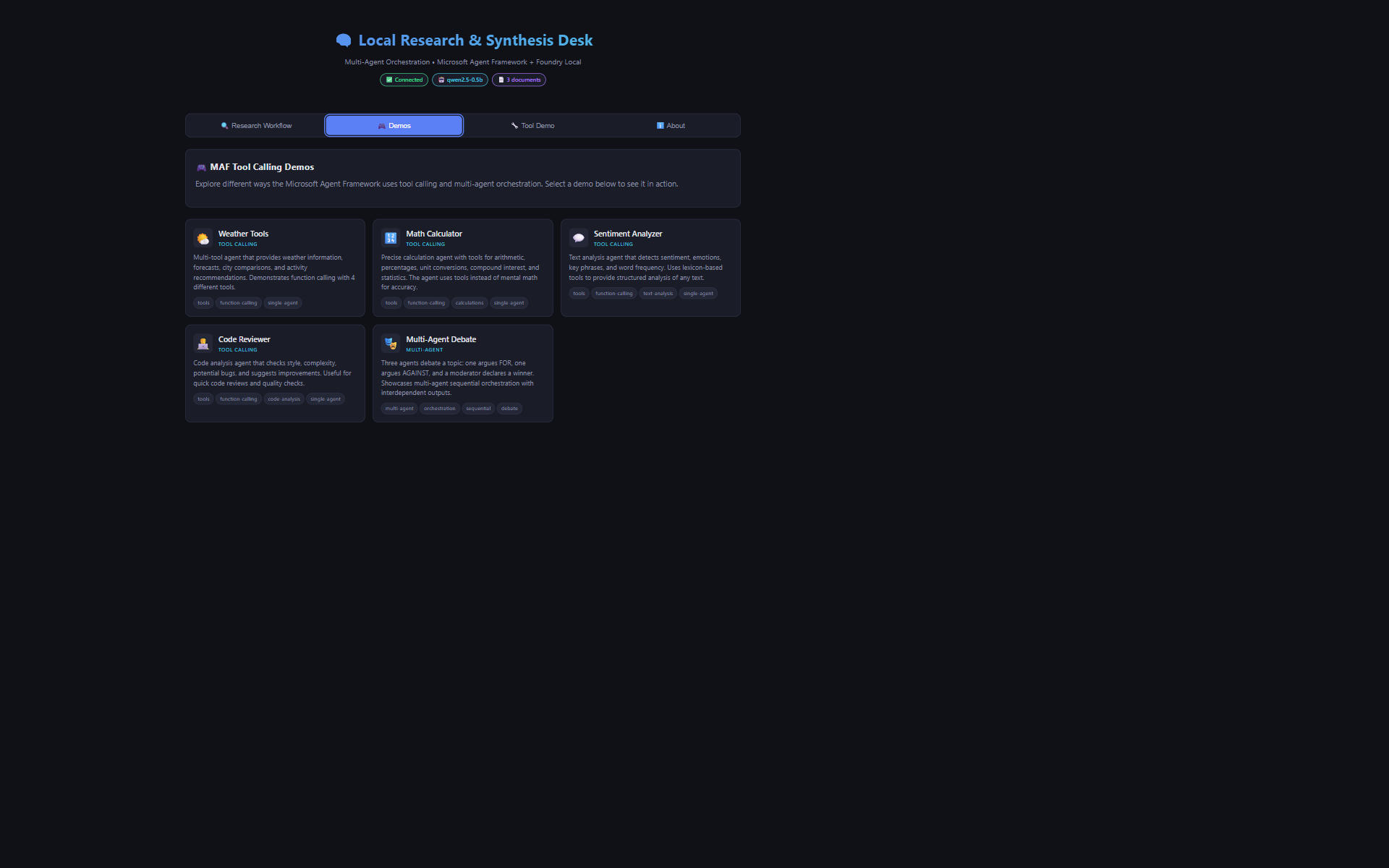
Interactive demos showcasing different MAF capabilities including weather tools, math calculator, sentiment analyzer, code reviewer, and multi-agent debate.
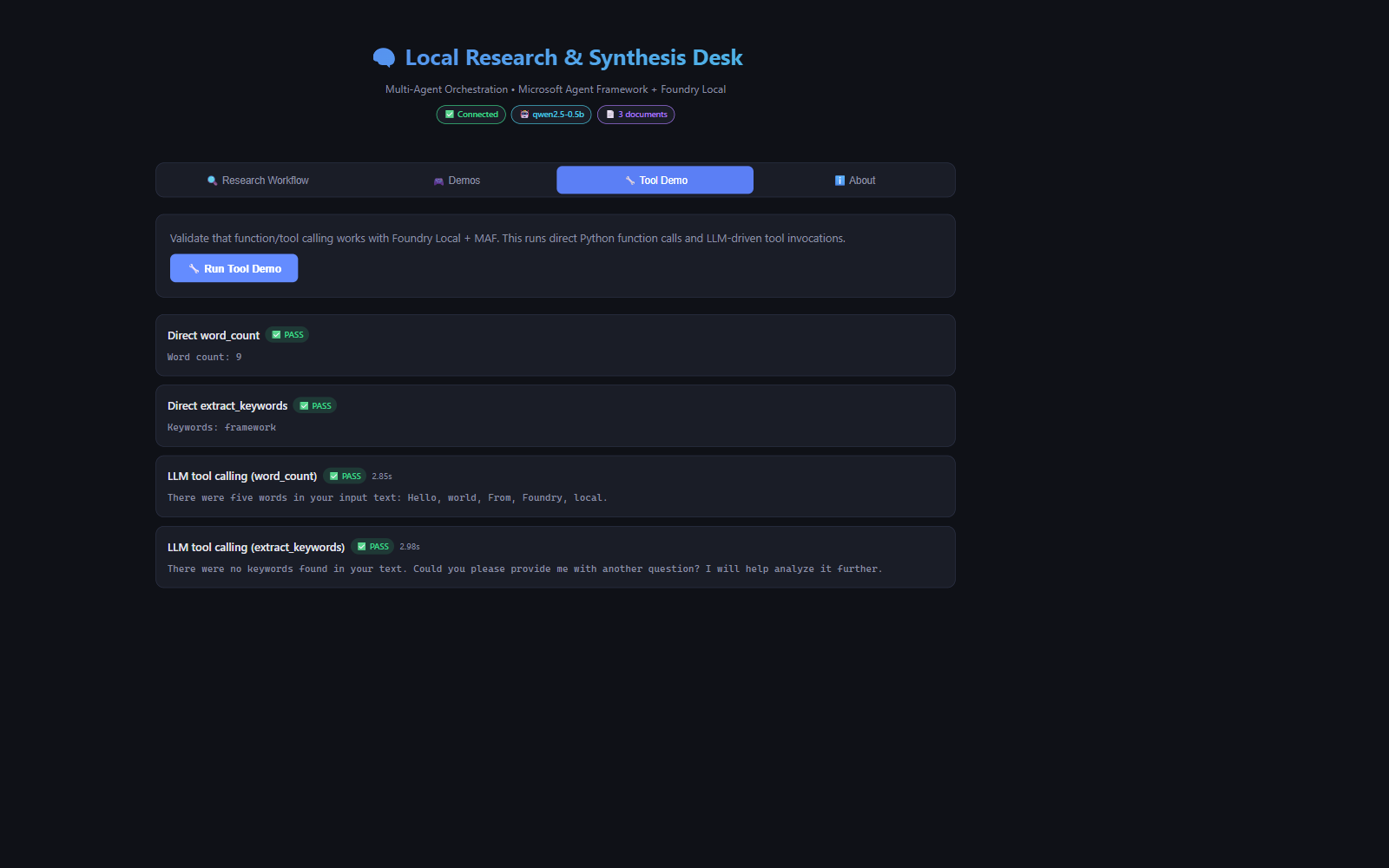
The tool calling demo showing word count and keyword extraction tools in action.
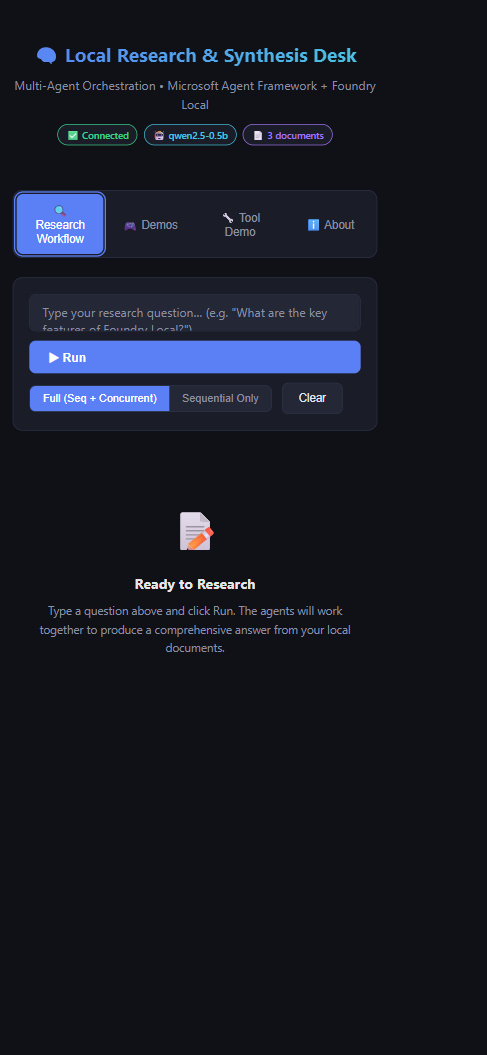
Responsive design adapts to mobile screens with touch-friendly controls and optimized layout.
You type a research question. Four AI agents collaborate locally to answer it:
| Agent | Role |
|---|---|
| Planner | Breaks your question into sub-tasks |
| Retriever | Reads local files and extracts relevant snippets with citations |
| Critic | Reviews for gaps and contradictions; loops back to Retriever if gaps are found |
| Writer | Produces a final report citing your local documents |
| ToolAgent (optional) | Computes word counts and keyword extraction |
The demo shows three orchestration patterns in a single run:
User question
     │
     ▼
  Planner          ← sequential (must run first)
     │
     ├──► Retriever ┐
     │               ├─► merge   ← concurrent (independent tasks)
     └──► ToolAgent ┘
              │
              ▼
           Critic          ← sequential (needs retriever output)
              │
         ┌────┴────┐
         │ Gaps?   │
         └────┬────┘
          YES │ NO
              │  └──────────┐
              ▼             │
        Retriever           │  ← feedback loop (fills gaps)
         (gap-fill)         │
              │             │
              ▼             │
           Critic           │  ← re-evaluate
              │             │
              ▼◄────────────┘
           Writer          ← sequential (needs everything above)
              │
              ▼
        Final Report
| Requirement | Version | Link |
|---|---|---|
| Python | 3.10 or higher | python.org |
| Foundry Local | Latest | github.com/microsoft/Foundry-Local |
Follow the instructions at github.com/microsoft/Foundry-Local to install the Foundry Local runtime for your OS.
Verify it works:
foundry --help
git clone <this-repo-url>
cd agentframework-foundrylocal

python -m venv .venv
Activate the environment:
# Windows
.venv\Scripts\activate

# macOS / Linux
source .venv/bin/activate
pip install -r requirements.txt
copy .env.example .env
The default settings use the qwen2.5-0.5b model alias. Foundry Local automatically picks the best hardware variant (GPU, NPU, or CPU) for your machine.
Tip: Run
foundry model listto see all available model aliases. Theqwen2.5family supports function/tool calling, which the ToolAgent needs. For better quality, try--model qwen2.5-7bor--model qwen2.5-14b.
foundry model run qwen2.5-0.5b
Type a question, see a response, press Ctrl+C to exit.
python -m src.app "What are the key features of Foundry Local and how does it compare to cloud inference?"
With a custom documents folder:
python -m src.app "Summarise the orchestration patterns" --docs ./data
Sequential-only mode (simpler pipeline, no parallel step):
python -m src.app "Explain multi-agent benefits" --docs ./data --mode sequential
Run the browser-based interface for an interactive experience:
python -m src.app.web
Open http://localhost:5000 in your browser. The web UI provides:
Run the dedicated tool calling demo to verify function calling works:
python -m src.app.tool_demo
This tests:
| Flag | Default | Description |
|---|---|---|
"question" |
(required) | Your research question |
--docs |
./data |
Folder of local documents to search |
--model |
qwen2.5-0.5b |
Foundry Local model alias |
--mode |
full |
full (sequential + concurrent) or sequential |
--log-level |
INFO |
DEBUG, INFO, WARNING, ERROR |
├── .env.example          # Config template
├── pyproject.toml        # Project metadata & dependencies
├── requirements.txt      # Pinned dependencies
├── LICENSE               # MIT License
├── CONTRIBUTING.md       # Contribution guidelines
├── SECURITY.md           # Security policy
├── data/                 # Sample documents for the Retriever
│   ├── foundry_local_overview.md
│   ├── agent_framework_guide.md
│   └── orchestration_patterns.md
├── src/app/
│   ├── __init__.py
│   ├── __main__.py       # CLI entry point
│   ├── foundry_boot.py   # Foundry Local SDK bootstrapper
│   ├── agents.py         # Agent definitions (Planner, Retriever, Critic, Writer, ToolAgent)
│   ├── documents.py      # Local file loader with chunking
│   ├── orchestrator.py   # Sequential + Concurrent + Feedback loop orchestration engine
│   ├── tool_demo.py      # Tool/function calling validation demo
│   ├── web.py            # Flask web UI (browser-based interface)
│   ├── templates/
│   │   └── index.html    # Web UI frontend (HTML + CSS + JS)
│   └── demos/            # Interactive tool calling demos
│       ├── __init__.py
│       ├── registry.py       # Demo registry with metadata
│       ├── weather_tools.py  # Weather info with 4 tools
│       ├── math_agent.py     # Calculator with 6 math tools
│       ├── sentiment_analyzer.py  # Text analysis with 5 tools
│       ├── code_reviewer.py  # Code analysis with 5 tools
│       └── multi_agent_debate.py  # 3-agent debate system
└── tests/
    └── test_smoke.py     # Smoke tests (no GPU/service required)
┌─────────────────────────────────────────────────────────┐
│                    Your Machine                          │
│                                                          │
│  ┌──────────────┐    Control Plane     ┌──────────────┐ │
│  │  Python App   │───(foundry-local-sdk)──►│Foundry Local │ │
│  │  (MAF agents) │                     │   Service     │ │
│  │               │    Data Plane       │              │ │
│  │  OpenAIChatClient──(OpenAI API)────►│  Model (LLM) │ │
│  └──────────────┘                     └──────────────┘ │
└─────────────────────────────────────────────────────────┘
Control plane — The FoundryLocalManager from foundry-local-sdk starts the service, downloads models, and returns the endpoint URL. (SDK reference)
Data plane — MAF's OpenAIChatClient sends chat completions to Foundry Local's OpenAI-compatible API (typically http://localhost:<port>/v1 — the port is assigned dynamically). No separate OpenAI key is needed.
Feedback loop — The Critic agent is instructed to output GAPS FOUND or NO GAPS at the start of its response. When gaps are detected, the orchestrator sends them back to the Retriever with the original documents, merges the new snippets, and re-runs the Critic. This iterates up to 2 times before the Writer takes over, ensuring higher quality reports.
When you run the demo, you'll see agent-by-agent progress in the terminal:
┌─ Local Research & Synthesis Desk ─┐
│ Multi-Agent Orchestration • MAF + Foundry Local │
│ Mode: full                                       │
└──────────────────────────────────────────────────┘

  Model : qwen2.5-0.5b-instruct-cuda-gpu:4  (alias: qwen2.5-0.5b)
  Documents: 3 file(s), 4 chunk(s) from ./data

┌─────────────────────────────────────────┐
│ 🗂  Planner — breaking the question …   │
└─────────────────────────────────────────┘
  1. Identify key features of Foundry Local …
  2. Compare on-device vs cloud inference …
  ⏱  2.3s

⚡ Concurrent fan-out — Retriever + ToolAgent running in parallel …
  Retriever finished in 3.1s
  ToolAgent finished in 1.4s

┌─────────────────────────────────────────┐
│ ✍️  Writer — composing the final report │
└─────────────────────────────────────────┘
  (Final synthesised report with citations)
  ⏱  4.2s

✅ Workflow complete — Total: 14.8s, Steps: 5
pip install pytest pytest-asyncio
pytest tests/ -v
The smoke tests check document loading, tool functions, and configuration — they do not require a running Foundry Local service.
The web UI includes a Demos tab with 5 interactive demos showcasing different MAF capabilities. Each demo has a suggested prompt you can use directly.
| Demo | Category | Description | Suggested Prompt |
|---|---|---|---|
| 🌤️ Weather Tools | Tool Calling | Multi-tool agent providing weather info, forecasts, city comparisons, and activity recommendations. Uses 4 different tools. | What's the weather in Seattle and San Francisco? Compare them and recommend activities for the warmer city. |
| 🔢 Math Calculator | Tool Calling | Precise calculation agent with tools for arithmetic, percentages, unit conversions, compound interest, and statistics. Uses tools instead of mental math for accuracy. | If I invest $10,000 at 7% annual interest compounded monthly for 15 years, how much will I have? Also convert that to euros assuming 1 USD = 0.92 EUR. |
| 💬 Sentiment Analyzer | Tool Calling | Text analysis agent that detects sentiment, emotions, key phrases, and word frequency. Uses lexicon-based tools for structured analysis. | Analyze this review: 'The product arrived quickly and the quality exceeded my expectations. However, the packaging was disappointing and customer support was slow to respond.' |
leestott/agentframework--foundrylocal is a public repo on GitHub by leestott. How Microsoft Agent Framework can orchestrate multiple specialised agents locally using Foundry Local How a coding agent can generate and execute a standalone Python application as part of an agent workflow How you can use tool calling with model which support tooling How planner and reviewer agents can be composed.
Open-source Windows and Office activator featuring HWID, Ohook, TSforge, and Online KMS activation methods, along with advanced troubleshooting.
The agent harness performance optimization system. Skills, instincts, memory, security, and research-first development for Claude Code, Codex, Opencode, Cursor and beyond.
Reverse engineer anything with agents, from app behavior down to native binaries.
It declares the MIT license on GitHub.
Its maker has not tagged a system, so it is unknown here. Its README says what it needs.
Open "Take it" on its page: Take My Repo writes an install plan for your machine and hands it to your AI agent (Claude Code, Codex or Cursor), which asks you before each step. Take My Repo has not tested it on any machine.
Its last change on GitHub was on 2026-02-12. GitHub counts 0 open issues and pull requests. Take My Repo does not judge from that whether it is maintained.
Nobody has reviewed it on Take My Repo yet, which says nothing about its quality.
Take My Repo cannot say: it does not audit code and has not run agentframework--foundrylocal. What is known comes from GitHub. It declares the MIT license on GitHub. Its last change was on 2026-02-12. It has 12 stars, which measure popularity, not safety. Nobody has reviewed it on Take My Repo yet, which says nothing about its quality. Read the source before you run it. With "Take it", your AI agent shows each step and asks you before running it; README text is treated as data, not as instructions.