
Angular-Forms-Performance-Fetch-Search-Filtering
Angular (20+ )forms performance, search and filtering project
- 3
- 16 mo ago
Repo leolanese/Angular-Forms-Performance-Fetch-Search-Filtering, read from GitHub 4 h ago. leolanese has not joined Take My Repo.
In short
leolanese/Angular-Forms-Performance-Fetch-Search-Filtering is a public repo on GitHub by leolanese. Angular (20+ )forms performance, search and filtering project. It declares no license on GitHub. Public does not mean open source: without a license, nobody is granted the right to reuse it. It is written mainly in TypeScript, has 3 stars and last changed on 2025-08-14. Nobody has reviewed it on Take My Repo yet, which says nothing about its quality. Read from GitHub on 2026-11-24.


Angular (20+) Signal Power: Angular Forms, Search & Filter Performance Lab
- This project serves as a comprehensive demonstration of Angular's flexibility in implementing the same core functionality through different patterns and approaches, each with its own trade-offs in terms of complexity, maintainability, and performance.
Demo
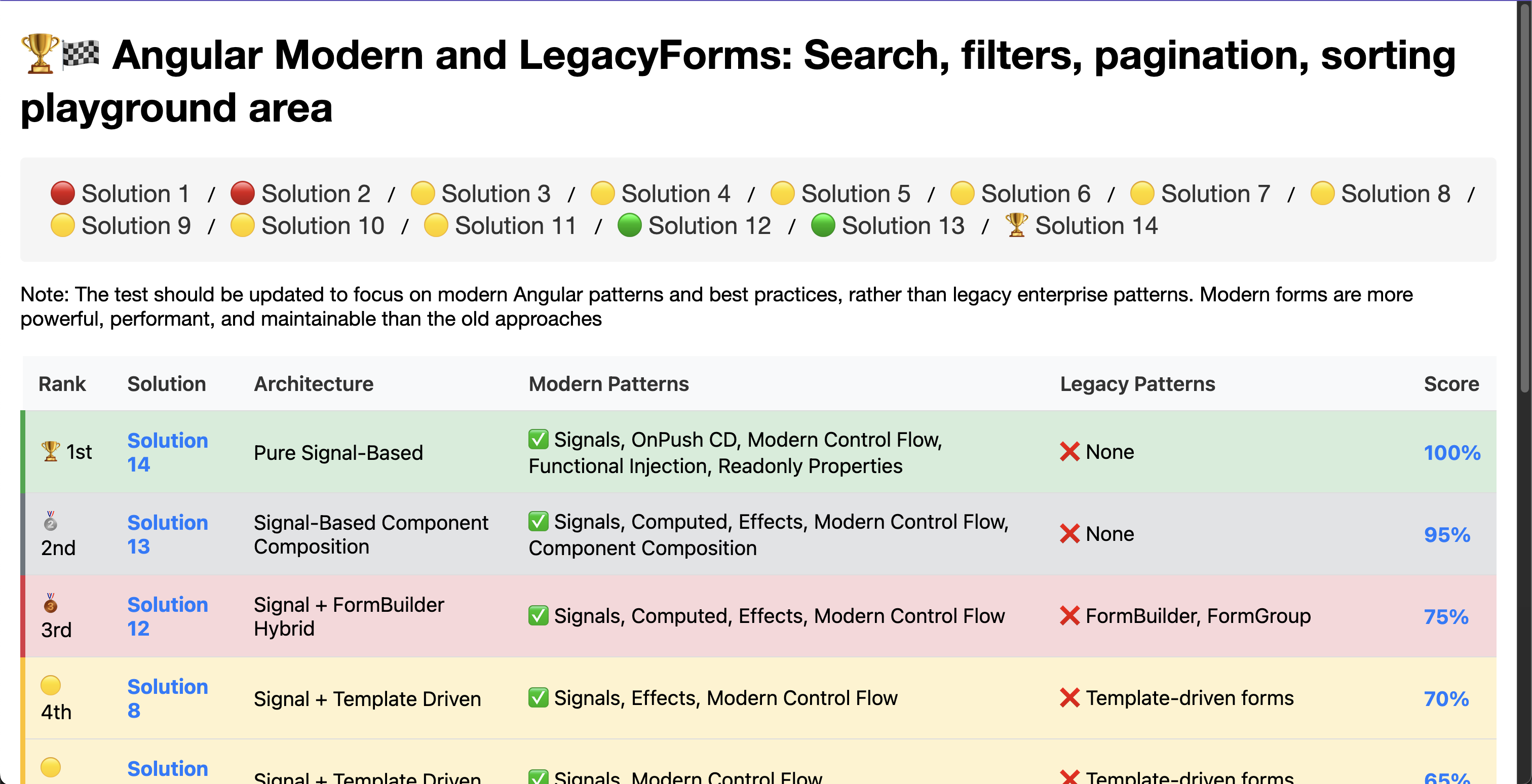
Score
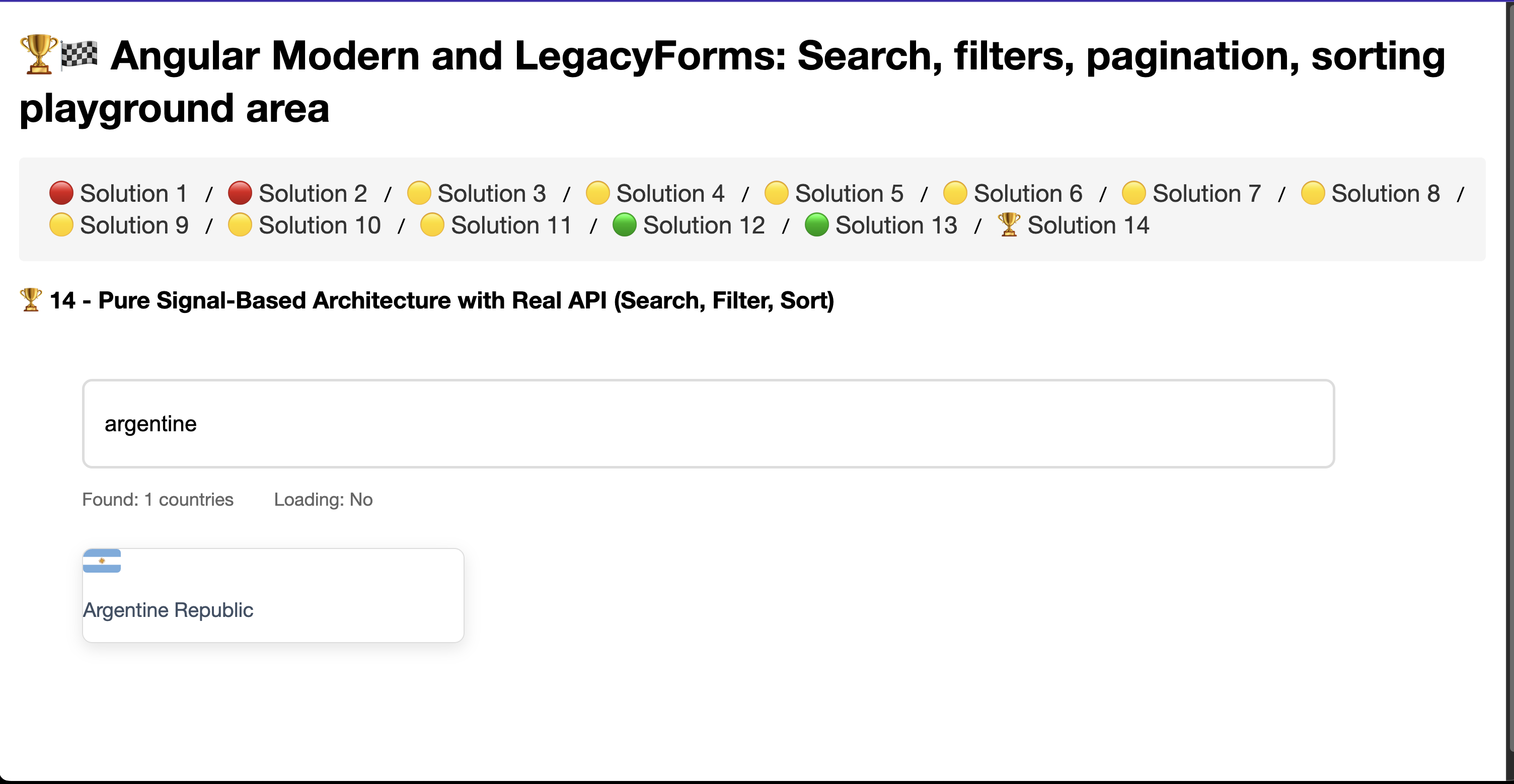
Winner example 14 - Pure Signal-Based Architecture
Evaluation Criteria
- Modern Angular best practices (Signals, Standalone Components, RxJS, etc.)
- Performance (reactivity, change detection, memory)
- Maintainability (readability, modularity, testability)
- Scalability (how well it would work in a larger app)
- Follows new modern Angular trends
Resoltion Solution evaluations
Solutions 1–5: Classic RxJS & Forms Approaches
| Solution | Approach | Rating | Notes |
|---|---|---|---|
| 1 | Template-driven forms, RxJS, filter pipe, manual subscription mgmt | 1 | Outdated, verbose, not idiomatic for modern Angular. |
| 2 | Template ref variable, RxJS, filter pipe | 1 | Slightly better, but still not scalable or modern. |
| 3 | Reactive Forms, RxJS, filter pipe | 2 | More modern, but relies on pipes and manual RxJS. |
| 4 | Material input, Reactive Forms, RxJS, filter pipe | 2 | Good for Material projects, but not leveraging Signals. |
| 5 | Reactive Forms, RxJS, filter pipe | 2 | Clean, but not as modern as Signals-based solutions. |
Solutions 6–9: Hybrid RxJS + Signals
| Solution | Approach | Rating | Notes |
|---|---|---|---|
| 6 | Reactive Forms, RxJS, toSignal, filter pipe | 2 | Starts using Signals, but still hybrid and not full Signals. |
| 7 | Like 6, but optimizes for stable values | 2 | Slightly better, but still hybrid. |
| 8 | Template-driven, Signals, RxJS, filter pipe | 2 | Uses Signals, but not fully idiomatic. |
| 9 | Template-driven, Signals, RxJS, filter pipe | 2 | Similar to 8, not fully leveraging Signals' power. |
Solutions 10–11: Component-Driven, RxJS, and Modular
| Solution | Approach | Rating | Notes |
|---|---|---|---|
| 10 | Reactive Forms, RxJS, combineLatest, modular | 2 | Good modularity, but not using Signals. |
| 11 | Component-driven (filter, sort, pagination), RxJS, modular | 2 | Very modular, but not using Signals. Good for classic Angular. |
Solutions 12–13: Hybrid Signals, Modern trendy Angular
| Solution | Approach | Rating | Notes |
|---|---|---|---|
| 12 | Component-driven, full Signals (computed, effect, toSignal), modular | 3 | Modern, scalable, maintainable, highly recommended. |
| 13 | Hybrid Signals (signal, computed, effect), modular, idiomatic | 3 | Mostly Remmended: idiomatic, performant, future-proof, best for new Angular projects. |
Solutions 14: Pure Signals, Modern trendy Angular
| Solution | Approach | Rating | Notes |
|---|---|---|---|
| 14 | Pure Signal-Based Architecture | 3 | Remmended: idiomatic, performant, future-proof, trendy, follow Angular best practices and best for new and future Angular projects. |
Overall Project Goals
- Demonstrate different approaches to implement the same search functionality in Angular
- Compare various Angular patterns and best practices
- Show evolution from simple to complex implementations
- Warning Spoil: Solution13 is the recommendation!
Form Handling Approaches
- Template-driven forms (Solutions 1, 8, 9)
- Reactive forms (Solutions 3, 4, 10)
- Manual event handling (Solution 2)
- Component-driven forms (Solution 11)
Simple State:
- Two-way binding (Solution 1)
- Template reference variables (Solution 2)
- FormControl direct binding (Solution 3)
Advanced State:
- Signals (Solutions 6, 7, 8, 9, 13)
- RxJS Streams (Solutions 10, 11)
Pure Signal Solution: Component + Service (httpResource instead httpClient):
- Fully signal-based (Solution 13)
- This is using Angular 19.2+ new "httpResource()" API which is designed to work with signals and provides automatic state management for HTTP requests.
- The
httpResourceprovides built-in signals:
- value for the data
- isLoading for loading state
- error for error state
- Main features:
- Automatic Reactivity
- Default state
- Data validation and transformation
Extra Aditional API notes:
- Filtering: The end-point is already filtering depending on the user-input, but including the filter pipe in our template (countries$ | async | filter:searchFilter), Angular will apply the FilterPipe's transform method to the countries$ observable's emitted values. This means, that each time the countries$ observable emits a new array of countries, Angular will filter those (can be multiple) countries based on the searchFilter string using the logic defined in the FilterPipe. To test: input
UKit should return onlyUkrainethen check for the console. You must see:Filter pipe triggered: trueonce
Conclusion
Solutions 1–5are not recommended for new projects.Solutions 6–11are transitional or modular, but not as modern as full Signals-based approaches.Solution 13is the most recommended, followed closely bySolution 12. Both use Angular Signals throughout, are modular, and align with the latest Angular best practices and trends for 2024 and beyond.Solution 14is the the recommended, followed closely bySolution 14. This align with 2025 best practices and recommendations.
Individual solutions explanation
- ✅ Uses:
- Template-driven forms with [(ngModel)] 2-way binding with ngModelChange
- Custom pipe filtering with filter pipe
- RxJS with takeUntilDestroyed pattern
- Reactive search with debounceTime and distinctUntilChanged
- ✅ Uses:
- Template reference variables (#searchBox)
- Event binding with (input)
- Custom pipe filtering with filter pipe
- RxJS with takeUntilDestroyed pattern
- Reactive search with debounceTime and distinctUntilChanged
- Manual state management for search text
- ✅ Uses:
- Reactive forms with FormControl and FormGroup
- Direct FormControl binding with [formControl]
- Custom pipe filtering
- RxJS with startWith and takeUntilDestroyed
- valueChanges observableformControl (directly binding the FormControl instance)
- ✅ Uses:
- Material UI components
- Reactive forms with formControlName
- Custom pipe filtering with slice
- RxJS subscription management
- Typed form controls with interfaces formControlName (directly bind to specific - - input element within the template)
- .get()
- ✅ Uses:
- pipe Ng2SearchPipeModule for filtering
- Reactive forms with formControlName
- RxJS with takeUntilDestroyed
- Null safety with optional chaining
- RxJS error handling with map
- ✅ Uses:
- Angular Signals with toSignal
- Reactive forms with FormGroup
- Effects for signal monitoring
- Custom pipe filtering
- RxJS with startWith and takeUntilDestroyed
- ✅ Uses:
- Signals with toSignal (based on stable values & optimise for efficient rendering)
- Reactive forms with FormGroup and formControlName
- Custom pipe filtering
- RxJS with debounceTime and takeUntilDestroyed
- Optimized for efficient rendering
- ✅ Uses:
- Template-driven forms with [(ngModel)]
- Signals with signal, computed, and effect
- ViewChild for form access
- Custom pipe filtering
- Manual
onSearchtrigger with button
- ✅ Uses:
- Template-driven forms with [(ngModel)]
- Signals with signal
- Simplified state management
- Custom pipe filtering
- Manual search trigger with button
- DestroyRef for cleanup
- ✅ Uses:
- Reactive forms with validation
- FormBuilder service
- RxJS combineLatest for data streams
- Mock data with static countries
- Form validation error messages
- RxJS operators (startWith, distinctUntilChanged) (based on https://github.com/leolanese/Angular-rxjs-filtering-list)
- ✅ Uses:
- Component-driven architecture
- Separate components for Filter, Sort, List, and Pagination
- Advanced RxJS stream management
- FormBuilder with reactive forms
- Comprehensive data handling (filter, sort, paginate)
- SearchService integration
- Smart and presentational component pattern
- ✅ Uses:
- Moving to pure signal
- Signal-based form value tracking
- Signal-based state management
- signal() for writable state, computed() Computed values for filtering, sorting, and pagination, effect() for side effects, toSignal() for converting RxJS
- Automatic dependency tracking between signals
- Performance optimization through Signal-based reactivity
- Reactive forms with FormGroup and FormControl (avoiding continuous re-evaluations caused by traditional getters)
- Component composition (reusing Solution11's child components)
This represents a modern Angular implementation using Signals instead of RxJS Observables for state management, while maintaining the component-driven architecture from Solution 11.
- ✅ Uses:
Signal State Management
✔ Uses a single state signal to manage all application state
Signal Data Flow
✔ Manages all state through signals ✔ Uses computed signals for derived data ✔ Handles data transformation (filtering, sorting, pagination) ✔ Communicates with the service layer
Signal Child Components communication
✔ SignalFilterComponent: Two-way binding with model() for filter text ✔ SignalSortComponent: Two-way binding with model() for sort direction ✔ SignalListComponent: Signal-based input for countries list ✔ SignalPaginationComponent: Two-way binding with model() for current page
Signal Service Layer communication
✔ SignalCountryService uses signals for: Data fetching, Loading states, Error handling
Solution13 represents a modern, fully signal-based Angular application with: Clean architecture, Efficient state management, Type-safe components, Reactive data flow, Optimised performance, Clear separation of concerns, which is more efficient than traditional change detection and provides better developer experience.
Further explanation Solution13 as fully signal-based
Singal state management
// Base signals for state
filterText = signal('');
sortDirection = signal<'asc' | 'desc'>('asc');
currentPage = signal(0);
Computed Signals for derived state:
filteredCountries = computed(() => {
  const countries = this.countryService.getCountries().data();
  const filter = this.filterText().toLowerCase();
  // ... filtering logic
});

sortedCountries = computed(() => {
  const countries = this.filteredCountries();
  // ... sorting logic
});

totalCount = computed(() => this.sortedCountries().length);
totalPages = computed(() => Math.ceil(this.totalCount() / this.itemsPerPage));
Effects (for side effects)
effect(() => {
  // Reset page when filter or sort changes
  this.currentPage.set(0);
}, { allowSignalWrites: true });
Signal-based Service
export class SignalCountryService {
  private countries = signal<Country[]>([]);
  private isLoading = signal(false);
  private error = signal<string | null>(null);
  // ...
}
Signal-based Components
// In SignalFilterComponent
filterValue = model.required<string>();

// In SignalListComponent
countries = input.required<Country[]>();
This project was generated with Angular CLI version 17+
ng new Angular-Search-Filtering

npm i
npm i bootstrap
// package.json
"styles": [
      "node_modules/bootstrap/dist/css/bootstrap.min.css",
      "src/styles.scss"
]
ng g s services/country
// later on exploring the Entity Pattern

ng g p pipes/filter
// reusable pipe to filter array based on search term
API Service
We are using "https://restcountries.com" sometimes these services are not as fast as expected, I'm looking forward to replace (maybe with: https://countries.petethompson.net) it but for now it's good enough.
Development server
Run ng serve for a dev server. Navigate to http://localhost:4200/. The application will automatically reload if you change any of the source files.
Code scaffolding
Run ng generate component component-name to generate a new component. You can also use ng generate directive|pipe|service|class|guard|interface|enum|module.
Build
Run ng build to build the project. The build artifacts will be stored in the dist/ directory.
Running unit tests
Run ng test to execute the unit tests via Karma.
Running end-to-end tests
Questions
What is Angular-Forms-Performance-Fetch-Search-Filtering?
leolanese/Angular-Forms-Performance-Fetch-Search-Filtering is a public repo on GitHub by leolanese. Angular (20+ )forms performance, search and filtering project.
Is Angular-Forms-Performance-Fetch-Search-Filtering open source?
It declares no license on GitHub. Public does not mean open source: without a license, nobody is granted the right to reuse it.


