
esp3d-webinstaller
Web Installer for ESP32 projects
- 2
- GPL-3.0
- 6 mo ago
Repo luc-github/esp3d-webinstaller, read from GitHub 1 d ago. luc-github has not joined Take My Repo.
In short
luc-github/esp3d-webinstaller is a public repo on GitHub by luc-github. Web Installer for ESP32 projects. It declares the GPL-3.0 license on GitHub. It is written mainly in JavaScript, has 2 stars and last changed on 2026-05-29. Nobody has reviewed it on Take My Repo yet, which says nothing about its quality. Read from GitHub on 2026-11-22.
ESP3D Web Installer
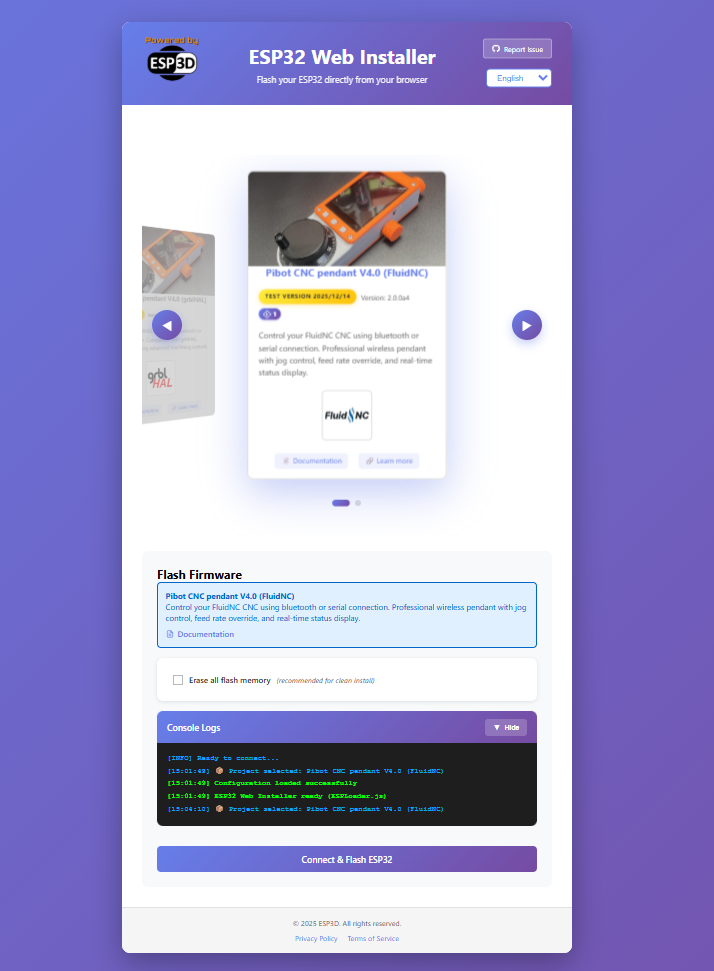
A modern, browser-based firmware installer for ESP32 devices using the Web Serial API. Flash your device directly from your browser without installing any software.
[!WARNING]
Disclaimer
The software is provided 'as is,' without any warranty of any kind, expressed or implied, including but not limited to the warranties of merchantability, fitness for a particular purpose, and non-infringement. In no event shall the authors or copyright holders be liable for any claim, damages, or other liability, whether in an action of contract, tort, or otherwise, arising from, out of, or in connection with the software or the use or other dealings in the software. It is essential that you carefully read and understand this disclaimer before using this software and its components. If you do not agree with any part of this disclaimer, please refrain from using the software.
✨ Features
- No installation required - Works directly in Chrome, Edge, or Opera
- Multi-project support - Configure multiple firmware projects with a 3D carousel selector
- Multi-language support - English and French included, easily extensible
- Progress tracking - Real-time progress bar and detailed console logs
- Adjustable flash speed - Select baudrate in UI (921600/460800/230400/115200)
- Error categorization - Detailed error logging with configurable filtering
- Flash statistics - Track successful flashes per project
- Release notes link - Clickable version with 📋 icon linking to release notes
- Fully customizable - Branding, colors, footer links via configuration files
- Privacy-focused - All firmware flashing happens locally in your browser
- Offline capable - No external CDN dependencies (ESPTool.js hosted locally)
🚀 Quick Start
Prerequisites
- A web server with PHP support (Apache, Nginx, or local development server)
- A compatible browser: Chrome 89+, Edge 89+, or Opera 75+
- ESP32 device with USB connection
Installation
Clone the repository:
git clone https://github.com/luc-github/esp3d-webinstaller.git
cd esp3d-webinstaller
Download ESPTool.js bundle:
curl -L "https://unpkg.com/esptool-js@0.4.5/bundle.js" -o js/esptool-bundle.jsOr download manually from unpkg.com/esptool-js@0.4.5/bundle.js
Add your firmware files:
firmware/
└── your-project/
    ├── bootloader.bin
    ├── partitions.bin
    └── firmware.bin
Configure your project (see Configuration section)
Deploy to your web server or test locally:
# PHP built-in server (recommended, enables analytics/logging endpoints)
php -S localhost:8000

# Or Python simple HTTP server (static mode)
python -m http.server 8000
Open in browser:
http://localhost:8000
[!TIP] Use the PHP server when you want flash statistics/error logging (
log-flash.php,get-flash-counts.php,get-flash-errors.php). Use the Python server for quick static testing.
📁 Project Structure
esp3d-webinstaller/
├── index.html              # Main application page
├── privacy.html            # Privacy policy page
├── terms.html              # Terms of service page
├── style.css               # Application styles
│
├── js/
│   ├── script.js           # Main application logic
│   └── esptool-bundle.js   # ESPTool.js library (download separately)
│
├── config.json             # Project/firmware configuration
├── page-config.json        # Page branding and settings
│
├── lang/
│   ├── en.json             # English translations
│   └── fr.json             # French translations
│
├── log-flash.php           # Flash event logging endpoint
├── get-flash-counts.php    # Retrieve flash statistics
├── get-flash-errors.php    # Retrieve detailed error logs
├── flash-counts.json       # Flash statistics data
├── flash-errors.json       # Detailed error logs
│
├── images/
│   ├── powered-logo.png    # Header logo
│   ├── favicon.ico         # Browser favicon
│   └── espressif.png       # Credits logo
│
└── firmware/
    └── your-project/
        ├── bootloader.bin
        ├── partitions.bin
        └── firmware.bin
⚙️ Configuration
config.json - Firmware Projects
This file defines the firmware projects available in the installer.
{
  "projects": [
    {
      "id": "my-project",
      "name": "My ESP32 Project",
      "enabled": true,
      "description": {
        "en": "English description of your project",
        "fr": "Description française de votre projet"
      },
      "version": "1.0.0",
      "releaseNotes": "https://github.com/your-repo/releases/tag/v1.0.0",
      "versions": [
        {
          "id": "2.0.0",
          "version": "2.0.0",
          "active": true,
          "releaseNotes": "https://github.com/your-repo/releases/tag/v2.0.0",
          "firmware": {
            "meta": {
              "chip": "esp32",
              "flash_mode": "dio",
              "flash_freq": "80m",
              "before": "default_reset",
              "after": "hard_reset"
            },
            "root": "my-project/v2.0.0",
            "files": [
              { "file": "bootloader.bin", "offset": "0x1000" },
              { "file": "partitions.bin", "offset": "0x8000" },
              { "file": "firmware.bin", "offset": "0x10000" }
            ]
          }
        }
      ],
      "image": "images/my-project.png",
      "badgeImage": "images/my-badge.png",
      "icon_left": "images/my-project-icon.svg",
      "icon_right": "images/my-radio-icon.svg",
      "url": "https://your-project-website.com",
      "documentation": "https://your-project-docs.com",
      "badge": {
        "en": "Stable",
        "fr": "Stable"
      }
    }
  ]
}
| Field | Type | Description |
|---|---|---|
id |
string | Unique identifier for the project |
name |
string | Display name shown in the carousel |
enabled |
boolean | Set to false to show as "coming soon" |
description |
object | Localized descriptions (en, fr, etc.) |
version |
string | Firmware version displayed on the card |
releaseNotes |
string | URL to release notes (optional). If set, version becomes clickable with 📋 icon |
versions |
array | Version list for rollback support (active: true used as default) |
firmware |
object/array/string | Legacy firmware definition (still supported) |
image |
string | Project card image (optional) |
badgeImage |
string | Small image overlay at bottom-right of card image, 25% height (optional) |
icon_left |
string | Left icon below description, same row as icon_right (optional) |
icon_right |
string | Right icon, same size as icon_left, to its right (optional) |
url |
string | Link to project website (optional) |
documentation |
string | Link to documentation (optional) |
badge |
object | Localized badge text (e.g., "Beta", "Stable") |
Versioned firmware format (recommended)
Use this object format to avoid repeating the same path prefix and to define flash behavior per project:
"versions": [
  {
    "id": "2.0.0",
    "version": "2.0.0",
    "active": true,
    "downloadFirmware": "firmware/my-project/v2.0.0/esp3dfw.bin",
    "firmware": {
      "meta": {
        "chip": "esp32",
        "flash_mode": "dio",
        "flash_freq": "80m",
        "before": "default_reset",
        "after": "hard_reset"
      },
      "root": "my-project/v2.0.0",
      "files": [
        { "file": "bootloader.bin", "offset": "0x1000" },
        { "file": "partitions.bin", "offset": "0x8000" },
        { "file": "firmware.bin", "offset": "0x10000" }
      ]
    }
  }
]
- Put each version in its own folder (example:
firmware/my-project/v2.0.0/...) active: truemarks the default version selected in UI- users can pick another entry in the firmware version dropdown to rollback
root: common directory underfirmware/used for all entries infilesmeta.flash_mode/meta.flash_freq: passed to esptool-js during writemeta.before/meta.after: connection/reset strategy formain()andafter()downloadFirmware(optional but recommended): direct offline binary link for this version; if omitted, UI can derivefirmware/<root>/esp3dfw.bin- Legacy format (
firmwareas object/array/string) is still supported for backward compatibility
Version tags and icons (optional)
On each entry in the versions array inside config.json, you can add optional UI hints for the firmware version dropdown (header):
| Field | Aliases | Description |
|---|---|---|
versionTag |
tag |
Preset key (see page-config.json → firmware_versions.tag_presets). Examples: preview, stable, beta, latest, legacy, rc. Unknown values still show a small generic badge. |
versionTagIcon |
tagIcon |
Overrides the preset icon (emoji or short text). |
versionTagLabel |
tagLabel |
Short label shown next to the icon in the pill. |
Preset icons and labels are defined in page-config.json under firmware_versions.tag_presets (merged with built-in defaults in js/script.js if the key is missing). Each preset is an object { "icon": "…", "short": "…" } or a shorthand string (treated as the icon only).
Flash baudrate (UI + page-config.json)
The flash speed is chosen from a dropdown in Flash Options (not a native <select>). Configure the list and default in page-config.json:
"flash_baudrate": {
  "options": [921600, 460800, 230400, 115200],
  "default": 921600
}
options: array of positive integers; order in the UI follows this array.default: used when nothing valid is stored inlocalStorageunderflashBaudrate, or when the saved value is no longer inoptions.
If flash_baudrate is omitted, the installer falls back to the same list and default as in code (js/script.js).
Serial monitor baudrate (UI + page-config.json)
The serial monitor uses its own dropdown (same custom UI as flash baudrate). Configure it in page-config.json:
"serial_monitor": {
  "options": [2000000, 1500000, 1000000, 921600, 460800, 230400, 115200, 74880, 57600, 38400, 19200, 9600],
  "default": 115200
}
options: array of positive integers; display order follows the array order exactly.default: used when no valid value exists inlocalStorageundermonitorBaudrate.
page-config.json - Page Settings
This file configures branding, links, and visual settings.
{
  "appearance": {
    "default_theme": "auto"
  },
  "branding": {
    "logo": "images/powered-logo.png",
    "favicon": "images/favicon.ico"
  },
  "languages": [
    {
      "code": "en",
      "name": "English",
      "default": true
    },
    {
      "code": "fr",
      "name": "Français"
    }
  ],
  "links": {
    "github": {
      "enabled": true,
      "url": "https://github.com/your-repo/issues/new"
    }
  },
  "footer": {
    "enabled": true,
    "links": [
      { "key": "privacyPolicy", "url": "privacy.html" },
      { "key": "termsOfService", "url": "terms.html" }
    ]
  },
  "browser_compatibility": {
    "show_warning": true,
    "supported_browsers": ["Chrome", "Edge", "Opera"]
  },
  "flash_baudrate": {
    "options": [921600, 460800, 230400, 115200],
    "default": 921600
  },
  "serial_monitor": {
    "options": [2000000, 1500000, 1000000, 921600, 460800, 230400, 115200, 74880, 57600, 38400, 19200, 9600],
    "default": 115200
  },
  "firmware_versions": {
    "enabled": true,
    "tag_presets": {
      "preview": { "icon": "🔭", "short": "Preview" }
    }
  },
  "theme": {
    "primary_color": "#667eea",
    "secondary_color": "#764ba2",
    "success_color": "#00ff00",
    "error_color": "#ff5555",
    "warning_color": "#ffaa00"
  },
  "audio_feedback": {
    "enabled": true,
    "verbosity": "normal",
    "volume": 0.7,
    "events": {
      "start": "sounds/[lang]/start.mp3",
      "boot_prompt": "sounds/[lang]/press-boot.mp3",
      "connected": "sounds/[lang]/connected.mp3",
      "erasing": "sounds/[lang]/erasing.mp3",
      "flashing_start": "sounds/[lang]/flashing-start.mp3",
      "success": "sounds/[lang]/success.mp3",
      "error": "sounds/error.mp3"
    }
  }
}
| Option | Description |
|---|---|
analytics |
false for static hosting (GitHub Pages), true for PHP server with logging |
appearance |
default_theme: "auto", "light" or "dark" for first visit (localStorage key installerTheme then overrides) |
branding |
Logo and favicon paths |
languages |
Available languages configuration |
links.github |
"Report Issue" button configuration |
footer |
Footer visibility and legal page links |
browser_compatibility |
Warning for unsupported browsers |
Questions
What is esp3d-webinstaller?
luc-github/esp3d-webinstaller is a public repo on GitHub by luc-github. Web Installer for ESP32 projects.
Is esp3d-webinstaller open source?
It declares the GPL-3.0 license on GitHub.
Does esp3d-webinstaller run on macOS, Windows or Linux?
Its maker has not tagged a system, so it is unknown here. Its README says what it needs.
How do I install esp3d-webinstaller?
Open "Take it" on its page: Take My Repo writes an install plan for your machine and hands it to your AI agent (Claude Code, Codex or Cursor), which asks you before each step. Take My Repo has not tested it on any machine.