
printer-cli
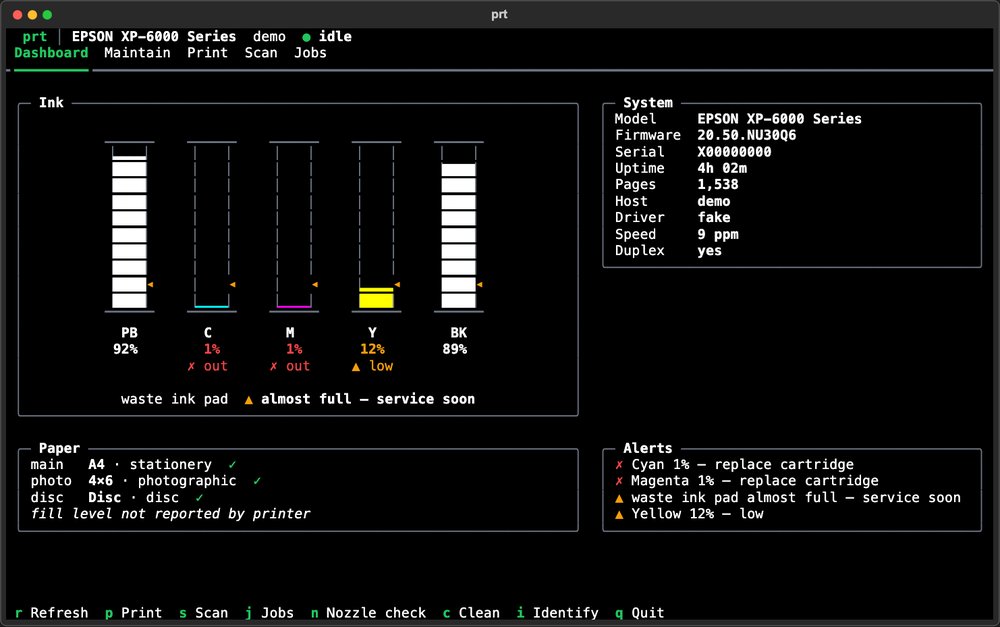
Your printer's dashboard in the terminal: ink, paper, alerts, nozzle checks, head cleaning, printing and scanning for network printers. CLI + TUI over IPP, eSCL, SNMP and Epson ESC/P2.
- 0
- MIT
- 8 h ago
Repo luongnv89/printer-cli, read from GitHub 5 h ago. luongnv89 has not joined Take My Repo.
In short
luongnv89/printer-cli is a public repo on GitHub by luongnv89. Your printer's dashboard in the terminal: ink, paper, alerts, nozzle checks, head cleaning, printing and scanning for network printers. CLI + TUI over IPP, eSCL, SNMP and Epson ESC/P2. It declares the MIT license on GitHub. It is written mainly in Python, has 0 stars and last changed on 2026-11-23. Nobody has reviewed it on Take My Repo yet, which says nothing about its quality. Read from GitHub on 2026-11-24.
Similar repos



Check ink, paper and alerts, run nozzle checks and head cleaning, print and scan on network printers, and print photos and web articles as newspaper and magazine pages, from a scriptable CLI or a full-screen TUI.
Install
uv tool install printer-cli
Requires Python 3.11+. Puts prt on your PATH (printer-cli works too). Other methods: Install options.
Quick start
Check a printer's ink, paper and alerts. No printer handy? The built-in demo printer replays a real Epson XP-6000:
prt -p demo status
╭─┐EPSON XP-6000 Series · office┌──────────────────────────────────────────╮
│ ● idle    firmware 20.50.NU30Q6 · up 4h02m                               │
├──────────────────────────────────────────────────────────────────────────┤
│ ink                                                                      │
│ Photo Black  ■■■■■■■■■■■■■■■■■■■■■■■■■■■■■■■■■■■■····  92%               │
│ Cyan         ········································   1%  ✗ replace    │
│ Magenta      ········································   1%  ✗ replace    │
│ Yellow       ■■■■····································  12%  ▲ low        │
│ Black        ■■■■■■■■■■■■■■■■■■■■■■■■■■■■■■■■■■■·····  89%               │
├──────────────────────────────────────────────────────────────────────────┤
│ paper   main A4 ✓   photo 4×6 ✓   disc Disc ✓   (levels not reported)    │
│ waste   ▲ almost full — service soon                                     │
╰─┘4 alerts · checked 17:42└───────────────────────────────────────────────╯
Next: Use your own printer · Commands · The TUI · Photo booth · Greeting card · 4×6 photo prints · Postcards · Disc labels · Recipe cards · Article printing · Vintage gazette · Safety
Why printer-cli
It started because the Epson XP-6000's web dashboard stopped working. printer-cli talks to the printer directly over standard protocols (IPP, eSCL, SNMP, plus Epson's ESC/P2 remote mode for maintenance). It works with most AirPrint/Mopria printers from any brand, and you can manage several printers from one place.
Use your own printer
prt discover                                        # find printers on the LAN and save new ones
prt printers default xp-6000                        # pick the default when several were saved
prt status                                          # ink, paper, alerts
prt tui                                             # full-screen dashboard
Every command also works against the built-in replay: prt -p demo status, prt -p demo tui.
Printers that discover can't see (another subnet, mDNS blocked) can be added by hand. prt list then shows which saved printers answer (here office points at the demo printer):
prt discover --wait 5                               # listen longer on a busy network
prt printers add pantum 192.168.1.80 --driver ipp   # save a printer by host or IP
prt printers remove pantum
prt list
╭─┐printers┌───────────────────────────────────────────────────────────────────╮
│    name    host          driver  state                                       │
│ ●  office  demo          fake    ● online                                    │
│    pantum  192.168.1.80  ipp     ○ offline                                   │
╰─┘2 saved · ● default└────────────────────────────────────────────────────────╯
Status
| Verified against the real XP-6000 | Covered by tests (replay of its data) | |
|---|---|---|
| Ink, state, alerts, paper, firmware (IPP) | ✅ read live during development | ✅ |
| Page counter (SNMP) | ✅ | ✅ |
| Scanner capabilities (eSCL) | ✅ | ✅ |
| Scanning a page | ⏳ not yet | ✅ (mocked HTTP) |
| Printing (IPP / CUPS) | ⏳ not yet | ✅ (fake transport) |
| Nozzle check / head cleaning (ESC/P2 on 9100) | ⏳ not yet: bytes match gutenprint escputil, port 9100 is open |
✅ (byte-exact) |
Commands
| Command | What it does |
|---|---|
prt status [--watch N] |
State, alerts, ink, paper, waste pad. --watch prints one line per sample |
prt ink |
Ink levels only |
prt overview |
System, software and hardware: model, serial, firmware, uptime, page count, formats, media, scanner, capabilities |
prt discover |
mDNS scan for printers and scanners. Saves each new printer under a short name; printers already saved and the default are left as they are |
prt list [--no-check] |
Saved printers and whether each one is online or offline (same as prt printers list) |
prt printers list/add/remove/default |
Manage saved printers. list checks each printer's connection and shows it as online or offline; --no-check skips the check |
prt maintain nozzle-check |
Print the nozzle check pattern |
prt maintain clean [--force] |
Head cleaning, with a safety check first (see Safety) |
prt maintain test-page |
Colour test page: ink bars, gradients, grey steps, fine lines |
prt maintain identify |
Flash the printer's panel |
prt print FILE… [-n 2] [--media 4x6] [--tray photo] [--quality high] [--mono] [--duplex] [--direct] [--wait] [--yes] |
Print; --wait returns once each job has finished and reports how it ended; --yes is needed in agent mode |
prt booth PHOTO [--style metro|daily|wizard|wanted|certificate|sports|missing|movie] [--story-file story.json] [--preview page.jpg] [--save page.pdf] |
Photo booth: print the photo as an A4 newspaper front page, wizard or sports card, certificate, or wanted, missing-pet or movie poster (see Photo booth) |
prt card PHOTO [--card-file card.json] [--greeting TEXT] [--verse TEXT] [--preview card.pdf] [--save card.pdf] |
Print a greeting card: the photo and a verse on one A4 sheet that folds into an A6 card (see Greeting card) |
prt strip PHOTO PHOTO PHOTO PHOTO [--caption TEXT] [--mono] [--preview strip.jpg] [--save strip.pdf] |
Print a four-frame photo-booth strip on 4×6 photo paper from the photo tray, twice side by side to cut into two strips (see 4×6 photo prints) |
prt instant PHOTO [--caption TEXT] [--preview photo.jpg] [--save photo.pdf] |
Print a photo as a Polaroid-style instant photo with a handwritten caption on 4×6 photo paper (see 4×6 photo prints) |
prt postcard PHOTO [--postcard-file postcard.json] [--message TEXT] [--address LINE]… [--side front|back] [--duplex] [--preview card.pdf] [--save card.pdf] |
Print a two-sided postcard on 4×6 photo paper: the photo on the front, the message, address lines and a stamp box on the back (see Postcards) |
prt disc PHOTO [--disc-file disc.json] [--title TEXT] [--track TEXT]… [--preview disc.png] [--save disc.pdf] |
Print a circular label on a printable CD/DVD through the disc tray: the photo, a title and a track list (see Disc labels) |
prt recipe URL|FILE [--preview card.pdf] [--save card.pdf] |
Print a recipe as 4×6 index cards from the photo tray (see Recipe cards) |
prt article URL|FILE [--style magazine|classic-magazine] [--preview page.pdf] [--save page.pdf] |
Print a blog post, news article or X post as A4 magazine pages (see Article printing) |
prt gazette PHOTO… [--landscape] [--story-file story.json] [--preview page.pdf] [--save page.pdf] |
Print one or more photos as a vintage newspaper, over as many A4 pages as the photos need (see Vintage gazette) |
prt compose PAGE.json [--preview page.pdf] [--save page.pdf] |
Print a page you describe as blocks: headings, text, images, QR codes, columns and rules (see Compose a page) |
prt styles |
Every booth, card, strip, instant, postcard, disc, article, recipe and gazette style and the options that pick it; with -f json, also each style's fields, character limits, photo count and a sample image (see Styles and schemas) |
prt schema story|article|gazette|page|card|recipe|postcard|disc |
The JSON Schema of a booth story file, an article JSON file, a gazette story file, a prt compose page file, a prt card card file, a prt recipe recipe file, a prt postcard postcard file or a prt disc label file |
prt jobs [--all] / prt jobs wait ID / prt jobs cancel ID |
List jobs, wait for one to finish, or cancel one |
prt scan [-o file.pdf] [--type jpeg] [--dpi 600] [--mode gray] [--area full] |
Flatbed scan (-o - writes to stdout) |
prt tui |
Full-screen dashboard |
prt mcp |
Run prt as an MCP server over stdio for AI agents (needs printer-cli[mcp]; see MCP server) |
prt skills list / prt skills install [--claude] [--agents] [--project] [--dir PATH] [--force] |
List the agent skills that come with prt, or install them for Claude Code or other agents (see Agent skills) |
Global options, which can go before or after the command:
-p/--printer NAME|HOSTpicks the printer.-f/--format jsonprints machine-readable output, and errors as a JSON object (see Scripting).--no-colorturns colour off.-qhides notes and prints only results.--timeout Ssets the network timeout in seconds.--config PATHuses a different config file.
Examples
The outputs below come from the built-in demo printer.
Ink levels: prt ink
╭─┐ink · demo┌─────────────────────────────────────────────────────────────────╮
│ Photo Black  ■■■■■■■■■■■■■■■■■■■■■■■■■■■■■■■■■■■■····  92%                   │
│ Cyan         ········································   1%  ✗ replace        │
│ Magenta      ········································   1%  ✗ replace        │
│ Yellow       ■■■■····································  12%  ▲ low            │
│ Black        ■■■■■■■■■■■■■■■■■■■■■■■■■■■■■■■■■■■·····  89%                   │
╰─┘15:39└──────────────────────────────────────────────────────────────────────╯
Watch status: prt status --watch 2 prints one line per sample until Ctrl-C.
15:39:31  ● idle       PB  92 C   1 M   1 Y  12 BK  89   4 alerts
15:39:33  ● idle       PB  92 C   1 M   1 Y  12 BK  89   4 alerts
15:39:35  ● idle       PB  92 C   1 M   1 Y  12 BK  89   4 alerts
Overview: prt overview (trimmed; it goes on with network, scanner and capabilities)
╭─┐EPSON XP-6000 Series · demo┌────────────────────────────────────────────────╮
│ system                                                                       │
│   model          EPSON XP-6000 Series                                        │
│   vendor         Epson                                                       │
│   serial         X00000000                                                   │
│   uuid           00000000-0000-4000-8000-000000000000                        │
│   driver         fake                                                        │
├──────────────────────────────────────────────────────────────────────────────┤
│ software                                                                     │
│   firmware       20.50.NU30Q6                                                │
│   ipp            1.0, 1.1, 2.0                                               │
│   formats        octet-stream, pwg-raster, urf, jpeg                         │
│   admin page     http://printer.local:80/PRESENTATION/BONJOUR                │
├──────────────────────────────────────────────────────────────────────────────┤
│ hardware                                                                     │
│   uptime         4h02m                                                       │
│   pages printed  1,538                                                       │
│   colour         yes                                                         │
│   duplex         yes                                                         │
│   speed          9 ppm                                                       │
│   resolutions    360dpi, 720dpi, 5760x1440dpi                                │
│   trays          main, photo, disc                                           │
│   media          A4, 4×6, 5×7, 8×10, A5, A6, Letter, Legal, L (3.5×5), B5 …  │
…
Maintenance
prt maintain nozzle-check     # print the pattern; a gap in a line means clogged nozzles
prt maintain clean            # head cleaning, refused while ink is low or the waste pad is near full
prt maintain test-page --yes  # colour test page, no prompt
prt maintain identify         # flash the panel to find the printer
Printing
prt print boarding-pass.pdf                                    # PDF goes through the local CUPS queue
prt print holiday.jpg --media 4x6 --tray photo --quality high  # photo paper from the photo tray
prt print notes.pdf -n 2 --duplex --mono                       # two double-sided black-and-white copies
prt print poster.png --direct                                  # straight to the printer, never via CUPS
Jobs: prt jobs --all includes finished jobs; cancel one by its id with prt jobs cancel 42.
Waiting for a print: prt print photo.jpg --wait
Questions
What is printer-cli?
luongnv89/printer-cli is a public repo on GitHub by luongnv89. Your printer's dashboard in the terminal: ink, paper, alerts, nozzle checks, head cleaning, printing and scanning for network printers. CLI + TUI over IPP, eSCL, SNMP and Epson ESC/P2.
Is printer-cli open source?
It declares the MIT license on GitHub.
Does printer-cli run on macOS, Windows or Linux?
Its maker has not tagged a system, so it is unknown here. Its README says what it needs.
How do I install printer-cli?
Open "Take it" on its page: Take My Repo writes an install plan for your machine and hands it to your AI agent (Claude Code, Codex or Cursor), which asks you before each step. Take My Repo has not tested it on any machine.