
skythread
Krea 2 + MiniMax H3 R2V workflow, prompts, seeds, and reference assets for the Skythread short film
- 10
- 4 mo ago
Repo lxe/skythread, read from GitHub 1 min ago. lxe has not joined Take My Repo.
In short
lxe/skythread is a public repo on GitHub by lxe. Krea 2 + MiniMax H3 R2V workflow, prompts, seeds, and reference assets for the Skythread short film. It declares no license on GitHub. Public does not mean open source: without a license, nobody is granted the right to reuse it. It is written mainly in Python, has 10 stars and last changed on 2026-08-06. Nobody has reviewed it on Take My Repo yet, which says nothing about its quality. Read from GitHub on 2026-11-22.
AI models this project points to
Skythread
Skythread is a short vertical animation I made while experimenting with MiniMax H3 reference-to-video (R2V) in ComfyUI.
I started with the prompting and reference-ordering ideas in this R2V post by u/Time-Ad-7720, then tested the approach scene by scene until I found a setup that stayed reasonably consistent.

How the experiment evolved
I began by making a storyboard with ChatGPT ImageGen. My goal was to keep the same character and kite throughout the film, then use each storyboard image as the starting frame for its scene. The images had too many small noise artifacts, and the fully composed starting frames still did not give H3 reliable motion.
I also tried using the end of one generated scene as the reference for the next. That preserved the previous composition too literally and caused new problems with movement, framing, and camera direction. It kept continuity at the expense of good cinematography.
The breakthrough was finding the R2V workflow and simplifying the inputs. Instead of carrying a whole frame forward, I gave H3 three reusable references:
- Hana for the character's face, clothes, age, and proportions.
- The kite for its shape, string, spool, and two tails.
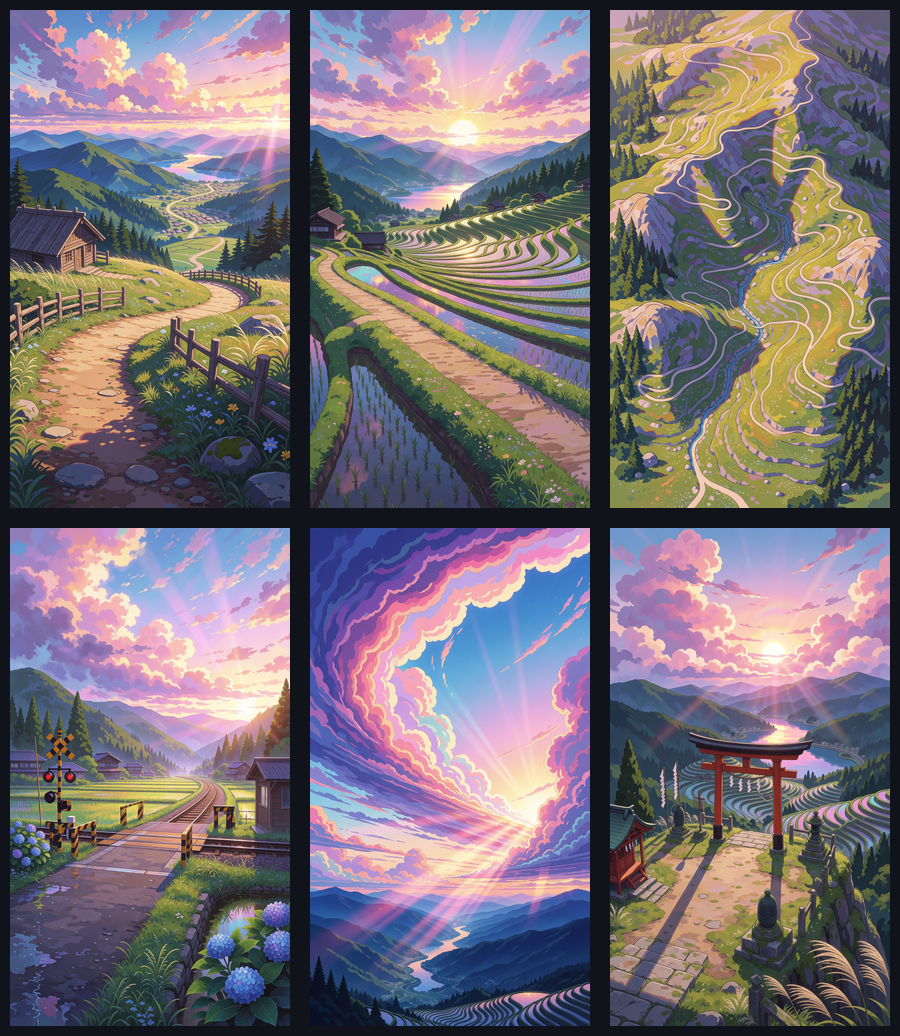
- An empty scene for the location, lighting, composition, and overall style.
This kept Hana and the kite consistent without locking every new scene to the previous camera angle. I made the final references with Krea 2 because I could apply my HoloSomnia LoRA, but the R2V setup is not tied to Krea. A clean image from another generator, a drawing, or your own artwork can work as a reference too.
Each Krea reference used its own seed. I simplified the kite to a plain white design and generated empty environment plates instead of asking one image model to place everything correctly at once.
The two main subject references are:
- Hana — seed
21137 - Plain white kite — seed
42281
From there I worked on one scene at a time. I reviewed contact sheets, changed the prompt, and regenerated only that scene. This was especially useful for spotting problems such as the kite staying on the ground too long, a stiff repeated running cycle, an impossible string connection, or a camera move that ignored the path in the reference image.
The main lessons were:
- Tell H3 exactly what each reference controls.
- Describe the opening state clearly. If the kite should already be high, say that instead of expecting the model to infer it from the previous scene.
- Start important action immediately. Scene 2 improved when the prompt made the kite rise on the first frame and gave Hana a specific reaction.
- Base the camera move on the actual scene. The mountain shot worked once Hana entered from the foreground path and the camera rose to reveal where that path led.
- Treat continuity as a state: screen direction, subject size, kite height, string tension, and where the previous scene ended.
- Keep each scene focused on one main action and one clear camera idea. More instructions were not automatically better.
Once a scene worked, I kept it and moved to the next one. One generation per scene was much easier to refine than trying to make H3 handle the whole film at once.
Keeping the HoloSomnia style
HoloSomnia is my own visual style, so I used a style LoRA instead of relying on Krea's default look. The exact checkpoint used for these references is HoloSomnia Krea 2 Style LoRA, trained on Krea 2 Raw for use with Krea 2 Turbo. I used it at a relatively light strength of 0.4 so the style carried across the film without overpowering the scene layout or character details.
Related versions of my HoloSomnia LoRA are also available for SDXL on Civitai and Z-Image Turbo on Hugging Face. They show the same style direction, but they are trained for different base models and are not direct replacements for the Krea 2 version used here.
Final scenes
The same H3 workflow was used for every scene. Only the references, prompt, seed, and duration changed.
| Scene | Environment reference | H3 prompt | H3 seed |
|---|---|---|---|
| Cabin | Cabin porch | Prompt | 88143 |
| Path | Mountain path | Prompt | 88402 |
| Mountain | Mountain path | Prompt | 92731 |
| Train | Train landscape | Prompt | 97019 |
| Bunnies | Bunny field | Prompt | 96541 |
| Sky | Soaring clouds | Prompt | 94783 |
| Shrine | Mountain shrine | Prompt | 94931 |
Earlier prompt experiments are also kept in prompts/h3. They are useful for seeing what changed between attempts without turning this README into a wall of text.
Workflows
- Krea 2 + HoloSomnia workflow
- MiniMax H3 R2V workflow
- SeedVR2 native video workflow
- Older SeedVR2 video workflow
The small Python runners in workflows/python show how I submitted the same workflows through the ComfyUI API. Model weights are not included.
The H3 workflow is based on Comfy-Org's official MiniMax H3 R2V template. The reference-ordering and structured-prompt approach was adapted from u/Time-Ad-7720's Reddit post.
Krea references and seeds
All generated PNGs are in assets/krea. The normal scene PNGs still contain their ComfyUI workflow metadata.
The matching Krea prompts, seeds, dimensions, and model settings are in manifests/krea. The final environment seeds were:
| Reference | Seed |
|---|---|
| Cabin porch | 73147 |
| Mountain path | 74101 |
| Train landscape | 96307 |
| Bunny field | 96121 |
| Soaring clouds | 74629 |
| Mountain shrine | 74771 |
Music and finishing
I created the backing track in Suno after the scene order and timing were settled. The exact Suno prompt and settings are in the score notes.
The final cut is 9:16 and 51.584 seconds long. I removed a narrow washed-out strip on the right with an undistorted 9:16 crop, then used SeedVR2 to upscale the result to 1080x1920.
License
The workflow code is available under the MIT License. The generated images are included as project references and remain copyright of the repository owner.
Questions
What is skythread?
lxe/skythread is a public repo on GitHub by lxe. Krea 2 + MiniMax H3 R2V workflow, prompts, seeds, and reference assets for the Skythread short film.
Is skythread open source?
It declares no license on GitHub. Public does not mean open source: without a license, nobody is granted the right to reuse it.
Does skythread run on macOS, Windows or Linux?
Its maker has not tagged a system, so it is unknown here. Its README says what it needs.
How do I install skythread?
Open "Take it" on its page: Take My Repo writes an install plan for your machine and hands it to your AI agent (Claude Code, Codex or Cursor), which asks you before each step. Take My Repo has not tested it on any machine.
Is skythread still maintained?
Its last change on GitHub was on 2026-08-06. GitHub counts 0 open issues and pull requests. Take My Repo does not judge from that whether it is maintained.
What do people who ran skythread say?
Nobody has reviewed it on Take My Repo yet, which says nothing about its quality.