
vscode-csharp-dependency-graph
A simple VS Code extension that generates a graph of your project dependencies.
- 4
- MIT
- 5 wk ago
Repo magic5644/vscode-csharp-dependency-graph, read from GitHub 17 min ago. magic5644 has not joined Take My Repo.
In short
magic5644/vscode-csharp-dependency-graph is a public repo on GitHub by magic5644. A simple VS Code extension that generates a graph of your project dependencies. It declares the MIT license on GitHub. It is written mainly in TypeScript, has 4 stars and last changed on 2026-10-19. Nobody has reviewed it on Take My Repo yet, which says nothing about its quality. Read from GitHub on 2026-11-23.
C# Dependency Graph

Generate interactive dependency graphs for C# projects and classes directly from Visual Studio Code.
Recent Changes
- Enhanced Package Optimization: Fixed duplicate files in the VSIX package, significantly reducing its size
- Improved Resource Loading: Added robust resource loading that works in both development and production environments
- Fixed Webview Initialization: Resolved "Required script URIs are not defined" error in the Graphviz preview
- Added New NPM Scripts: Simplified packaging process with optimized scripts for building and packaging
- SVG Export Enhancement: Improved SVG export functionality from the graph preview
- Cycle Detection Improvements: Enhanced cycle detection algorithm for better performance and accuracy
- Fixed Extension Activation: Resolved "command already exists" error during debugging with robust command registration
Change Log
See CHANGELOG.md for a list of changes in README.md
Features
- Project-level dependency visualization: See how your C# projects depend on each other
- Class-level dependency analysis: Analyze dependencies between classes across your solution
- Solution file support: Automatically detect and use .sln files to find all projects in a solution structure
- Customizable output: Configure which elements to include in your dependency graph
- Exclude test projects: Option to exclude test projects from the analysis
- DOT file output: Generate standard DOT files for use with internal preview feature or other visualization tools like Graphviz
- Preview Graphviz: Preview Graphviz on graphviz file open (beta)
- Highlight dependencies: Highlight dependencies in the preview graph (beta)
- Customizable colors: Customize the colors of classes and packages in the graph
- Preview configuration options: Preview configuration options in settings
- Export graph as SVG: Export the generated graph as an SVG file for easy sharing and embedding
- Cycle detection: Detect cycles in project and class dependencies
- Cycle report generation: Generate a report of cycles in dependencies
- Cycle analysis: Analyze hotspots and breakpoints in cycles
Screenshots
Project Dependencies
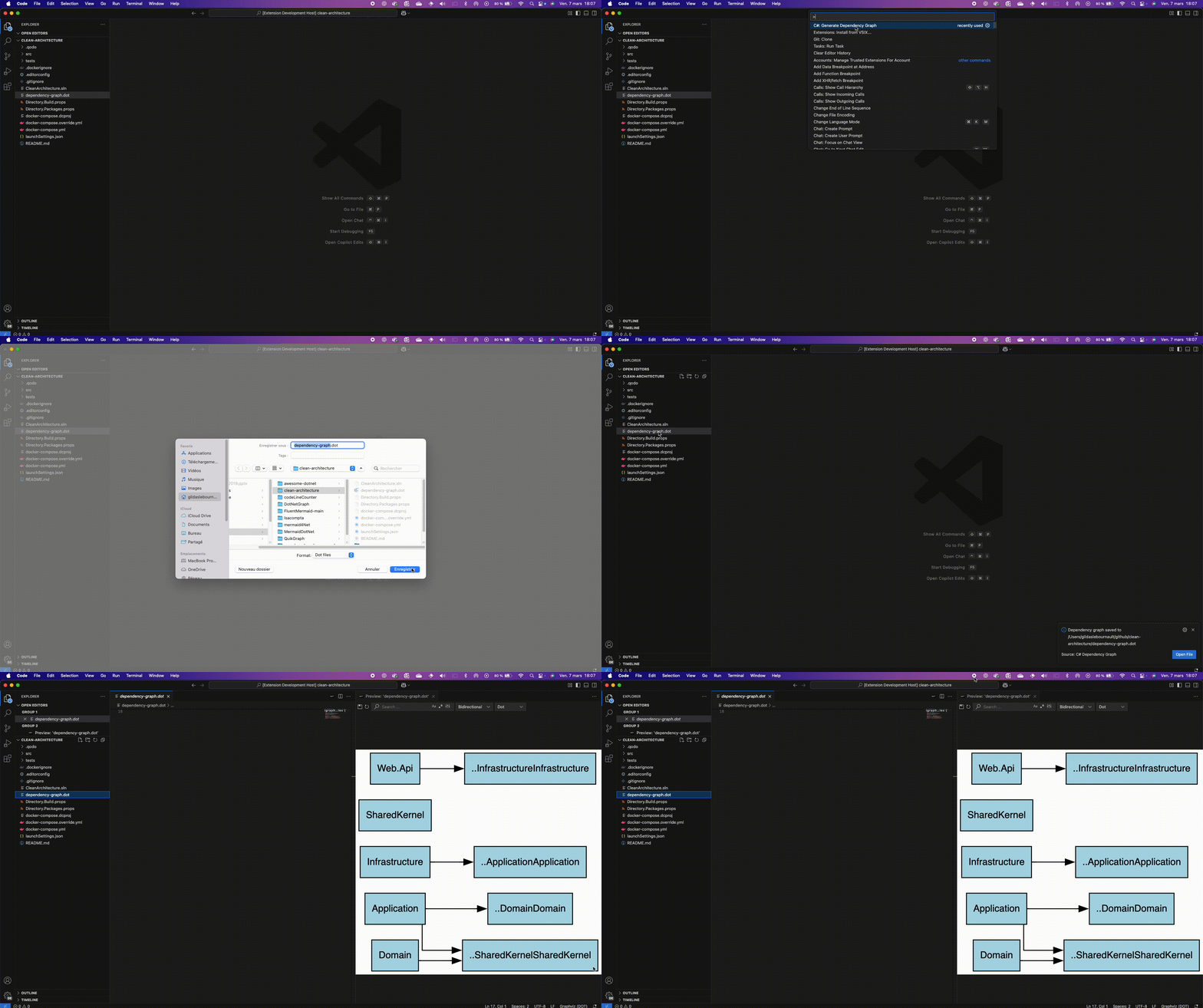
Select view->Command Palette: C#: Generate Dependency Graph and select Project Dependencies
Graph is generated in the selected folder. You can open it in Graphviz, Graphviz Online or Graphviz Preview
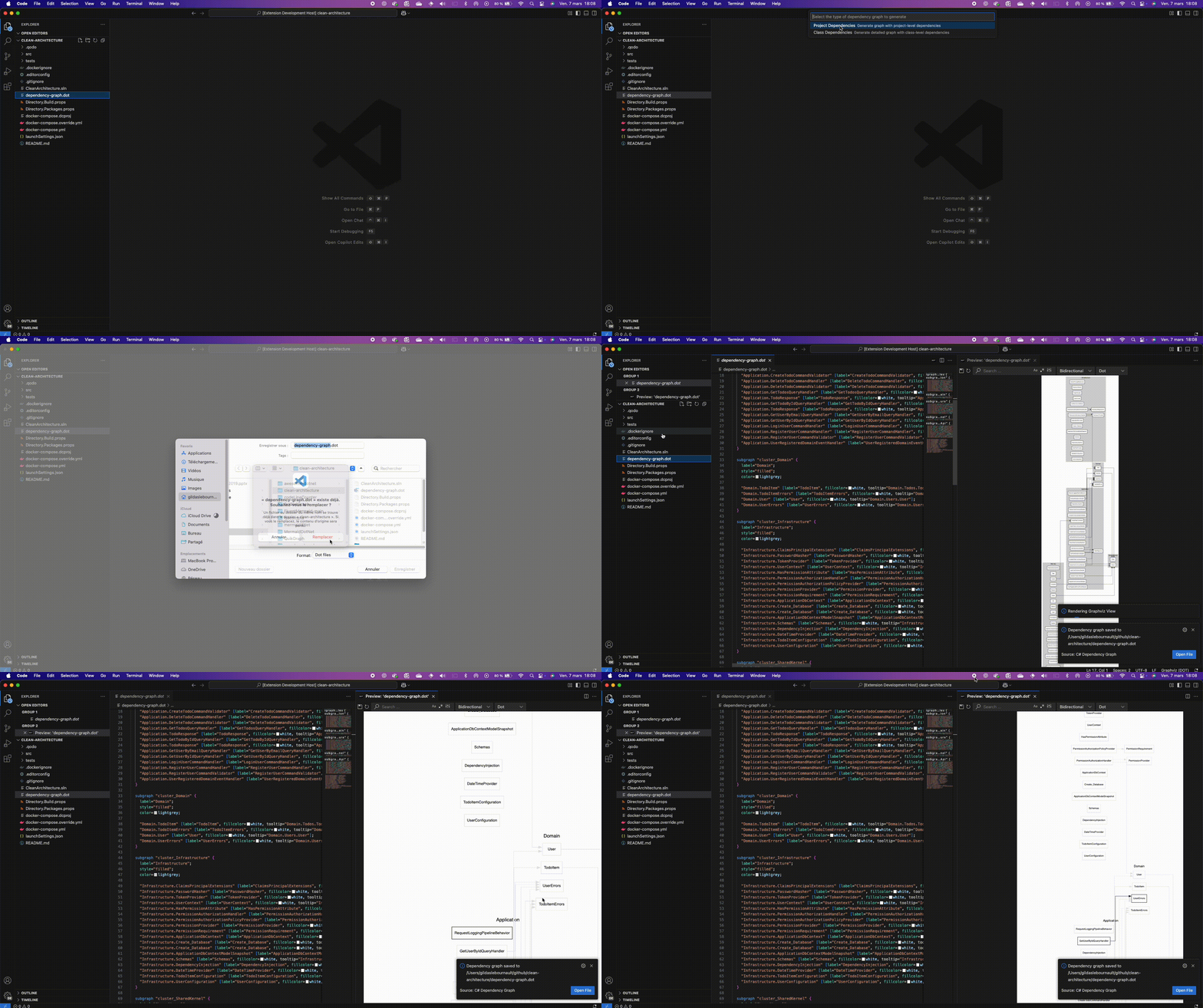
Class Dependencies
Select view->Command Palette: C#: Generate Dependency Graph and select Class Dependencies
Graph is generated in the selected folder. You can open it in Graphviz, Graphviz Online or Graphviz Preview
Installation
From VS Code Marketplace
- Open VS Code
- Go to Extensions (Ctrl+Shift+X)
- Search for "C# Dependency Graph"
- Click Install
Manual Installation
- Download the .vsix file from the releases page
- In VS Code, go to Extensions (Ctrl+Shift+X)
- Click on the "..." menu (top-right) and select "Install from VSIX..."
- Select the downloaded .vsix file
Requirements
- Visual Studio Code 1.75.0 or higher
- A C# project (typically a .NET solution with .csproj files)
Usage
Generating a Dependency Graph
- Open a folder containing C# projects in VS Code
- Press
Ctrl+Shift+Pto open the command palette - Type "C#: Generate Dependency Graph" and select the command
- If solution (.sln) files are found, you'll be asked if you want to use one of them
- Choose the type of dependency graph:
- Project Dependencies: Shows relationships between projects
- Class Dependencies: Shows detailed relationships between classes
- Select where to save the .dot file
- The graph will be generated and saved to the specified location
Viewing the Graph
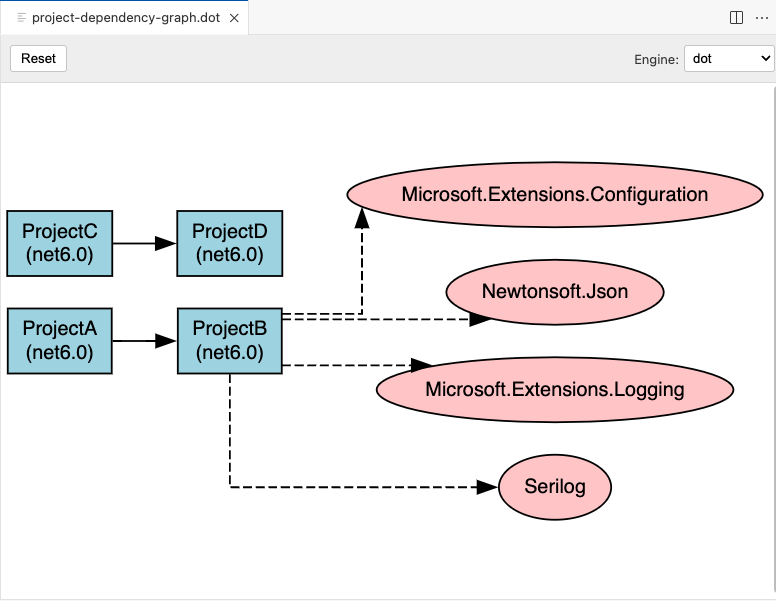
You can view the generated .dot file using:
- New: Preview Graphviz on graphviz file open (beta)

- VS Code extensions like Graphviz Preview
- Online tools like Graphviz Online
- Desktop applications like Graphviz
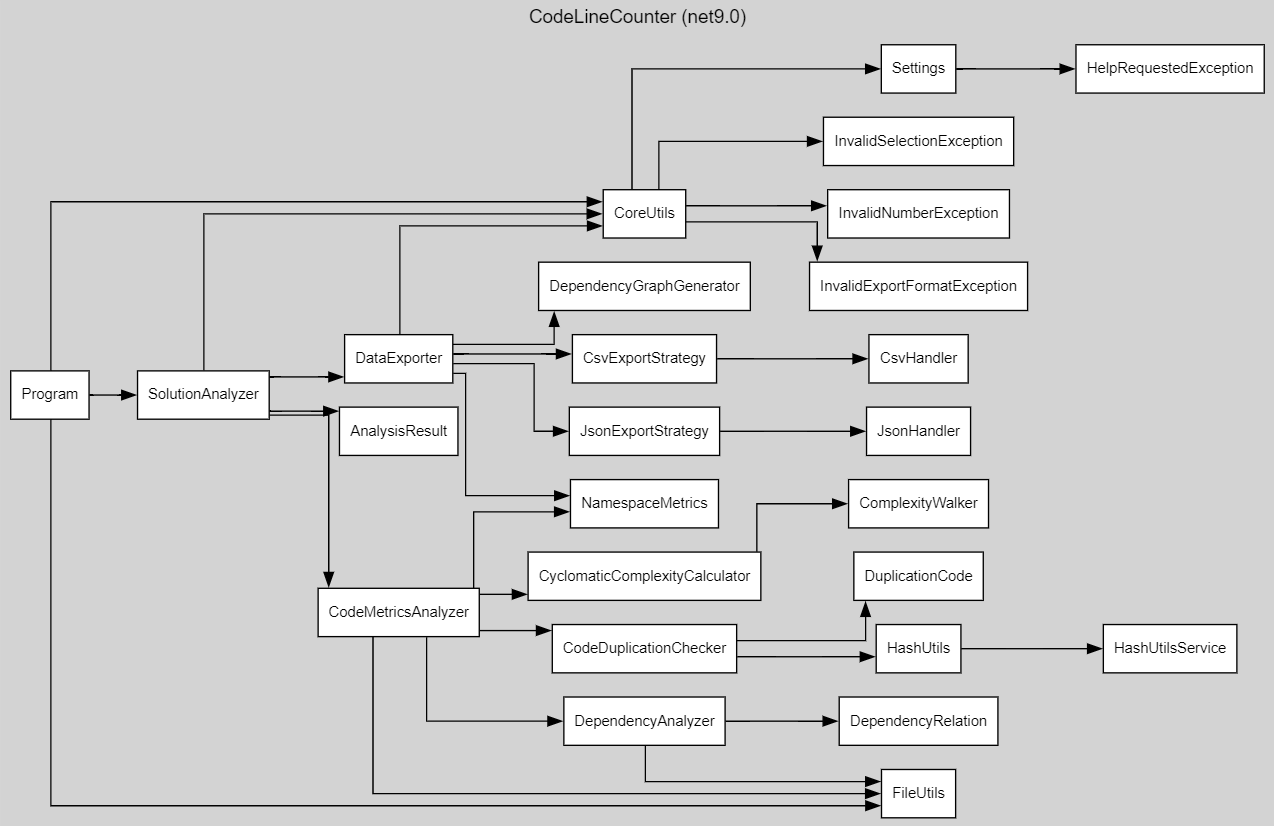
Example Class Dependency Graph
Here's an example of a class dependency graph generated by the extension:
Detailed Usage Examples
Example 1: Generating a Project Dependency Graph
- Open a folder containing multiple C# projects in VS Code.
- Press
Ctrl+Shift+Pto open the command palette. - Type "C#: Generate Dependency Graph" and select the command.
- If solution (.sln) files are found, you'll be asked if you want to use one of them. Select a solution file or choose to scan for all projects.
- Choose "Project Dependencies" when prompted for the type of dependency graph.
- Select a location to save the .dot file.
- The graph will be generated and saved to the specified location. You can open it using Graphviz or the Graphviz Preview extension.
Example 2: Generating a Class Dependency Graph
- Open a folder containing a C# project in VS Code.
- Press
Ctrl+Shift+Pto open the command palette. - Type "C#: Generate Dependency Graph" and select the command.
- If solution (.sln) files are found, you'll be asked if you want to use one of them. Select a solution file or choose to scan for all projects.
- Choose "Class Dependencies" when prompted for the type of dependency graph.
- Select a location to save the .dot file.
- The graph will be generated and saved to the specified location. You can open it using Graphviz or the Graphviz Preview extension.
Extension Settings
This extension contributes the following settings:
csharpDependencyGraph.useSolutionFile: Enable or disable using .sln files to identify projects (default: true)csharpDependencyGraph.includeNetVersion: Include .NET framework version in project nodes (default: true)csharpDependencyGraph.includePackageDependenciesInProjectGraph: Include NuGet package dependencies in the project dependency graph (default: false)csharpDependencyGraph.classDependencyColor: Color for the classes in class dependency graph (default: lightgray)csharpDependencyGraph.packageDependencyColor: Color for the packages in project dependency graph (default: #ffcccc)csharpDependencyGraph.excludeTestProjects: Exclude test projects from the dependency graph (default: true)csharpDependencyGraph.testProjectPatterns: Glob patterns to identify test projectscsharpDependencyGraph.excludeSourcePatterns: Glob patterns for source files to exclude from analysiscsharpDependencyGraph.openPreviewOnGraphvizFileOpen: Enable or disable previewing Graphviz on graphviz file open (default: true)
How It Works
The extension works by:
- Finding and parsing .sln files (if enabled) or searching for all .csproj files in the workspace
- Parsing the project files to extract project references
- For class-level analysis, parsing all C# files to extract class dependencies including:
- Inheritance relationships
- Field and property types
- Method parameter and return types
- Static method calls
- Object instantiations
- Generating a DOT file representation of the dependency graph
- Analyzing cycles in dependencies
- Generating a report of cycles in dependencies
Code organization
Questions
What is vscode-csharp-dependency-graph?
magic5644/vscode-csharp-dependency-graph is a public repo on GitHub by magic5644. A simple VS Code extension that generates a graph of your project dependencies.
Is vscode-csharp-dependency-graph open source?
It declares the MIT license on GitHub.
Does vscode-csharp-dependency-graph run on macOS, Windows or Linux?
Its maker has not tagged a system, so it is unknown here. Its README says what it needs.