
rea
Reverse engineer anything with agents, from app behavior down to native binaries.
- 476k
- TypeScript
- MIT
- 28 min ago
Stop your codebase from turning into one giant file. An Agent Skill for Claude Code, Codex, Cursor and Copilot: plan modules before coding, enforce a 300/500 line budget, split monoliths safely. 先规划模块再写代码,管控单文件体积,安全拆分巨型文件。
Repo magicapple123/modular-code-planner, read from GitHub 12 h ago. magicapple123 has not joined Take My Repo.
magicapple123/modular-code-planner is a public repo on GitHub by magicapple123. Stop your codebase from turning into one giant file. An Agent Skill for Claude Code, Codex, Cursor and Copilot: plan modules before coding, enforce a 300/500 line budget, split monoliths safely. 先规划模块再写代码,管控单文件体积,安全拆分巨型文件。. It declares the MIT license on GitHub. It is written mainly in Python, has 1 stars and last changed on 2026-09-14. Nobody has reviewed it on Take My Repo yet, which says nothing about its quality. Read from GitHub on 2026-11-23.
中文说明 → README.zh-CN.md
Stop your codebase from turning into one giant file.
An Agent Skills package that plans modules before code is written, holds every file to a line budget, and splits existing monoliths without changing behaviour.
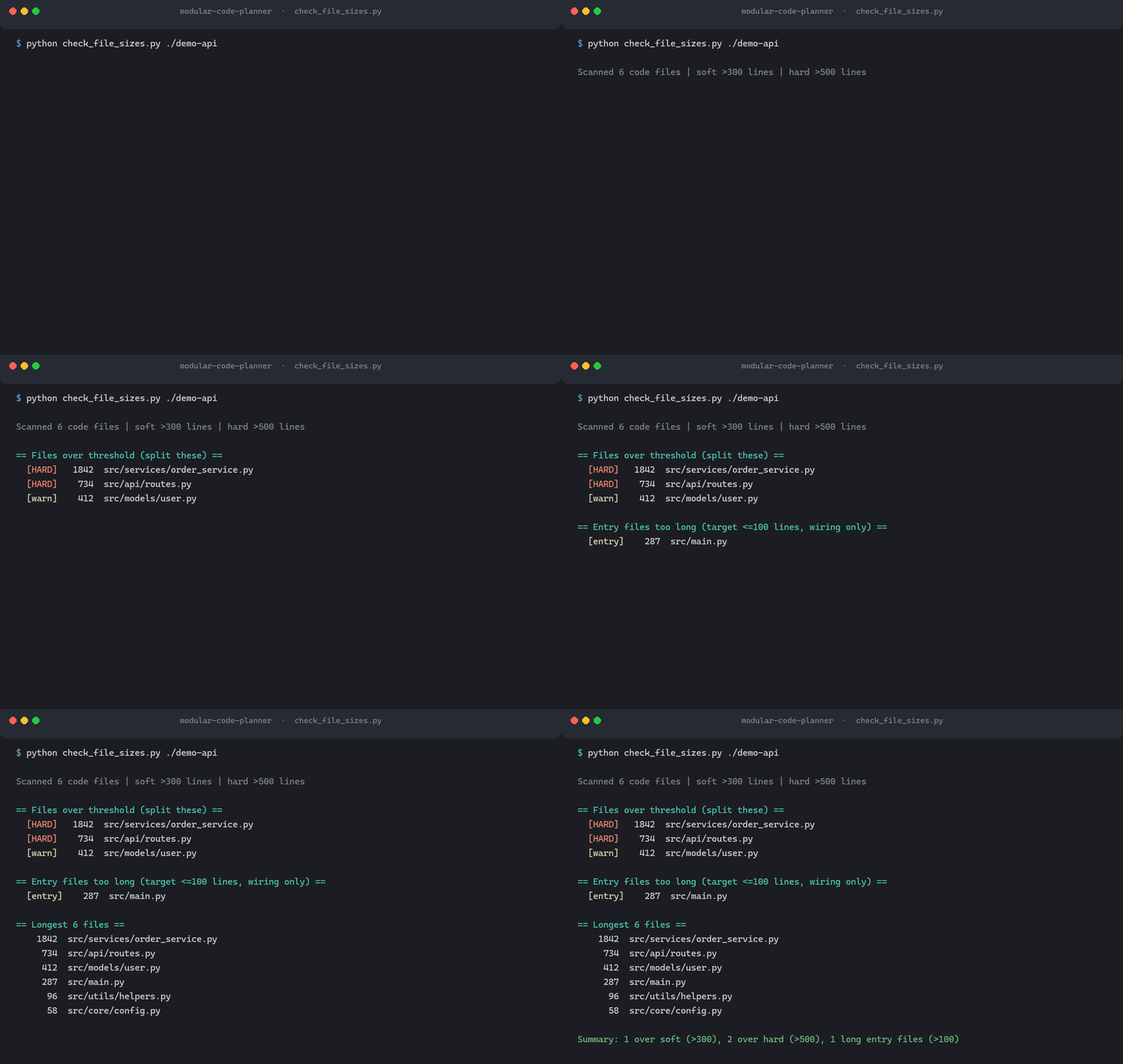
It does three things:
Works with any agent that reads SKILL.md. No runtime dependency beyond Python 3.9+ for the scanner.
Agents write code fast and rarely stop to split it. A utility file starts at 80 lines and ends at 1,400. Nobody notices until merge conflicts become unmanageable.
This skill makes file size a first-class constraint: plan modules up front, watch the line count as you go, and split existing monoliths without breaking them.
scripts/check_file_sizes.py. Standard library only — no pip install, no virtualenv, no network.SKILL.md. The instructions themselves are plain Markdown and need nothing at all.The package is a plain directory. Copy the whole folder into whichever skills directory your agent uses — no build step, no dependencies.
git clone https://github.com/Magicapple-Coder/modular-code-planner.git
Then copy it into place. Common locations:
| Agent | User-level (all projects) | Project-level |
|---|---|---|
| Claude Code | ~/.claude/skills/ |
<project>/.claude/skills/ |
| Codex CLI | ~/.agents/skills/ |
<project>/.agents/skills/ |
| Gemini CLI | ~/.gemini/skills/ or ~/.agents/skills/ |
<project>/.gemini/skills/ |
| GitHub Copilot | ~/.copilot/skills/ or ~/.agents/skills/ |
<project>/.github/skills/ or .agents/skills/ |
| Cursor | ~/.cursor/skills/ |
<project>/.cursor/skills/ |
| OpenCode | ~/.config/opencode/skills/ |
<project>/.agents/skills/ |
| Windsurf | ~/.codeium/windsurf/skills/ |
<project>/.windsurf/skills/ |
Example (macOS / Linux):
mkdir -p ~/.claude/skills
cp -r modular-code-planner ~/.claude/skills/
Example (Windows, PowerShell):
New-Item -ItemType Directory -Force "$HOME\.claude\skills" | Out-Null
Copy-Item -Recurse modular-code-planner "$HOME\.claude\skills\"
Newer agents that follow the open spec also read ~/.agents/skills/ as a shared location, so a single copy there can serve several tools at once. Check your agent's current documentation — skill discovery paths change between releases.
Resulting layout — the folder name must match the name field in SKILL.md:
<your-agent-skills-dir>/
└── modular-code-planner/
    ├── SKILL.md                 # loaded automatically; bilingual EN + 中文
    ├── references/
    │   ├── module-split-patterns.md   / .en.md
    │   └── refactoring-workflow.md    / .en.md
    ├── scripts/
    │   └── check_file_sizes.py
    └── tests/                   # only needed if you want to run the test suite
Copy the whole folder. Nothing outside SKILL.md, references/ and scripts/ is read at runtime.
Once installed, just describe the task. The agent picks the right workflow automatically.
Build a FastAPI service with JWT auth, Postgres, and a background job runner.
The agent reads the stack conventions from references/module-split-patterns.md, then proposes a directory tree, per-file responsibilities, estimated line counts, and dependency direction — and waits for your approval before writing anything.
python3 /path/to/modular-code-planner/scripts/check_file_sizes.py ./src --lang en
Scanned 412 code files | soft >300 lines | hard >500 lines

== Files over threshold (split these) ==
  [HARD]   1842  services/order_service.py
  [HARD]    734  api/routes.py
  [warn]    412  models/user.py

== Entry files too long (target <=100 lines, wiring only) ==
  [entry]   287  main.py

== Longest 10 files ==
    1842  services/order_service.py
     734  api/routes.py
     ...

Summary: 1 over soft (>300), 2 over hard (>500), 1 long entry files (>100)
Output language follows the system locale by default; pass --lang en or --lang zh to force one.
Then ask:
Split
services/order_service.py.
The agent follows the 5-phase workflow: freeze behavior → read-only inventory → plan → incremental migration → verification and report. It will not touch a single file until you approve the plan.
python3 scripts/check_file_sizes.py <path> [options]

  --soft N            warn above N lines            (default 300)
  --hard N            fail above N lines            (default 500)
  --entry-max N       entry-file target             (default 100)
  --top N             show top N longest files      (default 10)
  --ext a,b,c         scan these extensions only
  --ignore a,b        extra directory names to skip
  --exclude-glob a,b  extra filename globs to skip  (e.g. "*.generated.*")
  --json              machine-readable output
  --lang {auto,en,zh} output language               (default: auto)
Default extension set covers 35 common code extensions. Dependencies, build output, generated files, type declarations and lock files are skipped automatically.
Output uses the console's own encoding and degrades to ? rather than crashing on a console that cannot render a character. Set PYTHONIOENCODING=utf-8 for UTF-8 output — useful when piping into another tool or a log.
Exit codes
| Code | Meaning |
|---|---|
0 |
No file exceeds the hard threshold |
1 |
At least one file exceeds the hard threshold |
2 |
Bad arguments, or the path does not exist / contains no scannable files |
Exit code 2 is deliberate: it prevents a typo in the path from being reported as a clean bill of health.
| Range | Status | Action |
|---|---|---|
| ≤ 300 | Healthy | Target state |
| 301–500 | Warning | Stop adding responsibilities; split now or schedule it |
| > 500 | Red line | Must be split before the task counts as done |
Entry files (main, index, app, __main__) |
> 100 | Entry files should only wire things together |
Generated code, lock files and type declarations are exempt — but the exemption must be stated in the report.
Tune the values per project: front-end components can relax to 400 / 600; strongly-typed backend logic can tighten to 200 / 400.
| Path | Purpose |
|---|---|
SKILL.md |
Bilingual — every section gives English first, then Chinese. This is the file agents load automatically, and it covers all three workflows: plan new modules (A), split files that are growing (B), restructure existing monoliths (C) |
references/refactoring-workflow.md · .en.md |
The 5-phase safe-refactoring procedure, with exit conditions and a failure-handling table |
references/module-split-patterns.md · .en.md |
Layering model, 6 extraction techniques, conventions for Python / JS-TS / Java / Go / C#, 6 anti-patterns, interface-compatibility strategies, and signals that you should not split |
scripts/check_file_sizes.py |
Line-count scanner, standard library only |
tests/ |
Self-tests for the scanner and for the package metadata. python -m unittest discover -s tests -v |
prompts/giant-file-split-prompt.zh-CN.md · .en.md |
Standalone prompt covering the same ground — for any chat model that does not support skills |
docs/demo.gif |
The terminal recording above |
AGENTS.md |
Instructions for agents working in this repository |
llms.txt |
Machine-readable map of the package for answer engines |
Included in the refactoring workflow, because agent refactors usually fail there:
getattr, importlib, DI containers, component scanning, route strings, config class paths, decorator registries, embed directives.SKILL.md is bilingual, English first and Chinese second in every section. That keeps one source of truth: a host that loads it in either language gets the full instructions, and there is no second file to drift. references/ keeps separate .md and .en.md documents because those are read on demand, one language at a time. If you want an English-only skill, delete the **中文** blocks locally — the tests that enforce the bilingual structure live in tests/test_skill_package.py.SKILL.md, and allowed-tools support varies widely across agents — that is why this package does not declare it.How do I stop an AI agent from writing one giant file? Install this skill, then say so when you start a task. For anything touching 3+ files or ~200+ lines, it makes the agent produce a module plan and wait for your approval before writing code. It also sets a hard budget: 300 lines soft, 500 lines hard.
How do I split a 2,000-line file without breaking it? Ask the agent to split it. Workflow C runs a 5-phase procedure: freeze behaviour with a baseline test run, inventory the file read-only, produce a plan, migrate one responsibility at a time with verification after each step, then report. The agent cannot create, modify or delete a file until you approve the plan.
I have no tests. Can I still split safely? Yes, with a caveat the skill makes explicit: phase 0 requires characterization tests for the critical paths first — tests that pin down what the code does now, never what it "should" do. If that is not possible, it tells you so instead of splitting anyway.
How do I find which files in my project are too long?
python3 scripts/check_file_sizes.py ./src
It prints everything over the threshold, flags long entry files separately, and skips dependencies, build output, generated files and lock files. Exit code 1 means something is over the hard limit; 2 means the path was wrong — never read 2 as a pass.
Does it work with Claude Code / Codex CLI / Cursor / Copilot?
Yes. The package follows the open Agent Skills specification, so any agent that reads SKILL.md can use it. See Install for the directory each tool reads from.
Do I need to install dependencies?
No. The scanner uses the Python standard library only. There is no pip install, no virtualenv, no network access.
Is the skill itself in English or Chinese?
Both. SKILL.md gives English first and Chinese second in every section, so the agent gets the full instructions regardless of language, and there is no second file to drift out of sync.
Will this delete or rewrite my code? No. Splitting only moves code and fixes imports. The skill explicitly forbids changing business logic, fixing bugs, or "optimizing" during a split — findings go into a problem list for you to decide on.
Rules, conventions, scanner flags — all welcome. See CONTRIBUTING.md for what fits and what does not, and for the agent-behaviour bug report template. Issues in English or Chinese.
If this saved you a refactor, a star helps the next person find it.
MIT. See LICENSE.
magicapple123/modular-code-planner is a public repo on GitHub by magicapple123. Stop your codebase from turning into one giant file. An Agent Skill for Claude Code, Codex, Cursor and Copilot: plan modules before coding, enforce a 300/500 line budget, split monoliths safely. 先规划模块再写代码,管控单文件体积,安全拆分巨型文件。.
It declares the MIT license on GitHub.
Open-source AI penetration testing tool to find and fix your app’s vulnerabilities.
Open-source platform for creating safe, isolated production sandboxes for API, integration, and E2E testing.
Its maker tagged it for macOS, Windows and Linux, or as Docker or cross-platform. That is declared by the maker; Take My Repo has not tested it.
Open "Take it" on its page: Take My Repo writes an install plan for your machine and hands it to your AI agent (Claude Code, Codex or Cursor), which asks you before each step. Take My Repo has not tested it on any machine.
Its last change on GitHub was on 2026-09-14. GitHub counts 0 open issues and pull requests. Take My Repo does not judge from that whether it is maintained.
Nobody has reviewed it on Take My Repo yet, which says nothing about its quality.
Take My Repo cannot say: it does not audit code and has not run modular-code-planner. What is known comes from GitHub. It declares the MIT license on GitHub. Its last change was on 2026-09-14. It has 1 stars, which measure popularity, not safety. Nobody has reviewed it on Take My Repo yet, which says nothing about its quality. Read the source before you run it. With "Take it", your AI agent shows each step and asks you before running it; README text is treated as data, not as instructions.




