jsoncrack.com
✨ Innovative and open-source visualization application that transforms various data formats, such as JSON, YAML, XML and CSV into interactive graphs.
- 45k
- TypeScript
- Apache-2.0
- 2 mo ago
Fast, low-memory CSV parser for Swift on Apple platforms and Linux
Repo malcommac/FastCSV, read from GitHub 1 min ago. malcommac has not joined Take My Repo.
malcommac/FastCSV is a public repo on GitHub by malcommac. Fast, low-memory CSV parser for Swift on Apple platforms and Linux. It declares the MIT license on GitHub. It is written mainly in Swift, has 3 stars and last changed on 2026-11-10. Nobody has reviewed it on Take My Repo yet, which says nothing about its quality. Read from GitHub on 2026-11-21.
A fast, read-only CSV parser for Swift, built for large files. It has no dependencies and runs on Apple platforms and Linux.
FastCSV reads the file through a small fixed buffer and parses fields only when you ask for them, so memory stays flat whatever the file size. Numbers and times are converted directly from the buffered bytes, without creating a String first.
On a 235 MB file with 5 million rows, reading every field as a String takes 0.74 s and 6 MB of memory. The other Swift parsers tested take 8 to 24 s (benchmarks).
Add the package to your Package.swift:
.package(url: "https://github.com/malcommac/FastCSV.git", from: "1.0.0")
Then add "FastCSV" to your target's dependencies.
Resolve column positions once, then read each row with forEachRow. This is the fastest path.
import Foundation
import FastCSV

let url = URL(fileURLWithPath: "stop_times.txt")
let reader = try CSVReader(fileURL: url, config: .init(hasHeaders: true))

guard let trip = reader.columnIndex("trip_id"),
      let arrival = reader.columnIndex("arrival_time"),
      let sequence = reader.columnIndex("stop_sequence") else {
    fatalError("Unexpected header: \(reader.columnNames)")
}

print("Rows:", reader.rowCount)

reader.forEachRow { row in
    let tripID = row.field(at: trip)
    let arrivalSeconds = row.timeField(at: arrival)
    let stopSequence = row.intField(at: sequence)
    print(tripID, arrivalSeconds ?? -1, stopSequence ?? -1)
}
A CSVRow is a view into the reader's buffer and is only valid inside the closure. Copy out any values you want to keep.
rowCount scans the whole file on every access, so read it once and keep the value.
| Accessor | Returns | Notes |
|---|---|---|
field(at:) |
String |
Removes surrounding quotes and unescapes "" |
intField(at:) |
Int? |
nil when empty, non-numeric or overflowing |
doubleField(at:) |
Double? |
Same result as Double(String), bit for bit |
boolField(at:) |
Bool? |
1, 0, t, f, y, n, true, false, yes, no, case-insensitive |
timeField(at:) |
Int? |
H:MM:SS as seconds; hours above 24 are allowed, as in GTFS |
isFieldEmpty(at:) |
Bool |
Checks without building a String |
row[safe:] |
String? |
nil when the index is out of range |
The accessors other than row[safe:] expect a valid index and trap otherwise. Use row.count when rows can be irregular.
For convenience over speed, decode each row into a Decodable type. Property names are matched to column names, so hasHeaders must be true.
struct Route: Decodable {
    let route_id: String
    let route_type: Int
    let route_long_name: String?
}

let routes = try CSVReader(
    fileURL: URL(fileURLWithPath: "routes.txt"),
    config: .init(hasHeaders: true)
)

try routes.decode(Route.self) { route in
    print(route.route_id, route.route_type)
}
CSVReaderConfig sets delimiter, quoteCharacter, hasHeaders, which defaults to false, and bufferSize, which defaults to 64 KB and grows if a single row needs more. The delimiter and quote must be single ASCII characters. A semicolon-separated file looks like this:
let config = CSVReaderConfig(delimiter: ";", hasHeaders: true)
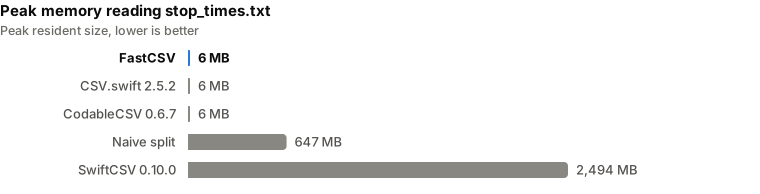
monitor 24" full HD stays a plain value. Quoted fields can contain delimiters, newlines and "" escapes.\n and \r\n. A leading UTF-8 BOM is skipped.encoding setting currently has no effect.CSVErrors.malformedFile.CSVReader.init, but forEachRow cannot report a failure, so an I/O error while iterating stops the process.Each parser reads every row of two files from the Rome GTFS feed, downloaded on 2026-11-08, and materializes every field as a String. Times are the median of 3 runs.
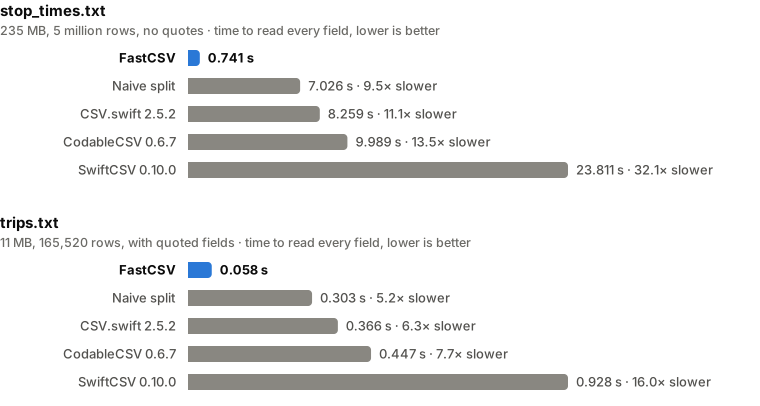
stop_times.txt: 235 MB, 5,039,902 rows, no quotes
| Parser | Time | Compared to FastCSV | Peak memory |
|---|---|---|---|
| FastCSV | 0.741 s | 6 MB | |
Naive String.split |
7.026 s | 9.5× slower | 647 MB |
| CSV.swift 2.5.2 | 8.259 s | 11.1× slower | 6 MB |
| CodableCSV 0.6.7 | 9.989 s | 13.5× slower | 6 MB |
| SwiftCSV 0.10.0 | 23.811 s | 32.1× slower | 2,494 MB |
trips.txt: 11 MB, 165,520 rows, with quoted fields
| Parser | Time | Compared to FastCSV | Peak memory |
|---|---|---|---|
| FastCSV | 0.058 s | 6 MB | |
Naive String.split |
0.303 s | 5.2× slower | 32 MB |
| CSV.swift 2.5.2 | 0.366 s | 6.3× slower | 6 MB |
| CodableCSV 0.6.7 | 0.447 s | 7.7× slower | 6 MB |
| SwiftCSV 0.10.0 | 0.928 s | 16.0× slower | 136 MB |
With the typed accessors, reading the two time columns and the sequence number of all 5 million rows of stop_times.txt takes 0.418 s.
How to read these numbers
csv module on both files. SwiftCSV returned the same rows and 0.16% fewer field bytes, because it drops fields containing only spaces. The naive split matches on stop_times.txt only, since it does not understand quotes.To reproduce, unzip the feed and run:
cd Benchmarks
swift build -c release
python3 run.py /path/to/unzipped/feed
python3 charts.py
run.py saves its results to results.json, and charts.py redraws the charts above from it. The comparison lives in its own package, so FastCSV itself stays dependency-free.
FastCSV builds with a Linux toolchain or the Static Linux SDK. For example, with Swift 6.4.1 and its matching SDK:
swift build -c release --swift-sdk x86_64-swift-linux-musl
swift test --skip BenchmarkTestsThe internal benchmarks need rome_static_gtfs/stop_times.txt in the package root and disable themselves if it is missing:
swift test -c release -Xswiftc -enable-testing --filter BenchmarkTestsMIT. See LICENSE.
malcommac/FastCSV is a public repo on GitHub by malcommac. Fast, low-memory CSV parser for Swift on Apple platforms and Linux.
It declares the MIT license on GitHub.
Its maker tagged it for macOS. That is declared by the maker; Take My Repo has not tested it.
Open "Take it" on its page: Take My Repo writes an install plan for your machine and hands it to your AI agent (Claude Code, Codex or Cursor), which asks you before each step. Take My Repo has not tested it on any machine.
Its last change on GitHub was on 2026-11-10. Take My Repo does not judge from that whether it is maintained.
Nobody has reviewed it on Take My Repo yet, which says nothing about its quality.
✨ Innovative and open-source visualization application that transforms various data formats, such as JSON, YAML, XML and CSV into interactive graphs.
Fast and powerful CSV (delimited text) parser that gracefully handles large files and malformed input
Text editor - Notes, ToDo & Filemanager (for Android) - Markdown, todo.txt, plaintext, math, ..
Build smaller, faster, and more secure desktop and mobile applications with a web frontend.
SRS is a simple, high-performance, AI-driven real-time media server supporting RTMP, WebRTC, HLS, HTTP-FLV, HTTP-TS, SRT, MPEG-DASH, and GB28181, with codec support for H.264, H.265, AV1, VP9, AAC, Opus, and G.711.
High performance self-hosted photo and video management solution.
🐔 Toolkit to parse, validate, manipulate, compare and display dates, time & timezones in Swift.
🕦 Modern Timer in Swift, Debouncer and Throttler (alternative to NSTimer) made with GCD
🏃♂️ Animated transitions for UIWindow's rootViewController property