
ttyprogress
Progress Indicator Framework for Terminal Output
- 2
- Apache-2.0
- 2 wk ago
Repo mandelsoft/ttyprogress, read from GitHub 4 h ago. mandelsoft has not joined Take My Repo.
In short
mandelsoft/ttyprogress is a public repo on GitHub by mandelsoft. Progress Indicator Framework for Terminal Output. It declares the Apache-2.0 license on GitHub. It is written mainly in Go, has 2 stars and last changed on 2026-11-08. Nobody has reviewed it on Take My Repo yet, which says nothing about its quality. Read from GitHub on 2026-11-23.
Progress Indicators for Terminal Output
This module provides various progress indicators for terminal output and a framework to create new such indicators.
It is possible to combine multiple progress indicators in a 'Context' object. It covers and manages trailing lines of a terminal output and acts as group to add any number of indicators. Additionally, indicators can be grouped again. Those groups are visualized as indicators, also.
The following indicators are directly supported by the library:
- Simple Spinners
- Scrolling Text Spinners
- Progress bars
- Progress bars for estimated remaining time
- Step lists
- Step lists using indicators to visualize step progress
- Simple text output
- Text output with leading spinner
- Indicator Groups
There are various presets with the visualization of bars and spinners. Additionally, they can freely be configured.
Usage
The usage of the library based on the Context type. It is created
using the For function for an io.Writer, which should represent
a terminal output. The Context acts as Container for a sequence of
indicators.
import (
	"context"
	"os"
	"time"

	"github.com/mandelsoft/ttyprogress"
	"github.com/mandelsoft/ttyprogress/units"
)

func main() {
	// setup output context
	p := ttyprogress.For(os.Stdout)

	// configure indicator (types)
	bar := ttyprogress.NewBar().
		SetPredefined(10).
		SetTotal(500).
		SetWidth(ttyprogress.PercentTerminalSize(30)).
		PrependMessage("Downloading...").
		PrependElapsed().AppendCompleted().
		AppendFunc(ttyprogress.Amount(units.Bytes(1024)))

	// instantiate bar definition for context
	// (similar to elem, _ := bar.Add(p) )
	// and run some process updating the progress on the indicator element.
	ttyprogress.RunWith(p, bar, func(bar ttyprogress.Bar) {
		for i := 0; i <= 20; i++ {
			bar.Set(i * 5 * 5)
			time.Sleep(time.Millisecond * 500)
		}
	})

	// close context to indicate, that no new indicators are created anymore
	p.Close()

	// wait until all indicators are finished
	p.Wait(context.Background())
}
Once a Context object is created for a writer, the writer MUST NOT be used
until the progress is finished (for example by calling Wait).
As long a Close is not called, it is possible to add progress indicators.
To create an indicator a definition has to be created and configured by calling configuration methods. Every definition can be instantiated multiple time by adding it to a context (or group).
Close on the context or group MUST be called prior to Wait. Wait waits until the context object is closed and all added indicators are closed and finished.
Progress indicators are defined by progress indicator definition objects. For every archetype there is one constructor function providing a basic configuration.
bartype := ttyprogress.NewBar()
This configuration can be refined by various chainable setters.
bartype.SetWidth(ttypprogress.PercentTerminalSize(50))
Any such configuration can be used as preconfigured type, which can be
instantiated with New. It creates a new configuration based on the given
one, which can furthermore be configured independently of the original configuration.
newtype := ttyprogress.New(bartype)
To save a configuration to a new immutable basic type, the function TypeFor can be used:
var BarElapsed = ttyprogress.TypeFor(NewBar(5).SetWidth(50).AppendElapsed())
This type is now independent of further modifications of the initial configuration and does not provide methods for further modifications.
But it can be used to create new preconfigured configurations with New, again. See the type example in examples/progress/def.
newtype := ttyprogress.New(BarElapsed)
Any configuration, regardless of its creation method, can be used to add an arbitrary number of instances
of such a progress indicator to a Context object.
newtype.Add(p)
The indicator is started by calling the Start method.
Some indicator archetypes implicitly start the indicator when
some progress is indicated by an appropriate indicator method
like Incr on a Bar indicator.
Once all indicators are added the Context object can be closed.
It is not possible anymore o add more indicators to a closed group.
With calling the Wait method, the calling Go routine waits
until the group and all included indicators are closed.
If a context is given Wait also returns if the context is cancelled.
ctx, cancel := context.WithTimeout(context.Background(), time.Minute)
defer cancel()
p.Wait(ctx)
Examples
Here some examples for the usage of the various archetypes are shown.
Spinner
The Spinner progress indicator visualizes unlimited progress
by cycling a sequence of fixed sized strings.
The look is completely
configurable, but there are several preconfigured setting.
They can be found in ttyprogress.SpinnerTypes. It maps an integer
to a spinner configuration.
bar, _ := ttyprogress.NewSpinner().
	SetPredefined(b).
	SetSpeed(1).
	SetColor(cols[i]).
	PrependFunc(ttyprogress.Message(fmt.Sprintf("working on task %d ...", i+1))).
	AppendElapsed().Add(p)
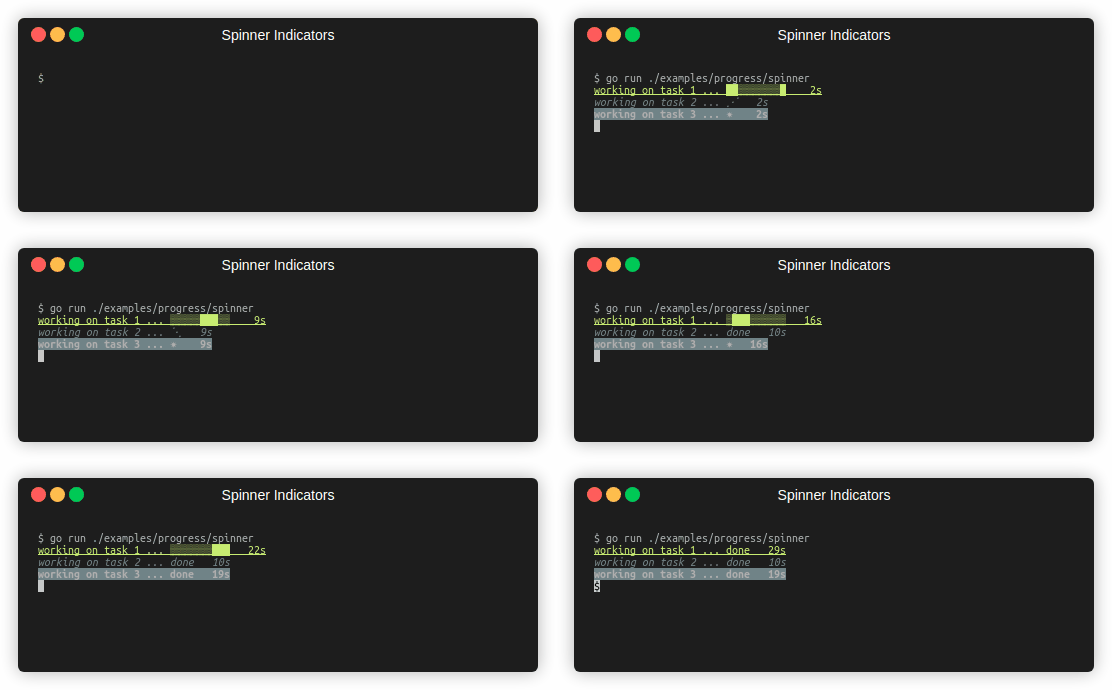
This example can be found in examples/progress/spinner/main.go.
Phases for Spinners
With the generic ttyprogress.NewPhasesSpinner(phases specs.Phases) it is possible to create a spinner with specific used defined phases implementing the specs.Phaces interface.
There are several standard implementations for text-based phases in packagespec:
- Format Phases: a given text with cycling
ttycolors.FormatProviders. (NewFormatPhases(s string, fmts ...ttycolors.FormatProvider)) - Rolling Text Phases: roll a text over a smaller window (
NewRollingTextPhases(text string, length int)) - Rolling Format Phases: part of the text if rolled with a given format. (
NewRollingTextFmtPhases(text string, length int, fmt ttycolors.FormatProvider)) - Bouncing Text Phases: Bouncing a text over a larder window. (
NewBouncingTextPhases(text string, length int)) - Bouncing Format Phases: Bouncing part of a text with a given format. (
NewBouncingTextFmtPhases(text string, length int, fmt ttycolors.Format))
Be aware, that the text must not contain own formatting sequences, because substrings are taken.
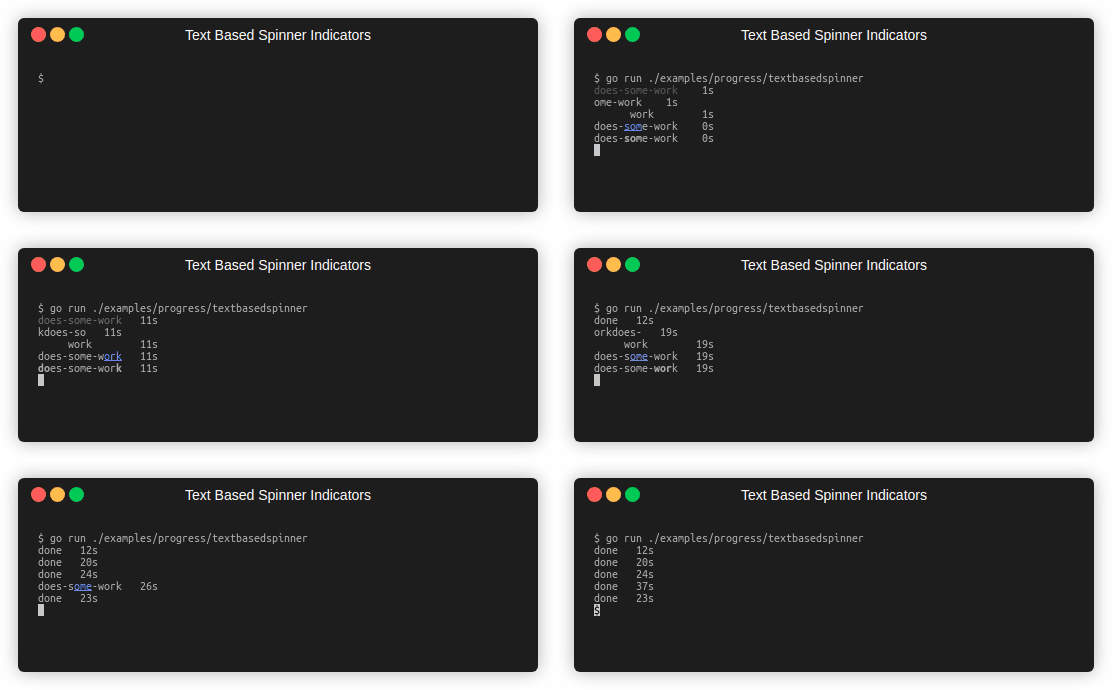
This example can be found in examples/progress/textbasedspinner/main.go.
Additionally, this package contains some helper to provide your own phases.
Scrolling Text Spinners
A scrolling text spinner is basically a spinner. But it uses a scrolling text to indicate the progress.
bar, _ := ttyprogress.NewScrollingSpinner("doing some calculations", 10).
	SetDone("calculations done").
	AppendElapsed().
	Add(p)

Scrolling text can also be used as decorator for other progress indicators using the specs.ScrollingText(text, length) decorator.
Progress Bar
The Bar progress indicator visualizers the progress
by a fixed length sequence of characters. The look is completely
configurable, but there are several preconfigured setting.
They can be found in ttyprogress.BarTypes. It maps an integer
to a bar configuration. For the brackets around the progress sequence
predefined ones can be provided by the map ttyprogress.BracketTypes.
The progress is defined an integer value between 0 and a configurable total amount. It can be set absolutely by calling Set or incrementally ba calling Incr.
bar := ttyprogress.NewBar().
	SetPredefined(10).
	SetTotal(500).
	SetWidth(ttyprogress.PercentTerminalSize(30)).
	PrependMessage("Downloading...").
	PrependElapsed().AppendCompleted().
	AppendFunc(ttyprogress.Amount(units.Bytes(1024)))
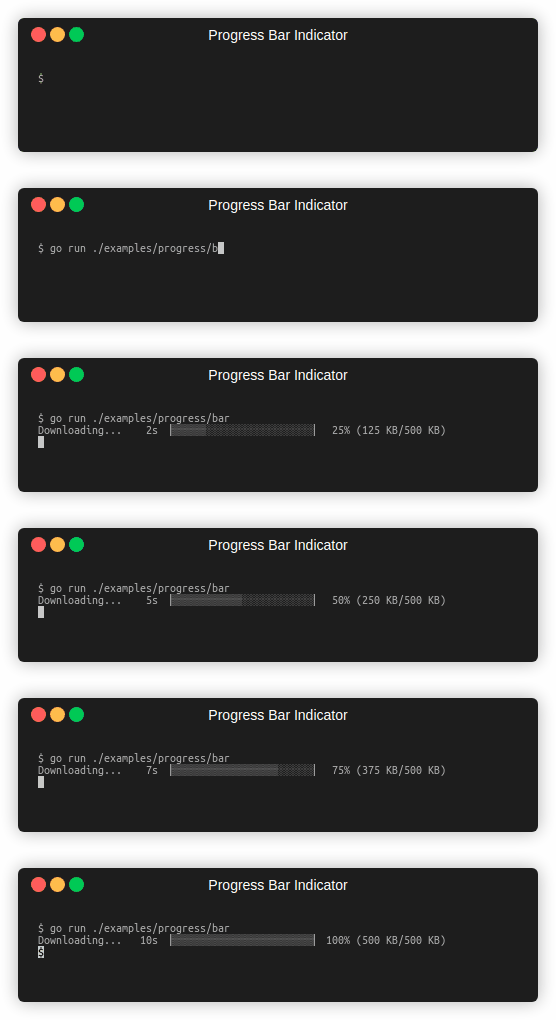
This example can be found in examples/progress/bar/main.go.
The LineBar progress indicator does not use an explicit
progress visualization, but the complete progress line
by reversing the output according to the achieved
progress.
bar, _ := ttyprogress.NewLineBar().
	SetTotal(500).
	PrependMessage("Downloading...").
	PrependElapsed().AppendCompleted().SetDecoratorFormat(ttycolors.FmtGreen).
	AppendFunc(ttyprogress.Amount(units.Bytes(1024))).
	Add(p)
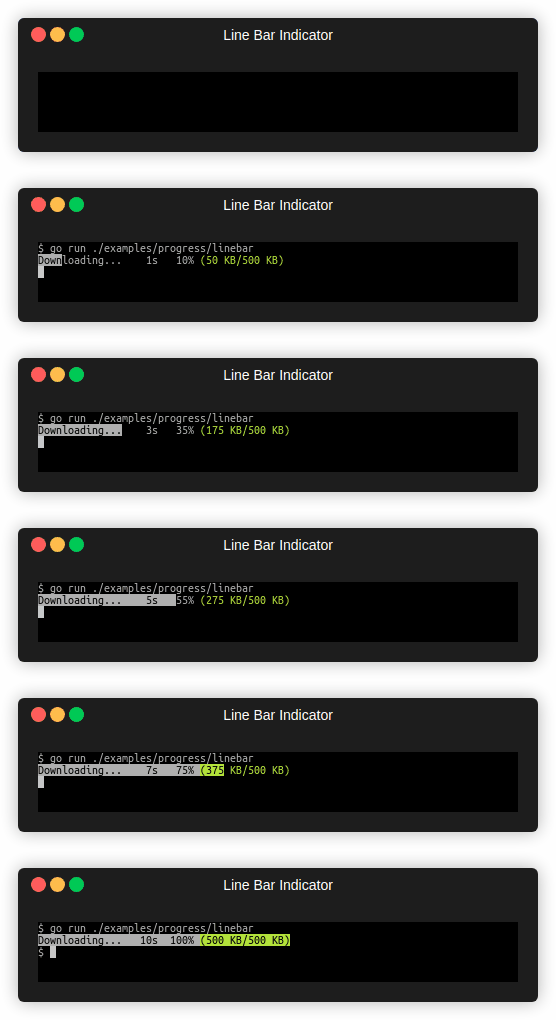
This example can be found in examples/progress/linebar/main.go.
By default, the completed part of the line is shown in reverse video.
SetCompletedFormat sets another output format for the completed part,
and SetRemainingFormat an output format for the remaining part (which
is not formatted by default). Several formats are composed. The formats
apply to all output formats not set by the content of the line, for example,
a foreground color set by a decorator format is kept:
bar := ttyprogress.NewLineBar().
		SetCompletedFormat(ttycolors.FmtBgBlue).
		SetRemainingFormat(ttycolors.FmtDim)
The following example marks the completed part with a yellow underline instead of reverse video:
p := ttyprogress.For(os.Stdout)
// Underline colors require an extended terminal feature, which cannot
// be detected and is therefore disabled by default. Without it, the
// underline color of the completed part is ignored.
p.GetTTYContext().EnableFeatures(ttycolors.FeatureUnderlineColor)

bar, _ := ttyprogress.NewLineBar().
	SetTotal(500).
	PrependMessage("Downloading...").
	PrependElapsed().AppendCompleted().SetDecoratorFormat(ttycolors.FmtGreen).
	AppendFunc(ttyprogress.Amount(units.Bytes(1024))).
	SetCompletedFormat(ttycolors.FmtUnderline, ttycolors.FmtUnderlineIdColor(ansi.COLOR_ID_YELLOW)).
	Add(p)
Underline colors are an extended terminal feature of package ttycolors
(ttycolors.FeatureUnderlineColor). Such features are not supported by all
terminals and cannot be detected, therefore they are disabled by default.
Output formats requiring a disabled feature are ignored (here, the underline
is shown in the default color). The feature is enabled for the
ttycolors.TTYContext used by the Context, as shown above. Alternatively,
it can be enabled globally with ttycolors.EnableFeatures(...) before the
Context is created, because a new context gets a copy of the global settings.
There is no demo image for this example, because the terminal emulator used to render the demo images (terminalizer) does not support underline colors.
This example can be found in examples/progress/linebar2/main.go.
Progress Bar for Steps
If there is a fixed set of sequential steps the progress can be indicated with a Steps indicator archetype.
It is a Bar progress indicator prepared to
indicate the progress of a predefined sequence of steps.
bar, _ := ttyprogress.NewSteps("downloading", "unpacking", "installing", "verifying").
	PrependStep().
	PrependFunc(ttyprogress.Message("progressbar"), 0).
	PrependElapsed().AppendCompleted().
	Add(p)
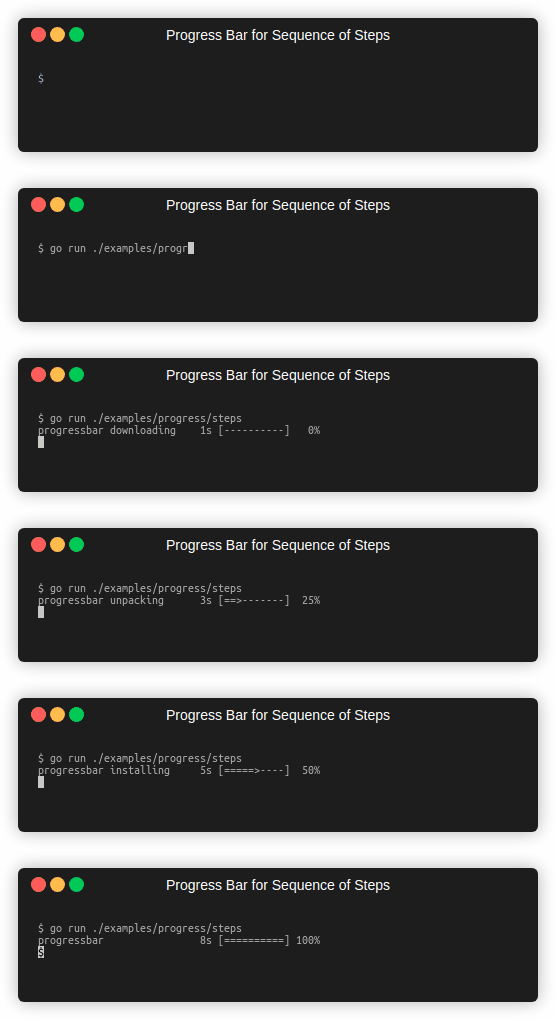
This example can be found in examples/progress/steps/main.go.
Progress Bar for estimated Total Time.
If there is a time estimation for a progress the Estimated archetype can be used. It is a progress bar indicating the progress based on elapsed and total time. Instead of setting the progress, the estimated total time can be updated.
total := 10 * time.Second
bar, _ := ttyprogress.NewEstimated(total).
	SetWidth(ttyprogress.ReserveTerminalSize(40)).
	SetPredefined(10).
	PrependFunc(ttyprogress.Message("Downloading...")).
	PrependEstimated().
	AppendCompleted().
	AppendElapsed().
	Add(p)
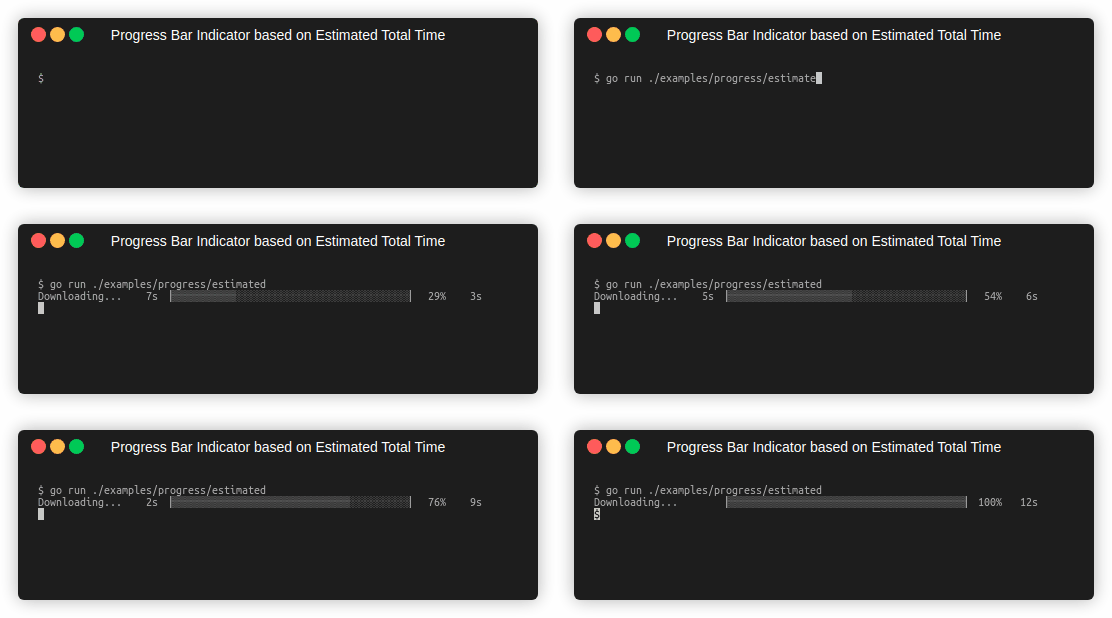
This example can be found in examples/progress/estimated/main.go.
Text Output
The Text progress indicator visualizes an output steam.
During the progress it shows a configured number of trailing lines
by providing an io.Writer.
After the indicator is closed the complete lines are
written to the terminal, after all preceding indicators in the group
and all outer groups are also closed.
It is intended to visualize multiple parallel output streams without mixing the output.
text, _ := ttyprogress.NewText().
	SetTitleLine("some output").
	SetFollowUpGap("> ").
	SetView(3).
	SetAuto().Add(p)
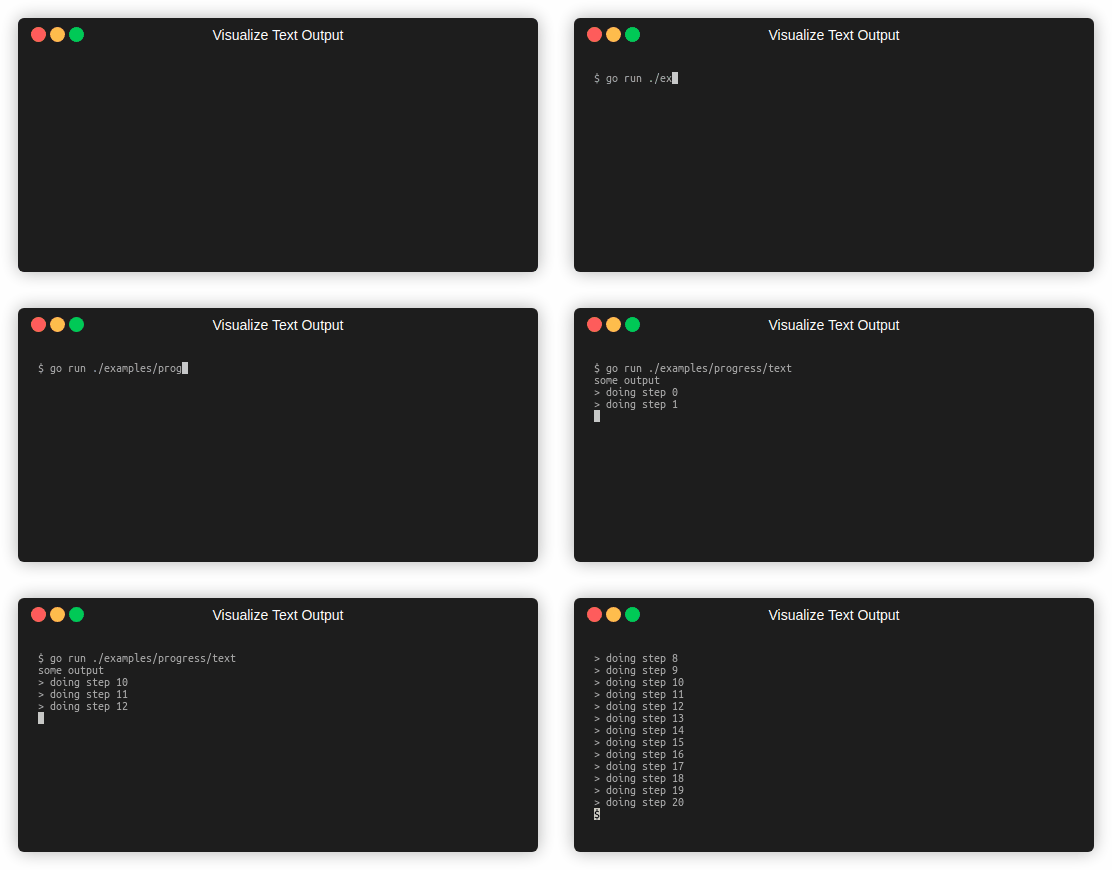
This example can be found in examples/progress/text/main.go.
Text Output with Spinner Title Line
The Text progress indicator visualizes an output steam.
During the progress it shows a configured number of trailing lines
by providing an io.Writer, like a Text indicator.
But instead an optional simple static title line a Spinner
is used.
bar, _ := ttyprogress.NewTextSpinner().
	SetPredefined(5).
	SetView(3).
	SetFollowUpGap("> ").
	PrependFunc(ttyprogress.Message(fmt.Sprintf("working on task %d...", s+1))).
	AppendElapsed().
	Add(p)
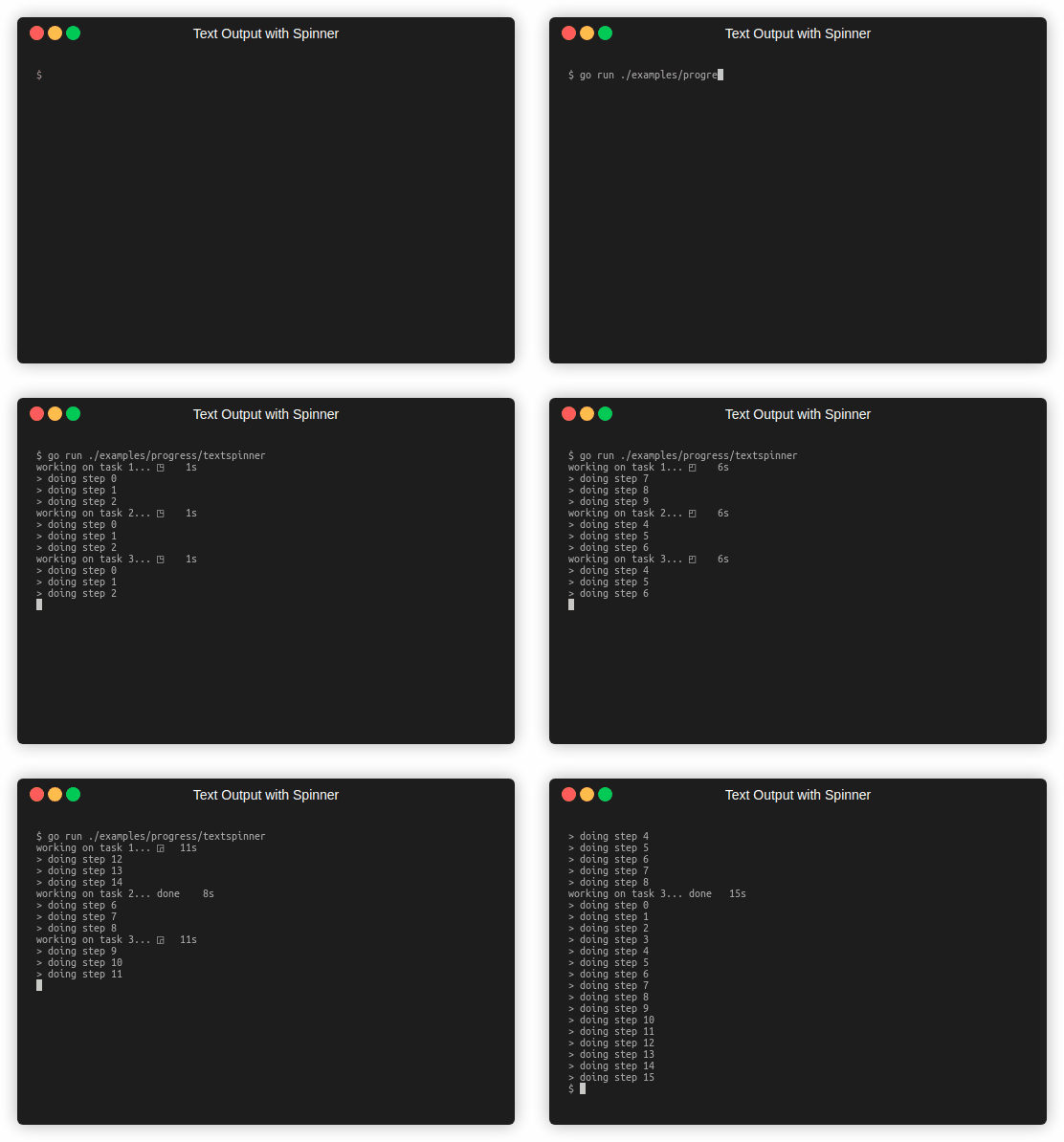
This example can be found in examples/progress/textspinner/main.go.
Indicator Groups
The initial Context object holds a sequence of progress
indicators. It is an initial indicator group.
There other Group indicators, which act as indicator and can
hold an arbitrary sequence of indicators, again.
The group progress is indicated by another indicator configuration
implementing the adapter API (GroupProgressElementDefinition).
So farm this is supported by the Bar and Spinner archetype.
As long as the groups is not closed more indicators can be added, even if there are additional indicators in an outer group. The group indicator is finished, if the group is closed and all contained indicators are finished.
func text(g ttyprogress.Group) {
	for t := 0; t < 2; t++ {
		text, _ := ttyprogress.NewTextSpinner().
			SetPredefined(70).
			SetView(3).
			SetSpeed(1).
			SetFollowUpGap("> ").
			PrependFunc(ttyprogress.Message(fmt.Sprintf("working on task %d...", t+1))).
			AppendElapsed().
			Add(g)

		go func() {
			m := 3 + rand.Int()%8
			for i := 0; i <= m; i++ {
				fmt.Fprintf(text, "doing step %d of task %d\n", i+1, t+1)
				time.Sleep(time.Millisecond * 100 * time.Duration(1+rand.Int()%20))
			}
			text.Close()
		}()
	}
}

func main() {
	p := ttyprogress.For(os.Stdout)

	// use spinner to indicate group progress.
	s := ttyprogress.NewSpinner().
		SetSpeed(5).
		SetPredefined(86).
		PrependFunc(ttyprogress.Message(fmt.Sprintf("Grouped work"))).
		AppendElapsed()

	g, _ := ttyprogress.NewGroup[ttyprogress.Spinner](s).
		SetGap("- ").
		SetFollowUpGap("  ").Add(p)
	text(g)
	g.Close()
	p.Close()
	p.Wait(nil)
}
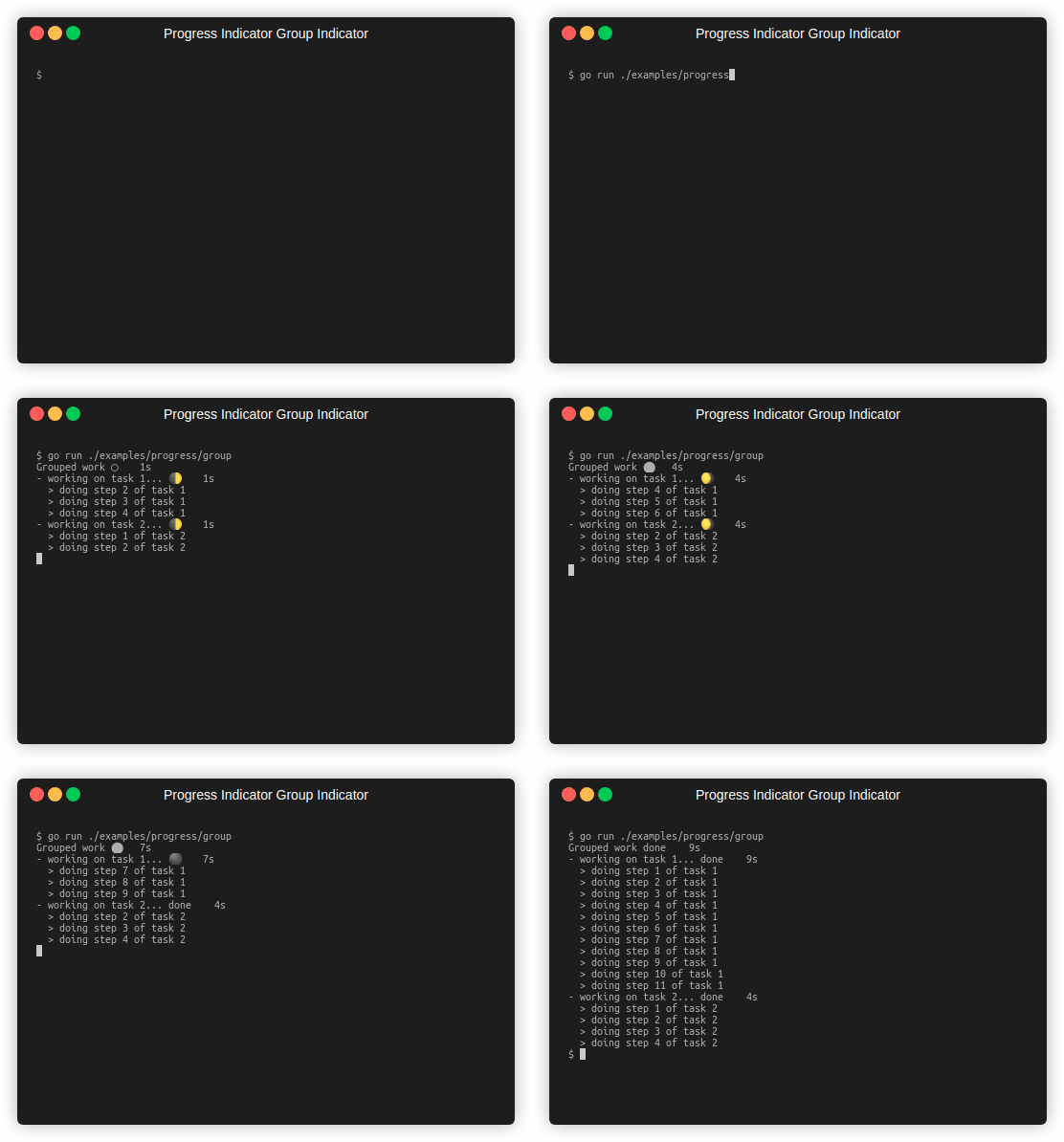
This example can be found in examples/progress/group/main.go.
A second group flavor AnonymousGroup acts as a sole indicator group
without own indicator visualizing the group progress.
It can be used for a common handling of a sequence of other
indicators. It offers hiding and the gap handling as shown above.
g, _ := ttyprogress.NewAnonymousGroup().
	HideOnClose().
	SetGap("- ").
	SetFollowUpGap("  ").Add(p)
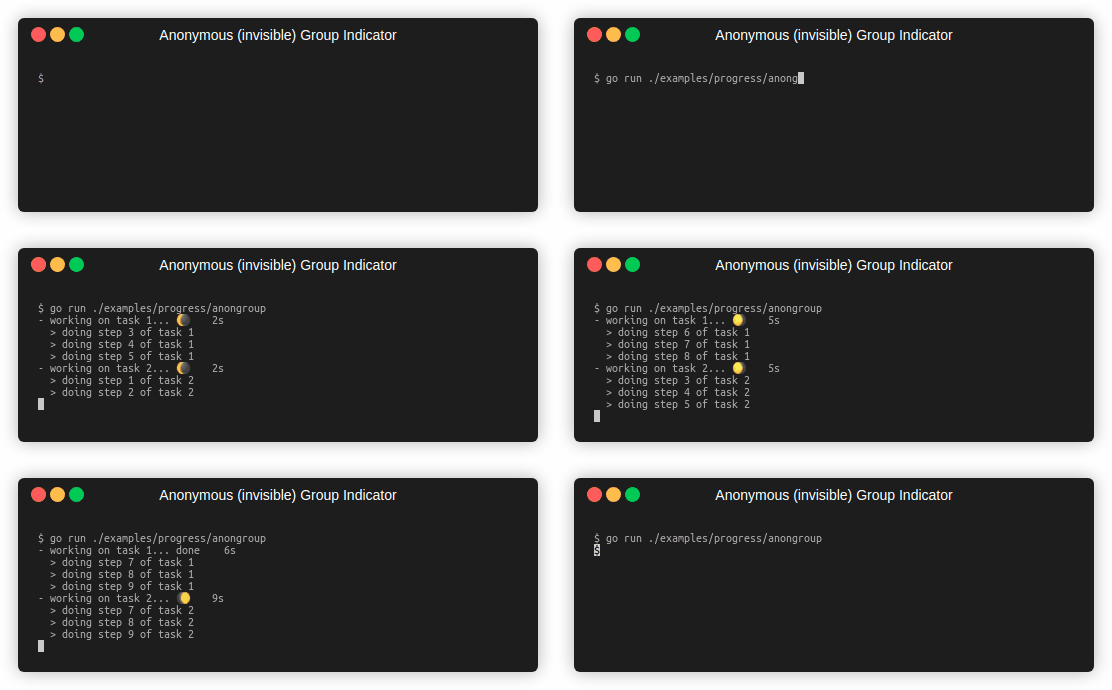
This example can be found in examples/progress/anongroup/main.go.
Nested Steps
If the progress of steps for a Steps indicator should be visualized
a NestedSteps archetype can be used. It is a group controlled
by a Steps indicator.
Here, steps are defined by a name and an indicator configuration.
The indicators are added to the group sequentially after the previous
step is finished.
func Step(n string) ttyprogress.NestedStep {
	return ttyprogress.NewNestedStep[ttyprogress.Bar](
		n, ttyprogress.NewBar().SetTotal(100).
			// HideOnClose().
			PrependElapsed().
			AppendCompleted(),
	)
}

bar, _ := ttyprogress.NewNestedSteps(
	Step("downloading"),
	Step("unpacking"),
	Step("installing"),
	Step("verifying")).
	SetGap("  ").
	SetWidth(40).
	ShowStepTitle(false).
	PrependFunc(ttyprogress.Message("progressbar"), 0).
	PrependElapsed().
	AppendCompleted().
	Add(p)
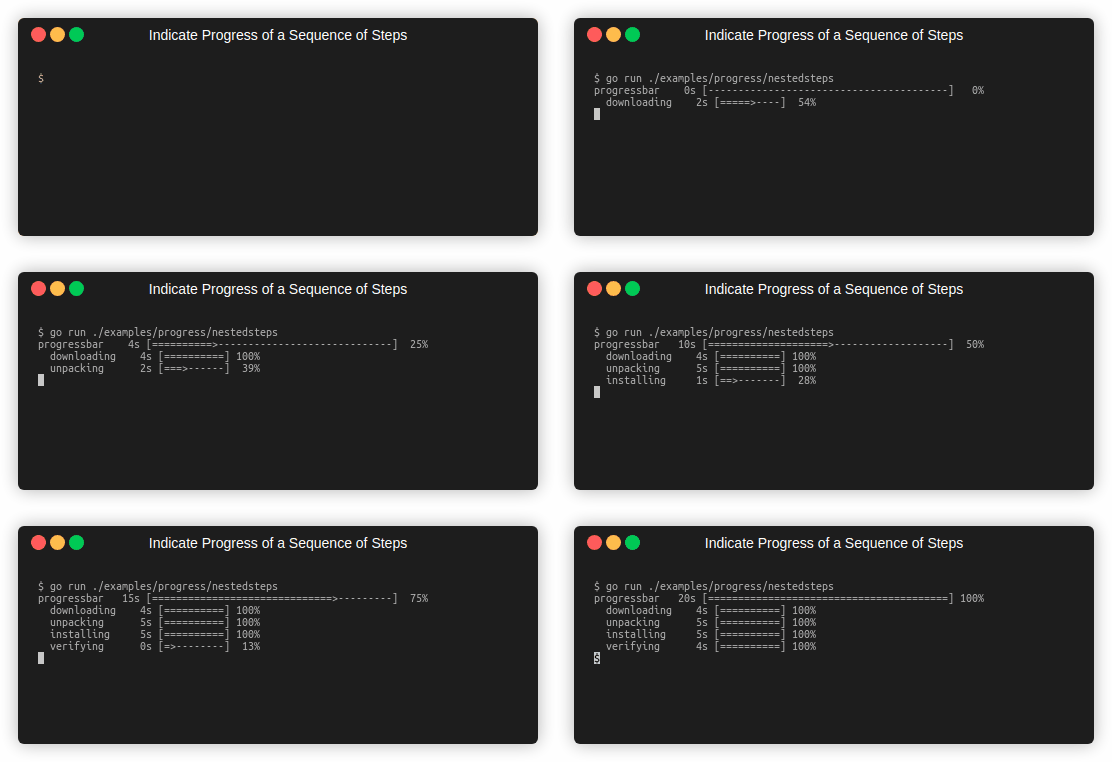
This example can be found in examples/progress/nestedsteps/main.go.
Bringing it all together
Using groups complex scenarios can be visualized as shown in the example examples/progress/complex/main.go.
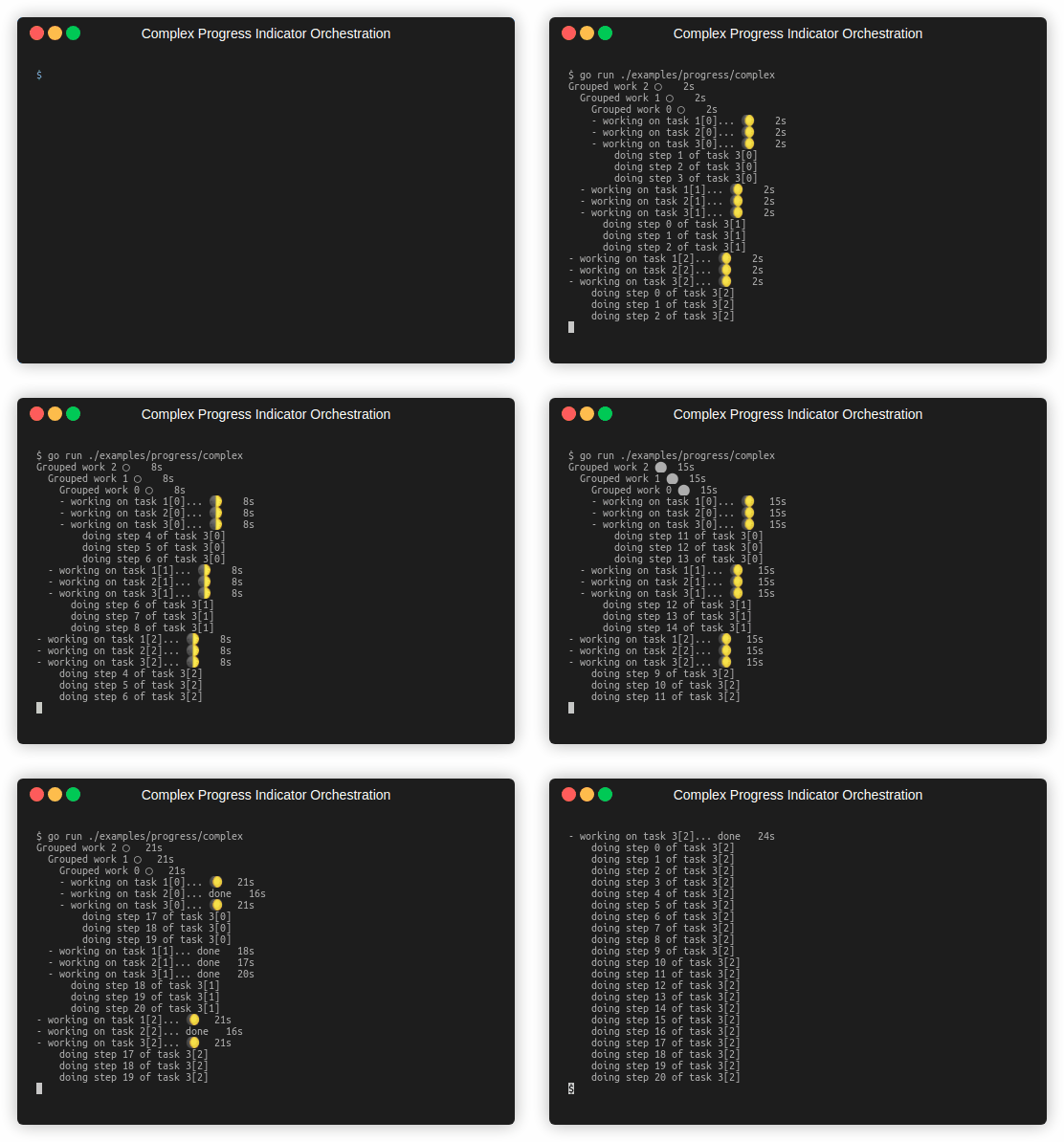
Variables
Progress indicator decorations can be based on variables. This can be used for example to visualize an execution status in addition to the progress. Variable values can be dynamically set on the progress elements.
func main() {
	p := ttyprogress.For(os.Stdout)

	bars := []int{1000, specs.SpinnerType}

	def := ttyprogress.NewSpinner().
		SetSpeed(1).
		AppendElapsed().
		PrependMessage("working on").
		PrependVariable("name").
		PrependVariable("temperature").
		PrependMessage("...")

	for i, b := range bars {
		bar, _ := def.SetPredefined(b).Add(p)
		bar.SetVariable("name", fmt.Sprintf("task %d", i+1))
		// show the initial temperature from the beginning
		temp := 10
		bar.SetVariable("temperature", fmt.Sprintf("[%d°]", temp))
		bar.Start()
		go func() {
			for i := 0; i < 10; i++ {
				temp += rand.IntN(5) - 2
				bar.SetVariable("temperature", fmt.Sprintf("[%d°]", temp))
				time.Sleep(time.Second * time.Duration(rand.IntN(3)))
			}
			bar.SetVariable("temperature", "")
			bar.Close()
		}()
	}

	p.Close()
	p.Wait(nil)
}
With AppendVariable or PrependVariable variable values can be
added to the progress line. The state passed to the decorators can access the
variable values, which enabled to create more complex decorators using
variable values of an arbitrary structure.
While feeding the progress the variables can be modified on the progress
element with SetVariable.
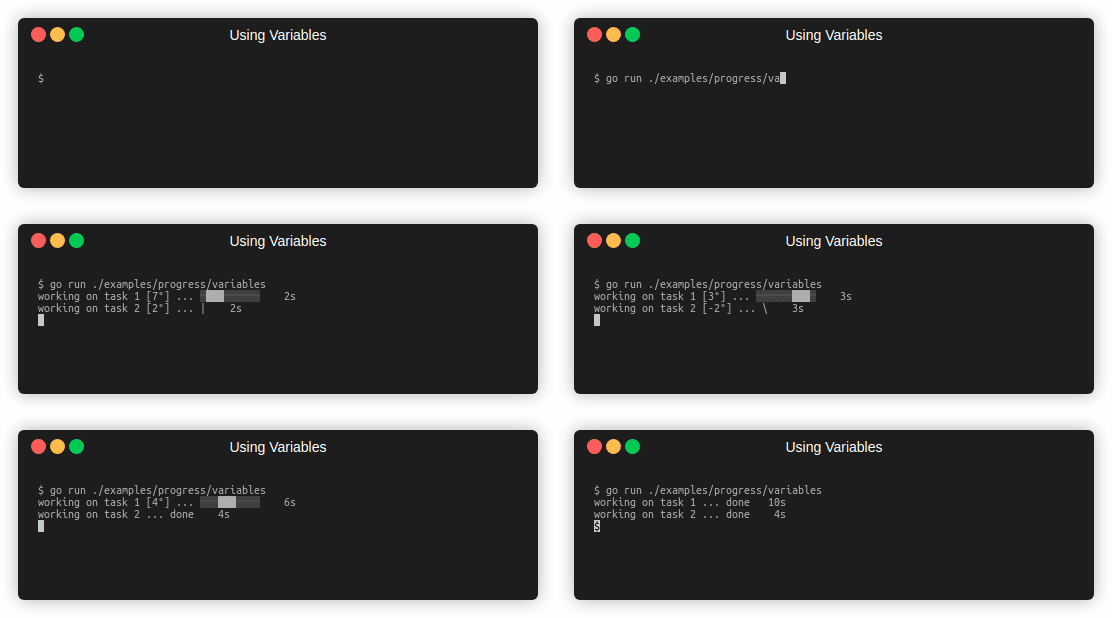
This example can be found in examples/progress/variables/main.go.
Colors
This library works together with the terminal color library github.com/mandelsoft/ttycolors.
The Context object is based on a ttycolors.TTYContext to control
the output formatting colorized in terms of ANSI Escape Codes.
By default, it is initialized by checking the writer for writing to a terminal.
But it can be configured, explicitly, by using the EnableColors method.
For example
p := ttyprogress.For(os.Stdout).EnableColors(false)
disables the output formatting, even if the standard output is directed to a terminal.
Disabling the output formatting affects all output formats configured
for the indicators. Texts provided by the application, for example messages,
strings returned by decorators or texts written to text views, are never
modified: output format sequences already contained in such texts are kept.
Therefore, decorators should provide ttycolors.String objects instead of
already formatted strings, which are rendered with the settings of the
Context. Already formatted strings can be passed through the method
StripIfDisabled of the ttycolors.TTYContext used by the Context,
which removes their output format sequences, if the output formatting is disabled:
text.Write([]byte(p.GetTTYContext().StripIfDisabled(formatted)))
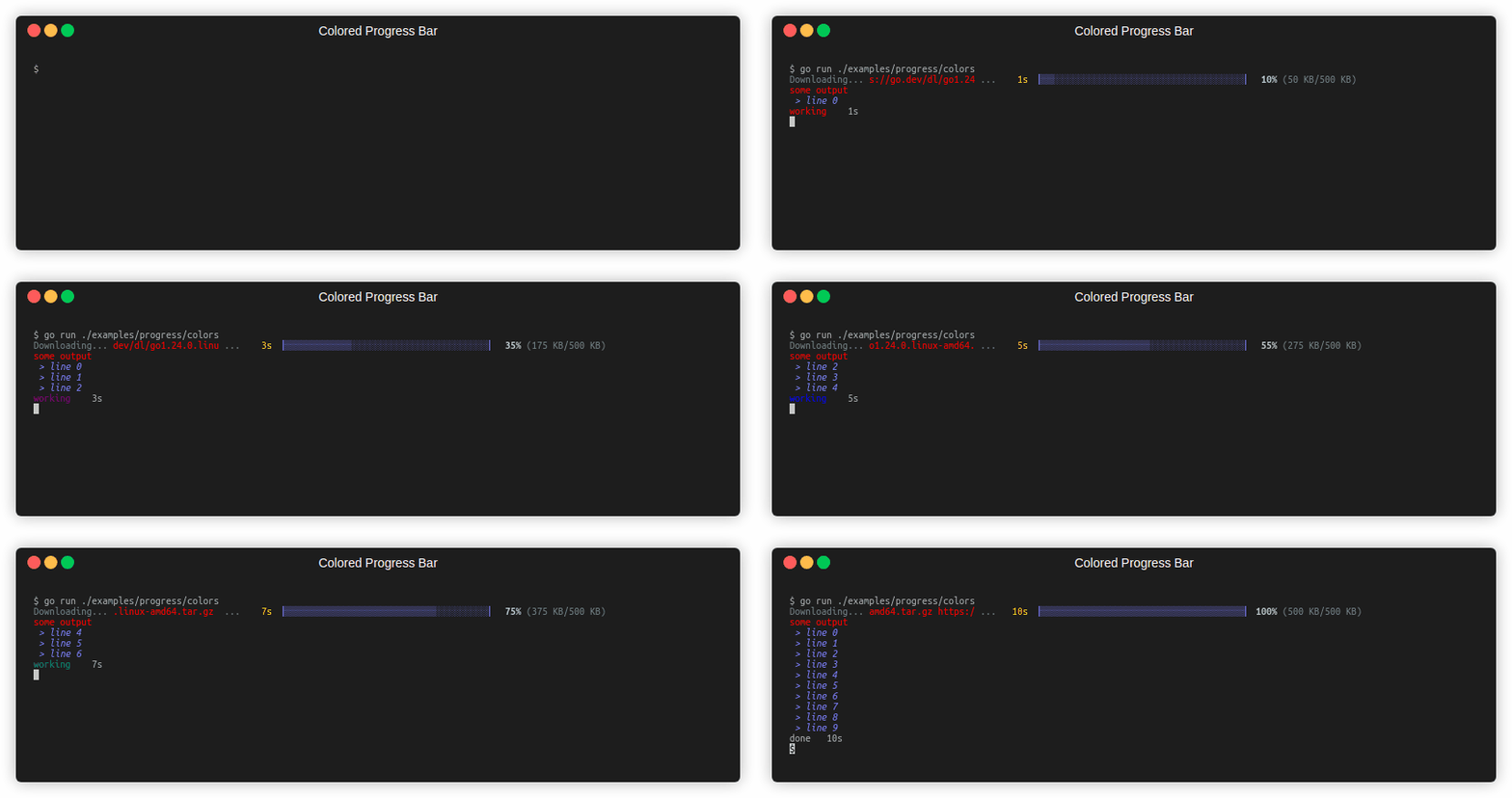
Elements of the main progress line can be colorized separately.
This example can be found in examples/progress/colors/main.go.
Be careful using colors in text views. This only works, if a line
contains a complete output format ANSI sequences. Text based indicators
support the SetViewFormat method to configure the output format for
the text view to set the format for the complete text independently of the
Write operations.
Checking the Behaviour of the Examples
The behaviour of the examples (the lines and their output formats shown during the
animation) is recorded in the files expected.ttyframes in the example directories
and can be checked with the tool ttyframes,
for example after changes of the libraries:
make check-behaviour   # compare the actual behaviour with the recorded one
make behaviour         # record the behaviour again
The check distinguishes differences caused by the timing of the animations from changed output.
The code fragments shown in this README are taken from the examples. The README
is generated with mdref from
doc/src/README.md, which includes the parts of the examples
marked by --- begin <key> --- and --- end <key> --- comments:
make doc         # generate the README.md
make check-doc   # check that the README.md is up to date with the examples
Acknowledgment of Prior Work
This library is inspired by libraries provided by Greg Osuri: github.com/gosuri/uilive and github.com/gosuri/uiprogress
Questions
What is ttyprogress?
mandelsoft/ttyprogress is a public repo on GitHub by mandelsoft. Progress Indicator Framework for Terminal Output.
Is ttyprogress open source?
It declares the Apache-2.0 license on GitHub.
Does ttyprogress run on macOS, Windows or Linux?
Its maker has not tagged a system, so it is unknown here. Its README says what it needs.
How do I install ttyprogress?
Open "Take it" on its page: Take My Repo writes an install plan for your machine and hands it to your AI agent (Claude Code, Codex or Cursor), which asks you before each step. Take My Repo has not tested it on any machine.
Is ttyprogress still maintained?
Its last change on GitHub was on 2026-11-08. Take My Repo does not judge from that whether it is maintained.
What do people who ran ttyprogress say?
Nobody has reviewed it on Take My Repo yet, which says nothing about its quality.





