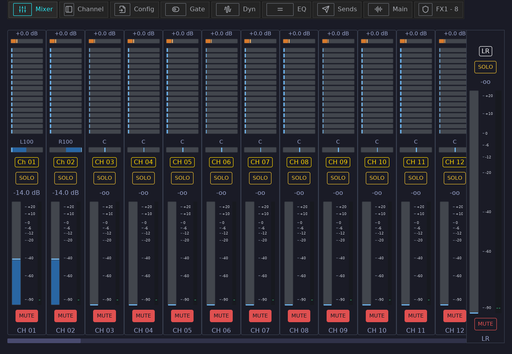
maolan-widgets
maolan-widgets is the reusable UI widget crate for the Maolan DAW project.
It contains the custom iced components that the main application uses for
timeline clips, piano-roll editing, mixer controls, meters, and related MIDI UI.
This repository directory is not the whole DAW. It is the focused widget package
that the main app imports as maolan_widgets.
What is in this crate
The crate exposes these public modules from src/lib.rs:
clip: audio and MIDI clip widgets, plus clip data types and interaction
payloads.controller: helpers for MIDI controller lanes, CC naming, RPN/NRPN mapping,
and SysEx previews.horizontal_scrollbar: a custom horizontal scrollbar widget.horizontal_slider: a compact horizontal slider widget.meters: canvas-based audio level meters for mixer-style UIs.midi: shared MIDI constants and data types used across the widgets.note_area: piano-roll background/grid composition and synchronized
scroller helpers.numeric_input: a spinner-style number input built from iced controls.piano: piano keyboard rendering, note coloring, and an interactive octave
keyboard canvas.piano_roll: note block rendering for MIDI clips and editors.slider: a vertical slider widget used for faders and similar controls.ticks: tick-mark and label rendering for slider scales.vertical_scrollbar: a custom vertical scrollbar widget.
Main building blocks
MIDI primitives
src/midi.rs defines the shared data structures that the rest
of the crate builds on:
PianoNote: a note event with start_sample, length_samples, pitch,
velocity, and channel.PianoControllerPoint: a controller event with sample position, CC number,
value, and channel.PianoSysExPoint: a SysEx event with sample position and raw bytes.PianoControllerLane, PianoRpnKind, PianoNrpnKind: enums used by the
controller UI.
It also exports layout constants such as keyboard width, note count, scroll IDs,
zoom limits, and MIDI-related limits used by the piano-roll widgets.
Clip widgets
src/clip.rs provides:
AudioClipData and MIDIClipData: lightweight clip models used to render
track clips.AudioClip<Message> and MIDIClip<Message>: builder-style widgets that can
be configured with size, labels, selection state, hover state, colors, and
interaction messages before converting into an iced::Element.AudioClipInteraction<Message> and MIDIClipInteraction<Message>: message
bundles for selection, opening, dragging, resizing, and fade-handle actions.
Audio clips can render waveform previews from peak data and an optional session
root path. MIDI clips can render note previews from PianoNote data.
Piano and piano-roll UI
These modules support Maolan's MIDI editing surfaces:
src/piano.rs: keyboard drawing helpers, note color logic,
octave math, and OctaveKeyboard, an interactive canvas widget that emits
note press/release messages.src/piano_roll.rs: PianoRoll, which turns
PianoNote data into positioned note blocks over an arbitrary interaction
layer.src/note_area.rs: NoteArea, which composes the
piano-roll background, beat/bar guides, playhead overlay, and arbitrary note
content; plus piano_grid_scrollers, which wires the keyboard area, note
area, and custom scrollbars together.
Mixer and control widgets
MIDI controller helpers
src/controller.rs contains pure helper logic for:
- choosing colors for controller lanes,
- mapping controller events into visible rows,
- decoding RPN/NRPN parameter combinations,
- collecting populated controller rows and CCs,
- generating short SysEx previews,
- resolving standard MIDI CC names.
This is the logic used by the main application when it builds controller-lane
views on top of the widget crate.
How the crate is used
This crate is consumed by the parent Maolan application in the repository root.
Examples in the main app include:
src/workspace/mixer.rs: uses slider, horizontal_slider, meters, and
ticks for mixer strips.src/workspace/editor.rs: uses clip::AudioClip and clip::MIDIClip for
arrangement clips.src/widget/midi_edit.rs: uses PianoRoll, OctaveKeyboard,
VerticalScrollbar, and other MIDI editing widgets.src/add_track.rs: uses numeric_input::number_input.
That usage pattern is the intended one: this crate supplies composable widgets
and helper types, while higher-level editor behavior stays in the main app.
Dependencies
The crate currently depends on:
iced for widget, canvas, and event handling infrastructure.iced_fonts for icon glyphs used by the numeric spinner.symphonia for reading waveform data used by audio clip previews.
Development
From this directory, standard Cargo commands are:
cargo build
cargo test
cargo fmt
cargo clippy
When working as part of the full Maolan repository, also run the engine tests
from the repository root:
cargo test -p maolan-engine
Testing
The crate includes unit tests in widget modules such as:
Tests focus on the pure math and interaction logic behind rendering and input
handling, which keeps the widget behavior verifiable without a full running UI.