
ECC
The agent harness performance optimization system. Skills, instincts, memory, security, and research-first development for Claude Code, Codex, Opencode, Cursor and beyond.
- 309k
- JavaScript
- MIT
- 8 h ago
Minimal, zero-dependency provider switching for Claude Code — switch between Anthropic, OpenRouter, DeepSeek, Z.AI, Kimi, Qwen, MiniMax and custom endpoints
Repo maxgfr/claude-code-switch, read from GitHub 15 h ago. maxgfr has not joined Take My Repo.
maxgfr/claude-code-switch is a public repo on GitHub by maxgfr. Minimal, zero-dependency provider switching for Claude Code — switch between Anthropic, OpenRouter, DeepSeek, Z.AI, Kimi, Qwen, MiniMax and custom endpoints. It declares the MIT license on GitHub. It is written mainly in Shell, has 1 stars and last changed on 2026-10-27. Nobody has reviewed it on Take My Repo yet, which says nothing about its quality. Read from GitHub on 2026-11-22.
In the maintainer's words. Shown from GitHub; Take My Repo does not keep a copy.
Minimal provider switching for Claude Code. One POSIX shell script to rule them all — no python, no node.
Switch between AI providers (Anthropic, OpenRouter, DeepSeek, Z.AI, Kimi, Qwen, MiniMax, Doubao, or any custom endpoint) with a single command, get each model's real context window instead of Claude Code's 200k guess, and keep the ~/.claude config that makes a good install backed up on a gist or a private repo. claude always works as-is — running it never goes through ccs, and switching provider only injects env vars into the process ccs spawns.
Inspired by foreveryh/claude-code-switch, stripped down to the essentials: switch provider, set model, launch claude.
ccs use claude configures nothing at all — same account, same session as running claude, so keep-awake and sync work on your normal Claude subscription toomodel=auto lets llm-models pick the newest flagship and its fast
variant per tier for that endpoint, so a new generation needs no config edit~/.claude to a gist or private repo, restore it on any machineccs pack on privacy no-trace guard — no telemetry, no Claude attribution in anything you publish, secrets and force pushes out of reach in bypassPermissions; ccs pack off puts back exactly what was thereccs caffeine on stops the machine sleeping mid-session, for exactly as long as claude runsjq, llm-models, git and gh are all optional, and each feature degrades instead of breaking when one is missingccs notify, ccs pack and ccs sync write to ~/.claude — all explicit opt-in, all reversible, all backed up firstccs starts Claude Code with the right env vars (scoped to that process)eval "$(ccs env)" exports vars to your current sessionccs status never leaks your full API keybrew install maxgfr/tap/claude-code-switch
That also installs llm-models (context-window sizing) and
jq (notifications).
# Download the script
curl -fsSL https://raw.githubusercontent.com/maxgfr/claude-code-switch/main/ccs -o /usr/local/bin/ccs
chmod +x /usr/local/bin/ccs

# First run creates ~/.claude-provider/config — add your API keys
ccs config
This path skips the dependencies Homebrew would have installed. ccs runs fine without them, but
add llm-models for context-window sizing and jq for
ccs notify when you want those.
ccs sync additionally needs git (and gh, only to create a gist or repo for you). Everything
else works without them.
So that Claude Code, Codex, Cursor, OpenCode and the other agents can drive ccs for you —
switch a provider, apply a pack, set up sync, diagnose the install:
npx skills add maxgfr/claude-code-switch --skill claude-code-switch --global
Pick the agents in the prompt, or name them with -a claude-code codex … and -y. Update it
with npx skills update claude-code-switch --global -y.
The skill is skills/claude-code-switch/SKILL.md. It
leaves the command list to ccs help, which always matches the installed version, and carries
what an agent cannot guess: which commands would block its own session (an interactive claude,
$EDITOR), how to handle an API key without leaking it, which commands publish or overwrite and
need the user's go-ahead (sync init|push|pull|import, purge, autonomous), and what to do
when guard or no-trace refuses a command. It does not install ccs itself — Homebrew does.
Out of the box ccs is the native login: it launches claude untouched, on whatever account
claude is already logged into — you just get keep-awake, sync and provider switching around it.
ccs --caffeine # your usual Claude session, machine kept awake
To bring another provider in:
# 1. Add your API keys
ccs config

# 2. Switch to a provider
ccs use openrouter

# 3. Launch Claude Code
ccs
>>> Launching claude with zai / glm-5.3 (1.0M context)
And to stop rebuilding your Claude Code setup by hand on every new machine:
ccs sync init --gist-new   # 1. create a secret gist for it
ccs sync push              # 2. back up ~/.claude
ccs sync pull              # 3. …restore it anywhere else
ccs [args...]               Launch claude with active provider (default)
ccs with <provider>[/<model>] [args...]
                            One launch with that provider, nothing saved
ccs <command> [arguments]

LAUNCH FLAGS
    --caffeine[=system|display] Keep the machine awake for this session only
    --no-caffeine               Let it sleep for this session only
    --relaunch / --no-relaunch  Relaunch when the usage limit resets, this session only
                                (must come first; everything else goes to claude)

COMMANDS
    use <provider> [model|auto] Switch to a provider (saves as default)
    list  (ls)                  List configured providers
    status  (st)                Show active provider and model
    config  (cfg)               Open config file in $EDITOR
    config get <section> <key>  Print one config value (empty if unset)
    config set <section> <key> [value]
                                Set one value; no value = read it from stdin,
                                hidden when that is a terminal
    launch  (run) [args...]     Launch claude with active provider env vars
    with <provider>[/<model>]   Launch once with another provider (see above)
    env                         Print export statements for current shell
    models [refresh|clear]      Show / refresh the context windows ccs will use
    notify on|off|status|test   Desktop notifications when Claude needs you
    pack [list]                 Reversible settings packs, and which are on
    pack on|off <pack>... | all privacy, no-trace, guard, quiet, autonomous
    pack status <pack>          Each setting of a pack, ok or not
    caffeine on|off|status      Keep the machine awake while claude runs
    relaunch on|off|status      Wait out the usage limit, then claude --continue
    sync <subcommand>           Back up ~/.claude to a gist or repo
    doctor                      Check the install: claude, tools, config, hooks
    reset                       Clear active provider (back to vanilla claude)
    purge                       Remove all ccs data (~/.claude-provider/)
    help                        Show help
    version                     Show version
    completion bash|zsh         Print a completion script for your shell

SYNC SUBCOMMANDS
    sync init --gist-new        Create a secret gist and use it (needs gh)
    sync init --repo-new <name> Create a private repo and use it (needs gh)
    sync init --gist <id|url>   Use a gist you already have
    sync init --repo <url>      Use a repo you already have
    sync push [--force] [--dry-run]
                                Back up ~/.claude to the remote
    sync pull [--additive] [--dry-run]
                                Restore ~/.claude from the remote
    sync import <id|owner/repo|url> [--adopt] [--with-ccs] [--additive] [--yes]
                                Import someone else's config (asks first;
                                --yes is required when stdin is not a terminal)
    sync status                 Remote, scope, last sync, what would push
    sync auto on|off            Sync on every 'ccs' launch (default: off)
    sync hooks on|off           Sync on Claude Code session start/end
    sync off                    Forget the remote, touch no files
# Switch provider
ccs use claude                        # Native login — exactly like running claude
ccs use anthropic                     # Anthropic API with your own key — latest Opus (model=opus)
ccs use anthropic claude-opus-4-6     # Override model
ccs use openrouter openai/gpt-4o     # OpenRouter with specific model
ccs use deepseek deepseek-reasoner   # DeepSeek, one model pinned
ccs use zai                          # Z.AI — the latest GLM per tier, picked by llm-models
ccs use zai glm-5.1                  # ...or one pinned
ccs use openrouter auto:anthropic/   # OpenRouter — the latest Claude per tier
ccs use kimi                         # Kimi, latest
ccs use qwen                         # Qwen, latest
ccs use minimax                      # MiniMax, latest
ccs use doubao                       # Doubao Seed Code (ByteDance)

# Check state
ccs list                              # See all providers and their status
ccs status                            # See active provider, model, masked API key
ccs models                            # See the context window ccs will use, per tier

# Launch Claude Code
ccs                                   # Launch with active provider
ccs --print "hello world"             # Pass flags through to claude
ccs --caffeine -p "long refactor"     # ...and don't let the machine sleep
ccs --relaunch --caffeine -p "…"      # ...and pick up again when the usage limit resets
ccs -p --output-format json "…" | jq  # stdout is claude's alone — ccs's own lines go to stderr

# One launch with another provider — the default stays what it was
ccs with deepseek -p "review this"    # DeepSeek for this run only
ccs with openrouter/openai/gpt-4o     # provider/model, split at the first slash
ccs with claude                       # the native login, once

# Export to current shell
eval "$(ccs env)"                     # Export env vars to current session
All providers expose an Anthropic-compatible Messages API endpoint, confirmed working with Claude Code.
claude is the exception and the default: it is not an endpoint at all, just claude as it already runs.
| Provider | Base URL | Default Model |
|---|---|---|
claude |
(nothing injected — claude's own login) | (claude's own default) |
anthropic |
https://api.anthropic.com (your API key) |
opus (Claude Code's alias) |
openrouter |
https://openrouter.ai/api |
anthropic/claude-sonnet-4 |
deepseek |
https://api.deepseek.com/anthropic |
auto |
zai |
https://api.z.ai/api/anthropic |
auto |
kimi |
https://api.moonshot.ai/anthropic |
auto |
qwen |
https://dashscope-intl.aliyuncs.com/apps/anthropic |
auto |
minimax |
https://api.minimax.io/anthropic |
auto |
doubao |
https://ark.cn-beijing.volces.com/api/coding |
doubao-seed-code-preview-latest |
custom |
(user-defined) | (user-defined) |
anthropic bills your API key per token, -p included — Claude Code prefers ANTHROPIC_API_KEY
over your login whenever it is set. To run on your Claude subscription, use claude.
auto means llm-models picks the newest models for that
endpoint at launch — the flagship for the opus tier, its fast variant for the main model — see
Automatic model choice. OpenRouter and Doubao stay pinned:
one is a multi-vendor catalogue where "newest" needs a filter (auto:anthropic/), the other is not
in the catalogue at all.
claude)claude is the default and the odd one out: it configures nothing. No base URL, no key, no
model, no context window — ccs exports not a single variable and simply runs claude, on
whatever account it is already logged into.
ccs use claude       # back to your normal Claude session
ccs --caffeine       # ...with the machine kept awake
That is the point: everything ccs wraps around the launch — keep awake, config sync, argument
passthrough — now works on a Claude subscription, not just on API keys. Switching to a provider and
back is one command each way.
It is stricter than plain claude on one point: the ANTHROPIC_* and CLAUDE_CODE_* variables
ccs manages are scrubbed from the environment first, so a stale eval "$(ccs env)" for another
provider cannot quietly survive into the session.
Don't confuse it with anthropic, which is the Anthropic endpoint with your own API key, billed
per token rather than on your subscription — ccs use anthropic says so when you switch.
Any section can be a native login — native=true makes every other key in it irrelevant:
[claude]
native=true
Z.AI offers a Coding Plan optimized for AI-powered coding tools like Claude Code:
ccs use zai            # model=auto: GLM-5.3 as opus, GLM-5.3-Flash as the main model
ccs use zai glm-5.1    # or pin one
ccs
Doubao is ByteDance's AI platform with coding-optimized models:
doubao-seed-code-preview-latest (256K context)ccs use doubao
ccs
Located at ~/.claude-provider/config. Simple INI format, editable by hand:
[_defaults]
provider=claude
model=
caffeine=off
relaunch=off

# Native login — nothing is injected, claude runs on its own account
[claude]
native=true

[anthropic]
base_url=https://api.anthropic.com
api_key=sk-ant-your-key-here
model=opus

[openrouter]
base_url=https://openrouter.ai/api
api_key=sk-or-v1-your-key-here
model=anthropic/claude-sonnet-4

[zai]
base_url=https://api.z.ai/api/anthropic
api_key=your-zai-key-here
model=auto

[kimi]
base_url=https://api.moonshot.ai/anthropic
api_key=your-kimi-key-here
model=auto
opus_model=kimi-k2.5    # an explicit tier still wins over its auto pick
[_defaults] — global default provider and modelapi_key= — empty means not configuredbase_url= — the provider's endpoint. Empty, or the official https://api.anthropic.com
(with or without a trailing /), means the Anthropic API itself: the key is sent as
ANTHROPIC_API_KEY, no ANTHROPIC_BASE_URL and no context window are exported. Any section
pointing there behaves that way; every other URL is a third-party endpoint (ANTHROPIC_AUTH_TOKEN)native= — true makes the section the native login: ccs exports nothing and every other key
in that section is ignored. That is what [claude] ismodel= — main model (maps to sonnet/default tier in /models), or auto /
auto:<filter> to let llm-models pick (see Automatic model choice)opus_model= — optional, for /models opus tier (falls back to model, or overrides the
auto pick for that tier)haiku_model= — optional, for /models haiku tier + fast tasks (falls back to model, or
overrides the auto pick for that tier)context_tokens= — optional, pins the context window (plain integer; empty means auto)max_output_tokens= — optional, pins the output limit (plain integer; empty means auto)auto_context= — in [_defaults], set to false to disable the automatic lookupcaffeine= — in [_defaults], off (default), system or display; written by
ccs caffeine on|off (see Keep the machine awake)relaunch= — in [_defaults], off (default) or on; written by ccs relaunch on|off
(see Relaunch when the usage limit resets)Sections whose name starts with _ are reserved: they hold settings, never providers, so they
never show up in ccs list. Alongside [_defaults] there is [_sync], normally written by
ccs sync init:
[_sync]
remote=https://gist.github.com/<id>.git
kind=gist            # gist | repo
include_ccs=false    # also back up this file, with every api_key= blanked
auto_launch=false    # sync on every `ccs` launch
auto_hooks=false     # written by `ccs sync hooks on|off`
prune=true           # a pull mirrors the remote; false only ever adds
Values run to the end of the line, so no trailing comments. Spaces around = and around a
section header are ignored (model = glm-5.1 works); a value keeps any further = it contains.
One value at a time, without opening the editor:
ccs config set zai api_key            # prompts for the value, hidden — no shell history
ccs config set zai api_key < key.txt  # or pipe it in
ccs config set _defaults caffeine display
ccs config get zai model              # prints the value, empty if unset
config set creates the section when it is missing. An api_key= changed this way is live at the
next launch: ccs use does not need to run again.
model=auto)Pinning a model id means editing the config at every new generation, and a shipped template that is
always one release behind. model=auto hands the choice to llm-models,
scoped to the endpoint in base_url:
ccs use zai
>>> Switched to zai / auto → glm-5.3-flash (opus glm-5.3, haiku glm-5.3-flash) (1.0M context)
llm-models latest looks at the catalogue for that endpoint, drops what Claude Code cannot use
(deprecated models, models without tool calling, previews, batch and free variants, vision / audio /
embedding specialists) and picks:
| Tier | Pick |
|---|---|
| opus | the newest flagship |
| main model, sonnet, haiku | its fast variant (-flash, -turbo, -mini, …) of the same generation, or the flagship itself when there is none |
Sonnet is what Claude Code runs by default, so the main model is the fast one; Opus is the strong
tier you reach for on purpose. opus_model= or haiku_model= set explicitly in the section still
win over their auto pick, so the two ways mix. ccs use <provider> <model> pins one; ccs use <provider> auto goes back.
auto:<filter> keeps only the catalogue ids containing the filter (no spaces), which is what a
multi-vendor endpoint needs: ccs use openrouter auto:anthropic/ picks the latest Claude of each
family. On [anthropic] itself, auto pins nothing — no ANTHROPIC_MODEL is exported at all
and claude keeps its own defaults.
The pick is cached for 24 hours in ~/.claude-provider/models-cache (windows are cached 7 days;
a model choice should follow a release faster), so a launch costs no subprocess. ccs models shows
the pick and its source, ccs models refresh asks again. When llm-models gives no answer the last
pick is kept with a warning; with nothing cached ccs refuses to launch rather than send an empty
model, and the error names the fix. What gets saved by ccs use is the spec, never the pick: a
relaunch a week later re-asks.
This needs llm-models 1.4 or later (brew upgrade llm-models); ccs doctor says so when
yours is older. A pinned model needs nothing.
Claude Code assumes a 200k context window for any model it doesn't ship in its own table, so on a 1M model auto-compact fires four times too early — and it says so on every launch:
"glm-5.3" is not a model this version of Claude Code recognizes, so auto-compact
will keep this session within 200k tokens (the context window it assumes)...
ccs looks the model up and sets CLAUDE_CODE_MAX_CONTEXT_TOKENS to its real window, which both
sizes auto-compact correctly and removes the warning:
>>> Launching claude with zai / glm-5.3 (1.0M context)
Inspect what it will use, per tier:
ccs models           # context + output limit + where each number came from
ccs models refresh   # re-resolve, ignoring the cache
ccs models clear     # drop the cache
  Tier     Model           Context   Output    Source         Resolved as
  main     glm-5.3-flash   1.0M      131K      cache          zai/glm-5.3-flash
  opus     glm-5.3         1.0M      131K      cache          zai/glm-5.3
  sonnet   glm-5.3-flash   1.0M      131K      cache          zai/glm-5.3-flash
  haiku    glm-5.3-flash   1.0M      131K      cache          zai/glm-5.3-flash

  Picked by llm-models latest (model=auto, cache) — ccs models refresh re-asks, ccs use zai <model> pins one.
With model=auto the windows come from the same answer as the models, so the whole table costs one
call; a pinned model is looked up on its own.
The lookup uses llm-models, which Homebrew installs
alongside ccs. If you installed ccs by hand instead, add it:
brew install maxgfr/tap/llm-models
ccs still runs without it — you just get no window, exactly as before — so a broken or missing
install degrades rather than breaks. Answers are cached in ~/.claude-provider/models-cache for 7
days (auto picks: 24 hours), so the launch path stays free of subprocesses, and a stale entry is still used when the lookup
fails (offline, say).
Because the same model id is published by many providers with different limits, the lookup is scoped
by the provider's base_url — api.z.ai resolves to Z.AI's own numbers, not a reseller's.
Override or opt out from the config:
[zai]
context_tokens=200000       # pin the window (plain integer — "200k" is not valid)
max_output_tokens=131072    # pin the output limit

[_defaults]
auto_context=false          # disable the lookup entirely
CLAUDE_CODE_MAX_CONTEXT_TOKENS is a single global value, so it is sized from the main
model even when the opus/haiku tiers have different windows. ccs models shows all four.claude-, which is why ccs sets it for
third-party providers only and scrubs it for native Anthropic.200k parses as 200, so ccs rejects any non-numeric pin with a
warning rather than passing it through.[claude-code:unrecognized_model] {"model":"glm-5.3",...}. That one is only silenced by mapping
the id in the modelOverrides setting — which would make Claude Code resolve your model to an
Anthropic one and ignore the window you just set. ccs deliberately does not do that, and does
not write to ~/.claude/settings.json outside ccs notify, ccs pack and ccs sync.ccs behaves as it did before. Pin it with context_tokens=.Claude Code already posts a desktop notification in Ghostty, Kitty and iTerm2 when it needs you and
you seem to be away (its preferredNotifChannel, auto by default). ccs notify on covers the
other terminals the way the official docs
recommend: with one Notification hook, only when Claude Code is waiting on you.
ccs notify on           # Auto-detect the terminal at each notification
ccs notify on wezterm   # Or pin: ghostty | iterm2 | kitty | wezterm | warp | macos | bell
ccs notify test         # Fire a test notification (also checks the terminal lets it through)
ccs notify status       # Hook state, preferredNotifChannel, tmux passthrough
ccs notify off          # Remove the hook
Requires jq (brew install jq) — only for this command, the rest of ccs stays zero-dependency.
| Terminal | Who notifies | How |
|---|---|---|
| Ghostty, Kitty, iTerm2 | Claude Code itself (banner) + ccs (bell) | native banner, bare BEL from the hook |
| WezTerm, Windows Terminal | ccs | OSC 9 |
| Warp | ccs | OSC 777 |
| anything else on macOS (Terminal.app, VS Code…) | ccs | osascript |
| anything else on Linux with a display | ccs | notify-send |
| anything else | ccs | bell only |
Every ccs notification rings a bare BEL — in Ghostty, Kitty and iTerm2 too, where it is all the hook sends — which most terminals turn into a dock badge or bounce (Ghostty: bell-features = attention).
How it works:
permission_prompt, idle_prompt (the task is done and you
have been away ~60 s), elicitation_dialog, elicitation_url_dialog, agent_needs_input,
quota_auto_resume_stale (press Enter to resume) and quota_auto_resume_disabled. Everything
else — agent_completed for each background task, auth_success… — stays silent.message, stripped of control characters.GHOSTTY_RESOURCES_DIR, KITTY_WINDOW_ID,
LC_TERMINAL, WEZTERM_PANE, WT_SESSION), so it keeps working inside a tmux session.Stop hook: a notification at the end of every turn, while you are watching, is
noise. A finished task reaches you through idle_prompt once you have looked away.Tips:
set -g allow-passthrough on to ~/.tmux.conf, or no notification gets out.
ccs notify on and status warn when it is off.preferredNotifChannel to notifications_disabled, Ghostty, Kitty and iTerm2 stay
silent — ccs notify on warns, and leaves it as you set it.Note:
ccs notify onis one of the three exceptions to the zero-interference principle (the others areccs packandccs sync): it adds oneNotificationhook to~/.claude/settings.json. It is explicit opt-in, backs up your settings to~/.claude-provider/settings-backup.json, andccs notify offremoves the hook. The script lives in~/.claude-provider/hooks/. Upgrading from an older ccs, which forcedpreferredNotifChanneloff and added aStophook, undoes both on the nextnotify onornotify off.
A pack is a named set of documented Claude Code settings that ccs writes into
~/.claude/settings.json — and takes back exactly.
ccs pack                       # Every pack: on, off or partial, with a one-line summary
ccs pack on privacy no-trace   # Turn some on (several at once is fine)
ccs pack on all                # Or every one
ccs pack status guard          # Each item of one pack, ok or not
ccs pack off guard             # Put back what was there before
Requires jq, like ccs notify.
| Pack | What it does |
|---|---|
privacy |
Nothing reaches Anthropic beyond the conversation itself |
no-trace |
Nothing you publish names Claude Code |
guard |
Secrets, force pushes and wipes out of reach — in bypassPermissions too |
quiet |
No tips, prompt suggestions or plugin suggestions |
autonomous |
Long unattended runs that do not stall (turns guard on) |
| Setting | Stops |
|---|---|
env.DISABLE_TELEMETRY=1 |
usage metrics |
env.DISABLE_ERROR_REPORTING=1 |
crash and error reports |
env.DISABLE_BUG_COMMAND=1 |
/bug, which uploads the session transcript |
env.CLAUDE_CODE_DISABLE_FEEDBACK_SURVEY=1, feedbackSurveyRate=0 |
the "how is Claude doing?" survey |
feedbackDrafts="off" |
model-drafted feedback |
autoUploadSessions=false |
mirroring local sessions to claude.ai |
disableRemoteControl=true, remoteControlAtStartup=false |
Remote Control, which relays sessions through claude.ai |
inputNeededNotifEnabled=false, agentPushNotifEnabled=false |
mobile push notifications, which carry what Claude asks |
CLAUDE_CODE_DISABLE_NONESSENTIAL_TRAFFIC would cover most of the
table at once, but it also stops updates, and a missed security fix costs more than a version check.disableClaudeAiConnectors
and syncClaudeAiSkills turn them off by hand.The settings are the reliable part — Claude Code then never writes an attribution in the first place:
attribution.commit="", attribution.pr="", attribution.sessionUrl=false, and the deprecated
includeCoAuthoredBy=false for older versions sharing the same file.
A PreToolUse hook is the safety net for everything the settings do not cover — a model that
writes one anyway, an instruction in a skill, a template. It refuses, before it runs:
git commit|tag|notes|merge or gh|glab pr|issue|release|api|… command whose text — or the
file it reads its message from (-F, --file, --body-file) — carries Co-Authored-By: Claude,
noreply@anthropic.com, "Generated with Claude Code", a claude.ai session link or Claude-Session:;Claude gets the reason and rewrites the text. Searching for those strings (grep, git log) is not
publishing and is never refused.
For bypassPermissions, where nothing asks first. Two layers, both checked in that mode — deny rules
and PreToolUse hooks apply in every permission mode:
Read/Edit of ~/.ssh, ~/.aws, ~/.gnupg;
Read of ~/.config/gh, ~/.config/gcloud, ~/.kube, ~/.docker/config.json, ~/.netrc,
~/.npmrc, ~/.pypirc, ~/.claude/.credentials.json, and every .env / .env.* (templates
included — cat .env.example still works through Bash).security find-*-password), printing every environment variable (env, printenv), reading a
.env file (templates and redirect targets are fine), git push --force / -f / --mirror /
+refspec (--force-with-lease is allowed), rm -r on /, ~, $HOME or a system
directory, curl … | sh, and --no-gpg-sign / commit.gpgsign=false.A hook is a guard rail against accidents, not a sandbox against an adversary: a command built to
dodge a pattern can. For hard isolation, Claude Code's own sandbox settings are the tool.
spinnerTipsEnabled=false, promptSuggestionEnabled=false, and the built-in plugin-suggestion
plugin (cc-plugin-you-should-know@builtin) off.
autoContinueAtUsageLimit=true (wait for the limit to reset, then continue), autoCompactEnabled,
switchModelsOnFlag=true (keep going on another model rather than pause), askUserQuestionTimeout="10m"
(a question left unanswered goes on with what was selected) and fileCheckpointingEnabled (so
/rewind can undo). Nobody is watching, so it needs guard: pack on autonomous turns it on, and
pack off guard is refused while autonomous is on. Overnight, add ccs caffeine on.
ccs pack on <name> records the previous value of every item in
~/.claude-provider/packs-state.json; turning it on again re-applies without re-recording.ccs pack off <name> restores each value — except one you changed since, which is yours. A
deny rule you already had before guard is never removed; neither is a hook of yours.ccs doctor lists the packs that are on, warns when one has drifted, and warns when
bypassPermissions runs without guard.ccs purge keeps the settings — they depend on nothing ccs owns, and purging ccs should not
quietly turn telemetry back on — but detaches the hooks, whose scripts it deletes. ccs pack off all first reverts everything.~/.claude-provider/hooks/pack-<name>.sh; ccs sync strips and reattaches
them like the notify and sync hooks.A long agent run and a laptop that sleeps at 15 minutes do not mix. ccs caffeine on holds an OS
sleep assertion for exactly as long as the claude process lives, then lets normal sleep
behaviour return on its own — whether the session exits, crashes or you Ctrl-C it. No permanent
system setting is changed.
ccs caffeine on              # Every session from now on
ccs caffeine on display      # ...and keep the screen lit too
ccs caffeine status          # Show the state and the exact wrapper
ccs caffeine off             # Back to normal sleep

ccs --caffeine               # Just this session
ccs --caffeine=display -p "long refactor"
ccs --no-caffeine            # Let this one sleep, whatever the config says
Two modes, because keeping the screen lit all night is rarely what you want:
| Mode | macOS | Linux (systemd) | Effect |
|---|---|---|---|
system (default) |
caffeinate -ims |
--what=sleep |
Machine stays awake, screen may sleep |
display |
caffeinate -dims |
--what=sleep:idle |
Screen stays lit too |
Linux falls back to gnome-session-inhibit when systemd-inhibit is absent.
Platform support, in full:
| Platform | Keep-awake |
|---|---|
| macOS | ✅ caffeinate |
| Linux (systemd) | ✅ systemd-inhibit |
| Linux (GNOME, no systemd) | ✅ gnome-session-inhibit |
| Linux, neither present | ⚠️ warns, launches normally |
| WSL | ⚠️ warns — a Linux VM cannot keep the Windows host awake, set it in Windows' power settings |
| Git Bash / MSYS / Cygwin | ⚠️ warns, launches normally |
| anything else (BSD…) | ⚠️ warns, launches normally |
There is no native Windows support: ccs is a POSIX shell script and cannot run there. In every
⚠️ case the session launches exactly as it would have — a missing keep-awake tool is never fatal,
and never silently pretends to have worked.
Two things worth knowing:
eval "$(ccs env)"
cannot carry it. Launch through ccs to get it (ccs env says so on stderr when caffeine is on).The state lives in [_defaults] caffeine= in ~/.claude-provider/config — nothing outside
~/.claude-provider/ is touched, so this is not an exception to the zero-interference principle.
Not using ccs, or on native Windows? claudfeine is the
same idea as a standalone wrapper around claude (and codex), and ships a PowerShell wrapper
built on SetThreadExecutionState for Windows.
ccs relaunch on                    # from now on
ccs --relaunch -p "finish the migration"   # this session only; --no-relaunch turns it off once
Claude Code stops on You've hit your session limit · resets 1:10am (Europe/Berlin). With
relaunch on, ccs stays as claude's parent instead of execing it, reads that line when the session
ends on it, waits until the reset — keeping the machine awake if caffeine is on — then runs
claude --continue with the same provider and arguments, so the conversation picks up where it
stopped.
/exit) and ccs takes over: it prints when it will be back and waits.-p / piped — automatic: claude exits with the message, ccs waits and reruns it. Give the
prompt as an argument rather than on stdin, since stdin is gone by the second run.claude --continue …, the most recent conversation in the current directory. A
--continue / --resume already in the arguments is respected, not duplicated.script(1) (macOS, util-linux, busybox) so the TUI
keeps a real tty; on a pipe, through tee, stdout and stderr kept apart. The recording is a temp
file removed as soon as the session ends — nothing is stored. Without script, ccs warns and runs
claude as usual.resets 1:10am) and the weekly one (resets Sep 5 at 9am) are both read,
with the time zone in parentheses. If the reset time cannot be read, ccs says so and exits with
claude's status.ccs --relaunch --caffeine -p "…". ccs env cannot carry it, like caffeine.Reinstalling Claude Code means rebuilding your global CLAUDE.md, your settings, your skills and
your commands by hand. ccs sync backs up the part of ~/.claude that makes a good install to
a GitHub gist or a private repo, and puts it back on any other machine.
ccs sync init --gist-new       # create a secret gist (or --repo-new <name>)
ccs sync push                  # back up ~/.claude
ccs sync status                # remote, scope, last sync, what would push

# on the new machine
ccs sync init --gist <id>
ccs sync pull                  # restore

# somebody else's setup, without adopting their remote
ccs sync import <gist-url>
An allow-list, never a deny-list — a lived-in ~/.claude runs to gigabytes of transcripts and
job state, none of which helps you reinstall:
| Backed up | Never leaves the machine |
|---|---|
CLAUDE.md |
projects/, jobs/, transcripts/, plans/ |
settings.json |
history.jsonl, shell-snapshots/, file-history/ |
agents/, commands/, skills/, output-styles/, hooks/ |
.credentials.json, ~/.claude.json |
plugins/installed_plugins.json, plugins/known_marketplaces.json |
settings.local.json, every cache |
skills/synced/ and skills/.trash/ — Claude Code's own, synced from claude.ai |
skills/synced/ is downloaded again by Claude Code on every machine signed in to the account, so it
is never pushed; a mirror pull leaves the local copy (and the trash) in place rather than deleting
it with the rest of skills/.
Three things happen on the way out, so the config actually works when it lands:
skills/ directory full of links into another checkout is
copied by content — otherwise the other machine gets dangling links. On the way back, a link
whose target exists is left a link: that checkout is the skill's source of truth, and a pull
never freezes it into a copy. Only where the target is missing — a new machine — does the
backed-up copy take its place.$HOME is replaced by a placeholder in every text file, and restored on pull. A statusLine
command or a hook path survives a move to a machine with a different home directory.settings.json and re-attached from local state on
pull, so you never inherit hooks pointing at scripts your machine does not have.A secret scan runs before every push and refuses to publish anything shaped like a credential
(sk-ant-…, ghp_…, AWS keys, private key blocks, an apiKey field). --force overrides it.
Both are git remotes, so it is one engine. The difference is cosmetic: GitHub's gist UI hides
subdirectories, so a gist stores a flat tree with / percent-encoded
(skills%2Fmy-skill%2FSKILL.md) and a repo stores the real one. ccs sync pull and
ccs sync import rebuild the tree either way.
git is required. gh only for --gist-new / --repo-new — otherwise pass a URL you already
have. Pushing uses your existing git credentials (SSH key or the gh credential helper).
A pull mirrors the remote: a file deleted there is deleted here. --additive (or
prune=false) only ever adds. Either way ~/.claude is snapshotted into
~/.claude-provider/sync-backup/<timestamp>/ before a single byte is written, and
ccs sync pull --dry-run shows the change first.
Manual by default. Two opt-in triggers:
ccs sync auto on      # sync at the start of every `ccs` launch
ccs sync hooks on     # sync on Claude Code session start / end
auto on gets a five-second budget and can never stop Claude Code from starting: an unreachable
remote, a conflicting history or a detected secret produces a warning and the launch continues.
hooks on installs SessionStart/SessionEnd hooks alongside the notification ones — the two
families are independent, so ccs notify off does not unhook sync.
Off by default. Turn it on to carry your providers, models and context pins across machines:
[_sync]
include_ccs=true
Every api_key= is blanked before the file leaves the machine, and the [_sync] section itself is
stripped so nobody importing your config ends up pointing at your remote. On the way back in, a key
is only ever written when the local one is empty — a pull can never cost you an API key.
Note:
ccs syncis the second exception to the zero-interference principle:pullandimportwrite into~/.claude. Both are explicit commands, both snapshot first, and nothing outside the allow-list above is ever read or written.ccs sync offforgets the remote and leaves every file alone.
ccs doctor
One line per check, read-only, no network. ok / warn / fail; the exit status is 1 only when
something is actually broken:
claude missing from PATH; the active provider has no key or is gone from the
config; ~/.claude/settings.json is not valid JSON; a ccs hook in it points to a script that no
longer exists (regenerate with ccs notify on / ccs sync hooks on, or detach with off)jq, git, llm-models) with what that switches off;
model=auto is configured but llm-models is missing or older than 1.4 (no latest command);
caffeine is on but no keep-awake tool works here (WSL included); a config section the parser
skips; permissions looser than 700 on ~/.claude-provider or 600 on config / activeAdd to ~/.zshrc or ~/.bashrc so ccs use automatically exports env vars to your current shell:
ccs() {
    if [ "${1:-}" = "use" ]; then
        command ccs "$@" && eval "$(command ccs env)"
    else
        command ccs "$@"
    fi
}
Tab completion for commands, subcommands and the providers in your config:
eval "$(ccs completion zsh)"     # ~/.zshrc, after compinit
eval "$(ccs completion bash)"    # ~/.bashrc
The script is static: it reads provider names straight from ~/.claude-provider/config and never
runs ccs while you type. It completes the ccs() function above too, since it carries the same
name.
ccs runs exec env ... claude — the env vars only exist in that child process. Your shell and claude are never affected.
claude          → normal Claude Code, no ccs involvement
ccs             → Claude Code with provider env vars (scoped to that process)
ccs use claude  → ...and with no env vars at all: normal Claude Code, wrapped
ccs also scrubs conflicting inherited vars (env -u) before launching: a stale ANTHROPIC_BASE_URL or tier model left in your shell by a previous eval "$(ccs env)" for another provider can't leak into the launch. Likewise, eval "$(ccs env)" for native Anthropic unsets the third-party tier vars it may have exported before.
If no provider is configured at all (no active provider, no API key in the defaults), ccs warns and launches vanilla claude instead of failing.
With ccs caffeine on, the keep-awake tool is spliced into that same exec, between env and claude — exec env ... caffeinate -ims claude ... — so the sleep assertion is scoped to the claude process exactly like the env vars are, and claude's exit status still reaches your shell.
On the native login (ccs use claude) every variable in the table below is unset, not set:
that branch of the exec is nothing but env -u ... claude, plus the keep-awake wrapper.
| Variable | When |
|---|---|
ANTHROPIC_BASE_URL |
Third-party providers only (unset for native) |
ANTHROPIC_AUTH_TOKEN |
Third-party providers only (avoids API key prompt) |
ANTHROPIC_API_KEY |
Native Anthropic only |
ANTHROPIC_MODEL |
Always — except [anthropic] with model=auto (unset) |
ANTHROPIC_DEFAULT_OPUS_MODEL |
Third-party — maps to opus_model in config |
ANTHROPIC_DEFAULT_SONNET_MODEL |
Third-party — maps to model in config |
ANTHROPIC_DEFAULT_HAIKU_MODEL |
Third-party — maps to haiku_model in config |
CLAUDE_CODE_SUBAGENT_MODEL |
Third-party — uses model |
ANTHROPIC_SMALL_FAST_MODEL |
Third-party — uses haiku_model |
CLAUDE_CODE_MAX_CONTEXT_TOKENS |
Third-party — the model's real context window |
CLAUDE_CODE_MAX_OUTPUT_TOKENS |
Third-party — the model's real output limit |
The provider and model chosen with ccs use are persisted in ~/.claude-provider/active so ccs
works across shell sessions. The key, endpoint and tier models are read from the config at every
launch, so editing api_key= is enough — no need to run ccs use again. With model=auto it is
the spec that is persisted, and the pick is resolved again at every launch (from the 24-hour cache
when it is fresh). Run ccs reset to clear
the active provider, or ccs purge to remove all ccs data.
Everything ccs owns lives in ~/.claude-provider/: config, active, models-cache,
hooks/ (notify, sync, packs), packs-state.json, sync/ (the git working copy) and sync-backup/ (the snapshots taken
before a restore). ccs reset only clears active; ccs purge removes the lot.
See CONTRIBUTING.md.
maxgfr/claude-code-switch is a public repo on GitHub by maxgfr. Minimal, zero-dependency provider switching for Claude Code — switch between Anthropic, OpenRouter, DeepSeek, Z.AI, Kimi, Qwen, MiniMax and custom endpoints.
It declares the MIT license on GitHub.
Its maker tagged it for macOS, Windows and Linux, or as Docker or cross-platform. That is declared by the maker; Take My Repo has not tested it.
Open "Take it" on its page: Take My Repo writes an install plan for your machine and hands it to your AI agent (Claude Code, Codex or Cursor), which asks you before each step. Take My Repo has not tested it on any machine.
Its last change on GitHub was on 2026-10-27. GitHub counts 0 open issues and pull requests. Take My Repo does not judge from that whether it is maintained.

The agent harness performance optimization system. Skills, instincts, memory, security, and research-first development for Claude Code, Codex, Opencode, Cursor and beyond.
Nobody has reviewed it on Take My Repo yet, which says nothing about its quality.
Reverse engineer anything with agents, from app behavior down to native binaries.

Fair-code workflow automation platform with native AI capabilities. Combine visual building with custom code, self-host or cloud, 400+ integrations.
Makes your AI agent think like the laziest senior dev in the room. The best code is the code you never wrote.
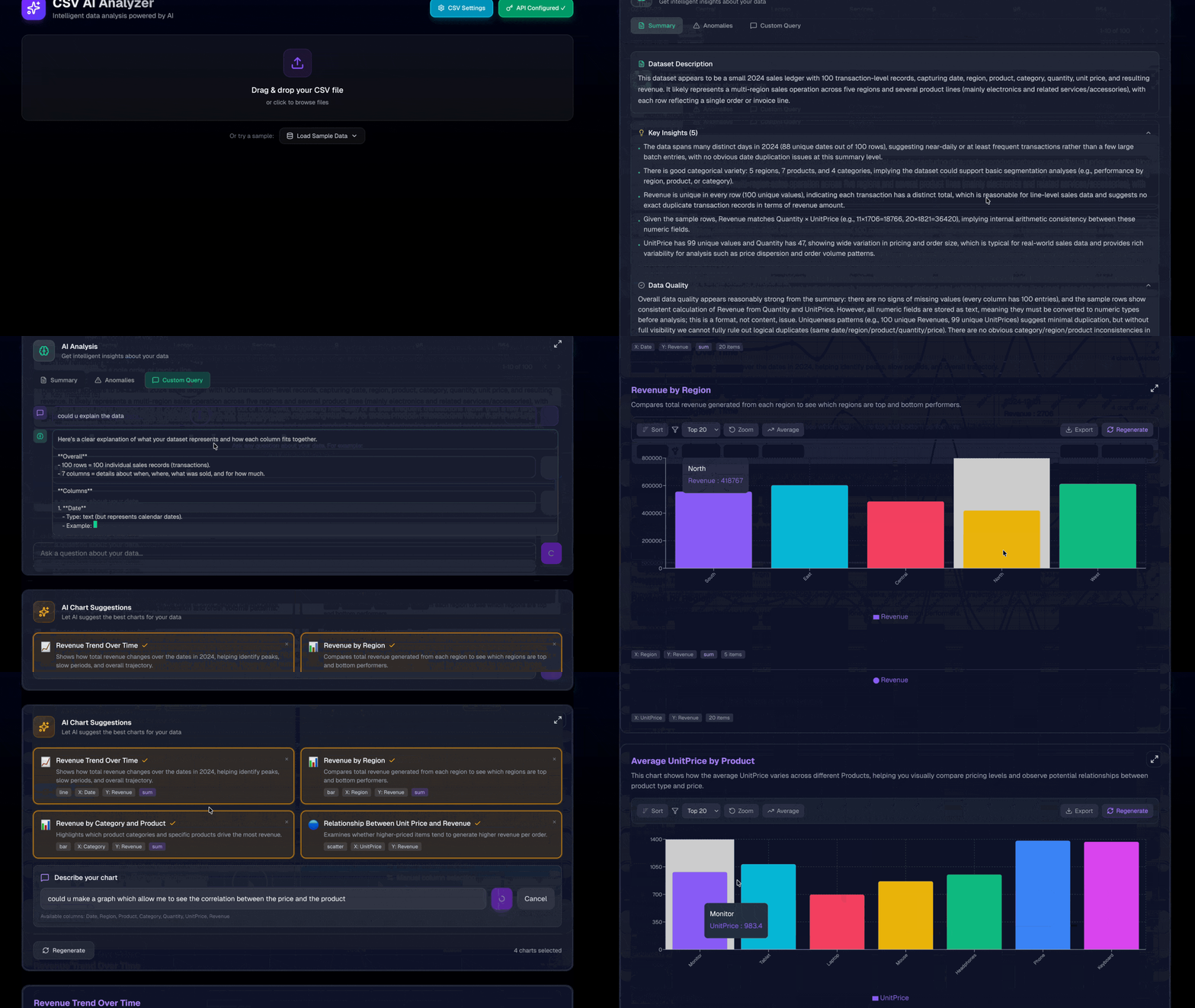
A self-hosted, browser-based AI CSV analyzer
My GitHub stars, sorted by AI and searchable, rebuilt daily by starsmith
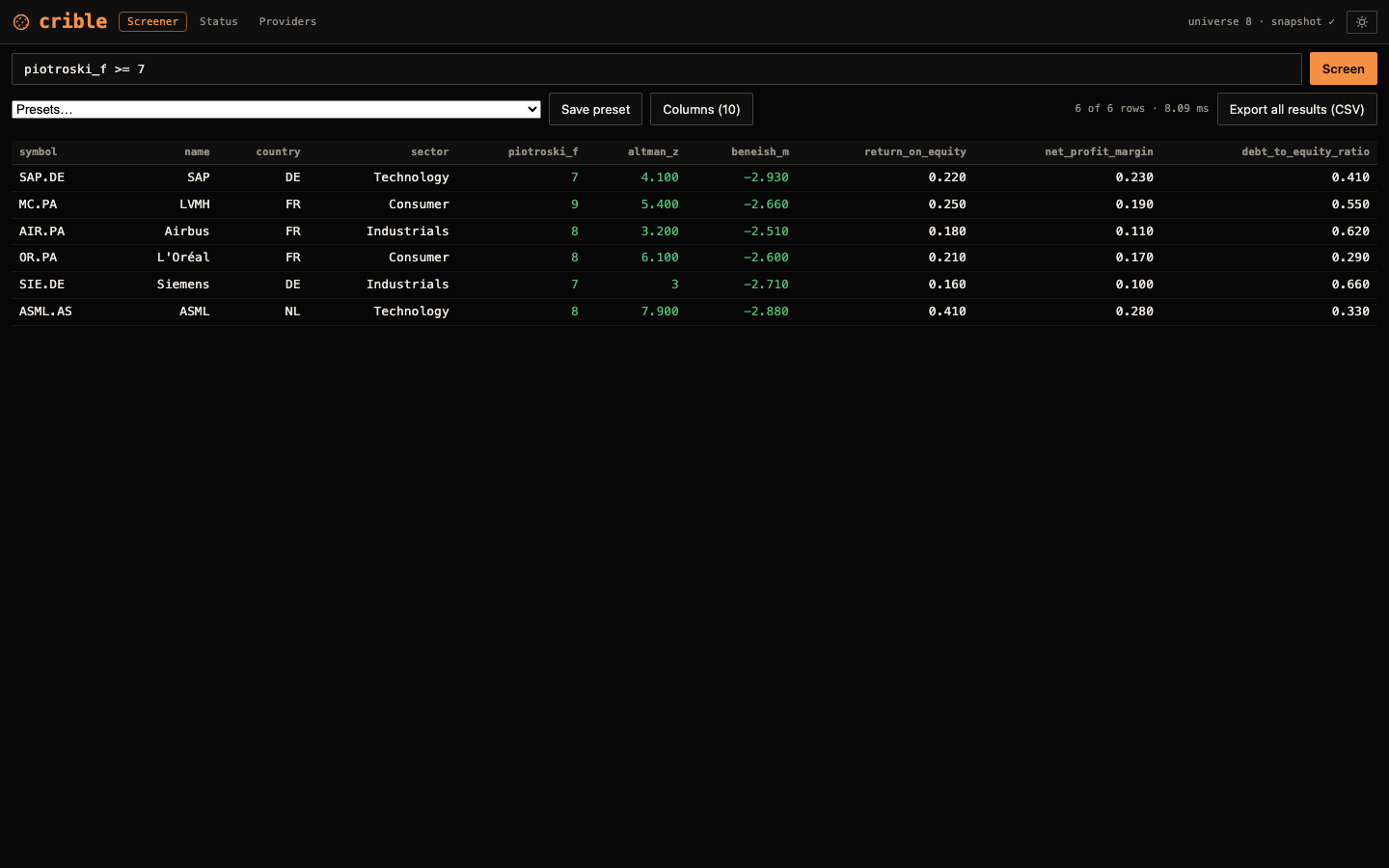
Self-hosted fundamental stock screener — 150k+ equities, zero API keys forever. Transparent scores: Piotroski, Altman, Ohlson, Zmijewski, Beneish, Montier, Greenblatt magic formula, Graham — full provenance, DuckDB-fast (<1s full-universe).
Client-side database schema visualizer with AI-powered analysis. Upload SQL, visualize, share, export. No backend needed.
Github action which lets you to change a value from a json file (e.g. package.json)
This page is also available as structured data, with the same sources and dates.
/api/v1/resources/gh/maxgfr/claude-code-switchTake My Repo has not tested this on your machine. Requirements come from the project's own documentation.


