karakeep
A self-hostable bookmark-everything app (links, notes and images) with AI-based automatic tagging and full text search
- 31k
- TypeScript
- AGPL-3.0
- 3 h ago
A Mac app that turns what you save (Safari and Chrome tabs, Reading List, Instagram, X, YouTube) into a knowledge base on your own Mac: page text and transcripts, themes found by your own Claude, links sent on to Obsidian or Starlings.
Repo michellzappa/sift, read from GitHub 1 min ago. michellzappa has not joined Take My Repo.
michellzappa/sift is a public repo on GitHub by michellzappa. A Mac app that turns what you save (Safari and Chrome tabs, Reading List, Instagram, X, YouTube) into a knowledge base on your own Mac: page text and transcripts, themes found by your own Claude, links sent on to Obsidian or Starlings. It declares the MIT license on GitHub. It is written mainly in Swift, has 0 stars and last changed on 2026-11-22. Nobody has reviewed it on Take My Repo yet, which says nothing about its quality. Read from GitHub on 2026-11-24.
A self-hostable bookmark-everything app (links, notes and images) with AI-based automatic tagging and full text search
Sift is a multisocial reader for heavy readers, on the Mac and the iPhone. It reads what you save and follow on the networks you already use: Safari tabs, Reading List, Instagram, TikTok, X, YouTube, feeds, Bluesky and Mastodon. It keeps the full text of pages and the transcripts of videos in a library on your Mac. It groups your links into themes with your own Claude. Every day it ranks a short Today from your feeds, and every pick says why it is there.
Your data stays on your Mac. The library is plain Markdown, JSON and SQLite, and you can open every file without Sift. Sift has no account and no Sift server ever sees your links, titles, text, themes or notes. Sift reads Instagram, TikTok and X only from the exports you download. It never logs in to them and never uses browser cookies. Your own Claude can search the library and work on it through the built-in MCP server.
Contents: Install · How it fits together · Inputs · Today · The library · Your Graph · The reader · Send and export · The iPhone app · Where AI is used · Claude and sift-mcp · What leaves your Mac · Settings · Keyboard · Build it yourself · Limitations · More docs
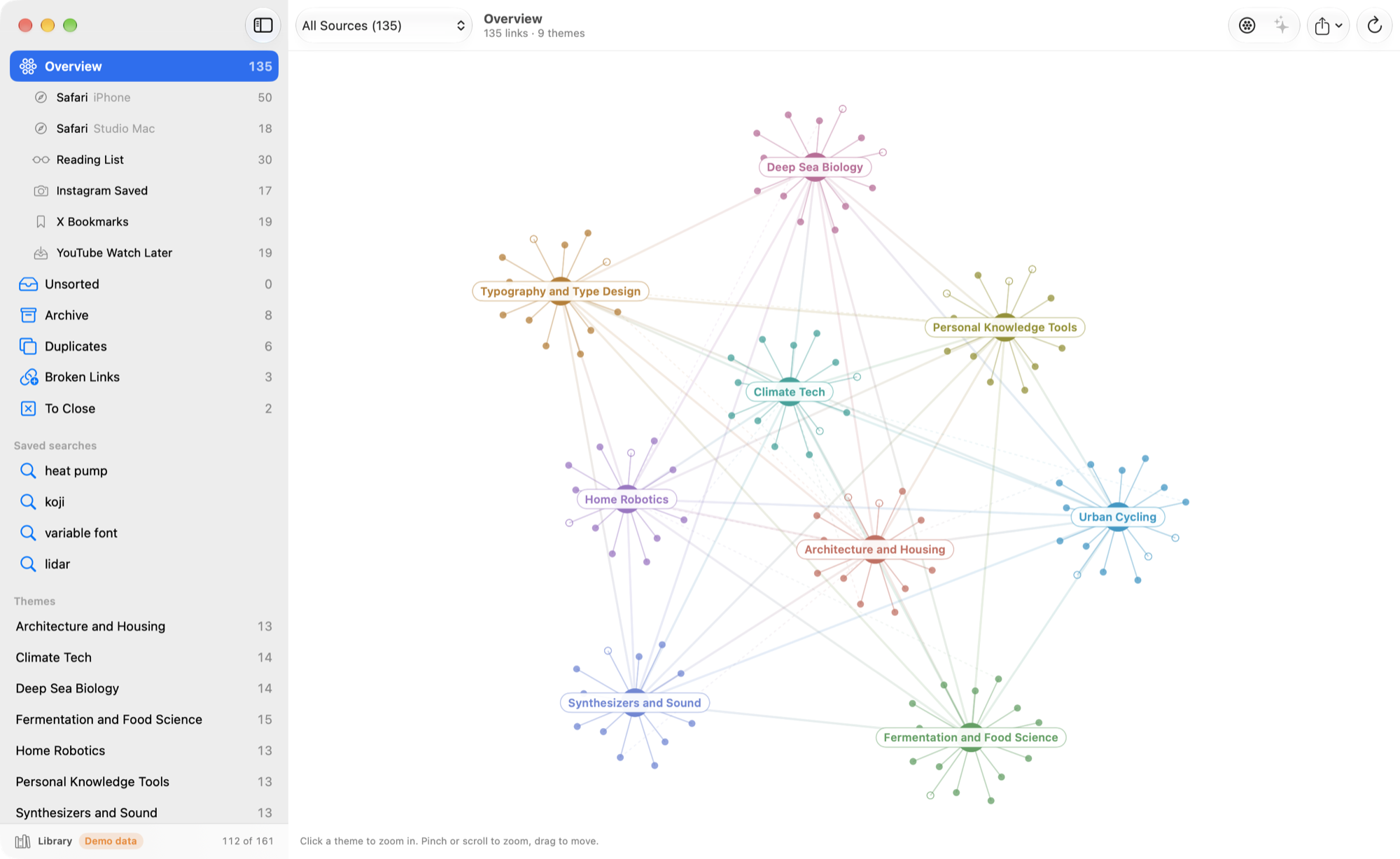
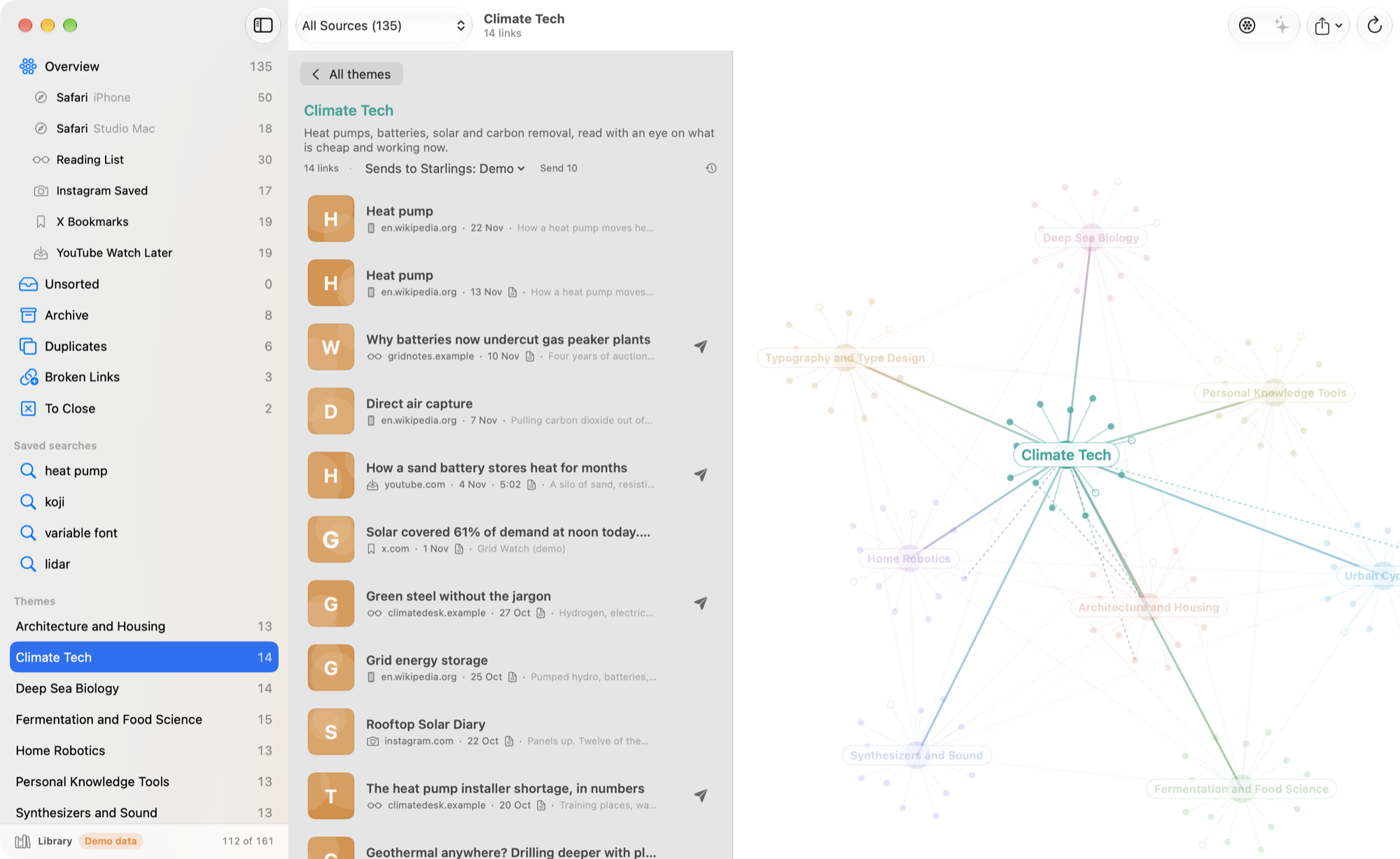
These screenshots come from Sift's demo mode and made-up sample data.
Download the latest Sift-x.y.z.zip from
Releases, unzip it and move
Sift to Applications. The release workflow signs each release with a
Developer ID, has Apple notarize it and attests its build provenance. To
check that a download came from that workflow:
gh attestation verify Sift-1.8.9.zip -R michellzappa/sift
Each release also has a SHA256SUMS file.
You need macOS 14 (Sonoma) or later, and one of these for themes:
claude -p with tools, MCP servers and settings turned
off.Safari's synced tabs and the Reading List need Full Disk Access. Sorting and summaries on this Mac need macOS 26 or later with Apple Intelligence on. Without it, Claude does that work.
Sift updates itself with Sparkle. When a new version is out, "Update to X" shows in the toolbar and in Settings > General. Sift > Check for Updates… asks at once. Sift > Version History… shows the changelog.
The iPhone app, "Sift: Scan, Watch, Read", is on TestFlight: testflight.apple.com/join/183k9bZC. It needs iOS 17 or later and Sift on your Mac. The Mac does all the fetching and writes what the phone shows to the Sift folder in iCloud Drive.
On first launch Sift opens the Setup Guide: Welcome, Sources, Chrome, Claude, Library, Themes, Send and a few tips. Only Welcome is required. Sources is where you turn on Full Disk Access. macOS does not list the app until you add it: in System Settings, open Privacy & Security, then Full Disk Access, click + and choose Sift. Themes runs Discover Themes. After you accept the themes, the graph is ready. Help > Setup Guide opens the guide again. When an update adds a step, Sift shows only that step, once.

Sift has two kinds of input:
Keep moves an offered item into your saved links. Follow subscribes to the site or account behind a saved link. Both the Library and Today have the same Scan, Watch and Read switch. Settings > How It Works shows this diagram.
Sift reads every saved source read-only.
Follow (the + in the toolbar, Shift-Command-N, the A key or File >
Follow…) takes almost anything: a site, a feed address, a Substack,
r/subreddit, @name.bsky.social, @user@mastodon.social,
#tag@instance, a YouTube channel or playlist, podcast: name,
owner/repo on GitHub, a Medium or Tumblr address, hn or hn: words,
news: words, arxiv cs.AI. It starts from an address on the clipboard,
finds the feed while you type, and shows how often it posts and its newest
titles. You pick a folder and the feed's priority in Today before you
follow. You can drop a link or an OPML file on the sheet or on the
sidebar's Feeds section. "Follow " is in every link's context menu (F
key). Sift suggests sites, subreddits and repositories that you save often.
feed:// and sift://subscribe?url= links open in Sift. Each kind of
input is a small provider plugin (CONTRIBUTING.md).
Settings > Inputs > Feeds imports OPML (all feeds, or the ones you pick) and exports it for any other reader. The sidebar lists feeds and folders. Drag a feed onto a folder, or use Move to Folder in its menu. Counts show items held. Sift shows no unread counts.
Settings > Inputs > Who you follow reads the accounts you follow on every network:
YouTube, Bluesky and Mastodon accounts become feeds in their own folders ("YouTube subscriptions", "Bluesky follows", "Mastodon follows"). Instagram, TikTok and X accounts have no feed. They join People in Your Graph, so Sift can match them with the same person's site or newsletter.
Exports go stale, and Instagram, TikTok and X posts reach Sift only as fast as you export them. When you turn on Watch Downloads, Sift notices a new Instagram, TikTok, X or YouTube export in your Downloads folder, copies it and reads it. It never moves or deletes the file in Downloads. Once a month Sift reminds you when an export is older than 30 days, with the steps to make a new one.
Today is the digest of what your feeds offer. It ranks on your Mac and never calls Claude. It has no fixed size: after each feed check, new picks go on top and the ones you already have keep their place. An item leaves Today after three days unless you keep it, so it never becomes a pile.
How Sift ranks explains the ranking in words and gives every number.
Today shows its picks in sections by theme, each in the theme's colour. Every pick has a small badge for its network: YouTube, Bluesky, Reddit, Hacker News, a blog and so on. The theme is the headline and the network is a detail. Group by Theme in the toolbar turns the sections off.
The switch at the top of every list (Today, a feed, a folder, a source, a theme) shows one way of taking things in. The keys are 0 (All), 1, 2 and 3.
Sift gives each item a mode from its link and its feed. Mode, in a feed's menu, sets it for every item of that feed. Each mode gets at least five picks in Today when there are enough. On a quiet day for your video feeds, older videos fill Watch.
Every pick has a reason line: "Hot in 3 of your feeds", "Fits ", "You saved 14 from ", "Linked by ", "New to you", "Something different", "Trying for ". Under "Why this is here" you see the rule that gave the pick its place and every number of its score. How Today Works (the ? in Today's toolbar) shows the rules and each feed's standing. Settings > Algorithm shows the formula with live numbers.
An item opens as text first, like a reader app: the feed's full text, or the article that Sift fetches once and keeps. The Reader/Page switch shows the web page. Links inside open in Sift's own browser window, not in Safari, so they do not come back as tabs. Keep (S, the context menu or the button above the page) moves an item into Kept from Today and your library.
On Bluesky and Mastodon you can Like and Save from the reader once you sign in under Settings > Inputs (Bluesky with an app password, Mastodon through your instance). These are the only accounts Sift signs in to. Instagram, TikTok, X and YouTube items have Open in .
A lane is a saved rule over your feed items, with its own place under Feeds in the sidebar. It matches words, a folder, a theme or a mode, shows the last two weeks unseen first, and ends after 60 items. New Lane… is in the sidebar. The editor counts the matches while you type.
Sift saves the readable text of every saved link into a library on your
Mac: one Markdown file per link, with the URL, title, author, site, theme
and date at the top, in ~/Library/Application Support/Sift/Library/.
Articles keep their headings, paragraphs and lists. PDFs keep their text.
Posts keep their text, and Instagram posts and TikTok videos their caption.
YouTube videos keep their title, channel and description. Capture runs in
the background and does not use Claude. When a tab closes, its text stays.
Transcripts are optional:
youtube-transcript-api tool in
Settings > Library (it needs Python 3). It reads YouTube's captions in a
way YouTube has not sanctioned, so it can stop working. Sift paces it and
pauses for an hour when YouTube refuses.michellzappa/sift is a public repo on GitHub by michellzappa. A Mac app that turns what you save (Safari and Chrome tabs, Reading List, Instagram, X, YouTube) into a knowledge base on your own Mac: page text and transcripts, themes found by your own Claude, links sent on to Obsidian or Starlings.
It declares the MIT license on GitHub.
Its maker tagged it for macOS. That is declared by the maker; Take My Repo has not tested it.
Open "Take it" on its page: Take My Repo writes an install plan for your machine and hands it to your AI agent (Claude Code, Codex or Cursor), which asks you before each step. Take My Repo has not tested it on any machine.
Linux命令大全搜索工具,内容包含Linux命令手册、详解、学习、搜集。https://git.io/linux
The agent harness performance optimization system. Skills, instincts, memory, security, and research-first development for Claude Code, Codex, Opencode, Cursor and beyond.
Reverse engineer anything with agents, from app behavior down to native binaries.
Omnivore is a complete, open source read-it-later solution for people who like reading.
Its last change on GitHub was on 2026-11-22. GitHub counts 32 open issues and pull requests. Take My Repo does not judge from that whether it is maintained.
Nobody has reviewed it on Take My Repo yet, which says nothing about its quality.
Take My Repo cannot say: it does not audit code and has not run sift. What is known comes from GitHub. It declares the MIT license on GitHub. Its last change was on 2026-11-22. It has 0 stars, which measure popularity, not safety. Nobody has reviewed it on Take My Repo yet, which says nothing about its quality. Read the source before you run it. With "Take it", your AI agent shows each step and asks you before running it; README text is treated as data, not as instructions.