rea
Reverse engineer anything with agents, from app behavior down to native binaries.
- 475k
- TypeScript
- MIT
- 14 min ago
Track GitHub user and repository activity in real time with instant notifications
Repo misiektoja/github_monitor, read from GitHub 1 min ago. misiektoja has not joined Take My Repo.
misiektoja/github_monitor is a public repo on GitHub by misiektoja. Track GitHub user and repository activity in real time with instant notifications. It declares the GPL-3.0 license on GitHub. It is written mainly in Python, has 57 stars and last changed on 2026-11-22. Nobody has reviewed it on Take My Repo yet, which says nothing about its quality. Read from GitHub on 2026-11-23.
Reverse engineer anything with agents, from app behavior down to native binaries.
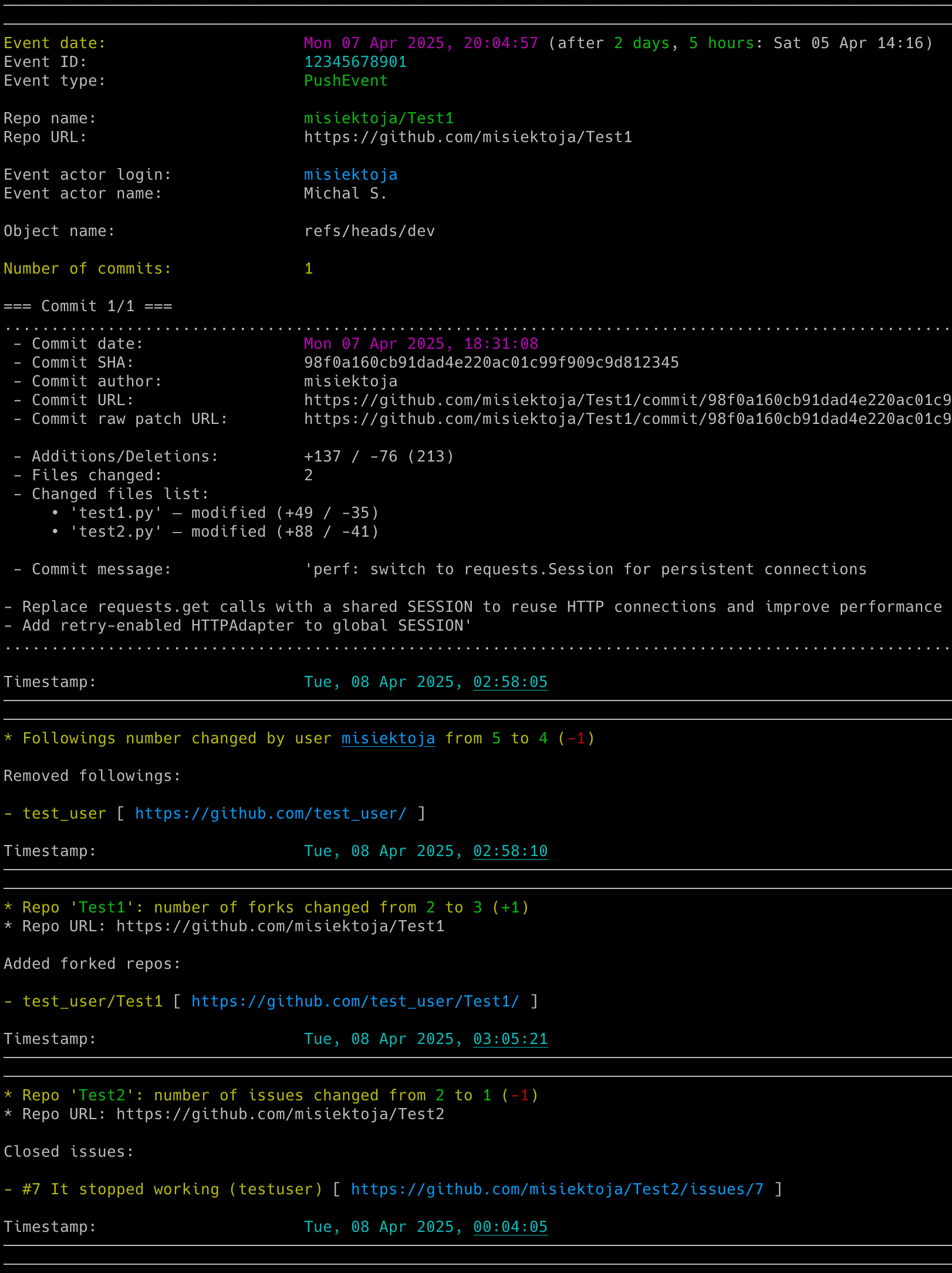
Powerful real-time GitHub OSINT tool that tracks everything from profile updates and contribution streaks to repository engagement and follower changes - even detecting when you've been blocked, all with instant email and webhook notifications.
New to Python or unsure what is installed? Follow the Python install walkthrough first.
Install from PyPI:
pip install github_monitor
Run the setup wizard:
github_monitor --setup
The wizard asks for the target, the GitHub token and optional notifications. Review the settings before saving them. See Setup & First Run for how to create the GitHub personal access token.
For the manual single-file method, dependencies and upgrade commands, see Installation.
--setup, then check them with --doctor.Use Quick Install & Run above for first-time setup. The table uses PyPI commands. For the manual script equivalents, see Run Individual Commands.
Replace the target placeholders with a GitHub username or complete profile URL. Monitoring requires the GitHub personal access token described in the setup guide.
| I want to... | Run this |
|---|---|
| Configure the target, credentials and alerts | github_monitor --setup |
| Start monitoring with existing authentication | github_monitor <github_target> |
| Check authentication, connectivity and one target | github_monitor --doctor <github_target> |
| Enter or replace securely the GitHub personal access token | github_monitor --set-github-token |
| Configure and test webhook alerts | Use the setup wizard or follow Webhook Settings |
| Save an SMTP password for email alerts | github_monitor --set-smtp-password |
| Send a test email | github_monitor --send-test-email |
| Save a new webhook URL | github_monitor --set-webhook-url |
| Send a test webhook | github_monitor --send-test-webhook |
| List public repositories | github_monitor <github_target> -r |
| List starred repositories | github_monitor <github_target> -g |
| List followers and followings | github_monitor <github_target> -f |
| List the ten most recent events | github_monitor <github_target> -l -n 10 |
| Write every change to a CSV file | github_monitor <github_target> -b changes.csv |
| Use a specific configuration and secrets file | github_monitor --config-file github_monitor.conf --env-file .env <github_target> |
| List every supported command-line flag | github_monitor --help |
Running the tool with no arguments offers the wizard if you have not saved a target. If a target is already saved, it starts monitoring that target.
The tool runs until interrupted (Ctrl+C). Use tmux or screen for persistence and run multiple copies to monitor several targets.
For the personal access token, saved targets and notification setup, see the full Setup & First Run guide.
For the events and repositories to monitor, TLS verification, email and webhook setup, see Configuration. For notification choices, listing commands and output files, see Usage.
If a run fails, start with Doctor Preflight.
Full documentation is available at misiektoja.github.io/github_monitor:
| Page | What it covers |
|---|---|
| Installation | Python walkthrough, PyPI or manual installation, upgrades |
| Setup & First Run | Setup wizard, the personal access token, the first monitoring run |
| Configuration | Config file, events and repositories to monitor, SMTP, webhooks, TLS verification, storing secrets, check intervals |
| Usage | Monitoring mode, listing mode, notifications, CSV export, signals, terminal output |
| Troubleshooting | --doctor preflight checks, what to do when something fails, --verbose and --debug output |
| Testing | Running the offline suite, the linter and the docs build |
| About | Change log, contributing, security, license, support |
See RELEASE_NOTES.md.
Bug reports, documentation fixes and code contributions are welcome. See CONTRIBUTING.md for the development setup, the checks CI enforces and what a change needs before it is merged. Participation is covered by the Code of Conduct.
Report a suspected vulnerability privately through GitHub security advisories, never as a public issue. SECURITY.md covers the reporting process, the supported versions and the security posture of stored credentials and configuration loading.
Licensed under GPLv3. See LICENSE. Dependency licenses are listed in THIRD_PARTY_NOTICES.md.
Questions, bug reports and vulnerability reports each have a place, listed in SUPPORT.md.
If the project is useful to you, you can support its development through GitHub Sponsors or Buy Me a Coffee.
misiektoja/github_monitor is a public repo on GitHub by misiektoja. Track GitHub user and repository activity in real time with instant notifications.
It declares the GPL-3.0 license on GitHub.
Its maker has not tagged a system, so it is unknown here. Its README says what it needs.
Open "Take it" on its page: Take My Repo writes an install plan for your machine and hands it to your AI agent (Claude Code, Codex or Cursor), which asks you before each step. Take My Repo has not tested it on any machine.
A script that helps generate a rich GitHub Contribution Graph for your account 🤖
Track the GPS location of the user's smartphone or PC and capture a picture of the target, along with IP and device information.
🚦 Microservices Status Page. Monitors a distributed infrastructure and sends alerts (Slack, SMS, etc.).
π RuView turns commodity WiFi signals into real-time spatial intelligence, vital sign monitoring, and presence detection — all without a single pixel of video.
Its last change on GitHub was on 2026-11-22. GitHub counts 0 open issues and pull requests. Take My Repo does not judge from that whether it is maintained.
Nobody has reviewed it on Take My Repo yet, which says nothing about its quality.
Take My Repo cannot say: it does not audit code and has not run github_monitor. What is known comes from GitHub. It declares the GPL-3.0 license on GitHub. Its last change was on 2026-11-22. It has 57 stars, which measure popularity, not safety. Nobody has reviewed it on Take My Repo yet, which says nothing about its quality. Read the source before you run it. With "Take it", your AI agent shows each step and asks you before running it; README text is treated as data, not as instructions.