
friday-showcase
Friday — A 24/7 AI Assistant Built Entirely on Claude Code. A Tiny Moon Labs product (tinymoonlabs.com).
- 195
- HTML
- 3 wk ago
Terminal dashboard + floating Electron widget that show your Claude Code usage. No API tokens — reuses your local claude login.
Repo missingus3r/CC_usage_widget, read from GitHub 1 min ago. missingus3r has not joined Take My Repo.
missingus3r/CC_usage_widget is a public repo on GitHub by missingus3r. Terminal dashboard + floating Electron widget that show your Claude Code usage. No API tokens — reuses your local claude login. It declares no license on GitHub. Public does not mean open source: without a license, nobody is granted the right to reuse it. It is written mainly in JavaScript, has 2 stars and last changed on 2026-05-10. Nobody has reviewed it on Take My Repo yet, which says nothing about its quality. Read from GitHub on 2026-11-22.
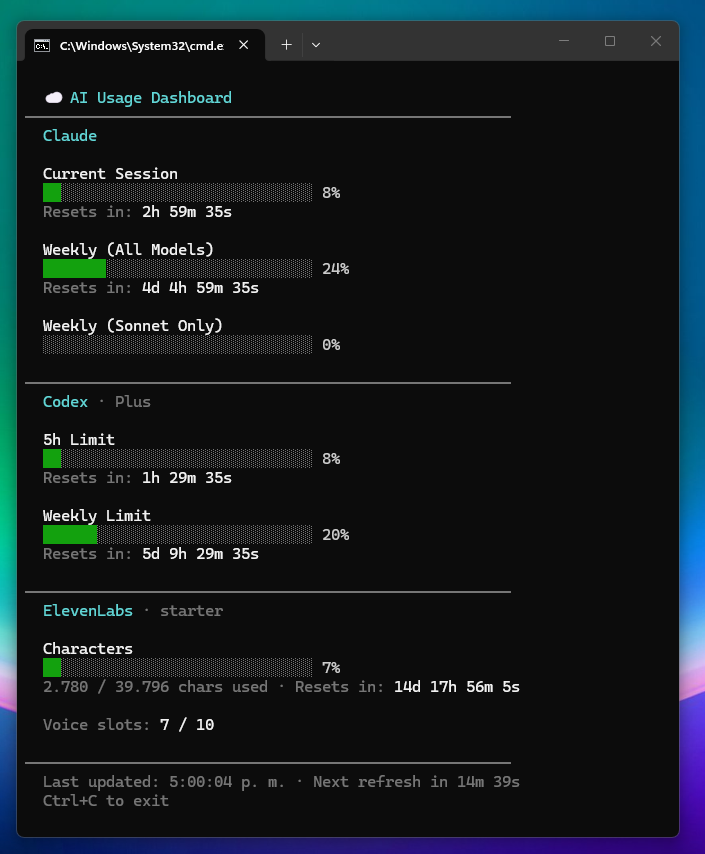
Tools that show your Claude Code, OpenAI Codex and ElevenLabs usage in real time — Claude's session %, weekly limits (all models + Sonnet only) and Extra Usage spend, Codex's 5-hour and weekly limits, and ElevenLabs' character + voice-slot consumption — with live countdowns to each reset.
get_usage.js) that renders directly in your shell.config.json).Claude and Codex reuse the CLI sessions you already have logged in (no tokens to paste). ElevenLabs uses an API key you save once in config.json (or in the API Keys tab) — see config.example.json.
Terminal dashboard (node get_usage.js)

Floating desktop widget — Usage tab (npm start)

API Keys tab — view, copy, hide/show and add keys

System tray icon with live bars and tooltip

The tray icon sits next to the clock and draws two horizontal bars — Claude's session % on top and weekly % on bottom — so you can see your usage at a glance without opening the widget. Hovering (or right-clicking) shows the full breakdown for every provider: Claude session and weekly limits, Codex 5-hour / weekly, and ElevenLabs character usage.
claude, and/or to Codex once with codex, in a terminal.node-pty), type /usage (Claude) or /status (Codex), capture the rendered screen, and parse out the numbers.That's it — no scraping of APIs, no tokens handled by the app. If you can run claude and/or codex in your terminal, these tools work.
Copy config.example.json to config.json and edit it:
{
  "refreshMinutes": 15,
  "elevenLabsApiKey": "",
  "apiKeys": []
}
refreshMinutes — how often to re-fetch usage (default 15).elevenLabsApiKey — optional; without it the ElevenLabs panel is skipped. Can also be supplied via the ELEVENLABS_API_KEY env var, or saved through the API Keys tab in the widget.apiKeys — list of {name, key} entries, managed from the widget's API Keys tab. Useful to keep your own provider keys handy (with copy/show buttons).config.json is git-ignored so your keys stay local. Both the terminal script and the widget read this file at startup; restart after changing it.
Install Claude Code following the official docs: https://docs.claude.com/claude-code
Then open a terminal and run:
claude
Complete the login flow. From this point on, the widget and the script work on their own — you never need to log in again or paste any token into this project.
git clone https://github.com/<your-user>/CC_usage_widget.git
cd CC_usage_widget
npm install
Requires Node.js 18+. See REQUIREMENTS.md for details (including native-build toolchain notes for
node-pty, if needed).
node get_usage.js
You'll see the ANSI dashboard above. Ctrl+C to exit.
npm start
An always-on-top frameless window appears in the top-right corner of your primary display, plus a tray icon next to the clock. The tray icon draws two horizontal bars (session % and weekly %), and the tooltip/right-click menu shows the exact numbers. Closing the widget window hides it to tray — use the tray's Quit entry to fully exit.
| File | Purpose |
|---|---|
get_usage.js |
Standalone terminal dashboard. |
fetcher.js |
One-shot fetcher — runs claude /usage and prints JSON. |
codexFetcher.js |
One-shot fetcher — runs codex /status and prints JSON. |
elevenLabsFetcher.js |
One-shot fetcher — calls https://api.elevenlabs.io/v1/user/subscription. |
main.js |
Electron main process; spawns the fetchers on a timer and auto-resizes the window. |
preload.js |
Electron preload bridging IPC to the renderer. |
renderer.js |
Widget UI logic (Usage + API Keys tabs). |
index.html |
Widget markup. |
styles.css |
Widget styles. |
config.example.json |
Sample config to copy as config.json. |
claude for ~20–25 seconds in the background to capture the /usage screen. This is intentional and cheap, but you'll see a short-lived child process appear./usage layout. If Anthropic changes the screen, the regexes in fetcher.js / get_usage.js may need a small update.America/Buenos_Aires (UTC−3), matching where /usage reports resets. Tweak parseResetDate() if you need a different zone.MIT
missingus3r/CC_usage_widget is a public repo on GitHub by missingus3r. Terminal dashboard + floating Electron widget that show your Claude Code usage. No API tokens — reuses your local claude login.
It declares no license on GitHub. Public does not mean open source: without a license, nobody is granted the right to reuse it.
Its maker tagged it for Windows. That is declared by the maker; Take My Repo has not tested it.
Open "Take it" on its page: Take My Repo writes an install plan for your machine and hands it to your AI agent (Claude Code, Codex or Cursor), which asks you before each step. Take My Repo has not tested it on any machine.
Its last change on GitHub was on 2026-05-10. GitHub counts 0 open issues and pull requests. Take My Repo does not judge from that whether it is maintained.
Friday — A 24/7 AI Assistant Built Entirely on Claude Code. A Tiny Moon Labs product (tinymoonlabs.com).
Nobody has reviewed it on Take My Repo yet, which says nothing about its quality.
Shared message bus for multi-assistant chat coordination — Python stdlib, SQLite WAL, HTTP + SSE. Fixes bot-to-bot visibility on Telegram and loop risk on Discord/Slack/WhatsApp.
YouTube en Android Auto con tu cuenta, para usar con el auto estacionado (GeckoView)
A free, decentralised network to send files and publish .capsule sites with no account: encrypted in the browser, works without Internet. A Tiny Moon Labs product (tinymoonlabs.com).
A new lossless compressor for png and bmp images (Preprocessor)