AutoGPT
AutoGPT is the vision of accessible AI for everyone, to use and to build on. Our mission is to provide the tools, so that you can focus on what matters.
- 188k
- Python
- 3 h ago

[ECCV2026] Official Implementation of "VideoSearch-R1: Iterative Video Retrieval and Reasoning via Soft Query Refinement"
Repo mlvlab/VideoSearch-R1, read from GitHub 6 h ago. mlvlab has not joined Take My Repo.
mlvlab/VideoSearch-R1 is a public repo on GitHub by mlvlab. [ECCV2026] Official Implementation of "VideoSearch-R1: Iterative Video Retrieval and Reasoning via Soft Query Refinement". It declares the Apache-2.0 license on GitHub. It is written mainly in Python, has 40 stars and last changed on 2026-09-04. Nobody has reviewed it on Take My Repo yet, which says nothing about its quality. Read from GitHub on 2026-11-25.
AutoGPT is the vision of accessible AI for everyone, to use and to build on. Our mission is to provide the tools, so that you can focus on what matters.
Seohyun Lee1,* Seoung Choi1,* Dohwan Ko2,* Jongha Kim2 Hyunwoo J. Kim1,†
1 KAIST 2 Korea University (* equal contribution † corresponding author)
TL;DR — VideoSearch-R1 is an agentic framework that unifies inter-video retrieval and intra-video reasoning through multi-turn interaction with a video search engine. We introduce Soft Query Refinement (SQR), which refines query tokens in a continuous latent space instead of rewriting text, and train it with GRPO. VideoSearch-R1 reaches state-of-the-art Video Corpus Moment Retrieval (VCMR) on three benchmarks while using far fewer generated tokens than text-level refinement.
If you use Codex, Claude Code, or another coding assistant to reproduce the project, give it a concrete workspace with enough free storage. The scripts write data, checkpoints, logs, and caches under VIDEOSEARCH_WORKSPACE; set it to a large local disk path such as /path/to/large/workspace/videosearchr1.
Charades-STA is the lightest prepared dataset. If you only want to verify inference with a released checkpoint, start with Quick Start: Inference with Released Checkpoints on charades.
| Goal | Recommended free workspace | GPU |
|---|---|---|
Quick inference on charades |
130 GB | 1 GPU; a single RTX 3090 is enough with conservative eval settings |
Quick inference on didemo |
240 GB | 1 GPU; a single RTX 3090 is enough with conservative eval settings |
Quick inference on activitynet |
470 GB | 1 GPU; a single RTX 3090 is enough with conservative eval settings |
| Toy end-to-end process | 80 GB | 1-4 GPUs depending on how much smoke training you enable |
Stage 1 or Stage 2 training from prepared charades data |
150 GB | 4x A6000-class GPUs recommended |
Stage 1 or Stage 2 training from prepared didemo data |
280 GB | 4x A6000-class GPUs recommended |
Stage 1 or Stage 2 training from prepared activitynet data |
520 GB | 4x A6000-class GPUs recommended |
| Start from scratch with raw videos and feature extraction | 1 TB preferred | 4x A6000-class GPUs recommended |
Prepared-data bucket manifests are approximately 107 GiB for charades, 215 GiB for didemo, and 436 GiB for activitynet. Released checkpoints add about 5 GiB per model, and training creates additional checkpoints, logs, and caches.
If the available workspace is below the requested target, the assistant should stop before downloading data and report that the data storage is insufficient.
I want to run VideoSearch-R1 inference only. I have <FREE_GB> GB free at <WORKSPACE_PATH>. Use the official repository https://github.com/mlvlab/VideoSearch-R1.

First check the free disk space at <WORKSPACE_PATH>. If it is below 130 GB, stop and tell me: "data storage is insufficient for the Charades quick inference run." Otherwise:
1. Clone or update the repository.
2. Create and activate a conda environment with Python 3.11.14.
3. Install requirements.txt with the PyTorch CUDA 12.8 extra index, then install the repo with pip install -e .
4. Set VIDEOSEARCH_WORKSPACE=<WORKSPACE_PATH>, VIDEOSEARCH_DATA_ROOT=$VIDEOSEARCH_WORKSPACE/data, VIDEOSEARCH_OUTPUT_ROOT=$VIDEOSEARCH_WORKSPACE/outputs, and VIDEOSEARCH_CHECKPOINT_ROOT=$VIDEOSEARCH_WORKSPACE/checkpoints.
5. Follow the README section "Quick Start: Inference with Released Checkpoints" using the charades dataset.
6. Run:
   bash scripts/data_construct/download_preextracted_data.bash charades
   EVAL_GPUS=0 bash scripts/inference/inference.bash charades
7. Report the final JSONL path and result JSON path.
I want to smoke-test the full VideoSearch-R1 process with the toy ActivityNet setting. I have <FREE_GB> GB free at <WORKSPACE_PATH> and access to GPU ids <GPU_IDS>. Use https://github.com/mlvlab/VideoSearch-R1.

First check free disk space at <WORKSPACE_PATH>. If it is below 80 GB, stop and tell me: "data storage is insufficient for the toy end-to-end run." Otherwise:
1. Set up the conda environment from requirements.txt as described in the README.
2. Export VIDEOSEARCH_WORKSPACE=<WORKSPACE_PATH> and keep all data, outputs, checkpoints, and caches under that workspace.
3. Read the README sections "Installation & Environment" and "Toy ActivityNet Full Process".
4. Run the toy script with GPU ids <GPU_IDS>, keeping Stage 1 and Stage 2 smoke training at MAX_STEPS=1 unless I explicitly ask for a longer run.
5. Verify that data construction, Stage 1, Stage 2, inference, and report generation complete.
6. Report the output checkpoint paths, inference JSONL path, and result JSON path.
I want to train VideoSearch-R1 from prepared artifacts for dataset <DATASET>, where <DATASET> is one of charades, didemo, or activitynet. I have <FREE_GB> GB free at <WORKSPACE_PATH> and 4 A6000-class GPUs with ids <GPU_IDS>. Use https://github.com/mlvlab/VideoSearch-R1.

First check free disk space and GPUs. If <DATASET> is `charades`, require at least 150 GB; if <DATASET> is `didemo`, require at least 280 GB; if <DATASET> is `activitynet`, require at least 520 GB. If the requirement is not met, stop and explain that the data storage is insufficient. If fewer than 4 suitable GPUs are available, stop and explain that the GPU resources are insufficient. Otherwise:
1. Set up the conda environment from requirements.txt as described in the README.
2. Export VIDEOSEARCH_WORKSPACE=<WORKSPACE_PATH> and keep all generated files under that workspace.
3. Download the prepared data with:
   bash scripts/data_construct/download_preextracted_data.bash <DATASET>
4. Follow "Quick Training: Prepared Data -> Stage 1 -> Stage 2".
5. Use the released base model defaults unless I explicitly request a different model.
6. After training, run inference on the resulting checkpoint and generate the report JSON.
7. Report all checkpoint, log, JSONL, and result JSON paths.
As video corpora grow in scale and task complexity, real applications need both inter-video reasoning (retrieving the right video from a large corpus) and intra-video reasoning (fine-grained, query-conditioned tasks such as temporal grounding). Existing pipelines treat retrieval as a one-shot preprocessing step, so a retrieval failure dooms the downstream reasoning; recent video agents often assume the relevant video is already given, bypassing retrieval entirely.
VideoSearch-R1 closes this gap with an iterative retrieve → verify → refine → ground loop:
N = 8 soft query tokens in latent space and append them to the original query, then re-retrieve.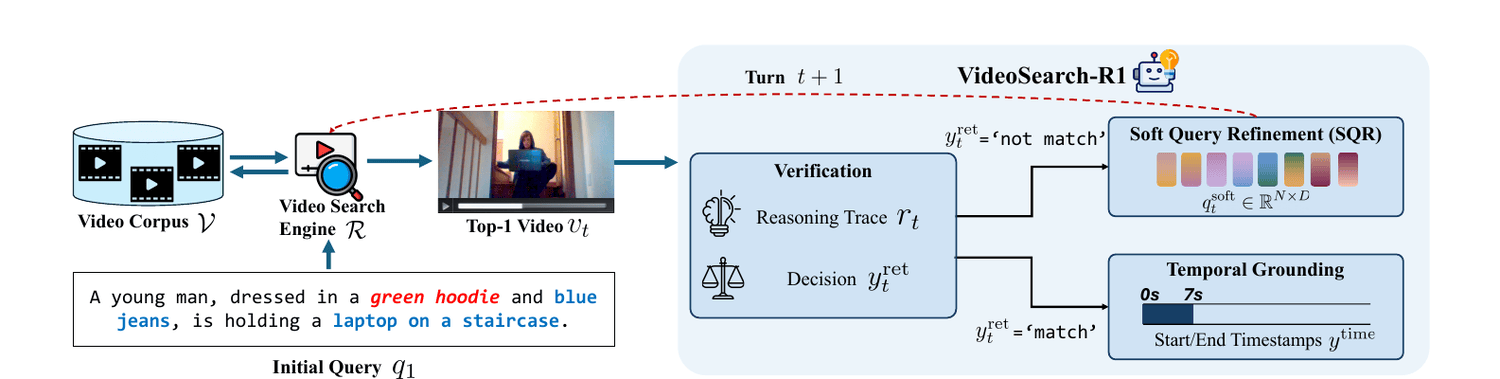
Unlike hard query refinement (rewriting the query as text), SQR adjusts the query representation directly. The soft tokens are trained with an InfoNCE retrieval objective for richer discriminative supervision, and the whole loop is optimized with GRPO under format, verification, retrieval, and temporal-grounding rewards — reaching superior retrieval with just 8 latent tokens instead of 26.8 rewritten text tokens.
Video Corpus Moment Retrieval (VCMR, reported as IoU/R@1), verification accuracy (VER), and video retrieval recall (VR).
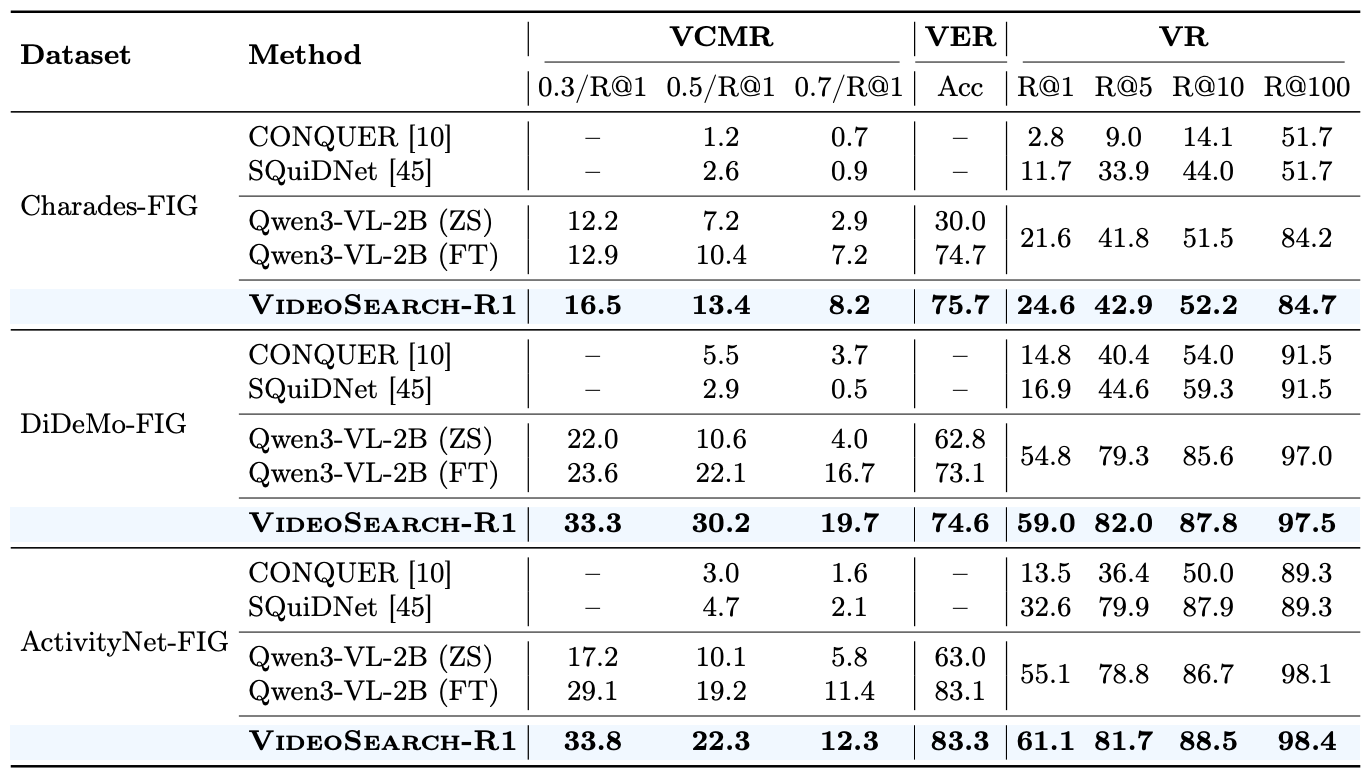
SQR lifts video retrieval despite using the same search engine, and consistently improves VCMR and verification over zero-shot baselines. See the project page for analyses and qualitative examples.
VideoSearch-R1 provides three click-through paths:
Supported dataset aliases are didemo, charades, and activitynet.
conda create -n videosearchr1 python=3.11.14 -y
conda activate videosearchr1

# CUDA 12.8 system install, if needed:
# apt-get install -y cuda-toolkit-12-8
# update-alternatives --set cuda /usr/local/cuda-12.8

export MAX_JOBS=8
pip install -U pip
pip install -r requirements.txt \
  --extra-index-url https://download.pytorch.org/whl/cu128 \
  --no-build-isolation
pip install -e .
Prepared artifacts are hosted under VideoSearchR1.
Datasets
hf://buckets/VideoSearchR1/data/datasets/activitynethf://buckets/VideoSearchR1/data/datasets/didemohf://buckets/VideoSearchR1/data/datasets/charades-staThe bucket shards include released annotations, query/video embeddings, FAISS indices, Stage 1/Stage 2 training JSONL files, and video_npy_with_meta tensors.
Checkpoints
VideoSearchR1/didemo-stage1VideoSearchR1/didemo-stage2VideoSearchR1/charades-stage1VideoSearchR1/charades-stage2VideoSearchR1/activitynet-stage1VideoSearchR1/activitynet-stage2This path downloads the released artifacts and runs inference directly. Charades-STA is comparatively lightweight, so use charades first if you only want to try inference with a released checkpoint. The Charades command path has been verified end-to-end with the released Hugging Face bucket and VideoSearchR1/charades-stage2 checkpoint.
Download the prepared data for the dataset you want to evaluate:
bash scripts/data_construct/download_preextracted_data.bash charades
Run inference on GPU 0. The script downloads the released Hugging Face checkpoint automatically.
EVAL_GPUS=0 bash scripts/inference/inference.bash charades
Other datasets use the same command shape:
bash scripts/data_construct/download_preextracted_data.bash didemo
EVAL_GPUS=0 bash scripts/inference/inference.bash didemo
After download_preextracted_data.bash, the dataset is placed under ${VIDEOSEARCH_DATA_ROOT}. If VIDEOSEARCH_DATA_ROOT is not set, the scripts use ${VIDEOSEARCH_WORKSPACE}/data. For large downloads, set VIDEOSEARCH_WORKSPACE explicitly to a disk with enough free space.
Dataset aliases map to these directories:
${VIDEOSEARCH_DATA_ROOT}/
  didemo/
  charades-sta/
  activitynet/
Each prepared dataset follows this layout:
mlvlab/VideoSearch-R1 is a public repo on GitHub by mlvlab. [ECCV2026] Official Implementation of "VideoSearch-R1: Iterative Video Retrieval and Reasoning via Soft Query Refinement".
It declares the Apache-2.0 license on GitHub.
Its maker has not tagged a system, so it is unknown here. Its README says what it needs.
Open "Take it" on its page: Take My Repo writes an install plan for your machine and hands it to your AI agent (Claude Code, Codex or Cursor), which asks you before each step. Take My Repo has not tested it on any machine.
Latest Advances on System-2 Reasoning
Build Agentic workflows, RAG pipelines, with rich AI model and tool support on one collaborative workspace. Deploy on cloud, VPC, or self-hosted, so teams move from prototype to production without rebuilding the stack.
Its last change on GitHub was on 2026-09-04. Take My Repo does not judge from that whether it is maintained.
Nobody has reviewed it on Take My Repo yet, which says nothing about its quality.
Take My Repo cannot say: it does not audit code and has not run VideoSearch-R1. What is known comes from GitHub. It declares the Apache-2.0 license on GitHub. Its last change was on 2026-09-04. It has 40 stars, which measure popularity, not safety. Nobody has reviewed it on Take My Repo yet, which says nothing about its quality. Read the source before you run it. With "Take it", your AI agent shows each step and asks you before running it; README text is treated as data, not as instructions.