
cn-math-taxonomy
中小学 10 学科知识图谱查漏补缺:4,068 个知识点、6,429 条先修关系、16,419 道题。按国家课程标准逐条核对,诊断定位真正没学会的前置知识点,给出补学路径。
- 9.1k
- Python
- 21 h ago
OBD2 K-Line diagnostics library for Arduino, ESP32 and compatible boards. Supports ISO9141, ISO14230 (KWP2000), KW1281, DS2 and KW82
Repo muki01/OBD2_KLine_Library, read from GitHub 2 h ago. muki01 has not joined Take My Repo.
muki01/OBD2_KLine_Library is a public repo on GitHub by muki01. OBD2 K-Line diagnostics library for Arduino, ESP32 and compatible boards. Supports ISO9141, ISO14230 (KWP2000), KW1281, DS2 and KW82. It declares the GPL-3.0 license on GitHub. It is written mainly in C++, has 100 stars and last changed on 2026-11-11. Nobody has reviewed it on Take My Repo yet, which says nothing about its quality. Read from GitHub on 2026-11-24.
中小学 10 学科知识图谱查漏补缺:4,068 个知识点、6,429 条先修关系、16,419 道题。按国家课程标准逐条核对,诊断定位真正没学会的前置知识点,给出补学路径。
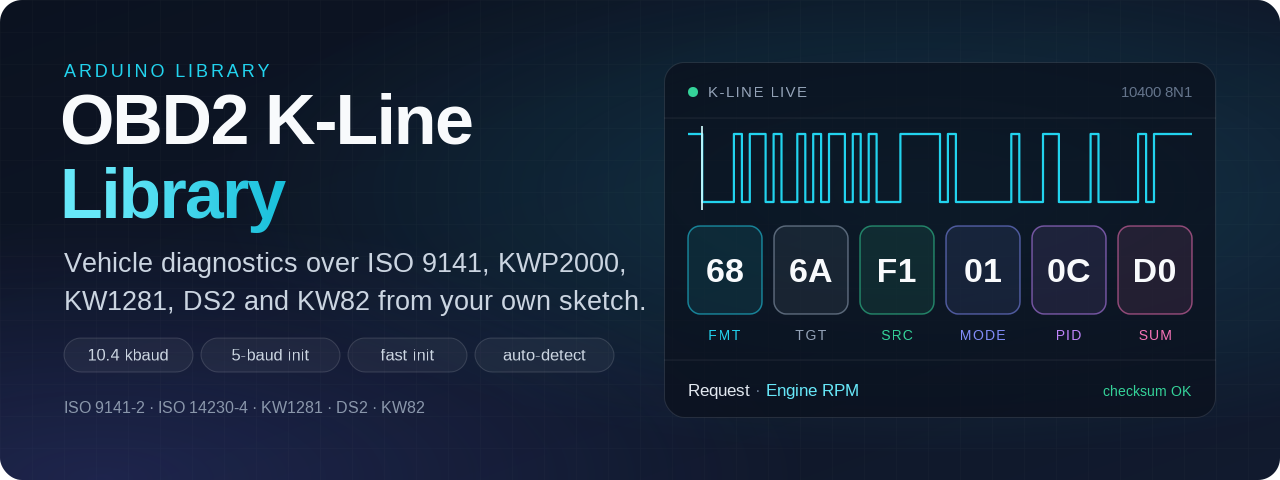
Vehicle diagnostics over the K-Line for Arduino and ESP32.
One library for universal OBD-II (ISO 9141-2, ISO 14230-4 / KWP2000) and for manufacturer protocols — VAG KW1281, BMW DS2 and Opel KW82. It handles the handshake, framing, checksums and timing, so your sketch only asks for the data.
Installation · Quick Start · Protocols · API · Wiring · Examples · License
K-Line is the single-wire diagnostic bus found on most European and Japanese vehicles built between roughly 1987 and 2010, before CAN became mandatory. This library lets an Arduino, ESP32 or similar microcontroller talk directly to the vehicle's ECU over that wire — no ELM327 adapter in between.
It covers both layers of K-Line diagnostics:
flowchart LR
    ECU["Vehicle ECU"] <-->|"K-Line · OBD-II pin 7<br/>12 V · 10.4 kbaud"| IF["K-Line interface<br/>L9637D · MC33290 · LM393 · transistors"]
    IF <-->|"UART"| LIB["OBD2 K-Line<br/>library"]
    LIB --> APP["Your sketch"]
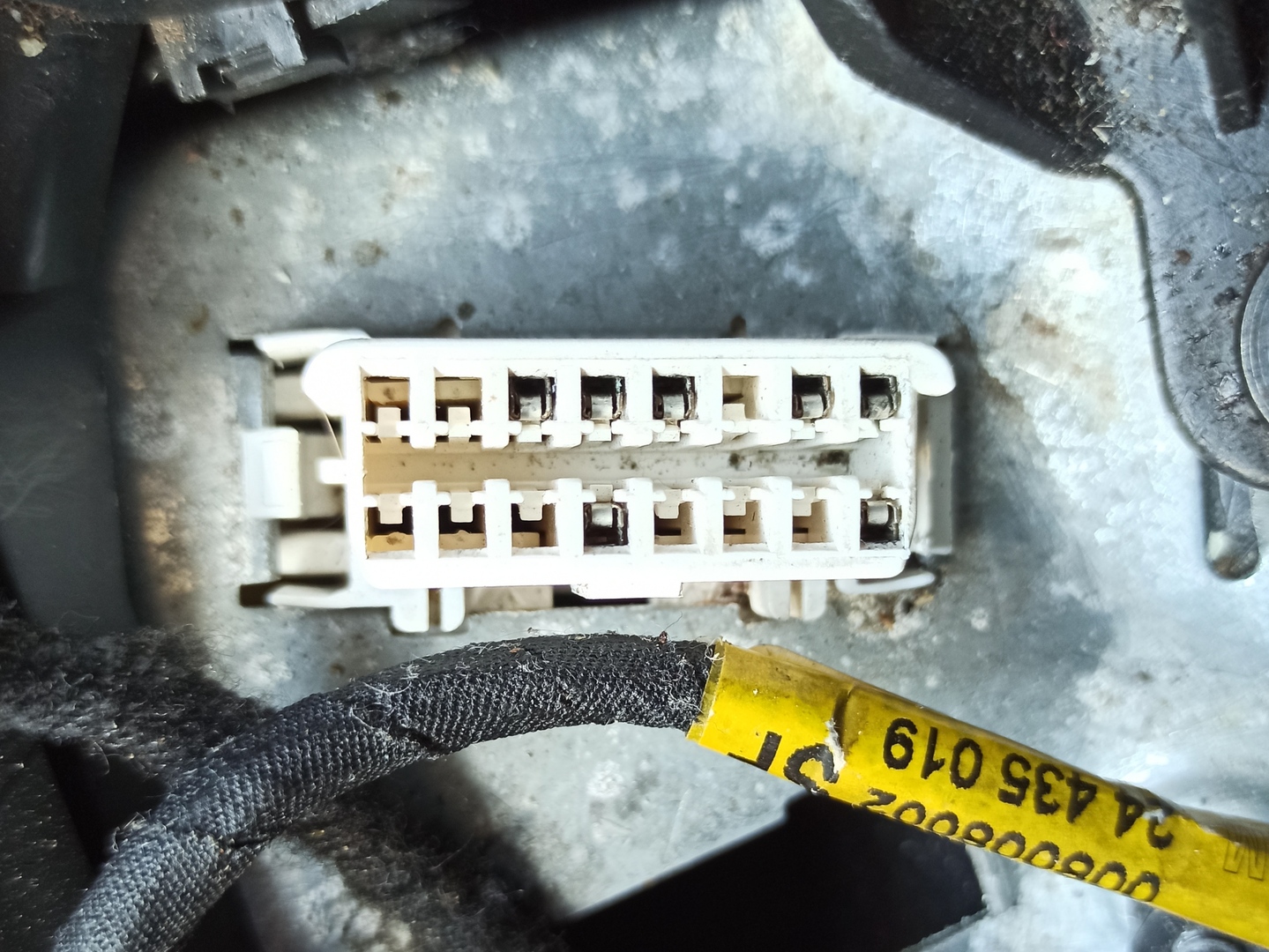
Look at the OBD-II connector under the dashboard:
 |
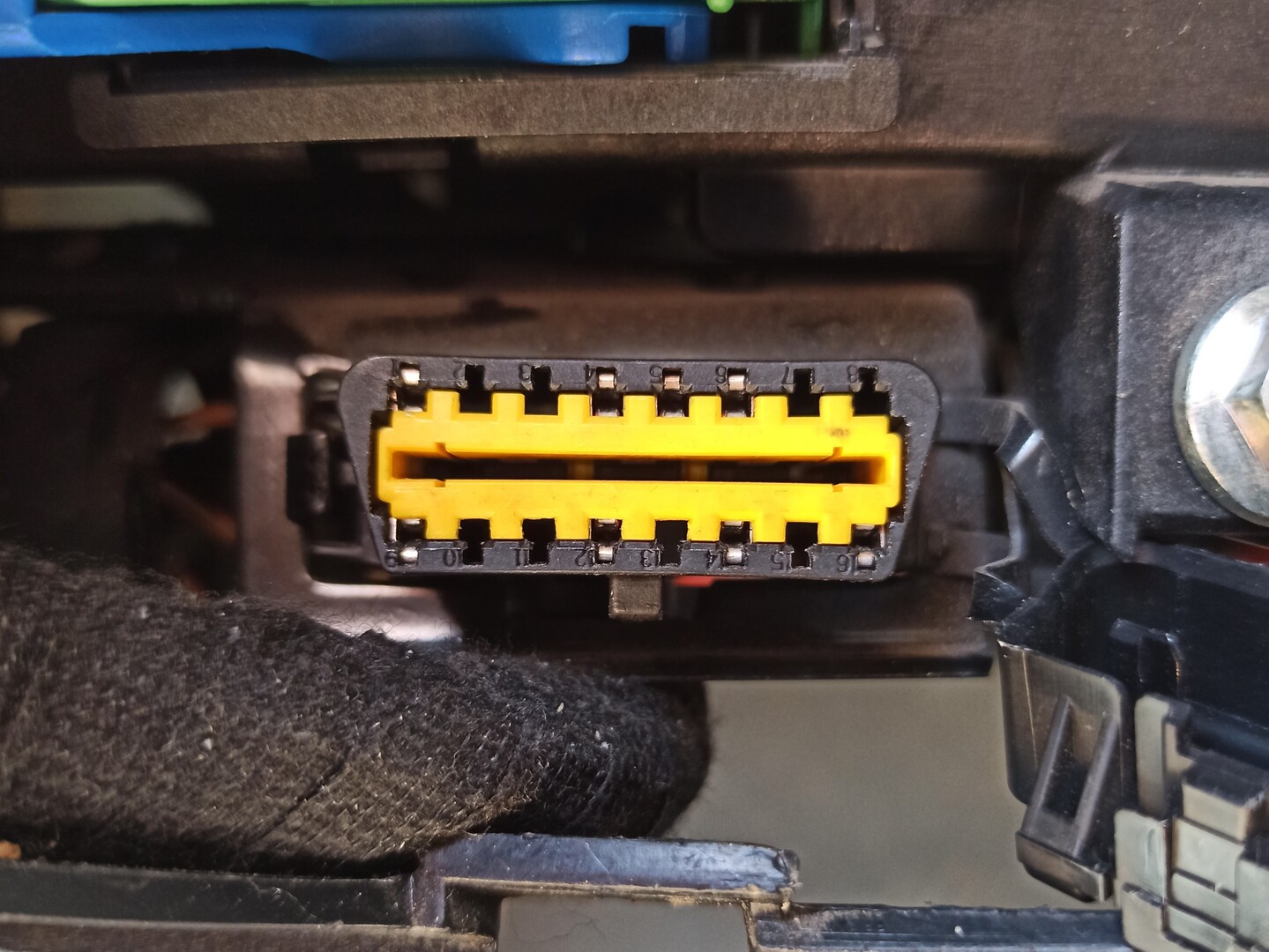 |
| K-Line — pin 7 | CAN bus — pins 6 and 14 |
HardwareSerial, SoftwareSerial and AltSoftSerial, with custom pins.| Protocol | Used by | Framing |
|---|---|---|
| ISO 9141-2 | Generic OBD-II | Header, no length byte, modulo-256 checksum |
| ISO 14230-4 (KWP2000) | Generic OBD-II | Length embedded in the header, modulo-256 checksum |
| KW1281 | VAG — VW, Audi, SEAT, Škoda | Block protocol, every byte acknowledged with its complement |
| DS2 | BMW | Separate length byte counting the whole frame, XOR checksum |
| KW82 | Opel / Vauxhall | No header, separate length byte, modulo-256 checksum |
| Custom | Anything else | You define the framing yourself |
| Automatic | — | Tries the known protocols until one connects |
The connection method is a separate setting from the packet format: 5-baud init, fast init, ping or none can be combined with any protocol through setInitType().
Generic diagnostics defined by SAE J1979. No car-specific configuration is needed.
| Mode | Description |
|---|---|
01 |
Live data — real-time sensor values (RPM, coolant temperature, speed, throttle, fuel trims …) |
02 |
Freeze frame — the sensor snapshot stored when a fault appeared |
03 |
Stored Diagnostic Trouble Codes (DTCs) |
04 |
Clear DTCs and reset the MIL |
05 |
Oxygen sensor test results |
06 |
On-board monitoring test results |
07 |
Pending Diagnostic Trouble Codes |
09 |
Vehicle information — VIN, calibration IDs, calibration verification numbers |
DTCs come back as readable codes (P0123 style), and a supported-PID scan lets you ask the ECU which PIDs it actually implements before requesting them.
[!NOTE] Manufacturer-specific access is provided through ECU definition files. The generic OBD-II layer ships with the library. Definitions for specific ECUs — Siemens Simtec 71, Bosch Motronic M1.5.5, Bosch ME7.5, Bosch BMS 46, Bosch EDC15VM+ — are maintained separately and are available on request; see Contact.
Arduino IDE — open Sketch → Include Library → Manage Libraries…, search for OBD2 K-Line and click Install.
PlatformIO — add it to platformio.ini:
lib_deps = muki01/OBD2 K-Line
Manual — download this repository as a ZIP and add it with Sketch → Include Library → Add .ZIP Library…
On the Arduino Uno and Nano the library uses AltSoftSerial; install it from the Library Manager as well.
Read engine speed, coolant temperature and vehicle speed. The same sketch runs on AVR boards and on the ESP32.
#include "OBD2_KLine.h"          // core: connection + protocol layer
#include "ecus/OBD2_Standard.h"  // standard OBD2 diagnostics -> OBD2_KLine

OBD2_KLine KLine;

// Uno / Nano have no spare hardware serial, so they fall back to AltSoftSerial
// on its fixed pins (RX 8, TX 9). Every other board uses Serial1.
#if defined(__AVR_ATmega168__) || defined(__AVR_ATmega328P__)
  #include <AltSoftSerial.h>
  AltSoftSerial altSerial;
  #define OBD_SERIAL  altSerial
#else
  #define OBD_SERIAL  Serial1
#endif

#define OBD_RX_PIN  5
#define OBD_TX_PIN  4

void setup() {
  Serial.begin(115200);

  KLine.setSerial(OBD_SERIAL);
  KLine.setPins(OBD_RX_PIN, OBD_TX_PIN);

  KLine.setDebug(Serial);        // View communication logs
  KLine.setProtocol(Automatic);  // Automatic, ISO9141, ISO14230, KW1281, DS2, KW82, Custom
}

void loop() {
  if (!KLine.isConnected() && !KLine.connect()) return;

  float rpm     = KLine.getLiveData(0x0C);  // PID 0x0C: Engine RPM
  float coolant = KLine.getLiveData(0x05);  // PID 0x05: Coolant Temp
  float speed   = KLine.getLiveData(0x0D);  // PID 0x0D: Vehicle Speed

  Serial.print("RPM: ");   Serial.println(rpm);
  Serial.print("Temp: ");  Serial.print(coolant); Serial.println(" C");
  Serial.print("Speed: "); Serial.print(speed);   Serial.println(" km/h");
}
int storedCount = KLine.readStoredDTCs();        // Mode 03
for (int i = 0; i < storedCount; i++) {
  Serial.println(KLine.getStoredDTC(i));         // e.g. P0171
}

KLine.clearDTCs();                               // Mode 04
KLine.setProtocol(ISO14230);     // packet format
KLine.setInitType(Init_5Baud);   // connection method — always call it after setProtocol()
| Method | Description |
|---|---|
setSerial(port) |
Use a HardwareSerial, SoftwareSerial or AltSoftSerial port. |
setPins(rx, tx) |
Select the RX and TX pins. |
setProtocol(protocol) |
Automatic, ISO9141, ISO14230, KW1281, DS2, KW82 or Custom. |
setInitType(type) |
Init_5Baud, Init_Fast, Init_Ping or Init_None. |
setInitAddress(address) |
Address sent during the 5-baud init (0x33 for generic OBD-II). |
connect() |
Run the handshake; returns true when the ECU answers. |
isConnected() |
Whether the link is still alive. |
getConnectedProtocol() |
The protocol that actually answered. |
setDebug(stream) |
Print every byte on the bus to any Stream. |
| Method | Description |
|---|---|
getLiveData(pid) |
Mode 01 value, converted to engineering units. |
getFreezeFrame(pid) |
Mode 02 value from the stored snapshot. |
readStoredDTCs() / getStoredDTC(i) |
Read and retrieve stored trouble codes. |
readPendingDTCs() / getPendingDTC(i) |
Read and retrieve pending trouble codes. |
clearDTCs() |
Clear trouble codes and reset the MIL. |
getVehicleInfo(pid) |
VIN (0x02), calibration ID (0x04), calibration verification number (0x06). |
readSupportedLiveData() / getSupportedData(mode, i) |
Scan which PIDs the ECU supports. |
| Method | Description |
|---|---|
writeData(data) |
Send data bytes; the library adds header, length byte and checksum. |
writeRawData(data, length, checksum) |
Send a packet as is and append only the requested checksum. |
sendBytes(data, length) |
Put bytes on the bus exactly as given. |
readData() |
Read the response; returns its length. |
getResultBuffer() / getResultLength() |
Access the raw response. |
setHeader(), setLengthMode(), setChecksumType() |
Define a custom packet format. |
setP1Time() … setP4Time(), setWakeUpDelay() |
Adjust the protocol timings. |
K-Line is a single-wire, 12 V bus and cannot be connected directly to a microcontroller pin. Each of these circuits does the level shifting; pick the one that suits your project.
| OBD-II pin | Signal |
|---|---|
| 7 | K-Line |
| 16 | Battery +12 V |
muki01/OBD2_KLine_Library is a public repo on GitHub by muki01. OBD2 K-Line diagnostics library for Arduino, ESP32 and compatible boards. Supports ISO9141, ISO14230 (KWP2000), KW1281, DS2 and KW82.
It declares the GPL-3.0 license on GitHub.
Its maker has not tagged a system, so it is unknown here. Its README says what it needs.
Open "Take it" on its page: Take My Repo writes an install plan for your machine and hands it to your AI agent (Claude Code, Codex or Cursor), which asks you before each step. Take My Repo has not tested it on any machine.
Independent Auditing of AI Agents. Run by human or the agent itself, to answer the most crucial question in the AI Agent Economy. Is the agent doing what is supposed to do? With iFixAi you can have this answer in less than 120 seconds.
:articulated_lorry: Awesome CAN bus tools, hardware and resources for Cyber Security Researchers, Reverse Engineers, and Automotive Electronics Enthusiasts.
:house_with_garden: Open source home automation that puts local control and privacy first.
π RuView turns commodity WiFi signals into real-time spatial intelligence, vital sign monitoring, and presence detection — all without a single pixel of video.
Its last change on GitHub was on 2026-11-11. Take My Repo does not judge from that whether it is maintained.
Nobody has reviewed it on Take My Repo yet, which says nothing about its quality.
Take My Repo cannot say: it does not audit code and has not run OBD2_KLine_Library. What is known comes from GitHub. It declares the GPL-3.0 license on GitHub. Its last change was on 2026-11-11. It has 100 stars, which measure popularity, not safety. Nobody has reviewed it on Take My Repo yet, which says nothing about its quality. Read the source before you run it. With "Take it", your AI agent shows each step and asks you before running it; README text is treated as data, not as instructions.


