

ECC
The agent harness performance optimization system. Skills, instincts, memory, security, and research-first development for Claude Code, Codex, Opencode, Cursor and beyond.
- 309k
- JavaScript
- MIT
- 19 h ago
Mac app to review the code written by you or your agent with Claude in the loop.
Repo nilbuild/diffity, read from GitHub 1 min ago. nilbuild has not joined Take My Repo.
nilbuild/diffity is a public repo on GitHub by nilbuild. Mac app to review the code written by you or your agent with Claude in the loop. It declares the MIT license on GitHub. It is written mainly in TypeScript, has 919 stars and last changed on 2026-11-23. Nobody has reviewed it on Take My Repo yet, which says nothing about its quality. Read from GitHub on 2026-11-23.
The agent harness performance optimization system. Skills, instincts, memory, security, and research-first development for Claude Code, Codex, Opencode, Cursor and beyond.

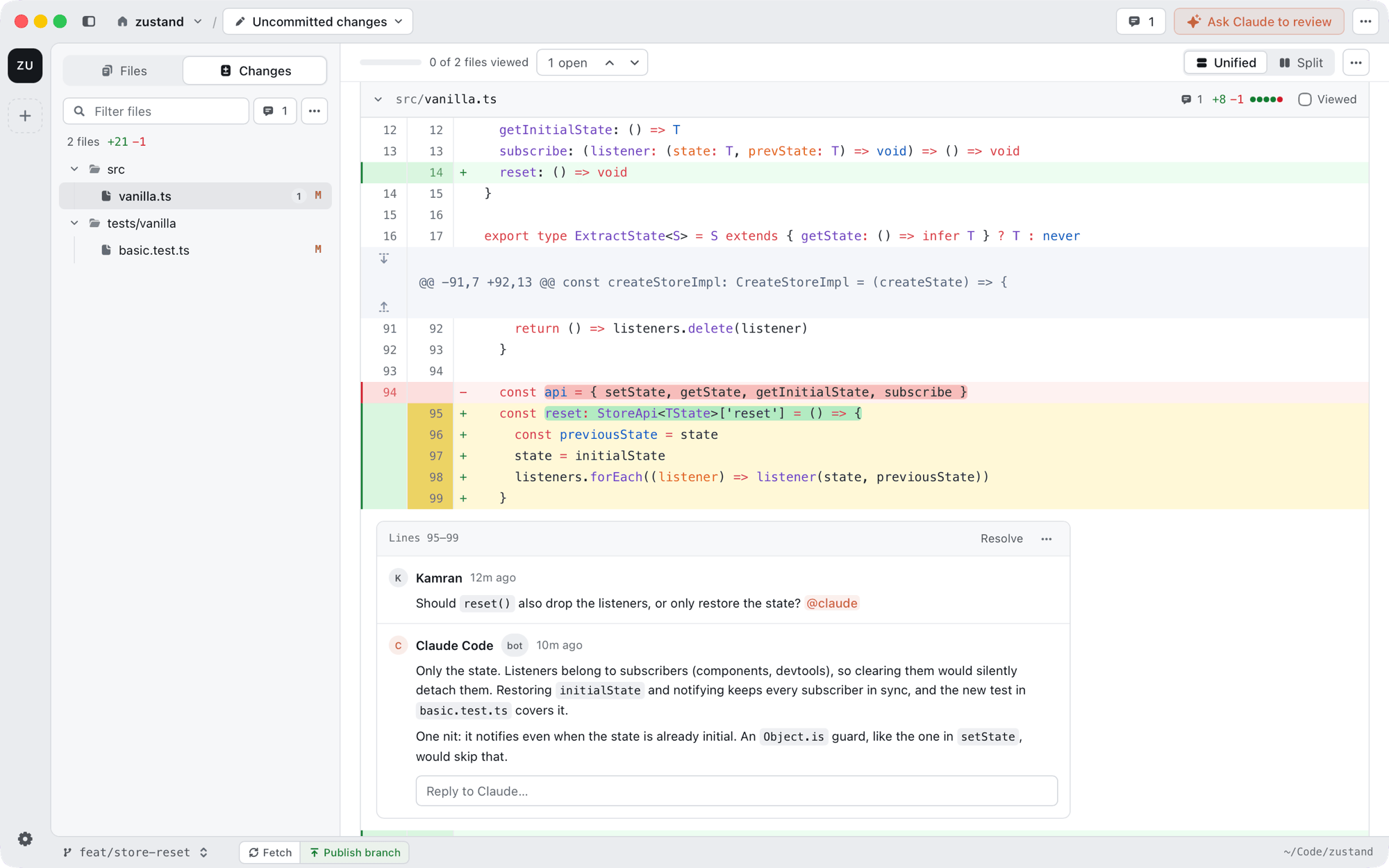
Diffity is a desktop app for Mac and Linux for reviewing code changes, yours or your agent's, GitHub-style, with Claude Code in the loop.

macOS 13.3 or later, Apple Silicon and Intel. Open the .dmg and drag Diffity to Applications.
Linux on x86_64: Ubuntu 22.04+, Debian 12+ or Fedora. Install the .deb or .rpm, which also pulls in WebKitGTK and Git:
sudo apt install ./Diffity_*_amd64.deb     # Ubuntu, Debian
sudo dnf install ./Diffity-*.x86_64.rpm    # Fedora
The GitHub token is kept in your system keyring (GNOME Keyring or KWallet); without one, sign in with the GitHub CLI instead.
The AI features need Claude Code (logged in) and Node.js. Shortcuts below are written for macOS; on Linux, use Ctrl wherever you see ⌘.
| What can you do? | Description |
|---|---|
| Comment on your diff | Leave comments on lines, files or the whole diff, then send them to Claude to fix |
| Let Claude fix your comments | Claude works through your comments, edits the code and replies in each thread |
| Ask @claude | Mention @claude in any thread and Claude replies right there |
| Get a Claude review | Claude reads the diff and leaves comments on the lines it cares about |
| Review any commit or range | Uncommitted changes, a commit, a range or a whole branch |
| Review pull requests | Check out a GitHub PR, review it locally, post the review back |
| Post reviews to GitHub | Submit as Comment, Approve or Request changes, with GitHub threads synced into the diff |
| Browse and comment on any file | Comment on code outside the diff from the Files tab |
| Jump anywhere | ⌘P for files, ⌘K for commits, comments, PRs and every action |
| Switch projects | Keep your repos in a rail and switch with ⌘1–9 |
| Work across repos | Group related repos, or @mention one, so Claude can work across them |
| Open from the terminal or your agent | diffity opens a repo, a diff or a pull request URL in the app |
Drag across line numbers or click the
+in the gutter, write a comment, then click Claude in the toolbar and send your comments to have it fix them.

Click Claude and pick the comments to send. It works through each one, edits the code and replies in the thread, and you review its changes like any other diff. This works on uncommitted changes and on the commit you have checked out, including comments from a Claude review.

Type
@claudein any comment or reply and Claude answers in the same thread.

Click Claude, open Review, optionally add what to focus on, and its comments land on the diff as it works.

Open the picker next to the project name to switch between uncommitted changes, a commit, a range or a branch.

Pick a PR from the branch switcher to check it out, comment as you read, then Submit review to post it to GitHub.

Comment as you read, then Submit review as Comment, Approve or Request changes; GitHub comments sync back into the diff so you can reply or resolve from the app.

Open the Files tab, pick any file in the repo and comment on its lines, even code the diff doesn't touch.

Press
⌘Pto open any file, or⌘Kto search commits, comments, PRs and every action.

Open a repo with
⌘O; it stays in the left rail, so⌘1–⌘9takes you back to it.

Right-click a project in the rail and pick Group with…, or drag it onto a group. When Claude works in any project of a group, it can read the others and change them when the fix belongs there. For a one-off, type
@and a project name in a comment or in Ask Claude. Reviews only read. After a run, Diffity tells you which other projects changed and marks them in the rail until you open them.
Run
diffityin any repository to open it in the app, or pass a pull request URL to review it.
Install the command once from Settings → Terminal (on macOS, Diffity → Install ‘diffity’ Command… opens it too). It links the command into /usr/local/bin and asks for your password if that folder needs it.

diffity                                        # uncommitted changes in the current repository
diffity ~/code/app                             # another repository
diffity --ref main                             # everything on this branch since it left main
diffity --ref HEAD~1..HEAD                     # the last commit
diffity https://github.com/owner/repo/pull/42  # check out and review a pull request
diffity src/app.ts                             # a file in the Files tab
diffity -n                                     # in a new window
--ref takes anything the ref picker does: work, staged, unstaged, a branch or commit, <a>..<b> or <a>...<b>. A pull request opens in the current repository if it is a clone of that repo, else in a clone Diffity already knows; with neither, Diffity offers to clone it. Run diffity --help for everything.
The agent that wrote the change is the one with the context to fix your comments. Let it read and answer them.
In Settings → Terminal, click Connect next to Claude Code or Codex. That registers Diffity with the agent for every project and allows terminal agents; for OpenCode, Cursor or any other MCP client, copy the setup from the same place.
Then, after you review and comment, tell the agent in its session:
address my Diffity review
It reads the open comments for the repository or worktree it is in, makes the changes, replies to each thread and resolves the fixed ones. The threads update live in Diffity, labelled with the agent's name. It can also open its changes in Diffity for you (“open it in Diffity when you're done”). Draft comments stay private until you submit them. Allow terminal agents turns access off for every agent at once.
Coding agents can run it too, so you can ask Claude Code to “open your changes in Diffity” before it opens a PR.
Find in the whole diff. ⌘F searches every file in the diff, including collapsed ones, and ⌘G jumps to the next match.
Changed since you viewed it. Files you marked Viewed get a badge when they change again, and one click shows just what changed.
Hide generated files. Add a .diffityignore to your repo (same syntax as .gitignore), or a list in Settings, and those files stay out of your diffs:
dist/
*.generated.ts
!dist/keep-me.js
Colour-blind friendly colours. Settings → General → Appearance switches the diff to blue and orange, in light and dark.
Split or unified, light or dark. Toggle the diff layout anytime; the theme follows your system unless you pick one in Settings.
Updates itself. New versions install in place, and What's New (in the Help menu on macOS, or the command palette) shows what changed.
Found a bug or have an idea? Open an issue.
nilbuild/diffity is a public repo on GitHub by nilbuild. Mac app to review the code written by you or your agent with Claude in the loop.
It declares the MIT license on GitHub.
Its maker tagged it for macOS and Linux. That is declared by the maker; Take My Repo has not tested it.
Open "Take it" on its page: Take My Repo writes an install plan for your machine and hands it to your AI agent (Claude Code, Codex or Cursor), which asks you before each step. Take My Repo has not tested it on any machine.
Reverse engineer anything with agents, from app behavior down to native binaries.
Fair-code workflow automation platform with native AI capabilities. Combine visual building with custom code, self-host or cloud, 400+ integrations.
Knowledge infrastructure to make your agents smarter. Search, scrape and access 550+ data providers through one API.
Its last change on GitHub was on 2026-11-23. GitHub counts 2 open issues and pull requests. Take My Repo does not judge from that whether it is maintained.
Nobody has reviewed it on Take My Repo yet, which says nothing about its quality.
Take My Repo cannot say: it does not audit code and has not run diffity. What is known comes from GitHub. It declares the MIT license on GitHub. Its last change was on 2026-11-23. It has 919 stars, which measure popularity, not safety. Nobody has reviewed it on Take My Repo yet, which says nothing about its quality. Read the source before you run it. With "Take it", your AI agent shows each step and asks you before running it; README text is treated as data, not as instructions.





