
macousel
A scrolling window manager for macOS. Windows are columns on one strip that scrolls.
- 0
- MIT
- 13 d ago
Repo nmbrthirteen/macousel, read from GitHub 9 h ago. nmbrthirteen has not joined Take My Repo.
In short
nmbrthirteen/macousel is a public repo on GitHub by nmbrthirteen. A scrolling window manager for macOS. Windows are columns on one strip that scrolls. It declares the MIT license on GitHub. It is written mainly in Swift, has 0 stars and last changed on 2026-11-11. Nobody has reviewed it on Take My Repo yet, which says nothing about its quality. Read from GitHub on 2026-11-24.
Macousel
Macousel is a native Mac app whose window management runs on Paneru, an open-source scrolling window manager written in Rust. Macousel adds the settings window, the menu bar indicator, the minimap, the overview, app shortcuts, and a URL scheme. Paneru moves the windows.
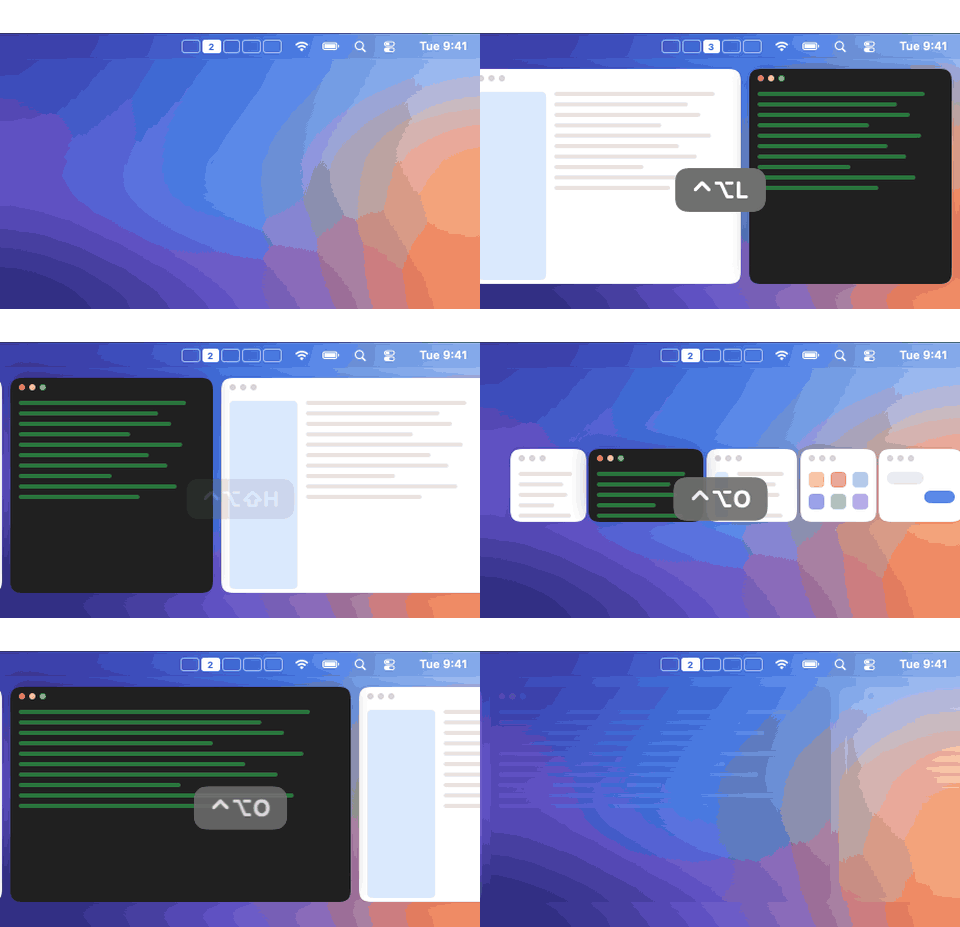
Every window is a column on one horizontal strip. The strip is wider than your screen, so you scroll it. Opening a window never resizes the ones you already have.
It is the model niri and PaperWM use on Linux, built as a native Mac app.
Status
Early. I wrote it on macOS 27 with two displays. The parts that talk to macOS have had little real use so far, so expect bugs and please report them.
Paneru runs as a child process of the app. Macousel writes its configuration, starts it, and stops it when you pause, quit, or switch engines. The older engine I wrote in Swift is still in the app. You can switch back to it in Settings > General.
What it does
The strip
- New windows open next to the focused one.
- Focus moves with the keyboard, and the strip scrolls just far enough to show the window.
- Each display and each Space has its own strip.
- With displays side by side, a window scrolled toward the other display waits on the free side of its own display.
- Column order and widths come back after a restart.
Columns
- Stack several windows in one column and resize the rows.
- Turn a stack into a tabbed column. Paneru shows one window at a time and has no tab bar.
- Cycle a column through preset widths, or nudge it wider and narrower.
- Float a window to take it out of the strip. Quick Look floats by default, and Paneru never tiles dialogs and sheets.
- Floating windows over the focused window come back to the front when you focus a tiled window, without taking focus. Settings > App rules has a switch for it.
- Switch between the floating windows and the strip with one shortcut.
- "Bring back floating windows" moves every floating window that is mostly off screen onto the active display, at the same size. It has no default shortcut.
- A floating window belongs to the Paneru virtual workspace it was on. Switching away parks it at the corner of the display, and switching back returns it.
- Pin a window to keep it on screen across virtual workspaces. Pinning a tiled window floats it first. Unpinning leaves it floating.
- "Show pinned windows" parks every pinned window at the corner of its display and brings them back where they were.
- A pinned window stays on the macOS Space where you pinned it. It does not follow you to another Space. Pinning is Paneru only.
- Windows that an app merges into native tabs, like Finder or Terminal tabs, share one column. Settings > Layout has a switch for it. This is Paneru only.
Input
- Every shortcut can be rebound. One action can have several shortcuts.
- Give an app its own key in Settings > App shortcuts. The key focuses its window, cycles through its windows when you press it again, and opens the app if it is not running.
- Swipe with three or four fingers, or hold Control-Option and scroll.
- A swipe moves one column at a time. Keep swiping to move further. Settings > Pointer has a free-scrolling mode if you prefer Paneru's own swipe.
- "Focus previous window" goes back to the window you focused before. Press it again to return.
- Optional focus follows mouse and mouse follows focus.
The rest
- A minimap of the strip that appears when focus moves, and a column count in the menu bar. With Paneru, the minimap also counts the floating windows on its display.
- An overview that shows every window in the strip, stacks included, with a picture of each window when Screen Recording is allowed. Pick one to focus it, or drag a card to reorder columns or stack it onto another window. Shift plus an arrow key or a number moves the selected window.
- The overview shows the floating windows in a row above the strip. Pick one to focus it. They stay out of the strip, so dragging one does nothing.
- Drag a cell in the minimap to reorder and stack the same way.
- Drag a real window by its title bar. A preview shows where it will land, between two columns, at either end of the strip, or on the top or bottom half of another window. Release and Paneru moves the window there.
- A focus border and dimming for inactive windows.
- Per-app rules: float, open at a set width, or open in a set column.
- A URL scheme and a command line client for scripts.
- Quitting or pausing stops Paneru, which centres every window on its display.
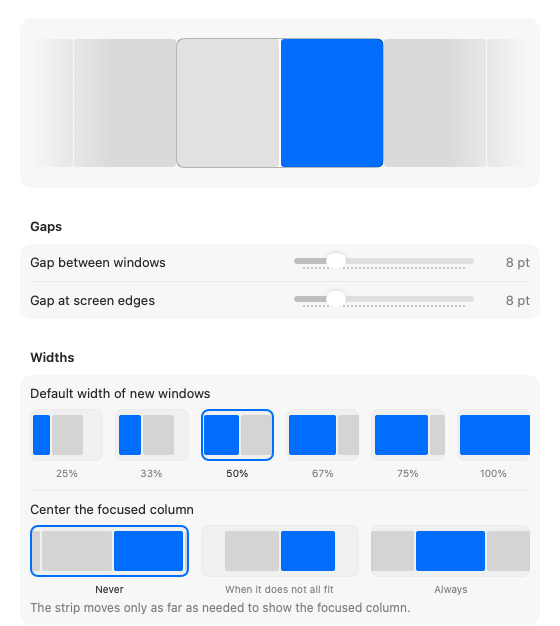
- Settings panes show a live preview. Choices with a picture, like the default width or the menu bar style, are picked by clicking the picture.
Macousel reads the column structure from Paneru through a small bridge helper, so stacks, tabbed columns, and columns parked off screen all map to the right column. Dropping a window on a tabbed column adds it as the last tab. The overview and minimap draw a tabbed column as one column with a row per tab.
With "Center the focused column" on, the strip centers on the dropped window after a drag.
What the built-in engine still offers
Paneru does not do these. The built-in engine does, and Macousel greys out the matching settings while Paneru is selected.
- A tab bar for tabbed columns.
- Tiling off for one display, and the display under the pointer becoming the active one.
- The scratchpad.
- Resize columns and rows in the overview.
- Putting every window back at its original frame when you quit or pause.
Switch engines in Settings > General. Macousel stops one and starts the other without a relaunch.
Requirements
- macOS 14 or later.
- Accessibility permission. macOS only lets an app move other apps' windows through the Accessibility API. It is the only permission Macousel needs, and Paneru runs under it as a child of the app.
- Screen Recording permission, optional. The overview uses it to show a picture of each window. Without it the overview shows app icons and a button that asks for it. Macousel never asks on its own.
- No other copy of Paneru running. Two window managers would both move your windows, so Macousel shows a message and does not start its own.
Install
Run the installer. It downloads the latest release, puts Macousel.app in /Applications, and replaces an older copy:
curl -fsSL https://github.com/nmbrthirteen/macousel/releases/latest/download/install.sh | bash
With Homebrew:
brew tap nmbrthirteen/macousel https://github.com/nmbrthirteen/macousel
brew install --cask macousel
Or download Macousel.dmg from the releases page and drag the app to Applications.
Then open Macousel. A short guide walks you through Accessibility access, the first shortcuts, and the menu bar item.
Updating
Open Settings > About and click "Check for updates". Macousel checks once a day on its own, and you can turn that off in Settings > General. You can also run the installer again. After either one, macOS asks for Accessibility access again, because every release has a new signature.
Macousel only installs an update whose archive carries a valid signature from my update signing key. If the check fails, nothing is installed.
After an update, Macousel shows that release's notes once.
Uninstall
Turn off "Launch at login" in Settings > General.
Quit Macousel from its menu.
Delete
/Applications/Macousel.app.Delete its data:
rm -rf ~/Library/Application\ Support/Macousel ~/Library/Logs/Macousel
defaults delete dev.macousel.app
Remove Macousel from System Settings > Privacy & Security > Accessibility.
With Homebrew, brew uninstall --zap macousel does steps 3 and 4.
The app is not notarized
I do not have an Apple Developer ID. Releases are signed with a certificate of my own, which macOS does not recognise. Two things follow from that:
- If you used the DMG or Homebrew, macOS blocks the first launch. Open System Settings > Privacy & Security and click "Open Anyway". The installer script checks the zip against the SHA-256 published with its release and the app against the release signing certificate. Then it clears the quarantine flag, so it skips this step.
- The Accessibility grant is tied to that certificate, so it carries over from one release to the next. Releases up to 0.1.4 were signed ad hoc, so the first update from one of them asks for access once more.
Updates are verified with a signing key that I hold, and the app is not notarized. The signature proves an update came from me. It does not replace Apple's notarization.
Build from source
You need Xcode's command line tools and Rust. Install Rust from rustup.rs.
git clone https://github.com/nmbrthirteen/macousel.git
cd macousel
scripts/bundle.sh
open build/Macousel.app
scripts/bundle.sh calls scripts/engine.sh, which builds the Paneru version pinned in support/engine-version into build/engine-<version>/ and prints the path of the binary. It downloads the Paneru source from crates.io, checks it against the checksum in engine-bridge/Cargo.lock, and applies the patches in support/engine-patches. The first build takes two to three minutes. Later runs reuse the binary. The same script builds engine-bridge, a small Rust program that asks Paneru for its column structure and prints it as JSON. The bundle script copies both to Contents/Helpers and signs them before it signs the app.
For a development build with swift run, run scripts/engine.sh once. Macousel finds the binary in build/ when the app has no bundled helper.
To keep the Accessibility grant across your own rebuilds, sign with a certificate from your keychain:
CODESIGN_IDENTITY="My Certificate" scripts/bundle.sh
Default shortcuts
Most of them use Control-Option, including the column numbers. Plain Option plus a digit would block characters on layouts such as German, where Option-5 to Option-9 type brackets and braces. Rebind any of them in Settings > Shortcuts, which groups them as Navigate, Size, Stacks, and Other and draws each key as a keycap. A shortcut you already changed keeps its binding.
Paneru handles the keys itself through an event tap. Macousel registers only the pause, overview, and previous window keys and your app shortcuts. A key that Paneru has no name for stays in Settings but is not sent to Paneru, and its row says so.
Two columns of two stacked windows make a 2 by 2 grid. I build one by stacking each window onto the column on its left.
| Action | Keys |
|---|---|
| Focus left, down, up, right | ⌃⌥ H J K L, or the arrows |
| Move the window | ⌃⌥⇧ and the same keys |
| First or last window | ⌃⌥⌘ ← → |
| Focus previous window | ⌃⌥ \ |
| Jump to column 1 to 8, or 9 for the last | ⌃⌥ 1 to 9 |
| Move the window to the first or last spot | ⌃⌥⌘⇧ ← → |
| Cycle width, full width, center | ⌃⌥ R, F, C |
| Wider, narrower | ⌃⌥ = and - |
| Taller, shorter, equalize | ⌃⌥⇧ = and -, ⌃⌥ 0 |
| Stack with the column on the left, or on the right | ⌃⌥ ] and [ |
| Pop out to its own column on the right, or on the left | ⌃⌥⇧ ] and [ |
| Tabbed column | ⌃⌥⇧ T |
| Float | ⌃⌥ T |
| Switch to floating windows | ⌃⌥ ` |
| Pin or unpin the window | ⌃⌥ P |
| Show or hide pinned windows | ⌃⌥⇧ P |
| Send to the next display | ⌃⌥ N |
| Send to the next display and stay here | ⌃⌥⇧ N |
| Focus the next display | ⌃⌥ D |
| Overview | ⌃⌥ O |
| Pause tiling | ⌃⌥ Q |
Paneru only stacks onto the column on the left and pops out to the right. For the other two directions Macousel adds a swap: past the right neighbour before stacking, and back to the left after popping out. The scratchpad shortcuts need the built-in engine. With Paneru, Macousel registers the move to column 1 to 9 keys (⌃⌥⇧ 1 to 9) itself and replays the move step by step, so they take a moment.
What Macousel stores and sends
Layout restore keeps the app identifiers and a hash of each window title in the app's preferences. It never stores a title in plain text. With Paneru selected, the engine's own state file in ~/Library/Application Support/Macousel/engine/state keeps the same kind of hash, through a patch in support/engine-patches. Nothing is sent anywhere, except two requests to GitHub: the update check once a day, which you can turn off in Settings > General, and the download when you install an update.
Reporting a problem
Choose "Save diagnostics…" from the menu bar icon. It writes one text file to your Desktop with the app's log, your settings, your displays, the names of any crash reports, and the names of any apps that respond slowly. It also holds the selected engine, the Paneru version, the state of the engine process, the configuration Macousel wrote for it, and the last 200 lines of the engine log. The app's log records each shortcut you press, as a key code and modifiers, and the bundle IDs of the apps Macousel manages. Read the file, then attach it to the issue.
The engine log is ~/Library/Logs/Macousel/engine.log. It rotates at 1 MB and keeps one previous file.
Scripting
Every action has a command name. With Paneru selected, Macousel forwards each engine action to the engine. List them:
build/Macousel.app/Contents/MacOS/Macousel list
Run one from the command line or through the URL scheme:
build/Macousel.app/Contents/MacOS/Macousel focus-left
open "macousel://cycle-width"
Pause tiling runs from its shortcut or the menu bar only, because any web page can open a macousel:// link.
Questions
What is macousel?
nmbrthirteen/macousel is a public repo on GitHub by nmbrthirteen. A scrolling window manager for macOS. Windows are columns on one strip that scrolls.
Is macousel open source?
It declares the MIT license on GitHub.
Does macousel run on macOS, Windows or Linux?
Its maker has not tagged a system, so it is unknown here. Its README says what it needs.
How do I install macousel?
Open "Take it" on its page: Take My Repo writes an install plan for your machine and hands it to your AI agent (Claude Code, Codex or Cursor), which asks you before each step. Take My Repo has not tested it on any machine.