node-opcua
Unlocking the Full Potential of OPC UA with Typescript and NodeJS - http://node-opcua.github.io/
- 1.7k
- TypeScript
- MIT
- 3 d ago
The maintainer has not written a description at the source.
Repo node-opcua/node-i3x, read from GitHub 1 min ago. node-opcua has not joined Take My Repo.
node-opcua/node-i3x is a public repo on GitHub by node-opcua. It declares no license on GitHub. Public does not mean open source: without a license, nobody is granted the right to reuse it. It is written mainly in TypeScript, has 3 stars and last changed on 2026-10-26. Nobody has reviewed it on Take My Repo yet, which says nothing about its quality. Read from GitHub on 2026-11-22.
TypeScript implementation of the i3X Beta specification — bridging OPC UA industrial automation to a modern REST API
node-i3x converts OPC UA address spaces into i3X-compliant REST/JSON endpoints. It exposes industrial automation data through a clean HTTP API with:
Built with node-opcua, Fastify, and a hexagonal (ports & adapters) architecture.
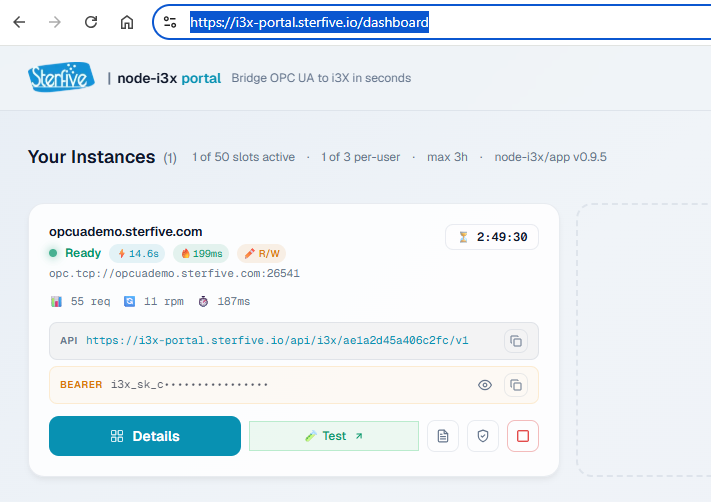
You can test node-i3x live in your browser using the public sandbox: 👉 i3x-portal.sterfive.io
The portal allows you to register an OPC UA server, bridge it to i3X REST endpoints in seconds, and run test API requests interactively.

graph TB
    Client(["☁ HTTP Client"])

    subgraph APP["@node-i3x/app — Composition Root"]
        direction TB

        subgraph INBOUND["INBOUND ADAPTER"]
            REST["@node-i3x/rest-server<br/>Fastify routes — i3X Beta API"]
        end

        subgraph CORE["DOMAIN CORE — ZERO DEPENDENCIES"]
            Core["@node-i3x/core<br/>Domain Models · Services · Port Interfaces<br/>Stable IDs · Subscriptions · History"]
        end

        subgraph OUTBOUND["OUTBOUND ADAPTERS"]
            OPC["@node-i3x/opcua-connector<br/>node-opcua client (remote)"]
            Pseudo["@node-i3x/pseudo-session-connector<br/>PseudoSession (embedded)"]
        end
    end

    OPCUA(["⚙ OPC UA Server"])

    Client <-->|"HTTP / JSON"| REST
    REST -->|"uses ports"| Core
    Core -->|"IDataSourcePort"| OPC
    Core -->|"IDataSourcePort"| Pseudo
    OPC <-->|"OPC UA TCP"| OPCUA
    Pseudo <-->|"In-process"| OPCUA

| Package | Description | Status |
|---|---|---|
@node-i3x/core |
Domain core: models, ports (IDataSourcePort, ILogger), services (ModelService, ValueService, HistoryService, SubscriptionService), stable ID mapper |
✅ Stable |
@node-i3x/opcua-connector |
OPC UA client adapter — implements IDataSourcePort using node-opcua (remote TCP/binary transport) |
✅ Stable |
@node-i3x/pseudo-session-connector |
PseudoSession adapter — implements IDataSourcePort using node-opcua PseudoSession (embedded in-process, zero network) |
✅ Stable |
@node-i3x/rest-server |
Fastify REST routes implementing the i3X Beta API surface | ✅ Stable |
@node-i3x/app |
Composition root — wires all packages together, entry point | ✅ Stable |
@node-i3x/mcp |
Model Context Protocol (MCP) server — connects Claude, Gemini, Cursor & AI agents to i3X/OPC UA | ✅ Stable |
@node-i3x/demo-embedded |
Embedded demo with live dashboard — OPC UA server + i3X API wired via PseudoSession | 🧪 Demo |
# Clone the repository
git clone https://github.com/node-opcua/node-i3x.git
cd node-i3x

# Install dependencies
npm install

# Configure environment
cp .env.example .env
# Edit .env — set NODE_I3X_OPCUA_ENDPOINT to your OPC UA server

# Start in development mode (remote OPC UA)
npm run dev

# Or run the embedded demo (no external OPC UA server needed)
npm run demo -w packages/demo-embedded
The server starts on http://127.0.0.1:8000 by default. Verify with:
curl http://127.0.0.1:8000/health
# → { "status": "ok" }Connect AI assistants (Claude Desktop, Google Gemini, Cursor IDE) directly to your factory floor or i3X gateway:
# Run the MCP server directly via npx
I3X_SERVER_URL=http://127.0.0.1:8000 npx @node-i3x/mcp
Add to your claude_desktop_config.json:
{
  "mcpServers": {
    "node-i3x": {
      "command": "npx",
      "args": ["-y", "@node-i3x/mcp"],
      "env": {
        "I3X_SERVER_URL": "http://127.0.0.1:8000"
      }
    }
  }
}
Now Claude or Cursor can diagnose machinery in single turns:
"Inspect Boiler_101. Is current temperature normal according to its schema definition?""Explore plant hierarchy and summarize any assets with Bad quality flags.""Query telemetry trends for Pump_101 over the last 2 hours."See packages/mcp for full documentation.
All configuration is via environment variables (or .env file):
| Variable | Default | Description |
|---|---|---|
NODE_I3X_OPCUA_ENDPOINT |
opc.tcp://localhost:4840 |
OPC UA server endpoint URL |
NODE_I3X_OPCUA_SECURITY_MODE |
None |
Security mode (None, Sign, SignAndEncrypt) |
NODE_I3X_OPCUA_OPTIMIZED_CLIENT |
auto |
auto = detect @sterfive module, disabled = skip |
NODE_I3X_PUBLISH_INTERVAL_MS |
1000 |
OPC UA publishing interval (milliseconds) |
NODE_I3X_SAMPLING_INTERVAL_MS |
250 |
OPC UA sampling interval (milliseconds) |
NODE_I3X_PRELOAD |
true |
Preload the OPC UA model on startup |
NODE_I3X_PRELOAD_STRICT |
false |
Exit if model preload fails |
NODE_I3X_PORT |
8000 |
HTTP server port |
NODE_I3X_HOST |
127.0.0.1 |
HTTP server bind address |
NODE_I3X_LOG_LEVEL |
info |
Log level (debug, info, warn, error) |
# Run all tests (vitest)
npm test

# Run tests in watch mode
npm run test:watch

# TypeScript type checking
npm run typecheck

# Lint + format check (Biome)
npm run lint

# Auto-fix lint and format issues
npm run lint:fix

# Build all packages (tsup — minified ESM + .d.ts)
npm run build
| Tool | Purpose |
|---|---|
| TypeScript | Language (ESM-only) |
| tsup | Build (esbuild, minified ESM + .d.ts) |
| Vitest | Testing |
| Biome | Lint + Format |
| Fastify | HTTP framework |
| node-opcua | OPC UA client SDK |
OPC UA NodeId values are volatile — namespace indices can shuffle across server restarts. node-i3x generates stable, deterministic element IDs by:
nsu=http://example.org;s=Sensor1/Temperature)This ensures that REST clients can bookmark and cache element IDs across server lifecycles.
The codebase follows a strict hexagonal / ports & adapters pattern:
@node-i3x/core defines domain models and port interfaces (IDataSourcePort, ILogger) with zero external dependenciesopcua-connector, pseudo-session-connector) implement IDataSourcePortrest-server) translates HTTP requests into domain service calls@node-i3x/app is the composition root that wires adapters to ports| Mode | Package | Transport | Use Case |
|---|---|---|---|
| Remote | @node-i3x/opcua-connector |
OPC UA TCP/Binary | Connect to any standard OPC UA server on the network |
| Embedded | @node-i3x/pseudo-session-connector |
In-process (zero network) | Run an OPC UA server and the i3X API in the same process — ideal for demos, testing, and edge deployments |
The i3X Beta REST API surface:
| Method | Endpoint | Description |
|---|---|---|
GET |
/health |
Health check |
GET |
/ready |
Readiness check (data source connected?) |
GET |
/v1/info |
Server info, spec version, capabilities |
| Method | Endpoint | Description |
|---|---|---|
GET |
/v1/namespaces |
List all OPC UA namespaces |
| Method | Endpoint | Description |
|---|---|---|
GET |
/v1/objects |
List all objects (optional: ?root=true, ?typeElementId=...) |
POST |
/v1/objects/list |
Bulk-fetch objects by element IDs |
POST |
/v1/objects/value |
Bulk-read current values |
POST |
/v1/objects/related |
Bulk-fetch related objects (children / parent) |
POST |
/v1/objects/history |
Bulk-read historical values |
PUT |
/v1/objects/:elementId/value |
Write a value to a single element |
| Method | Endpoint | Description |
|---|---|---|
GET |
/v1/objecttypes |
List all object types (optional: ?namespaceUri=...) |
| Method | Endpoint | Description |
|---|---|---|
GET |
/v1/relationshiptypes |
List relationship types (stub — 501) |
| Method | Endpoint | Description |
|---|---|---|
POST |
/v1/subscriptions |
Create a new subscription |
POST |
/v1/subscriptions/register |
Register element IDs for monitoring |
POST |
/v1/subscriptions/unregister |
Unregister element IDs |
POST |
/v1/subscriptions/sync |
Poll for value updates (long-poll) |
POST |
/v1/subscriptions/stream |
Stream value updates via SSE |
POST |
/v1/subscriptions/list |
List subscription details |
POST |
/v1/subscriptions/delete |
Delete subscriptions |
📘 Full OpenAPI specification:
openapi.json
docker build -t node-i3x .
docker run -p 8000:8000 \
  -e NODE_I3X_OPCUA_ENDPOINT=opc.tcp://host.docker.internal:4840 \
node-i3xFor production deployments, install the optional @sterfive/opcua-optimized-client module for up to 200% performance improvement:
The module is detected automatically at startup — no code changes needed. It is listed as an optionalDependency in @node-i3x/opcua-connector.
Contact Sterfive Support for access.
This project is dual-licensed:
| License | Use Case |
|---|---|
| AGPL-3.0-or-later | Open-source use — you must share your source code if you deploy this as a network service |
| Commercial | Proprietary / closed-source use — no copyleft obligations |
The AGPL-3.0 restrictions can be lifted by acquiring a commercial license at sterfive.com.
Contact contact@sterfive.com for pricing and terms.
See LICENSE for full details.
Built by Sterfive — Industrial-grade OPC UA solutions for the modern web.
node-opcua/node-i3x is a public repo on GitHub by node-opcua. Its maker has not written a description.
It declares no license on GitHub. Public does not mean open source: without a license, nobody is granted the right to reuse it.
Its maker tagged it for macOS, Windows and Linux, or as Docker or cross-platform. That is declared by the maker; Take My Repo has not tested it.
Open "Take it" on its page: Take My Repo writes an install plan for your machine and hands it to your AI agent (Claude Code, Codex or Cursor), which asks you before each step. Take My Repo has not tested it on any machine.
Its last change on GitHub was on 2026-10-26. GitHub counts 0 open issues and pull requests. Take My Repo does not judge from that whether it is maintained.
Nobody has reviewed it on Take My Repo yet, which says nothing about its quality.
Unlocking the Full Potential of OPC UA with Typescript and NodeJS - http://node-opcua.github.io/
small HTML panel to display a OPCUA monitored variable based on node, express, socket.io and node-opcua
a simple OPCUA sample client to demonstrate how to use node-opcua SDK