hoppscotch
Open-Source API Development Ecosystem • https://hoppscotch.io • Offline, On-Prem & Cloud • Web, Desktop & CLI • Open-Source Alternative to Postman, Insomnia
- 81k
- TypeScript
- MIT
- 2 d ago
A desktop client for making REST API, GraphQL and gRPC calls, calling the tools of MCP servers and talking to WebSocket servers.
Repo nomad-software/triggerapi, read from GitHub 9 min ago. nomad-software has not joined Take My Repo.
nomad-software/triggerapi is a public repo on GitHub by nomad-software. A desktop client for making REST API, GraphQL and gRPC calls, calling the tools of MCP servers and talking to WebSocket servers. It declares the GPL-3.0 license on GitHub. It is written mainly in Go, has 1 stars and last changed on 2026-11-22. Nobody has reviewed it on Take My Repo yet, which says nothing about its quality. Read from GitHub on 2026-11-22.
 TriggerAPI
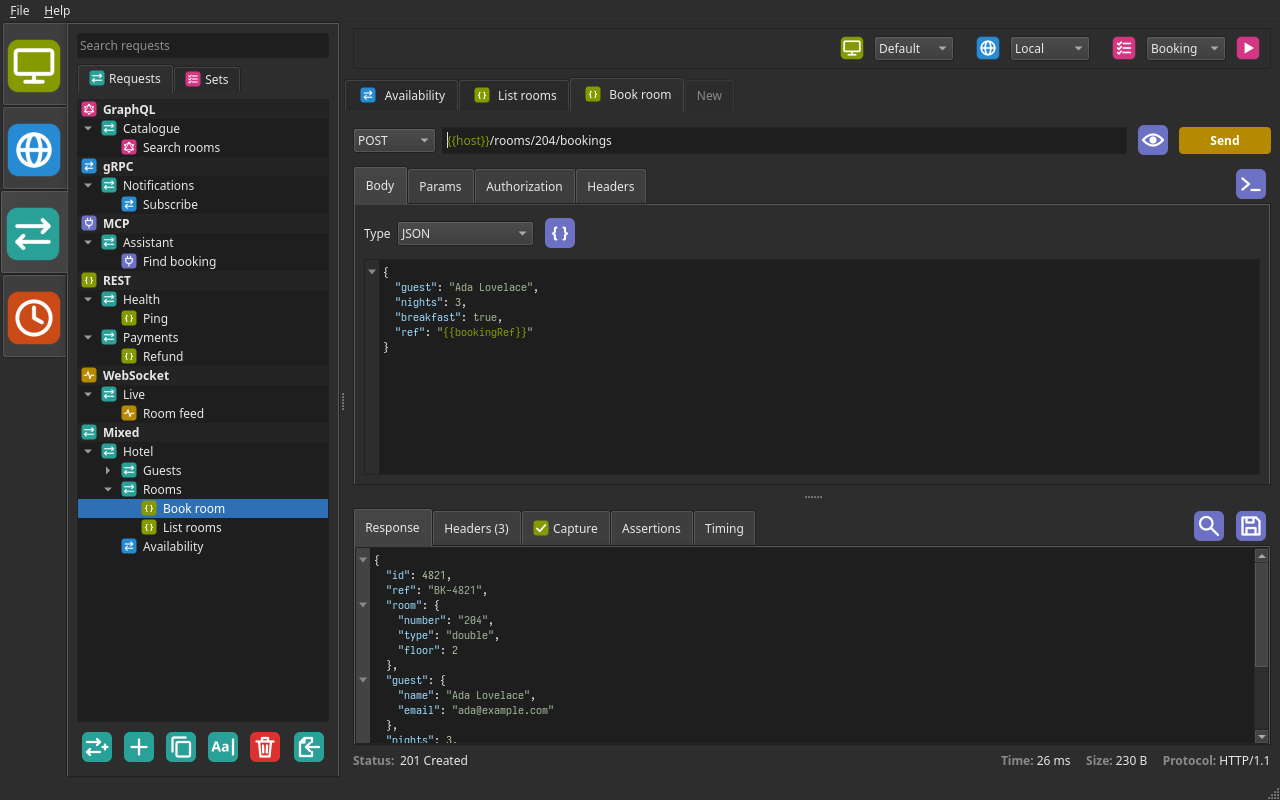
A desktop client for making REST API, GraphQL and gRPC calls, calling the tools of MCP servers and talking to WebSocket servers. It is written in Go with a Qt 6 interface using the qute bindings, for Linux.
{{placeholder}} the environment
does not define, or defines as nothing, is red wherever it is used, in the
cells of tables and the password of basic authorization too, before the
request is sent.REST
{{placeholders}} in it as they are.curl command, with the environment's variables
filled in, to copy and run in a terminal, or run it from TriggerAPI with the
installed curl and see the response as usual.curl command, such as one copied from a browser's developer
tools, into the URL field of a new request that is not saved yet, and it
becomes the request: its method, address, params, headers, authorization
and body. The type of the body comes from its Content-Type header, which
is then not listed with the headers if it is the one that type sends
anyway, and a bearer Authorization header becomes the authorization.
Options that only say how curl runs (-s, -L, -o, ...) are left out,
and a command which sends a file or a multipart form is refused.Content-Type: text/event-stream), as
the APIs of language models stream their answers, is shown as it comes:
each event with when it came, its type and its ID, followed as it grows.
The bar beneath says whether the stream is open, has ended or was stopped,
how many events there were and how long the first took. The time limit of
the settings is on the headers alone, so a stream can stay open as long as
the server keeps it; Cancel stops it, keeping what had come. Values are
captured from the data of the last event, and Save writes the stream as it
was received. GraphQL responses are shown the same way.gRPC
GraphQL
{"id": {{id}}}. A Format button
sets out the variables.MCP
WebSocket
ws:// or wss://, which is assumed when
there is no scheme), with headers and basic, bearer or OAuth 2.0 authorization on the
handshake. The connection stays open until Disconnect is pressed, the
server closes it or another request is shown.Responses
How a request went is shown beneath its response: the status, any error, and the time it took, with the size and protocol of an HTTP response (and whether a stream of events is open, how many events there were and when the first came), the number of messages of a gRPC call, or the server and protocol version of an MCP call. Failures are in red. The headers of the response, and the trailers of a gRPC call, are in a tab of their own.
The Timing tab of a REST, GraphQL or gRPC response shows where the time went: the redirects, DNS lookup, TCP connect, TLS handshake, sending the request, waiting for the first byte of the response (mostly the server's own time) and downloading it, each with a bar on the time of the whole (in a colour of its own, chosen in the settings), and in a panel beneath, the server's address, whether the connection was new or reused, and the TLS version and cipher. A request run with curl gives the times curl measures; after a redirect, curl adds up the times of each request, so only the redirects, the wait and the download are shown. For a gRPC call, sending is that of every message, and the download from the response's headers to the end of the call.
Capture values from a response into variables of the selected environment,
such as a token from a login to use in later requests. The Capture tab of
the response lists the variables to set, each with the path of its value in
the JSON of the response, such as data.items[0].id, and optionally a
regex to keep only part of that value: what the regex matches, or what its
first group matches if it has one. A tick or a cross on the tab and against
each variable shows whether it was captured.
Right-click a value in a JSON response and choose Capture to add the variable for it, with its path filled in.
Check that a response is what it should be with assertions, listed on the Assertions tab of the response of every REST, GraphQL, gRPC and MCP request and saved with it. Each row checks one thing: the status, the time in milliseconds, a header (named in the path column), a value in the body (by the same paths as captures; with no path, the whole body, as text if it is not JSON) or the size of the body in bytes. It compares it in one of these ways:
1 equals
1.0; an object or array as JSON, so spacing does not matter; anything
else as text, with null for null. The status is compared ignoring
case, by any name it goes by: an HTTP status by its code (200) or its
status line (200 OK), a gRPC status by its name (NOT_FOUND) or code
(5), and an MCP call by its outcome (OK, Tool error, or the code
and name of a JSON-RPC error).{{placeholders}} in the value are replaced when the response comes, after
any values have been captured from it. Every response is checked, an error
status too, but nothing is when there is no response at all. A tick or a
cross on the tab and against each row shows how it went, with why a check
failed beside it, and the results are kept in the history. Right-click a
value in a JSON response and choose Assert to add a check that it equals
what it is.
JSON bodies, messages, arguments and responses are syntax highlighted, and their objects and arrays can be folded.
Find text in a response with Ctrl+F, or the button beside its tabs: every match is marked and counted, and Enter and Shift+Enter go from one to the next.
Save the body of a response to a file. JSON is saved formatted. The name
offered for the file is that of the request and the time, such as
book_room_20261011_173005_resp.json, in lower case with underscores for
anything that is not a letter or a digit. For a response opened from the
history, they are the name of the request it was sent as and the time it
was received.
History
{{placeholders}}, and
where it went with them filled in; the values of the other placeholders,
which are often secrets, are not kept.meld or kdiff3, with the compare button beside
the remove button. The tool is set under History in File > Settings as a
command, to which the files to compare are added, oldest first: each holds
the body of a response as it is shown, or the error there was instead. The
command is run as it is written, not by a shell, so quote a word with
spaces in it. The files are written to a temporary folder that only you
can read, and deleted when TriggerAPI closes.Organising requests
{{token}} bearer token otherwise.Environments
{{name}} placeholders. Environments exported from Postman can be imported.Settings
File > Settings has five tabs:
The size and layout of the window are remembered between runs. Folders of requests all start closed; choosing a request's tab opens the folders it is in.
A variable whose value is one of these functions, and nothing else, is given a freshly generated value each time a request is sent. Within one request the value is the same everywhere the variable is used.
| Value | Generates | Example |
|---|---|---|
random_uuid() |
A random UUID | 3f2b8c1e-9a4d-4e7b-b1c6-5d8e2f0a7c94 |
random_int() |
A random whole number from 0 to 1000 | 417 |
random_int(10) |
A random whole number from 0 to that number | 7 |
random_int(5, 9) |
A random whole number from the first number to the second | 6 |
iso_date() |
Today's date | 2026-10-11 |
iso_date(1) |
The date that many days from today | 2026-10-12 |
iso_timestamp() |
The time now, in UTC | 2026-10-11T15:04:05Z |
iso_timestamp(2) |
The same time that many days from now | 2026-10-13T15:04:05Z |
unix_timestamp() |
The time now, in seconds since 1970 | 1791731045 |
unix_timestamp(2) |
The same time that many days from now | 1791903845 |
base64(text) |
The text in base64 | base64({{user}}:{{password}}) gives YW5uOnNlY3JldA== |
sha256(text) |
The SHA-256 hash of the text, in lower case hex | sha256(abc) gives ba7816bf…20015ad |
The number of days can be negative, so iso_date(-1) is yesterday. Dates are
in the local time zone and timestamps in UTC. Both ends of the range of
random_int are included.
The text of base64 and sha256 is everything between the brackets, as it is
written, spaces included. Placeholders in it are replaced with the other
variables of the environment, including ones that are themselves functions,
so a variable signature set to sha256({{request_id}}{{secret}}) hashes the
same UUID that {{request_id}} puts in the request. A variable whose text
needs its own value, directly or through others, keeps that placeholder as it
is. The value of a variable that is not a function is used as it is written,
placeholders and all.
For example, with a variable request_id set to random_uuid(), a header of
X-Request-Id: {{request_id}} carries a new UUID on every request.
A function is only recognised when it is the whole value: id-random_uuid()
is used as it is written. To put a generated value inside other text, do it
where the variable is used, as in id-{{request_id}}.
A function can also be written straight into a request, as a placeholder:
X-Request-Id: {{random_uuid()}}. It works with no environment active, and
each place it is written gets its own value, so {{random_uuid()}} in a
header and in the body sends two different UUIDs. To send the same value in
several places, use a variable. A variable named like a call is the variable.
The text of base64 or sha256 written this way cannot hold placeholders
({{base64({{user}})}} does not work); give it to a variable instead.
Choose OAuth 2.0 as the type of authorization, of a request of any kind, and TriggerAPI gets the access token and sends it as a bearer token. Every field can hold placeholders, so the client ID and secret can be kept in an environment.
| Grant | Fields it uses | What you do |
|---|---|---|
| Client Credentials | Token URL, client ID and secret | Nothing |
| Authorization Code (PKCE) | Authorization URL and token URL, client ID, and the secret if the client has one | Sign in once, in your browser |
| Device Code | Device authorization URL and token URL, client ID | Enter the code shown, at the page opened in your browser |
audience=https://api.example.com for Auth0 or
resource=https://api.example.com for Entra ID.Authorization header, in the body, or Detect,
which tries the header and then the body.http://127.0.0.1/callback on a free port, unless the
Redirect URL says otherwise: it must be http to 127.0.0.1, [::1] or
localhost, with a port if the server only accepts the one you registered
with it. The token is got with PKCE (S256) and checked against the state
sent.Anywhere
| Keys | Does |
|---|---|
| Ctrl+Return | Send the REST or GraphQL request, invoke the gRPC method or call the MCP tool, resource or prompt. While one is in flight, cancel it. For a WebSocket request, send the message, connecting first if need be. |
| Ctrl+W, Ctrl+E, Ctrl+R, Ctrl+H | Go to the Workspaces, Environments, Requests or History tab of the sidebar, with the keyboard in its list (Ctrl+R shows the requests, not the sets). |
| Ctrl+S | Go to the request sets in the sidebar, with the keyboard in their list. |
| Ctrl+P | Go to the search of the Requests tab, to find a request and open it. |
| Ctrl+F | Find text in the response. |
| Escape | Close the environment editor, or else the search of the response, the curl command or the URL preview. |
| Ctrl+, | Open the settings. |
| Ctrl+I | Show the about box, with the version of the program. |
| Ctrl+Q | Quit. |
Sending
| Keys | Where | Does |
|---|---|---|
| Return | The URL of a REST request | Take in what was typed: the params and the preview follow it, and it is saved. It does not send the request; Ctrl+Return does. |
The sidebar
| Keys | Where | Does |
|---|---|---|
| F2 | A workspace, a folder or a request | Rename it, as the rename button does. |
| F2 | An environment | Edit it, as the edit button does, with the keyboard in its name. |
| Ctrl+C | A folder, a request or an environment | Copy it, to paste in this workspace or another. Nothing is put on the system clipboard. |
| Ctrl+V | The tree of requests or the list of environments | Paste what was copied there. |
Finding and opening a request
| Keys | Where | Does |
|---|---|---|
| Return | The search box | Go to the tree, at the first request found, or with the sets shown to the first set found. |
| Return | The list of sets | Choose the set, replacing the tabs with its own. |
| Up, Down | The tree | Move to the item above or below, without opening it. |
| Left | The tree | Close the folder, or go to the folder an item is in. |
| Right | The tree | Open the folder, or go to the first item in it. |
| Return | The tree | Open the request, in the tab it is pinned in or else the tab that is not pinned. On a folder, open or close it. |
The history
| Keys | Where | Does |
|---|---|---|
| Return | The search box | Go to the first entry found, without opening it. |
| Up, Down | The history | Move to the entry above or below, passing over the headings, without opening it. |
| Left, Right | The history | Close or open the day of the entry. |
| Return | The history | Open the entry. |
| Space | The history | Tick or untick the entry. |
| Delete | The history | Remove the ticked entries, or the entry if none is ticked. |
Completing a GraphQL query or a gRPC message
| Keys | Does |
|---|---|
| Ctrl+Space | Show what can be typed at the cursor. A name, or for a gRPC message a quote, shows it as it is typed. |
| Up, Down | Choose in the list. |
| Return, Tab | Type what is chosen, in place of what has been typed of it. |
| Escape | Close the list, as typing anything that does not match does. |
Finding text in a response
| Keys | Does |
|---|---|
| Return | Go to the next match. |
| Shift+Return | Go to the previous match. |
| Escape | Close the search. |
Editing text works as it does elsewhere on the system. Ctrl+Z, for one, undoes the formatting of a JSON body.
TriggerAPI is for Linux.
Building needs:
pkg-configThe Qt bindings, qute, are made from the headers of Qt 6.12 and do not build with an older Qt. Install them with your distribution's package manager where it has Qt 6.12 or later:
# Arch, CachyOS, Manjaro
sudo pacman -S go gcc pkgconf qt6-base

# Fedora
sudo dnf install golang gcc-c++ pkgconf-pkg-config qt6-qtbase-devel

# openSUSE Tumbleweed
sudo zypper install go gcc-c++ pkgconf-pkg-config qt6-base-devel
Where it has an older Qt, as Debian and Ubuntu do, install Qt's own build of
Qt 6.12 (with the Qt online installer
or aqtinstall, as the AppImage
workflow does) and point pkg-config at it:
sudo apt install golang-go build-essential pkg-config libgl1-mesa-dev
pipx run aqtinstall install-qt linux desktop 6.12.0 linux_gcc_64 --outputdir ~/Qt
export PKG_CONFIG_PATH=~/Qt/6.12.0/gcc_64/lib/pkgconfig
export LD_LIBRARY_PATH=~/Qt/6.12.0/gcc_64/lib
If your distribution's Go is older than 1.27, install Go from go.dev/dl instead.
Running a built binary on another machine only needs the Qt 6.12 runtime
libraries (qt6-base on Arch, qt6-qtbase on Fedora, libQt6Widgets6 on
openSUSE), or the AppImage, which has them inside it.
Check that Qt can be found with:
pkg-config --modversion Qt6Widgets
This should print 6.12 or later.
make build
This is the same as:
go build -ldflags "-s -w -X github.com/nomad-software/triggerapi/internal/ui.version=$(git describe --tags --abbrev=0)" -o triggerapi .
The -s -w flags build without the symbol table and debug information, which
roughly halves the size of the binary, to about 46 MB. The -X flag gives the
about box the tag the commit is, or follows; a build without it says dev.
The first build compiles the Qt bindings and takes a few minutes. Later builds use the Go build cache and take a few seconds.
make test runs the tests, which need no display, and make bench the
benchmarks of the user interface (making the window, drawing the request
tree and the history, searching the tree, showing a large JSON response,
switching requests and drawing icons), five runs of each, to compare with
benchstat.
Releases for Linux are an AppImage: one file with TriggerAPI and the Qt libraries it needs inside it, which runs without installing anything.
chmod +x TriggerAPI-*-x86_64.AppImage
./TriggerAPI-*-x86_64.AppImage
It is built by a GitHub workflow (.github/workflows/appimage.yml), which runs
packaging/appimage.sh on Ubuntu 22.04 with Qt's own build of Qt 6.12:
v builds it and attaches it to a release of
that name: git tag v1.0.0 && git push origin v1.0.0.It runs under both X11 and Wayland, using Wayland where the session is one.
To use the other, set QT_QPA_PLATFORM to xcb or wayland when starting
it.
On GNOME it takes its colours, light or dark, from the desktop, unless a light or dark theme is chosen in the settings, through Qt's GTK theme plugin, which is in the AppImage. GTK itself is not, and is the desktop's own.
The C library of the system (glibc) is not put in the AppImage, as it cannot
be reliably: it has to match the system's graphics drivers. It is built on an
old distribution instead, and runs on any with glibc 2.35 or later (Ubuntu
22.04, Debian 12, Fedora 36 and anything newer, or rolling). curl, which the
Execute button of the curl command uses, is not in it either.
make appimage runs the same script locally, but an AppImage built on a newer
system only runs on systems at least as new. It is built in a folder of its
own in /tmp, which is removed afterwards, and only the AppImage is left, in
the folder of the project.
A gRPC request needs a server with
server reflection turned on. Enter
its address as host:port and the methods it has are loaded into the method
list. Tick TLS, or use a grpcs:// or https:// address, for a server that
uses TLS.
Unary and server-streaming methods are supported. The responses of a streaming
method are shown together once the call ends or is cancelled. Loading service
definitions from .proto files is not supported yet.
The Service Definitions tab of a gRPC request lists every endpoint of the server, by name, under a heading for each service.
On a server with many endpoints, type in the search box above the list to narrow it. Something is found when every word typed is in the name of the endpoint or of its service. Select All and Select None then act on what is shown, and an endpoint that is ticked stays ticked when a search hides it.
A folder named after the server address is added to the Requests tab, with a folder inside it for each service and a request in that for each endpoint ticked. Each request has the server address and its method, and no message: open it and use Use Example Message to fill one in.
To add endpoints later, open any request in those folders. The endpoints there are requests for already are ticked and cannot be unticked. Tick others and click Update Requests, and they are added to the same folders. Only the folders the open request is in are changed, and requests are only removed in the sidebar.
Which endpoints there are requests for is worked out from the names of the service folders and the method each request calls, so the outer folder and the requests can be renamed freely.
An MCP request talks to a server over the Streamable HTTP transport: enter
the address of its endpoint, such as http://localhost:8000/mcp. The tools,
resources and prompts it has are loaded into the list beside it; Reload asks
again.
Since protocol version 2026-07-28 MCP is stateless and sessions are
deprecated: TriggerAPI asks the server what it has with server/discover
and sends its protocol version with every request. A server from before then
is still supported: it is given the older initialize handshake, and the
session it hands out is kept for the calls that follow, until a request for
another server is opened or TriggerAPI is closed, and begun again if the
server ends it. The protocol version agreed is shown beneath each response.
The stdio transport, in which the client starts the server as a program, is not supported on purpose: TriggerAPI never runs anything, so a request someone shares with you cannot run a program on your machine. To use a server that only speaks stdio, run it behind a bridge yourself, in a terminal, and point TriggerAPI at the address of the bridge. For example, with supergateway:
npx -y supergateway --stdio "npx -y @modelcontextprotocol/server-everything" \
  --outputTransport streamableHttp --port 8000
then use http://localhost:8000/mcp. Many servers can also serve Streamable
HTTP themselves; look for a --transport or --port option. The older
HTTP+SSE transport is not supported.
The Capabilities tab works as the Service Definitions tab of a gRPC request (see Creating requests from a server), with a folder for each of Tools, Resources and Prompts.
While a call is under way the server can send its progress and log messages, which the Events tab of the response lists with when each came, and ask things of the client. TriggerAPI asks for every message logged, and gives each call a progress token. A stateless server asks by answering a call with what it needs, and is called again with the answers; an older one asks through its session. Either way TriggerAPI asks you:
* has to be
filled in, and numbers and lengths are checked against what the server
allows. Accept sends what is filled in, Decline says no, and Cancel, or
closing the dialog, says that you did not answer. A request to go to a page
instead is declined.Sampling and logging are deprecated since protocol version 2026-07-28, but servers still use them while they are. A dialog is closed, unanswered, if the call is cancelled or another request is shown, and the time it is open counts towards the time limit of the settings.
./triggerapi
On Linux, every time it starts TriggerAPI writes a desktop entry for itself,
~/.local/share/applications/triggerapi.desktop (or under $XDG_DATA_HOME),
with its icon in ~/.local/share/icons/hicolor/256x256/apps/triggerapi.png.
That puts it among the desktop's applications, to be started from the menu
and kept in a dock or sidebar. The entry starts the copy that was run last,
from wherever it was and whatever it is called: the AppImage, if it was run
as one, and otherwise the program itself. It is only rewritten when that
changes. Delete the two files to take it out of the menu again; they come
back the next time TriggerAPI is run.
Only one copy of TriggerAPI runs at a time. Starting it again while it runs
(from the desktop's menu, or ./triggerapi) brings the window there is to the
front, even if it was minimised, and the new copy leaves at once. The copy
that runs holds a lock, triggerapi.lock, and listens on a socket,
triggerapi.sock, in $XDG_RUNTIME_DIR (or a folder of your own,
triggerapi-<uid>, in the temporary folder); the system lets go of the lock
if the program dies, and the next copy clears the socket away. Under Wayland
the new copy hands on the desktop's activation token, without which the
window would only ask for attention.
TriggerAPI keeps its data as JSON files.
The settings are kept where the system keeps the configuration of programs:
~/.config/triggerapi/settings.json (or under $XDG_CONFIG_HOME).
They hold the window size and layout, the code font, colours, the time limit of requests and whether redirects are followed, how much history is kept, the workspaces folder, the paths of the encryption keys and the workspace in use.
The workspaces are kept, by default, where the system keeps the data of
programs: ~/.local/share/triggerapi/workspaces (or under $XDG_DATA_HOME).
| Path in it | Contents |
|---|---|
<name>/environments.json |
The environments of a workspace and their variables |
<name>/requests.json |
The saved requests of a workspace and their folders |
<name>/history.json |
The requests sent from a workspace and their responses |
Each workspace has its own environments, requests and history, and is a folder named after it inside the workspaces folder. Workspaces are added, renamed and removed in the Workspaces tab of the sidebar; the selected one is the one in use. The workspaces folder can be kept elsewhere, such as a folder that is synced or shared, by choosing its location in File > Settings.
Changes are saved as they are made: what is typed into a field once the field is finished with (Return, or moving to anything else), and before a request is sent, another is opened or TriggerAPI is closed. The files are encrypted and written in the background, and everything waiting is written before TriggerAPI closes. Every file is replaced atomically and flushed to the disk first, so a crash or a power cut leaves it as it was or as it was to be, never half written. The files of the workspaces are encrypted, and they and the settings file can be read and written only by the user who runs TriggerAPI.
The environments, requests and history of every workspace are encrypted with a pair
of SSH keys, using age. Give the files of
the public and the private key (Ed25519 or RSA, such as
~/.ssh/id_ed25519.pub and ~/.ssh/id_ed25519) under Encryption in the
Workspaces tab of File > Settings. The settings hold the paths of the keys, not
the keys.
The settings file itself is not encrypted. Keep a copy of the private key: without it the files cannot be recovered.
Workspaces are given to someone else, and taken from them, under Import and export in the Workspaces tab of File > Settings.
In the zip file each workspace is a folder named after it, holding its
environments.json and requests.json. The history is not exported.
The Network tab of the settings says how every kind of request (REST, GraphQL, gRPC, WebSocket and MCP, and the curl command) reaches its server. These settings belong to the computer, not to a workspace, so nothing shared or imported can change them.
HTTP_PROXY, HTTPS_PROXY and
NO_PROXY, the default), none, or a proxy of your own (http, https or
socks5). A proxy can name a user, as in http://gary@proxy:3128; its
password is asked for once a session and never saved. The hosts under Not
for, and the hosts inside them, are reached directly.*.name for
any name inside it, or * for every one, and a request uses the most
particular host that matches its own. Each can have:.p12 or .pfx) holding
both. The passphrase of an encrypted key or PKCS #12 file is asked for
once a session, or again if it was wrong, and never saved. An encrypted PKCS #8 key cannot be read;
put it in a PKCS #12 file with
openssl pkcs12 -export -in cert.pem -inkey key.pem -out client.p12;--connect-to.Paths can start with ~. A failure to reach a server says what may be done
about it, such as trusting the authority of its certificate. The curl
command has the same options (--proxy, --noproxy, --tlsv1.3,
--cacert, --cert, --key, --insecure and --connect-to), and a
passphrase or password is given to curl on its standard input, never as an
argument or in the command shown. The Timing tab of a response shows the
proxy it went through.
make test
The interface tests run Qt offscreen, so they do not need a display.
The concurrent code is tested for data races with Go's race detector, which the first time builds the Qt bindings again and takes several minutes:
go test -race ./... -timeout 600s
The screenshot at the top of this file is drawn by a test, from sample requests in the dark theme, and is made again with:
make screenshot
test/mcpserver is a small MCP server to try MCP requests against by hand.
Start it with:
make mcp-server
and give an MCP request the address http://localhost:8000/mcp. It has the
tools add, echo, headers (which lists the headers the call came with,
to check headers, authorization and placeholders), time and fail (which
always reports an error), the resources sample://readme and
sample://config, and the prompt review. It logs every call it is given.
Other tools send what a server can while a call is under way: progress
works through a number of steps ({"steps": 10, "delay": 1000}, a delay in
milliseconds), sending its progress and logging each step, log logs a
message at every level, book_flight asks for a form with a field of every
kind, confirm_delete asks for a form with no fields, and summarise asks
for the message of a language model.
| Option | Does |
|---|---|
ARGS="-token secret" |
Refuse requests without Authorization: Bearer secret |
ARGS="-legacy" |
Behave as a server from before protocol version 2026-07-28, with sessions |
ARGS="-addr localhost:9000" |
Listen elsewhere |
test/grpcserver is a small gRPC server, described through reflection, to
try gRPC requests against by hand. Start it with:
make grpc-server
and give a gRPC request the address localhost:50051, without TLS. Its
service, sample.v1.Demo, has a method of every kind: Say (unary),
Countdown (server streaming, {"from": 5, "delayMs": 300}), Sum
(client streaming: send it numbers, [{"value": 1}, {"value": 2}]), Chat
(bidirectional, answering each message) and Fail. It logs every call.
test/restserver is a small HTTP server to try streams of server-sent
events against by hand. Start it with:
make rest-server
and open http://localhost:8001/ to see its endpoints. /events sends a
number of events and ends (?count=20&interval=200ms), /clock never ends,
/broken breaks off part way, /slow takes its time to answer
(?delay=10s), and /json answers as an ordinary API does. POST
{"messages": [{"role": "user", "content": "Hello"}], "stream": true} to
/v1/chat/completions or /v1/messages to have it answered a word at a
time, as OpenAI's API and Anthropic's Messages API stream. It logs every
request it is given; ARGS="-addr localhost:9001" has it listen elsewhere.
TriggerAPI is free software, licensed under the GNU General Public License, version 3.
nomad-software/triggerapi is a public repo on GitHub by nomad-software. A desktop client for making REST API, GraphQL and gRPC calls, calling the tools of MCP servers and talking to WebSocket servers.
It declares the GPL-3.0 license on GitHub.
Its maker has not tagged a system, so it is unknown here. Its README says what it needs.
Open "Take it" on its page: Take My Repo writes an install plan for your machine and hands it to your AI agent (Claude Code, Codex or Cursor), which asks you before each step. Take My Repo has not tested it on any machine.
Its last change on GitHub was on 2026-11-22. Take My Repo does not judge from that whether it is maintained.
Nobody has reviewed it on Take My Repo yet, which says nothing about its quality.
Open-Source API Development Ecosystem • https://hoppscotch.io • Offline, On-Prem & Cloud • Web, Desktop & CLI • Open-Source Alternative to Postman, Insomnia
Opensource IDE For Exploring and Testing API's (lightweight alternative to Postman/Insomnia)
Your go-to microservice framework for any situation, from the creator of Netty et al. You can build any type of microservice leveraging your favorite technologies, including gRPC, Thrift, Kotlin, Retrofit, Reactive Streams, Spring Boot and Dropwizard.
Fair-code workflow automation platform with native AI capabilities. Combine visual building with custom code, self-host or cloud, 400+ integrations.
The industry-leading GraphQL client for TypeScript, JavaScript, React, Vue, Angular, and more. Apollo Client delivers powerful caching, intuitive APIs, and comprehensive developer tools to accelerate your app development.
Fast, native API client for REST, gRPC, WebSocket and GraphQL. A local-first Postman alternative written in Go: no Electron, no account, no cloud.