
openmacfuse
Open-source FUSE 2.x library for macOS with no kernel extension: an in-process NFSv4.0 server. The mount engine of NTFSTool Pro.
- 0
- MIT
- 6 d ago
Repo ntfstool/openmacfuse, read from GitHub 5 h ago. ntfstool has not joined Take My Repo.
In short
ntfstool/openmacfuse is a public repo on GitHub by ntfstool. Open-source FUSE 2.x library for macOS with no kernel extension: an in-process NFSv4.0 server. The mount engine of NTFSTool Pro. It declares the MIT license on GitHub. It is written mainly in C, has 0 stars and last changed on 2026-11-18. Nobody has reviewed it on Take My Repo yet, which says nothing about its quality. Read from GitHub on 2026-11-23.
Similar repos
seaweedfs
SeaweedFS is a distributed storage system for object storage (S3), file systems, Iceberg table buckets, and Lance vector buckets, designed to handle billions of files with O(1) disk access and effortless horizontal scaling.

OpenMacFUSE
English | 简体中文 | 日本語 | Deutsch | Français | Español
A FUSE 2.x compatible library for macOS that needs no kernel extension and nothing to install.
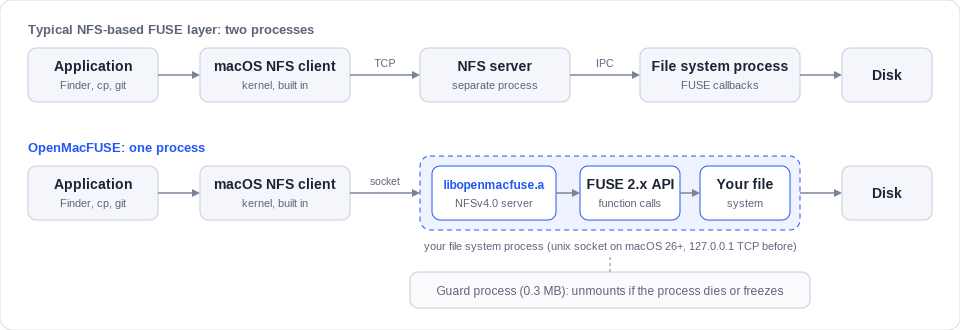
OpenMacFUSE runs an NFSv4.0 server inside your file system process and mounts it with the NFS client that ships with macOS. Your fuse_operations callbacks stay the same; you link one static library, libopenmacfuse.a, instead of a FUSE library.
It is the mount engine built into NTFSTool Pro, where it carries NTFS, ext2/3/4, exFAT and BitLocker volumes. It was written for a shipping product, and the measurements below come from that work.
Status: v0.9 preview. Fully tested on macOS 12 (Intel) and macOS 27 (Apple silicon). macOS 13 to 26 are untested. See Tested systems.
Why
Since macOS 11, a third-party kernel extension only loads after the user lowers the security level in recovery mode. For software aimed at ordinary users that is no longer a realistic requirement. A user-space file system can instead be reached through the NFS client that macOS already has: run an NFS server on the same machine, translate each NFS request into a file system call, and mount it with mount_nfs.
OpenMacFUSE takes that route and puts the whole server inside the file system process:
- Nothing to install. No kernel extension, no system extension, no installer, no Reduced Security on Apple silicon. One static library.
- One process. The NFS server and the file system share an address space. A request goes from the protocol decoder to your callback as a function call, with no second process and no extra copy.
- Bounded memory. Fixed buffer pool, capped node table, capped directory snapshots. Memory does not grow with file size, file count or uptime.
- Fails closed. If the device disappears, the process hangs, or it is killed, the mount is taken down within seconds instead of leaving applications blocked on a dead volume.
- Mac semantics handled in the library. Extended attributes without
._files on the volume, case-insensitive lookup, NFC/NFD file names. - Clean-room C. About 17,000 lines, written from RFC 7530, 7531, 5531 and 4506 and the public FUSE 2.x API. No third-party code. MIT.
Measurements
All numbers were measured by the NTFSTool engineering team. The same FUSE file system source (the NTFS driver from NTFSTool Pro) was built twice, once against OpenMacFUSE and once against FUSE-T 1.0.49, and run on the same machine with the same volume image. Method, machines and the full tables are in docs/BENCHMARKS.md.
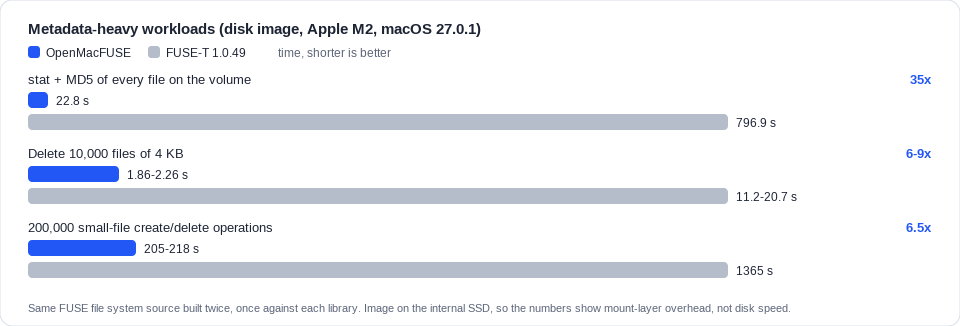
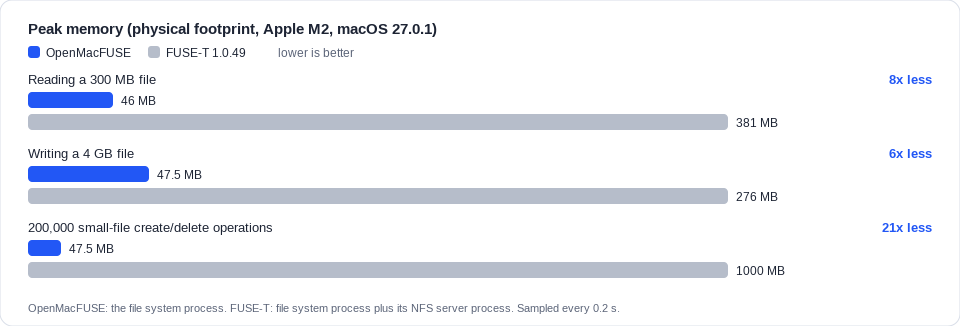
On real USB disks, large sequential transfers are limited by the disk and the two are level:
| Real disk | OpenMacFUSE | FUSE-T 1.0.49 |
|---|---|---|
| USB SSD, sequential write 4.5 GB | 293-313 MB/s | 300 MB/s |
| USB SSD, cold read | 245-251 MB/s | 236-241 MB/s |
| USB SSD, delete 2,000 small files | 0.82-0.86 s | 8.4-9.7 s |
| USB SSD, walk the directory tree | 0.25-0.30 s | 4.1-4.6 s |
| USB hard disk, write / read | 70 / 97 MB/s | 74 / 93 MB/s |
Small-file creation is not listed: the default durability setting of the file system changed after these runs and that comparison has not been repeated.
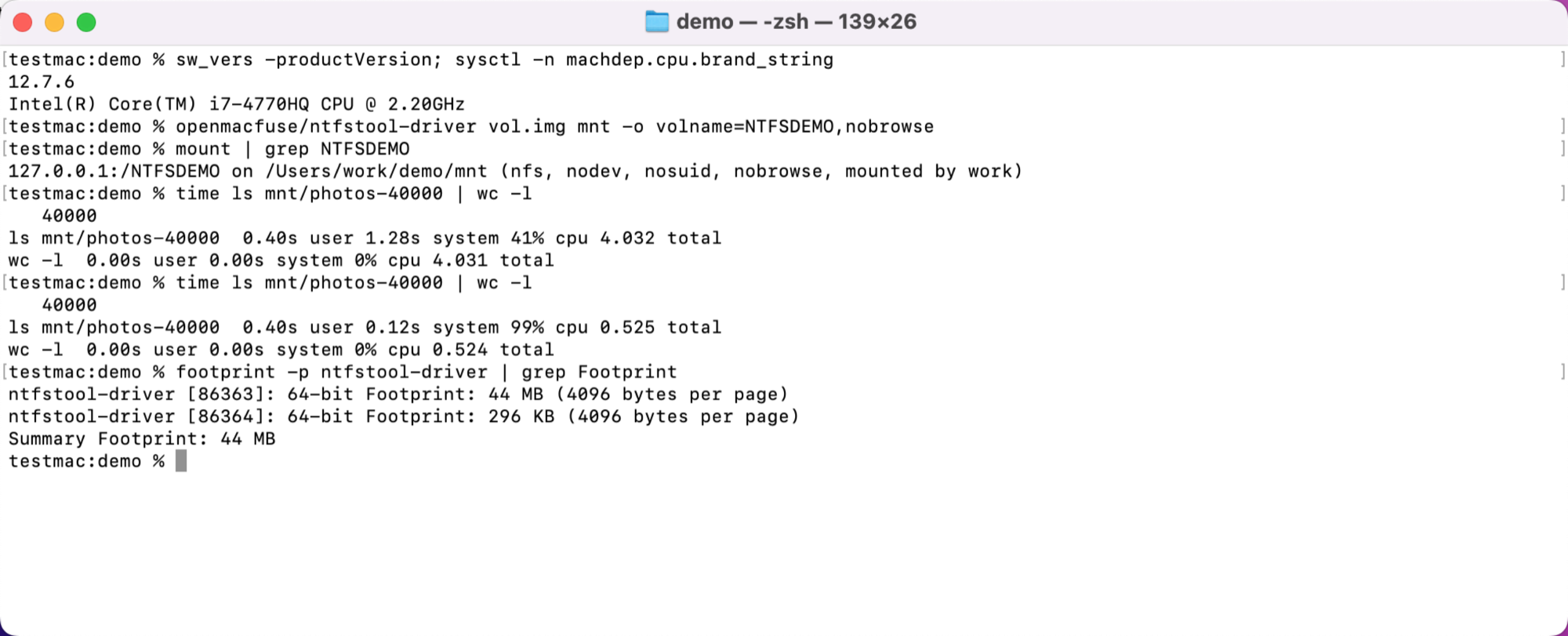
The same volume image mounted on an Intel Mac running macOS 12.7.6, listing a directory of 40,000 files and then reading the memory footprint of the mount processes:
| OpenMacFUSE | FUSE-T 1.0.49 |
|---|---|
 |
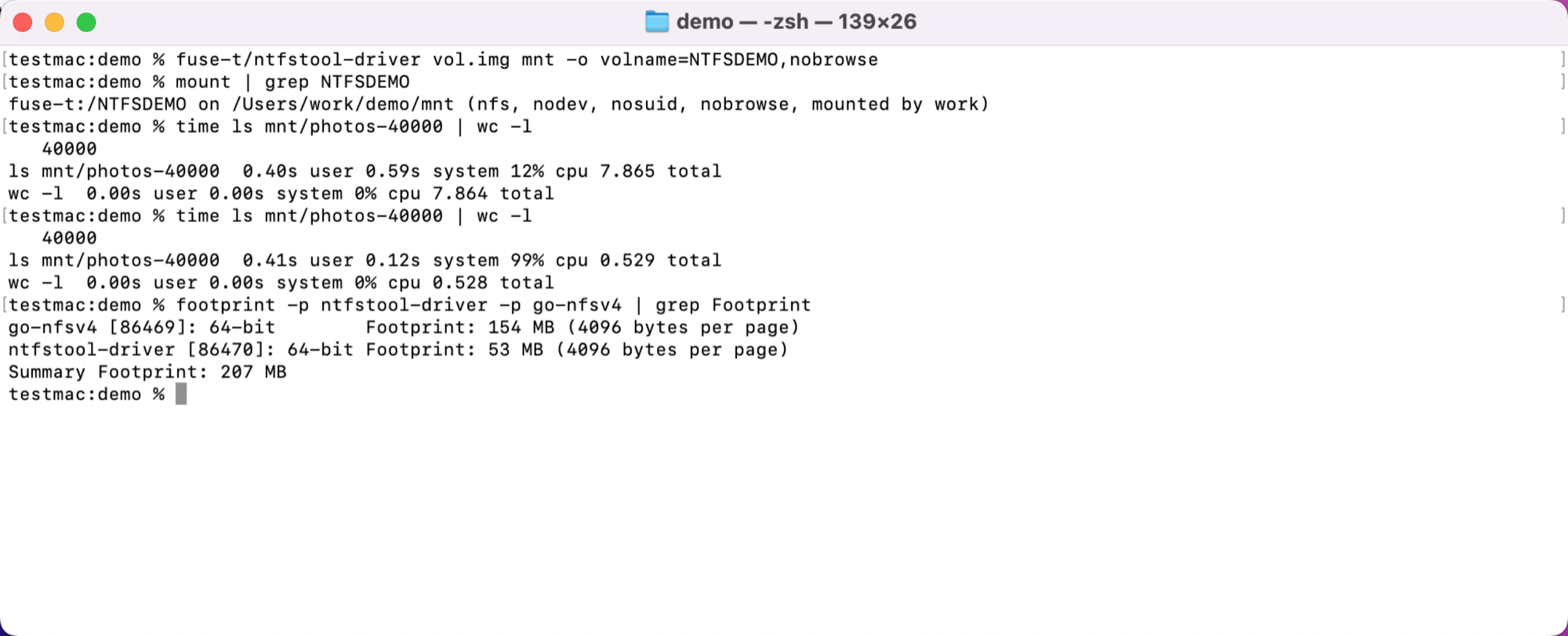 |
| first listing 4.03 s, footprint 44 MB | first listing 7.87 s, footprint 207 MB |
When things go wrong
| Event | What happens |
|---|---|
| Disk unplugged during a write | the writer gets an error and the mount is gone in 0.2-0.5 s |
| Disk unplugged while idle or reading | unmounted in about 1.2-1.4 s |
| A request makes no progress for 30 s | watchdog fails pending requests, force-unmounts, exits |
| File system process crashes or is killed | guard process removes the mount in about 2 s |
| Six hours of continuous mixed load | memory 45 MB at start, 51 MB at the end (+0.27 MB/hour) |
Without a guard, a dead NFS server leaves the mount in place until the client's deadtimeout expires (about 70 s), and processes touching it cannot be interrupted in the meantime.
Quick start
Requirements: macOS with the Xcode Command Line Tools. Nothing else.
git clone https://github.com/ntfstool/openmacfuse
cd openmacfuse
make              # build/libopenmacfuse.a (+ build/openmacfuse-m0, an in-memory test server)
make universal    # arm64 + x86_64
make -C examples/hello
mkdir -p /tmp/hello && examples/hello/hello /tmp/hello
cat /tmp/hello/hello.txt      # Hello from openmacfuse
umount /tmp/hello             # hello exits after the unmount
The first mount may trigger the macOS "network volumes" permission prompt for the calling app. That is expected: it is an NFS mount.
Using it in your file system
#define FUSE_USE_VERSION 26
#include <fuse.h>
cc -I/path/to/openmacfuse/include -c myfs.c
cc -o myfs myfs.o /path/to/openmacfuse/build/libopenmacfuse.a \
   -lpthread -framework CoreFoundation -framework IOKit
Both styles of the FUSE 2.x high-level API work:
fuse_main(argc, argv, &ops, NULL)
fuse_mount → fuse_new → fuse_set_signal_handlers → [daemon()] → fuse_loop → fuse_unmount → fuse_destroy
The mount is complete when fuse_new returns. fuse_loop returns after the volume is unmounted, after the device is reported lost, or on SIGINT/SIGTERM/SIGHUP.
examples/hello/hello.c is a complete read-only file system in under 150 lines. A file system becomes read-write when it provides a write callback and is not mounted with -o ro.
Two things your file system must do
- Return a stable, unique
st_inofromgetattrfor every object. NFS file handles are built from inode numbers. If your file system leavesst_inoat zero, the library assigns stable numbers by path. - Make
fsyncmean what you wantCOMMITto mean. The library callsfsyncfor NFSCOMMITandFILE_SYNCwrites and has no other durability signal.
Mount options (-o)
| Option | Effect |
|---|---|
volname=NAME |
volume name shown by macOS |
ro / rdonly |
read-only mount |
rwsize=N |
NFS read/write size (default 262144) |
nobrowse |
do not show the volume in Finder |
nosuid, nodev, noexec |
passed to the mount |
openmacfuse_case=insensitive|sensitive |
case-insensitive lookup (default). Falls back to sensitive automatically when the volume already holds names that differ only by case |
openmacfuse_xattr=adfile|appledouble|streams |
where extended attributes go. adfile (default): the library turns the client's ._ files into calls to your setxattr/getxattr, so nothing extra is stored on the volume. appledouble: plain ._ files. streams: NFSv4 named attributes, experimental, see Known limitations |
openmacfuse_nfc=1|0 |
store new names in Unicode NFC (default 1). Lookup accepts NFC and NFD either way |
Common FUSE options (local, allow_other, fsname, …) are accepted and ignored. Programs that enter through fuse_main get conservative defaults (openmacfuse_xattr=appledouble, openmacfuse_case=sensitive) unless they pass these options.
Environment variables
| Variable | Default | Effect |
|---|---|---|
OPENMACFUSE_TRANSPORT |
auto |
unix, tcp, or auto (unix socket on macOS 26+, 127.0.0.1 TCP before) |
OPENMACFUSE_LOG |
— | append the log to this file |
OPENMACFUSE_WATCHDOG_S |
30 | seconds without progress before a request counts as hung; 0 disables |
OPENMACFUSE_WATCHDOG_MAX_S |
600 | hard limit for one request; 0 disables |
OPENMACFUSE_GUARD |
1 | 0 = do not start the guard process |
OPENMACFUSE_GUARD_S |
20 | seconds without a heartbeat before the guard treats the process as frozen |
OPENMACFUSE_MOUNT_TIMEOUT_S |
30 | mount_nfs timeout |
Optional extension callbacks (case folding, ranged xattr I/O, progress counter for the watchdog, mount information) are declared in include/openmacfuse.h.
How it works
macOS's NFS client is old, stable and always present. OpenMacFUSE speaks NFSv4.0 to it over a local unix socket (macOS 26 and later) or 127.0.0.1 TCP (earlier versions, where connections from other local processes are rejected), and translates each COMPOUND request into FUSE high-level callbacks.
A few decisions that shape its behaviour:
- Bounded node table. A file handle is not a pointer to an in-memory object. The table has a cap; an evicted handle is resolved again by path on next use. With the cap forced down to 64 entries and 301 renames in a row, 7,839 lookups of old handles all resolved and none returned
NFS4ERR_STALE. - Duplicate request cache. The client resends requests after a timeout. Replies to non-idempotent operations (
CREATE,REMOVE,RENAME, …) are cached and replayed, so the operation runs once. - No named attributes by default. NFSv4 named attributes are the natural home for extended attributes, but enabling them led to a kernel panic in the macOS NFS client during development (seen on macOS 27.0.1 and 12.7.6). The default path uses only what the client exercises most.
Design notes and protocol trade-offs: docs/DESIGN.md.
Tested systems
| macOS | Hardware | Result |
|---|---|---|
| 12.7.6 | Intel (MacBookPro11,4) | full suite, 869 automated checks pass |
| 27.0.1 | Apple silicon (M2) | read/write, simulated unplug, kill, Mac-semantics suite pass |
| 13, 14, 15, 26 | — | untested |
The full suite drives real file systems (NTFS, ext, exFAT) that are not part of this repository. What you can run from this repository:
make test               # unit tests, no mount
tests/m0_smoke.sh       # mount the in-memory server, read, unmount
Known limitations
- Untested macOS versions: 13, 14, 15, 26.
- The volume is a network volume to macOS. No Trash, and Finder's first open of a very large directory (40,000+ entries) is slow.
- A kernel panic in the macOS NFS client cannot be caught from user space. The two paths we hit during development (named attributes; interrupting a mount whose server does not answer) are avoided by default.
- API coverage: FUSE 2.x high-level API. Not provided: the low-level API, FUSE 3.
- Callbacks are serialised (one global lock). A slow request on a slow device delays other requests on the same mount.
- No inode generation numbers in FUSE 2.x: if your file system reuses inode numbers after delete, a client holding an old handle can reach the new file.
- File flags: hidden and archive pass through to your
chflagscallback. The Finder "Locked" flag (uchg) does not; the macOS NFS client rejects it without sending a request.
Related projects
Questions
What is openmacfuse?
ntfstool/openmacfuse is a public repo on GitHub by ntfstool. Open-source FUSE 2.x library for macOS with no kernel extension: an in-process NFSv4.0 server. The mount engine of NTFSTool Pro.
Is openmacfuse open source?
It declares the MIT license on GitHub.
Does openmacfuse run on macOS, Windows or Linux?
Its maker tagged it for macOS. That is declared by the maker; Take My Repo has not tested it.
How do I install openmacfuse?
Open "Take it" on its page: Take My Repo writes an install plan for your machine and hands it to your AI agent (Claude Code, Codex or Cursor), which asks you before each step. Take My Repo has not tested it on any machine.


