ECC
The agent harness performance optimization system. Skills, instincts, memory, security, and research-first development for Claude Code, Codex, Opencode, Cursor and beyond.
- 311k
- JavaScript
- MIT
- 3 d ago
Track AI API quotas across Synthetic, Z.ai, Anthropic (Claude Code), Codex, GitHub Copilot & Antigravity in real time. Lightweight background daemon (<50MB RAM), SQLite storage, Material Design 3 dashboard. Zero telemetry.
Repo onllm-dev/onWatch, read from GitHub 6 h ago. onllm-dev has not joined Take My Repo.
onllm-dev/onWatch is a public repo on GitHub by onllm-dev. Track AI API quotas across Synthetic, Z.ai, Anthropic (Claude Code), Codex, GitHub Copilot & Antigravity in real time. Lightweight background daemon (<50MB RAM), SQLite storage, Material Design 3 dashboard. Zero telemetry. It declares the GPL-3.0 license on GitHub. It is written mainly in Go, has 776 stars and last changed on 2026-11-16. Nobody has reviewed it on Take My Repo yet, which says nothing about its quality. Read from GitHub on 2026-11-25.
The agent harness performance optimization system. Skills, instincts, memory, security, and research-first development for Claude Code, Codex, Opencode, Cursor and beyond.
Free, open-source AI API quota monitoring for developers.
Track usage across Synthetic, Z.ai, Anthropic, Codex, GitHub Copilot, MiniMax, Gemini CLI (legacy), Cursor, Grok, Kimi Code, and Antigravity in one place. See history, get alerts, and open a local web dashboard before you hit throttling or run over budget. Additionally, you can ingest local telemetry from your own API-driven workflows with API Integrations, keeping track of token use and spending across multiple providers.
Links: Website | Buy Me a Coffee
Trust & Quality
Compatibility & Docs

onWatch fills the gap between "current usage snapshot" and the historical, per-cycle, cross-session view that developers actually need. It runs as a lightweight background agent (<50 MB RAM with all providers polling in parallel), stores historical data in SQLite, and serves a Material Design 3 web dashboard with dark/light mode.
It works with any tool that uses Synthetic, Z.ai, Anthropic, Codex, GitHub Copilot, MiniMax, Gemini CLI, Cursor, Grok, or Antigravity API keys, including Cline, Roo Code, Kilo Code, Claude Code, Codex CLI, Cursor, GitHub Copilot, MiniMax Coding Plan, Grok CLI, Antigravity, and others.
Zero telemetry. Single binary. All data stays on your machine.
Beta: onWatch is currently in active development. Features and APIs may change as we refine the product.
If onWatch helps you track your AI spending, consider giving it a star. It helps others discover the project.
Powered by onllm.dev | Landing Page
One-line install:
curl -fsSL https://raw.githubusercontent.com/onllm-dev/onwatch/main/install.sh | bash
This downloads the binary to ~/.onwatch/, creates a .env config, sets up a systemd service (Linux) or a launchd agent (macOS, offered during install), and adds onwatch to your PATH.
The installer downloads the standard binary, which includes the menubar companion on macOS and the system tray on Linux desktops.
brew install onllm-dev/tap/onwatch
onwatch setup    # Interactive setup wizard for API keys and config
One-line install (PowerShell):
irm https://raw.githubusercontent.com/onllm-dev/onwatch/main/install.ps1 | iex
Or download install.bat from the Releases page and double-click it.
This downloads the binary to %USERPROFILE%\.onwatch\, runs interactive setup for API keys, creates a .env config, and adds onwatch to your PATH.
For manual setup or troubleshooting, see the Windows Setup Guide.
Download binaries from the Releases page. Binaries are available for macOS (ARM64, AMD64), Linux (AMD64, ARM64), and Windows (AMD64, ARM64).
Or build from source (requires Go 1.25+):
git clone https://github.com/onllm-dev/onwatch.git && cd onwatch
cp .env.example .env    # then add your API keys
./app.sh --build && ./onwatch --debug    # or: make build && ./onwatch --debug
Or use Docker (requires Docker or Docker Compose):
cp .env.docker.example .env   # add your API keys
docker-compose up -d
Or via app.sh:
./app.sh --docker --run
The Docker image uses a distroless base (~10-12 MB) and runs as non-root. An Alpine variant with shell access is also available (ghcr.io/onllm-dev/onwatch:alpine). Data persists via volume mount at /data. Logs go to stdout (docker logs -f onwatch). See Docker Deployment for details.
Edit ~/.onwatch/.env (or .env in the project directory if built from source):
SYNTHETIC_API_KEY=syn_your_key_here       # https://synthetic.new/settings/api
ZAI_API_KEY=your_zai_key_here             # https://www.z.ai/api-keys
ANTHROPIC_TOKEN=your_token_here           # Auto-detected from Claude Code credentials
CODEX_TOKEN=your_token_here               # Recommended for Codex-only setups
COPILOT_TOKEN=ghp_your_token_here         # GitHub PAT with copilot scope (Beta)
ONWATCH_ADMIN_USER=admin
ONWATCH_ADMIN_PASS=changeme
At least one provider key is required. Configure any combination to track them in parallel. Anthropic tokens are auto-detected from Claude Code credentials (macOS Keychain, Linux keyring, or ~/.claude/.credentials.json). For Codex-only setups, set CODEX_TOKEN in .env; during runtime onWatch re-reads Codex auth state from ~/.codex/auth.json (or CODEX_HOME/auth.json) and picks up token changes. Copilot tokens require a GitHub Personal Access Token (classic) with the copilot scope.
Provider setup guides:
onwatch              # start in background (daemonizes, logs to ~/.onwatch/data/.onwatch.log)
onwatch --debug      # foreground mode, logs to stdout
onwatch stop         # stop the running instance
onwatch status       # check if running
Open http://localhost:9211 and log in with your .env credentials.
Put the same quotas in your editor. The extension is published on the VS Code Marketplace:
https://marketplace.visualstudio.com/items?itemName=onllm-dev.onwatch
code --install-extension onllm-dev.onwatch
It is a thin client: it needs the onWatch daemon running (steps above) and finds it automatically. Status bar item, hover tables and an onWatch sidebar with the quick view. Every GitHub release also ships the extension as onwatch-vscode-<version>.vsix for editors without Marketplace access. See docs/VSCODE_EXTENSION.md.
┌──────────────────────────────────────────────────────────────────┐
│ What your provider shows          │ What onWatch adds           │
├───────────────────────────────────┼──────────────────────────────┤
│ Current quota usage               │ Historical usage trends      │
│                                   │ Reset cycle detection        │
│                                   │ Per-cycle consumption stats  │
│                                   │ Usage rate & projections     │
│                                   │ Per-session tracking         │
│                                   │ Multi-provider unified view  │
│                                   │ Live countdown timers        │
└───────────────────────────────────┴──────────────────────────────┘
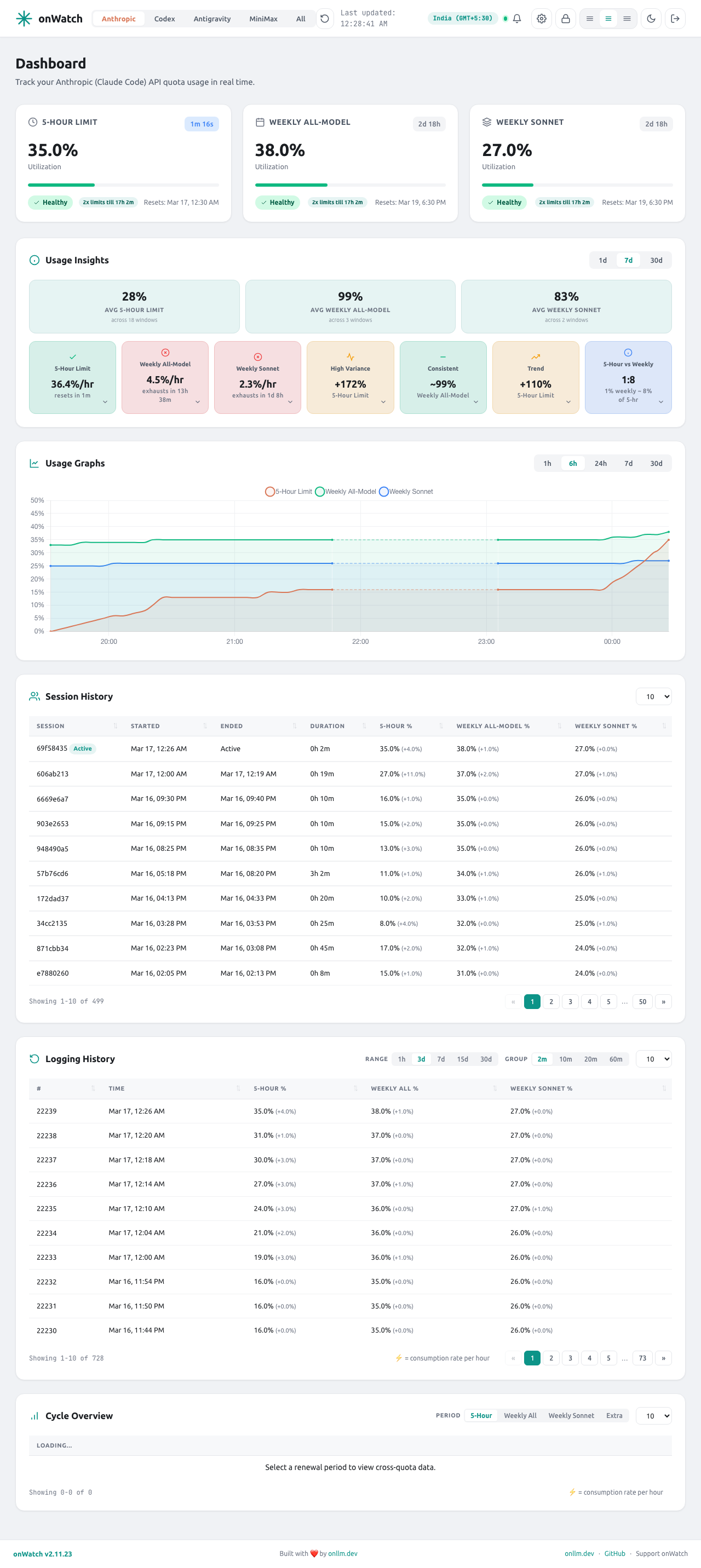
Dashboard -- Material Design 3 with dark/light mode (auto-detects system preference). Provider tabs appear for each configured provider:
agy source on the Antigravity provider insteadagy CLI (richer weekly + 5-hour buckets), or both (default) -- switchable in the dashboard settings; all variants share one Google-account quotaGET /coding/v1/usages (auto-detect ~/.kimi-code/credentials). Weekly + window limits with reset countdown. See Kimi Setup.~/.grok/auth.json (or $GROK_HOME), optional grok agent stdio RPC, and grok.com gRPC-web bearer probe (no browser cookie import). Primary "Credits" utilization against plan limit with reset countdown. Informational local session token stats also captured.MOONSHOT_API_KEY. See Moonshot Setup.DEEPSEEK_API_KEY. See DeepSeek Setup.OPENCODE_GO_API_KEY) or your browser session (OPENCODE_GO_WORKSPACE_ID + OPENCODE_GO_AUTH_COOKIEonllm-dev/onWatch is a public repo on GitHub by onllm-dev. Track AI API quotas across Synthetic, Z.ai, Anthropic (Claude Code), Codex, GitHub Copilot & Antigravity in real time. Lightweight background daemon (<50MB RAM), SQLite storage, Material Design 3 dashboard. Zero telemetry.
It declares the GPL-3.0 license on GitHub.
Its maker tagged it for macOS, Windows and Linux, or as Docker or cross-platform. That is declared by the maker; Take My Repo has not tested it.
An AI skill that provides design intelligence for building professional UI/UX across multiple platforms.
Reverse engineer anything with agents, from app behavior down to native binaries.
Makes your AI agent think like the laziest senior dev in the room. The best code is the code you never wrote.
Claude Code statusline and rate limit tracker with pace-aware quota monitoring. Pure Bash + jq, single file.
Turn any codebase, with its docs, SQL schemas, configs, and PDFs, into a queryable knowledge graph. A /graphify skill for Claude Code, Cursor, Codex, and Gemini CLI: local deterministic AST parsing, every edge explained, no vector store.
Open "Take it" on its page: Take My Repo writes an install plan for your machine and hands it to your AI agent (Claude Code, Codex or Cursor), which asks you before each step. Take My Repo has not tested it on any machine.
Its last change on GitHub was on 2026-11-16. GitHub counts 8 open issues and pull requests. Take My Repo does not judge from that whether it is maintained.
Nobody has reviewed it on Take My Repo yet, which says nothing about its quality.
Take My Repo cannot say: it does not audit code and has not run onWatch. What is known comes from GitHub. It declares the GPL-3.0 license on GitHub. Its last change was on 2026-11-16. It has 776 stars, which measure popularity, not safety. Nobody has reviewed it on Take My Repo yet, which says nothing about its quality. Read the source before you run it. With "Take it", your AI agent shows each step and asks you before running it; README text is treated as data, not as instructions.