ralph-claude-code
Autonomous AI development loop for Claude Code with intelligent exit detection
- 9.7k
- Shell
- MIT
- 10 d ago
VSCode extension to launch a live server that is aware of p5.js
Repo osteele/vscode-p5server, read from GitHub 1 d ago. osteele has not joined Take My Repo.
osteele/vscode-p5server is a public repo on GitHub by osteele. VSCode extension to launch a live server that is aware of p5.js. It declares the MIT license on GitHub. It is written mainly in CSS, has 7 stars and last changed on 2026-08-16. Nobody has reviewed it on Take My Repo yet, which says nothing about its quality. Read from GitHub on 2026-11-22.
Autonomous AI development loop for Claude Code with intelligent exit detection
☁️ Live reload for Go apps
Create and run p5.js sketches, explore sketch collections. Includes a sketch-aware development server with live reload; a sketch explorer; and support for JavaScript-only sketches with automatic library inclusion.
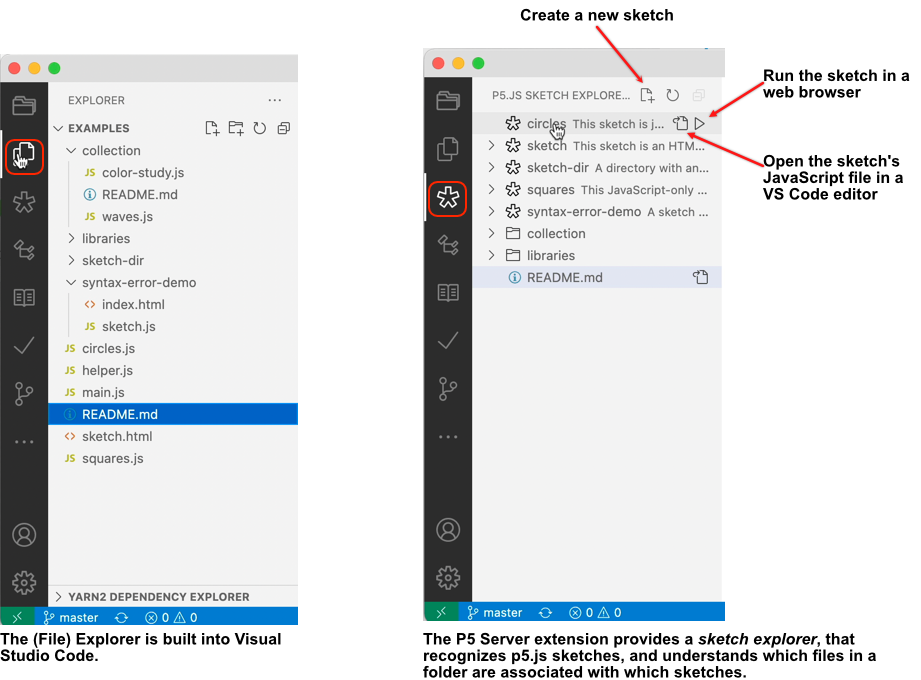
The Sketch Explorer is similar to Visual Studio Code's built-in Explorer, but the Sketch Explorer is organized around sketches instead of files. It supports both sketches that are included in HTML files, and JavaScript-only sketches (that don't have an HTML file).
The extension finishes loading after VS Code starts so the P5 Server status item remains immediately available. The server and its browser-console relay still load only when a sketch is run.
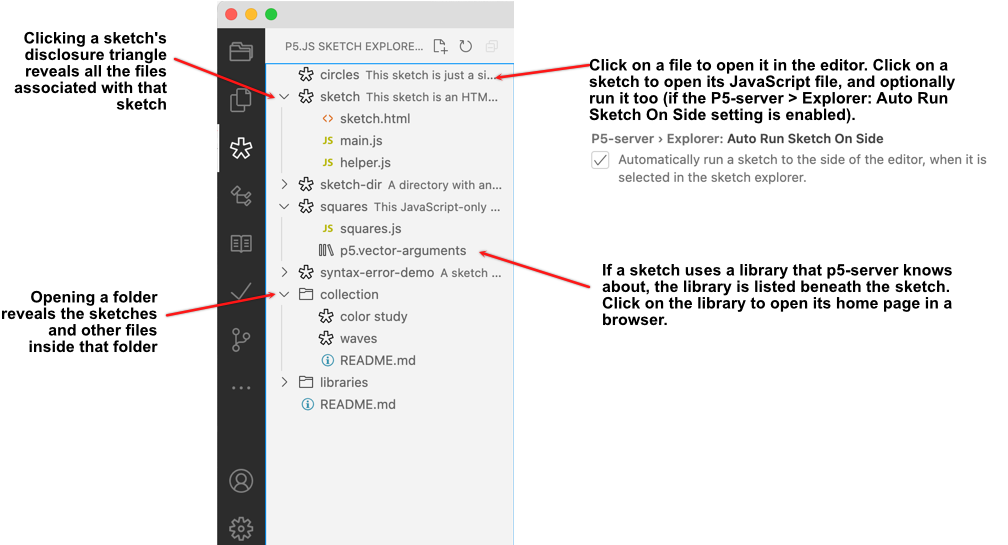
Clicking on a sketch in the Sketch Explorer opens its JavaScript file in the Visual Studio Code editor.
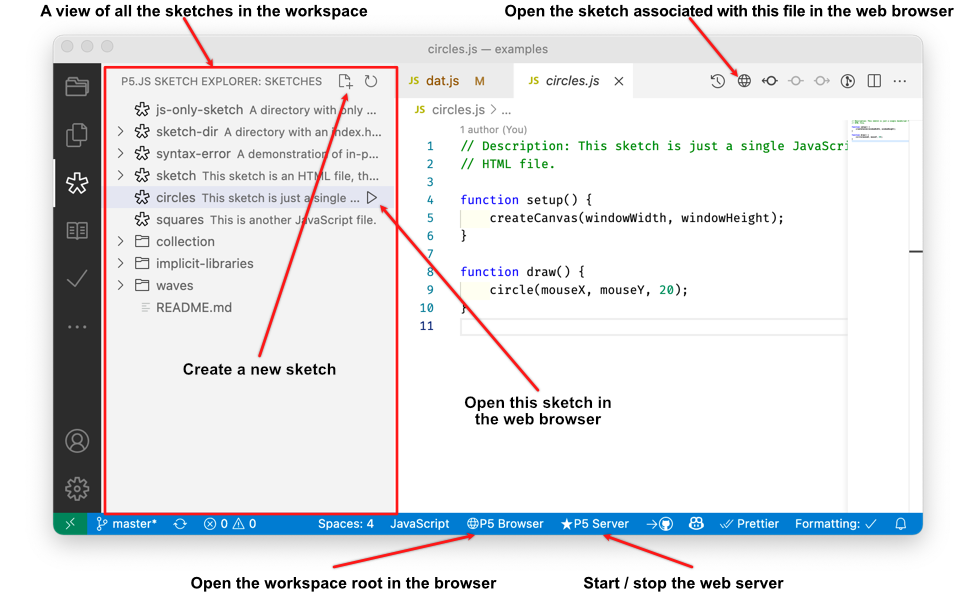
The extension includes a local web server. This server reloads sketches when files are modified. It also serves JavaScript-only sketches in a way that the browser can play.
The Run Sketch command can open the sketch in an external web browser (such as Chrome, Safari, or Edge), or in VS Code's integrated browser. (The "P5-server: Browser" setting controls this.) The integrated route uses the current built-in browser when available and falls back to Simple Browser on compatible older builds.
If the "P5-server > Explorer: Auto Run Sketch On Side" setting is enabled, clicking on a sketch in the Sketch Explorer also runs it next to the editor. This makes it easy to quickly browse a collection of sketches.

Debug P5 Sketch starts the server if necessary and launches VS Code's
browser debugger. Breakpoints, stepping, variables, the Debug Console, and the
usual debug controls work without creating a launch.json file. The command is
available from the editor title, Command Palette, and Sketch Explorer.
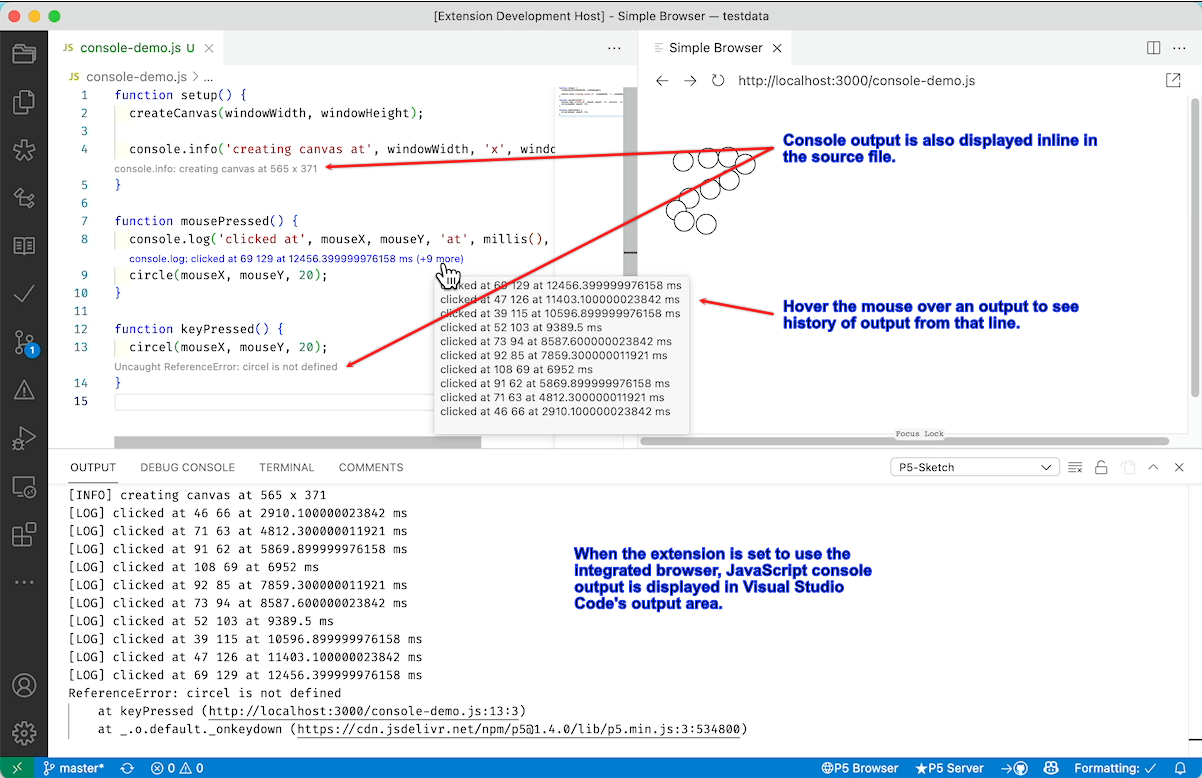
When the "P5-server: Browser" setting is set to integrated, messages from
console.log() and other console output will display in the P5 Sketch log
output. These messages also appear as inlay hints in the JavaScript source
file. Runtime exceptions appear in VS Code's Problems view and at the failing
source location.
The console output pane automatically appears when a message is printed to it. This behavior can be changed via the "Console > Integrated Browser > Auto Show: Level" setting.
High-volume output is batched to keep the editor responsive. Inline messages are coalesced and retain a bounded recent history. Turning off the Editor > Info Lens setting removes the extension's inlay hints and diagnostics; output-channel logging continues.
If a JavaScript-only sketch uses a class or function from one of the p5.js community libraries, or from my own library collection, that library is automatically included.
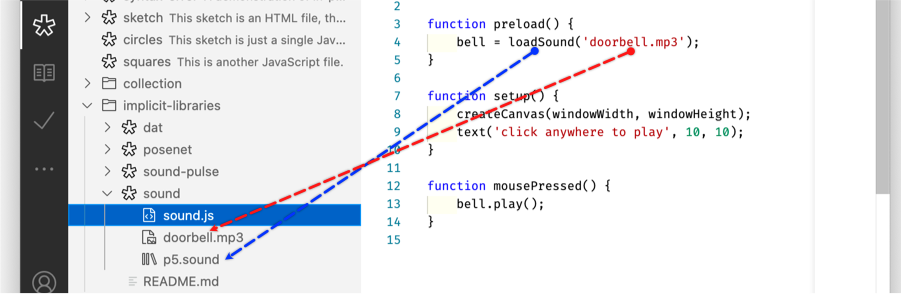
In the screenshot below, the extension infers that the sound.js sketch
requires the p5.sound library, because of the presence of a call to
loadSound(). Running the sketch will include this library.
The explorer also detects that the file doorbell.mp3 is associated with the
sketch, because it's the argument to the p5.js function loadSound().
setup() and draw() function; or create a pair of index.html and
sketch.js.View the Visual Studio Code Marketplace extension page, and click the Install button.
P5 Server requires Visual Studio Code 1.115 or newer. After installation, open Help: Get Started and select Get Started with P5 Server for an in-editor walkthrough.
Step-by-step installation and usage instructions are here.
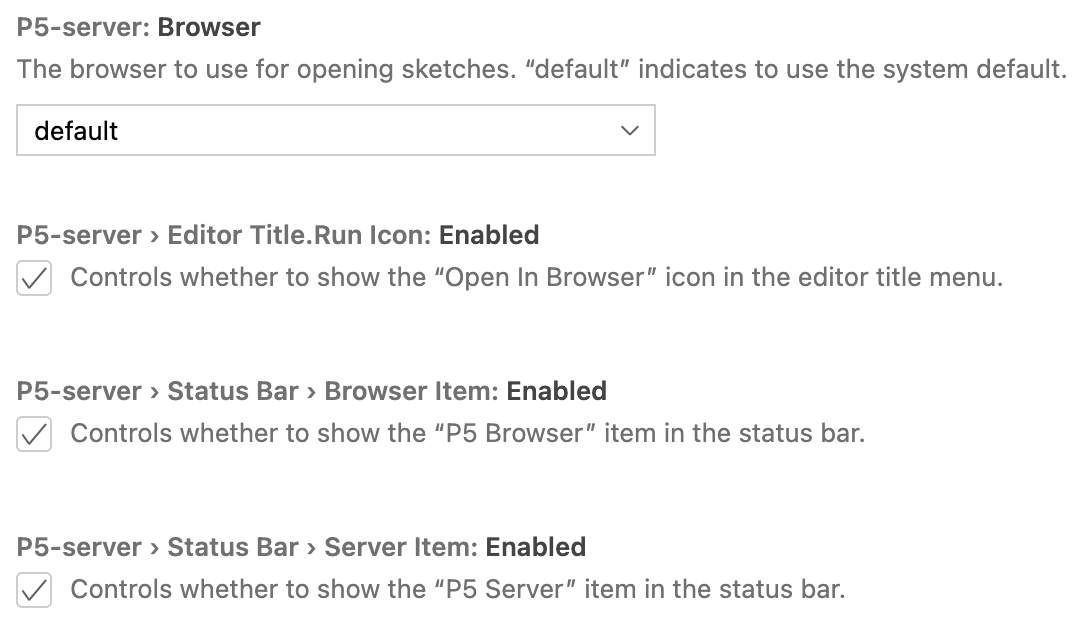
The extension provides configuration settings to set the browser, and to hide various user interface elements. Follow these instructions to modify these settings.
See the p5-server documentation for limitations that also affect this extension.
In particular:
The sketch-aware server is available as command-line tool at
p5-server. Install it via npm install -g p5-server, and run p5 serve or p5 serve --template split.
The command-line version can also be used to generate a static web site. This creates the HTML files that are necessary to run the sketch in a browser without a special server.
The code to infer libraries from JavaScript-only sketches, and to generate HTML files based on this, is available as a separate package.
https://code.osteele.com lists my other p5.js projects. These include tools, libraries, and examples and educational materials.
For information on developing and contributing to this extension, please see DEVELOPMENT.md.
Bug reports, suggestions, and other contributions are cheerfully accepted. Please use the Issues page of the GitHub repository.
MIT by Oliver Steele
osteele/vscode-p5server is a public repo on GitHub by osteele. VSCode extension to launch a live server that is aware of p5.js.
It declares the MIT license on GitHub.
Its maker has not tagged a system, so it is unknown here. Its README says what it needs.
Open "Take it" on its page: Take My Repo writes an install plan for your machine and hands it to your AI agent (Claude Code, Codex or Cursor), which asks you before each step. Take My Repo has not tested it on any machine.
p5.js is a client-side JS platform that empowers artists, designers, students, and anyone to learn to code and express themselves creatively on the web. It is based on the core principles of Processing. Looking for p5.js 2.0? http://beta.p5js.org
Small self-contained pure-Go web server with Lua, Teal, Markdown, HTTP/2, QUIC, Redis, TypeScript, npm-less React 19, SQLite, and PostgreSQL support ++
Its last change on GitHub was on 2026-08-16. Take My Repo does not judge from that whether it is maintained.
Nobody has reviewed it on Take My Repo yet, which says nothing about its quality.
Take My Repo cannot say: it does not audit code and has not run vscode-p5server. What is known comes from GitHub. It declares the MIT license on GitHub. Its last change was on 2026-08-16. It has 7 stars, which measure popularity, not safety. Nobody has reviewed it on Take My Repo yet, which says nothing about its quality. Read the source before you run it. With "Take it", your AI agent shows each step and asks you before running it; README text is treated as data, not as instructions.