rea
Reverse engineer anything with agents, from app behavior down to native binaries.
- 475k
- TypeScript
- MIT
- 33 min ago
Spotify in your terminal: plays on its own, with Home and the DJ, synced lyrics, real cover art and full mouse support.
Repo parda21/cloofy, read from GitHub 1 d ago. parda21 has not joined Take My Repo.
parda21/cloofy is a public repo on GitHub by parda21. Spotify in your terminal: plays on its own, with Home and the DJ, synced lyrics, real cover art and full mouse support. It declares the MIT license on GitHub. It is written mainly in Rust, has 86 stars and last changed on 2026-11-19. Nobody has reviewed it on Take My Repo yet, which says nothing about its quality. Read from GitHub on 2026-11-22.

Spotify and YouTube Music in your terminal.
Plays on its own, with Home, Spotify's DJ, synced lyrics, real cover art and a mouse that works everywhere.
cloofy.app · Docs · Install · Setup · Keys · Omarchy · FAQ · Changelog
Recorded from cloofy demo, which needs no account. The covers are Spotify's; the library is made up.
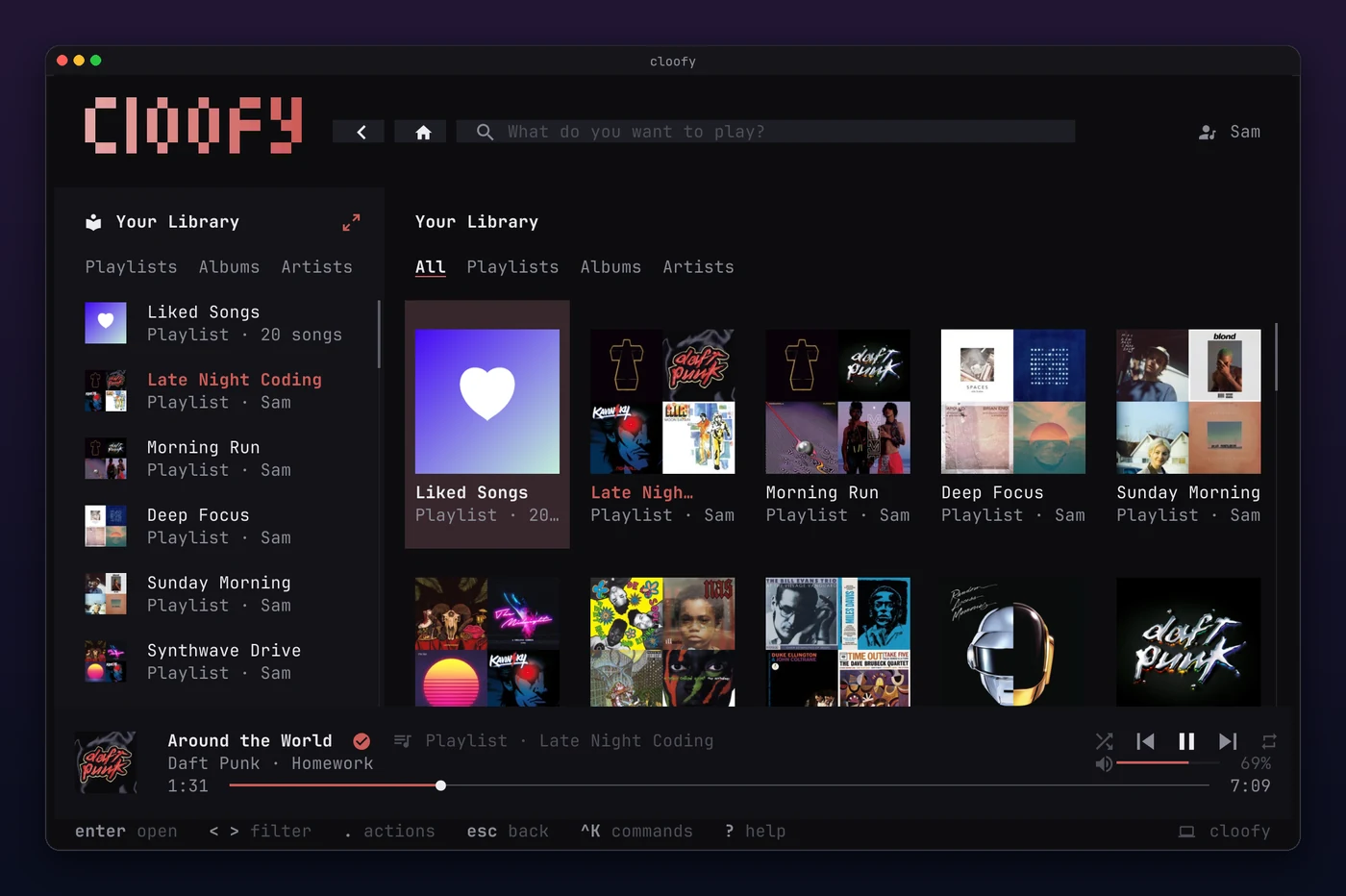
cloofy plays Spotify and YouTube Music in the terminal, one of them or both side by side. It plays the music itself, with no official app in the background: Spotify through librespot, as a Spotify Connect device you can pick from your phone, and YouTube Music through mpv, with or without an account. It looks and works like the desktop client you know: your Home feed, your library in a sidebar, cover art, synced lyrics, and on Spotify the DJ talking between tracks.
z opens the track in full: a large cover, and lyrics that follow the song line by line.
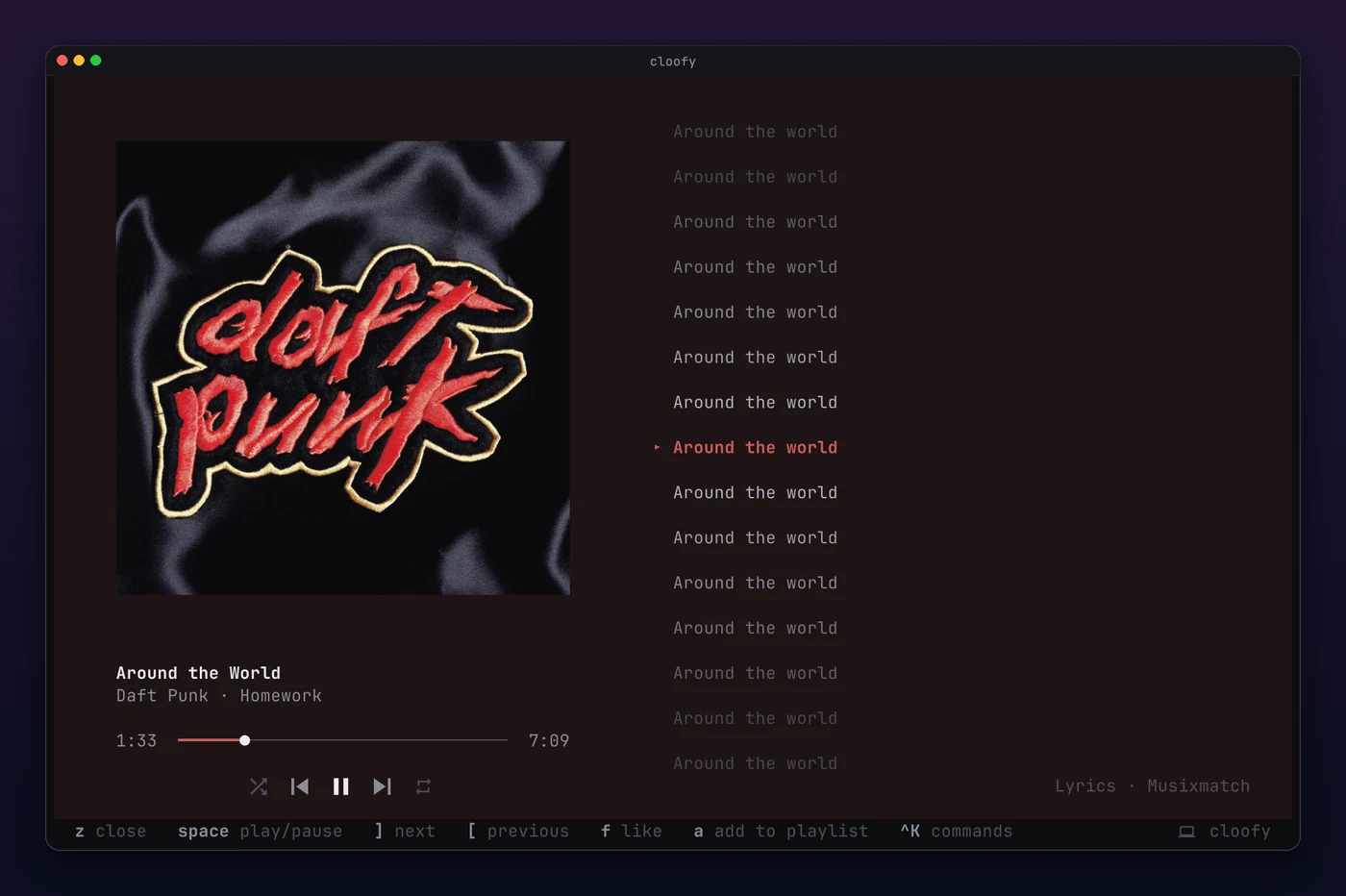
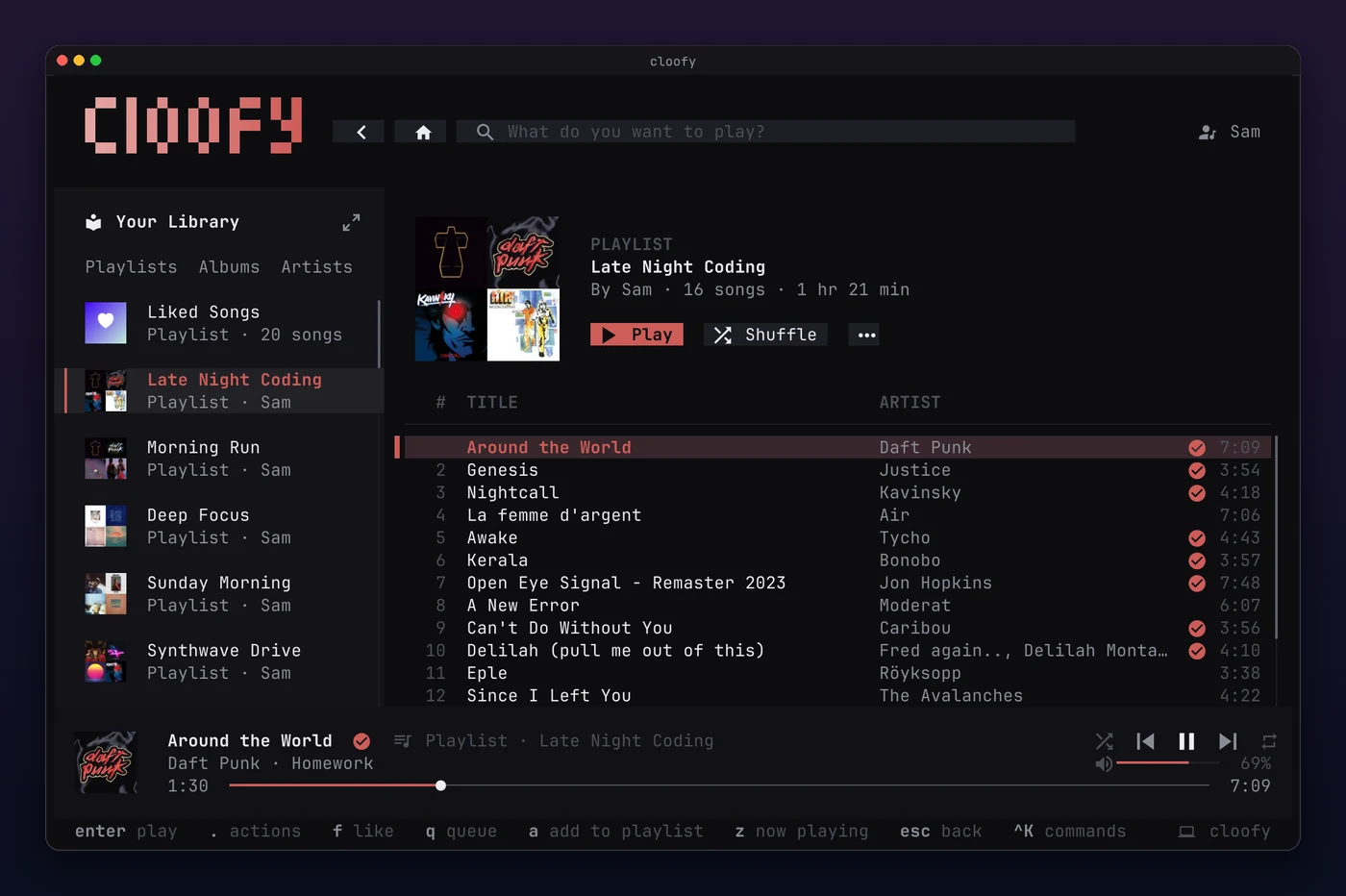
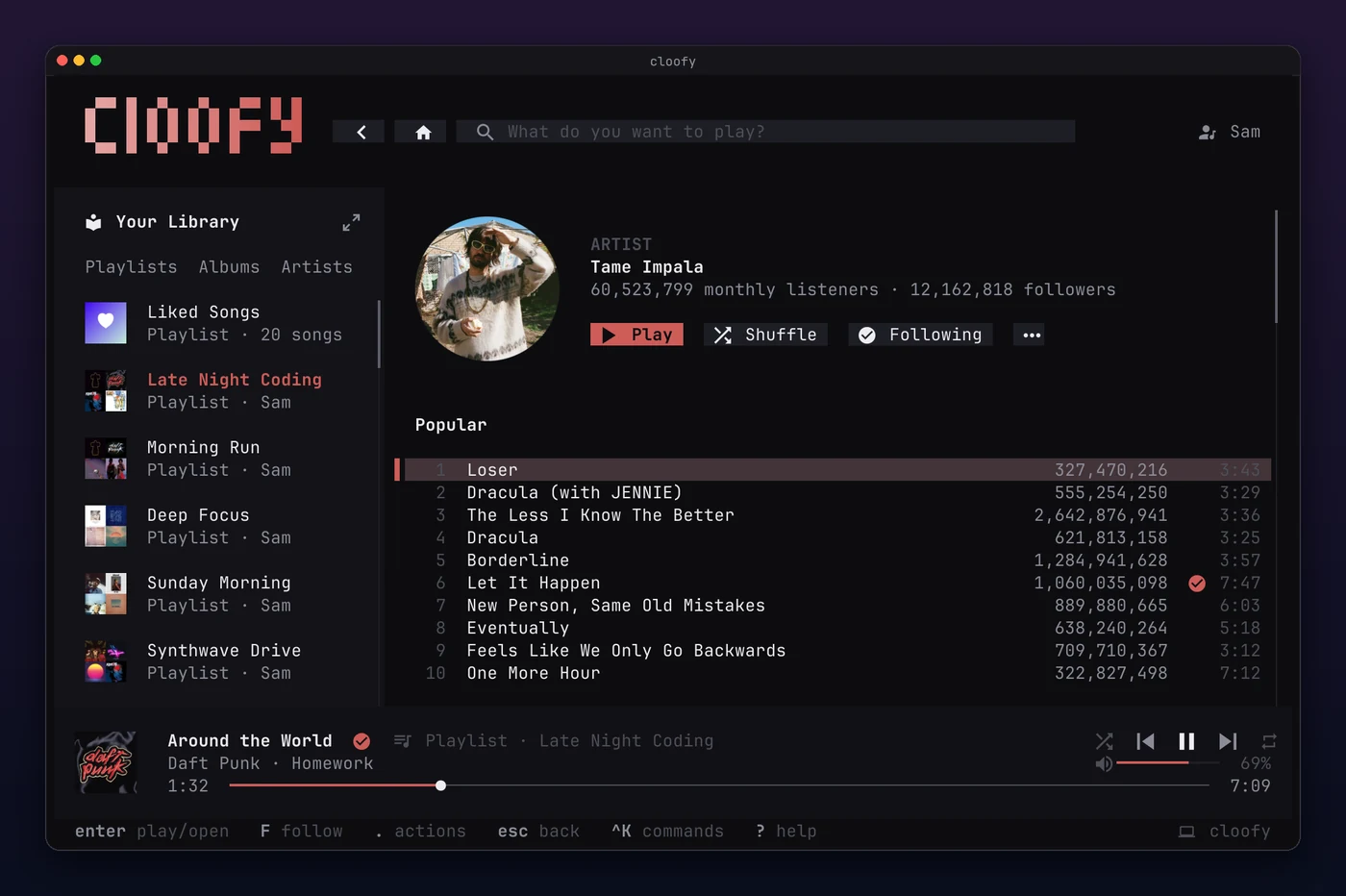
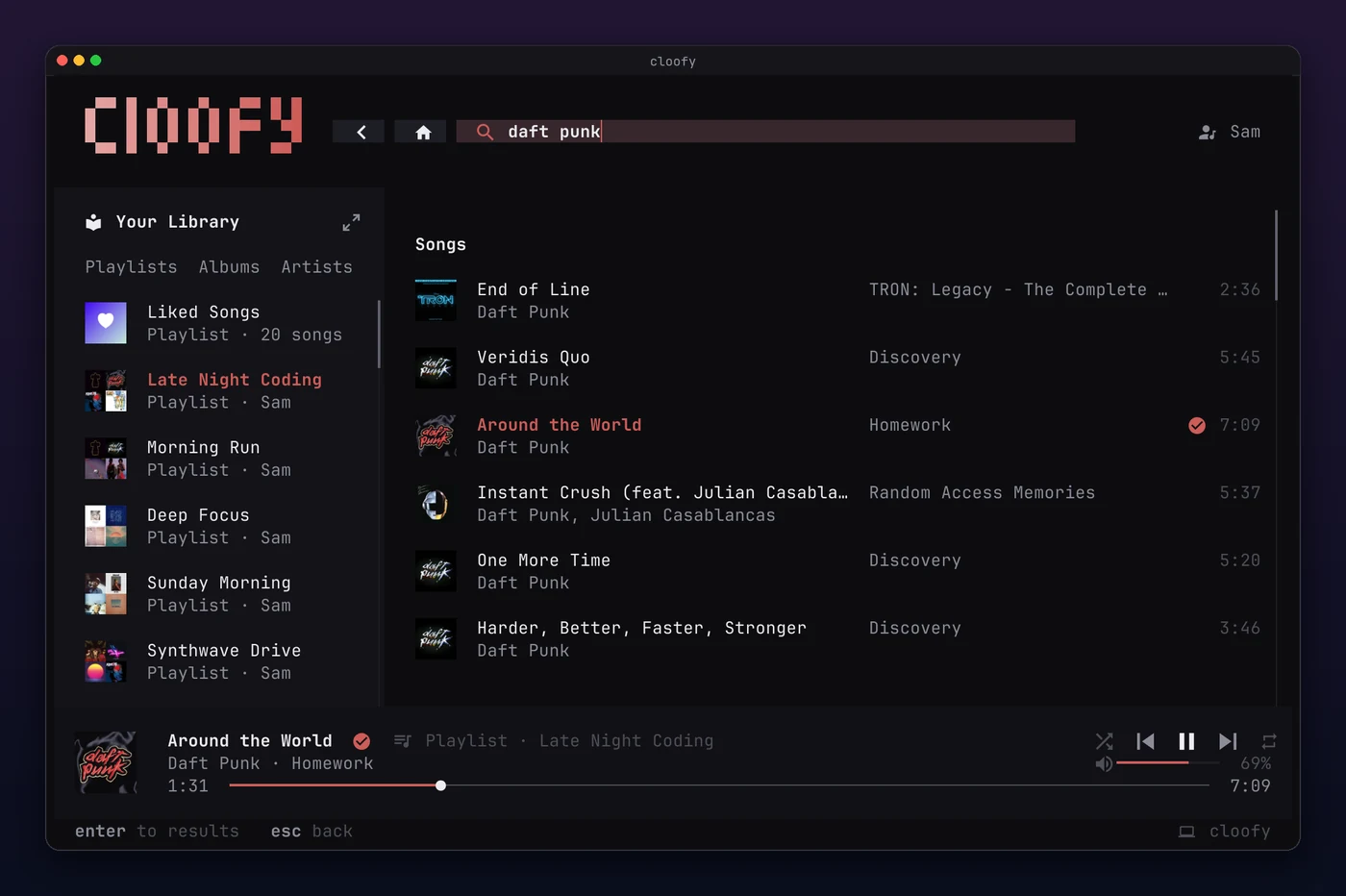
Playlists and albums with the playing song marked, artist pages with popular tracks and play counts, search with covers, and your whole library as a grid.
 |
 |
 |
 |
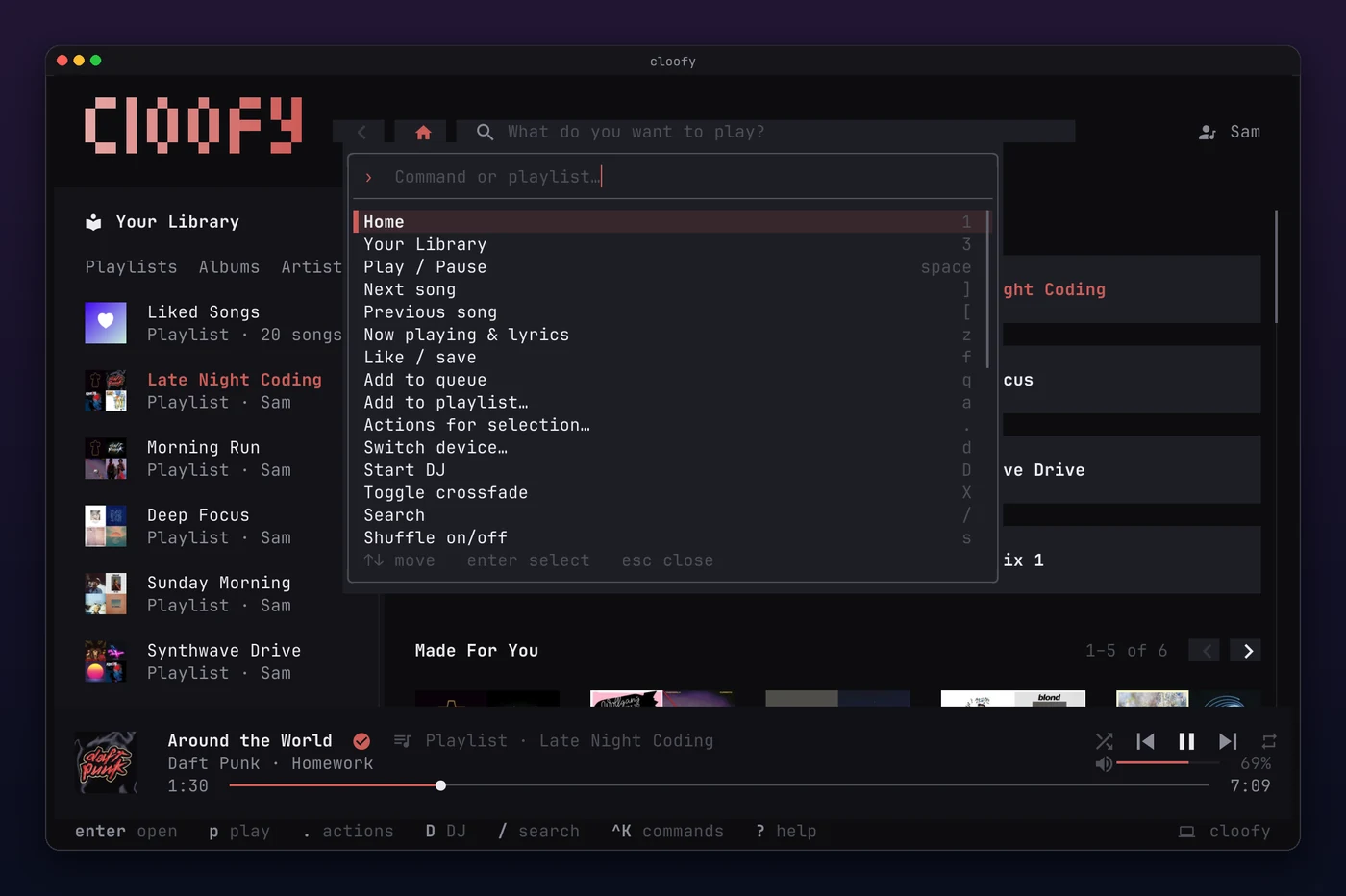
Ctrl K opens a command palette for every action and playlist, ? lists all keys, and the hint bar at the bottom shows what works on the current page. All of it works with the mouse too.
cloofy demo
The demo opens the full interface with a sample library: real albums and artists, and a few made-up playlists. It needs no account and plays nothing, so it's a quick way to see how cloofy looks in your terminal. Every picture on this page comes from it.
curl -fsSL https://cloofy.app/install.sh | bash
The installer first asks what you listen to: Spotify, YouTube Music, or both. Each comes as a build of its own, so a YouTube Music install carries no Spotify code, and the other way around. Then it checks your system, puts the latest release in ~/.local/bin, and walks you through the setup. For Spotify that's your Spotify app, its client ID and signing in. For YouTube Music it's mpv, yt-dlp and deno, which it offers to install with your package manager, and an optional sign-in. On Omarchy it also offers cloofy's bar widget, theme, menu entries and launcher. On other Linux desktops it adds cloofy with its icon to the app menu. Run it again to switch; cloofy offers new releases itself, see updates.
Package managers have the same three builds:
| Spotify | YouTube Music | Both | |
|---|---|---|---|
| Homebrew, macOS and Linux | cloofy |
cloofy-ytmusic |
cloofy-full |
| mise, anywhere | matching=spotify |
matching=ytmusic |
matching=full |
| Arch Linux | cloofy-bin |
cloofy-ytmusic-bin |
cloofy-full-bin |
brew install parda21/cloofy/cloofy-ytmusic
mise use -g 'github:parda21/cloofy[matching=ytmusic]'
On Arch Linux, as a package built from the PKGBUILD that comes with each release:
curl -L -o PKGBUILD https://github.com/parda21/cloofy/releases/latest/download/cloofy-ytmusic-bin.PKGBUILD && makepkg -si
Homebrew's and Arch's YouTube Music packages bring mpv, yt-dlp and deno along; with mise, install those yourself. Each package replaces the others. Installed with a package manager, go through the setup yourself. The package manager keeps cloofy up to date.
bash -s -- --service ytmusic installs YouTube Music without asking about it: spotify, ytmusic or both.bash -s -- --yes installs without asking anything: the services you have, or Spotify the first time.bash -s -- --uninstall removes cloofy, its entry in the app menu and its Omarchy setup.On platforms without a prebuilt binary, the installer builds cloofy with cargo, with only the services you picked. To do that yourself (Rust 1.90 or newer), name them as features; without any, you get both:
cargo install --git https://github.com/parda21/cloofy --locked cloofy --no-default-features --features ytmusic
On Linux the Spotify build needs the ALSA and PulseAudio headers:
| Distro | Packages |
|---|---|
| Debian, Ubuntu | libasound2-dev libpulse-dev pkg-config |
| Fedora | alsa-lib-devel pulseaudio-libs-devel |
| Arch | alsa-lib libpulse |
YouTube Music needs no headers to build, and mpv, yt-dlp (2025.11.12 or newer) and deno to play.
Set up the services you installed; the installer does it with you. With both, cloofy login signs in to each in turn, and asks before YouTube Music, which plays without an account.
[!NOTE] Playing music needs Spotify Premium, and reading your library needs a free Spotify developer app of your own. The installer guides you through it in about two minutes.
Create an app at developer.spotify.com/dashboard. Give it any name, set the redirect URI to http://127.0.0.1:8974/callback, and pick the Web API.
If you listen with another Spotify account than the dashboard's, add it under User Management.
Put the app's client ID into ~/.config/cloofy/config.toml:
client_id = "your client id"
Run cloofy login spotify. The browser opens twice: once for your app, once for playback.
Run cloofy doctor to check that everything works, then cloofy.
YouTube Music needs no account. cloofy plays it with mpv and finds the streams with yt-dlp 2025.11.12 or newer, which needs deno for YouTube's challenges. The installer offers to install all three with your package manager, and the Homebrew and Arch packages bring them along.
Signed out, Home, search, artist, album and playlist pages, lyrics and song radios work. Signing in adds your library: your playlists, albums, subscribed artists and liked songs, and liking, saving and adding to playlists.
cloofy login ytmusic. cloofy borrows the sign-in of your default browser: yt-dlp reads its cookies, which may ask for your keyring, and cloofy keeps only YouTube's. If the browser isn't signed in to YouTube yet, cloofy opens YouTube's sign-in there and goes on once you're signed in. The browser's cookies sign in every Google account signed in to it, so cloofy lists them by their address, brand accounts too, and you pick the one for YouTube Music: a work account signed in first is never taken by itself. Another account opens Google's sign-in for one more in the browser and goes on with it. With a browser cloofy doesn't know, or one it can't read, pick another from the list, or Another way to paste the Cookie header of a request to music.youtube.com from the browser's developer tools.cloofy doctor to check mpv, yt-dlp, deno, music.youtube.com, the sign-in and its account, and a stream, then cloofy.On Linux, yt-dlp reads the keyring of Chrome, Brave and other Chromium-based browsers with Python's secretstorage: the installer offers it, and the Arch packages bring it along.
cloofy login ytmusic --force signs in again, with another account if you like. cloofy logout ytmusic forgets the sign-in, and YouTube Music plays without an account again. A sign-in or sign-out shows the next time cloofy starts.
| Key | Action |
|---|---|
| space | Play or pause |
| [ ] | Previous, next track |
| ⇧ ← → | Seek 5 seconds |
| + - | Volume |
| s r | Shuffle, repeat |
| 1 / 3 | Home, search, your library |
| S | Switch between Spotify and YouTube Music |
| enter | Open or play the selection |
| esc | Back |
| f | Like the song, or save the album or playlist |
| F | Follow the artist |
| q a | Add to queue, add to a playlist |
| . | Actions for the selection |
| z | Now playing and lyrics |
| Q | Queue |
| d | Devices, on Spotify |
| D | Start the DJ on Spotify; while it plays, ask it for something |
| , | Settings |
| U | Update cloofy |
| Ctrl K | Command palette |
| ? | All shortcuts |
| Ctrl C | Quit |
Other commands:
cloofy play <uri or link>   # play a Spotify or YouTube link without the interface; --shuffle to shuffle
cloofy connect              # Spotify: wait as a Spotify Connect device until an app picks it
cloofy login ytmusic        # sign in to one service: spotify or ytmusic
cloofy login --force        # sign in again
cloofy logout ytmusic       # sign out of YouTube Music
cloofy doctor               # check what each service can reach
cloofy omarchy install      # set cloofy up in Omarchy
cloofy update               # update to the latest release
When a new release is out, an update button shows in the top bar. Click it or press U: cloofy downloads the release, checks it against its published checksum and puts it in place of itself, then the same button restarts it. cloofy update does the same without the interface. An update keeps the build you have: Spotify, YouTube Music or both. Where cloofy can't write to its own folder, such as /usr/local/bin, update with the installer.
Installed with Homebrew, mise, a system package or Nix, cloofy leaves its updates to that tool: the button shows the new version, and clicking it or cloofy update tells you how to update, such as brew upgrade cloofy.
,, the command palette, or a click on your name in the top bar opens the Settings page: crossfade, volume normalization, the shelves hidden from Home, cover art and how covers are drawn, the colors, the accent color, icons, power saving, song notifications and update checks. Changes apply at once and cloofy saves them in ~/.config/cloofy/config.toml, so there's no need to edit the file. You still can; it's read at start:
client_id = "your client id"
services = ["ytmusic"]     # "spotify", "ytmusic" or both, in the switch's order; every one built in when missing
crossfade = 6              # seconds tracks overlap, 0 to 12; off when missing
normalize_volume = true    # every song at about the same loudness; off when missing
hidden_shelves = ["Covers and remixes"]  # shelves Home leaves out, by title
covers = false             # no cover art, for slower computers; on when missing
colors = "terminal"        # "cloofy" or "terminal"; Omarchy's theme there, cloofy's own elsewhere, when missing
accent = "violet"          # "theme", "green", "violet", "pink", "blue" or "orange"; follows the cover when missing
images = "blocks"          # "kitty", "sixel", "iterm2" or "blocks"; detected from the terminal when missing
icons = "nerd"             # "nerd" or "text"; detected from the terminal when missing
power_saving = "on"        # "on" or "off"; follows the system when missing
notifications = false      # no desktop notifications for new tracks; on when missing
update_check = false       # don't look for new releases at start; on when missing
credentials = "keychain"   # macOS: sign-ins in the Keychain instead of files (only here)
The installer writes services with what you listen to. One config file serves every build, so a build leaves out the services it doesn't have. The "theme" accent is the one of the colors in use: theme.toml's when it sets one, else the Omarchy theme's with Colors on Auto, and cloofy's green otherwise, also with Terminal.
cloofy draws with its own dark colors, or with Omarchy's theme. With Colors set to Terminal, it takes your terminal's background and text instead, with the shades in between. To pick colors yourself, put any of bg, surface, player, raised, text, muted, faint, accent and the others in ~/.config/cloofy/theme.toml, as bg = "#2b0a3d"; they go over whichever colors are set, and cloofy follows the file as you edit it.
Power saving stops animations and redraws less often. Unless set otherwise, it turns on by itself with Low Power Mode on macOS and the Power Saver profile on Linux.
Inside tmux, notifications need set -g focus-events on, and the terminal's own also set -g allow-passthrough all, in ~/.tmux.conf. With credentials = "keychain", cloofy moves its sign-ins into the macOS Keychain on the next start; macOS asks once after each update, because release builds aren't signed yet.
cloofy keeps its sign-ins (unless they are in the Keychain) and its session in ~/.local/share/cloofy, and its caches and log in ~/.cache/cloofy.
On Omarchy, cloofy takes its colors from the theme and follows it when you switch, without a restart. Song notifications come from the desktop with the cover, in any terminal, and a click on one brings cloofy to the front. cloofy omarchy install adds the rest, and the installer offers to run it:
~/.config/omarchy/themed/cloofy.toml.tpl to change how every theme looks in cloofy, or give a theme its own cloofy.toml.--bind-music-key.cloofy omarchy status shows what is set up, and cloofy omarchy remove takes out exactly what install added. Running install again changes nothing, and running the installer again brings it up to date.
| Terminal | Cover art | Icons | Notifications |
|---|---|---|---|
| Ghostty, kitty, WezTerm | Real images | Built in | Yes |
| iTerm2 | Real images | With a Nerd Font | Yes |
| foot, Konsole, VS Code, xterm, mlterm | Real images | With a Nerd Font | On Linux |
| Windows Terminal | Real images | With a Nerd Font | No |
| Others | Real images with Sixel, else blocks | With a Nerd Font | On Linux |
Every terminal needs true color. Without a Nerd Font, pick text icons in Settings. VS Code shows images once terminal.integrated.enableImages is on, xterm when started with -ti 340, and Windows Terminal from version 1.22. Inside tmux, covers are real images in Ghostty and kitty and blocks elsewhere, because tmux keeps only a few Sixel images at a time. On Linux, terminals without notifications of their own get them from the desktop, with the cover, and on Hyprland and Omarchy every terminal does.
Spotify gives its Web API, which cloofy reads your library and searches through, only to registered apps. Apps in development mode are limited to a handful of users, so one shared app couldn't serve everyone. Yours is free and only yours, and the installer sets it up with you.
No. Outside its own apps, Spotify streams only to Premium accounts.
No. YouTube Music plays without any account, and signing in only adds your library and likes: cloofy gets every song's stream the same way either way, without your sign-in.
YouTube protects its audio streams with challenges that only a JavaScript runtime can solve. yt-dlp solves them, with deno, and an older yt-dlp gets no streams at all, so keep it up to date. mpv plays what yt-dlp finds, and cloofy hands it the next song ahead of time, so there's no gap. cloofy starts mpv in the background without your mpv.conf or scripts, and mpv quits with cloofy, even when cloofy crashes.
cloofy login ytmusic has yt-dlp export the browser's cookies into a private folder, keeps only youtube.com's, and deletes the export right away. They stay in ~/.local/share/cloofy/ytmusic/cookies.txt, which only you can read, or in the macOS Keychain with credentials = "keychain". cloofy sends them only to music.youtube.com, with its own requests there; streams, covers and lyrics from LRCLIB load without them. They are a signed-in session like the browser's, so treat the file like a password. cloofy logout ytmusic deletes it. A browser that goes on using its sign-in gets new cookies for it, so after a day or two YouTube may stop taking cloofy's copy: cloofy then reads them from the same browser again, the same way, and keeps them only when they still sign in the same account. A sign-in made before cloofy 0.5.3, or from a pasted Cookie header, doesn't say which browser it came from: run cloofy login ytmusic --force once to sign in with a browser.
On GNOME, KDE and other desktops with media controls they work right away, through MPRIS. On bare window managers like Sway, i3 or Hyprland, the keys need a binding, usually to playerctl. Omarchy binds them already.
Requests to Spotify and YouTube Music, for the services you use, and to LRCLIB for lyrics they don't have. For YouTube Music, yt-dlp and mpv fetch the streams from YouTube. cloofy also asks GitHub for new releases, unless update_check = false. Nothing else: no telemetry, no server of its own.
Spotify playback runs through a fork of librespot that adds the DJ and crossfade from two open upstream pull requests. Your library and search come from the Web API through your own app. Home, artist pages and the DJ use Spotify's internal APIs, the same ones its own apps use.
YouTube Music's pages, search, lyrics and your library come from InnerTube, the API music.youtube.com itself uses. yt-dlp finds each song's stream, and mpv plays it.
Spotify's internal APIs and InnerTube are not public and may change without notice.
To librespot for playing Spotify outside Spotify, including the open pull requests for the DJ and crossfade; to yt-dlp and mpv for playing YouTube Music; to ratatui, ratatui-image and tachyonfx for the interface; and to @yk-sgr for everything that makes cloofy feel at home on macOS.
cloofy is not affiliated with Spotify or YouTube. It is MIT licensed.
Was this repo created with the help of AI? Yes.
Do I care, as long as it works? No.
parda21/cloofy is a public repo on GitHub by parda21. Spotify in your terminal: plays on its own, with Home and the DJ, synced lyrics, real cover art and full mouse support.
It declares the MIT license on GitHub.
Its maker tagged it for macOS and Linux. That is declared by the maker; Take My Repo has not tested it.
Open "Take it" on its page: Take My Repo writes an install plan for your machine and hands it to your AI agent (Claude Code, Codex or Cursor), which asks you before each step. Take My Repo has not tested it on any machine.
Its last change on GitHub was on 2026-11-19. GitHub counts 5 open issues and pull requests. Take My Repo does not judge from that whether it is maintained.
Nobody has reviewed it on Take My Repo yet, which says nothing about its quality.
Reverse engineer anything with agents, from app behavior down to native binaries.
A flock of birds in your terminal: Craig Reynolds' boids, in braille in any terminal and as sprites in Kitty and Ghostty. One C99 program, no dependencies. Linux and macOS
Spotify, native and fast. One lightweight Rust app for your whole library, local playback, and Spotify Connect on Linux, macOS, and Windows.
The agent harness performance optimization system. Skills, instincts, memory, security, and research-first development for Claude Code, Codex, Opencode, Cursor and beyond.
Fair-code workflow automation platform with native AI capabilities. Combine visual building with custom code, self-host or cloud, 400+ integrations.
Claude Code plugin to see, review and iterate on your agent's work without leaving the terminal: show images, play videos, and run visual QA with Playwright recordings and before/after comparisons inside the Claude Code terminal. Works in any terminal that supports the kitty graphics protocol, fully cross-platform on macOS, Linux and Windows.
Neural Weight Compression: lossless LLM weight compression decoded inside the CUDA matvec. BF16 31 % smaller and faster than cuBLAS; fp8 13 % smaller at native fp8 speed. Bit-identical weights.
A GNOME-style settings app for Omarchy — monitors, sound, Wi-Fi, Bluetooth, themes, input, shortcuts and power, without touching config files.