supabase
The Postgres development platform. Supabase gives you a dedicated Postgres database to build your web, mobile, and AI applications.
- 115k
- TypeScript
- Apache-2.0
- 1 h ago
App-Token based fully extended and extensible JPA implementation of Spring Security 6 + Spring Authorization Server (https://mvnrepository.com/artifact/io.github.patternhelloworld.securityhelper.oauth2.api/spring-oauth2-easyplus)
Repo patternhelloworld/spring-oauth2-easyplus, read from GitHub 17 h ago. patternhelloworld has not joined Take My Repo.
patternhelloworld/spring-oauth2-easyplus is a public repo on GitHub by patternhelloworld. App-Token based fully extended and extensible JPA implementation of Spring Security 6 + Spring Authorization Server (https://mvnrepository.com/artifact/io.github.patternhelloworld.securityhelper.oauth2.api/spring-oauth2-easyplus). It declares no license on GitHub. Public does not mean open source: without a license, nobody is granted the right to reuse it. It is written mainly in Java, has 36 stars and last changed on 2026-07-26. Nobody has reviewed it on Take My Repo yet, which says nothing about its quality. Read from GitHub on 2026-11-22.
App-Token based easy OAuth2 implementation built to grow with Spring Boot
<dependency>
    <groupId>io.github.patternhelloworld.securityhelper.oauth2.api</groupId>
    <artifactId>spring-oauth2-easyplus</artifactId>
    <version>4.4.1</version>
</dependency>
| App-Token Status | Access Token Behavior |
|---|---|
| same for the same user | Access-Token is shared |
| different for the same user | Access-Token is NOT shared |
application.properties.io.github.patternhelloworld.securityhelper.oauth2.no-app-token-same-access-tokenno-app-token-same-access-token Value |
App-Token Status | Access Token Sharing Behavior |
|---|---|---|
true |
App-Token is null for the same user |
Same user with a null App-Token shares the same access token across multiple logins. |
false |
App-Token is null for the same user |
Even if the App-Token is null, the same user will receive a new access token for each login. |
- |
App-Token is shared for the same user | Access tokens will not be shared. A new access token is generated for each unique App-Token, even for the same user. |
- |
App-Token is NOT shared for the same user | Each unique App-Token generates a new access token for the same user. |
UserDetailsServiceFactory)/oauth2/token and on our controller layer such as /api/v1/traditional-oauth/token, both of which function same and have the same request & response payloads for success and errors. (However, /oauth2/token is the standard that "spring-authorization-server" provides.)/oauth2/token(Recommended) is what "spring-authorization-server" provides./api/v1/traditional-oauth/token(Easily Customizable) is what this library implemented directly.
 {
     "access_token" : "Vd4x8D4lDg7VBFh...",
     "token_type" : "Bearer",
     "refresh_token" : "m3UgLrvPtXKdy7jiD...",
     "expires_in" : 3469,
     "scope" : "read write"
  }
  {
      "timestamp": 1719470948370,
      "message": "Couldn't find the client ID : client_admin", // Sensitive info such as being thrown from StackTraces
      "details": "uri=/oauth2/token",
      "userMessage": "Authentication failed. Please check your credentials.",
      "userValidationMessage": null
  }
com.patternhelloworld.securityhelper.oauth2.client.config.securityimpl to understand how to implement the library.| Category | Dependencies |
|---|---|
| Backend-Language | Java 17 |
| Backend-Framework | Spring Boot 3.3.2 |
| Main Libraries | Spring Security 6.3.1, Spring Security Authorization Server 1.3.1, JPA |
| Package-Manager | Maven 3.6.3 (mvnw, Dockerfile) |
| RDBMS | Mysql 8.0.17 |
pom.xml or this link "https://libraries.io/maven/io.github.patternhelloworld.securityhelper.oauth2.api:spring-oauth2-easyplus/4.4.1/tree".mysql folder.# Do NOT use your latest Maven version, but mvnw here or one with the same version.
cd lib
mvnw clean install
cd ..
cd client
mvnw clean install # Integration tests are done here, which creates docs by Spring-Rest-Doc.
SpringSecurityOauth2PasswordJpaImplApplication in the client.http://localhost:8370/docs/api-app.html, managed by Spring Rest Doc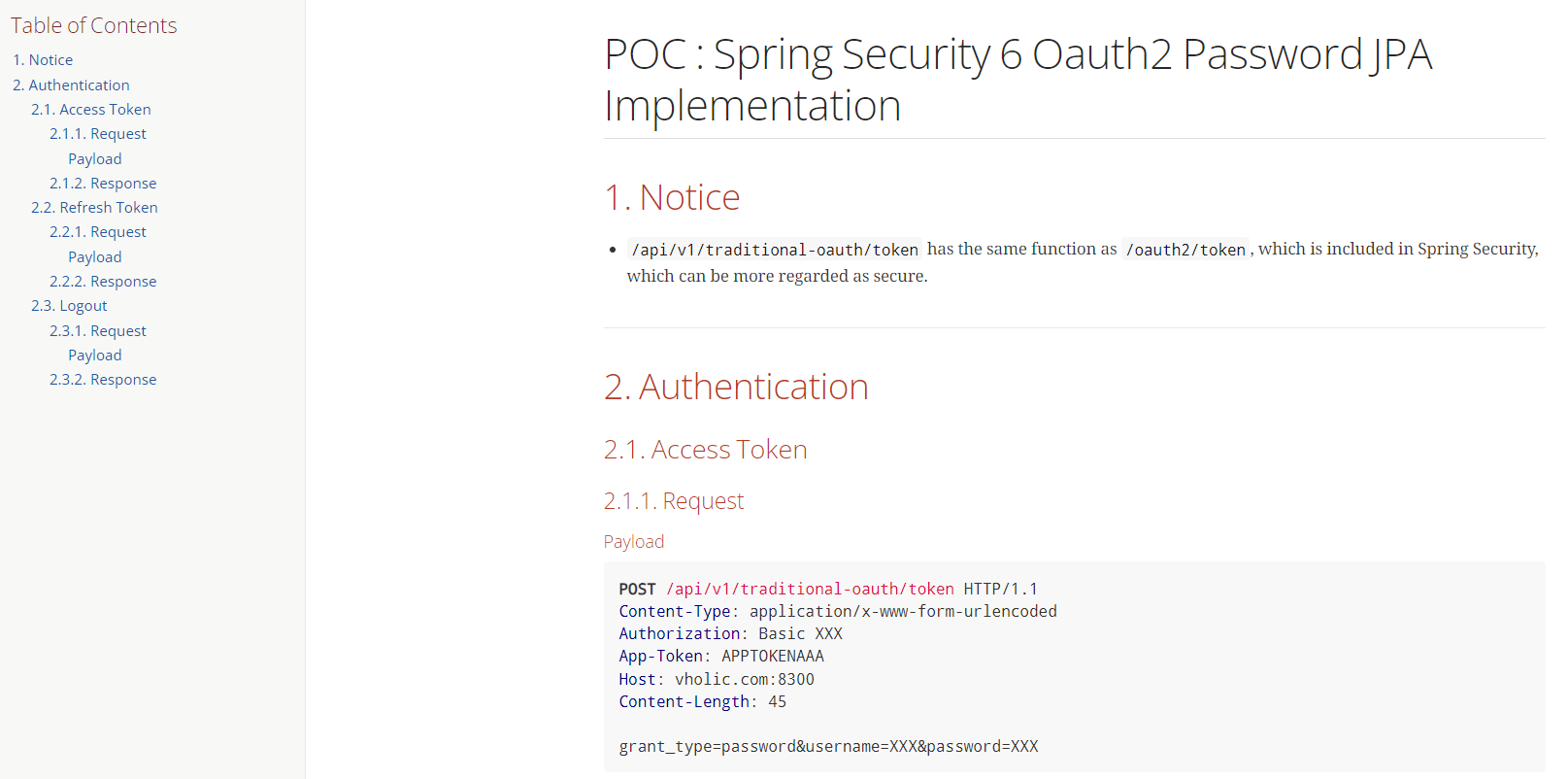
client folder.
// Add 'io.github.patternhelloworld.securityhelper.oauth2.api'
@SpringBootApplication(scanBasePackages =  {"com.patternhelloworld.securityhelper.oauth2.client", "io.github.patternhelloworld.securityhelper.oauth2.api"})
public class SpringSecurityOauth2PasswordJpaImplApplication {

    public static void main(String[] args) {
        SpringApplication.run(SpringSecurityOauth2PasswordJpaImplApplication.class, args);
    }

}
@Configuration
// ADD 'io.github.patternhelloworld.securityhelper.oauth2.api.config.security'
@EnableJpaRepositories(
        basePackages = {"com.patternhelloworld.securityhelper.oauth2.client.domain",
                "com.patternhelloworld.securityhelper.oauth2.client.config.securityimpl",
                "io.github.patternhelloworld.securityhelper.oauth2.api.config.security"},
        entityManagerFactoryRef = "commonEntityManagerFactory",
        transactionManagerRef= "commonTransactionManager"
)
public class CommonDataSourceConfiguration {


   // ADD 'io.github.patternhelloworld.securityhelper.oauth2.api.config.security'
    @Primary
    @Bean(name = "commonEntityManagerFactory")
    public LocalContainerEntityManagerFactoryBean commonEntityManagerFactory(EntityManagerFactoryBuilder builder) {
        return builder
                .dataSource(commonDataSource())
                .packages("com.patternhelloworld.securityhelper.oauth2.client.domain",
                        "io.github.patternhelloworld.securityhelper.oauth2.api.config.security")
                .persistenceUnit("commonEntityManager")
                .build();
    }

}
client folder demonstrates how to use this library.client.config.securityimpl.service.userdetail.CustomUserDetailsServiceFactory. The rest depend on your specific situation.Insert your code when events happen such as tokens created
SecurityPointCutclient.config.securityimpl.aopRegister error user messages as desired
ISecurityUserExceptionMessageServiceclient.config.securityimpl.messageCustomize the whole error payload as desired for all cases
client.config.securityimpl.response.CustomAuthenticationFailureHandlerImplclient.config.response.error.GlobalExceptionHandler.authenticationException ("/api/v1/traditional-oauth/token", Resource Server (Bearer token inspection))client.config.securityimpl.response.CustomAuthenticationEntryPointImplclient.config.response.error.GlobalExceptionHandler.authorizationExceptionCustomize the whole success payload as desired for the only "/oauth2/token"
client.config.securityimpl.response.CustomAuthenticationSuccessHandlerImplapi.domain.traditionaloauth.dto and is not yet customizable.Customize the verification logic for UsernamePassword and Client as desired
IOauth2AuthenticationHashCheckServiceCustomize OpaqueTokenIntrospector as desired (!This is for Resource Servers)
client.config.securityimpl.introspector.CustomResourceServerTokenIntrospector # Introspection type configuration:
# - api: The Resource Server sends introspection requests to the Authorization Server.
# Benefits: High scalability and real-time authorization checks.
# Drawbacks: Increased traffic due to frequent API calls.
#
# - database: The Resource Server and Authorization Server share the same database.
# Benefits: Minimal traffic and real-time authorization checks.
# Drawbacks: Limited scalability due to direct database dependency.
#
# - decode: The Resource Server decodes the Access Token locally using the JWT algorithm.
# Benefits: No traffic and high scalability.
# Drawbacks: Lacks real-time authorization updates.
#
# [WARNING] api: Certain test cases are currently failing due to issues with the specified introspection URI calls.
patternhelloworld.securityhelper.oauth2.introspection.type=database
patternhelloworld.securityhelper.oauth2.introspection.uri=http://localhost:8370/oauth2/introspect
patternhelloworld.securityhelper.oauth2.introspection.client-id=client_customer
patternhelloworld.securityhelper.oauth2.introspection.client-secret=12345
Customize token expiration as desired (EasyPlusTokenExpirationPolicy)
RegisteredClient's TokenSettings (standard Spring Authorization Server behavior).X-Zone-Id request header at token issuance (if zone-header-enabled, for global apps where each user has a different zone) → the fixed zone-id property → no rollover (pure TTL). An invalid header value silently falls back and never breaks the login flow. Since the maximum extension is bounded by the rollover window (< 24h) regardless of the claimed zone, the client-supplied header gives no meaningful advantage to a malicious client.EasyPlusTokenExpirationPolicy bean to replace the policy entirely. # Example: access tokens expire at the next 3 AM (in the user's zone if the X-Zone-Id header is sent, otherwise Asia/Seoul)
# on or after "issuedAt + accessTokenTimeToLive". Disabled by default (pure TTL).
patternhelloworld.securityhelper.oauth2.token.expiration.access.rollover.enabled=true
patternhelloworld.securityhelper.oauth2.token.expiration.access.rollover.hour=3
patternhelloworld.securityhelper.oauth2.token.expiration.access.rollover.zone-id=Asia/Seoul
patternhelloworld.securityhelper.oauth2.token.expiration.access.rollover.zone-header-enabled=true
# The same set of properties exists for refresh tokens. (A refresh token preserved across re-logins keeps its original expiration.)
patternhelloworld.securityhelper.oauth2.token.expiration.refresh.rollover.enabled=false
patternhelloworld.securityhelper.oauth2.token.expiration.refresh.rollover.hour=3
patternhelloworld.securityhelper.oauth2.token.expiration.refresh.rollover.zone-id=
patternhelloworld.securityhelper.oauth2.token.expiration.refresh.rollover.zone-header-enabled=false
client/src/docs/asciidoc/api-app.adoc @Controller
public class LoginWeb {
@GetMapping("/login")
public String loginPage() {
return "login";
}
}
  spring.mvc.view.prefix=/templates/
  spring.mvc.view.suffix=.html
oauth2_registered_client table in the database.http://localhost:8370/oauth2/authorize?client_id=client_customer&state=xxx&scope=read&redirect_uri=http%3A%2F%2Flocalhost%3A8081%2Fcallback1&code_challenge=HVoKJYs8JruAxs7hKcG4oLpJXCP-z1jJQtXpQte6GyA&code_challenge_method=S256, using the values from the oauth2_registered_clientcode_challege, code_challege_METHOD) is optional.cicd@test.com / 1234 https://localhost:8081/callback1?code=215e9539-1dcb-4843-b1ea-b2d7be0a3c44&state=xxxpatternhelloworld.securityhelper.authorization-code.consent=Yis set in theapplication.properties, it will be redirected to the consent page.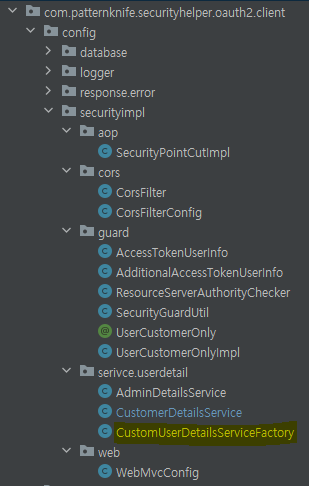
code_verifier sample : EAp91aanXdoMcoOc2Il55H3UDDIV909k9olEEcl6L24J6_9Xpatternhelloworld/spring-oauth2-easyplus is a public repo on GitHub by patternhelloworld. App-Token based fully extended and extensible JPA implementation of Spring Security 6 + Spring Authorization Server (https://mvnrepository.com/artifact/io.github.patternhelloworld.securityhelper.oauth2.api/spring-oauth2-easyplus).
It declares no license on GitHub. Public does not mean open source: without a license, nobody is granted the right to reuse it.
Its maker has not tagged a system, so it is unknown here. Its README says what it needs.
Open "Take it" on its page: Take My Repo writes an install plan for your machine and hands it to your AI agent (Claude Code, Codex or Cursor), which asks you before each step. Take My Repo has not tested it on any machine.
The Postgres development platform. Supabase gives you a dedicated Postgres database to build your web, mobile, and AI applications.
Its last change on GitHub was on 2026-07-26. Take My Repo does not judge from that whether it is maintained.
Nobody has reviewed it on Take My Repo yet, which says nothing about its quality.
mall项目是一套电商系统,包括前台商城系统及后台管理系统,基于Spring Boot+MyBatis实现,采用Docker容器化部署。 前台商城系统包含首页门户、商品推荐、商品搜索、商品展示、购物车、订单流程、会员中心、客户服务、帮助中心等模块。 后台管理系统包含商品管理、订单管理、会员管理、促销管理、运营管理、内容管理、统计报表、财务管理、权限管理、设置等模块。
🔥 官方推荐 🔥 RuoYi-Vue 全新 Pro 版本,优化重构所有功能。基于 Spring Boot + MyBatis Plus + Vue & Element 实现的后台管理系统 + 微信小程序,支持 RBAC 动态权限、数据权限、SaaS 多租户、Flowable 工作流、三方登录、支付、短信、商城、CRM、ERP、MES、IM、AI 大模型、IoT 物联网等功能。你的 ⭐️ Star ⭐️,是作者生发的动力!
Google Workspace CLI — one command-line tool for Drive, Gmail, Calendar, Sheets, Docs, Chat, Admin, and more. Dynamically built from Google Discovery Service. Includes AI agent skills.
循序渐进,学习Spring Boot、Spring Boot & Shiro、Spring Batch、Spring Cloud、Spring Cloud Alibaba、Spring Security & Spring Security OAuth2,博客Spring系列源码:https://mrbird.cc
Extract and decompose (fuzzy) URLs (including emails, which are conceptually a part of URLs) in texts with Area-Pattern-based modularity
By simply configuring the .env file, a safe isomorphic Blue-Green Deployment is instantly set up.
An Experimental Regex Engine to Parse and Apply Bulk Changes to a JSON String Without Using 'JSON.parse()' for Deserialization
Run MySQL Master Slave replication and cope with emergency with Docker and robust scripts
A library for extracting and validating env-functions such as env(), config() on sources