
n8n
Fair-code workflow automation platform with native AI capabilities. Combine visual building with custom code, self-host or cloud, 400+ integrations.
- 212k
- TypeScript
- 2 min ago
Instant SECURE Full Stack Apps and AI Agents
Repo polterguy/magic, read from GitHub 5 h ago. polterguy has not joined Take My Repo.
polterguy/magic is a public repo on GitHub by polterguy. Instant SECURE Full Stack Apps and AI Agents. It declares the MIT license on GitHub. It is written mainly in C#, has 1,254 stars and last changed on 2026-11-24. Nobody has reviewed it on Take My Repo yet, which says nothing about its quality. Read from GitHub on 2026-11-24.
Turn plain English into a working full-stack app — database, secure API, business logic, and frontend — running on your own hardware, with zero lock-in. An open-source alternative to Lovable, Bolt44, and Replit that gives you the whole backend, plus an MCP server that turns every endpoint into a tool for Claude, Cursor, or Codex. Read more about Hyperlambda.
curl -fsSL https://hyperlambda.dev/docker-compose.yaml | docker compose -f - up
Then open localhost:5555, point it at localhost:4444, and log in with root / root.
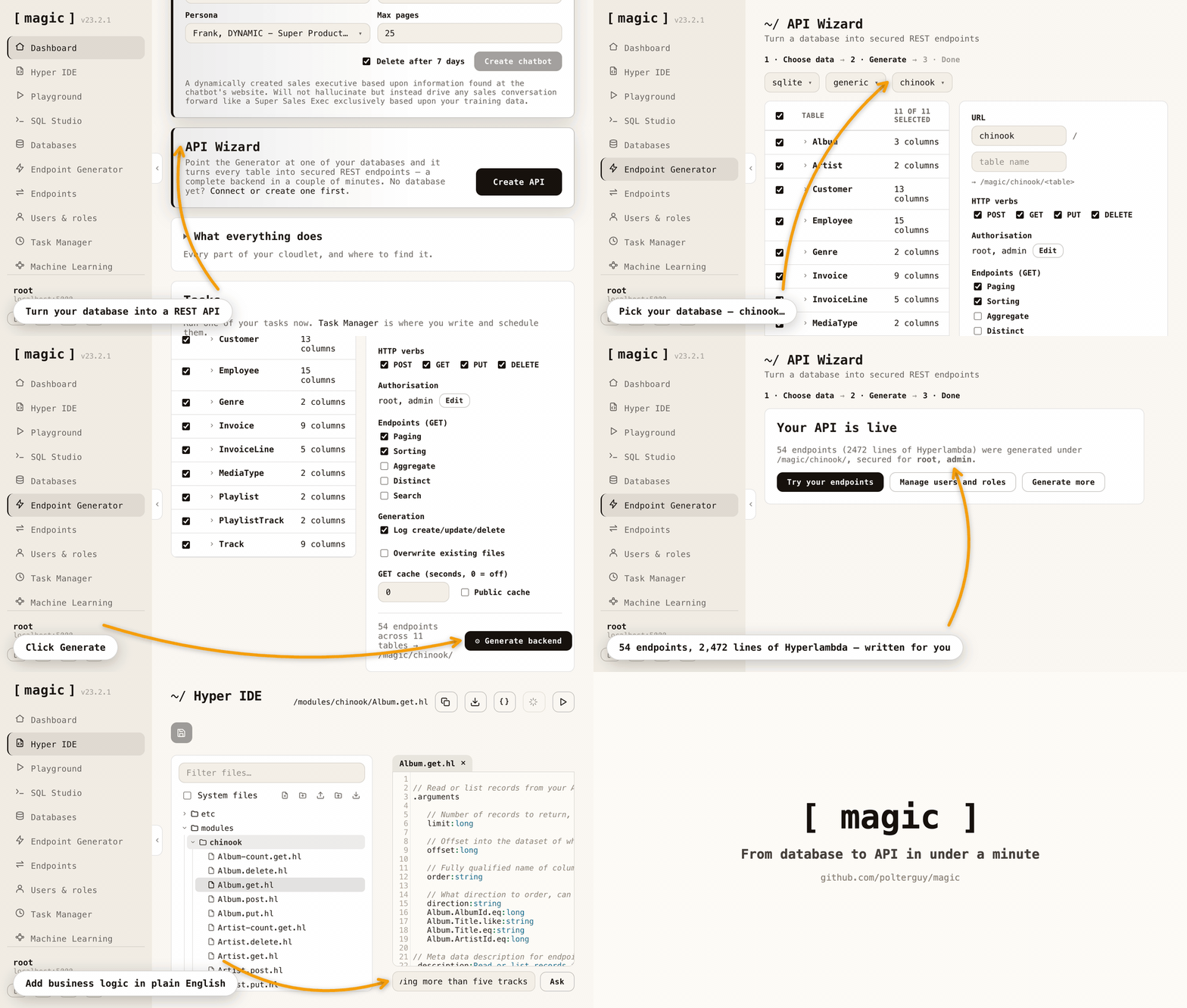
Point the API Wizard at your database, and it generates a complete, secured REST API — then extend it in plain English, without a build or deploy step.
⭐ If this saves you time, star the repo — it's the main way other developers find it.
| Magic Cloud | Lovable / Bolt | n8n / Zapier / Make | |
|---|---|---|---|
| License | MIT, fully open source | Proprietary | Mixed |
| Self-hostable | Yes — your hardware, your data | No | Partly |
| Backend included | Database, API, auth, RBAC, jobs | Frontend + third-party BaaS | Workflows only |
| Deploy step before you can test | None — save and run | Deploy to third parties first | Publish step |
| Execution model | Compiled .NET runtime | — | Interprets JSON/YAML workflows |
| MCP server | Built in | No | No |
| Vendor lock-in | None | Yes | Yes |
Magic runs Hyperlambda, which can be generated by our own proprietary LLM. Because we generate an AST rather than text, the output is analysed and rejected if it contains functions that don't exist. The Hyperlambda Generator cannot return hallucinated function invocations — like any LLM it can still write logically wrong code, but every function it invokes is guaranteed to exist.
Combined with the ability to restrict the vocabulary, this lets you ship AI agents that grow their own tool space on demand, without widening your attack surface.
How good is it? The model behind the generator, round 8 of our fine-tune of Google's Gemma 4 26B-A4B (about 4B active parameters per token), passes 79.2% of 401 plain-English tests, where every answer is executed against real databases, files and HTTP endpoints and judged by its result. On the 277 tests plain Python can also do, it passes 88.8%, against 91.5% for the frontier model gpt-6-luna writing Python with the same prompts and the same judge, three runs per side. The gap is not statistically significant on these tests. We wrote the tests ourselves, our model gets up to three attempts when an answer does not parse, and on the 124 tests that need Magic itself it passes 58%. The method, the failures on both sides and every prompt are in Python 91.5%, Hyperlambda 88.8%: Frontier Results From a Small Lab.
Hyperlambda runs sandboxed, with no file system access outside its sandbox, and can whitelist individual functions through its RBAC system — so your server can accept code as input and execute it safely without knowing where it came from. Restricting invocations at the execution level makes Hyperlambda, as far as we know, the only language that currently does this.
I'm so confident in the codebase quality, I'll give you $100 if you can find a severe security-related bug in its backend code — and another $100 if you can exploit the natural language API, which has accepted arbitrary public input for 3 months with nobody succeeding.
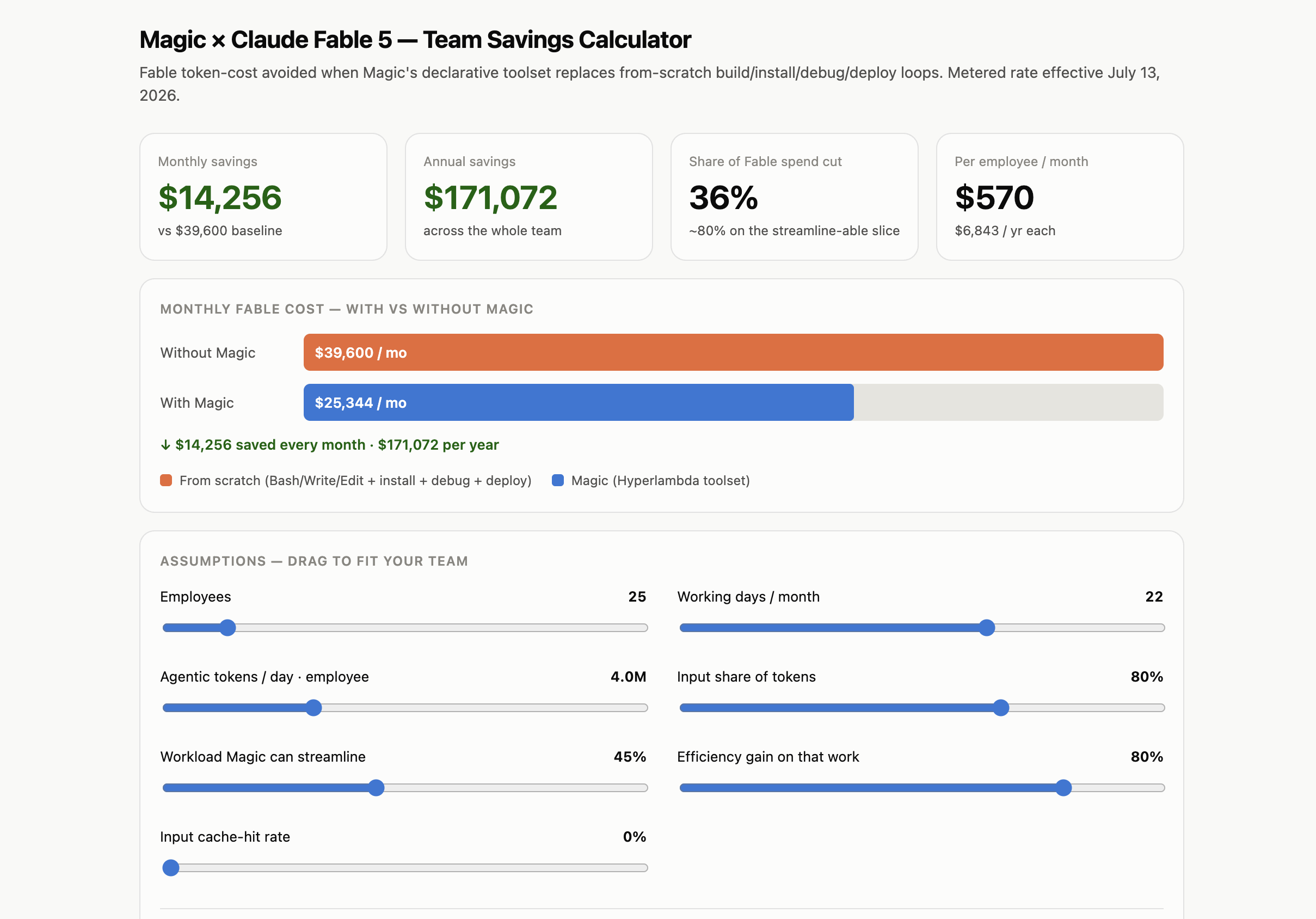
Install the mcp plugin, point Claude Code, Cowork, or OpenAI's Codex at your cloudlet, and every HTTP endpoint in your modules folder becomes a tool the agent can invoke. In our measurements this also cuts token consumption by roughly 80%. Calculate your own savings here.
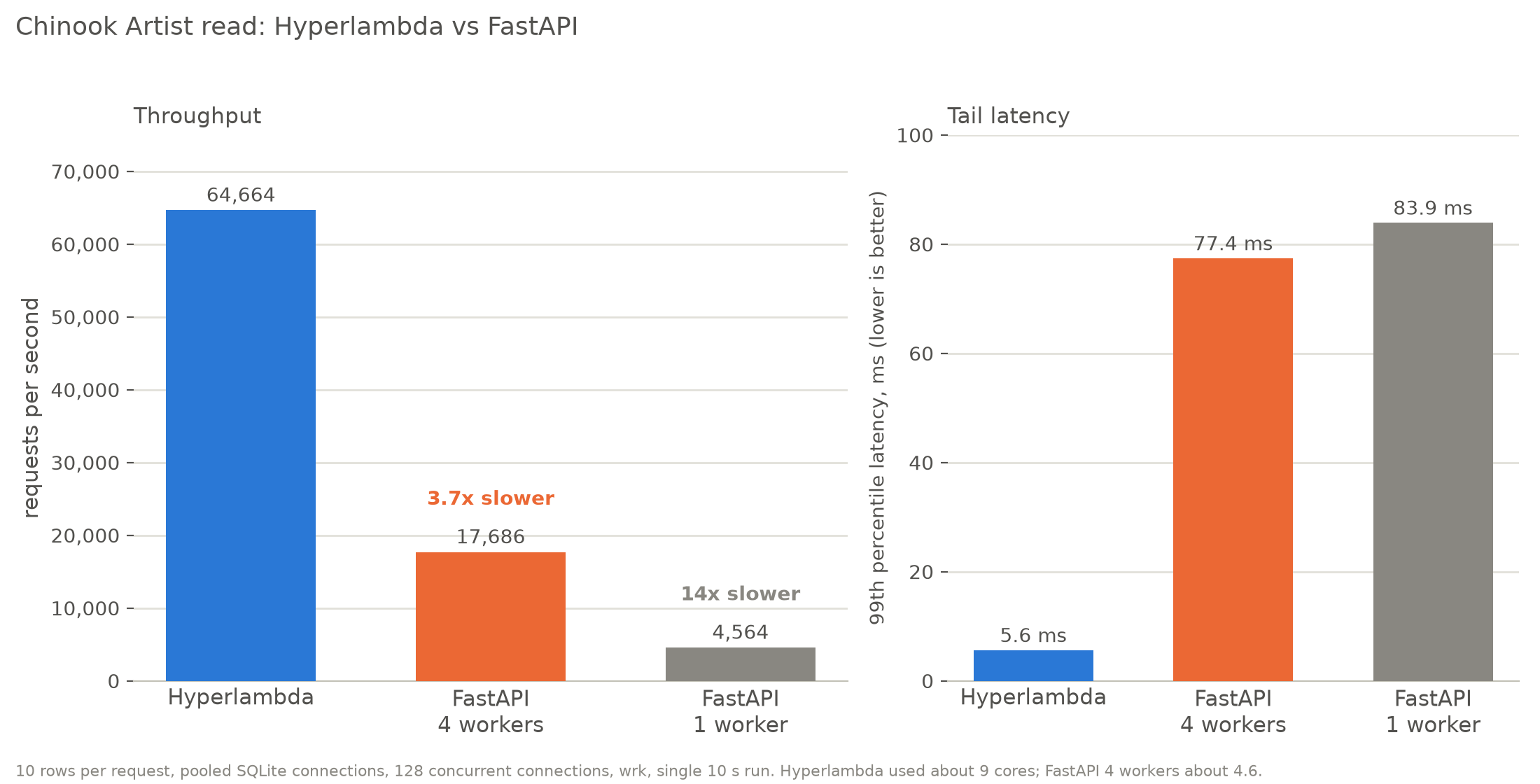
On a Chinook read endpoint (10 rows per request, pooled SQLite connections, 128 concurrent connections, measured with wrk), Hyperlambda served 64,664 requests per second, 3.7× the throughput of FastAPI with 4 workers (17,686) and 14× that of FastAPI with 1 worker (4,564). The 99th percentile latency was 5.6 ms, against 77.4 ms and 83.9 ms for FastAPI. Hyperlambda used about 9 cores and FastAPI with 4 workers about 4.6, so this is a measurement of throughput on one machine, not of efficiency per core: per core the gap is 1.8×. It needs connection pooling (Pooling=True), which is not the shipped default, it was measured mostly by an AI model (Claude) under the author's supervision, on one laptop, and it has not been independently replicated. The conditions, the caveats and the results as JSON are at hyperlambda.dev/benchmark, and the scripts to reproduce it are in benchmarks/fastapi.
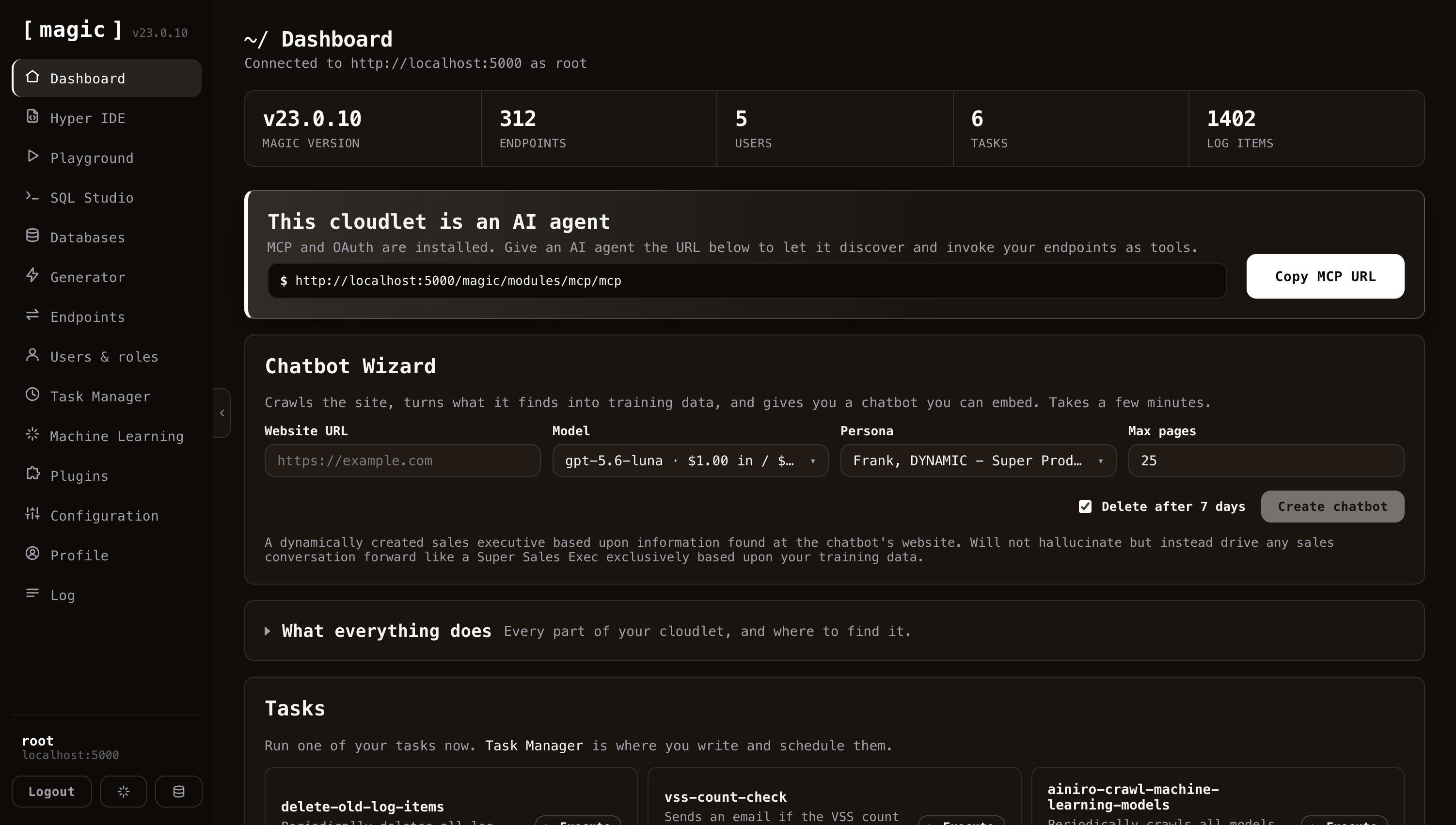
The sidebar is the whole platform: Hyper IDE for editing, running and replaying any file on the server, Playground for executing Hyperlambda without saving it first, SQL Studio for querying and designing databases, Endpoint Generator for turning tables into secured CRUD endpoints, wrapping caller-supplied code in a role-scoped sandbox, and importing third-party APIs from their OpenAPI specifications, plus users and roles, scheduled tasks, machine learning, and the plugin store.
Your cloudlet is also an AI agent. With the MCP plugin installed, the URL at the top hands any MCP-capable agent your endpoints as tools. The Chatbot Wizard goes the other way: give it a website, and it crawls the site, turns what it finds into training data, and hands you an embeddable chatbot grounded in your own content.
Once you save the code, you can test it — no deployment or publish step required.
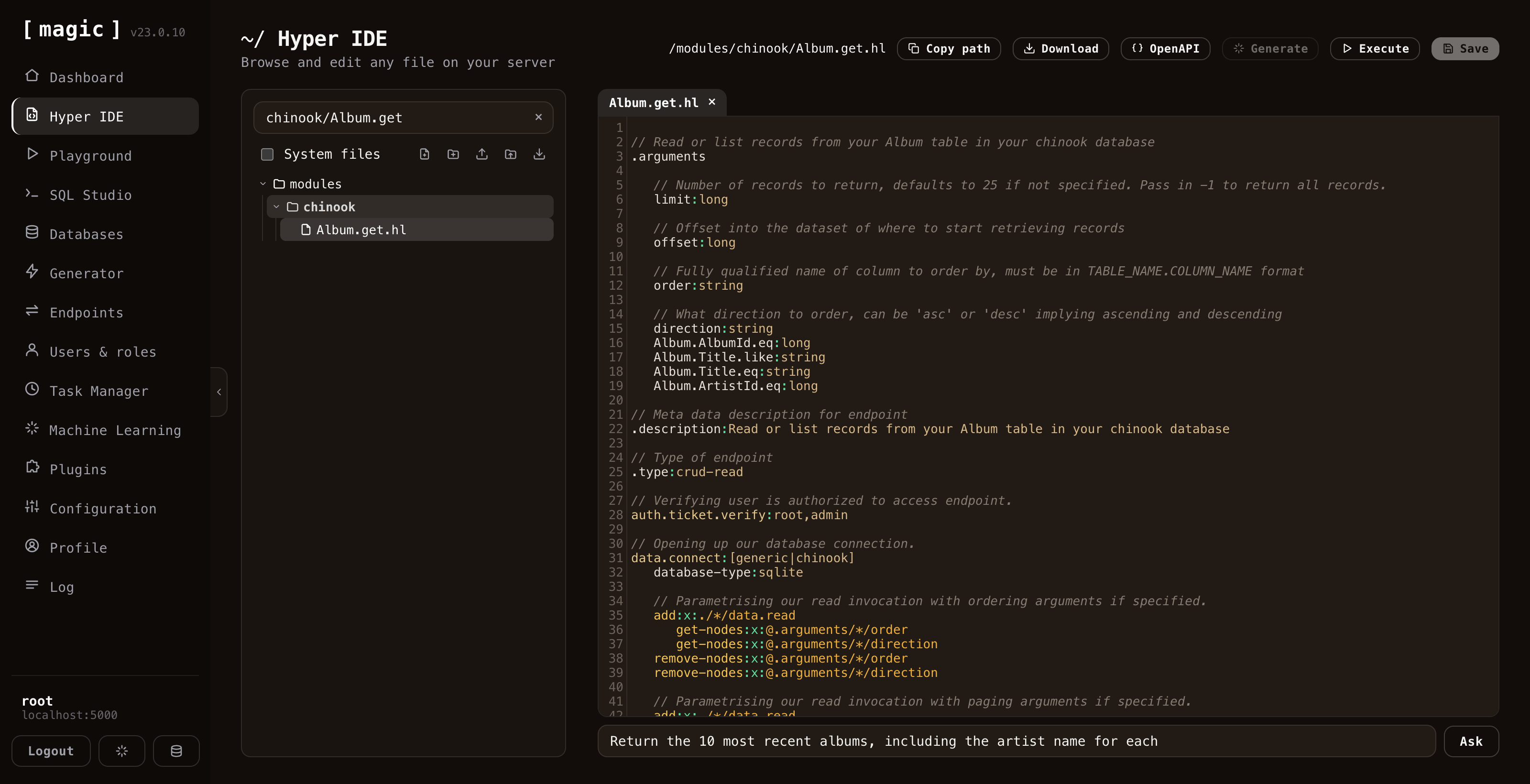
Notice the prompt bar below the editor, where "the Machine Creates the Code". Describe what you want in plain English and the built-in generator writes it straight into the file you're editing. The same bar follows you into the Playground and SQL Studio, generating Hyperlambda, SQL, HTML, or whatever fits the file you have open.
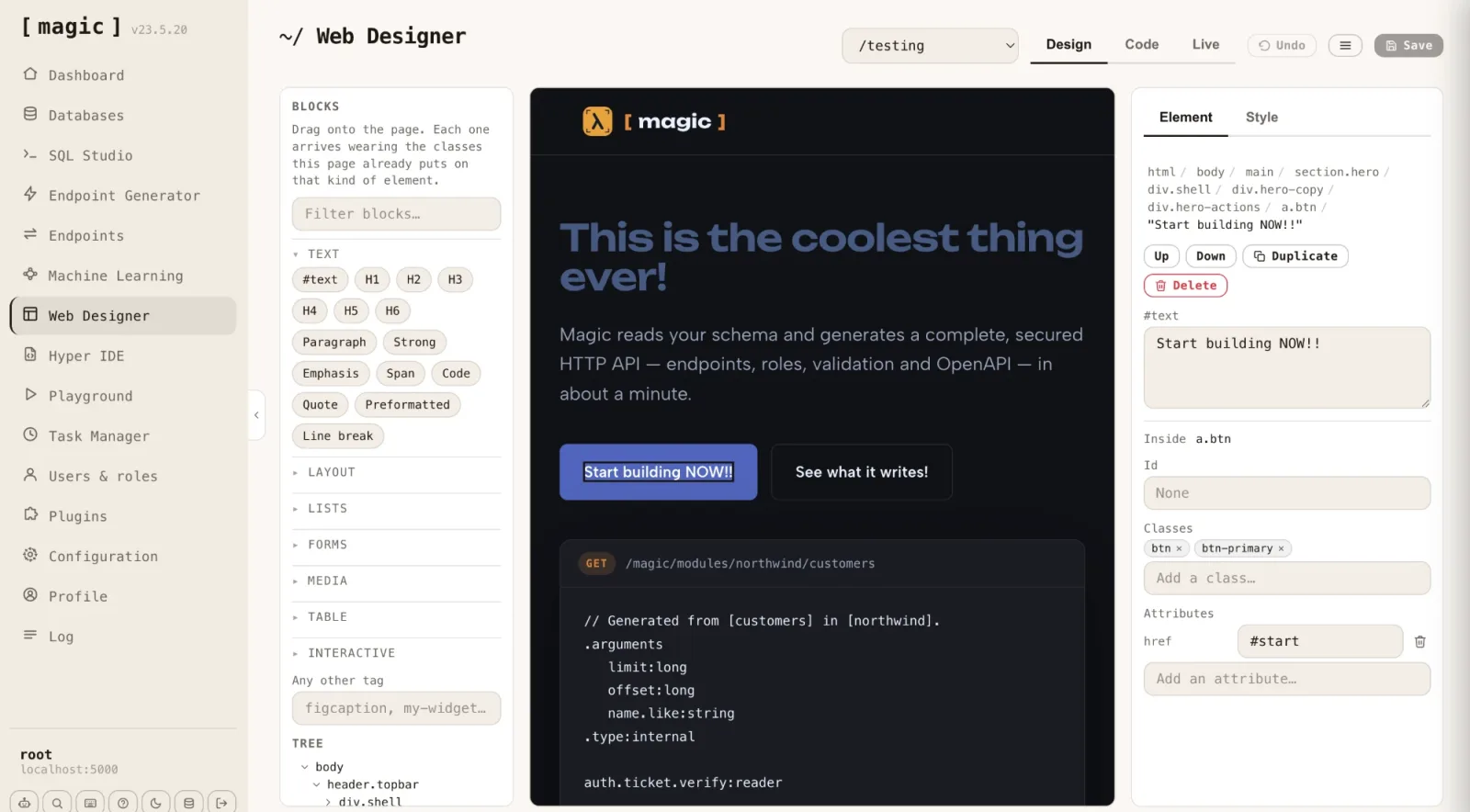
Design your frontend in the browser, on the real file. Web Designer opens any HTML page your cloudlet serves and lets you edit it the way you would edit a document — click an element to select it, double-click a run of text to rewrite it, drag a block in from the palette, drag it somewhere else to move it.
There is no project format and no build step. The page in the middle is the file on disk: scripts are disabled inside the canvas, so what the browser has parsed is exactly what will be saved back. That is also why selection can reach a bare #text node — every run of text is its own thing in the tree, not a property of the tag around it.
The palette carries 60+ blocks, and each one arrives wearing the classes that page already puts on that kind of element — drop a button into the navbar and it lands looking like the other nav items. Style changes go into the page's own stylesheet, inside a fenced block, so your hand-written CSS above and below it is returned to disk untouched.
Code view puts the same file in an editor — HTML, or any stylesheet the page links, picked from a dropdown — with the "the Machine Creates the Code" prompt bar underneath. Live view runs the page for real, scripts and all.
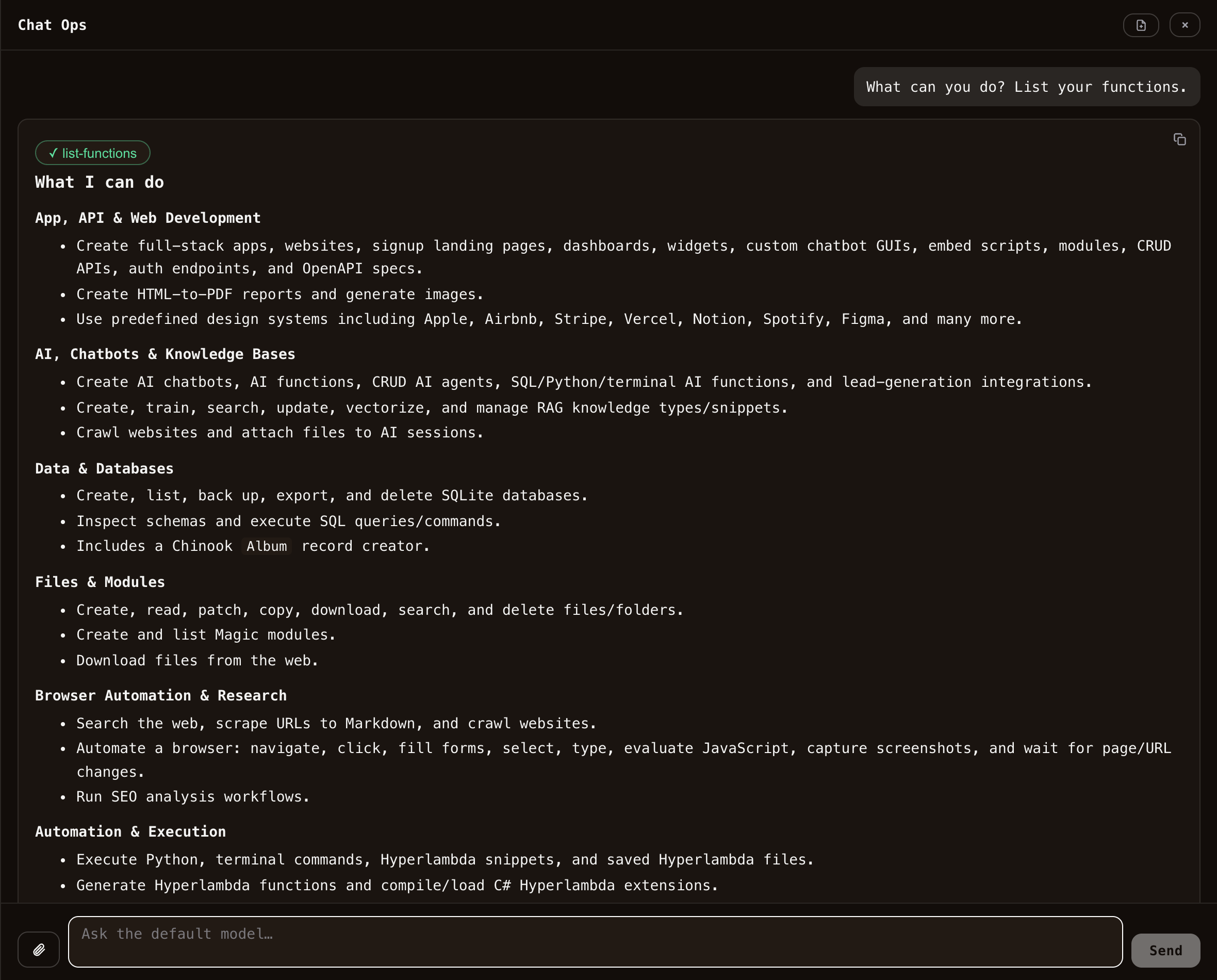
Ctrl+. anywhere in the dashboard opens Chat Ops: a conversation with your cloudlet that slides in over whatever screen you are on, and stays there while you navigate. Ask it to generate an endpoint from Hyper IDE and the file lands in the tree behind you — the conversation is still open when you turn round to look at it.
It talks to the default model, the developer-tools model, and it does not merely answer. It executes AI functions on your behalf: crawl a site, query a database, generate a CRUD API, scrape a URL, run a Hyperlambda snippet. Each invocation appears as a pill — amber while it runs, green when it succeeds, red when it throws — and clicking one opens the exact file and JSON arguments the model sent, so you can see what it actually did rather than trust a summary.
The whole loop is enforced server-side. A function the model tries to invoke that is not declared on the type is rejected before it executes, every function file carries its own auth.ticket.verify, and the invocation runs under your JWT — so Chat Ops can never do anything you could not do yourself from the dashboard.
Answers stream in as Markdown with syntax-highlighted code (Hyperlambda included), Mermaid diagrams render inline, and you can attach up to five files — either uploaded to the cloudlet for a function to work on, or handed to the model to read. Copy any code block, or the whole response, with one click.
Chat Ops appears only when an OpenAI API key is configured, and the key dialog is where you pick which model default runs.
polterguy/magic is a public repo on GitHub by polterguy. Instant SECURE Full Stack Apps and AI Agents.
It declares the MIT license on GitHub.
Its maker tagged it for macOS, Windows and Linux, or as Docker or cross-platform. That is declared by the maker; Take My Repo has not tested it.
Open "Take it" on its page: Take My Repo writes an install plan for your machine and hands it to your AI agent (Claude Code, Codex or Cursor), which asks you before each step. Take My Repo has not tested it on any machine.
The agent harness performance optimization system. Skills, instincts, memory, security, and research-first development for Claude Code, Codex, Opencode, Cursor and beyond.
Build Agentic workflows, RAG pipelines, with rich AI model and tool support on one collaborative workspace. Deploy on cloud, VPC, or self-hosted, so teams move from prototype to production without rebuilding the stack.
An open-source AI agent that brings the power of Gemini directly into your terminal.
Its last change on GitHub was on 2026-11-24. GitHub counts 1 open issue and pull requests. Take My Repo does not judge from that whether it is maintained.
Nobody has reviewed it on Take My Repo yet, which says nothing about its quality.
Take My Repo cannot say: it does not audit code and has not run magic. What is known comes from GitHub. It declares the MIT license on GitHub. Its last change was on 2026-11-24. It has 1,254 stars, which measure popularity, not safety. Nobody has reviewed it on Take My Repo yet, which says nothing about its quality. Read the source before you run it. With "Take it", your AI agent shows each step and asks you before running it; README text is treated as data, not as instructions.





