OpenTokenUsage
Every AI coding limit, next to your Windows 11 clock. Claude Code, Codex, Cursor, Copilot, Antigravity and 13 more: session and weekly limits, resets, pace, project costs and alerts in the tray and taskbar. Free and open source.
- 60
- MIT
- 2 d ago
Repo poweruserz/OpenTokenUsage, read from GitHub 11 h ago. poweruserz has not joined Take My Repo.
In short
poweruserz/OpenTokenUsage is a public repo on GitHub by poweruserz. Every AI coding limit, next to your Windows 11 clock. Claude Code, Codex, Cursor, Copilot, Antigravity and 13 more: session and weekly limits, resets, pace, project costs and alerts in the tray and taskbar. Free and open source. It declares the MIT license on GitHub. It is written mainly in TypeScript, has 60 stars and last changed on 2026-11-20. Nobody has reviewed it on Take My Repo yet, which says nothing about its quality. Read from GitHub on 2026-11-22.

OpenTokenUsage
A free, open-source Windows 11 tray app that tracks your limits and spend
on Claude Code, Codex, Cursor, Copilot and 21 more AI coding tools.
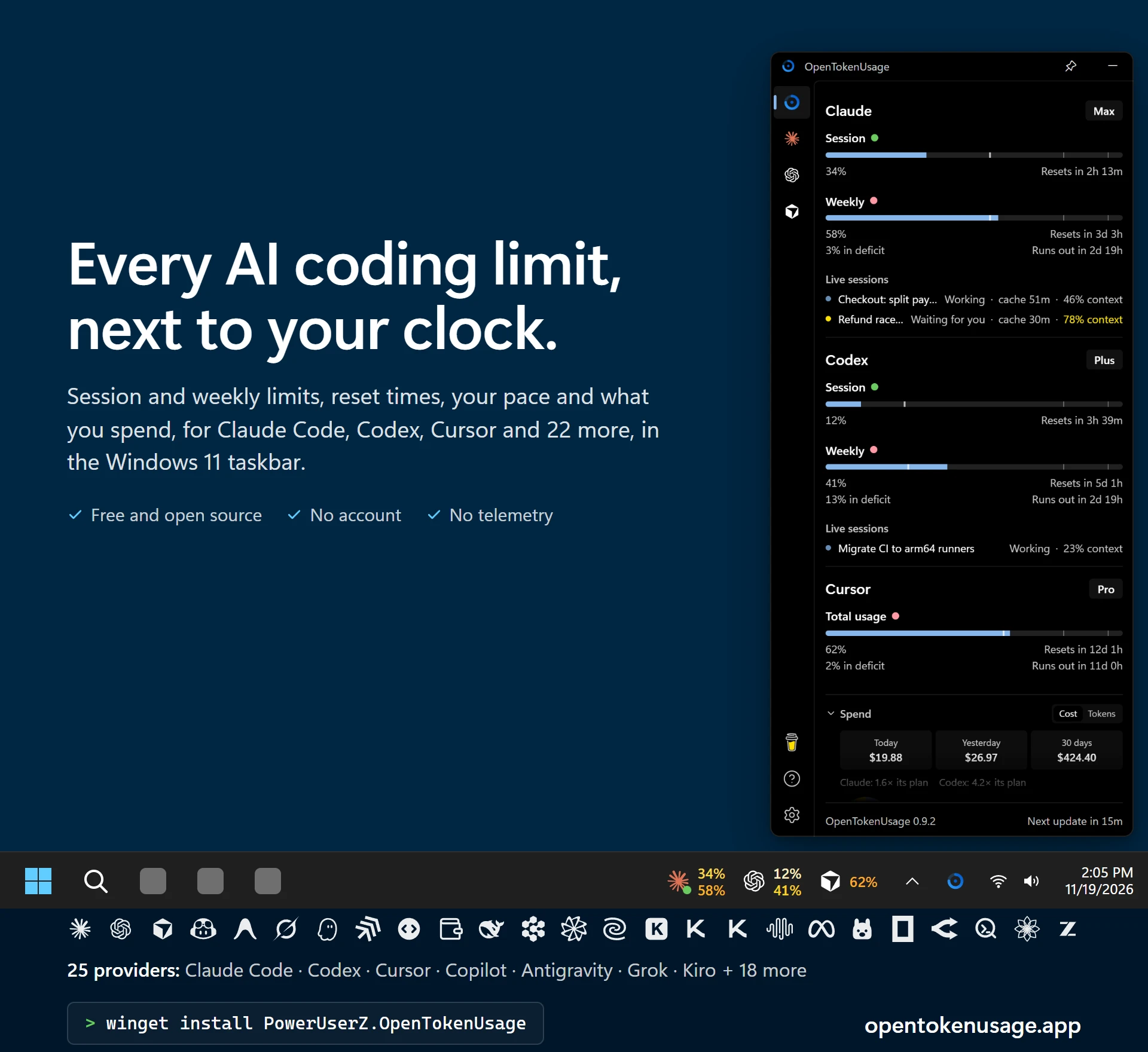
OpenTokenUsage sits in the notification area and reads your usage with the sign-in each tool already keeps on your PC. No API keys to paste for Claude or Codex, no dashboards to dig through, no mental math: one glance shows how much is left, when it resets, whether it lasts until then, and what you spent today.
Install
With WinGet (recommended):
winget install PowerUserZ.OpenTokenUsage
Or download the latest release and run OpenTokenUsage_<version>_x64-setup.exe.
Either way it installs for your Windows user only (%LOCALAPPDATA%\OpenTokenUsage), so neither the install nor updates ask for admin rights. The app checks for new versions every 15 minutes and updates itself when you click Restart to update. On first start it turns on the providers you're signed in to.
[!NOTE] The installer isn't code-signed, so a setup downloaded in the browser gets a Microsoft Defender SmartScreen warning ("Windows protected your PC", unknown publisher): choose More info → Run anyway (newer Windows shows Run anyway right away). WinGet checks the installer against its manifest's hash and shows no warning, and neither do the in-app updates.
Installed 0.7.7 or earlier (MSI or WinGet)? Use the in-app update once. It moves the app to the per-user install and asks for admin once, to remove the old per-machine copy. Your settings stay. Until then, winget upgrade says the install technology is different.
Is it safe?
Open source, built in public. Since 0.6.24, every installer is built by GitHub Actions from this repository's tagged commit, not on a personal PC.
Official downloads only: GitHub Releases, WinGet (
PowerUserZ.OpenTokenUsage) and opentokenusage.app, which links to the releases. A copy from anywhere else isn't ours.Check your download. The release page lists each file's SHA-256. Compare it with:
Get-FileHash .\OpenTokenUsage_<version>_x64-setup.exeReleases can't be changed. From 0.9.1 on, releases are immutable: once published, a release's files and tag are locked, so a download can't be swapped later. GitHub also keeps signed records for each setup, filed under its SHA-256 (nothing is added to the file itself). With the GitHub CLI:
# The file is the one published in that release:
gh release verify-asset v<version> .\OpenTokenUsage_<version>_x64-setup.exe -R PowerUserZ/OpenTokenUsage
# It was built by this repository's release workflow:
gh attestation verify .\OpenTokenUsage_<version>_x64-setup.exe -R PowerUserZ/OpenTokenUsage `
  --signer-workflow poweruserz/OpenTokenUsage/.github/workflows/publish.yml
Signed updates. The app installs an update only if it's signed with the release key whose public half is built into the app.
Code signing is on its way. The SignPath Foundation accepted the project; once its certificate is issued, the app and installer will be signed. Releases up to 0.9.2 are unsigned. See the code signing policy.
Your data stays on your PC. No telemetry, no account, no server of its own. See Privacy.
Found a security problem? Report it privately, as SECURITY.md describes.
What It Does
- One glance. All your AI tools in one panel that opens in the corner of the screen, from the tray or a global shortcut. Pin it above other windows, have it open where you left it, or drag its left or right edge to make it wider.
- Next to the clock. The tray shows the app icon, a percent, bars, or one number or logo ring per provider.
- Taskbar strip (experimental). Provider logos with session and weekly usage right in the taskbar, in your own fonts, colors and order, on one monitor or all of them. A dot on a logo shows its agent working (green) or waiting for you (yellow).
- On the desktop too. Widgets you drag anywhere, and a rail on the screen's edge with today's spend and live tokens per minute.
- Spend. Today, yesterday and the last 30 days across Claude, Codex and other CLIs' own logs, the models you used most, and, with your plan prices set, how many times its price each plan was worth.
- Live sessions. The Claude Code and Codex sessions running on this PC, on their cards: working or waiting, the time left on Claude's prompt cache, and how full each context is.
- Pace. Every limit says whether you're ahead or behind, and when it runs out at this rate. A weekly limit's pace can count work days only.
- Since you last looked. When the panel opens, what you used while it was closed blinks hatched, then the bar fills over it.
- Notifications. At the usage levels you pick, for every provider or each on its own (the bars show a notch at each level), when you're on pace to run out before a reset, when a limit resets, and when a Claude or Codex session uses tokens far faster than usual (often an agent stuck in a loop), with a built-in sound or your own.
- Banked resets. Codex and Claude reset counts, what each one clears, its expiry date and a live countdown, with reminders 7 days and 24 hours before.
- One-click fixes. A provider you're signed out of shows a quiet card with its sign-in button; errors come with the fix: run the login command in a terminal, or open the provider's API key page and Windows' Environment Variables. A Claude or Codex card that lost its sign-in refreshes the moment you sign in again. With only the Claude desktop app signed in, its login is enough.
- Service status. A badge on the card when the provider's status page reports an incident.
- More than one login. A second Claude or Codex account gets its own card, and so does a different login inside a running WSL distro.
- Plugin-based. Each provider is a small plugin, so adding one is easy. New providers arrive with app updates.
- Local HTTP API. Other apps on your PC can read your usage from
127.0.0.1:6736(loopback only). - Proxy support. Route provider, status page and update requests through an HTTP, HTTPS or SOCKS5 proxy, set in Settings → App.
- Hide from screen sharing. The panel and the widgets stay out of screen shares, recordings and screenshots.
On Your Desktop
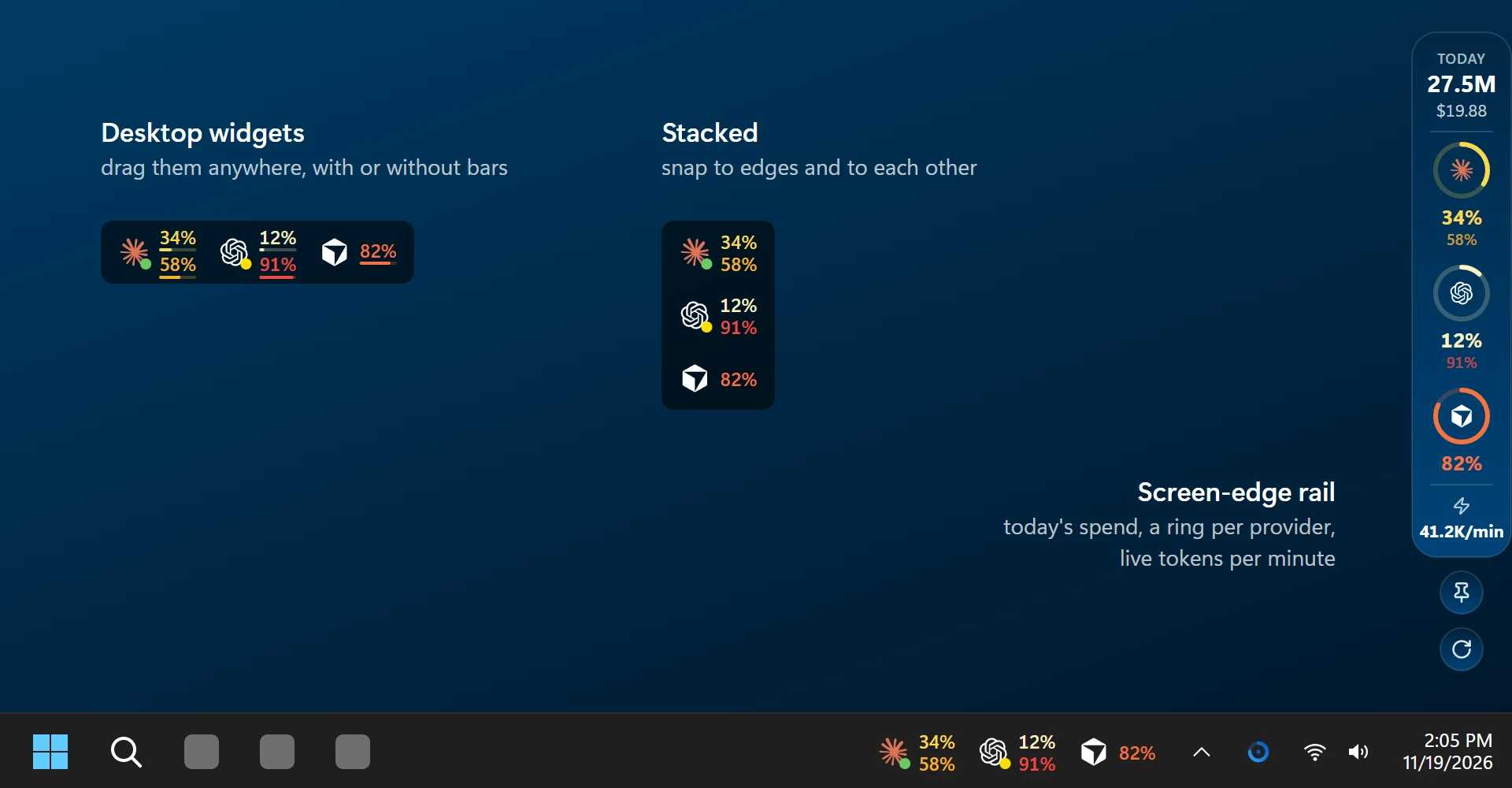
Settings → Taskbar & desktop puts the strip's providers on the desktop as well:
- Desktop widgets. Side by side, stacked, one per provider or each in turn. Drag them where you like; they snap to screen edges and to each other, can stay on top, be locked in place or let clicks pass through. A click opens the panel, and they hide while a full-screen app is in front.
- Screen-edge rail. Today's tokens and spend, each provider's logo in a ring filled as far as its usage, and the live token rate, tucked against the right, left or top edge until the pointer comes near. Pin it open, or refresh from it.
See Where Your Tokens Go
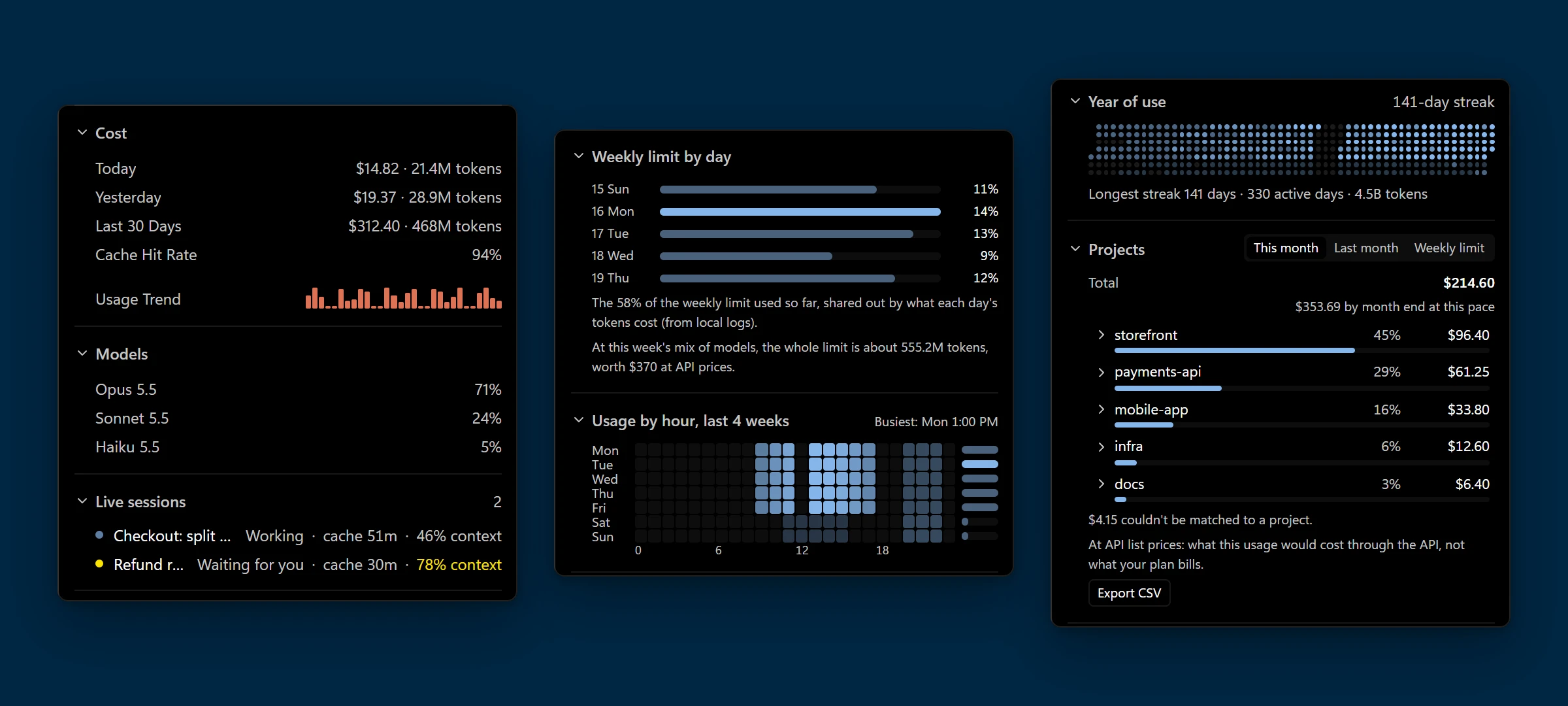
Open Claude or Codex for its detail page. It adds what only their own logs on your PC can tell, and none of it leaves the PC:
- Usage by project. Each repository's share of the month, or of the current weekly limit, and its cost at API prices, with its git branches and any ticket key in the branch name.
- Monthly budgets. A project's bar turns yellow at 80% and red at 100%, with a notification at each, even with the panel closed.
- Export CSV of the month, one row per branch, and costs in one of 13 currencies at a rate you enter.
- Weekly limit by day. What each day of the current weekly limit used of it, so far.
- Usage by hour. Tokens per weekday and hour over the last 4 weeks, with your busiest hour and each weekday's total.
- Year of use. Every day of the last year, with your streaks. Usage is kept after Claude Code deletes its logs (after 30 days by default), and daily tokens can be exported as CSV and JSON.
- Models by their share of the month, the cache hit rate and a 30-day usage trend.
Costs come from ccusage, which runs through Bun or Node.js. Without either, the lists show tokens.
Make It Yours
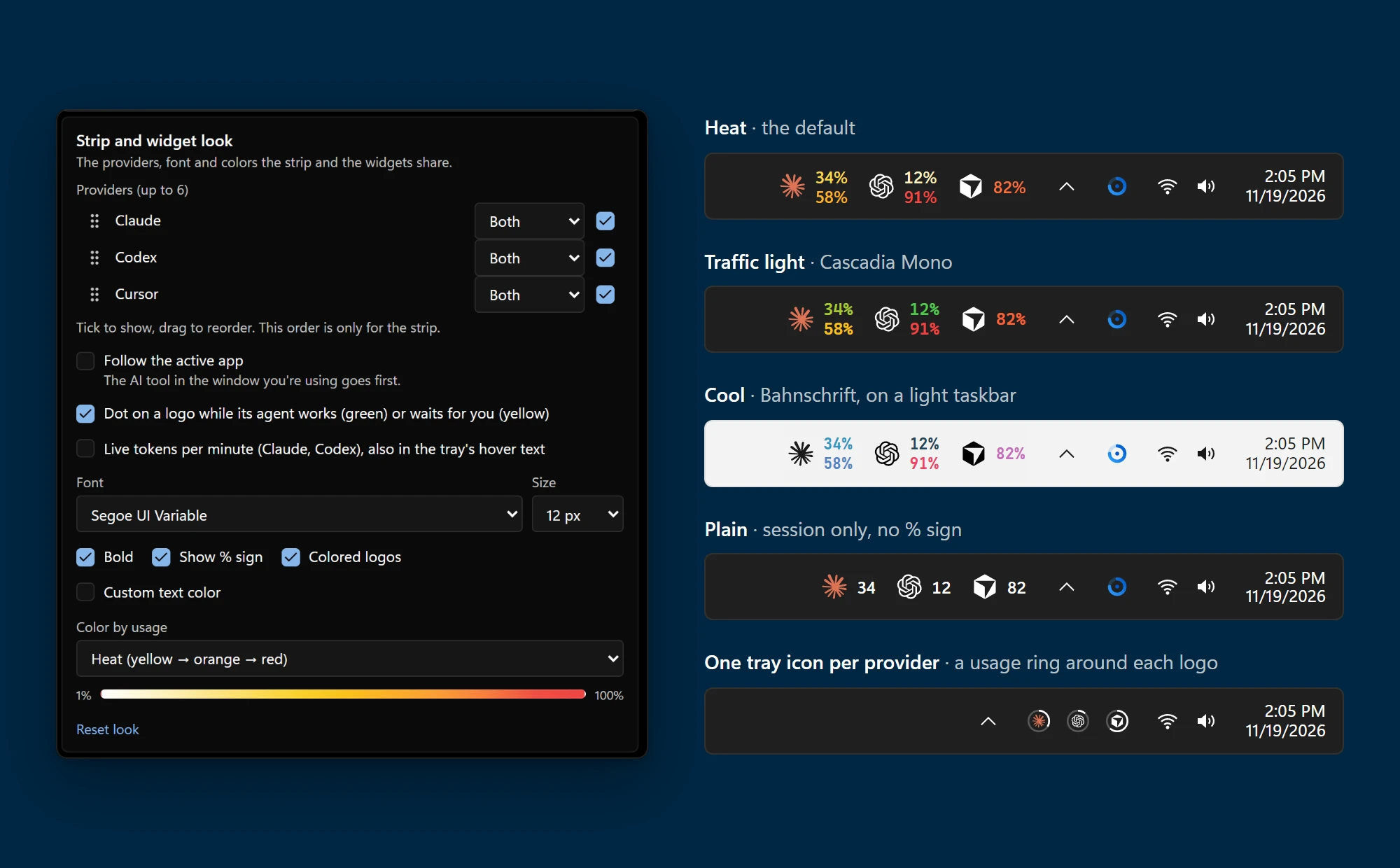
Settings → Taskbar & desktop picks what sits next to the clock and puts logos with session and weekly numbers into the taskbar: choose up to 6 providers and their order, the font and size, and a color scale that warms up as you use more. The strip and the desktop widgets share this look.
Right keeps the strip beside the notification area. The other choice follows how Windows aligns the taskbar icons: Left (the taskbar's left edge) when they are centered, Center when they are aligned left. The strip measures the Start, Widgets, app and tray buttons and stays in the free space next to them, so it never covers one; with no free space wide enough, it hides. Offset (px) adds spacing (0–4096, scaled with the display). The default stays Right with an 8 px offset, and the placement applies to every selected taskbar.
At Home on Windows 11
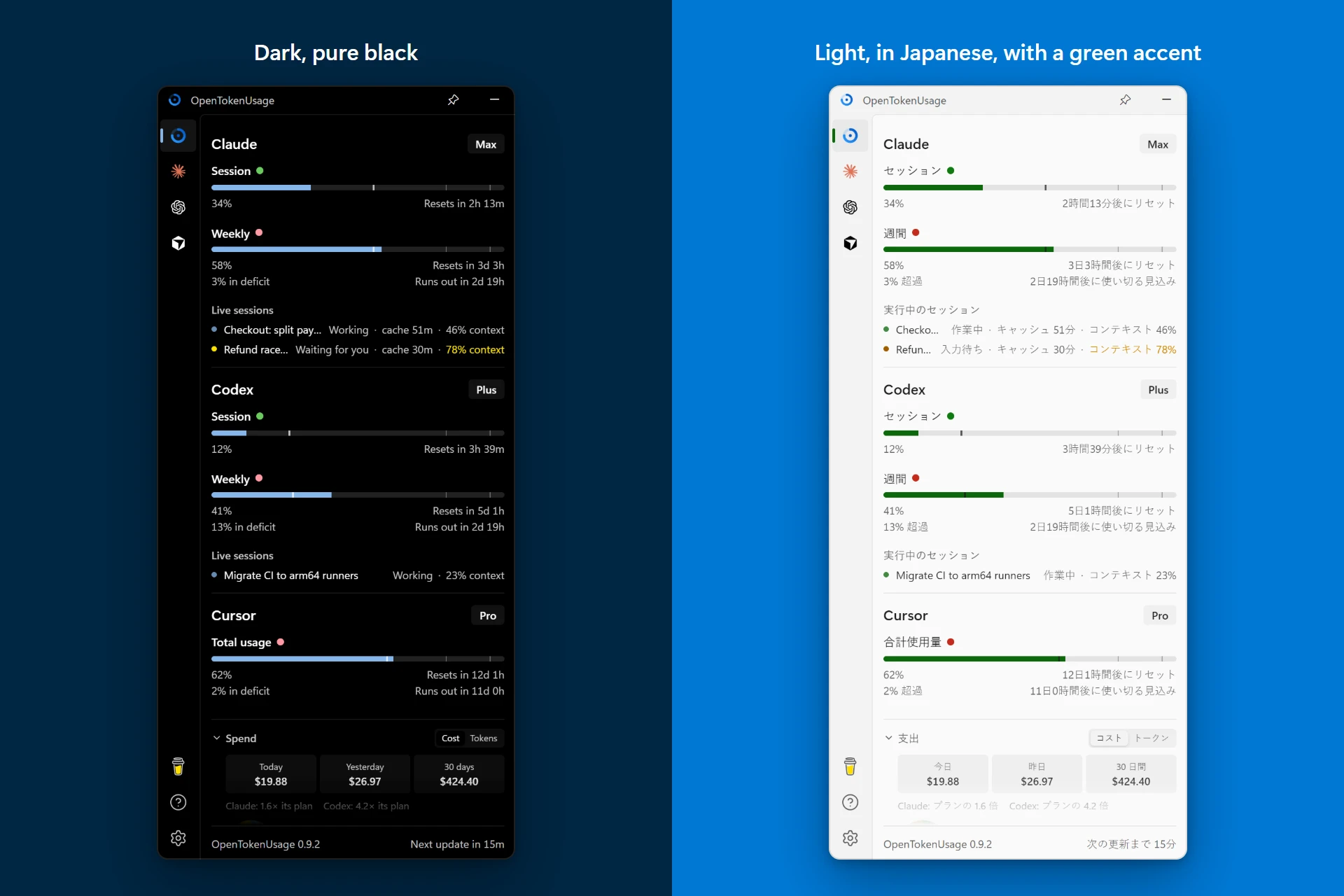
- Mica and your accent color. The panel takes Windows' backdrop and your accent color, or Glass blurs the desktop behind it.
- Dark and light. A pure black dark theme and a light one. Tray icons and the strip follow the taskbar's theme the moment it changes.
- 11 languages. It follows Windows' language unless you pick one.
- Settings backup. Export your settings to a file and import them on another PC. Logins stay where they are.
Smart Refresh
Settings → Auto refresh → Smart paces each account on its own: every 2 minutes while its usage moves, then 5, 10 and finally 15 minutes while it stays the same. Claude cards wait at least 10 minutes between checks: Anthropic allows about 30 usage reads an hour per login, shared with Claude Code and other monitors. Fixed intervals, 15 minutes by default, stay available.
How it schedules
Checks are scheduled after results arrive, so a slow account does not overlap itself or block another account. Failures use a separate 2/5/10/15-minute backoff, and the HTTP rate-limit gate still enforces server retry delays, also after the app restarts. Opening the panel refreshes data at least a minute old, without bypassing error backoff. At the 15-minute cadence, usage elsewhere can take up to 15 minutes to be detected.
Smart polls reuse successful local token-history scans for up to 15 minutes; manual refreshes and fixed intervals still scan fresh history. Quota checks remain live. Only raw progress values and limits determine activity, so countdown text and history charts cannot keep an idle account polling rapidly.
Supported Providers
- Amp / free tier, bonus, credits
- Antigravity / Gemini and Claude models, session and weekly
- Claude / session, weekly, Fable, extra usage, rate limit resets, local token usage (ccusage)
- Codebuff / credits, weekly limit
- Codex / session, weekly, reviews, credits, banked resets with expiry countdowns
- Copilot / credits, extra usage, chat, completions
- Custom balances / New API, One API, Sub2API or your own endpoint (set up in Settings)
- Cursor / credits, total usage, requests, auto usage, API usage, Grok Bot, on-demand, bonus spend, CLI auth
- DeepSeek / API balance
- Devin / weekly and daily quota, extra usage
- Factory / Droid / session, weekly, monthly limits
- Grok / weekly limit, credits used, pay-as-you-go cap
- JetBrains AI Assistant / quota, remaining
- Kilo / credits, Kilo Pass month
- Kimi API / API balance, vouchers, cash
- Kimi Code / session, weekly
- Kiro / credits, bonus credits, overages
- MiniMax / coding plan session
- Muse Code / session, weekly (turn it on in Settings)
- Ollama / installed and loaded models (local server)
- OpenCode Go / 5h, weekly, monthly usage limits
- OpenRouter / credits, API key spending cap, daily and monthly spend
- Qwen Code / requests today and this month (local ledger)
- Synthetic / 5-hour rate limit, subscription, tool calls, search
- Z.ai / session, weekly, web searches
Code signing policy
Free code signing provided by SignPath.io, certificate by SignPath Foundation.
Signing starts with the first release after the certificate is issued; earlier releases are unsigned.
- What is signed: only the OpenTokenUsage app (
opentokenusage.exe) and its installer (OpenTokenUsage_<version>_x64-setup.exe), built by GitHub Actions from a tagged commit of this repository. Nothing built elsewhere and no third-party program is signed. - Committers and reviewers: PowerUserZ. Outside contributions arrive as pull requests and are merged only after review.
- Approvers: PowerUserZ (owner) approves every signing request.
- Privacy: see Privacy.
- System changes: it installs for the current Windows user in
%LOCALAPPDATA%\OpenTokenUsage, without admin rights. Start on login is on by default (a value underHKCU\Software\Microsoft\Windows\CurrentVersion\Run); turn it off in Settings. It asks Windows to show its tray icon next to the clock, only if you haven't chosen yourself. Updates come only from this repository's releases, are checked against the updater signing key, and install when you choose. - Uninstall: Windows Settings > Apps > Installed apps > OpenTokenUsage. The uninstaller can also delete the app's data folders, proxy and custom balance settings included. Turn off Start on login first to remove its Run value too.
Privacy
This program will not transfer any information to other networked systems unless specifically requested by the user or the person installing or operating it.
OpenTokenUsage has no telemetry, no analytics and no server of its own. It connects only to:
- The AI providers you use, with the sign-in already on your computer, to read your usage and to refresh that sign-in when it expires. Each provider receives only its own credentials.
- GitHub (
api.github.com,github.com), to check for updates and show the changelog. - Provider status pages (for example
status.claude.com), for the status badge. - The npm registry, through your own package manager: when Bun, pnpm or npm is installed, the Claude and Codex cards run ccusage to total local token usage, and the package manager may download it the first time.
Settings and cached usage stay on your computer (%APPDATA%\com.poweruserz.opentokenusage). The local HTTP API listens on 127.0.0.1 only.
Languages
 English |
 Deutsch |
 Español España |
 Español Latinoamérica |
 Français |
 Italiano |
 日本語 |
 한국어 |
 Português Brasil |
 Türkçe |
 简体中文 |
The app follows Windows' language when it has it, English otherwise, and Settings → App → Language picks another. Flags from flag-icons (MIT). A translation is a pull request away: see CONTRIBUTING.md.
Contributing
- Add a provider. Each one is just a plugin. See the Plugin API.
- Fix a bug. PRs welcome. Provide before/after screenshots.
- Request a feature. Open an issue and make your case.
- Accessibility. What works with a keyboard, a screen reader, contrast themes and larger text, and what doesn't yet: ACCESSIBILITY.md.
Support
OpenTokenUsage is free and made by one person. If it saves you time, you can buy me a coffee, or star the repository so others find it.

License
Build from source
Prerequisites
Steps
git clone https://github.com/PowerUserZ/OpenTokenUsage.git
cd OpenTokenUsage
bun install
bun tauri build
The built app will be in src-tauri/target/release/bundle/.
Acknowledgments
OpenTokenUsage started as a fork of OpenUsage by Robin Ebers (MIT) and was rebuilt for Windows. It is not the official OpenUsage and is not affiliated with it. Inspired by CodexBar by @steipete.
Questions
What is OpenTokenUsage?
poweruserz/OpenTokenUsage is a public repo on GitHub by poweruserz. Every AI coding limit, next to your Windows 11 clock. Claude Code, Codex, Cursor, Copilot, Antigravity and 13 more: session and weekly limits, resets, pace, project costs and alerts in the tray and taskbar. Free and open source.
Is OpenTokenUsage open source?
It declares the MIT license on GitHub.
Does OpenTokenUsage run on macOS, Windows or Linux?
Its maker tagged it for macOS, Windows and Linux, or as Docker or cross-platform. That is declared by the maker; Take My Repo has not tested it.
How do I install OpenTokenUsage?
Open "Take it" on its page: Take My Repo writes an install plan for your machine and hands it to your AI agent (Claude Code, Codex or Cursor), which asks you before each step. Take My Repo has not tested it on any machine.
Is OpenTokenUsage still maintained?
Its last change on GitHub was on 2026-11-20. Take My Repo does not judge from that whether it is maintained.