
TerminalMap
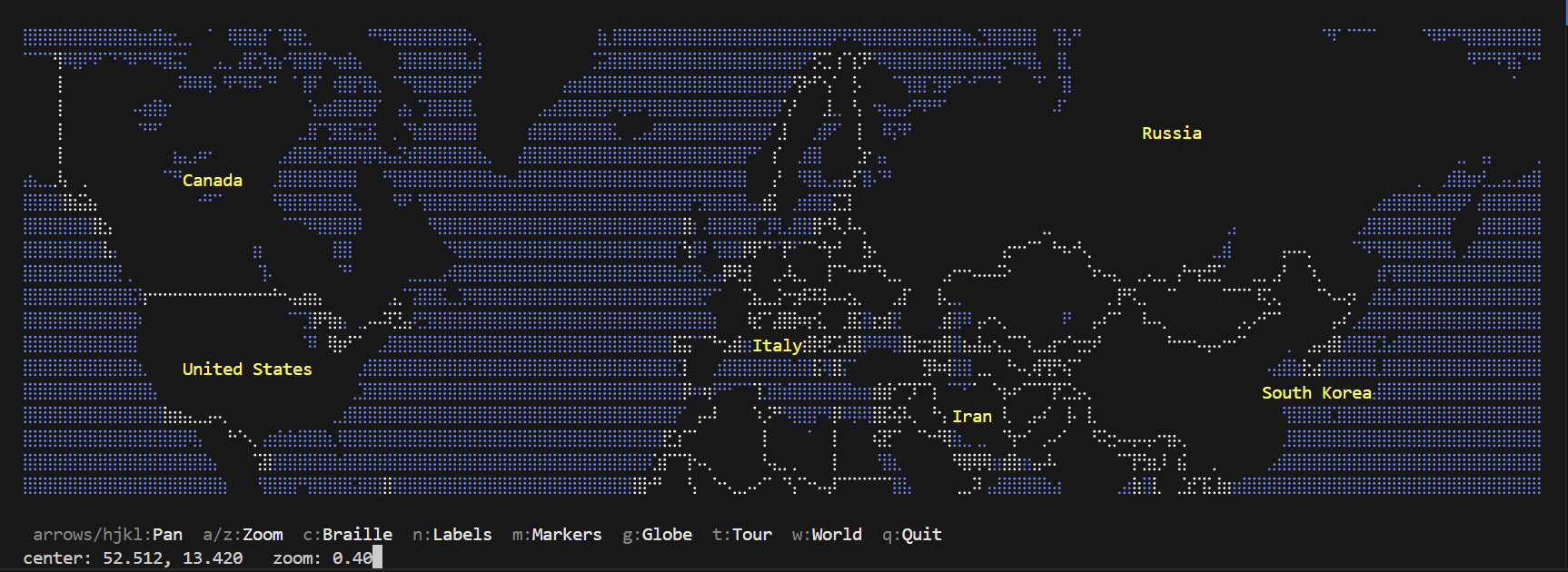
Render real world maps in your terminal. High precision interactive map viewer and embeddable Rust SDK. OpenStreetMap vector tiles rendered as braille/ASCII art.
- 28
- MIT
- 7 wk ago
Repo psmux/TerminalMap, read from GitHub 1 min ago. psmux has not joined Take My Repo.
In short
psmux/TerminalMap is a public repo on GitHub by psmux. Render real world maps in your terminal. High precision interactive map viewer and embeddable Rust SDK. OpenStreetMap vector tiles rendered as braille/ASCII art. It declares the MIT license on GitHub. It is written mainly in Rust, has 28 stars and last changed on 2026-10-07. Nobody has reviewed it on Take My Repo yet, which says nothing about its quality. Read from GitHub on 2026-11-24.
🗺️ TerminalMap
The entire world, rendered in your terminal. A high precision, interactive map viewer and embeddable Rust SDK that turns OpenStreetMap vector tiles into beautiful braille/ASCII art, right in any terminal.
Works offline at low zoom. No API keys. No external dependencies. Just a terminal.

🦀 Made with love using Rust | 💻 For terminal lovers | 🌍 Powered by OpenStreetMap
🤔 What is this
TerminalMap is two things:
- A standalone terminal app 🖥️ for browsing OpenStreetMap interactively with keyboard and mouse
- A Rust library (SDK) 📦 you can embed in any TUI application to add live, zoomable maps
It renders Mapbox Vector Tiles (MVT/protobuf) using Unicode braille characters at 2x8 subpixel resolution per terminal cell, giving you smooth, detailed maps at every zoom level from continents down to individual streets.
🙌 Who is this for?
- 🦀 Rustaceans who want a real world use case for terminal rendering
- 💻 Terminal enthusiasts who live in the command line
- 🗺️ GIS and mapping nerds exploring vector tiles and OpenStreetMap data
- 🧑💻 TUI developers building dashboards, DevOps tools, or monitoring UIs
- 🎨 Creative coders experimenting with braille art and Unicode rendering
- 🌍 Open source advocates looking for API free, self contained mapping
- 📡 DevOps and SRE teams who want geographic context in terminal dashboards
- 🏠 Offline first builders needing maps without network dependencies
✨ Features
- 🔤 Renders OpenStreetMap vector tiles using Unicode braille characters for high resolution
- 🔎 Smooth zoom from world view to street level (zoom 0 to 18)
- ⌨️ Keyboard and mouse navigation (pan, zoom, scroll)
- 📐 Full Mapbox Vector Tile (MVT/protobuf) parsing
- 🎨 Mapbox GL style support with layer filtering and color mapping
- 🏷️ Label collision detection to avoid overlapping text
- 🔺 Polygon triangulation and filled rendering
- 💾 Tile caching (in memory LRU + persistent disk cache)
- 📦 Embedded offline tiles for low zoom (world view works without network)
- 🔁 Toggle between braille and ASCII block character rendering
- 📍 Marker system with shapes, colors, and animations (blink, pulse, flash)
- 🎬 Scriptable camera with smooth fly to animation between locations
- 🖼️ Multiple independent map instances for dashboards and split views
- 🧩 Designed as a reusable library component with
MapStateAPI
🚀 Quick Start
📥 Install
Choose your preferred method:
Cargo (Rust)
cargo install terminalmap
Chocolatey (Windows)
choco install terminalmap
Winget (Windows)
winget install psmux.TerminalMap
Scoop (Windows)
scoop bucket add terminalmap https://github.com/psmux/scoop-terminalmap
scoop install terminalmap
APT (Debian/Ubuntu)
curl -fsSL https://psmux.github.io/apt-repo/gpg.key | sudo gpg --dearmor -o /usr/share/keyrings/terminalmap.gpg
echo "deb [signed-by=/usr/share/keyrings/terminalmap.gpg] https://psmux.github.io/apt-repo stable main" | sudo tee /etc/apt/sources.list.d/terminalmap.list
sudo apt update && sudo apt install terminalmap
From source
git clone https://github.com/psmux/TerminalMap.git
cd TerminalMap
cargo run --release
🎮 Controls
| Key | Action |
|---|---|
| Arrow keys / h,j,k,l | Pan the map |
| a / + | Zoom in |
| z / y / - | Zoom out |
| c | Toggle braille/ASCII mode |
| n | Toggle labels on/off |
| o | Toggle ocean background (fills empty space outside the world map with ocean) |
| m | Toggle demo markers |
| g | Start/stop globe tour (auto camera) |
| t | Start/stop marker tour |
| w | Fit world view |
| Mouse scroll | Zoom in/out |
| q / Esc | Quit |
📦 As a library (Map SDK)
TerminalMap is designed as a reusable map component you can embed in any Rust TUI application. Each MapState is an independent map instance with its own center, zoom, markers, and renderer. You can create as many as you need and place them wherever you want in your layout.
Add to your Cargo.toml:
[dependencies]
terminalmap = { path = "path/to/TerminalMap" }
tokio = { version = "1", features = ["full"] }
anyhow = "1"
🧪 Minimal example
use terminalmap::config::MapConfig;
use terminalmap::widget::MapState;

#[tokio::main]
async fn main() -> anyhow::Result<()> {
    let config = MapConfig::default();
    let mut map = MapState::new(config).await?;
    map.set_size_from_terminal(120, 40);

    let frame = map.render().await?;
    print!("{}", frame);

    Ok(())
}
🗺️ Startup view recipes
Control exactly what the user sees when the map first loads:
use terminalmap::config::MapConfig;
use terminalmap::widget::MapState;

// 1. Zoomed out world view (default behavior)
let mut map = MapState::new(MapConfig::default()).await?;
map.set_size_from_terminal(cols, rows);
// zoom auto fits the terminal

// 2. Centered on a specific city
let config = MapConfig {
    initial_lat: 40.7128,
    initial_lon: -74.0060,
    initial_zoom: Some(6.0),  // city region level
    ..MapConfig::default()
};
let mut map = MapState::new(config).await?;

// 3. Fit the whole world (auto calculated zoom)
let mut map = MapState::new(MapConfig::default()).await?;
map.set_size_from_terminal(cols, rows);
map.fit_world();

// 4. Country level view of Japan
let config = MapConfig {
    initial_lat: 36.2048,
    initial_lon: 138.2529,
    initial_zoom: Some(3.0),  // country level
    ..MapConfig::default()
};
let mut map = MapState::new(config).await?;

// 5. Street level detail
let config = MapConfig {
    initial_lat: 48.8584,
    initial_lon: 2.2945,   // Eiffel Tower
    initial_zoom: Some(14.0),
    ..MapConfig::default()
};
let mut map = MapState::new(config).await?;
⌨️ Handling keyboard and mouse input
TerminalMap does not capture input on its own. You wire up whatever keys you want to the MapState methods. Here is a complete example using crossterm:
Questions
What is TerminalMap?
psmux/TerminalMap is a public repo on GitHub by psmux. Render real world maps in your terminal. High precision interactive map viewer and embeddable Rust SDK. OpenStreetMap vector tiles rendered as braille/ASCII art.
Is TerminalMap open source?
It declares the MIT license on GitHub.
Does TerminalMap run on macOS, Windows or Linux?
Its maker tagged it for Windows and Linux. That is declared by the maker; Take My Repo has not tested it.
How do I install TerminalMap?
Open "Take it" on its page: Take My Repo writes an install plan for your machine and hands it to your AI agent (Claude Code, Codex or Cursor), which asks you before each step. Take My Repo has not tested it on any machine.