
laya
Non-autoregressive System 1 decision engine. Typed choice, score and yes/no decisions over any text in a single forward pass, in 100+ languages, with a router that picks the right checkpoint per request.
- 36k
- Python
- Apache-2.0
- 16 h ago
AmneziaWG: веб-панель для каскада VPN-серверов с балансировкой | AmneziaWG cascade VPN panel with load balancing
Repo r-slashslash/AWG-Router, read from GitHub 3 h ago. r-slashslash has not joined Take My Repo.
r-slashslash/AWG-Router is a public repo on GitHub by r-slashslash. AmneziaWG: веб-панель для каскада VPN-серверов с балансировкой | AmneziaWG cascade VPN panel with load balancing. It declares the MIT license on GitHub. It is written mainly in Python, has 139 stars and last changed on 2026-11-24. Nobody has reviewed it on Take My Repo yet, which says nothing about its quality. Read from GitHub on 2026-11-24.
Non-autoregressive System 1 decision engine. Typed choice, score and yes/no decisions over any text in a single forward pass, in 100+ languages, with a router that picks the right checkpoint per request.
English · Русский · 中文 · فارسی
A web panel for AmneziaWG: users, tunnel settings, cascade routing and individual routing for each client in one place.
It installs its own AmneziaWG server — in a Docker container or on the host — or takes over a server that already runs, the one the AmneziaVPN app installed (the amnezia-awg2 container) included, with all its users. Protocol support goes up to AmneziaWG 3.1.
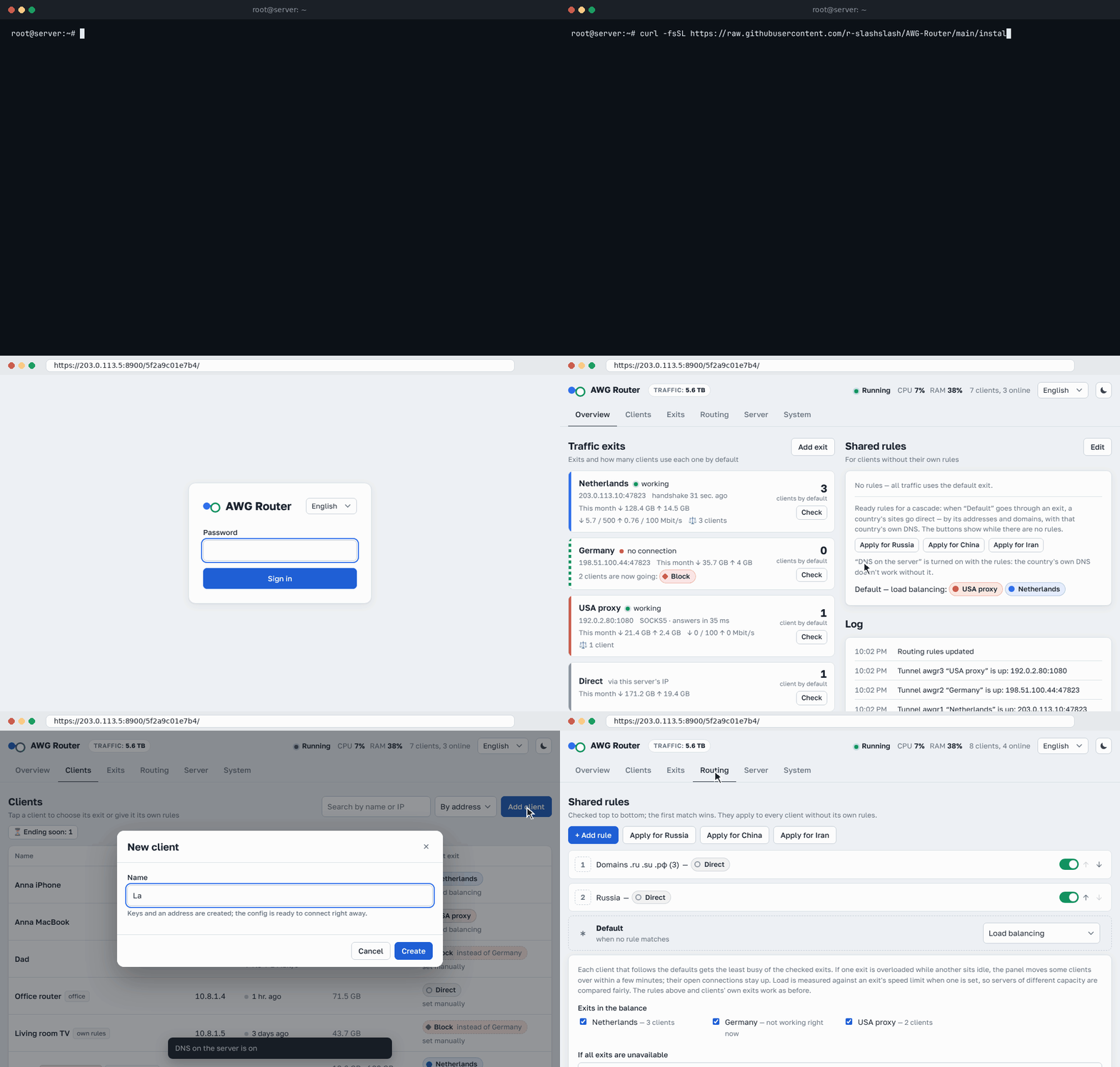
Quick start — on an Ubuntu or Debian server, as root (Docker is installed if it's missing):
curl -fsSL https://raw.githubusercontent.com/r-slashslash/AWG-Router/main/install.sh | bash
The installer sets up everything, including Docker Compose, and prints the panel link and password at the end. Details: Install.
                               ┌── RU / CN / IR ──────────► internet (this server's IP)
 clients ──AWG──► this server ─┤
                               ├── everything else ──AWG──► server #2 ──► internet
                               └── client "Dad" ─────AWG──► server #3 ──► internet
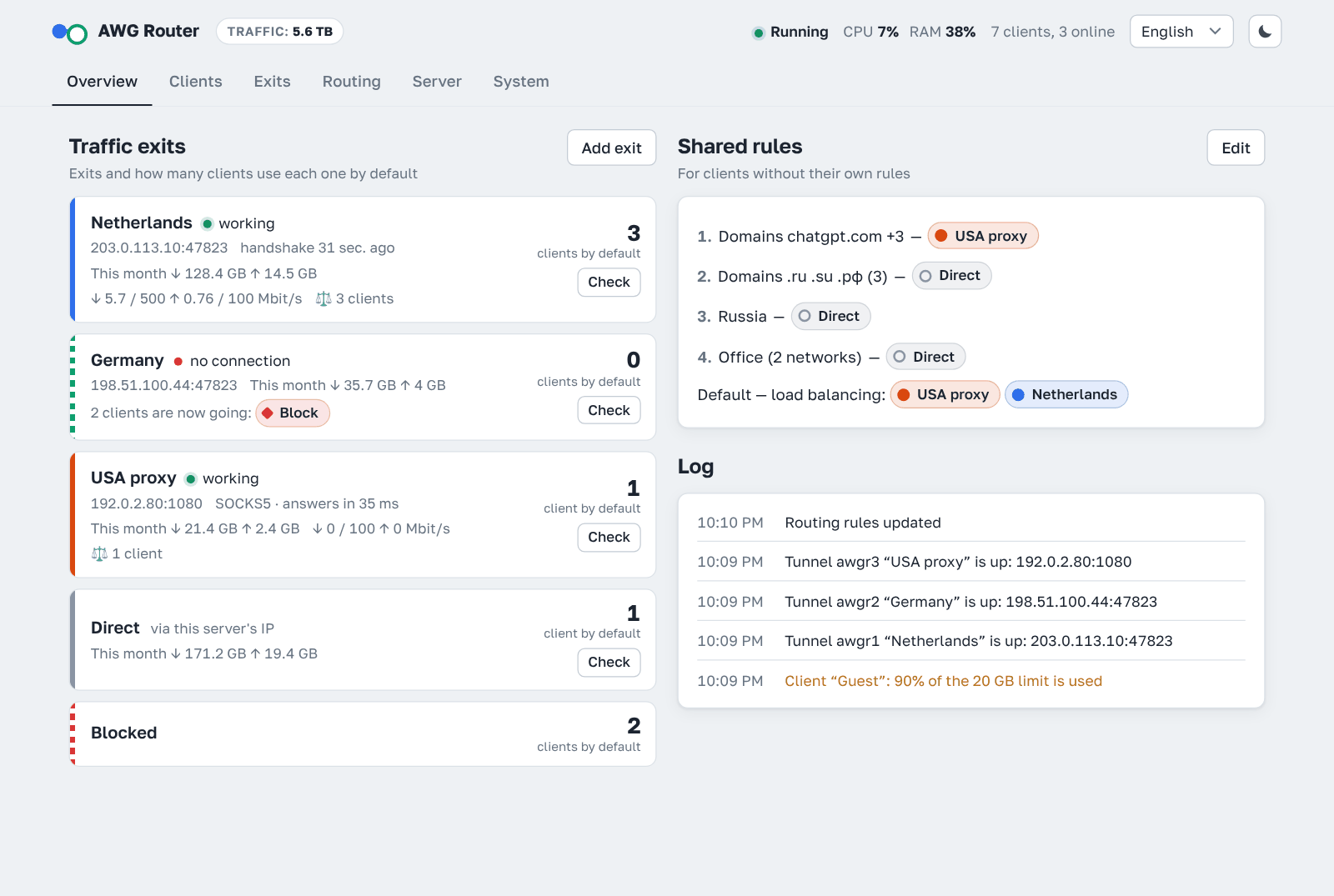
AWG Router makes your AmneziaWG server the entry point of a cascade. Clients connect to it only, and the server decides where each connection leaves for the internet:
A fallback helps only when it fails separately from the main exit. Two exits to the same server are one path, not two: if its address is blocked entirely, a SOCKS5 proxy over that address and a direct AmneziaWG tunnel to it stop working at the same moment.
So put an exit on a different server in the fallback — a different address, a different host, a different autonomous system. And where possible don't reach the final server directly from a country that blocks: if it is only reached from abroad, its address is not visible there.
Details are in How routing works.
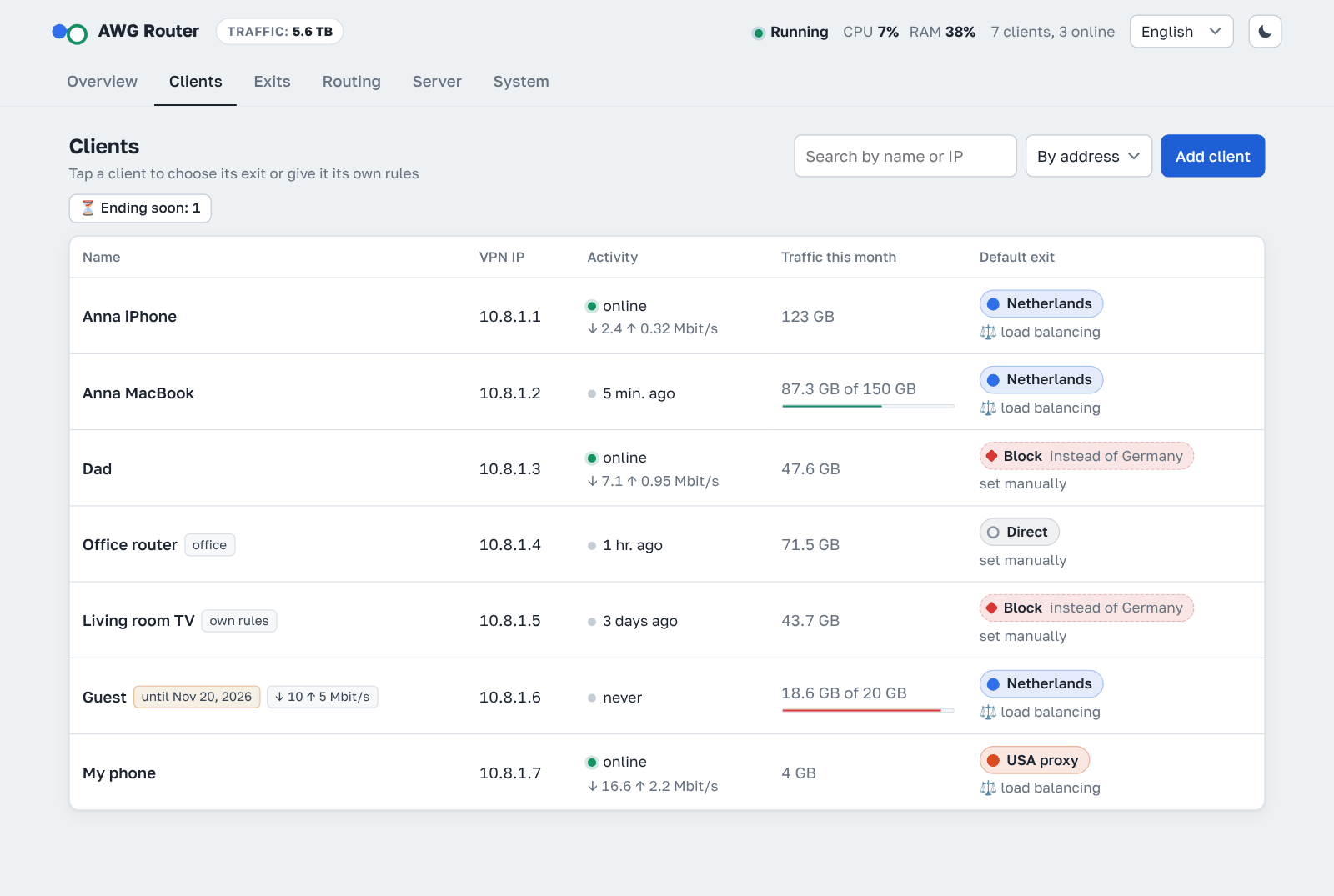
Clients
.conf file or a vpn:// link for the AmneziaVPN app.amneziawg-go when memory ran out), the panel restarts the server by itself and tells you in Telegram. Server → Restart the AWG server does it by hand.
Server
Routing
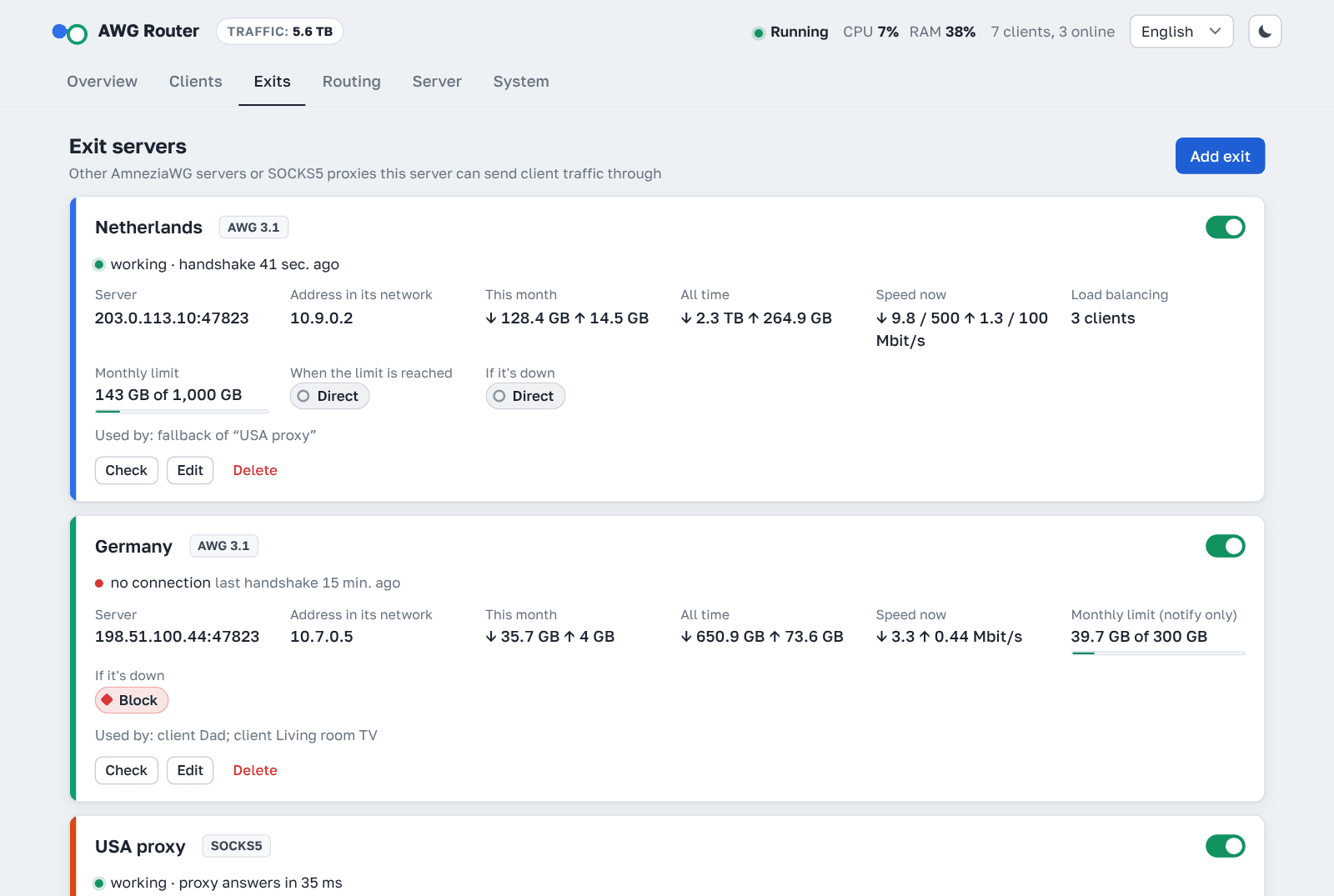
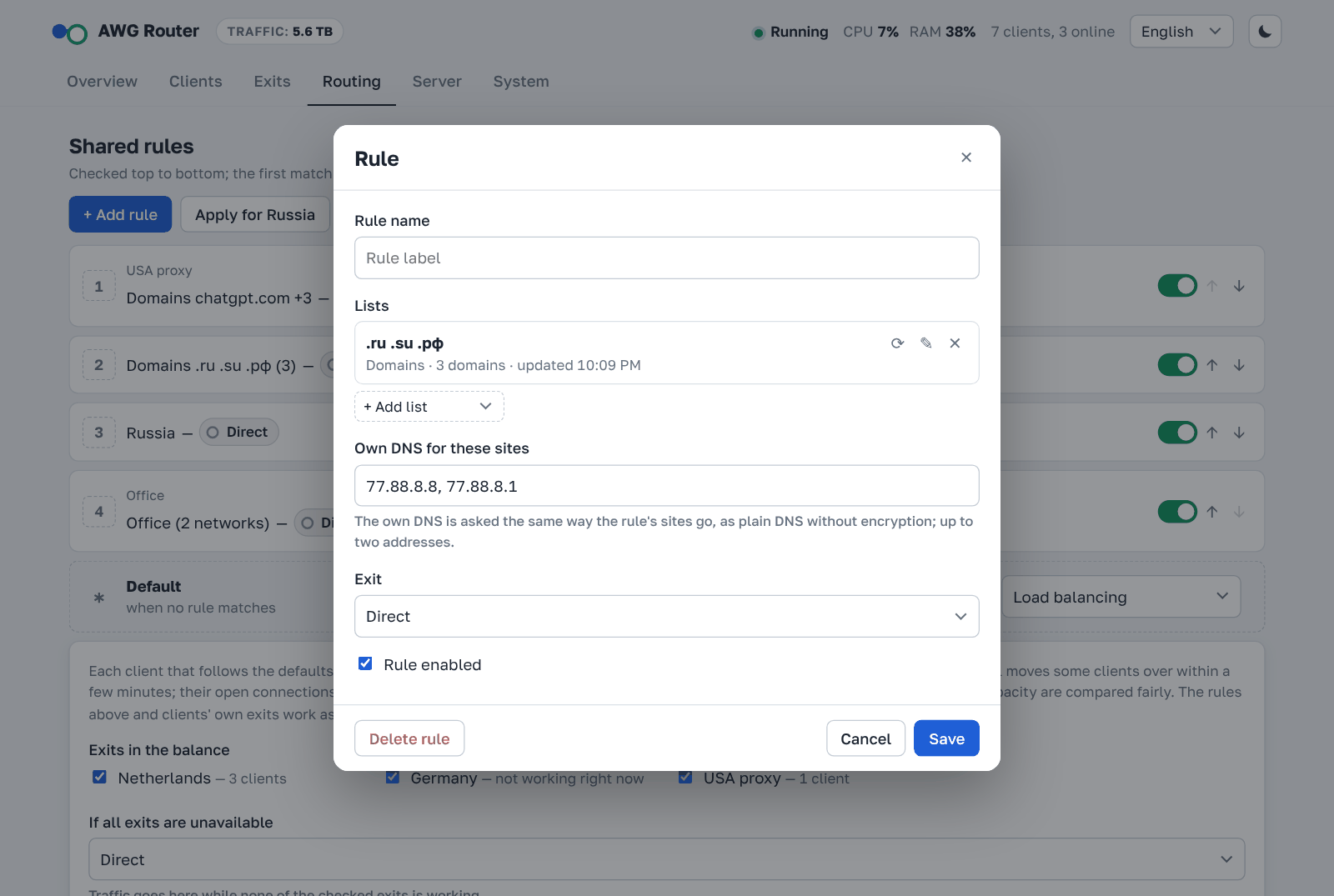
socks5://login:password@host:port). Both TCP and UDP go through a SOCKS5 exit (UDP if the proxy supports UDP ASSOCIATE); HTTP/3 (QUIC, UDP 443) only with “Let QUIC through the proxy” in the exit's window — without it browsers open sites over HTTPS right away. Check on the exit shows whether the proxy passes UDP. If an exit fails, its traffic goes direct, gets blocked or moves to another exit, whichever you choose.example.com on a list also covers all its subdomains, and a whole zone works too (.ru, .cn, .net); you can paste a link to a ready-made list (plain domains, dnsmasq, hosts, Adblock, v2ray). The server learns the site from its name at the start of an HTTPS, HTTP or HTTP/3 connection (TCP 443 and 80, UDP 443). Through SOCKS5 it passes the name to the proxy, which finds the address itself, so DNS spoofing by the ISP doesn't matter; through AmneziaWG and Direct the connection goes to the address the device got from its DNS; DNS on the server resolves such names through the rule's exit, so the address isn't spoofed and is near the exit. Client DNS and configs don't change. Such rules are checked before address rules.Domains work (20), an exit's own sites by their first domain youtube.com +19, Russia, China +1, Office (12 networks)), then the exit — right after them on a wide screen, at the right edge on a phone, where a rule whose exit doesn't fit next to its lists shows only the first one and +N; a rule's own name shows above it in small grey; a rule that is off stays in its place, grey and struck through.
Panel
/start opens the menu in a single message — the panel logo with the host, panel version, clients, how many are online and all-time traffic under it — and everything happens in that message, with a ‹ Menu button to go back. Server holds the status (versions, IPv4 and IPv6, DNS on the server, uptime, RAM, traffic this month) and the exits (tap an exit to check it or make it the default); Clients starts with New client. Also: turning a client on or off or deleting it (after a confirmation), its QR code and config file, +30 days or +10 GB, a new client with /addr-slashslash/AWG-Router is a public repo on GitHub by r-slashslash. AmneziaWG: веб-панель для каскада VPN-серверов с балансировкой | AmneziaWG cascade VPN panel with load balancing.
It declares the MIT license on GitHub.
Its maker has not tagged a system, so it is unknown here. Its README says what it needs.
Open "Take it" on its page: Take My Repo writes an install plan for your machine and hands it to your AI agent (Claude Code, Codex or Cursor), which asks you before each step. Take My Repo has not tested it on any machine.
A list of Free Software network services and web applications which can be hosted on your own servers
Method, accessor, and assignment cascades for Nim, inspired by Smalltalk & Dart.
🦄️ 🎃 👻 Clash Premium 规则集(RULE-SET),兼容 ClashX Pro、Clash for Windows 等基于 Clash Premium 内核的客户端。
Fair-code workflow automation platform with native AI capabilities. Combine visual building with custom code, self-host or cloud, 400+ integrations.
Its last change on GitHub was on 2026-11-24. Take My Repo does not judge from that whether it is maintained.
Nobody has reviewed it on Take My Repo yet, which says nothing about its quality.
Take My Repo cannot say: it does not audit code and has not run AWG-Router. What is known comes from GitHub. It declares the MIT license on GitHub. Its last change was on 2026-11-24. It has 139 stars, which measure popularity, not safety. Nobody has reviewed it on Take My Repo yet, which says nothing about its quality. Read the source before you run it. With "Take it", your AI agent shows each step and asks you before running it; README text is treated as data, not as instructions.




