
yolov5
Ultralytics YOLOv5 in PyTorch for object detection, instance segmentation, classification, training, and export.
- 58k
- Python
- AGPL-3.0
- 6 d ago
Record meetings and dictation on your Mac. Everything becomes plain Markdown files that Claude, Codex, or any AI can search. Free, open source, 100% local transcription.
Repo r3dbars/transcripted, read from GitHub 1 d ago. r3dbars has not joined Take My Repo.
r3dbars/transcripted is a public repo on GitHub by r3dbars. Record meetings and dictation on your Mac. Everything becomes plain Markdown files that Claude, Codex, or any AI can search. Free, open source, 100% local transcription. It declares the MIT license on GitHub. It is written mainly in Swift, has 96 stars and last changed on 2026-11-21. Nobody has reviewed it on Take My Repo yet, which says nothing about its quality. Read from GitHub on 2026-11-21.
Transcripted is a free, open-source Mac app for meeting notes and dictation. It transcribes on your Mac and saves plain Markdown files you own. You can search them, or let your AI read them.
Install with Homebrew · Interactive demo · transcripted.app
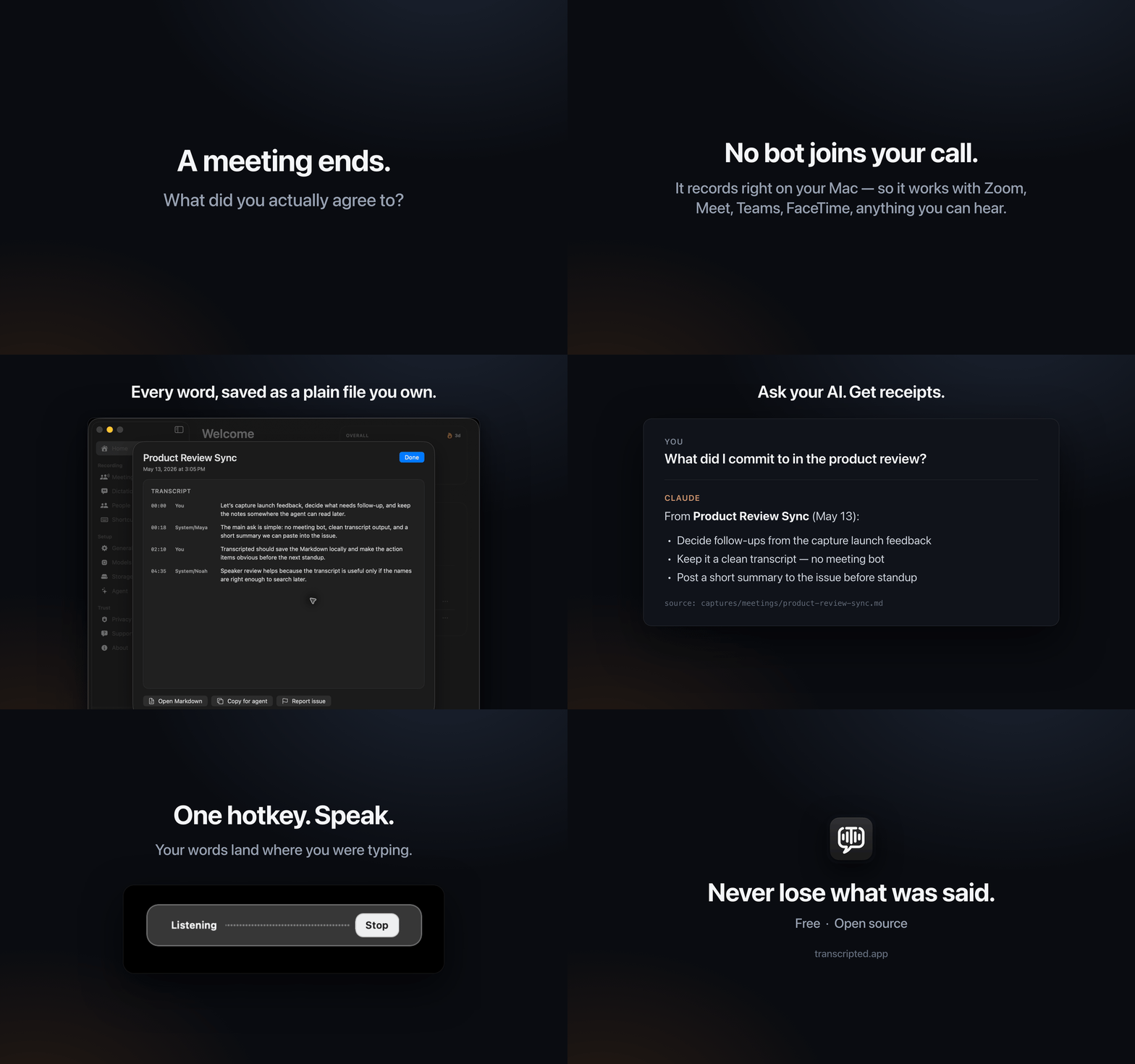
Everything runs on your Mac. The speech models ship inside the app, so transcription works offline.
Each meeting becomes a Markdown file with timestamps and speaker names. Here's one, trimmed:
---
title: "Product Review Sync"
capture_type: meeting
date: 2026-05-13
duration: "18:42"
transcription_engine: parakeet_local
sources: [mic, system_audio]
---

# Product Review Sync

Recorded May 13, 2026 at 3:05 PM  •  18 min, 42 sec  •  1864 words  •  27 turns

## Transcript

**00:00**  [Mic/You]
Let's capture launch feedback and decide what needs follow-up.

**00:18**  [System/Maya]
The main ask: no meeting bot, a clean transcript, and a summary for the issue.
By default, your notes are saved here:
~/Library/Application Support/Transcripted/captures/
To keep them somewhere else, like an Obsidian vault, change Capture library in Settings. Transcripted can move your files for you. The full format is in docs/capture-format.md.
Your notes are plain files, so any AI tool that reads files can use them.
You:    What did I commit to in the product review?

Claude: From Product Review Sync (May 13):
        • Decide which launch feedback needs follow-up (00:00)
        • Make the action items clear before the next standup (02:10)
        Maya also asked for a summary for the issue (00:18).
For one-click setup, open Transcripted, go to Agent, and click Connect next to Claude Desktop, Claude Code, Codex, or Cursor. For anything else, copy the ready-made prompt from the Something else row. It tells your AI where your notes are.
Connect adds Transcripted's MCP server to that app. MCP is an open standard that lets AI apps use outside tools. Transcripted's tools can search and read your notes, but they can't change or delete anything. Setup details are in docs/agent-connect.md.
The transcripted-live plugin brings the meeting you're recording into Claude
Code while it happens. Claude gets the call as context with each message, a
line above the prompt shows the meeting with Notes, a question aimed at you
shows up with Draft answer, and when the call ends you get a wrap-up.
In Claude Code:
/plugin marketplace add r3dbars/transcripted
/plugin install transcripted-live@transcripted
/reload-plugins
Or from a terminal:
claude plugin marketplace add r3dbars/transcripted
claude plugin install transcripted-live@transcripted
It needs Transcripted 1.1.69 or later (that version ships the live helper) and Claude Code 2.1.287 or later. Live transcription runs on your Mac; the lines it passes to Claude go to Claude like anything else you send it. Details are in Tools/TranscriptedLive/README.md.
Autocomplete is optional. Turning it on downloads a 3.4 GB model. If your Mac has 16 GB of memory or more, you can pick a larger 5.6 GB model instead.
brew tap r3dbars/transcripted https://github.com/r3dbars/transcripted
brew install --cask transcripted
Then do steps 3 and 4 above.
Where everything is stored: docs/storage-paths.md.
How is it different from Otter, Fireflies, or Granola? Otter and Fireflies are built around a bot that joins your calls, and they keep your meetings in their cloud. Granola skips the bot, but your meetings still go to the cloud. Transcripted does it all on your Mac, and it's free and open source. More comparisons, including local apps like MacWhisper and Meetily: transcripted.app/compare.
Does it write summaries? It saves the full transcript, not an AI summary. For a summary, decisions, or action items, ask your AI. It answers from your notes.
Does it work offline? Yes. Recording, transcription, and speaker labels need no internet. The app only goes online to check for updates, download optional models, and send the crash reports and usage stats above.
What languages does it understand? The default model, Parakeet V3, covers 25 European languages, English included. For others, pick a Whisper model in Settings → Transcription. It downloads once, then runs on your Mac too.
How accurate is it? Good for notes and search, but not perfect. Names and jargon are the usual misses. If it keeps mishearing a word, add a fix under Settings → Transcription → Corrections (for example, "okay ours" to "OKRs").
Do people know I'm recording? Only if you tell them. There's no bot, so the app doesn't notify anyone. Tell people before you record. In many places, the law requires their consent.
What does it cost? Nothing. No account, no subscription.
Is there a command-line tool? Yes, it ships inside the app. See the CLI instructions.
brew uninstall --cask transcripted.~/Library/Input Methods/Transcripted Keyboard.appYour meetings, dictations, and writing stay where they are. To also delete the Autocomplete model and Writing's data, remove these folders:
~/Library/Application Support/Transcripted/models/writing/
~/Library/Application Support/Transcripted/writing/
To remove everything, including voice profiles, delete
~/Library/Application Support/Transcripted/. That also deletes your notes if
they're still in the default folder.
It's a native Swift app. You need an Apple silicon Mac on macOS 26 or later with Xcode 26 or later.
bash build-deps.sh
bash build.sh --no-open
bash run-tests.sh
Start with CONTRIBUTING.md. Coding agents start with AGENTS.md. Security reports go to SECURITY.md.
If Transcripted is useful to you, a star helps other people find it. You can also sponsor the project.
MIT. See LICENSE. Bundled third-party code is listed in THIRD_PARTY_LICENSES.md.
r3dbars/transcripted is a public repo on GitHub by r3dbars. Record meetings and dictation on your Mac. Everything becomes plain Markdown files that Claude, Codex, or any AI can search. Free, open source, 100% local transcription.
It declares the MIT license on GitHub.
Its maker tagged it for macOS. That is declared by the maker; Take My Repo has not tested it.
Open "Take it" on its page: Take My Repo writes an install plan for your machine and hands it to your AI agent (Claude Code, Codex or Cursor), which asks you before each step. Take My Repo has not tested it on any machine.
Its last change on GitHub was on 2026-11-21. Take My Repo does not judge from that whether it is maintained.
Nobody has reviewed it on Take My Repo yet, which says nothing about its quality.
Ultralytics YOLOv5 in PyTorch for object detection, instance segmentation, classification, training, and export.
Whisper & Faster-Whisper standalone executables for those who don't want to bother with Python.
Stop renting your intelligence. Own it with AnythingLLM. Everything you need for a powerful local-first agent experience
Flutter makes it easy and fast to build beautiful apps for mobile and beyond
VoiceStudio is the open-source, fully-local ElevenLabs alternative — voice cloning, voice design, video dubbing, dictation, transcription & audiobook creation in 646 languages.
利用 AI 大模型和自动化工作流,根据主题或关键词一键生成高清短视频。Generate HD short videos from a topic or keyword with an automated AI workflow.


