

AutoGPT
AutoGPT is the vision of accessible AI for everyone, to use and to build on. Our mission is to provide the tools, so that you can focus on what matters.
- 188k
- Python
- 2 h ago
Open-source task tracker for AI coding agents (Claude Code, Codex, Cursor, Copilot, Gemini CLI). A git-tracked kanban board with a CLI agents can drive, evidence-gated stages, GitHub Issues sync, and unattended agent runs you can start and stop from the browser. Zero dependencies, one command to install in any repo.
Repo rahilp/gatewright, read from GitHub 4 h ago. rahilp has not joined Take My Repo.
rahilp/gatewright is a public repo on GitHub by rahilp. Open-source task tracker for AI coding agents (Claude Code, Codex, Cursor, Copilot, Gemini CLI). A git-tracked kanban board with a CLI agents can drive, evidence-gated stages, GitHub Issues sync, and unattended agent runs you can start and stop from the browser. Zero dependencies, one command to install in any repo. It declares the MIT license on GitHub. It is written mainly in JavaScript, has 3 stars and last changed on 2026-09-20. Nobody has reviewed it on Take My Repo yet, which says nothing about its quality. Read from GitHub on 2026-11-25.
AutoGPT is the vision of accessible AI for everyone, to use and to build on. Our mission is to provide the tools, so that you can focus on what matters.
Evidence-gated work tracking for coding agents. File-first, provider-agnostic, zero dependencies.
Work that earns its way forward.
Every coding-agent session starts from zero: the agent doesn't know what is in flight, what is blocked, or what it was supposed to pick up next, so the human re-explains it, or the agent re-reads a wall of markdown and burns context before writing a line of code. When the session ends, the record of what happened lives in a chat transcript nobody will open again.
Install once, then use gw from anywhere:
npm install -g gatewright        # puts `gw` on PATH
gw init --pipeline solo
gw add "Wire the scheduler tick loop" --phase P1 --type feature --priority P1
gw claim T-0001
gw move T-0001 building
gw edit T-0001 --scope "Scheduler tick fires once per tick_s and never overlaps a run in flight"
gw move T-0001 done --evidence abc1234 --evidence test/scheduler.test.js
gw brief
gw serve
Capture is one command with no required flags: phase, type and priority start out null, because at the moment you write a title down you genuinely may not know them yet, and guessing is worse than leaving them unset. add → claim → move … building is the whole path to "I am working on this" — no mandatory edit stands in the way. Rigor still applies; it just applies where a claim of completion is made. In the solo pipeline, reaching done needs a scope (what "done" means) and evidence that looks like evidence — a commit SHA, a file path, or a link — because that is the step where the claim needs to hold up, not the step where the idea got written down.
No global install? Use npx gatewright <command> for each command instead. The package ships both gw and gatewright as binary names so a gw collision on your PATH is never a blocker.
In a terminal, init walks you through three screens driven by the arrow keys, and each one explains its question and every option in plain English: how you want to work (Solo or Team), what to set up (instruction files for your AI tools and a commit check, ticked with Space; AGENTS.md is always written, and a tool already found in the project starts ticked), and a review listing every file that will be written. Nothing is written until you confirm the review; Esc or Ctrl-C at any screen leaves the directory untouched. Terminals that cannot run a full-screen picker (TERM=dumb, a legacy Windows console, or GW_TUI=0) get the same workflow question as a numbered prompt instead. Solo installs backlog → building → done, with no PR stage or policy hold for agent-created work. Team installs backlog → building → built → in_review → reviewed → merged → verified, with PR review and triage. With --yes, a GitHub origin selects team; otherwise it selects solo.
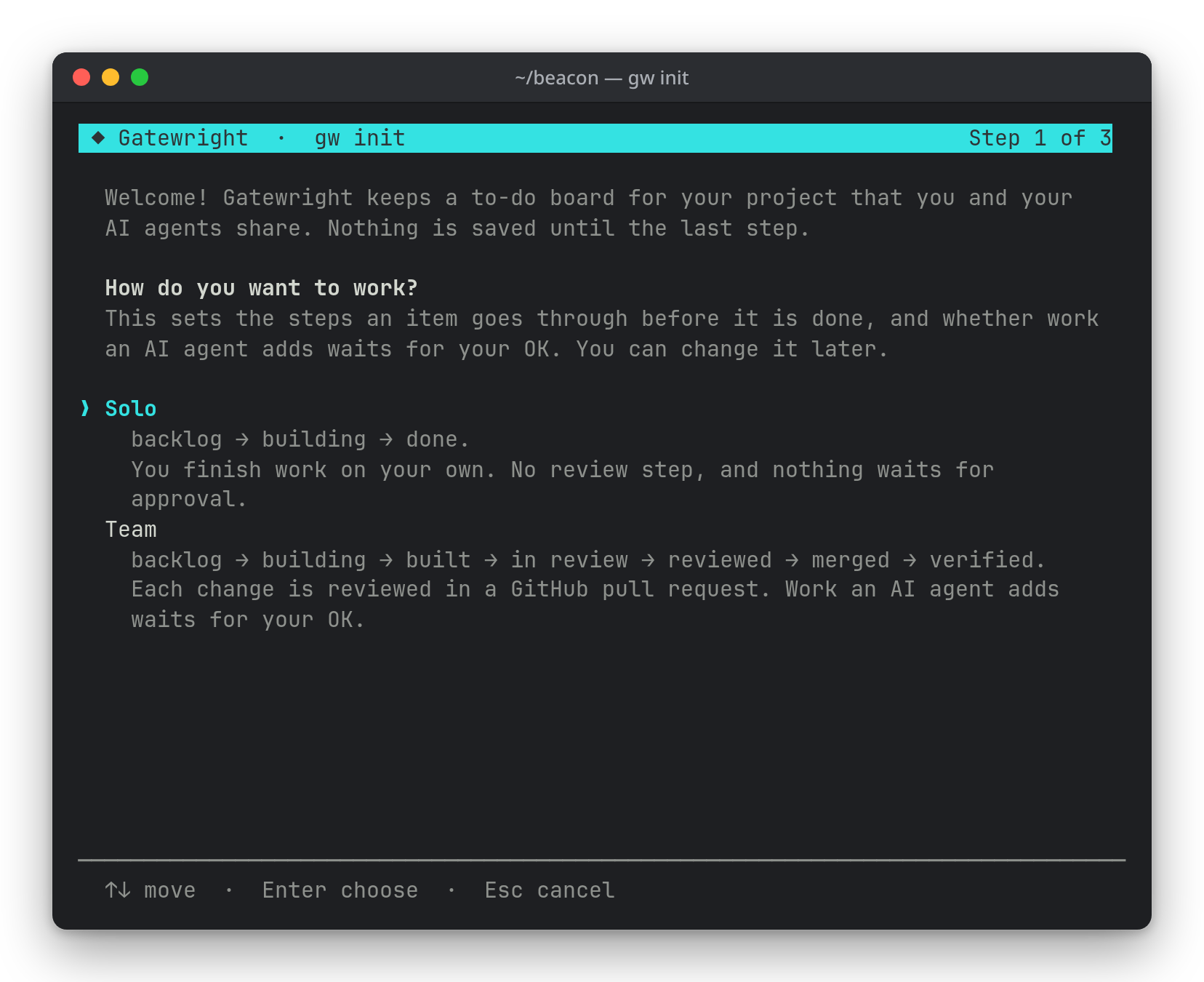
Step 1 of gw init: choose how you want to work. Each option lists its stages and says what choosing it means.
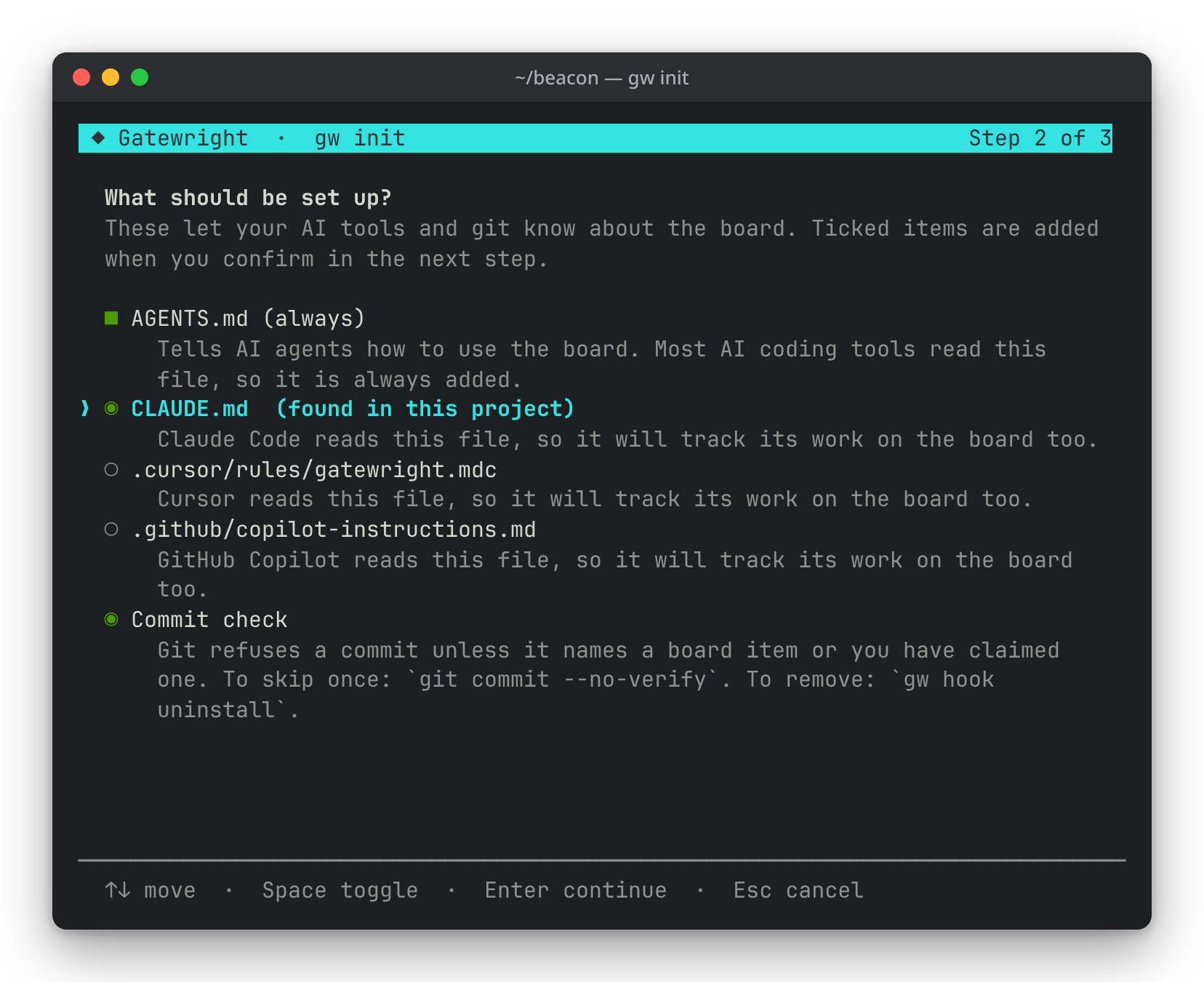
Step 2: pick what to set up. A tool already found in the project starts ticked; Space toggles the rest.
In a Git repository, init installs the commit hook unless you pass --no-hook. It finishes by pointing at gw serve for the live board.
init creates .gatewright/ (items, events, stages, config, prompt), writes an instruction block to AGENTS.md, and baselines .digest. gw open writes board.html. The CLI and the live board's write API are the only write paths; the snapshot board is written on demand.
A card in Built has evidence because it could not have got there without it. gw move evaluates the target stage's exit rule from stages.json and refuses the move if the rule is unmet.
$ gw move T-0001 built
target stage requirements are not met
built: needs a scope: run `gw edit T-0001 --scope "<what done looks like>"`
built: Needs at least one new piece of evidence, distinct from anything already recorded: run `gw move T-0001 built --evidence "<commit sha, test path, or URL>"`
built: Evidence supplied with the move must look like a commit, a file path, or a link: run `gw move T-0001 built --evidence "<commit sha, test path, or URL>"`
$ echo $?
1
Every value a refusal prints is an angle-bracketed placeholder, because a refusal that prints a value prints the answer to itself. The stage where completion is claimed — done in the solo pipeline, built in the team one — asks for evidence that looks like a commit SHA, a file path, or a link, so a sentence about the work is not evidence of it:
$ gw move T-0001 built --evidence "new evidence 1"
target stage requirements are not met
built: Evidence supplied with the move must look like a commit, a file path, or a link: run `gw move T-0001 built --evidence "<commit sha, test path, or URL>"`
Add the scope and the evidence and the same command succeeds:
$ gw edit T-0001 --scope "Scheduler tick fires once per tick_s and never overlaps a run in flight"
$ gw move T-0001 built --evidence abc1234 --evidence test/scheduler.test.js
T-0001  building → built  ·  evidence: abc1234, test/scheduler.test.js
--force exists to skip stages, not to skip rules. Use it when the pipeline order is wrong, not when the rule is — reopening finished work and re-entering from a side stage are order, and the refusal prints the forced command for you. No refusal ever asks you to force your way past a gate.
Everything above governs work that is already on the board. Nothing in it stops a person or an agent from editing code and committing without ever touching gw — and instructions in AGENTS.md are advice, not a gate. gw hook install turns that advice into three gates, all of them asking one question: which item accounts for this change?
$ gw hook install --ci --agent
gw: installed the commit-msg hook at .git/hooks/commit-msg
gw: wrote .github/workflows/gatewright.yml
gw: edits are now gated before they happen — wrote the PreToolUse guard to .claude/settings.json

$ git commit -m "quick fix"
gw: this change is not on the board.
  no item is claimed by human:you, and neither the commit message nor the branch names one.
  Fix one of:
    gw brief — see what is already on the board
    gw claim <id> — take the item this change belongs to
    gw add "<what this change is>" — if it is not on the board yet
    name the item in the commit message, e.g. "P1-07: <subject>"
  Deliberate exception: git commit --no-verify
--agent): an agent's first Edit or Write is refused until the work is on the board, so the plan gets written down while it still exists. This is the one that matters most: told at commit time, an agent has already lost the plan it should have recorded.commit-msg): a claimed item, an id in the commit message, or an id in the branch name all count. Commits that only touch .gatewright/ are exempt.--ci): gw check audits the board, and gw guard --range audits every commit in the pull request. A claim is local state that does not travel with a commit, so CI judges what the commit itself says.--no-verify still works, on purpose — a tracker that cannot be bypassed is a tracker that gets uninstalled, and a bypass leaves a record. Set guard.mode to "warn" to report without blocking, or guard.enabled to false to switch it off.
.gatewright/                     (created by `gw init`)
  items.jsonl    one item per line, current state
  events.jsonl   append-only, one event per line
  stages.json    stages and their exit rules
  config.json    vocab, labels, policy, runner, memory
  prompt.md      dispatch prompt template

baselined by `gw init` and after each gw write:
  .digest        SHA-256 of items.jsonl

created by `gw open`:
  board.html     viewer snapshot with the data inlined
A change to one item is a one-line diff. grep P2-01 .gatewright/events.jsonl is the audit tool. git log on .gatewright/ is the project history.
Three rules keep the data trustworthy:
serve API, sync, and the scheduler all call the same store module, so every stage move evaluates the same exit rules whether a human dragged a card or an agent ran a command..gatewright/ directly. store writes a hash of items.jsonl to .gatewright/.digest after every successful write; gw check reports a mismatch, and gw repair --write --force is the deliberate way to re-baseline it after review.gw open takes the pinned viewer/board.html, injects the current data as <script type="application/json"> blocks, and writes .gatewright/board.html. A file:// page cannot fetch its own data because Chrome and Firefox give it an opaque origin; inlining works in every browser with no server and no flags.The screenshots below are of a demo board for a small uptime-monitor project, worked by two people and two coding agents on the team pipeline. docs/img/regenerate.sh rebuilds it with the CLI and retakes every screenshot.
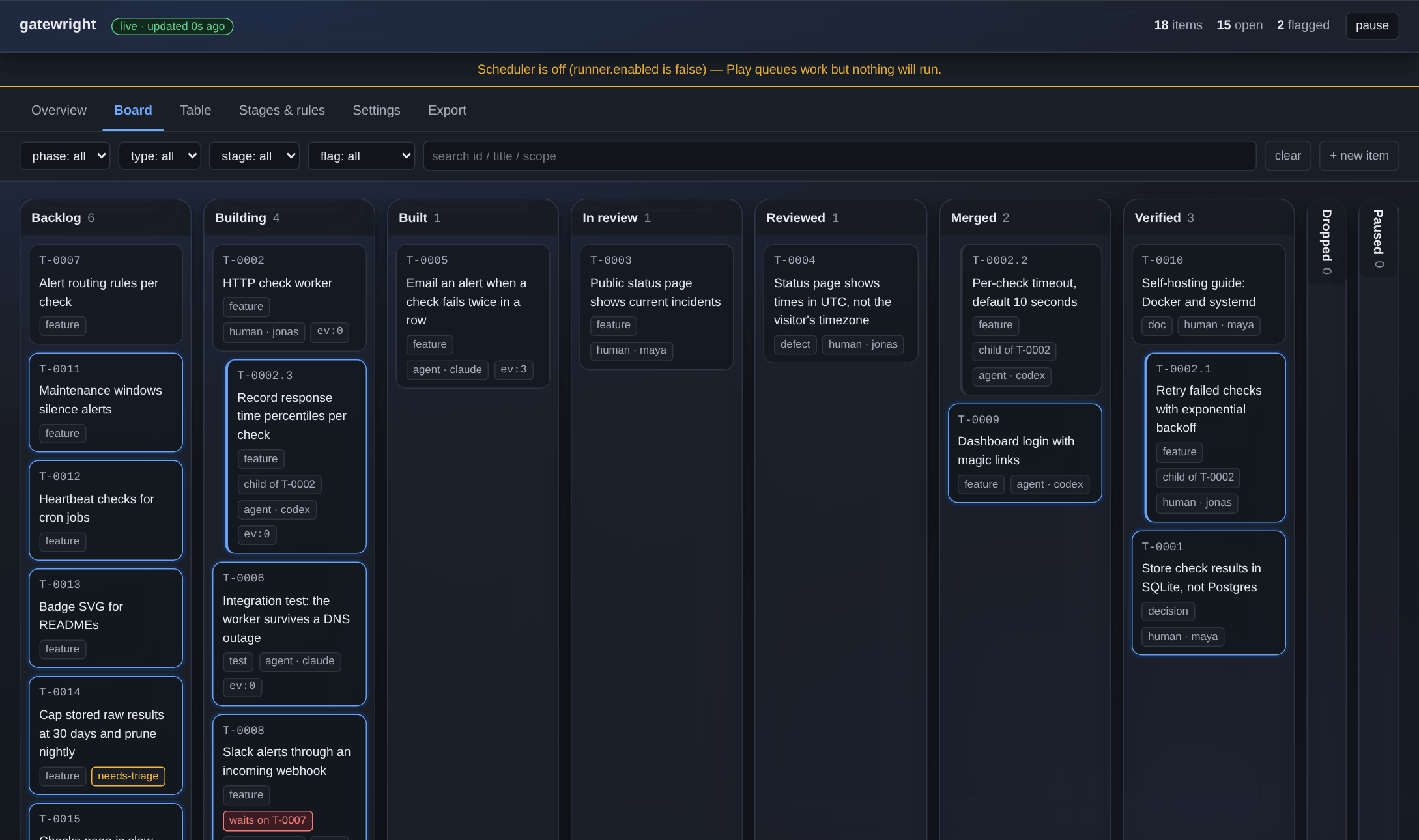
Board view: every stage is a column, and each card shows its type, owner and parent, and work in progress shows its evidence count. The yellow chips mark an agent's item held for approval and a quick capture that has not been classified yet.
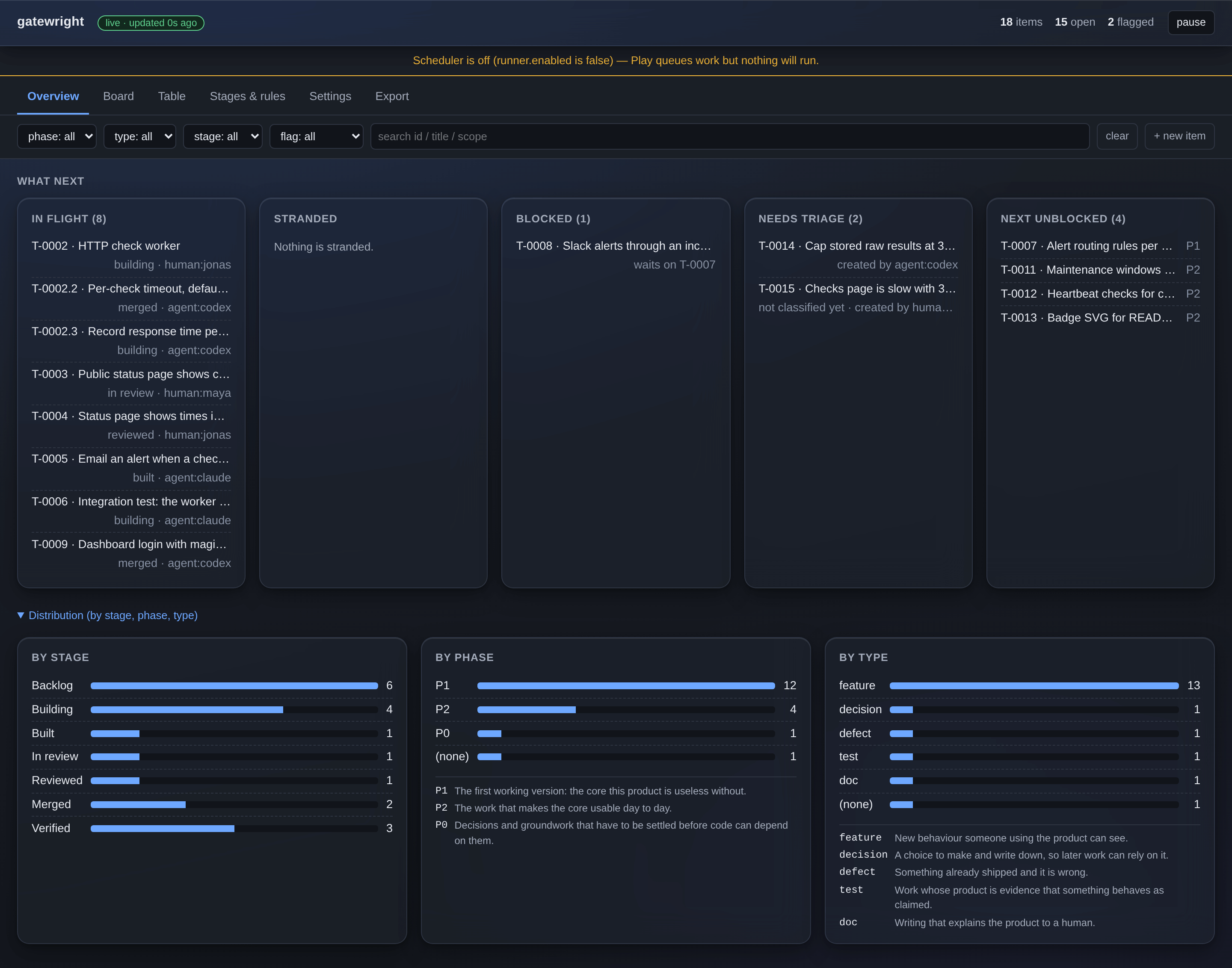
Overview: what is in flight, what is blocked, what waits for triage, and what can be picked up next, above a count of items by stage, phase and type.
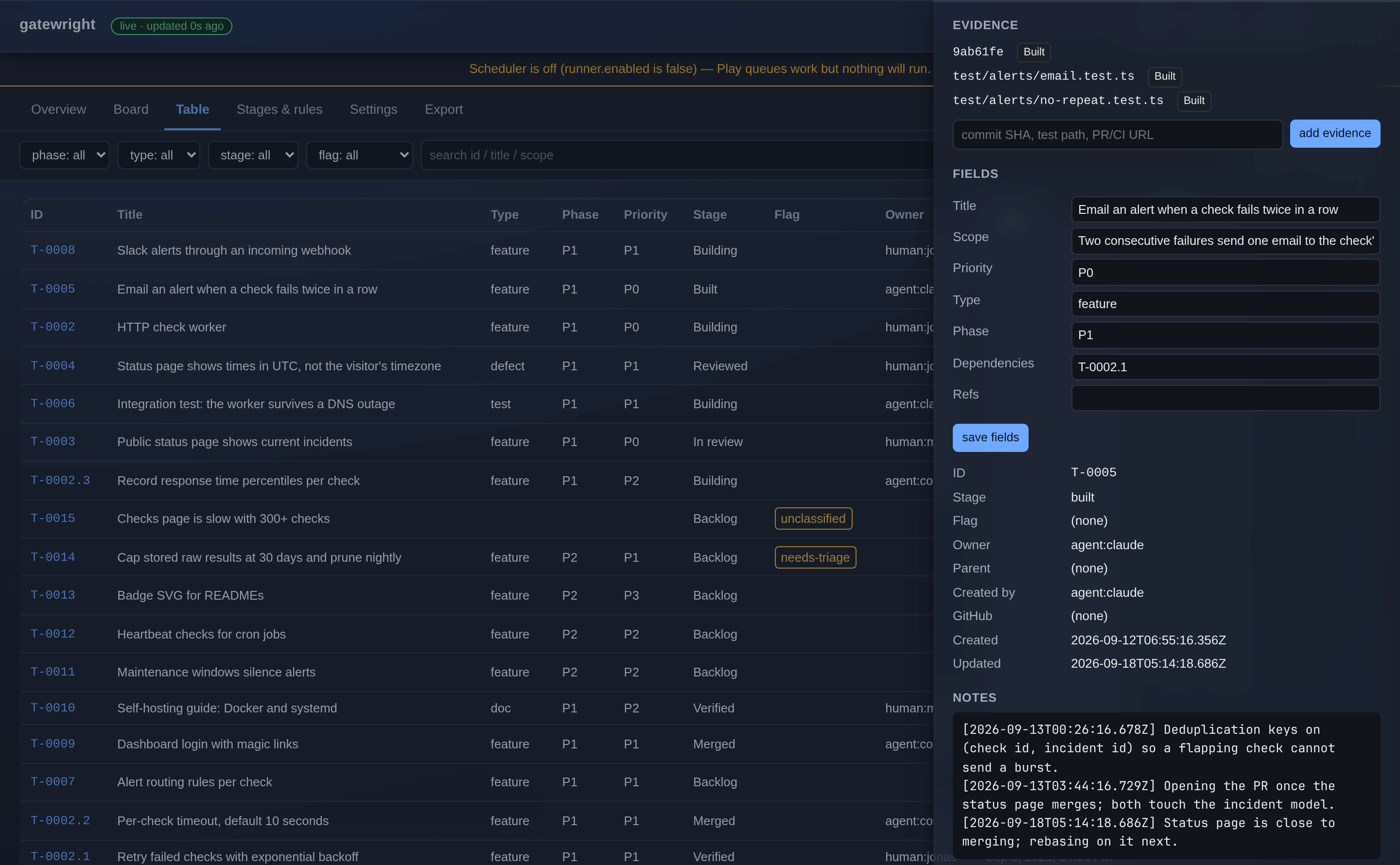
Item detail: the evidence recorded at each gate, the editable fields including dependencies, who owns and created the item, and its running notes.
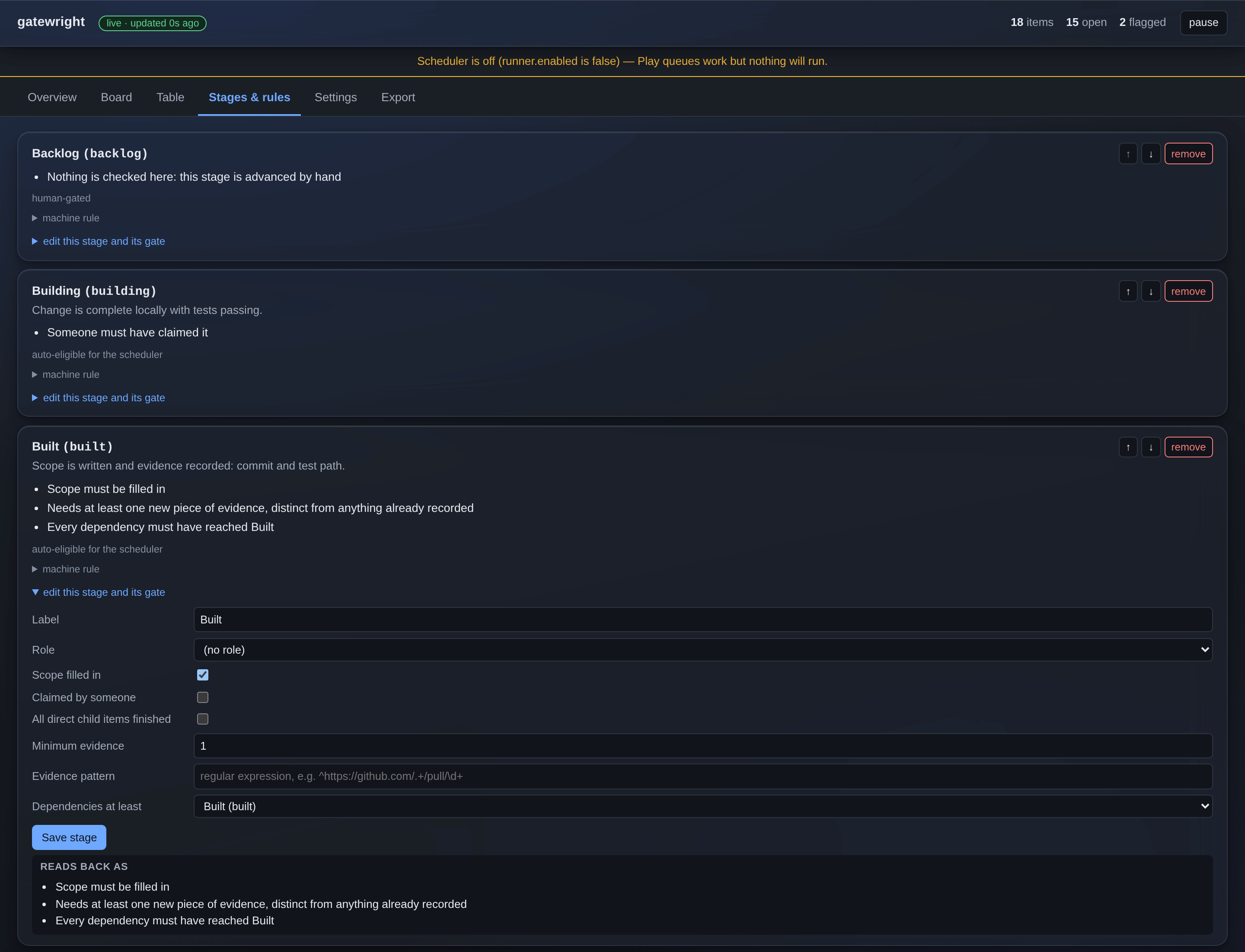
Stages & rules: each stage's gate in plain English, with a form to change it that reads the rule back the same way.
The board is read-only when opened from a snapshot. gw serve makes it live, with editors, live run logs, triage and resume controls, global pause, and a 2-second poll for new events.
gw serve serves the board on loopback and polls the store for new items and events every two seconds. Edits, moves, notes, Play, Stop, triage, resume, and global pause write back through the same rules as the CLI. When the runner is enabled, its scheduler starts eligible dispatched items and the board exposes their live logs.
$ gw serve --port 17888
Gatewright live board: http://127.0.0.1:17888/
Cards drag between columns. A column that would refuse the move says so while you drag rather than letting the card snap back, and a backward move — correcting a mis-drag — is offered separately and styled differently so it is never done by accident.
A refused move is explained in English rather than in rule syntax, and where the board can clear the condition itself it offers the action instead of a command to type:
Not met yet:
  Someone must have claimed it     [Claim]
  Needs at least one piece of evidence
Stages, gates and settings are editable from the board. "Stages & rules" adds, renames, reorders and removes stages, and builds a gate from a form — evidence counts, an owner requirement, a dependency stage — showing the same English read-back the board uses when it refuses a move. The Settings view is generated from the same schema gw config validates against, so the two cannot drift.
Those three are loopback only. Moving a card is available wherever the board is reachable, which is what --host is for; changing the rules of the board is not. Off loopback the controls are not drawn at all rather than offered and refused, and there is no authentication to configure — reachability is the whole mechanism.
Finished columns collapse to a count with the most recent items visible, so a board that is mostly archive still shows the work that is live.
Play queues a dispatch event. The scheduler can act on that event only when its runner controls permit it. Stop cancels a queued dispatch or stops a recorded run. Global pause stops new dispatches.
The runner is a scheduler for dispatched items. Each run gets its own git worktree and gw/<id> branch, and its combined output is recorded under .gatewright/runs/.
Nothing spawns without two deliberate acts: configure a provider in runner.providers and set runner.enabled: true. A default install runs nothing; gw serve alone never spawns.
Turning it on, without editing files by hand:
rahilp/gatewright is a public repo on GitHub by rahilp. Open-source task tracker for AI coding agents (Claude Code, Codex, Cursor, Copilot, Gemini CLI). A git-tracked kanban board with a CLI agents can drive, evidence-gated stages, GitHub Issues sync, and unattended agent runs you can start and stop from the browser. Zero dependencies, one command to install in any repo.
It declares the MIT license on GitHub.
Its maker has not tagged a system, so it is unknown here. Its README says what it needs.
Reverse engineer anything with agents, from app behavior down to native binaries.
The agent harness performance optimization system. Skills, instincts, memory, security, and research-first development for Claude Code, Codex, Opencode, Cursor and beyond.
Langflow is a powerful tool for building and deploying AI-powered agents and workflows.
Fair-code workflow automation platform with native AI capabilities. Combine visual building with custom code, self-host or cloud, 400+ integrations.
Open "Take it" on its page: Take My Repo writes an install plan for your machine and hands it to your AI agent (Claude Code, Codex or Cursor), which asks you before each step. Take My Repo has not tested it on any machine.
Its last change on GitHub was on 2026-09-20. Take My Repo does not judge from that whether it is maintained.
Nobody has reviewed it on Take My Repo yet, which says nothing about its quality.
Take My Repo cannot say: it does not audit code and has not run gatewright. What is known comes from GitHub. It declares the MIT license on GitHub. Its last change was on 2026-09-20. It has 3 stars, which measure popularity, not safety. Nobody has reviewed it on Take My Repo yet, which says nothing about its quality. Read the source before you run it. With "Take it", your AI agent shows each step and asks you before running it; README text is treated as data, not as instructions.







