
micronaut-optimizer
- 42
- Java
- 22 mo ago
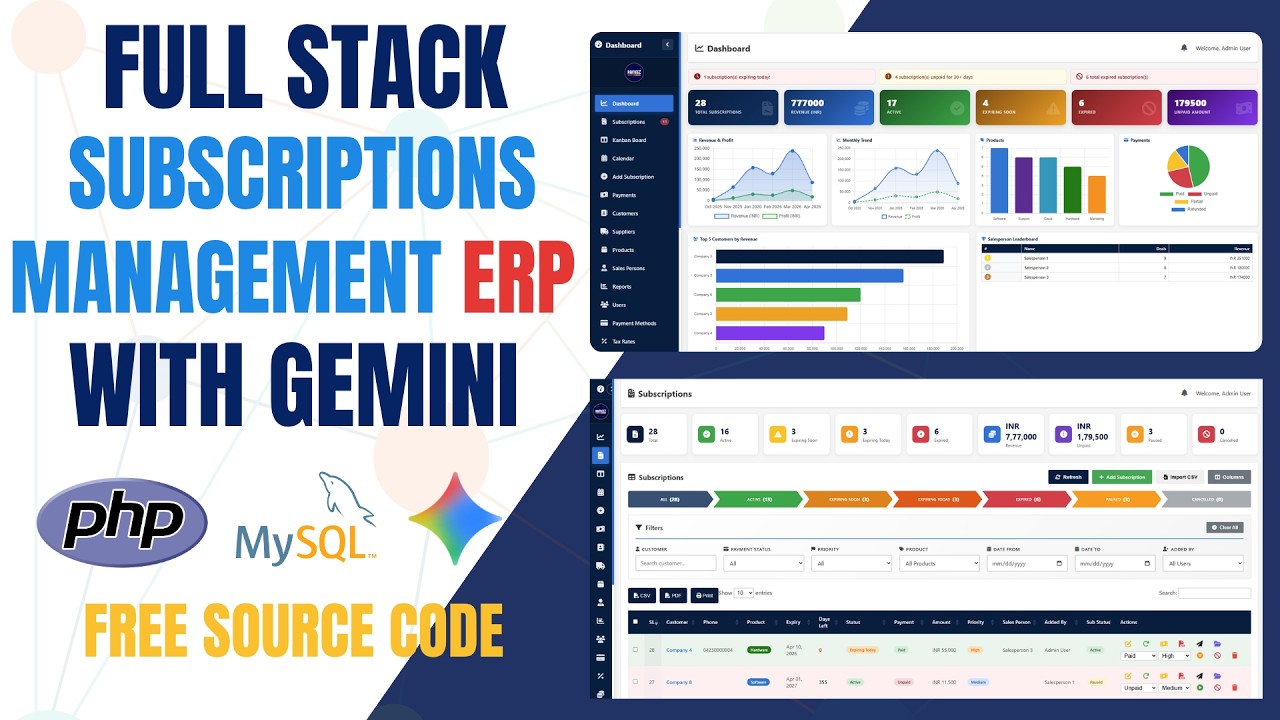
Full-featured Subscription Management System — PHP 8 + MySQL | 4 Roles | AI Analytics (Gemini) | Kanban | Multi-currency | Customer Portal | Invoice PDF | Cron Alerts | PWA | Full Tutorial on YouTube
Repo rameezscripts/subscription-management-system-php-mysql, read from GitHub 20 min ago. rameezscripts has not joined Take My Repo.
rameezscripts/subscription-management-system-php-mysql is a public repo on GitHub by rameezscripts. Full-featured Subscription Management System — PHP 8 + MySQL | 4 Roles | AI Analytics (Gemini) | Kanban | Multi-currency | Customer Portal | Invoice PDF | Cron Alerts | PWA | Full Tutorial on YouTube. It declares no license on GitHub. Public does not mean open source: without a license, nobody is granted the right to reuse it. It has 2 stars and last changed on 2026-04-11. Nobody has reviewed it on Take My Repo yet, which says nothing about its quality. Read from GitHub on 2026-11-24.
The open alternative to Salesforce, designed for AI.

Track every subscription, renewal, payment, and client — with AI analytics, multi-currency, customer portal, and automated email alerts. Built on PHP 8 & MySQL.
[!IMPORTANT] 📥 Source Code — Download link is in the YouTube video description above.
A full Subscription Management System you can host yourself. Built for businesses that sell software licenses, SaaS subscriptions, annual maintenance contracts, or any recurring service — and need to track every client, every renewal date, every payment, and every document in one place.
The system has four user roles — admin, user, salesperson, and customer — each with their own dashboard and access scope. Admins get full control including an AI chat assistant (powered by Google Gemini) that can analyze revenue data, forecast renewals, detect at-risk clients, and project salesperson commissions. Customers get their own portal to log in and see their subscriptions and invoices.
No frameworks. No Composer. PHP 8 + MySQL, React 18 on the frontend via CDN, and a service worker for PWA support. Drop it in your web root, run setup.php, and it's live.
| Role | What they can do |
|---|---|
admin |
Full access — all modules, settings, reports, AI chat, backup |
user |
Manage their own added subscriptions only |
salesperson |
View and manage subscriptions assigned to them, their commission data |
customer |
Customer portal — view their own subscriptions, invoices, and pricing |
1. Admin does the initial setup (wizard guides you through it)
On first run, a setup wizard takes the admin through company branding (name, logo, email), currency selection, tax rate, notification preferences, and SMTP configuration. Once done, the wizard is dismissed and won't appear again.
From Settings, the admin can configure: company info, default currency, tax %, notification schedule, auto-email on/off, date format, timezone, maintenance mode, Google OAuth, SMTP credentials, and the Gemini API key for AI chat.
2. Load the catalog and team
Before adding subscriptions, the admin sets up:
3. Add subscriptions
Each subscription record holds everything about a client's contract:
You can also bulk-import subscriptions via CSV using the provided template.
4. Track renewals — the core workflow
The dashboard shows you exactly where everything stands:
The Kanban board visualizes all subscriptions across 6 status columns — Active, Expiring Soon, Expiring Today, Expired, Paused, Cancelled. When a subscription renews, a new record is created with a renewal invoice number linked to the original.
The Calendar shows every expiry date on a monthly grid — click any date to see which subscriptions are due.
The automated cron email system sends expiry alert emails to clients on a configurable schedule (e.g. 30, 15, 7, 3, 1 days before, and on expiry day). Emails use a branded HTML template with the company logo and subscription details.
5. Payments and invoices
Payments are tracked as separate records per subscription — supports partial payments, multiple installments, different payment methods (Cash, Bank Transfer, Online, Cheque). Each payment has a reference number and date.
From any subscription, you can generate a PDF-ready invoice showing company branding, customer details, product details, tax breakdown, total, and payment history. Salesperson commission is shown based on their rate.
6. Customer portal
Customers get their own login and see only their subscriptions — payment status, expiry dates, documents, and a pricing page showing available products. Nothing else in the system is visible to them.
7. AI Chat (Gemini)
Admin-only. The AI chat loads a snapshot of your entire database — subscription stats, revenue totals, monthly trends, upcoming expiries, customer breakdown, salesperson performance, unpaid amounts — and lets you ask questions in plain English.
It's set up to handle forecasting: "which subscriptions expire next month?", "what's our renewal rate?", "who are the at-risk clients?", "project next quarter revenue". The system prompt enforces a chain-of-thought process (Understand → Gather → Analyze → Challenge → Verify → Answer) so it cross-checks its numbers instead of just guessing.
8. Everything is logged
Every action across the system writes to activity_logs with the user, IP, module, action type, and before/after values. Session management shows active sessions per user. Notification logs track every email sent.
Ask your subscription data anything in plain English.
customer) for your clientsphp cron_email.php) or browser with a secret tokencustom_field_values table, linked per entity| Setting | Description |
|---|---|
| Company Info | Name, email, logo, copyright text |
| Currency | Default system currency |
| Tax | Default tax percentage |
| Notifications | Days before expiry to alert (e.g. 30,15,7,3,1,0) |
| Auto Email | Toggle automated expiry emails on/off |
| Email Frequency | Daily or weekly batch |
| Date Format | MM/DD/YYYY, DD/MM/YYYY, YYYY-MM-DD |
| Timezone | Any PHP-supported timezone |
| Maintenance Mode | Block all non-admin access with a maintenance page |
| Gemini API Key | Key for the AI chat module |
| Forgot Password | Show/hide password recovery on login page |
| User Uploads | Toggle profile avatar uploads system-wide |
.sql filemanifest.php uses your company name and logo from Settingsrameezscripts/subscription-management-system-php-mysql is a public repo on GitHub by rameezscripts. Full-featured Subscription Management System — PHP 8 + MySQL | 4 Roles | AI Analytics (Gemini) | Kanban | Multi-currency | Customer Portal | Invoice PDF | Cron Alerts | PWA | Full Tutorial on YouTube.
An open-source AI agent that brings the power of Gemini directly into your terminal.
An extremely lightweight React component to declaratively (and elegantly) plot shapes on an inline SVG
It declares no license on GitHub. Public does not mean open source: without a license, nobody is granted the right to reuse it.
Its maker tagged it for macOS, Windows and Linux, or as Docker or cross-platform. That is declared by the maker; Take My Repo has not tested it.
Open "Take it" on its page: Take My Repo writes an install plan for your machine and hands it to your AI agent (Claude Code, Codex or Cursor), which asks you before each step. Take My Repo has not tested it on any machine.
Its last change on GitHub was on 2026-04-11. Take My Repo does not judge from that whether it is maintained.
Nobody has reviewed it on Take My Repo yet, which says nothing about its quality.
Take My Repo cannot say: it does not audit code and has not run subscription-management-system-php-mysql. What is known comes from GitHub. It declares no license on GitHub. Public does not mean open source: without a license, nobody is granted the right to reuse it. Its last change was on 2026-04-11. It has 2 stars, which measure popularity, not safety. Nobody has reviewed it on Take My Repo yet, which says nothing about its quality. Read the source before you run it. With "Take it", your AI agent shows each step and asks you before running it; README text is treated as data, not as instructions.


