
rea
Reverse engineer anything with agents, from app behavior down to native binaries.
- 473k
- TypeScript
- MIT
- 3 h ago
A CLI tool that converts CSS/HTML to JS/TS modules, making it easier to develop Web Components with normal CSS/HTML files.
Repo rammewerk/csshtml-module, read from GitHub 3 d ago. rammewerk has not joined Take My Repo.
rammewerk/csshtml-module is a public repo on GitHub by rammewerk. A CLI tool that converts CSS/HTML to JS/TS modules, making it easier to develop Web Components with normal CSS/HTML files. It declares no license on GitHub. Public does not mean open source: without a license, nobody is granted the right to reuse it. It is written mainly in JavaScript, has 4 stars and last changed on 2023-02-10. Nobody has reviewed it on Take My Repo yet, which says nothing about its quality. Read from GitHub on 2026-11-19.
⚡ Easily compile CSS, HTML, or other files into ES6 modules for JavaScript or TypeScript ⚡
A simple CLI tool to let you use HTML and CSS files when developing Web Components.
npm install -g csshtml-module
There are currently no well-supported native way to import CSS and HTML to JavaScript. You can fetch these files, use compilers like Webpack and Rollup, or just put your code inside a JS file. But, you could also just let your IDE compile it automatically to native JS modules, which this CLI can help you with 😎
Set up your IDE to automatically trigger this CLI on changes made to HTML and CSS.
It can then convert files - like this button.css file 👇🏻
button {
    background-color: red;
}
into native modules in JavaScript or Typescript 👇🏻
// language=css
export const css: string = `button {
    background-color: red;
}`;
so you can import them wherever you need them 🔥
import {css} from './button.style.js'

const style = document.createElement('style');
style.innerHTML = css;
There are even an option to compile CSS and HTML file to a ready template module for Web Components 🤘🏻
export const template = document.createElement('template');
template.innerHTML = `
    <style>
        button{ background-color: firebrick }
    </style>
    <button>🔥</button>
`;
Learn more about this below 👇👇👇
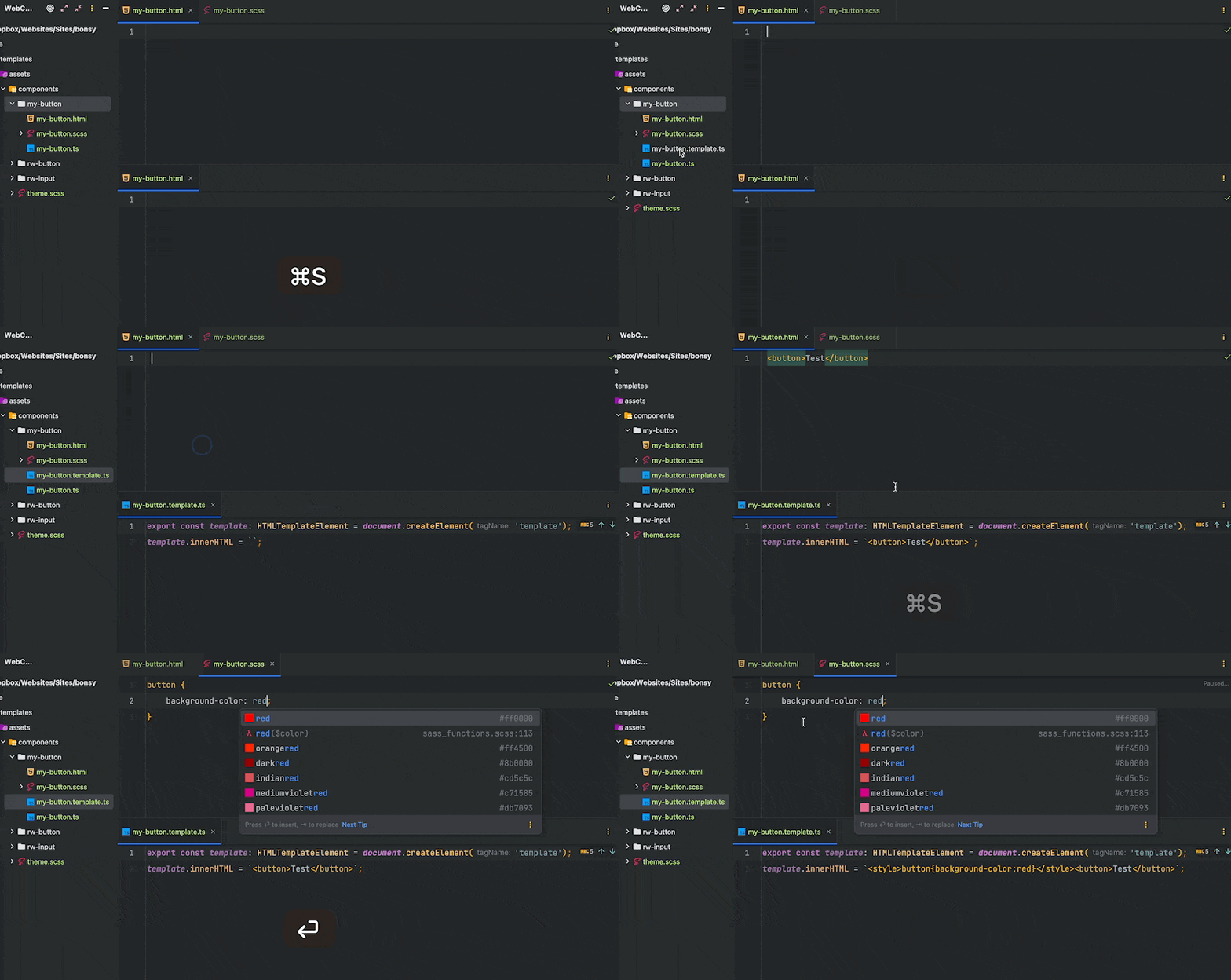
With an IDE like JetBrains PHPStorm you can set up File Watchers to automatically compile CSS and HTML to usable JavaScript modules with this CLI.
There should be an option to do this in VS Code as well (maybe you could help?).
So, you go from a SCSS file to ES6 module in seconds 🏎️💨
If you update your SCSS it will recompile and changes are instant.
➡️ Details on how to set up JetBrains File Watchers.
➡️ Details on how to set up VSCcode.
Single file compiling:

    csshtml-module -i [inputFile] -o [outputFile]

HTML Template file compiling:

    csshtml-module --template --css [file] --html [file] -o [template.ts]

Options:
  -V, --version            output the version number.
  -i, --input <file>       single file to convert - ignored if --template is set.
  -o, --output <file>      destination file. Should end with .ts or .js (required).
      --template           compiles to a HTMLTemplate module.
  -d, --delay <int>        time, in milliseconds, that the script should wait before compiling.
  -n, --name <string>      name of the JS constant - ignored if --template is set.
      --html <string>      html file to use for --template
      --css <string>       css file to use for --template
  -h, --help               display help for command
In terminal:
csshtml-module -i buttons.html -o buttons.html.ts --n ButtonHtml
Which will convert your buttons.html file 👇🏻
<button type="submit" class="button">Save</button>
Into this buttons.html.ts file 👇🏻
// language=html
export const ButtonHtml: string = `<button type="submit" class="button">Save</button>`;
Which can be imported as a JS/TS module 👇🏻
import {ButtonHtml} from './buttons.html.ts'

const template = document.createElement('template');
template.innerHTML = ButtonHtml;
.js or .ts)\\ language=file-extension comment to help you IDE understand the content.--delay.HTML or CSS - but the output will be string.In terminal:
csshtml-module --template --css buttons.css --html buttons.html -o buttons.template.js
Which will convert your buttons.html file 👇🏻
<button>Hello</button>
And your buttons.css file 👇🏻
button { background-color: red }
Into this buttons.template.js file 👇🏻
export const template = document.createElement('template');
template.innerHTML = `<style>button{background-color:red}</style><button>Hello</button>`;
Which can be imported as a HTMLTemplate module 👇🏻
import {template} from './buttons.template.js'

...
this.shadowRoot.appendChild(template.content.cloneNode(true));
style tag.I wasn't able to find a satisfying solution to keep HTML and CSS as native, and separated, files when developing Web Components. I see other people want to keep these files separated as well.
I tried fetching, which I had problem accepting. I tried Webpack, but I found it to be slow and had too much configuration. I didn't try Rollup - because it didn't make sense in my environment.
There is a promising new feature for CSS module scripts, but this isn't well-supported for Safari (at least for now - in Feburary 2023). And the HTML module script is way too early.
Hopefully we will see this be implemented in browsers soon. Anyway, compiling down to a ready HTMLTemplate module that combines CSS and HTML does sound like a more performant solution.
With this CLI I can get performant code, compiled from native HTML and CSS files in matter of seconds. All ready to be used in the same instance.
Do you have any thoughts on how to achieve this in a more performant, faster or maybe in a well-supported native way? Then I would ❤️ to hear from you!
Please help if you can! Found any bugs or irregularities? Or maybe you are using VS Code and have found a way to automatically compile like I do in PHPStorm, then maybe you could share to help others?
Thanks for checking this out!
rammewerk/csshtml-module is a public repo on GitHub by rammewerk. A CLI tool that converts CSS/HTML to JS/TS modules, making it easier to develop Web Components with normal CSS/HTML files.
It declares no license on GitHub. Public does not mean open source: without a license, nobody is granted the right to reuse it.
Its maker has not tagged a system, so it is unknown here. Its README says what it needs.
Open "Take it" on its page: Take My Repo writes an install plan for your machine and hands it to your AI agent (Claude Code, Codex or Cursor), which asks you before each step. Take My Repo has not tested it on any machine.
Its last change on GitHub was on 2023-02-10. Take My Repo does not judge from that whether it is maintained.
Reverse engineer anything with agents, from app behavior down to native binaries.
Nobody has reviewed it on Take My Repo yet, which says nothing about its quality.
The most popular HTML, CSS, and JavaScript framework for developing responsive, mobile first projects on the web.
The agent harness performance optimization system. Skills, instincts, memory, security, and research-first development for Claude Code, Codex, Opencode, Cursor and beyond.




