

AutoGPT
AutoGPT is the vision of accessible AI for everyone, to use and to build on. Our mission is to provide the tools, so that you can focus on what matters.
- 188k
- Python
- 30 min ago
Minimal and readable coding agent harness implementation in Python to explain the core components of coding agents.
Repo rasbt/mini-coding-agent, read from GitHub 17 h ago. rasbt has not joined Take My Repo.
rasbt/mini-coding-agent is a public repo on GitHub by rasbt. Minimal and readable coding agent harness implementation in Python to explain the core components of coding agents. It declares the Apache-2.0 license on GitHub. It is written mainly in Python, has 1,242 stars and last changed on 2026-04-07. Nobody has reviewed it on Take My Repo yet, which says nothing about its quality. Read from GitHub on 2026-11-23.
AutoGPT is the vision of accessible AI for everyone, to use and to build on. Our mission is to provide the tools, so that you can focus on what matters.
This folder contains a small standalone coding agent:
mini_coding_agent.pymini-coding-agentIt is a minimal local agent loop with:
The model backend is currently based on Ollama.
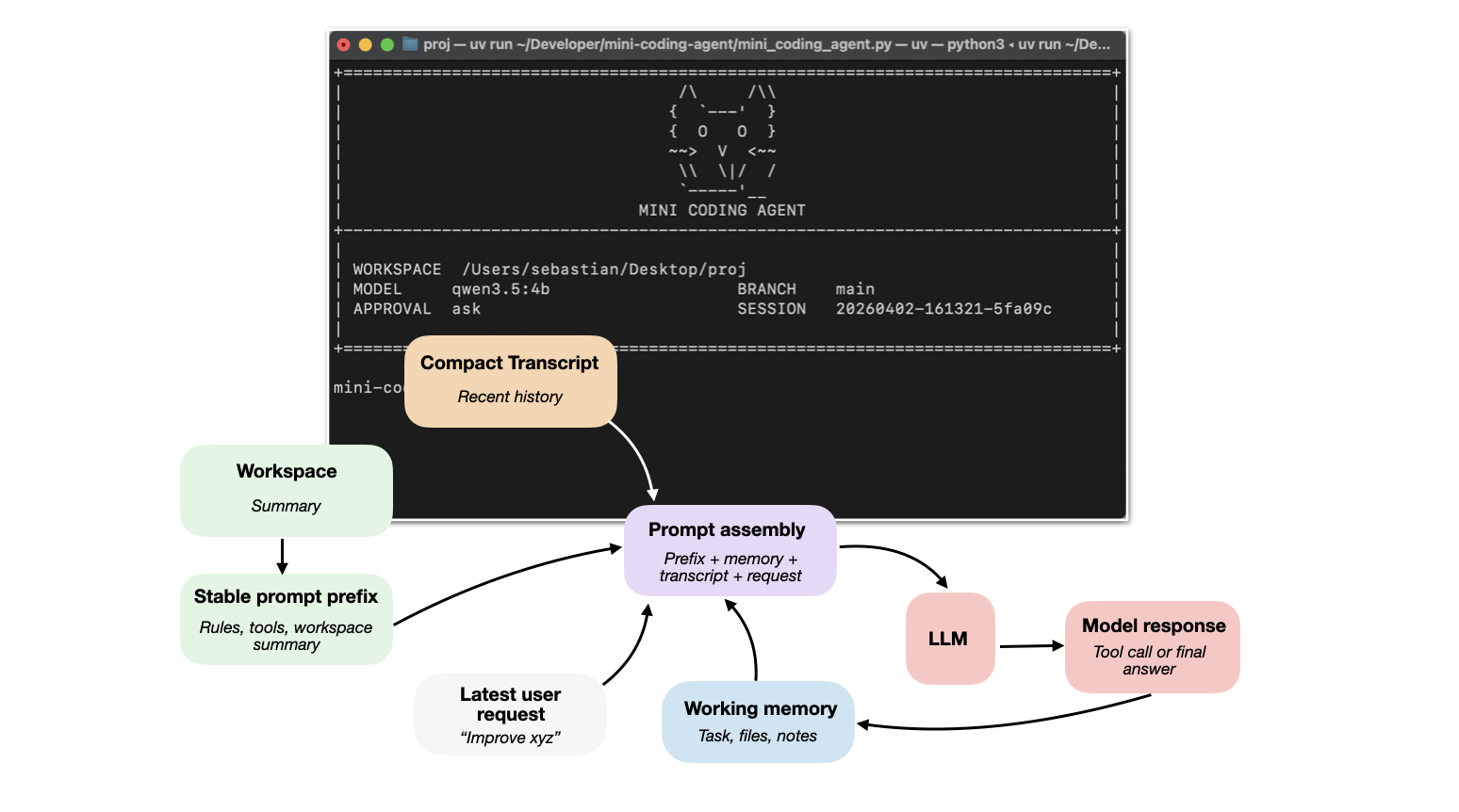
The detailed tutorial: Components of a Coding Agent
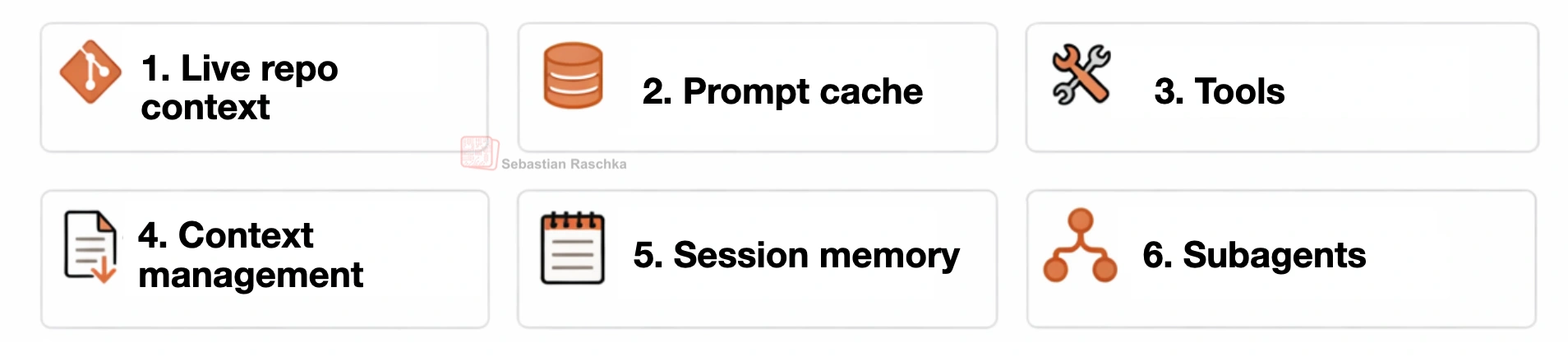
This coding harness is organized around six practical building blocks:
You need:
Optional:
uv for environment management and the mini-coding-agent CLI entry pointThis project has no Python runtime dependency beyond the standard library, so you can run it directly with python mini_coding_agent.py if you do not want to use uv.
Install Ollama on your machine so the ollama command is available in your shell.
Official installation link: ollama.com/download
Then verify:
ollama --help
Start the server:
ollama serve
In another terminal, pull a model. Example:
ollama pull qwen3.5:4b
Qwen 3.5 model library:
The default in this project is qwen3.5:4b. If you have sufficient memory, it is worth trying a larger model such as qwen3.5:9b or another larger Qwen 3.5 variant. The agent just sends prompts to Ollama's /api/generate endpoint.
Clone the repo or your fork and change into it:
git clone https://github.com/rasbt/mini-coding-agent.git
cd mini-coding-agent
If you forked it first, use your fork URL instead:
git clone https://github.com/<your-github-user>/mini-coding-agent.git
cd mini-coding-agent
Start the agent:
cd mini-coding-agent
uv run mini-coding-agent
Without uv, run the script directly:
cd mini-coding-agent
python mini_coding_agent.py
By default it uses:
qwen3.5:4baskFor a concrete usage example, see EXAMPLE.md.
Risky tools such as shell commands and file writes are gated by approval.
--approval ask
prompts before risky actions (default and recommended)--approval auto
allows risky actions automatically, including arbitrary command execution and file writes by the model; use only with trusted prompts and trusted repositories--approval never
denies risky actionsExample:
uv run mini-coding-agent --approval auto
The agent saves sessions under the target workspace root in:
.mini-coding-agent/sessions/
Resume the latest session:
uv run mini-coding-agent --resume latest
Resume a specific session:
uv run mini-coding-agent --resume 20260401-144025-2dd0aa
Inside the REPL, slash commands are handled directly by the agent instead of being sent to the model as a normal task.
/help
shows the list of available interactive commands/memory
prints the distilled session memory, including the current task, tracked files, and notes/session
prints the path to the current saved session JSON file/reset
clears the current session history and distilled memory but keeps you in the REPL/exit
exits the interactive session/quit
exits the interactive session; alias for /exituv run mini-coding-agent --help
Without uv:
python mini_coding_agent.py --help
CLI flags are passed before the agent starts. Use them to choose the workspace, model connection, resume behavior, approval mode, and generation limits.
Important flags:
--cwd
sets the workspace directory the agent should inspect and modify; default: .--model
selects the Ollama model name, such as qwen3.5:4b; default: qwen3.5:4b--host
points the agent at the Ollama server URL (usually not needed); default: http://127.0.0.1:11434--ollama-timeout
controls how long the client waits for an Ollama response (usually not needed); default: 300 seconds--resume
resumes a saved session by id or uses latest; default: start a new session--approval
controls how risky tools are handled: ask, auto, or never; default: ask--max-steps
limits how many model and tool turns are allowed for one user request; default: 6--max-new-tokens
caps the model output length for each step; default: 512--temperature
controls sampling randomness; default: 0.2--top-p
controls nucleus sampling for generation; default: 0.9See EXAMPLE.md
<tool>...</tool> or <final>...</final>.rasbt/mini-coding-agent is a public repo on GitHub by rasbt. Minimal and readable coding agent harness implementation in Python to explain the core components of coding agents.
It declares the Apache-2.0 license on GitHub.
Its maker has not tagged a system, so it is unknown here. Its README says what it needs.
Open "Take it" on its page: Take My Repo writes an install plan for your machine and hands it to your AI agent (Claude Code, Codex or Cursor), which asks you before each step. Take My Repo has not tested it on any machine.
Langflow is a powerful tool for building and deploying AI-powered agents and workflows.
Get up and running with Kimi, GLM, MiniMax, DeepSeek, gpt-oss, Qwen, Gemma and other models.
The agent harness performance optimization system. Skills, instincts, memory, security, and research-first development for Claude Code, Codex, Opencode, Cursor and beyond.
Reverse engineer anything with agents, from app behavior down to native binaries.
Its last change on GitHub was on 2026-04-07. Take My Repo does not judge from that whether it is maintained.
Nobody has reviewed it on Take My Repo yet, which says nothing about its quality.
Take My Repo cannot say: it does not audit code and has not run mini-coding-agent. What is known comes from GitHub. It declares the Apache-2.0 license on GitHub. Its last change was on 2026-04-07. It has 1,242 stars, which measure popularity, not safety. Nobody has reviewed it on Take My Repo yet, which says nothing about its quality. Read the source before you run it. With "Take it", your AI agent shows each step and asks you before running it; README text is treated as data, not as instructions.




